Categories
Mobile Syrup

The Last of Us’ Bloater seems to be a bit of a sex icon

Spoiler warning: the fifth episode of The Last of Us ends in a massive outbreak in Kansas City.

Among these infected is the giant Bloater, an incredibly large and murderous enemy. This Bloater is played by Adam Basil, a 6’6 British stunt performer from films like No Time to Die, Fast 9, Cruella and Venom: Let There Be Carnage. 

Basil spoke to Entertainment Weekly after the episode, saying he got a lot of attention after starring as the Bloater.

“He seems to be a bit of a sex icon,” Basil told EW. “He’s captured a lot of people’s imaginations. Someone asked me if I’d come to their wedding. I’ve had people sending me love messages. He really brought out something in people that I don’t think even they knew they had. He’s the big daddy mushroom, I think there’s been a [meme].”

The costume was designed by Barrie Gower, who made the prosthetics for Game of Thrones‘ Night King and Stranger Things’ Vecna.

The Last of Us hits Crave every Sunday at 9pm ET/6pm PT.

Image credit: HBO

Source: Entertainment Weekly

Categories
Mobile Syrup

Apple’s iOS 16.4 developer beta brings over 20 new emojis to the iPhone

Apple’s latest iOS 16.4 developer beta is out now, and it brings new emojis, web app notifications and keyboard updates for some languages to the iPhone.

Read on for a brief overview of what’s new features are coming to the iPhone with the OS and how you can start using iOS 16.4 starting today.

New emojis

iOS 16.4 developer beta brings several new emojis to the mix from the new Unicode 15 emoji characters. In total, there are 21 new emojis added, including shaking face, pink heart, light blue heart, grey heart, leftwards pushing hand, rightwards pushing hand, moose, donkey, wing, black bird, goose, jellyfish, hyacinth, ginger root, pea pod, folding hand fan, hair pick, maracas, flute, khanda and wireless.

Keyboard updates

International language keyboards are getting a significant update with iOS 16.4. Apple is enabling autocorrect for Korean keyboards by default with the update for testing and feedback, alongside enabling predictive text for Ukrainian keyboards. Further, some South Asian languages, including Urdu, Punjabi, and Gujarati, are gaining transliteration layouts in the new beta.

The developer beta also adds new keyboard layouts for Choctaw and Chickasaw.

Safari web push notifications

Any websites that are added to your Home Screen as a web app can now send you web push notifications on your iPhone running iOS 16.4.

Apple first announced the feature at its WWDC event last year, saying that web apps added to your Home Screen can ask for permission to enable push notifications, and permissions for the apps will appear alongside other apps in your device’s notification settings.

Web app notifications function in the same manner as notifications from any other application. They will appear on the Lock Screen, within the Notification Center, and on a paired Apple Watch as well.

Further, third-party web browsers, like Google Chrome, now allow users to add websites and web apps to their iPhone Home Screen.

Homekit update

Apple’s Homekit architecture update that was pulled from the iOS 16.2 release is finally rolling out with the iOS 16.4 developer preview.

The updated ‌HomeKit‌ framework is put in place to enhance the reliability and effectiveness of communication between Apple devices and smart home accessories.

Apple podcasts

The Podcasts app has received multiple updates in iOS 16.4 developer beta. The app now includes channel access in the Library section. Furthermore, the Up Next feature now enables users to resume episodes, play saved episodes, and delete episodes they prefer to skip.

With CarPlay, users now have the ability to either continue playing a podcast where they left off by utilizing the Up Next feature or discover new podcast options via the Browse feature.

Find out everything new in iOS 16.4 developer beta here.

How to download iOS 16.4 developer beta

It’s worth noting that the iOS 16.4 developer beta is called a developer beta for a reason. The OS is sure to have some unstable elements, as Apple is still actively polishing it.

To download the developer beta, you need to have an Apple Developer Account. The simplest way to get your hands on an Apple Developer Account is through the Apple Developer app. Download the app from the App Store and head to the in-app ‘Account’ section. The app will ask you to sign in with your Apple ID, after which, you can click on the ‘Enroll Now’ button. Once you’ve got your hands on a developer account, the rest of the download procedure is simple.

Head to developer.apple.com on your iPhone, tap on the menu on the left and tap on ‘Discover.’ You’ll be brought to a new operating system page, and you need to tap on ‘iOS.’ Tap on ‘Download’ on the top right and log in with your Apple Developer Account credentials. Tap on ‘Download’ again after signing in and you’ll see the iOS beta software profile has begun downloading. Once the download is complete, head to your iPhone’s Settings and tap on ‘Profile Downloaded’ under your Apple ID banner, tap on ‘Install’ and enter your device’s passcode. Provide your consent and tap on ‘Install’ again. Upon the completion of installation, restart your device.

Then, update your iPhone like you normally would. Head to Settings > General > Software Update > Download and Install and you’re good to go.

Image credit: Unicode

Source: Apple, via: MacRumours

Categories
Mobile Syrup

Telus reportedly considered removing $85/mo 25GB plan, adjusting other plan prices

MobileSyrup has learned details of changes Telus planned to implement to its mobile offerings starting February 21st, which include eliminating the lowest cost plan and adjusting pricing across the board.

These upcoming plan changes were linked to a change Telus made to its website that MobileSyrup reported on earlier this week. On February 15th, Telus added a banner to the plans on its website warning that the plans would end on February 20th. Following publication, Telus removed the banners from the website.

A Telus spokesperson confirmed to MobileSyrup that the banners were put up “in error” and were taken down.

According to the information obtained by MobileSyrup, Telus backtracked on the forthcoming plan changes and scrapped the plans. MobileSyrup understands that Telus doesn’t know if or when it will make the changes.

A Telus spokesperson told MobileSyrup that “nothing is changing” with the current plans on its website and didn’t respond to questions about whether Telus had previously intended to change its plans.

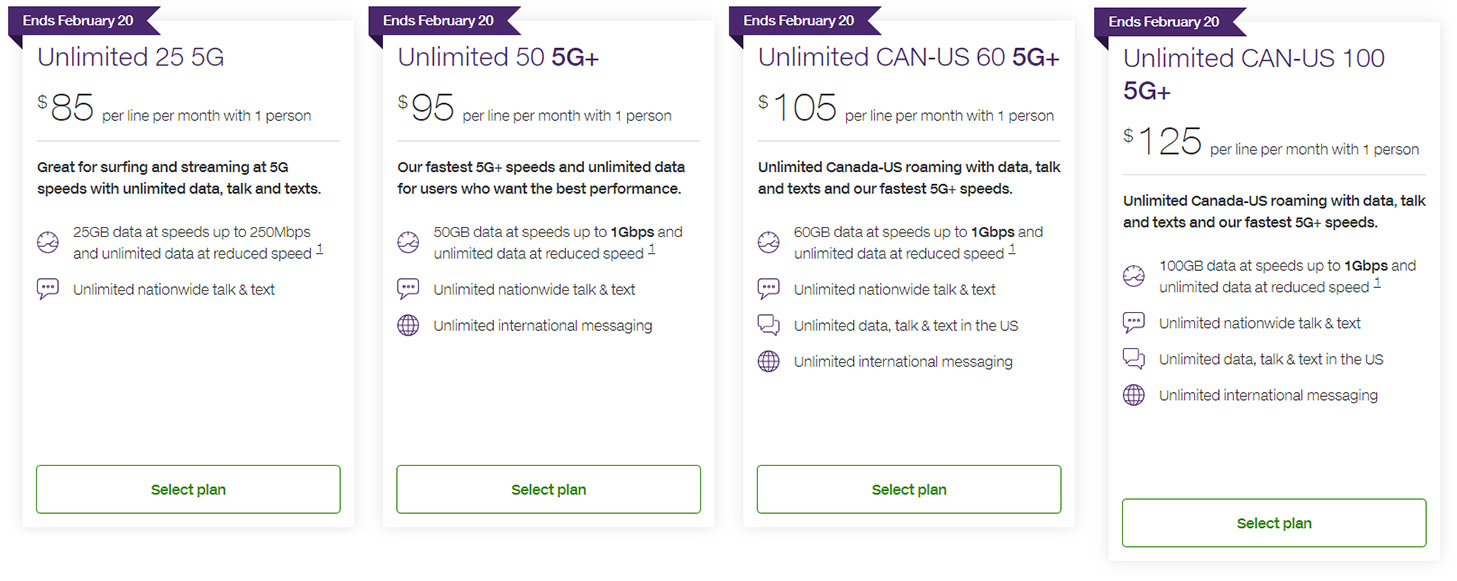
Based on the information obtained by MobileSyrup, Telus planned to remove its current base plan, which offers 25GB of 5G data at speeds of up to 250Mbps (throttled to 512Kbps beyond the 25GB) for $85/mo. The plan also includes Telus’ standard suite of features, including unlimited Canada-wide calling and texting, shareable data, voicemail and more.

Telus plans as of February 15, 2023 with the February 20th banner.

Next, Telus planned to offer a $90/mo plan at the base level. This plan would include 50GB of 5G+ data — Telus’ current 5G+ plan offer data with speeds of up to 1Gbps (again, throttled to 512Kbps beyond the data allotment). This plan appears to be a slightly cheaper version of Telus’ current $95/50GB 5G+ plan.

The other changes shared with MobileSyrup include adding a $100/mo plan with 100GB of 5G+ data and a $110/100GB 5G+ plan. The difference between these two plans would be the $110 option includes Canada/U.S. calling, texting and data. Those appear to be replacements for Telus’ current $105/60GB and $125/100GB plans, both of which offer Canada/U.S. calling.

Aside from removing the $85/mo plan, these changes generally appear positive with slightly lower prices and the same or more data. It remains to be seen if Telus will eventually make these changes.

Categories
Mobile Syrup

Over half of Ontarians plan to cancel Netflix over password sharing crackdown: poll

Neighbourhood social network platform Nextdoor ran a poll recently that revealed things are looking bleak for Netflix, at least in Ontario.

The poll questioned Ontario residents whether they plan to cancel their Netflix subscription in response to the streamer’s full-swing crackdown on password sharing.

If you haven’t been keeping up with the recent changes at Netflix, here’s a quick rundown.

Netflix has informed Canadians that they need to set a ‘Primary Location‘ on their account by February 21st. This is how Netflix will know if anyone is using your account from a different location and I.P. address. The streamer wants passwords to be shared only between those living in the same house and not with people outside it.  if you choose to share your password with users outside your household, you’ll need to pay an extra $7.99 per person.

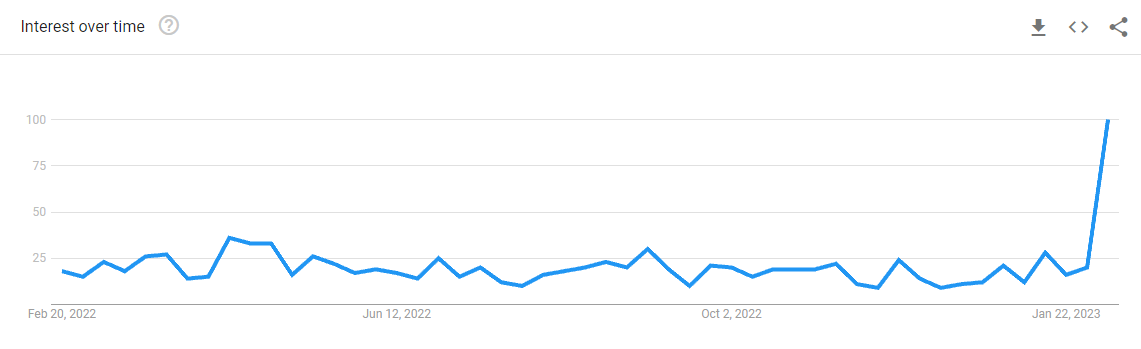
The move subsequently led to searches for the term ‘Cancel Netflix’ skyrocketing, as revealed in Goole Search Trends.

According to Nextdoor’s poll, more than half of poll respondents from Ontario said they plan to cancel their Netflix subscription in response to the streamer’s crackdown. 57 percent, to be exact, said they wish to end their subscription, while 43 percent said they’ll be retaining it.

“For years Netflix’s big selling point was to share your subscription with family. We upgraded at extra cost so that more than 2 households (my kids) could watch at the same time. Now they are changing their rules and making it sound like we are the ones stealing. That is why I’m canceling my account. I think they have alienated a lot of people and it’s going to be their undoing,” said a Nextdoor user.

“I’m paying for five subscriptions.  It shouldn’t matter if my daughters and grandsons are in my living room or theirs.  I’m extremely tempted to cancel, but I guess I have to run it by my daughters first.  Especially as they are now threatening to have ads.  I can get that kind of service for free!”

“I would rather cancel my cogeco account as I watch Netflix more than any other programs,” wrote a user, while a different user said “I will be keeping mine. I actually called them to clarify some of the new policy cause the emails say that it’s based on the WiFi from the primary location. However my husband watches from his phone while on his dinner break at work, obviously not on our WiFi. Was told that any devices belonging to two primary locations just have to open and log in to the Netflix app while on the primary location WiFi once a month to have it recognized as a user/device.”

Nextdoor polled over 2,000 Ontarians, starting on Wednesday, February 15th. The stats mentioned above comprise data from February 15th, 16th and 17th. The poll will continue to run until Tuesday, February 21st.

Even MobileSyrup readers were unhappy about the change in Netflix’s policy. In a recent ‘Here’s how to set a primary location for your Netflix account‘ story we published, the way Canadians feel about the crackdown on password sharing was very evident.

It’s worth noting that Netflix has started cracking down on password sharing in Canada, New Zealand, Portugal, and Spain only, and U.S. has been left unscathed. Though it appears that it’s only a matter of time before Netflix implements the rules south of the border.

If you’re looking to cancel your Netflix subscription as well, follow this link.

Image credit: Shutterstock

Source: Nextdoor

Categories
Mobile Syrup

iPhone 15 Pro renders show off thinner bezels, deeper camera bump and USB-C port

Along with the recent leak of the iPhone 15 Pro/iPhone 15 Pro Max’s reported USB-C port, an in-depth look at what could be the smartphone’s overall design has appeared.

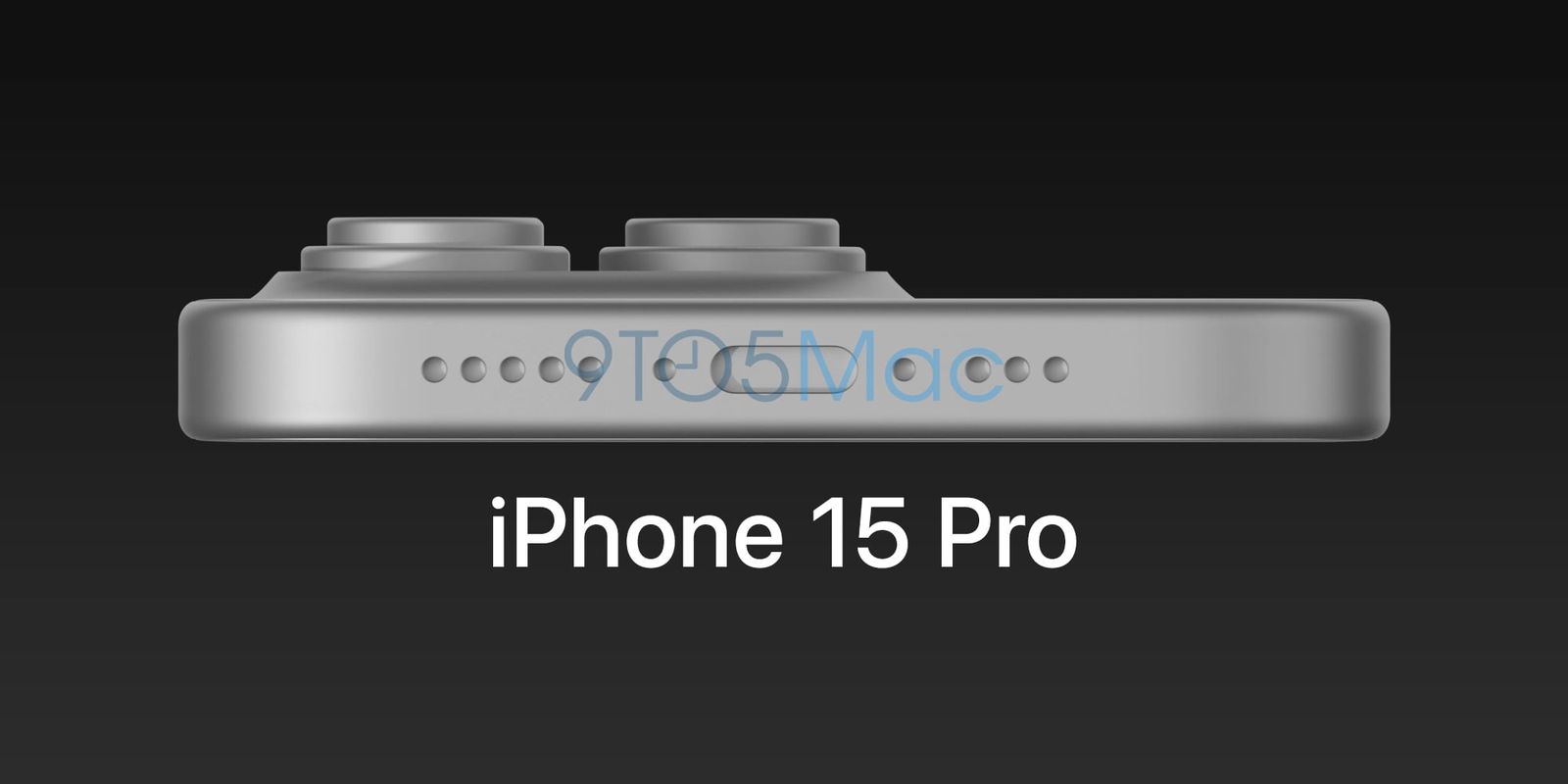
Renders created by freelance 3D artist Ian Zelbo that were first published on 9to5Mac show off the iPhone 15 Pro’s and iPhone 15 Pro Max’s slightly thinner bezels, subtly curved display edges and a USB-C port. On the other hand, the renders don’t feature Power or Volume buttons, so it’s unclear if the designs back up recent rumours regarding the iPhone 15 Pro switching to buttons that don’t actually move.

According to 9to5Mac and Zelbo, these “early CAD drawings are based on information sourced from Apple’s parts suppliers. With this in mind, it’s important to point out that the phone’s design could change before its expected September reveal.

Previous iPhone 15 Pro/iPhone 15 Pro Max rumours indicate that the smartphones will still be available in 6.1-inch and 6.7-inch variants, respectively, and that they’ll feature a new A17 Bionic chipset alongside an upgrade to 8GB of RAM and, of course, the switch to USB-C following the EU’s mandate surrounding the port.

Image credit: 9to5Mac, @ianzelbo

Source: 9to5Mac

Categories
Mobile Syrup

Tesla says allegations of union firings in Buffalo are ‘false’

Tesla says recent firings at its Buffalo, New York factory resulted from performance reviews and not from employee unionizing efforts.

In a blog post, Tesla says employee reviews occur every six months at all of its locations worldwide. “If an employee fails to meet their performance expectations, they will be let go,” the post says. Firings for the most recent employee reviews began the week of February 12th. Employees announced their efforts to unionize on February 14th.

Roughly four percent of the employees part of the Buffalo Autopilot labelling team lost their jobs based on the most recent review process. Tesla says it identified the employees on February 3rd, more than a week before unionizing efforts were announced.

“The employees let go as part of this process received prior feedback on their poor performance from their managers over the course of the review period,” the blog post says. “Despite feedback, they did not demonstrate sufficient improvement.”

The company also addressed allegations that some employees face constant pressure that makes them feel like they can’t use the bathroom, specifically pointing to its image labelling process. Tesla said it is time monitored to improve labelling software.

“Since its purpose is to calculate how long it takes to label an image, there is nothing to be gained by delaying bathroom breaks. The claim that Tesla pressures employees to do so is categorically false.”

Image credit: Tesla 

Source: Tesla

Categories
Mobile Syrup

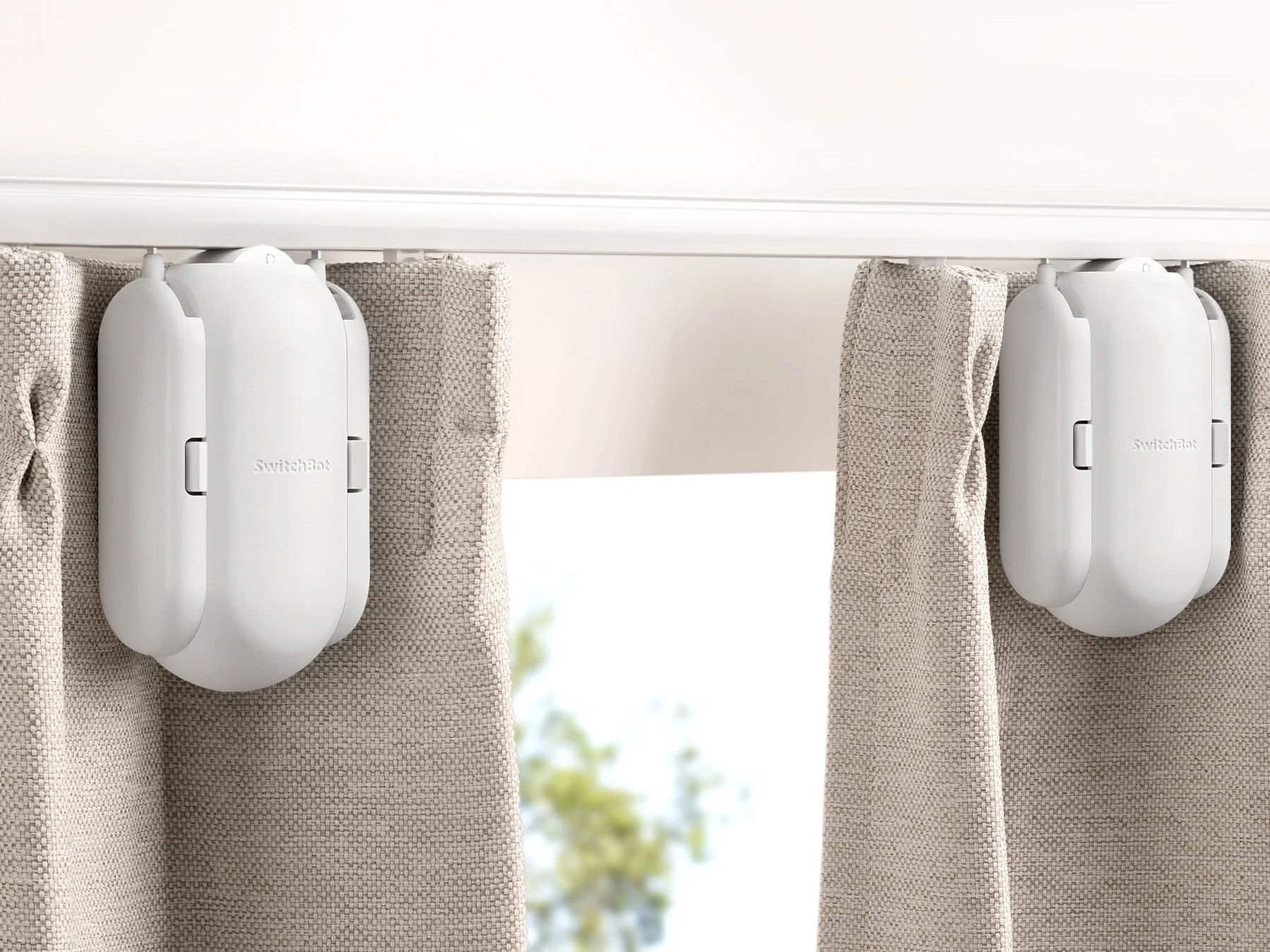
SwitchBot’s Curtain Rod 2 is the smart home device I didn’t know I needed

No one needs smart curtains, but that doesn’t mean they aren’t somewhat useful and, more importantly, undeniably cool. Who wouldn’t want to say “Hey Google, open my curtains,” and have them instantly open?

I’ve always been interested in connected home products that have no business being on the internet, like lights, speakers, smoke alarms, doorbells and more (I even have a ridiculous internet-connected dishwasher). But smart home devices that have so far eluded me are smart curtains/blinds because they’re typically absurdly expensive.

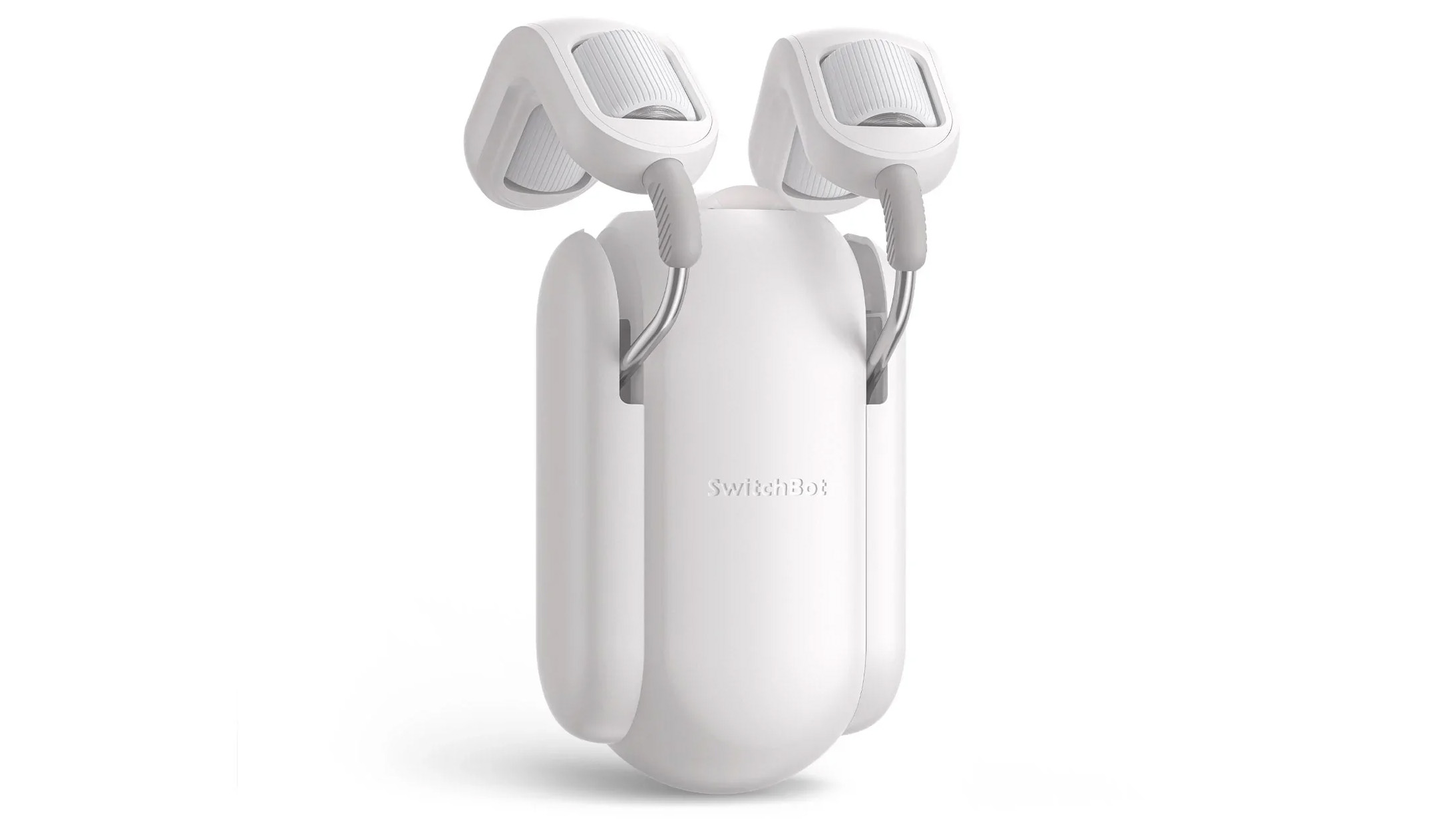
This is why SwitchBot’s $135.59 Curtain Rod 2 caught my attention (most people will likely want two to open each curtain, bringing the total to $271.18 for one set, which is still pretty expensive). The device is part of a relatively new focus in the smart home space on adding ‘smart’ features to everyday objects in a cost-effective way.

SwitchBot Curtain Rod 2

On a base level, the Curtain Rod 2 is pretty simple. It slides back and forth across a curtain rod powered by two small motors, pushing your curtains open and closed. The setup process is relatively straightforward but still takes time, depending on what curtains you have. In my case with a circular curtain rod, I attached the Rod 2 between two included clamps, allowing it to push the curtains back and forth (according to other reviews I’ve read, the first-gen version of SwitchBot’s smart curtains only included one clamp).

The actual setup process in the SwitchBot app is a little more finicky and requires you to select the middle of the rod and the closed position for both Curtain Rod 2 devices. I’ve found that sometimes you need to go through this process again a few weeks after the initial setup, especially if you occasionally close the curtains manually, which starts the motors after a bit of pressure. I’ve also run into an issue where a small amount of light still comes through the centre of the curtains when they’re closed. This was solved by reconfiguring the curtains and pushing them as far as possible to the left.

Within the SwitchBot app, you can set a time of day for your curtains to open and close, update the firmware and rework a few other settings. Unfortunately, Google Assistant, Alexa and Siri voice commands require SwitchBots’ $48 Mini Hub, which is disappointing. Further, if you’re like me and you’d sometimes rather just press a button than use a voice command, you’ll need the $28.95 SwitchBot Remote. While these two devices don’t make a SwitchBot Curtain Rod 2 quite as expensive as most smart curtain hardware, these are still added costs I didn’t expect.

Price and setup aside, there are other issues with the Curtain Rod 2 worth noting. For example, the device makes a loud mechanical noise as its motors push along the rod. I’ve grown used to it over the past few months, but some might take issue with the motor’s audible grind as it travels along the rod.

Battery life also isn’t as great. In my experience, if I open and close the smart curtains once a day, they last roughly two months. Charging the Curtain Rod 2 without taking them down is challenging (unless you have a nearby plug and a lengthy cable). I’ve resorted to attaching a battery pack and resting it on the window sill to charge.

SwitchBot sells a $29.99 Solar Panel Charger, but given the placement of my curtain rod (it’s well above my window), this isn’t a viable option for me. This is also why the Curtain Rod 2’s light-sensing feature that allows the device to automatically open when it views light doesn’t work for me (the curtain rod is just too high for the sensor).

While SwitchBot’s Curtain Rod 2 isn’t perfect, it still works well and is cheaper than most established smart curtain options (especially if you’re only buying one). Still, I wish the device was quieter, featured longer battery life and came with integral accessories like the Mini Hub and Remote.

SwitchBot’s Curtain Rod 2 is available on Amazon for $135.59.

MobileSyrup utilizes affiliate partnerships. These partnerships do not influence our editorial content, though we may earn a commission on purchases made via these links that helps fund the journalism provided free on our website.

Categories
Mobile Syrup

Northwestel dropping prices for Internet 500, 300, plans come March 1

Northwestel says some of its internet plans will see price drops come March 1st.

The Bell subsidary will lower the price of its Internet 500 unlimited plan, which offers download speed of 500Mbps and upload speed of 20Mbps, by $20/ month. Subscribers currently pay $239.95 a month.

The Internet 300 unlimited, with download speed of 300 Mbps and upload speed up to 17.5Mbps, will drop by $10/month. The plan currently costs $219.95/month.

Customers will see the price reduction on their bills and don’t have to take any action.

“We’re finding ways to save northerners money and bring them more value, all while delivering the fastest speeds in the north,” Tammy April, Northwestel’s vice-president of customer experience, says in a press release.

The company will also roll out a new plan; Internet 15 will cost $57.95/month.

Image credit: Northwestel 

Source: Northwestel

Categories
Mobile Syrup

Samsung might bring back its FE series this year

Unlike Google or Apple, Samsung offers a variety of smartphone lineups, including its S series, A series, Z series, and more. Last year, we missed one of the company’s most popular series, the FE series, but it might be coming back if recent rumours are accurate.

According to the South Korean outlet Hankooki, Samsug’s Fan Edition line could return this year sometime in August or September.  The report also indicates that Samsung won’t launch its A74 handset this year.

The S23 FE falls into the entry-level category, so it makes sense for Samsung to ditch its mid-range A74 handset. Even though it’ll be more affordable than all of the S23 series, the phone will likely still offer great specs, similar to the S21 FE released last Februrary.

We’re still several months from the rumoured S23 FE’s potential release date, so it’s important to note that Samsung’s plans could change.

Source: Hanooki.com Via: Android Police

Categories
Mobile Syrup

Leaked image reportedly shows iPhone 15 Pro with a USB-C port

We’re only one-and-a-half month into 2023, and leaks about the upcoming ‘September-expected’ iPhone 15 are already starting to heat up.

Recent rumours suggest the iPhone 15 Pro and Pro Max will still be available with 6.1-inch and 6.7-inch displays, respectively, but that the screen will be slightly curved. Other than that, we expect the Pro series devices to feature a new A17 Bionic chipset, 8GB of RAM and a new set of volume and power buttons that don’t move when you press them.

Now, a new leaked image (not a render) shared by leaker Unknownz21 (@URedditor) shows off the iPhone 15 Pro in a rumoured Titanium frame alongside a USB-C port.

“Here’s an actual close up of the USB-C port on the iPhone 15 Pro. No imagination or rendering required.” wrote Unknownz21. The bottom of the alleged iPhone 15 Pro photo makes the device look like it has the same layout as the iPhone 14 Pro, with the screw and speaker holes in the same place, albeit with a USB-C port. Further, the leaked image might also be the first look at the rumoured titanium design of the iPhone 15 Pro. Reports suggest that Apple will transition from stainless steel to titanium for the iPhone 15 Pro lineup, resulting in a matte finish similar to the Apple Watch Ultra.

In addition to the leaked photo, 9to5Mac published exclusive CAD renders of the upcoming flagship device. 9to5’s report also says that the CAD renders suggest a move away from the lightning port, and the introduction of USB-C charging. The report goes on to say that the camera bump on the back of the device is also thicker than before, and that Apple might upgrade the camera system with new sensors and lenses.

The volume rocker and the power button look like capacitive touch buttons, instead of physical ones, while the mute switch seems to sport a smaller and rounder shape.

It’s worth noting that the renders were created using an initial CAD model and may not depict every aspect of Apple’s final flagship design. However, they do offer insight into what we can anticipate from one of the most eagerly awaited smartphones of the year.


Image credit: @URedditor

Source: 9to5Mac