Categories
Mobile Syrup

February security patch starts hitting Samsung devices

Samsung just launched its latest S23 series devices, but that doesn’t mean the company’s older smartphones are being left behind.

Several older Samsung devices are receiving the February 2023 Android update. The patch notes for the update from Samsung lists five “Critical” severity vulnerability fixes, 43 “High,” and no “Moderate” resolutions. The update includes fixes for a vulnerability in ‘WindowManagerService’ that could allow attackers to take a screenshot without your permission, and a vulnerability in ‘UwbDataTxStatusEvent’ that would allow attackers to launch certain activities.

It’s worth noting that the update doesn’t bring any new features to your Samsung device.

The Galaxy S21 FE 5G was the first device to receive the February security update, and the S20, S20+ and S20 Ultra 4G/5G started receiving itonFebruary 9th. The patch started rolling out to Note 20 and the Note 20 Ultra on February 6th, while the more affordable A52 5G started receiving the update yesterday, February 8th.

To check if your Samsung device has received the February 2023 Android update, head to Settings > Software Update and tap on “Download and install.”

Via: 9to5Google

Categories
Mobile Syrup

It looks like the Pixel 4a will just miss Android 14

While smartphone nerds are digging into Android 14 DP1, Pixel 4a owners are sadly left out of the fun.

As spotted by Android Police, Google’s excellent Pixel 4a likely won’t make the jump to Android 14 because of Google’s lame update policy. This time around, however, it stings a little more — the Pixel 4a turns three years old in August, meaning it will just miss eligibility for Android 14.

Google has offered three years of OS upgrades for a while now (starting with the Pixel 6, it tacks on five years of security patches too). Unfortunately, this update policy means the Pixel 4a  will miss the Android 14 update. Google’s Android 14 timeline points to an August or September release for the new OS. Moreover, Android 14 DP1 isn’t available on the Pixel 4a.

What’s worse is there’s nothing actually preventing the Pixel 4a from running Android 14. Sure, it’s not the most powerful smartphone, thanks to its Snapdragon 730G chipset, but we also know these decisions aren’t based on a phone’s capability. Otherwise, the Pixel 4 and 4 XL — which are more powerful than the 4a — wouldn’t have just got their last patch.

Anyway, Google should really improve it’s update policies to at least be in line with other Android manufacturers, like Samsung (who’d have thought Samsung would be the model for Android updates?).

As for Pixel 4a owners, if you don’t want to get a new phone, you may want to start learning how to flash ROMs to squeeze more life out of your device.

Source: Android Police

Categories
Mobile Syrup

Netflix asks Canadians to set a primary streaming location by February 21

Netflix is cracking down on password sharing, and it’s doing so with haste.

We already know that sharing your Netflix password, within the same household, is something that Netflix is a-okay with. However, it would charge you $7.99 CAD per month, per person, to add up to two people outside of your household to your Netflix account.

We also know that users can set a primary location, and this is how Netflix will know if anyone is using your account from a different location and a different I.P. address.

Now, as spotted in a new Netflix email hitting Canadians’ inboxes today, the streaming service is asking subscribers to set their primary location by Tuesday, February 21st. The company says users can set or update their primary location when signed into Netflix from a TV that is connected to their home Wi-Fi network.

  1. From the Netflix home screen on a TV, press left to open the app menu.
  2. Select Get Help > Manage primary location.
  3. Select Set by Email or Set by Text. A verification link will be sent to the account email address or phone number. Verification links expire after 15 minutes.
  4. If you do not receive the verification link by email or text, click Resend Email or Resend Text. Or you can choose another option or select Remind Me Later.
  5. Select Review Request in the email, or tap the link in the text message, then Review Request to continue.
  6. Select Set Primary Location.
  7. You will see a confirmation on your TV screen and receive a confirmation email. Select Continue to Netflix to start watching.

In the email, Netflix says you can still use your account while travelling (i.e. on vacation). “Watch while you travel. You can still easily stream with your personal devices or log into Netflix on a new TV, like at a hotel or vacation rental.” However, the streaming service did not mention how logging in from an IP not connected to your primary location would work.

Categories
Mobile Syrup

Android 14 to bring support for the DualSense Edge

If you’ve got your hands on Sony’s $270 DualSense Edge, and have tried to play around with it, you’d already know that the premium customizable controller isn’t compatible with Android.

The DualShock 4 and the DualSense 5 can both be used with an Android smartphone or tablet, while the more expensive DualSense Edge can’t. This is about to change with Android 14.

Mishaal Rahman pointed out the information on Twitter. He said that the operating system added layout files for the DualSense Edge, making Android 14 and smartphones running it compatible with the premium controller. This means that button presses are now understood by an Android 14 device and are mapped to input events.

It’s worth noting that in addition to the layout files, your Android device will also need a new hid-PlayStation kernel patch, as pointed out by AndroidPolice. The DualSense Edge has a different product ID than the DualShock 4 or the DualSense 5, making the current drivers from Sony unusable with the Edge.

For reference, it wasn’t until Android 12 that support for the regular DualSense was fully integrated.

Google has just rolled out the first developer preview for Android 14. The update will go through several months of previews and betas before releasing later this year, possibly in August or September.

Via: AndroidPolice

Categories
Mobile Syrup

Disney will lay off 7,000 employees: CEO

Disney CEO Bob Iger says the company will lay off thousands of employees to “address challenges.”

According to The Verge, Iger shared the news in an earnings call on Wednesday. The CEO wants to save the company $5.5 billion, and the layoffs will help cut costs in a “challenging economic environment.”

Iger took up the role in November 2022 and, despite the cuts, wants to continue working on the company’s streaming services.

“Our priority is the enduring growth and profitability of our streaming business,” Iger said during the call. “Our current forecasts indicate Disney Plus will hit profitability by the end of fiscal 2024, and achieving that remains our goal.”

According to the company’s latest financial report, Disney+ lost 2.4 million subscribers in the last quarter of 2022. However, the platform added 200,000 subscribers in Canada and the U.S., reaching 46.6 million subscribers.

Source: Disney Via: The Verge 

Categories
Mobile Syrup

Android 14 might make removing carrier bloatware easier

A long-running annoyance with Android smartphones is pre-installed bloatware from carriers and device manufacturers. Not only does the bloat suck, but carrier apps can be a privacy risk and removing them can be quite difficult.

Well, that last point might change with Android 14. The first developer preview for Google’s upcoming mobile operating system update is out now. A notable new feature uncovered in the preview will show which apps were installed by carriers/device manufacturers that users can safely remove.

Mishaal Rahman, who regularly uncovers work-in-progress Android features and details them on Twitter, wrote about the new bloatware tool for XDA Developers. Rahman noted that the feature is currently hidden in Android 14 DP1 — users need to enable a developer flag and access a special version of the Settings app dubbed ‘Spa,’ which is also hidden behind a separate flag.

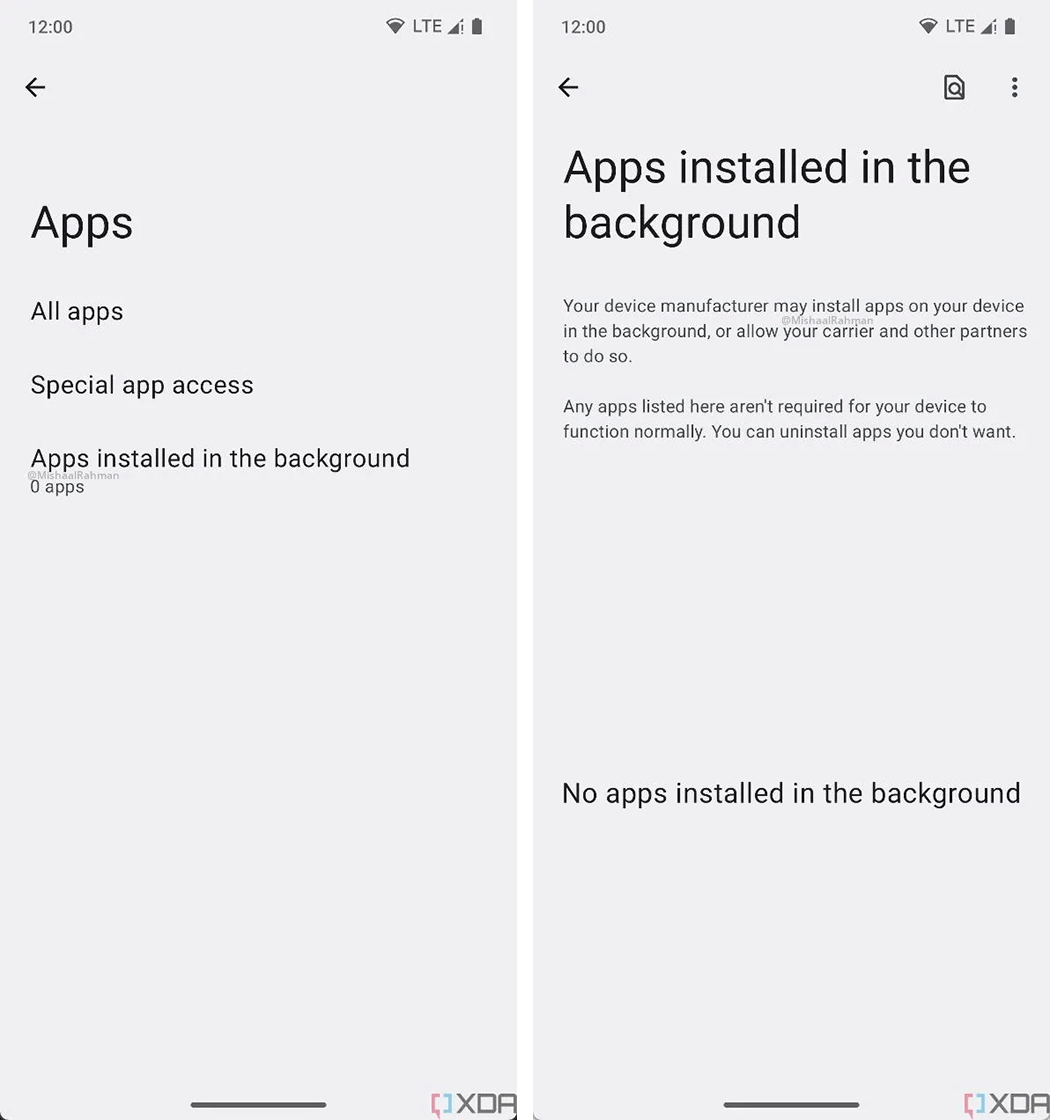
‘Apps installed in the background’ menu in Android 14 DP1 | Image credit: XDA Developers

The new menu, dubbed ‘Apps installed in the background,’ appears in the ‘Apps’ section and includes the following description:

“Your device manufacturer may install apps on your device in the background, or allow your carrier and other partners to do so.

“Any apps listed here aren’t required for your device to function normally. You can uninstall apps you don’t want.”

Below that is space for a list of apps, though in the example photos shared by Rahman, there weren’t any apps listed.

Rahman goes on to explain that a new system service called “Background Install Control” powers the new menu. Under the hood, it looks like the feature doesn’t capture apps installed through ADB or by other apps running in the foreground. That makes sense, since installations through ADB require manual effort. Foreground apps, on the other hand, would count things like the Play Store.

Instead, the feature will likely work best for, as an example, apps installed after you insert a carrier’s SIM card. Which, frankly, is exactly what’s needed — I’m tired of uninstalling 20 apps whenever I set up a new phone to review.

Source: XDA Developers Via: Android Police

Categories
Mobile Syrup

Android 14 DP1 is available now — here’s what you need to know

The first Developer Preview of Android 14 has arrived, kicking off a months-long testing phase where we’ll get to see much of what’s new in Android ahead of the stable release later this year.

Google released several details about Developer Preview 1 (DP1) as well as a timeline for the preview and beta period ahead on the Android Developers website. Plus, several publications have already started sharing new features and other details about Android 14 based on what they’ve found in DP1.

When will Android 14 release?

The short answer is in August or September 2023, but if you want more detail, read on.

Google published a timeline overview for Android 14 that gives us a pretty good idea how many previews and betas we’ll get, as well as when we’ll get them. DP1 and DP2 will come out in February and March, respectively, and then in April we should get the first Android 14 Beta, with further releases coming roughly every month.

Timeline for Android 14 developer previews and betas

Timeline for Android 14 developer previews and betas.

Google expects to hit platform stability in June with Beta 3 — this is when the search giant will lock in the Android 14 APIs and developers can start building apps knowing there won’t be any further changes. Android 14’s final release will come sometime after July — likely August, as in past years.

How to get Android 14 DP1

Getting a developer preview isn’t the easiest thing for most people, so if you’re not a technical user, I’d recommend waiting until the beta releases start coming out. Not only will those be more stable than developer previews, but you can easily enroll your Pixel phone through Google’s Android Beta Program website without wiping your data or flashing anything.

As for the developer previews, you’ll need to head to the Android Developers website and download the compatible Android 14 DP factory image for your Pixel phone. The following Pixel phones are supported:

You can find the Android 14 DP1 factory images here — you’ll need to download them and flash them, which will wipe your data (that said, you shouldn’t install the developer preview on your daily driver device in the first place). Once flashed, you’ll get future Android 14 updates delivered over the air.

We won’t get into the detailed step-by-step instructions on this process, but there are plenty of excellent guides online — such as this one from Android Police.

What’s new in Android 14 DP1?

Below is a non-exhaustive list of what’s new in Android 14 DP1. We’ll update this as new features and changes are discovered.

  • Optimizations for devices with large screens.
  • Improvements to standby battery life through changes to how Android communicates app changes.
  • Increased text zoom up to a maximum of 200 percent (previously, 130 percent was the max).
  • Android 14 will block installation of apps targetting older versions of Android — learn more.
  • Battery usage page improvements.

Source: Google Via: Android Police

Categories
Mobile Syrup

The Legend of Zelda: Tears of the Kingdom will officially cost $90 in Canada

Nintendo has announced that The Legend of Zelda: Tears of the Kingdom will cost $90 in Canada.

Shortly before the February 8th Nintendo Direct, the eShop briefly listed the $70 USD/$90 CAD price tag before it was taken down. However, following the release of a new trailer at the Direct, Nintendo confirmed in a press release that this price is indeed accurate.

It’s a notable move from Nintendo, which has otherwise priced Switch games at the standard $79.99 MSRP (manufacturer’s suggested retail price) in Canada. While some publishers have moved towards $90 — like PlayStation, 2K and, starting this year, Xbox — they’ve done so for titles on the current-gen PS5 and Xbox Series X/S consoles. Given that the Switch was released nearly six years ago, as well as the fact that Nintendo titles rarely go on sale, there’s been some debate about whether games on such dated hardware warrant the increased cost.

MobileSyrup reached out to Nintendo of Canada for comment, but a response has not yet been received. That said, Game Informer asked why Tears of the Kingdom costs more, to which a Nintendo of America spokesperson said, “We determine the suggested retail price for any Nintendo product on a case-by-case basis.” When asked whether this sets a trend for future Nintendo games, the representative added, “No. We determine the suggested retail price for any Nintendo product on a case-by-case basis.”

It should be noted that there has been speculation among industry insiders that Tears of the Kingdom could be the last “significant” exclusive title for the Switch, given that it’s been around for so long. Presumably, any other major games, like another 3D Mario in the vein of Super Mario Odyssey, would release on whatever the Switch’s successor ends up being. To that point, analysts are looking to 2024 for the next Nintendo console. In other words, Nintendo could be testing the waters with $90 games before shifting towards that pricing range in its next-gen system.

For now, though, Nintendo is mostly just talking about the first half of 2023, which was the focus of its February 8th Direct. Some of the highlights of the show include the aforementioned new look at Tears of the Kingdom (reiterating a May 12th release), a new trailer for Pikmin 4 (coming July 21st) and shadow drops for Metroid Prime Remastered and Game Boy and Game Boy Advance titles on Switch Online.

Image credit: Nintendo

Source: Nintendo

Categories
Mobile Syrup

Indigo’s website remains down one day after ‘cybersecurity incident’

Bookstore chain Indigo’s website remains down after it suffered a “cybersecurity incident” on Wednesday.

The company first posted about the issue on Twitter at 2:15pm ET/11:15am PT on Wednesday, providing an update later in the evening. The incident also impacts Chapters and Coles, bookstores under the Indigo brand.

The company said it’s working with third-party experts. “Our hope is to have our system back online as soon as possible. In the interim, our website will remain unavailable,” the update reads.

It’s unclear what the incident means for customer information. Various Twitter users brought the topic up in the comments to Indigo’s post, only for the company to say it will provide more information once it’s available.

Order delays are also possible, Indigo shared in one reply.

Image credit: Shutterstock 

Source: @chaptersindigo

Categories
Mobile Syrup

How to stream Super Bowl LVII in Canada

On Sunday, February 12th, the Kansas City Chiefs will face off against the Philadelphia Eagles at the Super Bowl LVII for the ultimate NFL glory.

The matchup is expected to kick off at 3:30pm PT/6:30pm ET at the State Farm Stadium in Glendale, Arizona, with a halftime show featuring Rihanna.

Canadians can stream the action directly on the sports streaming app DAZN. A subscription to DAZN ($24.99 CAD) gives you access to NFL GamePass, which includes all regular-season NFL Games and playoffs. If you aren’t a DAZN subscriber, you’ll have to shell out $24.99 for a monthly plan or $199.99 for a yearly plan to watch the 57th Super Bowl.

The DAZN app is available on almost all devices, including AndroidiOSFire TVAndroid TV, Apple TVChromecastRoku, and all major gaming consoles. You can see the entire list of supported hardware here.

Canadians with a cable connection can stream the game directly on the CTV channel on their TV, or on the CTV website with their TV service provider credentials. Supported TV service providers include Bell, Eastlink, NorthernTel, Rogers, SaskTel, Shaw, Telus, Access and more. Check out the full list of supported providers here.

Alongside CTV, TSN also holds the national broadcast rights to the Super Bowl in Canada. If you have TSN 1 or TSN 4 included in your cable plan, you can watch the event directly on your TV. If you don’t, you’ll have to subscribe to TSN’s monthly or annual pass. The monthly pass should suit those who only want to stream the Super Bowl, and not use the service thereafter. It costs $19.99.

Those who’d like to stream sporting events throughout the year should go with the annual plan. It costs $199.99 (billed annually), which equates to $16.66 per month.

Image credit: NFL