HBO has confirmed that the Succession‘s highly anticipated fourth season will premiere on March 26th.
The date was revealed alongside the first teaser for the upcoming season, which offering a glimpse at the Roy kids as they plot against Logan (Brian Cox).
Season 3 of the acclaimed black comedy-drama ran from October to December 2021. All three seasons, as well as the upcoming fourth, stream exclusively on Crave in Canada.
“The need and demand for high-speed internet has never been greater, particularly in rural Canadian communities,” Jeff Gillham, Eastlink’s CEO, said.
Eastlink says the upgrade will be completed by spring.
“We’re very happy with our progress as we near completion of our fibre network build,” Louigi Salvati, the company’s sales and marketing director for Ontario, said.
“This improvement in connectivity will not only help strengthen the local economy but it will also help the community’s ability to retain and attract people who want to live and work here.”
Each time I write a story about the Tesla Cybertruck, it’s about its production and eventual release date being pushed forward.
The Cybertruck was announced way back in 2019, and was supposed to enter production in late 2021. That never happened, supposedly due to battery shortages. Subsequently, in August 2021, Tesla CEO Elon Musk delayed the vehicle to sometime in 2022 before pushing it to January during a Q4 earnings call.
Subsequently, a report from July 2022 indicated that deliveries for the vehicle could finally start arriving in mid-2023. That didn’t happen either. Then, in November, Tesla told Reuters that the Cybertruck will enter mass production at the end of 2023. That turned out to be an empty promise as well. Further, in a conference call with financial analysts in October, Musk said Tesla is readying its Austin, Texas plant to build the Cybertruck, with “early production” set to begin in the middle of 2023.
Now, during Tesla’s Q4 2022 earnings call, Musk said that mass production of the truck won’t begin until 2024. He did say that production of the vehicle will begin in some capacity this summer, though Tesla would only be able to initiate mass production in 2024. The Cybertruck is expected to be manufactured at Tesla’s Austin, Texas Gigafactory.
When the truck was first revealed in 2019, Tesla quoted a $39,900 USD (roughly $54,400 CAD) price tag for the vehicle. During a Tesla shareholder’s meeting last August, Musk said that “a lot has changed” since then and the Cybertruck’s price and specifications will also change before the vehicle’s release.
OpenAI’s ChatGPT, an artificial intelligence chatbot tool, was a hot topic when the New York City Department of Education decided to block access to it on its networks and devices, quoting concerns about the potential “negative impacts on student learning” and “concerns regarding the safety and accuracy of content” provided by the chatbot.
Now, a Computer Science major has developed a tool that would diminish the need to ban the chatbot in school settings.
Toronto’s Edward Tian is a 22-year-old Computer Science Major at Princeton University that knows about how people can misuse the AI-powered chatbot and decided to create a solution. Tian has spent “the last couple years” studying GPT-3 and other artificial intelligence tools that produce human-like text.
Upon becoming viral in November last year, educators globally feared that students would submit essays generated by the chatbot and there would be no way for teachers to detect plagiarism. To combat that, Tian developed GPTZero in Toronto, an app that can tell if a piece of text was written by AI or a human.
“Everyone deserves to know the truth and everyone deserves a tool at their fingertips that can determine whether something is human or machine-generated,” he told CTV News.
I spent New Years building GPTZero — an app that can quickly and efficiently detect whether an essay is ChatGPT or human written
The way GPTZero works is that it measures the “perplexity, creativity, and variability” of a piece of text, and subsequently displays a score that reveals whether the text was generated by ChatGPT or a human. The application went live on January 3rd, and since, more than 300,000 people have tried it. “It was totally crazy. I was expecting a few dozen people,” Tian told CTV News.
If you’re looking to distinguish between a human-written and an AI-written piece of text, check out Tian’s app here.
Lyft will now charge users for making their drivers wait upon pickup.
Specifically, standard riders will be charged a per-minute rate starting two minutes after the driver has arrived. Black and Black XL rides have a five-minute window. Lyft says disabled riders can apply for a waiver for wait time fees.
According to The Verge, a company spokesperson confirmed that the change was quietly rolled out in December. However, Lyft hasn’t clarified exactly how much people will be charged, simply noting that fees “vary by location” and “additional wait time charges may apply depending on how busy it is.”
For example, one New Yorker’s widely circulated tweet showed a charge of $0.58 USD (about $0.77 CAD) for a wait time for 49 seconds. “When did Lyft start charging a wait time fee?? Like sorry I took a minute to come downstairs?” wrote Twitter user @themarweaker on January 23rd.
When did Lyft start charging a wait time fee?? Like sorry I took a minute to come downstairs? pic.twitter.com/Q46cAWKERM
Notably, this comes well after rival ride-sharing company Uber implemented a wait time fee in 2016. It’s unclear why Lyft decided now is the time to introduce its own version of that.
Bell has announced that a ton of new content is coming to Crave in February (and quite a few TV shows and movies are also leaving the platform).
Crave subscriptions start at $9.99/month for a Mobile plan, which includes access to HBO content. A $19.99/month Crave Total subscription is required to stream this content on Crave’s supported devices, like Android, iOS, Apple TV, PlayStation, etc. A $5.99 Starz add-on is also available.
Below is all the content coming to Crave in February 2023:
February 1st
Crave Celebrates Black History Month highlighting Black creators
Crave Celebrates Valentine’s Day with Valentine’s Day programming
February 2nd
Black Ice @9pm ET
February 3rd
The Other Two: Seasons 1-2
Ainbo: Spirit of the Amazon
Firestarter
The Games Maker
Escaping the Taliban: Reporter’s Notebook By Genevieve Bauchemin
The Colony — Starz
The Dirties — Starz
The Inhabitant — Starz
Get On Up — Starz
Madea’s Family Reunion — Starz
Madea Goes Jail — Starz
120 BPM — Starz
Beginners Guide to Endings — Starz
Born to be Blue — Starz
Closet Monster — Starz
February 6th
C.B. Strike: Troubled Blood: Season 1 @9pm ET
February 7th
All That Breathes @9pm ET
February 10th
Pleasure
Downton Abbey: A New Era
Milton’s Secret
The Swearing Jar
Leverage: Redemption: Season 2
Mr. A & Mr. M: The Story of A&M Records: Episodes 1-2
Stephen Colbert Presents Tooning Out The News: Season 1
Transplant: Season 3
The Grand Seduction — Starz
Into The Forest — Starz
Leap Year — Starz
Mack & Rita — Starz
Madea’s Witness Protection — Starz
Tyler Perry’s A Madea Christmas — Starz
Tyler Perry’s Boo 2! A Madea Halloween — Starz
Good Neighbors — Starz
Let Me In — Starz
Mean Dreams — Starz
Men With Brooms — Starz
Milton’s Secret — Starz
My Awkward Sexual Adventure — Starz
February 11th
Marc Maron: From Bleak to Dark @10pm ET
February 16th
Star Trek: Picard: Season 3
Drag Race Belgique: Seaosn 1, Episode 1 @3:30pm
February 17th
Thunder Bay
Mia and the White Lion
Wolfhound
The Nutcracker (2010)
Pil’s Adventure
Ozzy
Showtime!
Quentin Blake’s Clown
The Woman King
Just for Laughs 2022: The Gala Specials – Russell Peters
Gigi & Nate — Starz
Tyler Perry’s A Madea Family Funeral — Starz
Tyler Perry’s Daddy’s Little Girls — Starz
50/50 — Starz
Tyler Perry’s The Family That Preys — Starz
February 18th
Pokémon Animation on Crave — includes Pokémon: The First Movie, Pokémon The Movie: I Choose You! and more
February 19th
Last Week Tonight With John Oliver: Season 10, Episode 1 @11pm
February 20th
Jumanji — Starz
Jumanji: Welcome to the Jungle — Starz
February 24th
The Marksman
1Up
Lignes de Fuite
Lord of the Rings (1978)
Sing
MTV Cribs: Season 19
MTV’s Deliciousness: Season 3B
Children Ruin Everything: Season 2
A Beautiful Mind — Starz
Tyler Perry’s Good Deeds — Starz
Gulliver Returns — Starz
Source Code — Starz
Leonard Cohen: I’m Your Man — Starz
Remember Me — Starz
Secretary — Starz
Neighbors 2: Sorority Rising — Starz
Cool Hand Luke —Starz
February 27th
The Grizzlie Truth
Leaving Crave in February
David Crosby: Remember My Name (February 2nd)
High Fidelity: Season 1 (February 13th)
Supervillain: The Making Of 6IX9INE (February 20th)
The Sit-In: Harry Belafonte Hosts the Tonight Show (February 21st)
We Broke Up (February 21st)
Another Day (February 24th)
Casino Royale (February 24th)
Diamonds Are Forever (February 24th)
Dr. No (February 24th)
For Your Eyes Only (February 24th)
From Russia With Love (February 24th)
GoldenEye (February 24th)
Goldfinger (February 24th)
License to Kill (February 24th)
Live and Let Die (February 24th)
The Living Daylights (February 24th)
The Man with the Golden Gun (February 24th)
Moonraker (February 24th)
Never Say Never Again (February 24th)
Octopussy (Feberuary 24th)
On Her Majesty’s Secret Service (February 24th)
Quantum of Solace (February 24th)
Skyfall (February 24th)
Spectre (February 24th)
The Spy Who Loved Me (February 24th)
Thunderball (February 24th)
Tomorrow Never Dies (February 24th)
A View to Kil (February 24th)
The World Is Not Enough (February 24th)
You Only Live Twice (February 24th)
French Exit (February 24th)
Four Weddings and a Funeral (February 25th)
Detroit (February 27th)
The Fighter (February 28th)
News of the World (February 28th)
Ottolenghi & The Cakes of Versaille (February 28th)
Tyler Perry’s Meet the Browns (February 28th)
I Am Paul Walker (February 28th)
Hilarious House of Frightenstein: Season 1 (February 28th)
Bell’s 2023 Let’s Talk campaign has entered a “new era.”
The annual event took place on January 25th this year, and the company replaced its traditional 5 cents per social media post donation with a capped $10 million donation.
The previous method tracked how many posts were shared on social media; information Bell typically shared a day after the campaign. However, the post-mortarium press release this year is void of specific information on social media posts.
The change was made “so that we can put a greater emphasis on the actions we can all take to support mental health rather than counting interactions,” a Bell spokesperson told MobileSyrup.
While the $10 million figure is more than what Bell donated last year, the increasing popularity of the campaign raises questions if the $10 million limits on how much the company could donate.
Bell says more than $2 million of the funding has already been awarded to various organizations supporting mental health initiatives.
Despite the changes, the annual event featured the usual support from various government organizations it typically receives. Also on theme was Bell’s failure to address its own various actions that run opposite to the message its campaign shares.
I worked for Bell, when I had a very difficult period in my life I asked for time off, and they wouldn't even let me use my vacation entitlement
They do not care about your, or anyone's mental health. Least of all their employees. Everything they do on that front is performative
As someone whose primary gaming platform is PlayStation, I’ve long wanted the Japanese gaming giant to come out with its own version of Xbox’s well-received Elite Controller.
Sure, there’s been third-party offerings from the likes of Scuf, but an official first-party product is naturally more exciting. Now, PlayStation has finally answered the call with the DualSense Edge, a highly customizable expansion of the PS5’s standard gamepad. Truthfully, I was hard on the controller when it was originally revealed due to its whopping $270 price tag.
But I have to say that while it’s still undeniably expensive, I’m quite impressed with the gamepad now that I’ve spent a couple of days with it. Of course, that’s not enough time for this to be a proper review, but for now, here are my initial, largely positive impressions.
Look and feel
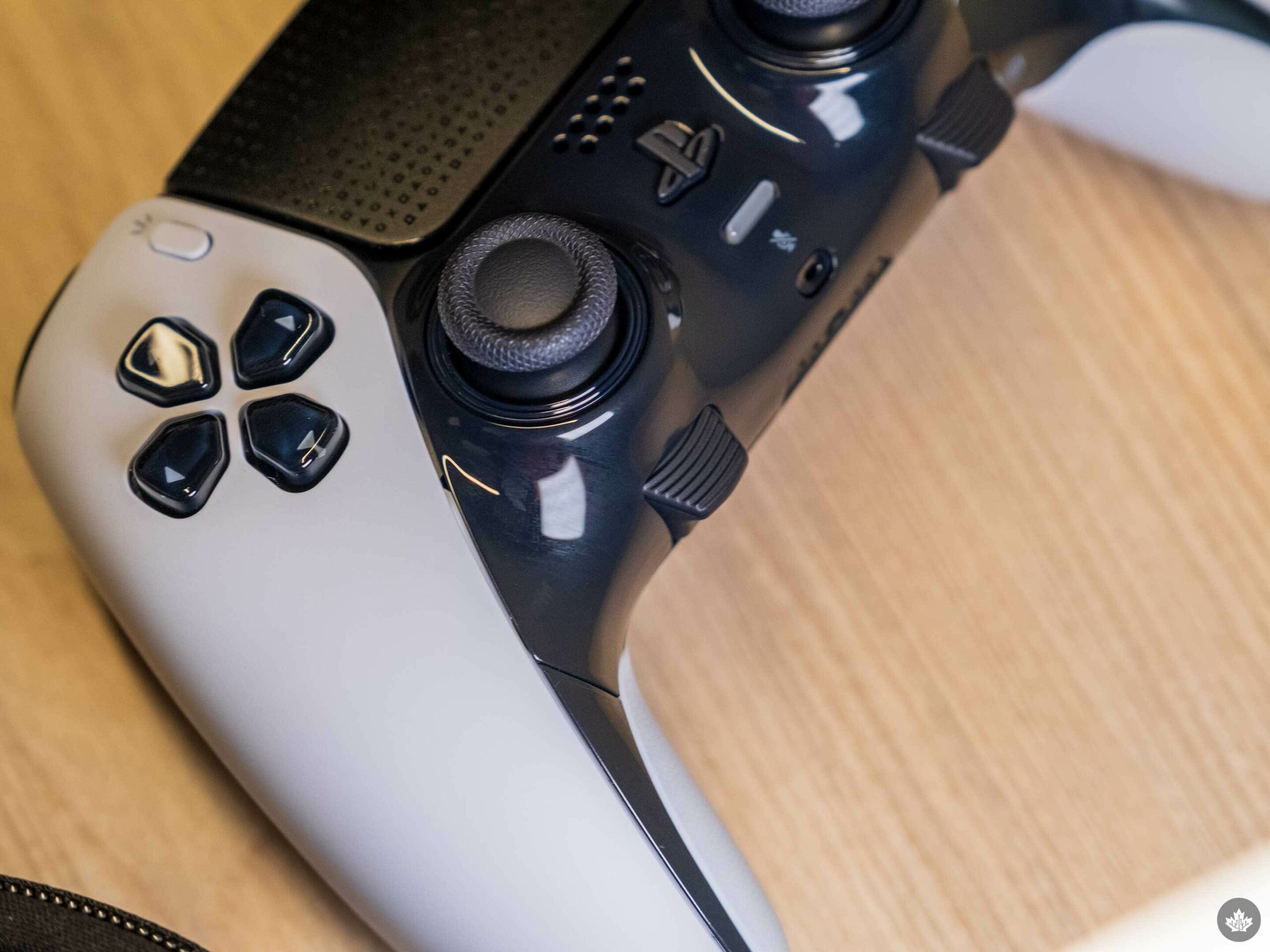
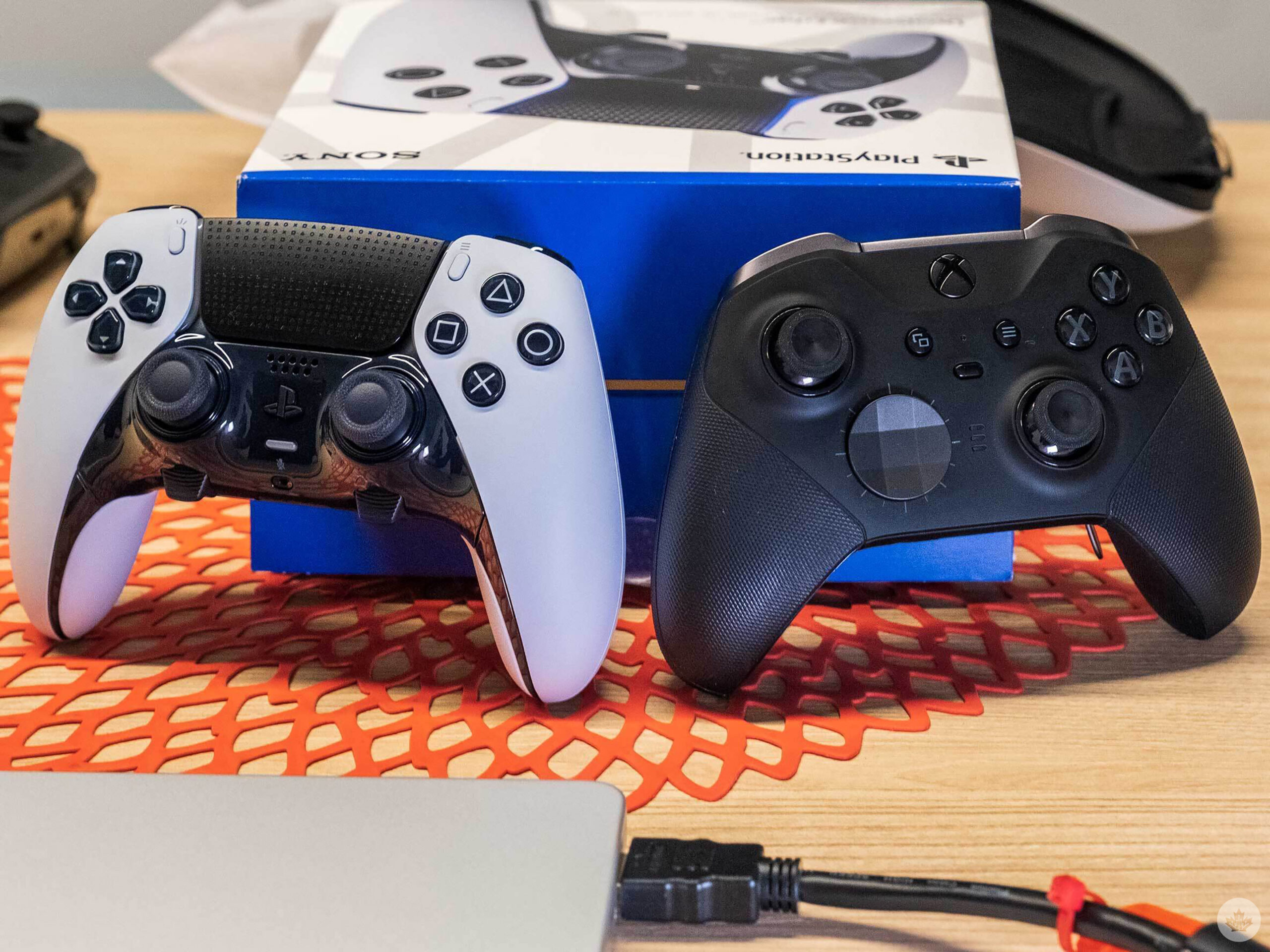
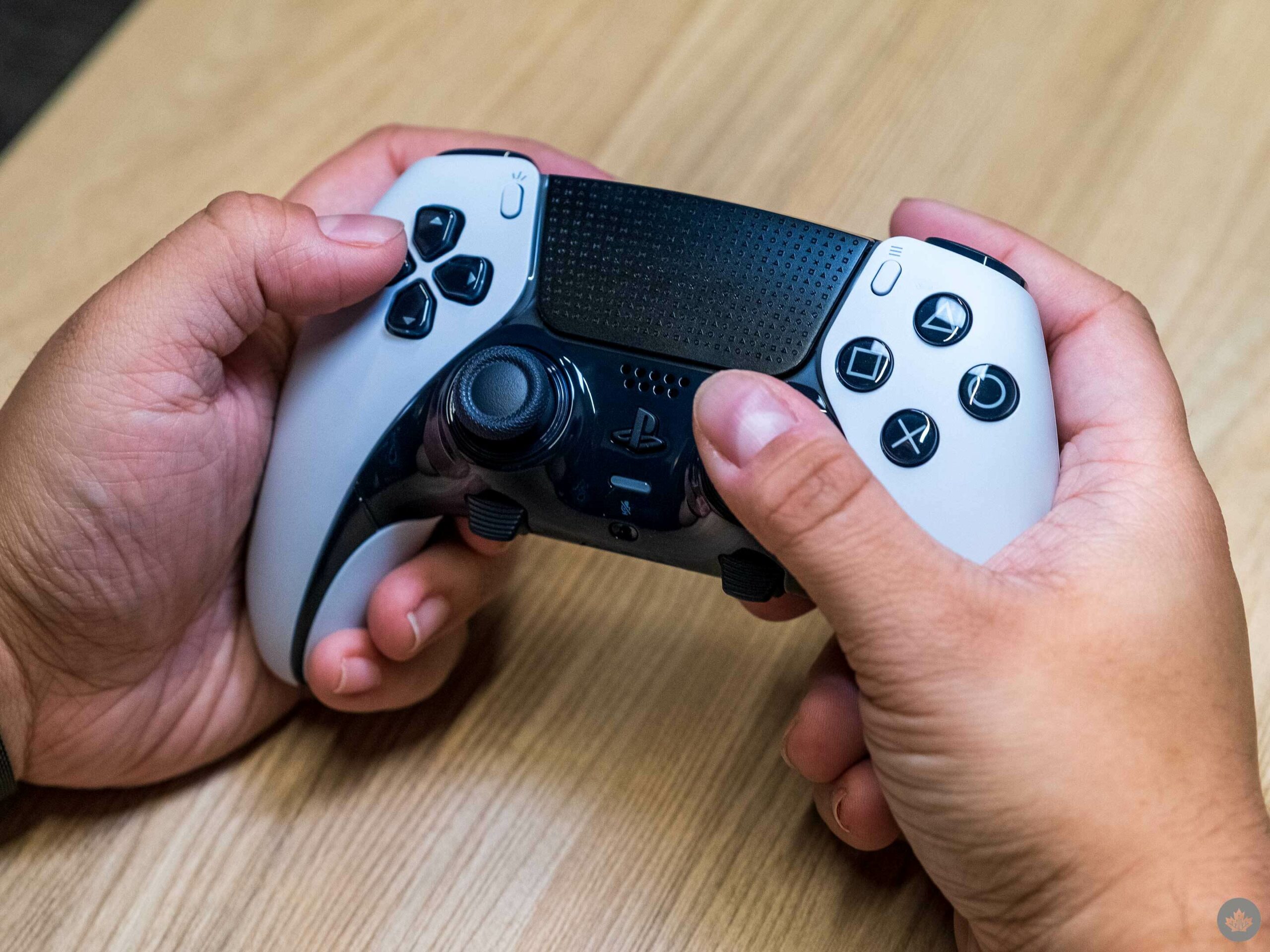
While I initially thought that the Edge so closely resembling the regular DualSense was a little boring, the aesthetic has certainly grown on me. For one, it creates a sense of visual unity between the white-and-black PS5 console, controller and other accessories. More importantly, it helps accentuate the subtle iterations that PlayStation has made.
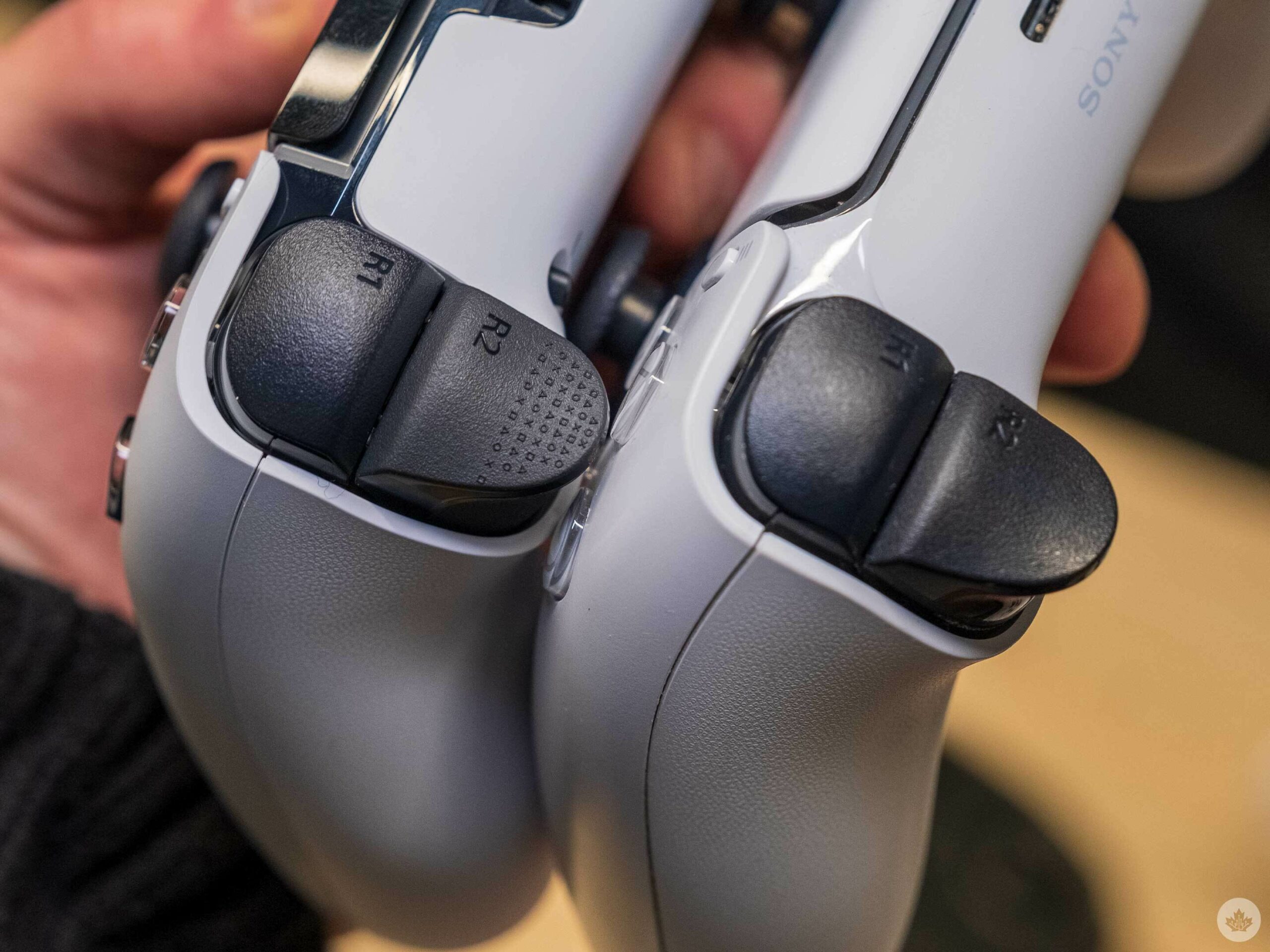
This includes rubberized inside grips and texturized little grooves on the L2/R2 buttons, both of which add a welcome level of comfort. There’s also an undeniable charm in seeing PlayStation’s iconic Square, Circle, Triangle and Cross buttons patterned across the touchpad and L2/R2.
Parts
And that’s just what’s there at default. Of course, the core appeal of these “pro-style” controllers is the fact that they are modular. In that regard, the breadth of options with the DualSense Edge really is exceptional.
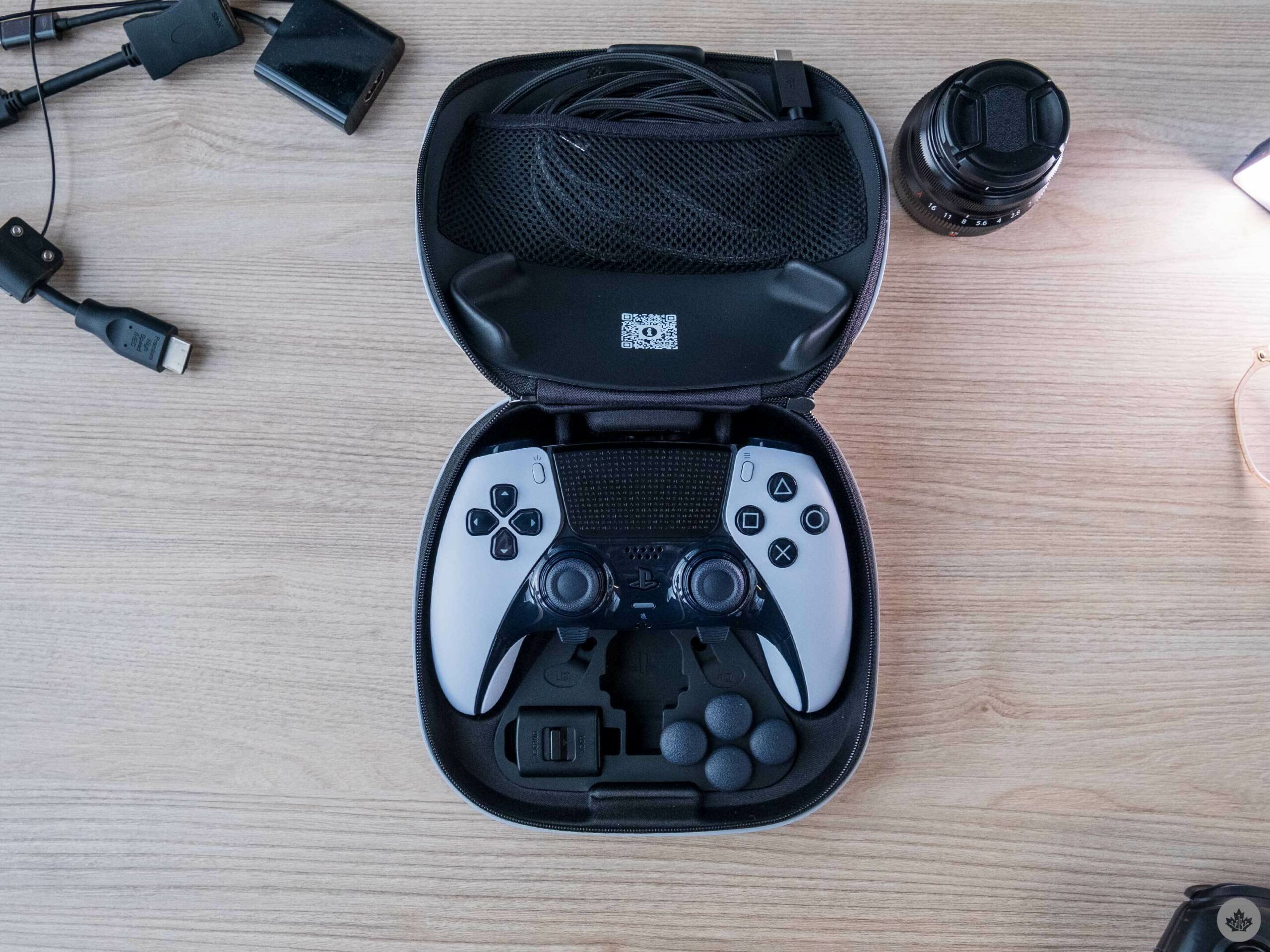
For context, here’s everything you get with the controller:
Carrying case
Connector housing
USB braided cable
Two standard caps
Two high dome caps
Two low dome caps
Two half dome back buttons
Two lever back buttons
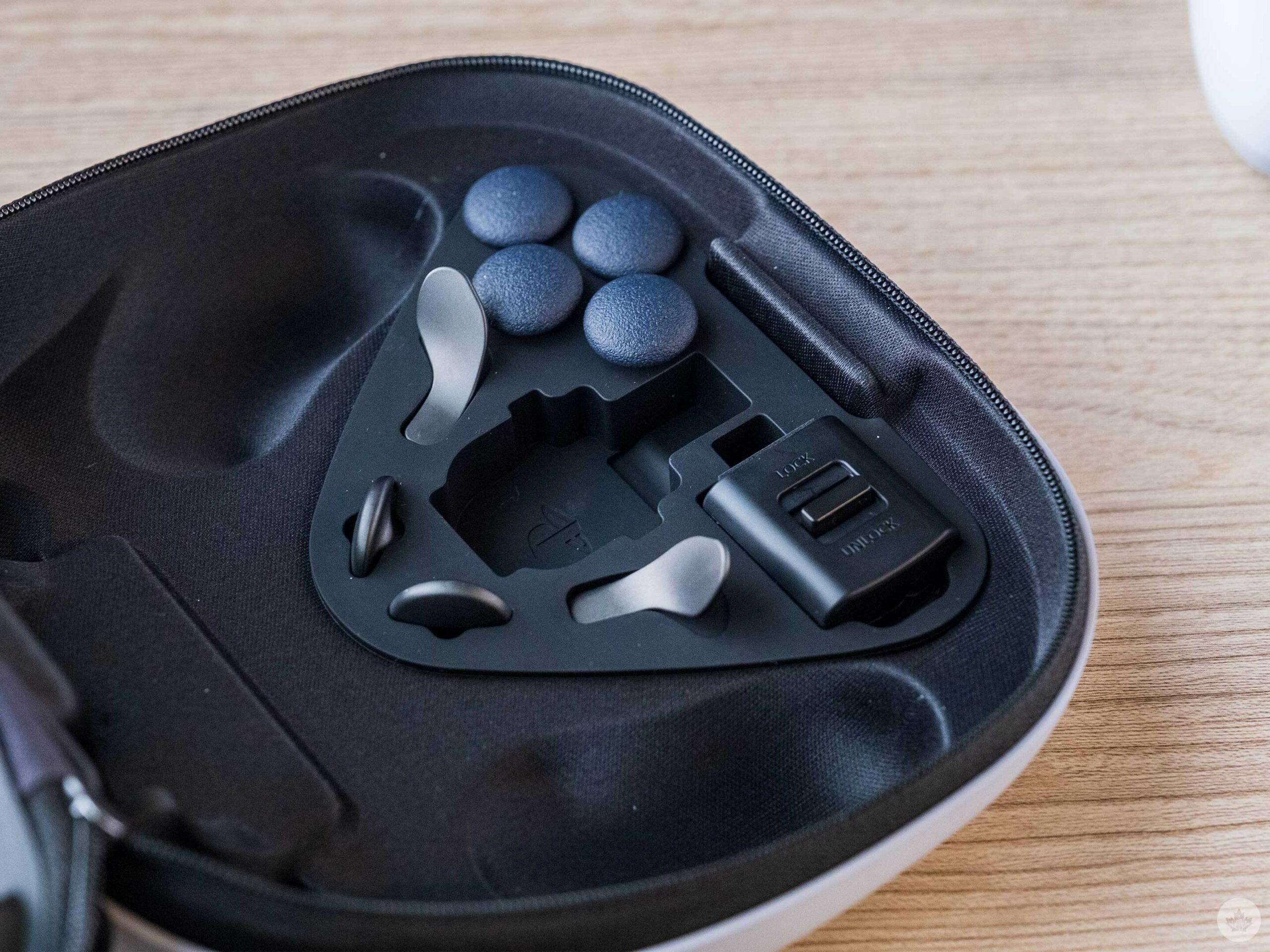
In terms of the packed-in physical components, my favourite, by far, is swappable analog stick caps. The default “low domes” are identical to the DualSense’s flat, slightly indented sticks, which were themselves based on the PS4’s DualShock 4. But you can instead replace them with mushroom-esque “high dome” caps which stick upward. In practice, they’re much like the curved thumbsticks of the PS1-3 DualShock controllers, creating a sense of nostalgia that also just feels satisfyingly smooth on my fingers. Best of all, the caps can be easily removed and swapped using just your fingers, so you can always go back and forth to see what you prefer. PlayStation is also selling separate $25 replacement stick modules — a surprisingly affordable solution should you run into issues down the line.
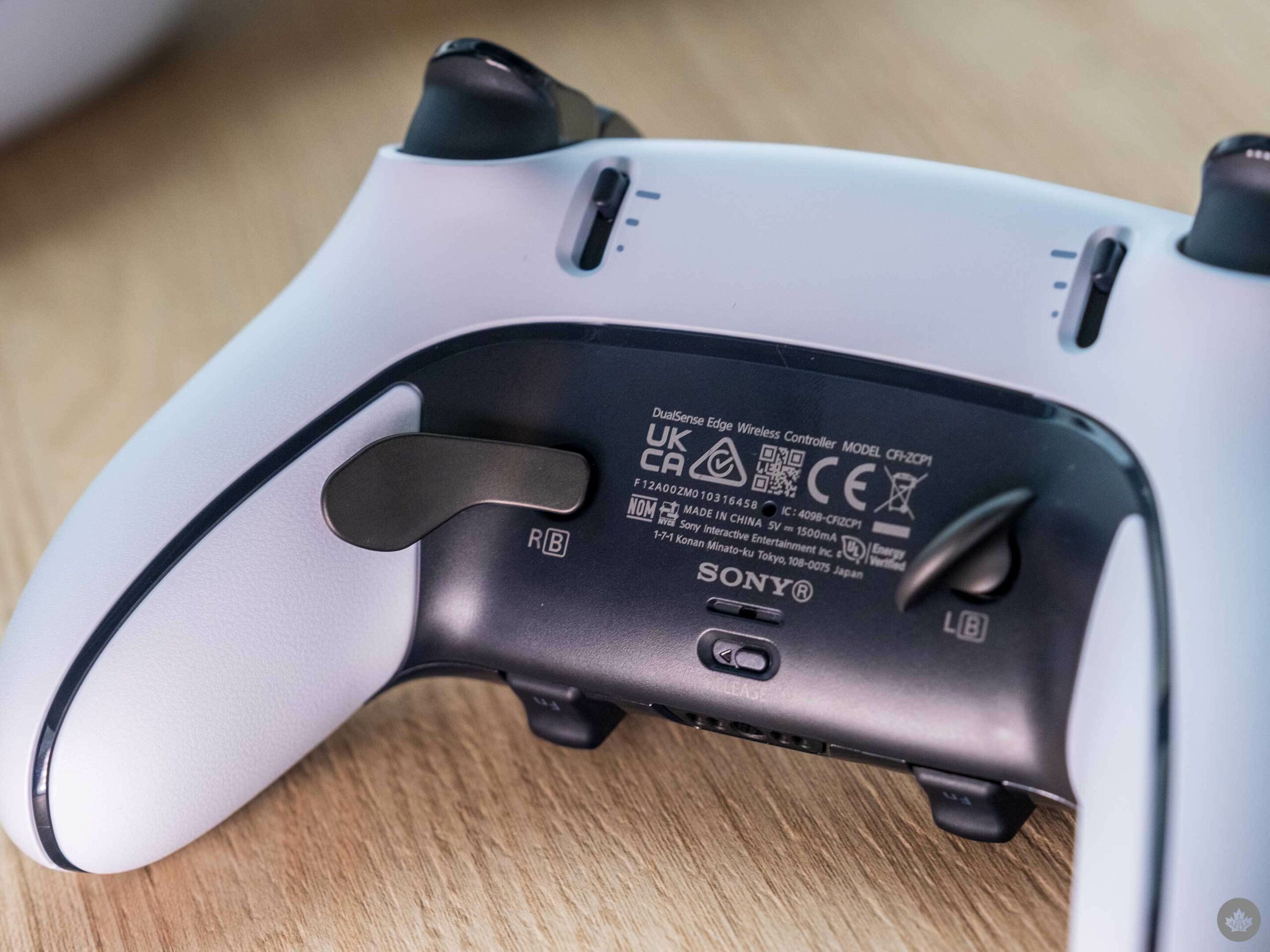
That’s to say nothing of the back attachments. Like the Xbox Elite Controller, you can opt to equip your DualSense Edge with rear paddles, which PlayStation refers to as ‘lever types.’ These are great because you can bind inputs to them for your middle fingers to handle that would otherwise require your thumbs. But the DualSense expands on this concept with a second type of rear attachment, which it calls ‘half dome’ buttons. These little ovular, pill-shaped attachments go in the same slot but otherwise function the same. Once again, it’s really up to preference. Personally, I liked the half dome variants because they’re smaller and, therefore, less intrusive than the longer paddles. This means that they also require more pressure and you’re less likely to accidentally graze them as you might with the paddles — a nice option for people with fatter fingers like me. At the same time, I found having two both middle fingers higher up on the rear to be a bit awkward, so I later swapped one of the domes for a peddle so I could more naturally reach it.
Then there are the trigger stops, a pair of sliders beside the L2/R2 buttons that limit how far the triggers can be pressed. There are three options — full, limited and very limited travel distance. Naturally, the less travel distance you have, the quicker response time when pulling the triggers. These precious milliseconds are most tangible in shooters, where you want aiming and firing to feel as snappy as possible. It’s not something that will single-handedly make you a Call of Duty pro, but that added responsiveness nonetheless makes a pleasing and tangible difference over time. Keep in mind, however, that using the stops will disable the DualSense’s unique adaptive trigger functionality. You’ll also want to consider that games that require a full press of the trigger (i.e. racing games like Gran Turismo 7).
Software
Perhaps the best aspect of the DualSense Edge is just how seamlessly it integrates into the PS5’s ecosystem. As soon as you plug it into your console via USB-C, you’re given a brief-yet-useful overview of the controller. You can also scan a QR code in the surprisingly sturdy carrying case to instantly jump to a series of handy in-depth PlayStation Support videos on individual aspects of the Edge. This makes the whole setup process feel extremely smooth.
It doesn’t stop there. Directly beneath either thumbstick are two ‘Function’ buttons. At any point, you can hold these down to bring up a quick menu related to Profiles. These are sets of button configurations that you can fine-tune to your liking, and you can create as many as you want. In other words, you can absolutely have game-specific Profiles. Four Profiles can then be assigned to face button shortcuts when you press down Function. And because the Function button itself is a shortcut to Profiles, you graciously don’t have navigate to Settings > Accessories > DualSense Edge each time.
Honestly, being able to easily customize and swap between button layouts on the fly was probably the biggest highlight of the total experience. That’s because I underestimated just how much I’d end up loving the ability to play around with controls. For example, I set the D-pad’s Up button to the back-left dome for Call of Duty: Warzone 2.0. This meant that I could simply use my otherwise idle middle finger to ping waypoints and enemies for my teammates, thus freeing up my thumb to focus on actual movement. Likewise, I set the other dome for X so I could jump and clamber more easily and have that thumb prioritize camera rotation. On the flip side, Fortnitehas such colourful taunts that I wanted to switch from D-pad Up to Down to quickly get my groove on. Players who prioritize inventory checking, however, might want to leave it on D-pad Up or go Right (Augments) or Left (ping).
Admittedly, though, I’m predominantly someone who enjoys single-player experiences, so I didn’t get nearly as much mileage out of this as others would. Much to my pleasant surprise, then, when I started digging into all of the ways I could tailor Profiles to benefit my offline gaming. Take Uncharted 4: I’ve always found that game’s binding of reload to Triangle to be a bit clunky. With the Edge, though, I can simply assign that to a rear button. Beauty. I then decided to set the other dome to Square, which swaps weapons while aiming, to allow me to more quickly toggle guns while maintaining consistent fire. This was especially handy in firefights where I was spraying a nearby enemy with a rifle then swapping to my pistol to send off more precise single shots. In a similar vein, I appreciated the convenience this had in one of my favourite games, Final Fantasy VII Remake. Here, I could set one dome/paddle to Circle to dodge roll more easily and the other to D-pad Up/Down to quickly swap between characters (essential for the quick on-the-fly reactions that game requires).
But I think the biggest benefit came with Resident Evil 4. I’ve been revisiting the Capcom classic ahead of March’s remake, although it’s admittedly taken some getting readjustment. After all, I’m going back to tank controls after the modern controls of games like Resident Evil 2and Village. This means that you can’t aim and move or even fully rotate the camera (the right analog stick only partially looks in that direction). And because X is the sprint button, you can’t properly run and rotate the camera. Thankfully, the Edge can simply bind X to a rear dome/paddle, freeing up my thumb to rotate the camera while Leon runs forward. That situational awareness is especially helpful when fighting large groups of enemies.
Of course, these are but a few use cases. All in all, the interchangeability between button and rear attachment configurations was staggering, and I loved discovering — and constantly tweaking — my preferred set-ups per game. Throw in such additional customization options as stick sensitivity and stick and trigger deadzones (the input range that isn’t registered) and you really can get a lot out of the Edge.
That battery, though
…Except, perhaps, battery life. Indeed, one of the main issues with the DualSense Edge is it simply doesn’t last for too long. Reports vary depending on exactly how you’re using the Edge, but generally, it seems to last for anywhere between four and eight hours. (Sony hasn’t released an official battery life estimate.) In my experience, I got closer to six hours, although I was primarily playing games that didn’t take advantage of adaptive triggers — or even other draining features like the microphone and speaker — to begin with. Last year, Sony told The Vergethe reduced battery life is due to the Edge’s “many more features” over the roughly 12-hours-long standard DualSense, but it’s still frustrating.
Early verdict
Once again, I haven’t spent that much time with the DualSense Edge, so I don’t have a fully-formed take on it. Further, it remains to be seen whether people will run into any issues in the weeks ahead. I immediately think of the several broken Xbox Elite Controllers that our editor-in-chief, Patrick O’Rourke, has gone through. Could the Edge suffer from similar build quality issues? Only time will tell. Then there’s the matter of the steep price tag, which is more than half the cost of the $520 PS5 Digital Edition itself. Frankly, it’s difficult to wrap my head around such a price for a controller.
Therefore, I can’t really tell you if it’s “worth” spending $270 on it. What I can say, though, is that those who regularly play on PS5 will undoubtedly get a lot out of this gamepad, thanks to its sleek and comfortable form factor, solid lineup of swappable buttons and robust in-game customization options. If you’re part of the PlayStation faithful and any of that sounds appealing to you, the DualSense Edge would be a fine addition to your collection.







 Once again, I haven’t spent that much time with the DualSense Edge, so I don’t have a fully-formed take on it. Further, it remains to be seen whether people will run into any issues in the weeks ahead. I immediately think of the