Twitter is reportedly set to receive a user interface (UI) overhaul in the coming months, as suggested by Twitter CEO Elon Musk himself.
Kicking off the refresh would be the ability for users to switch between recommended top Tweets vs latest Tweets by swiping right/left. The ability would likely be limited to Twitter on iOS and Android, and it is currently unclear if an easier way to switch between timelines would be made available for Twitter on the web.
The feature is expected to roll out “later this week.”
Easy swipe right/left to move between recommended vs followed tweets rolls out later this week.
First part of a much larger UI overhaul.
Bookmark button (de facto silent like) on Tweet details rolls out a week later.
Furthermore, a new bookmark button, which Musk is calling the “de facto silent like,” will roll out next week. It’s worth noting that Twitter users on iOS, Android and web already have the option to bookmark Tweets, but they must first tap the ‘Share’ button to reach the bookmark button. The refresh coming next week will likely bring the bookmark button front and centre alongside the Tweet details (likes, retweets, views).
The Tweets wouldn’t take up all 4,000 characters worth of space and “will get the same Timeline screen space as other tweets.” Users would be able to click a ‘read more’ or ‘see more’ button to expand the Tweet, similar to Instagram and Facebook.
We will also be adding simple formatting features like bold, underline & font size later this quarter.
The goal is to allow people to publish long-form natively on Twitter, rather than forcing them to use another website.
Twitter will continue to recommend brevity in tweets.
Other new Twitter features that are on the drawing board, but don’t have an exact release date, include simple formatting features, like bold and italicized Tweets, underlining and font sizing. These features are expected to roll out “later this quarter.”
Bell’s is committing $10 million to mental health programs ahead of Bell Let’s Talk Day on January 25th.
The annual event sees Bell donate five cents for every interaction and social media post about the campaign. However, Bell will not renew the action this year, and the $10 million commitment will replace the practice.
Bell says the $10 million figure is more than it’s ever committed to the annual event. Last year, the company provided $8.2 million after Canadians shared 164 million messages, a 3.2 percent increase from 2021 and 47 million social media interactions.
However, it remains unclear how Bell reached the $10 million figure or if it acts as a cap to Bell’s donation.
The company’s own records show Bell Let’s Talk Day is an immensely popular event which has continued to grow year after year. With a 3.2 percent increase in 2022 alone, it’s unclear how the event will grow in 2023 and what Bell’s total donation could be. It’s possible the usual method of five cents a post could lead to more than $10 million.
The irony of this announcement is also hard to ignore. The press release sharing details of the $10 million commitment doesn’t mention any efforts Bell will make on its part to provide its own employees with a healthier work environment. Bell has faced questions about its practices for years but has yet to address them.
While the importance of talking about mental health can’t be denied, the effectiveness of such messages diminishes when organizations do little to address ongoing issues in their own companies.
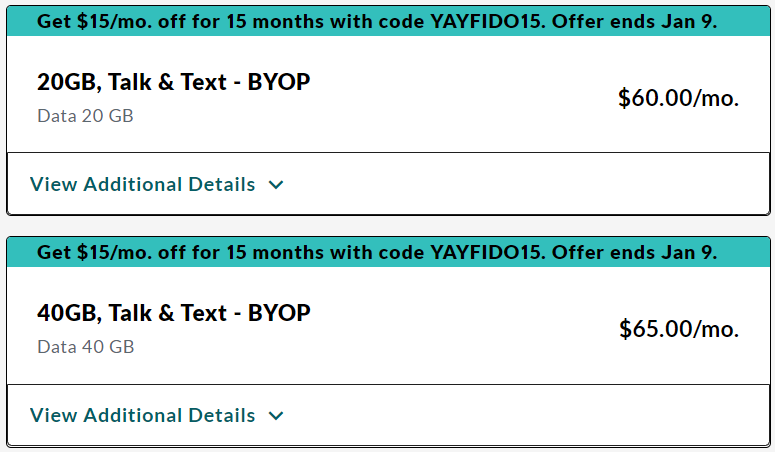
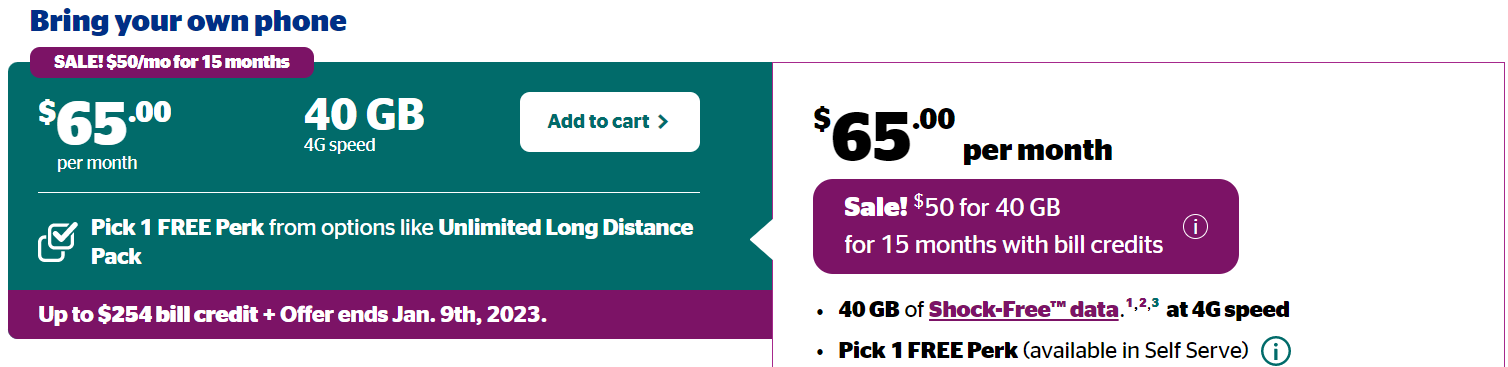
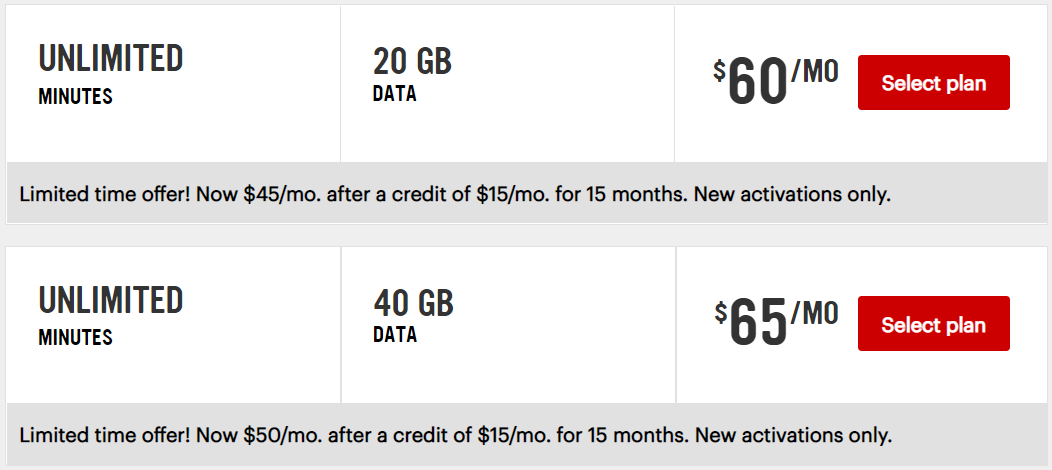
Today looks to be the last day for the $45/20GB and $50/40GB Boxing Week plans at Fido, Koodo, and Virgin Plus. Both Fido and Koodo now list the plan as ending on January 9th — Virgin Plus didn’t have a similar label at the time of writing, but it likely will follow the other two.
At all three providers, the plans actually cost $60/20GB and $65/40GB, but come with a $15/mo credit for 15 months. The downside is that anyone who signs up will need to be ready to switch carriers in 15 months’ time unless they’re okay with paying a higher monthly price. That said, Black Friday and Boxing Week 2023 will happen within that time frame, which means customers could potentially switch to a different promotional plan before the credit expires.
The deal isn’t as good for those looking to get a phone with one of these providers, as the phone contracts are 24 months long, so customers will be stuck paying the higher cost for the last nine months of their contract.
Aside from the large data buckets, these plans also include unlimited Canada-wide text messaging, unlimited Canada-wide calling, and other features that vary from provider to provider, such as voicemail, call display, international texting, and more.
If you’re in the market for a new plan, you may want to pick up one of these deals before they go away — it’s unclear what plan options will be available tomorrow, but they’ll likely cost more and have less data. Before the flanker providers added the Boxing Week plans, they had $60/10GB and $65/20GB plans.
You can check out Fido’s plans here, Koodo’s plans here, and Virgin’s plans here.
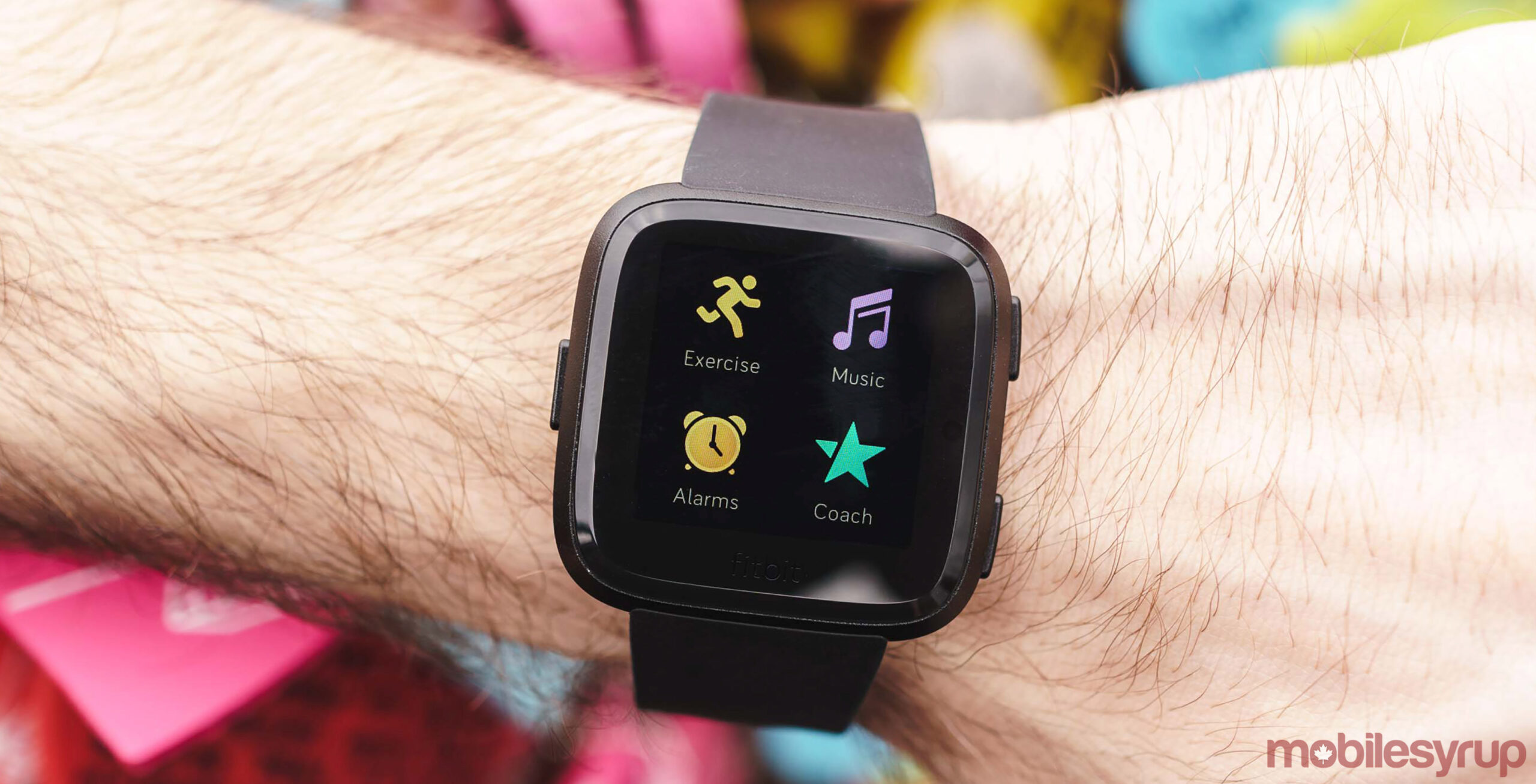
The time is right to get on the fitness train. Fitbit is banking on this as the company has discounted its most popular fitness trackers by up to 23 percent.
MobileSyrup utilizes affiliate partnerships. These partnerships do not influence our editorial content, though we may earn a commission on purchases made via these links that helps fund the journalism provided free on our website.
A critical part of owning a smartphone these days is managing the associated cloud storage holding backups of your photos, messages, contacts, and more. Unfortunately, most people neglect this, often to their detriment, when an ageing smartphone gives up the ghost, or a clumsy hand sends it rocketing to the floor, never to work again.
As someone who spent years working at a cellphone store (and who still serves as the resident IT guy for friends and family), cloud storage often ended up causing problems during the upgrade process. With that in mind, it might be a good idea to check in on your cloud storage, make sure you have space for your phone’s backups, and more. Here’s how to manage it.
iPhone
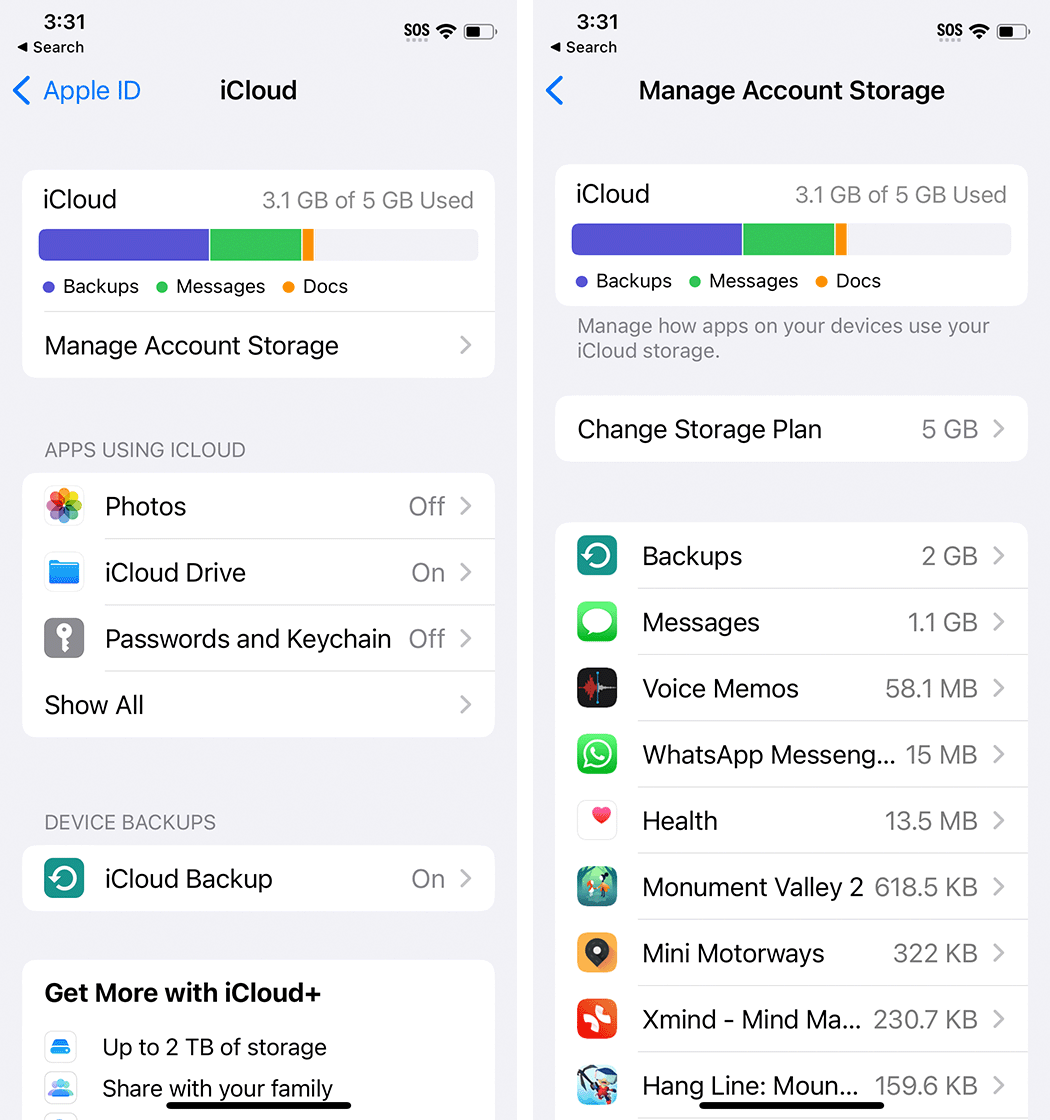
Every Apple ID comes with 5GB of free iCloud storage that can be used for backups, but chances are you’ve already filled it with photos and other storage-heavy content. To clean up your iCloud from an iPhone, open Settings > Tap your name > iCloud. In this menu, you’ll see a breakdown of what’s using up your storage, followed by an option to manage your storage. Below are some apps that use iCloud, like Apple Photos, a Device Backups section, ‘Advanced Data Protection’ (which will let you encrypt your iCloud data, although the feature isn’t available in Canada yet), and finally a toggle to turn on access to your iCloud data from the web. You may also see ads pushing you to upgrade your iCloud storage.
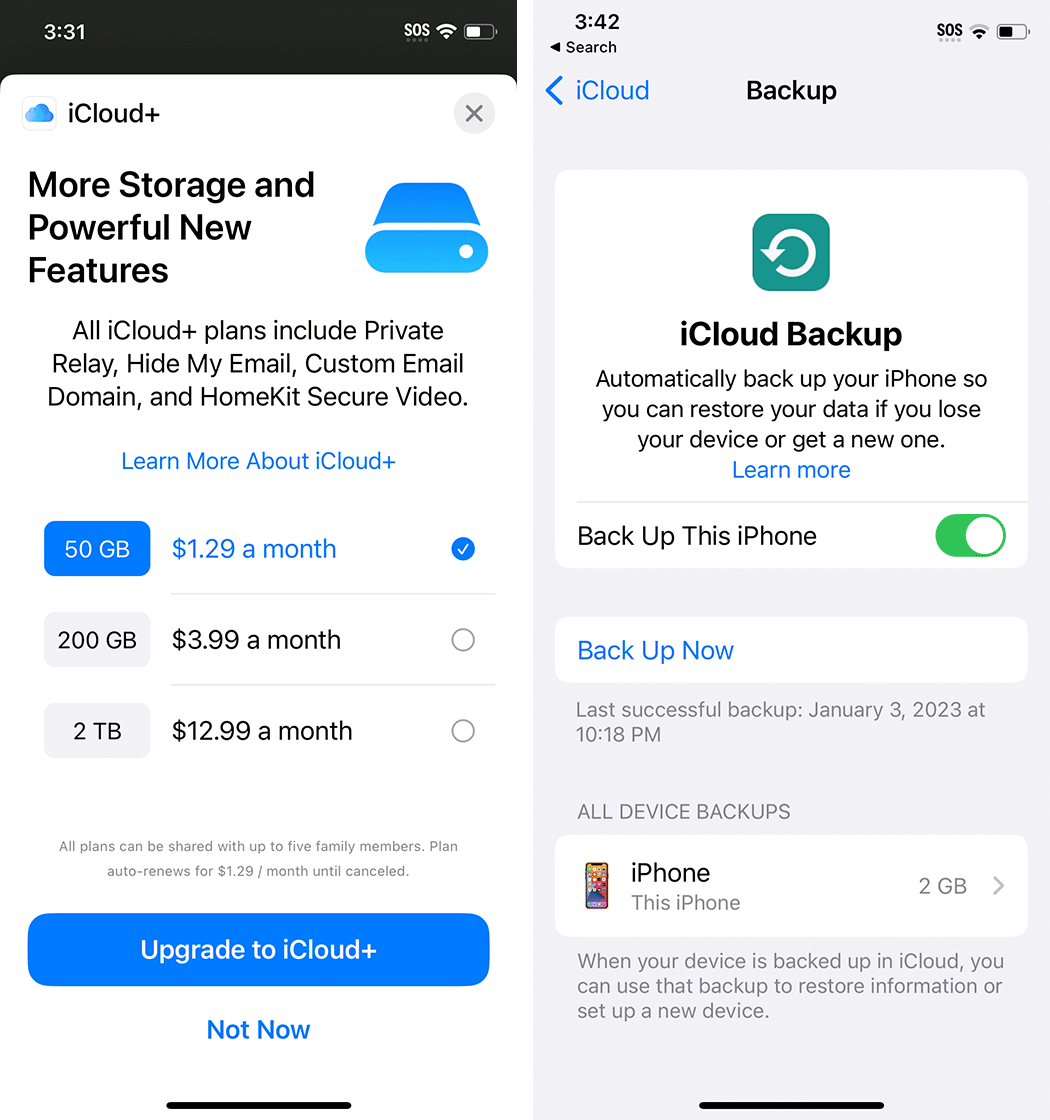
Tapping ‘Manage Account Storage’ brings up a list of everything stored in your iCloud along with how much space is being used by that thing. Most of my storage is used up by Backups and Messages because I disabled Photos backup (more on that in a moment). This list can be handy if you want to clear out any large items — simply tap an item and tap ‘Delete’ on the next screen to remove it from iCloud. You can also expand your iCloud storage from this screen with the following options and prices in Canada (as of January 6th, 2023):
50GB – $1.29/mo
200GB – $3.99/mo
2TB – $12.99/mo
Paying for iCloud also gives you access to iCloud+ features like Private Relay, Hide My Email, and more — learn about those here.
iCloud Photos will likely be the thing gobbling up most of your iCloud storage. It’s a system for backing up photos and videos from your iPhone and it’s a great way to protect your pictures in the event you break or lose your iPhone. As I mentioned above, I don’t use iCloud to back up my pictures because I prefer Google Photos and I primarily use Android phones. If you don’t want to back up images to iCloud, you can turn this feature off (but I’d strongly recommend using another backup service to protect your pictures, whether that’s Google Photos, Microsoft OneDrive, or something else).
Most importantly, check the Device Backups section to ensure your iPhone is backing up to iCloud. This will make it easier to restore your data on a new iPhone.
Android
Android’s backup system is fairly complex, thanks partly to manufacturers offering their own backup systems on top of what’s available as part of Android. My recommendation is to make sure the Android backup system is set up and good to go first, and then look into setting up the manufacturer backup system (for example, Samsung Cloud backup for Galaxy phones).
You can manage your backups from two places on Android. The first is through the Google One app, and the second is by heading into the Settings app and going to the ‘Backup’ section. It might be in a different spot depending on your phone — on my Pixel 7, it’s in Settings > System > Backup, while on a Galaxy S10e I checked it was in Settings > Accounts and backup > Back up data under the Google Drive header.
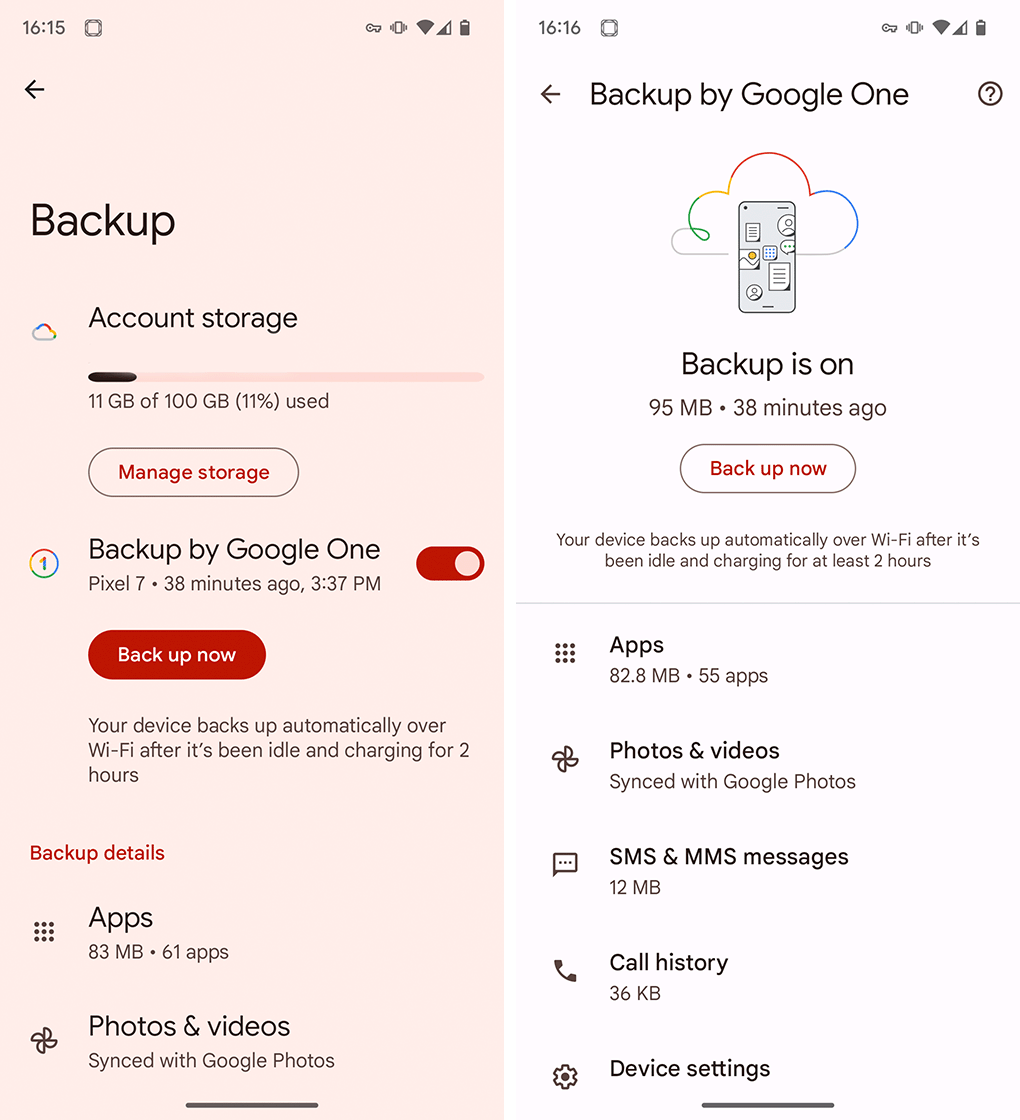
Regardless, you should end up on a screen showing your Google account storage, an option to manage the storage, and then backup details for your device, including a ‘Back up now’ button and a list of what’s included in the backup and how much space it takes up.
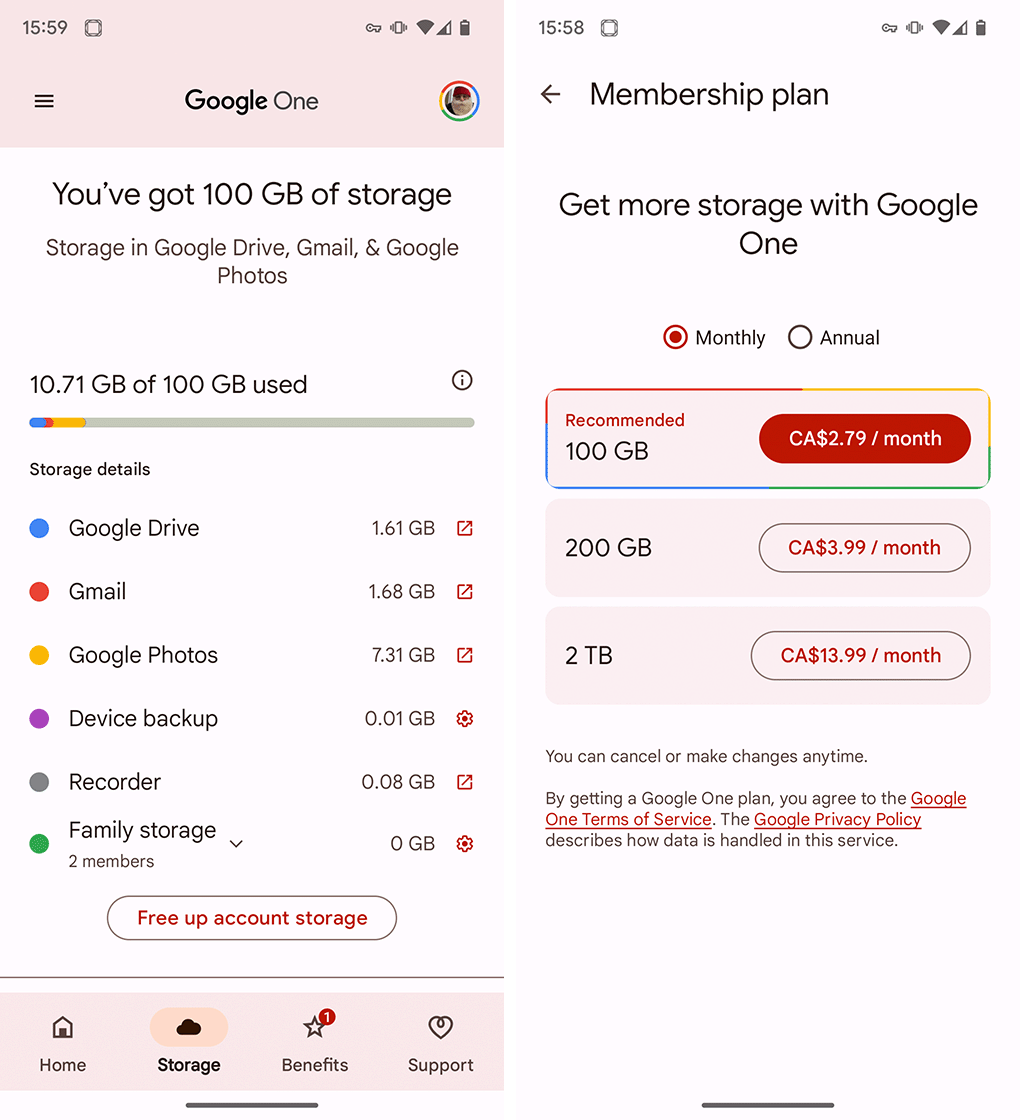
Android backups are stored in Google One cloud storage, which is shared across various Google services, including Drive, Gmail, and Google Photos (it’s worth noting that while photos are listed in the device backup section, the Google Photos app handles the backup). You get 15GB for free and can upgrade your storage to:
100GB – $2.79/mo or $27.99/year
200GB – $3.99/mo or $39.99/year
2TB – $13.99/mo or $139.99/year
Controlling what gets backed up and what doesn’t is a little more confusing than it is with the iPhone. In the Backup menu in my phone’s Settings app, I could only view a list of what was backed up. However, if you head into the Google One app to view your backup, there’s a ‘Manage backup’ button that takes you to a menu with options to toggle off certain categories, such as device data, multimedia messages, or photos and videos. However, other parts of the Android backup interface will bounce you to Google Photos to manage what gets backed up.
Again, your photo library will probably take up the most space in your device backup, so being able to manage that separately is the most important thing — none of the other stuff in my backup takes more than 100MB of space.
In 2023, we’re expected to see a lot of smartphones from manufacturers like Apple, Samsung, Google, Vivo, Motorola, LG, Huawei, OnePlus and more. And even though not many of these phones will come to Canada, they’re usually still pretty cool to look at from afar.
For example, last year’s Oppo Find N was a fantastic looking foldable that I unfortunately never got to use. This year I’m looking forward to checking out cool smartphones from companies like Oppo and Asus, but the handset I’m most excited about will likely actually come to Canada.
While my most anticipated handset for 2022 was the Galaxy Fold 4, this year, I’m looking forward to a foldable from a different manufacturer — the Pixel Fold, Google’s often-rumoured first foldable smartphone.
The Pixel Fold is rumoured to measure 158.7 x 139.7 x 5.7mm (8.3mm with the camera bump) when unfolded. It will reportedly come in ‘Silver’ and ‘Black’ colours, offer USB-C charging, and will have a 5.79-inch cover display with a hole-punch selfie camera and a 7.69-inch inner display with a hole-punch selfie camera on the right side.
Further, it’ll support a stylus, sport 12GB of RAM, run Android 13L and feature the Tensor G2 processor.
The Pixel Fold could arrive anywhere from April to May or even as late as October, so I’ll have to wait a while to check out this Android foldable.
Let us know in the comments below which handset you’re looking forward to most.
The world’s most used messaging service, WhatsApp, announced on Thursday, January 5th, that it’s adding proxy connection support to the platform.
That means that in cases where your connection is blocked or disrupted, you’ll still be able to maintain access to WhatsApp to get in touch with your loved ones. Using a proxy allows you to connect to WhatsApp through servers that are established by volunteers and organizations committed to facilitating free communication.
Said proxy connections maintain the level of security WhatsApp normally offers. “Connecting via proxy maintains the high level of privacy and security that WhatsApp provides. Your personal messages will still be protected by end-to-end encryption — ensuring they stay between you and the person you’re communicating with and are not visible to anyone in between, not the proxy servers, WhatsApp, or Meta,” WhatsApp wrote in a blog post about the feature.
This comes soon after the Iranian government tried to block WhatsApp due to widespread protests following the death of 22-year-old Mahsa Amini in police custody. The feature is available to use globally, though its primary use case is to aid Iranians in keeping in touch.
We continue to fight for your right to communicate freely and privately.
Now, when connecting to WhatsApp directly is not possible, you can stay connected around the world through a server set up by volunteers and organizations dedicated to helping others communicate freely.
To use a proxy server, you’ll need a proxy port — 80, 443 or 5222. To look for a proxy, according to WhatsApp, users will have to “search through social media or search engines for trusted sources that have created a proxy.” Since the feature is still new, not many people know about it. Once it becomes more widely known, finding proxy ports through volunteers and organizations on the internet shouldn’t be too difficult.
The proxy connection support is available for both iOS and Android users. Make sure you’re running the latest version of WhatsApp and follow the steps below:
On iPhone:
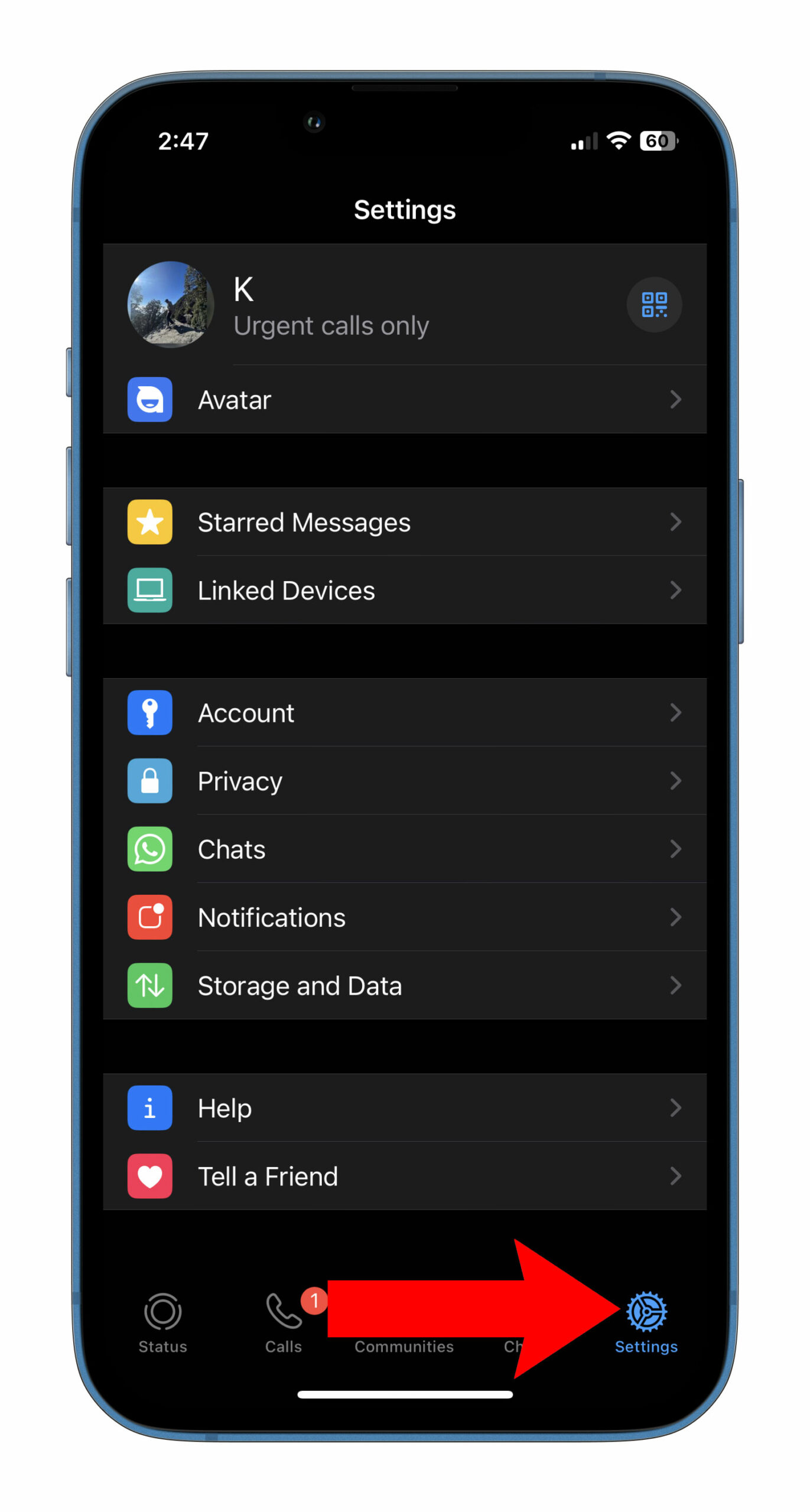
Open WhatsApp and head to settings
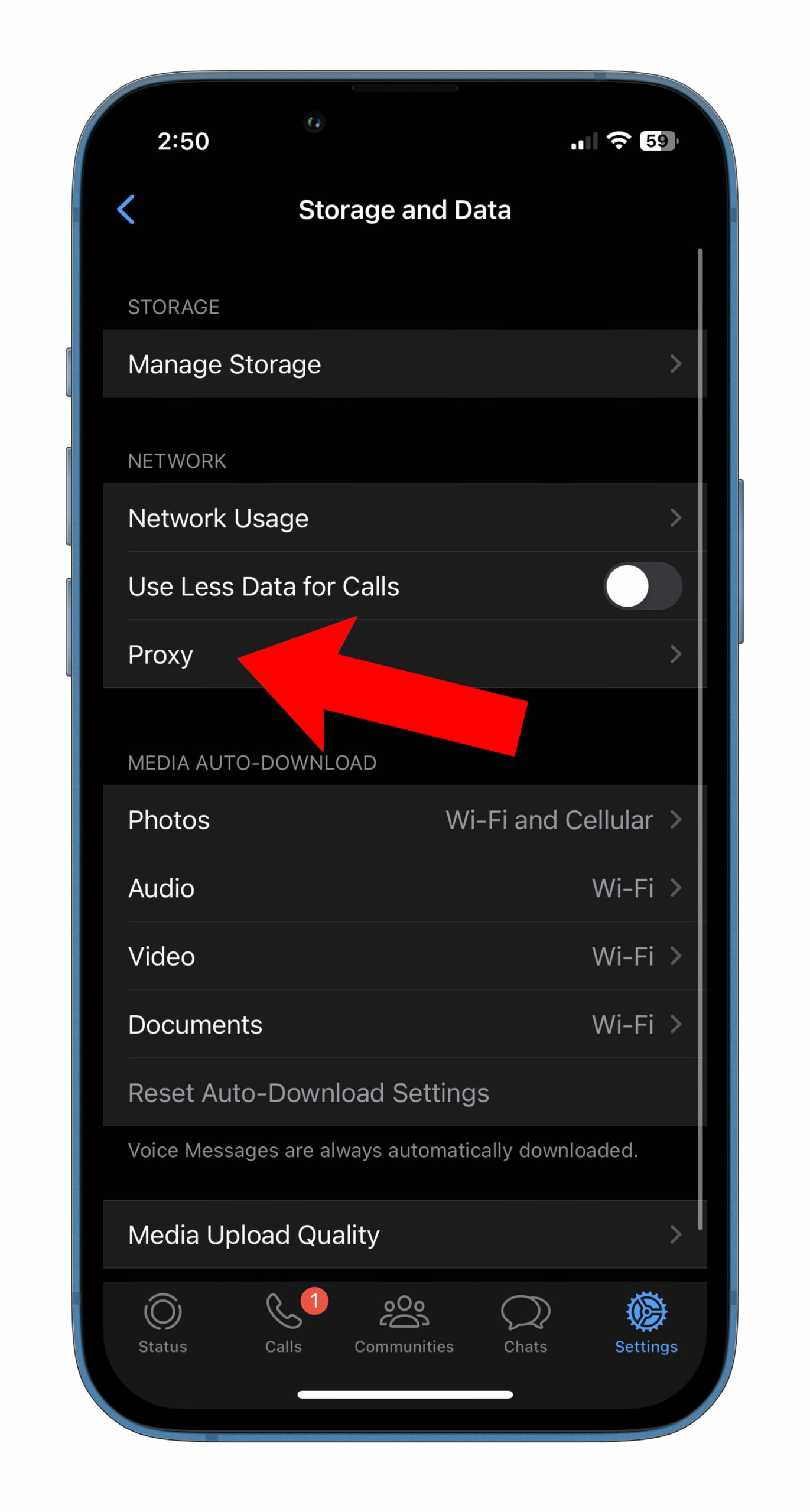
Tap on Storage and Data
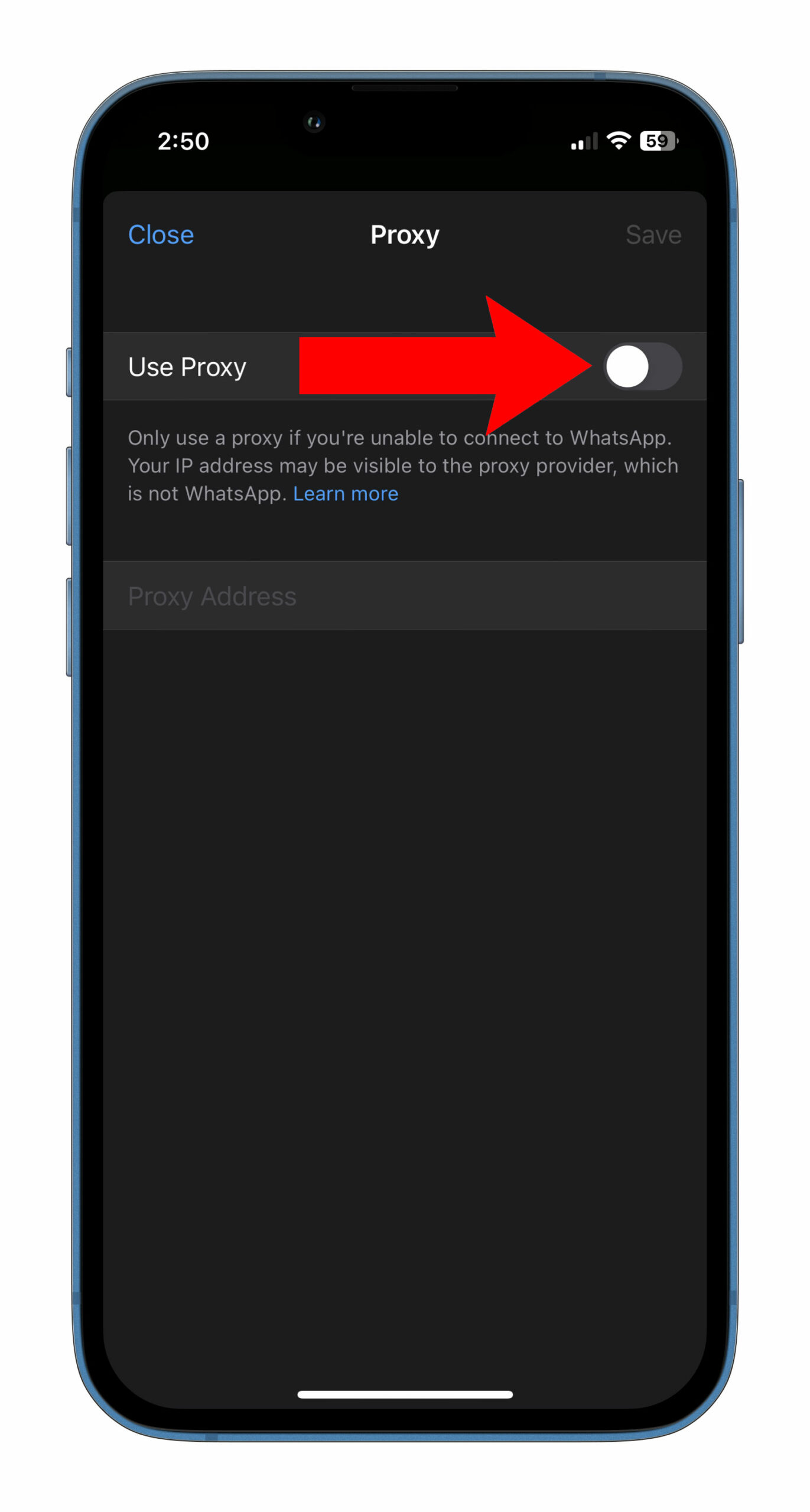
Tap on Proxy and enable the toggle
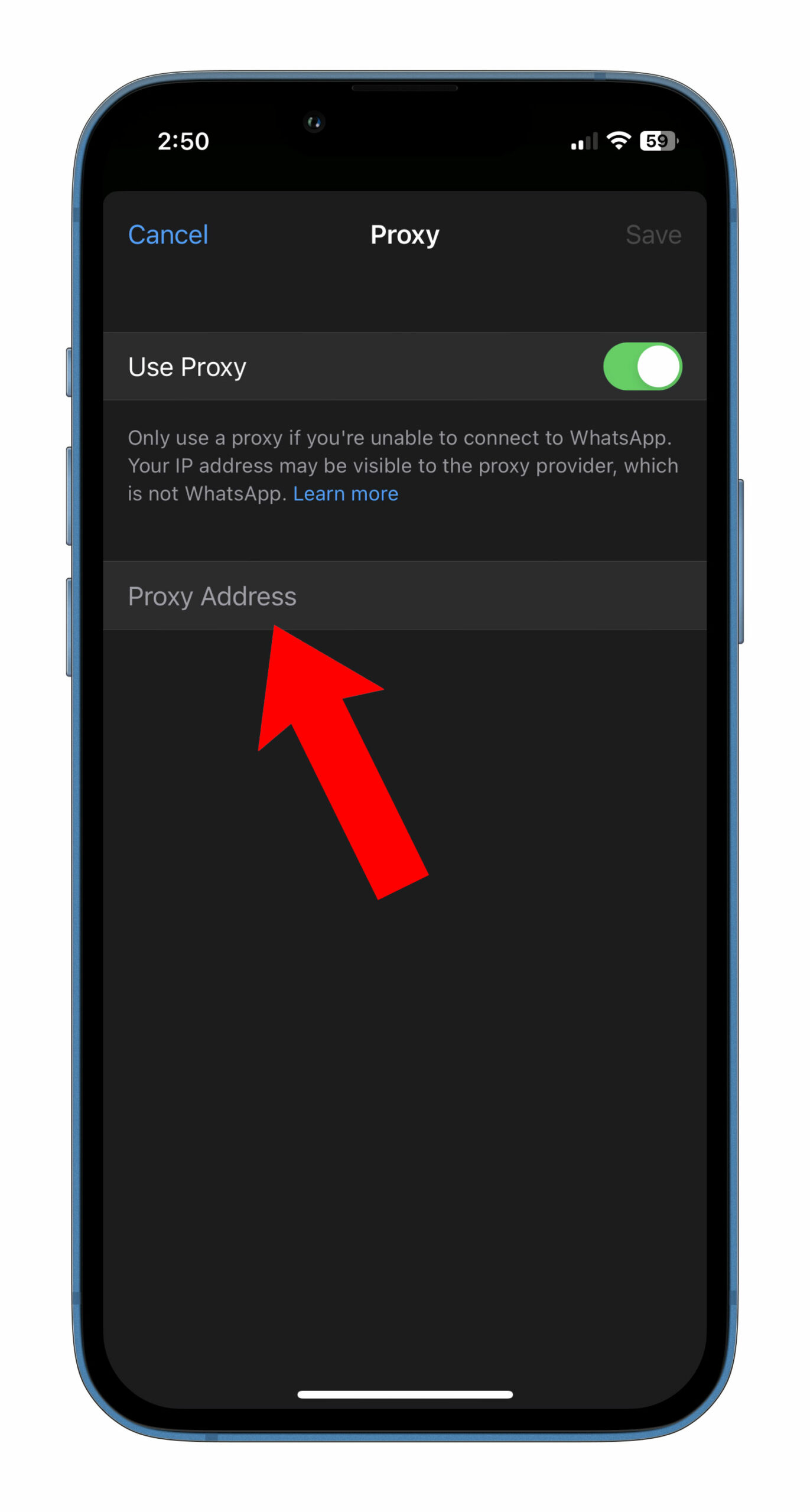
Enter the proxy address and tap Save to connect
If the proxy port is correct, you should see a Green checkmark to indicate that the connection is successful
On Android:
Open WhatsApp and go to the Chats section
Tap on More options and then Settings
Tap Storage and Data and then on Proxy
Tap Use Proxy and Set Proxy
Enter the proxy address and tap Save to connect
If the proxy port is correct, you should see a Green checkmark to indicate that the connection is successful
According to WhatsApp, using a third-party proxy will reveal the IP address of the user to the proxy provider. These types of proxies are not offered by the platform itself. Further, if you are unable to send or receive WhatsApp messages while using a proxy, it is possible that the proxy might have been blocked. To fix this, you can delete the blocked proxy address by long pressing it and then entering a new proxy address to try again.
For those interested in setting up a proxy to help others connect, check the Tweet below:
For those interested in helping, you can find a step by step guide on how to set up a proxy here https://t.co/6SoWq1FH9o.
It’s worth noting that I haven’t been able to locate any created proxy. If and when found, this article will be updated.
It’s also worth noting that Signal has long allowed users to connect to its service and send/receive messages with a proxy connection. It added the feature for Android in February 2021 and iOS in September 2022. Learn more about Signal’s proxy support here.
Every week, MobileSyrup outlines some of the most notable movies and TV shows that recently hit Canadian streaming platforms.
Our ‘Streaming in Canada’ column typically focuses on new content from Amazon Prime Video, Crave and Netflix, but other services like Apple TV+ and Disney+ are mentioned when relevant. Premium video on demand (PVOD) platforms are also fair game as movies continue to come to digital early amid the COVID-19 pandemic.
Finally, we’ll highlight shows or movies that are made by Canadian companies, involve notable Canadian cast or crew and/or are filmed in Canada.
Amazon Prime Video
LOL: Qui Le Dernier? [Amazon Original]
Netflix Canada release date: January 6th, 2023 (first three episodes, new episodes every Friday) Genre: Comedy Runtime: 10 episodes (around 30 minutes each)
After Montreal’s Jay Baruchel hosted a Canadian version of Last One Laughing last year, Amazon now has a Quebecois version.
LOL: Qui Le Dernier? is hosted by Patrick Huard (Good Cop, Bon Cop) and features the following comedians trying to make each other laugh without cracking up themselves:
Amazon Prime Video Canada release date: January 6th, 2023 Genre: Supernatural thriller Runtime: Six episodes (47 to 55 minutes each)
The crew of a North Sea oil rig must contend with supernatural forces when a mysterious fog rolls in.
The Rig is the first work from creator David Macpherson and stars Montreal’s Emily Hampshire (Schitt’s Creek), Iain Glenn (Game of Thrones), Martin Compston (The Nest) and Mark Bonnar (Catastrophe).
The full list of movies and shows hitting Amazon Prime Video Canada this month can be found here.
Crave
The Northman
Original theatrical release date: April 22nd, 2022
Amazon Prime Video Canada release date: January 6th, 2023 Genre: Epic historical action Runtime: 2 hours, 16 minutes
A Viking prince sets out to get revenge for the death of his father.
The Northman was co-written and directed by Robert Eggers (The Lighthouse) and star Alexander Skarsgärd (Big Little Lies), Nicole Kidman (The Hours), Claes Bang (Dracula) and Anya Taylor-Joy (The Queen’s Gambit).
Stream The Northman here.
RuPaul’s Drag Race (Season 15)
Crave release date: January 6th, 2023 (two new episodes every Friday at 9:30pm and 10:45pm ET) Genre: Reality Runtime: 16 episodes (around one hour each)
Sixteen new queens compete for a chance to win the title of America’s Next Drag Superstar and a record-high grand prize of $200,000.
A standard Crave subscription is priced at $19.99/month, with Starz costing an additional $5.99/month. A mobile-only subscription is also available for $9.99/month.
The full list of movies and shows hitting Crave this month can be found here.
This week in Crave news: Not news, per se, but we recently published an interview with the cast and crew of HBO’s The Last of Us, which is coming to Crave later this month. It’s believed to be the biggest TV production in Canadian history and stars the likes of Pedro Pascal and Bella Ramsey (Game of Thrones).
Disney+
The Menu
Original theatrical release date: November 18th, 2022 Disney+ Canada: January 4th, 2023 Genre: Dark comedy, horror-thriller Runtime: 1 hour, 46 minutes
A world-class chef hosts an exclusive tasting menu at his restaurant with some sinister surprises.
The Menu was directed by Mark Mylod (Succession) and stars Ralph Fiennes (Schindler’s List), Anya Taylor-Joy (The Queen’s Gambit), Nicholas Hoult (Mad Max: Fury Road) and Hong Chau (Downsizing).
The Bad Batch was created by Dave Filoni (The Clone Wars) and features Dee Bradley Baker reprising his role as the clones/Bad Batch, while Michelle Ang (Fear the Walking Dead: Flight 462) voices a new female clone named Omega.
The full list of games hitting Disney+ Canada this month can be found here.
Netflix
Copenhagen Cowboy [Netflix Original]
Netflix Canada release date: January 5th, 2023
Genre: Noir-thriller Runtime: Six episodes (47 to 56 minutes each)
A woman with supernatural abilities seeks revenge against those who wronged her.
Copenhagen Cowboy was created by Nicolas Winding Refn (Drive) and stars Angela Bundalovic (The Rain), Andreas Lykke Jørgensen (debut role) and Jason Hendil-Forssell (debut role).
Netflix Canada release date: January 5th, 2023
Genre: Comedy-drama Runtime: Ten episodes (52 to 61 minutes each)
A mother tries to settle down with her two children to give them a better life than she ever had.
Ginny & Georgia was created by Sarah Lampert (Haze) and stars Brianne Howey (Batwoman), Antonia Gentry (Raising Dion), Diesel La Torraca (Little Monsters) and Vancouver’s Jennifer Robertson (Schitt’s Creek).
It’s worth noting that the series was filmed in Toronto.
Madoff: The Monster of Wall Street [Netflix Original]
Learn more about the rise and fall of infamous financier Bernie Madoff, the man behind one of Wall Street’s biggest Ponzi schemes.
Netflix Canada release date: January 4th, 2023
Genre: Comedy-drama Runtime: Four episodes (54 to 77 minutes each)
New year, more Rogers and Shaw merger developments. The latest stems from the Competition Tribunal’s decision to reject the Competition Bureau’s arguments to block the merger. Now headed to the Court of Appeal, the merger can’t close until the court makes a decision.
That likely won’t be too far from now, as the court set a January 24th hearing date. Rogers and Shaw have set January 31st as their deadline to close the deal, which they may be forced to extend.
More in acquisitions, Telus International (TI) has completed its takeover of WillowTree, a U.S.-based digital product production company. WillowTree will serve TI’s 600 clients, including its telecom company Telus Corporation. WillowTree will help “Telus’ digital transformation ambitions,” Jeffrey Puritt, TI’s president and CEO, told MobileSyrup.
Bell and Snap have partnered to give Toronto Raptors fans a special AR experience. Those attending Welcome Toronto games at Scotiabank Arena will be able to access a Raptors AR Lens, letting them shoot hoops like the pros.
Deals
Koodo is texting subscribers with a $3/25GB extra data offer. Other offers include $1/5GB or $2/10GB. More details are available here.
Best Buy is offering the Google Pixel 6 Pro for $8/month if you sign up with certain carriers. Plus, those activating with Koodo could score $500 in Best Buy gift cards. Learn more here.
Now, though, we want to hear what you think. With the start of the new year comes the promise of all kinds of new games. 2023, in particular, is poised to be the year this current-gen of consoles really comes alive. Between the likes of the PS5-only Final Fantasy XVI(June) and Marvel’s Spider-Man 2(fall) or Bethesda Xbox Series X/S titles Starfield and Redfall(first half of 2023), it should finally feel as though the industry is moving past the nearly 10-year-old PS4 and Xbox One.
That’s to say nothing of smaller indie titles, including the likes of the long-awaited Hollow Knight: Silksong(TBA 2023), Jet Set Radio-esque Bomb Rush Cyberpunk(summer), South-Asia-meets-Scott-Pilgrim Thirsty Suitors(TBA 2023) and Quebec City-based Sabotage’s Chrono Trigger-inspired Sea of Stars (first half of 2023).
Personally, the first two games I mentioned are my most anticipated. Two of my favourite things, period, are Final Fantasyand Spider-Man, and getting big new PS5 titles from both franchises in the same year is beyond exciting. As a big JRPG fan, Sea of Stars is likewise hitting all of the right notes so far. March’s Star WarsJedi: Survivor, meanwhile, looks like an excellent sequel to 2019’s Jedi: Fallen Order. Replaced, a 2.5D cyberpunk action game, also seems rad.
Of course, more games will be revealed throughout 2023, especially at both E3 and Summer Game Fest in June. For now, though, what are you most excited to play this year? Let us know in the comments.