Categories
Mobile Syrup

Take ChatGPT for a spin and see what it can do

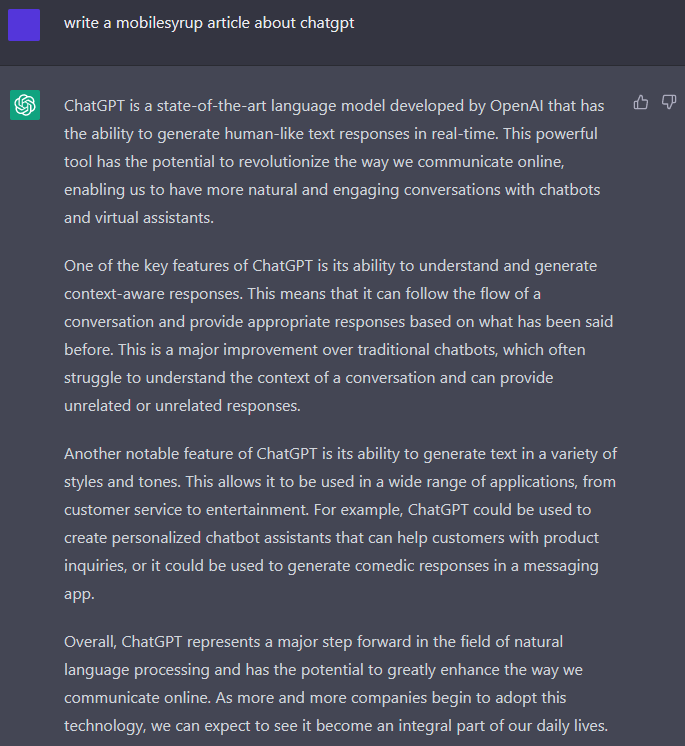
Are you tired of boring, robotic chatbots that always seem to be one step behind in your conversations? Well, fear not, because ChatGPT is here to save the day!

At least, so says ChatGPT about itself in response to prompts I gave it. I’ve finally had a chance to play around with the new chatbot developed by OpenAI and see what it could do. Chat Generative Pre-trained Transformer (GPT), for those unfamiliar, runs on OpenAI’s GPT-3.5 family of large language models launched as a prototype in November 2022. It’s currently free to use and OpenAI plans to monetize it in the future.

ChatGPT has so far proven somewhat impressive in its ability to generate detailed responses to a myriad of queries, although it’s not always factually accurate. When playing around with ChatGPT, I found myself swinging back and forth between being impressed and being disappointed.

For example, I asked it to write a MobileSyrup story about itself, which generated the following:

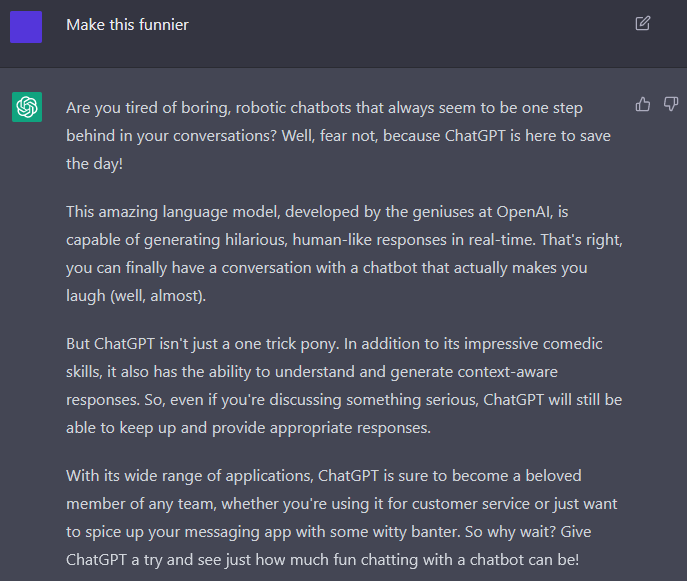
And when I asked it to make that response funnier, it gave me this:

Both responses are fine, but neither are particularly mind-blowing in my book. Moreover, the “funny” response wasn’t all that funny.

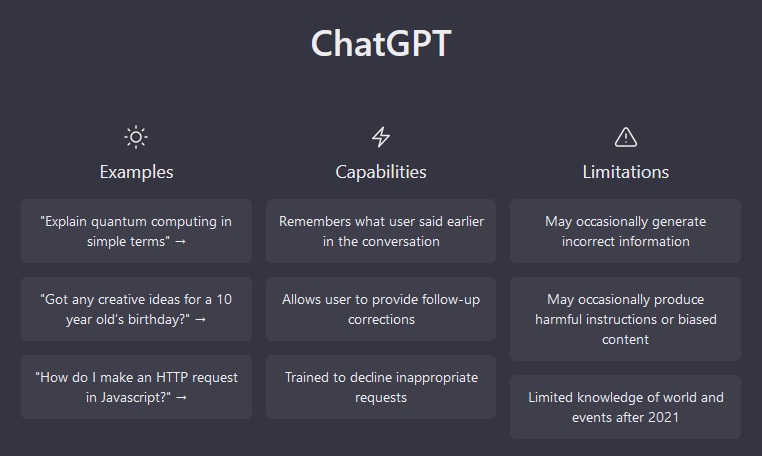
I also asked ChatGPT to generate a review of the iPhone 14, but it told me the iPhone 14 didn’t exist. I think it messed up the response because, as indicated by a warning on the main ChatGPT page, it has “limited knowledge of world and events after 2021,” and the iPhone 14 came out earlier this year.

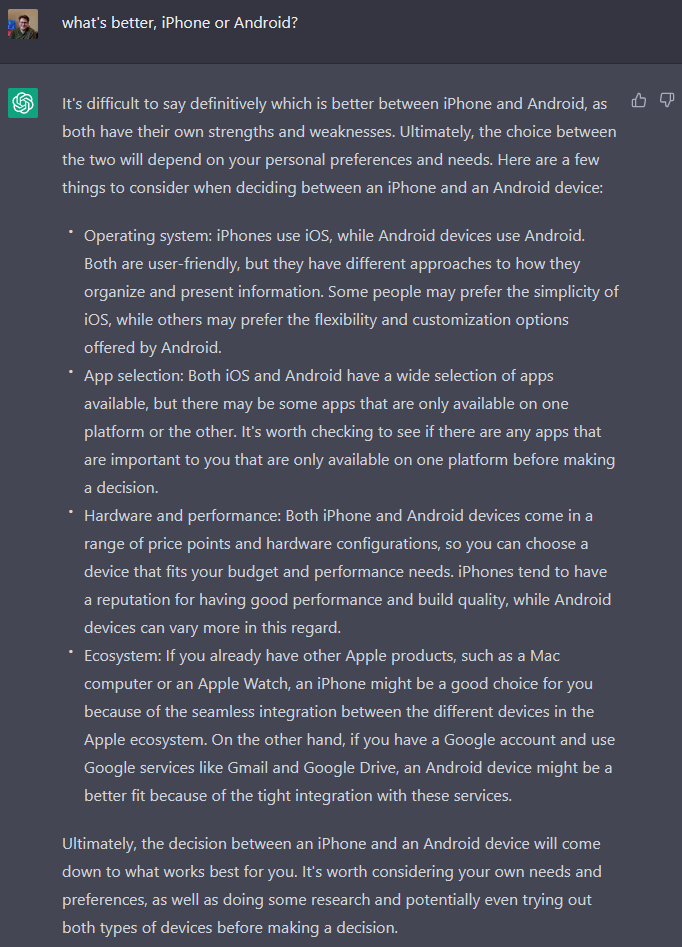
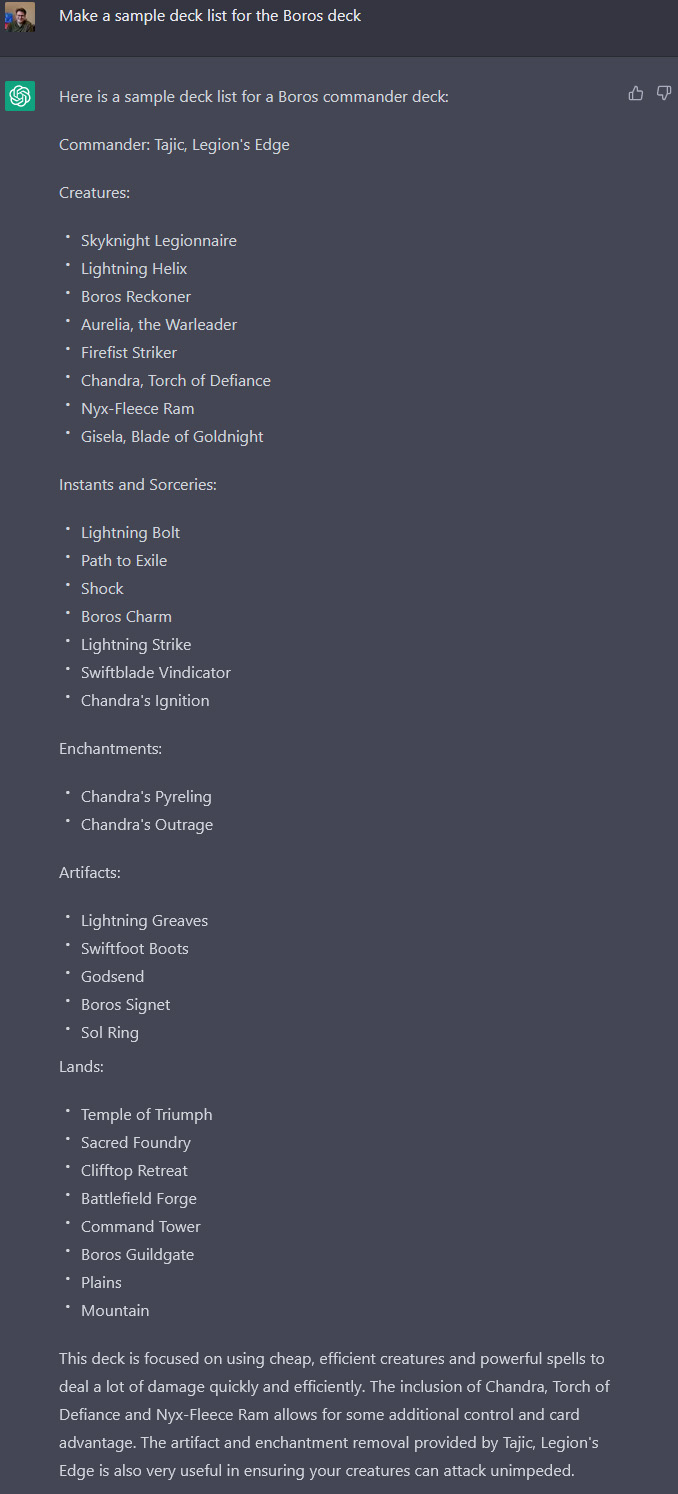
Other prompts I gave to ChatGPT included asking it whether iPhone or Android was better, to which it spat out what I think is a reasonable comparison between the two. I was also pleasantly surprised when ChatGPT was able to generate several ideas for Magic: The Gathering Commander decks. However, the suggestions were somewhat basic, and when I asked for a decklist based on one of the suggestions, there wasn’t much synergy, and it provided incorrect information about some of the cards. You can view those prompts below:

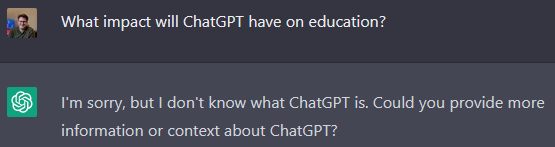
I did a few other prompts with ChatGPT as well, ranging from complex questions like asking for solutions to the housing crisis to simpler stuff, like fun activities to do with an eight-month-old. When it came to suggesting ideas or information, ChatGPT generally did okay as long as you keep an eye out for inaccuracies. However, when ChatGPT did miss, it would miss hard — for example, I asked it what impact ChatGPT will have on education, and it responded with, “I don’t know what ChatGPT is.” Neat.

Ultimately, I’m interested to see what comes of ChatGPT, but I think so far it’s somewhat overhyped. I’m sure it’ll be a powerful tool eventually, but for now, it still needs some work.

How to try ChatGPT out for yourself

Want to try out ChatGPT for yourself? It’s actually pretty easy to get started. Here’s what to do:

  • Head to the OpenAI website and click ‘Try’ at the top of the page (or just click this link).
  • You’ll be prompted to sign in with your OpenAI account. If you don’t have one, you can make one for free.
  • Once signed in, you should see the above screen along with a spot to enter text at the bottom. You can then start entering prompts.
  • Conversations are stored on the side of the page so you can return to them later.

That’s all you need to do to try ChatGPT. It’s worth noting that you might not be able to access it right away — after I made an OpenAI account last week, I had to wait several days because there wasn’t enough capacity for me to use ChatGPT. However, once I got access, I haven’t had any issues using it.

Categories
Mobile Syrup

Brad Bennett’s five favourite things of 2022

2022 was a whirlwind of gear, content and more, but if I have to pick five things that I liked over the year, it would be the following.

That said, a lot of my favourite things from 2018, 2019, 2020 and 2021 are still applicable, so check those out if you’re interested.

Fujifilm X-H2S

My trusty 16-55mm felt right at home on the X-H2S.

My friend David convinced me to go Fuji years ago, and while I’ve loved my cameras and the brand, it’s been hard to watch the competition from Canon and Sony outstrip Fuji with autofocus and other tech improvements.

However, that all changed with the launch of the flagship X-H2S this year. This camera is packed with innovation, and I was blown away by how much smarter it felt than my ageing X-T3 from 2018. While it may not have been the camera for me since I don’t need all the top-of-the-line perks, it restored my faith in the brand and got me excited to see what 2023 offers. Hopefully, we can even get an updated X100 camera.

Read or watch the full review here.

Teenage Engineering Computer-1

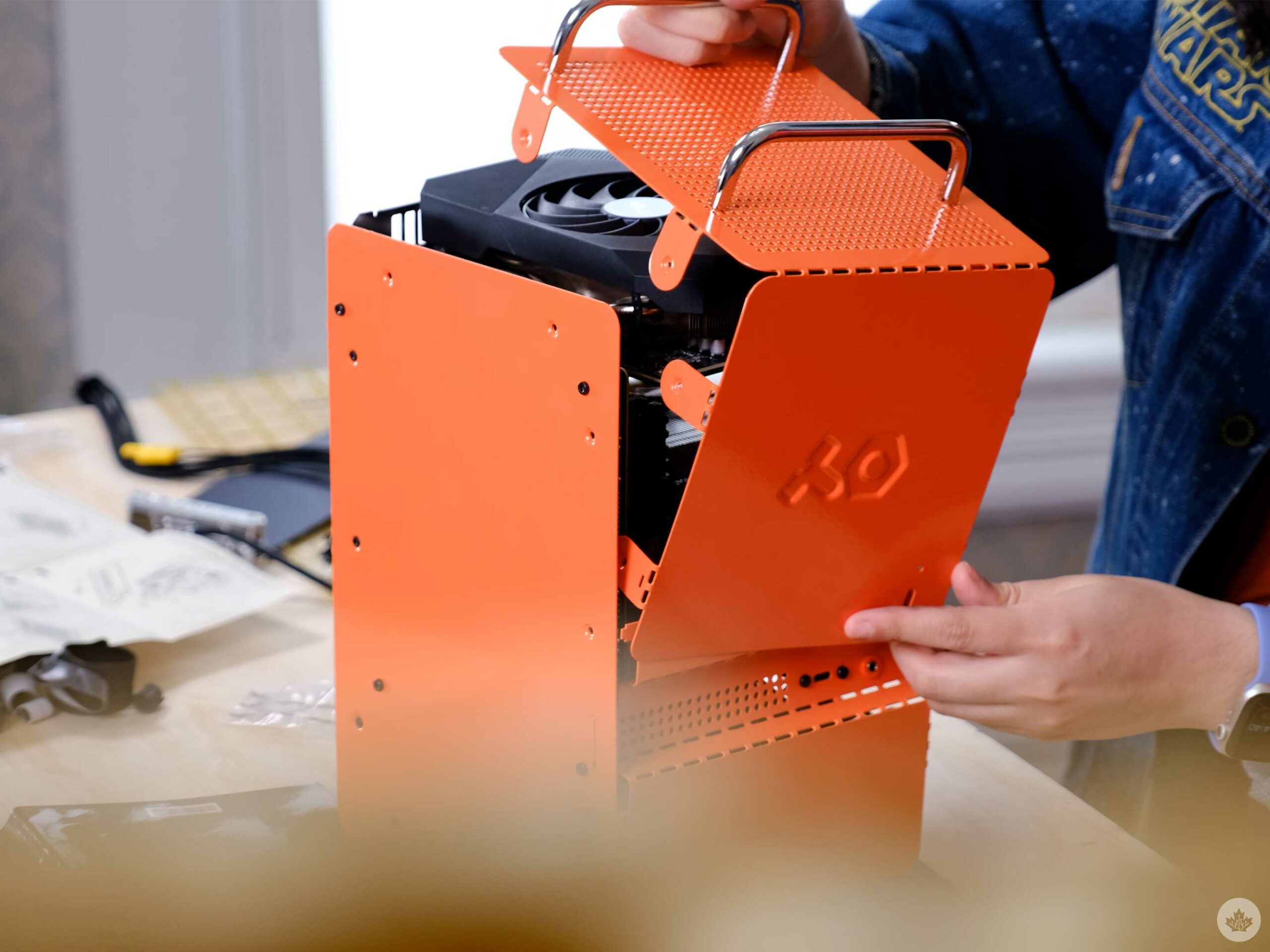
While I’ve worked mainly on a MacBook Pro 14 since I bought one last year, I still love the PC building space, and this case blew me away. Its retro design and small size made it perfect for me.

As someone who was always annoyed with how big computers were, the prospect of a tiny one was enough. I haven’t built a machine in my copy yet, but my partner Alex did, and she loves it. Typically a Mac girl, she fell in love with this case and hasn’t looked back.

You can read my full thoughts on the case or watch a video from Alex here. 

iOS 16

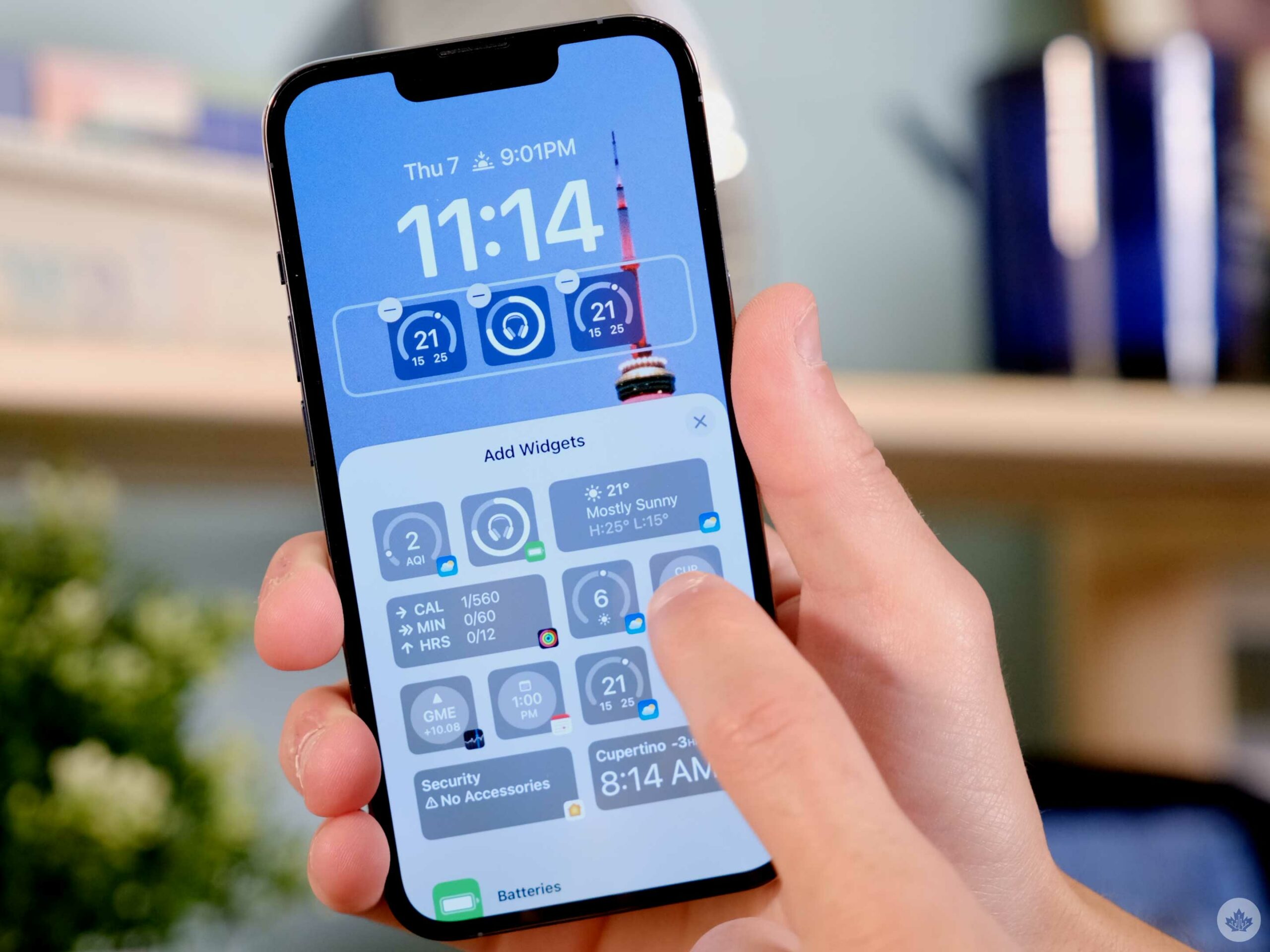
This year Apple finally took a big swing at iPhone customization, and it’s fantastic. The company’s latest update makes the iOS lock screen more personal, and with widgets, it can be more functional, too.

I haven’t been this happy with an iOS update in a long time, so this, combined with the new Camera continuity updates, has kept me believing that the Apple ecosystem still isn’t going to be beaten by Google or Samsung any time soon.

You can read or watch my full thoughts on the update here.

Huawei MateView

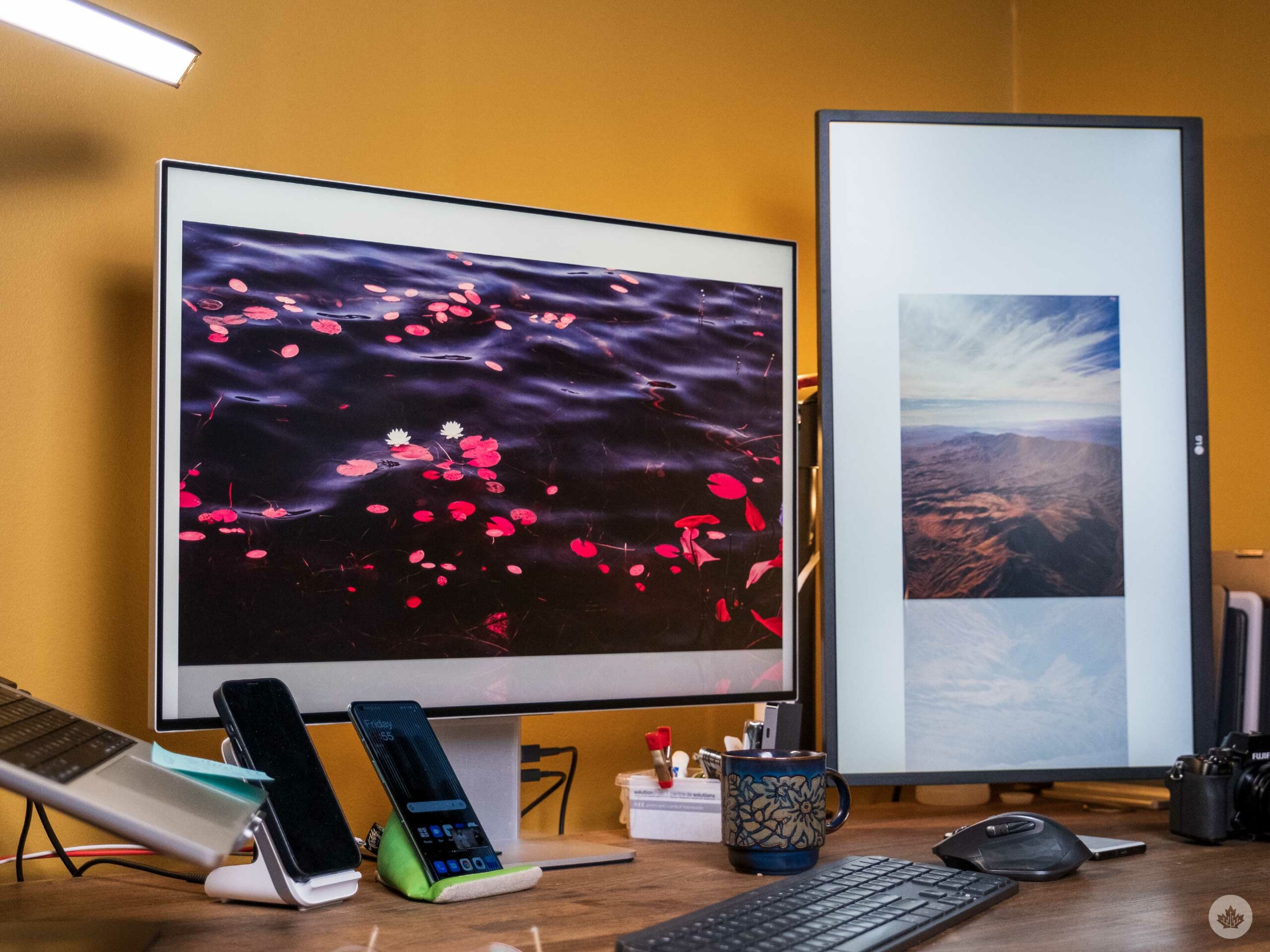
I’ve been on a quest to find a good square monitor to be my main workstation at home and the MateView is hard to beat. This monster has a 28-inch screen with a 3:2 aspect ratio giving me about an inch of extra usable space at the top and bottom of the screen.

It’s fantastic for working, and its 4K panel is bright and colourful. It’s technically been factory calibrated, but I found I needed to tweak it more to match the spectacular panel on my MacBook Pro 14.

It’s also got a non-removable stand that is somewhat of a downside but comes with some worthwhile tradeoffs. Plus, it has a small on-desk footprint, and the brushed metal looks nice. There are 90 watts of power passthrough via USB so I can charge my laptop, Apple Watch, phone and more just from the monitor stand. There’s also a built-in speaker, meaning you don’t need clunky speakers on your desk. They’re not perfect, but they’re more than enough, and I use them all the time when connected to my Windows PC. Overall it’s a pricey piece of kit, but side-by-side with things like Apple’s Studio Display, it paints a very appealing picture.

Making videos memories

The last thing I truly fell in love with during 2022 was making videos. From cruising through the Utah mountains in an EV to trying my best to document the chaos of WWDC, I had a blast creating tech videos.

Not only was it the creative outlet I never knew I needed, but it’s also taken me to some crazy places and taught me skills that I’ve always wanted to learn, from lighting and angles to edits and camera movement. I’ve become obsessed with it all, and I want to take this moment to thank anyone who watched and supported over the year. We have some big plans for video in 2023, so the channel will go dark for a while, but I have one last big blowout at CES to cover, so stay tuned for that. Again, thanks, and I hope everyone has a fantastic 2023.

Check out the YouTube channel below. Some of my favourites include the Cadillac Lyric, the DJI Mini 3 Pro and the OnePlus 10 Pro review.

Categories
Mobile Syrup

Samsung to showcase 12 startups at CES

Samsung always has a massive presence at CES, so it’s nice to see the company sharing the spotlight with some startups it helped fund.

Four in-house Samsung startups and eight external companies are supported in what the company calls a startup accelerator. Samsung says that it’s nurtured over 500 small companies over the past five years and these companies represent the tech giant’s commitment to finding new ideas.

The four in-house small companies are as follows:

  • Meta-Running, a metaverse platform to learn proper running form
  • Porkamix, a metaverse platform that provides an interactive concert experience
  • Soom, a new meditation experience with real-time feedback
  • Falette, a 3D digital transformation for home fabric products

The eight outside companies’ support are listed below:

  • NdotLight, a web-based 3D design solution
  • NEUBILITY, an urban delivery service through self-driving robots
  • 40FY, a digital mental health care app service from examination to treatment,
  • CELLICO, a micro-bionic eye for patients with retinal disease
  • Plask, an AI and browser-based motion capture and animation editing tool
  • Wrn Technologies, writing training and content creation services using Generative AI
  • Catius, a multi-turn conversational AI companion for children
  • Erangtek, an IoT micro repeater for home users to improve call quality

Source: Samsung

Categories
Mobile Syrup

Dean’s favourite anime of 2022

A yearly tradition at MobileSyrup is going over our favourite things of the year. 2022 has probably been the best year since 2019, considering how the pandemic has eased up; of course, it’s not gone, I caught COVID three times, but it’s definitely gotten better.

I’ve travelled to Turkey, NYC (I even like the city now) and Hawaii, and I’ve played awesome games like God of War: Ragnarok, Elden Ring, Weird West and Cult of the Lamb. I’ve even managed to keep a boyfriend for longer than three months.

However, one of my favourite things to do this year was just get stoned and watch TV — specifically anime.

So this year, let’s discuss my favourite anime of 2022. These are not in any order, and I’m not saying these are the best anime, either; they’re just my favourite.

Ranking of Kings

Let’s start with probably the cutest anime on the list, Ranking of Kings.

This anime was better than it had any right to be. The series stars a little giant boy name Boji who can’t speak and is incredibly weak, and an orphaned shadow named Kage. The show talks about loss, facing your fears, and overcoming incredible odds. And while I thought the animation initially looked like garbage, it grows on you, and the fight scenes are amazing and much better than I’d expected.

I don’t want to give too much away (which will be a theme in this list), but if you want your heart to sink, follow a great story and see some fun and cool fights, give Ranking of Kings a shot.

Blue Lock

One of my favourite anime series is Haikyuu!, a volleyball series that’s all about the intensity of the sport, teamwork and friendship. Blue Lock, another sports anime, doesn’t have the same teamwork characteristics as Haikyuu!, but it’s fun all the same. Blue Lock is a soccer anime, but instead of a team of full players in every position, Blue Lock focuses only on strikers, the person on the team whose primary role is to score goals.

The premise of the show is 99 strikers are placed in a training facility and put on teams with one another, but they’re all aiming for the same spot on the Japanese Olympic soccer team.

As someone who played soccer for more than ten years and loves anime like Haikyuu! and Yuri on IceBlue Lock piqued my interest, and I’m happy it did; it was incredibly fun. It’s got a lot of cool scenes, and the main character is a mastermind, so that’s always great to watch.

Attack on Titan: season 4, part 2

I’ve been watching Attack on Titan since 2013, and I’ve seen little Eren Yeager grow up from the strong Attack Titan into the monstrous Founding Titan.

In the latest season, Yeager initiated a coup, betrayed his brother, became the Founding Titan, now controls an army of Wall Titans and is on his way to get revenge for the people who’ve treated his race like worthless cattle.

It was an insane season with unsuspected twists and turns, and seeing enemies who were once friends become friends again (I know, weird sentence) was a beautiful sight, and I loved every moment of it.

I can’t wait until the end of the series when part three comes out.

Bleach: Thousand Year Blood War

While I’ve been watching Attack on Titan since 2013, I’ve been watching Bleach since 2006, before we could even imagine how much Aizen was a badass.

Bleach was on a six-year hiatus and while I’ve read all the manga, finally seeing the final arc on the screen has been incredible.

I don’t want to give away any spoilers, but this season has had so much badassery so far. Seeing Captain Commander Yamamoto use his Shikai and Bankai (his sword abilities), watching all the Quincies take on the 13-Seat Captains and seeing Kenpachi Zaraki take on Unohana was similarly amazing.

Unfortunately, the second part of this season won’t air until July 2023, but when it does, get ready for even more action and Bankais.

Chainsaw Man

Of course, I couldn’t make an anime list without Chainsaw Man. This show has taken the anime world by storm with its amazing fighting scenes (of course, the studio behind this animation is Mappa, also responsible for AOT season 4 and my favourite anime, Jujutsu Kaisen).

Since the show was released in October, I’ve planned many Tuesday nights all around this. Aki and Sasuke are so cool, Power is such a loveable character who wants to take over human society and Denji, the main character, is so relatable to heterosexual men. Usually, I hate that, but for a 16-year-old who was homeless his whole life and can now turn into chainsaws, it’s just so loveable that his purpose in life is to touch boobs.

Chainsaw Man is incredibly fun and surprisingly hilarious. Anyone who likes anime like Jujutsu Kaisen will get a kick out of this one.

If you want to watch any of the above anime, head to Crunchyroll, except for Bleach: Thousand Year Blood War, which is on Disney+.

Honourable Mentions: RWBY Ice Queendom (Crunchyroll), Cyberpunk: Edgerunners (Netflix), Tomodachi Game (Crunchyroll), Vampire in the Garden (Netflix), Spy X Family (Crunchyroll), Classroom of the Elite season 2 (Crunchyroll), Demon Slayer season 2 (Crunchyroll) — hopefully I’m not missing any.

Categories
Mobile Syrup

Here are the free games hitting PlayStation Plus Essential in January 2023

Every month, PlayStation offers a handful of games at no additional cost to its PlayStation Plus subscribers.

Now, the company has revealed the trio of titles hitting PlayStation Plus Essential in January 2023. (PlayStation will announce January’s PS Plus Extra and Premium games in the coming days.)

This month’s highlight is Star Wars Jedi: Fallen Order, Respawn’s 2019 Souls-like action-adventure game, which is free on both PS4 and PS5. The sequel, Jedi: Survivor, will release on PlayStation 5, Xbox Series X/S and PC on March 17th, 2023.

January’s other two free PS Plus games are the platformer Axiom Verge 2 (PS4/PS5) and online action-RPG Fallout 76 (PS4).

All three games will be free through PS Plus starting January 3rd. Meanwhile, December’s free PS Plus Essential games will remain available until January 2nd.

Image credit: EA

Source: PlayStation

Categories
Mobile Syrup

Nintendo scrapped ‘Switch Pro’ to focus on next-gen console: report

Nintendo has ditched plans for its long-rumoured 4K-capable ‘Switch Pro’ system in favour of focusing on a next-gen console, according to Digital Foundry.

Citing multiple developers, John Linneman, the tech-focused gaming outlet’s senior staff writer, said on the Digital Foundry podcast that “there was some sort of mid-generation Switch update planned at one point and that seems to be no longer happening.”

He added that “it’s pretty clear that whatever they [Nintendo] do next is going to be the actual next-generation hardware. I don’t think it’s going to be 2023.”

For years now, rumours have surfaced that Nintendo would release some sort of improved model of the Switch, which first launched in 2017. Even credible sites like Bloomberg have reported on the alleged system. Throughout all of this, though, Nintendo has remained mum on any such plans, instead releasing the handheld-only Switch Lite in 2020 and an OLED-equipped Switch in 2021.

Elsewhere in the podcast, Linneman claims that Nintendo is “worried” about transitioning from the Switch to a successor. That apprehension is certainly logical, given how Nintendo went from the meteoric success of the Wii (over 100 million units sold) to the abysmally-performing Wii U (less than 15 million units sold). The Switch, meanwhile, is among the top five best-selling consoles to date at around 115 million units sold.

It remains to be seen what Nintendo might do with a successor to the Switch, especially considering how popular the system’s functionality as a console-handheld hybrid has been.

Source: Digital Foundry

Categories
Mobile Syrup

Google drops Pixel 7 to $649, Pixel 7 Pro to $879

All Boxing Week long, Google is selling the brand new Pixel 7 series of phones for discounts akin to its Black Friday deals.

If you’re considering buying either of these phones, you can read our reviews below. In summary, the Pixel 7 ($649) is an excellent value for a solid phone, while the Pixel 7 Pro ($879) has a zoom camera, a slightly better screen and a bigger body. There’s also a discount on the lower-cost Pixel 6a ($499).

You can view all the deals on the Google Store here.

While not usually a better buy, most Canadian carriers also have the Pixel 7 and Pixel 7 Pro on sale. For instance, Bell, Rogers and Telus have it down to 15 per month, which works out to roughly $360 for the phone over a two-year contract.

In a year when iPhone discounts seem harder to come by, Google’s aggressive pricing and marketing might finally help it generate some market share — a good thing in iPhone-dominant North America.

Source: Google

Categories
Mobile Syrup

What company makes the best version of Android 13?

The three big Android players in Canada are Google, OnePlus and Samsung, so I decided to look at all three companies’ Android 13 implementations to see what they can learn from each other.

With the launch of ‘Material You’ in 2021, Google started to push Android towards personalization. Samsung and OnePlus have followed suit, and now we have three compelling Android options heading into 2023.

Not only do the looks set them apart, but the way each system handles default apps and the animations linking them all together play a significant part in what makes an excellent operating system. Overall, system stability and user-friendliness also play a role, along with how functional it is.

Colours based on your wallpaper are the new black
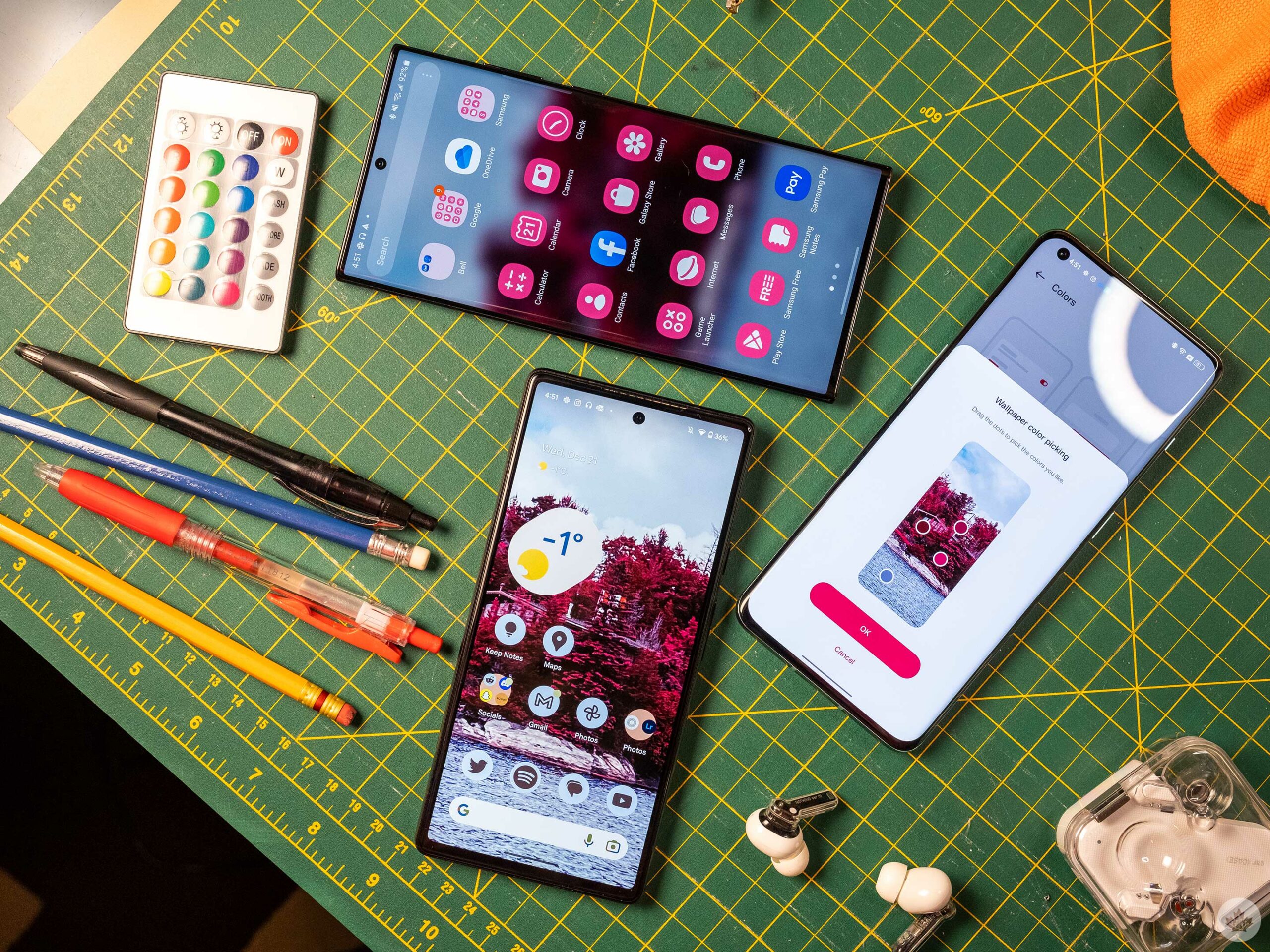
The most prominent theme linking all three builds of Android 13 I’ve played with, is that the system UI adapts to the user’s wallpaper in varying ways throughout the OS.

Samsung and Google push this the furthest with colour-adapting icons, and I like it a lot. Unfortunately, many devs don’t support the feature yet, and all the icons look alike, but when people mod their iPhones to look like this, I think we need to prioritize customization.

This slideshow requires JavaScript.

Samsung’s colours often seem bolder than the Pixel’s, but both phones retain a trendy pastel palette, so selecting what you find more appealing is up to you. Samsung and Google offer several colour palettes in Android 13, so picky people should be able to find something that suits them. However, it would be nice if users could select the theme colours themselves. OnePlus allows you to do this, but the company’s implementation doesn’t permeate as much throughout the operating system, and they’re often quite subtle, so it’s difficult to call this a real win.

Notifications and quick toggles never looked so good
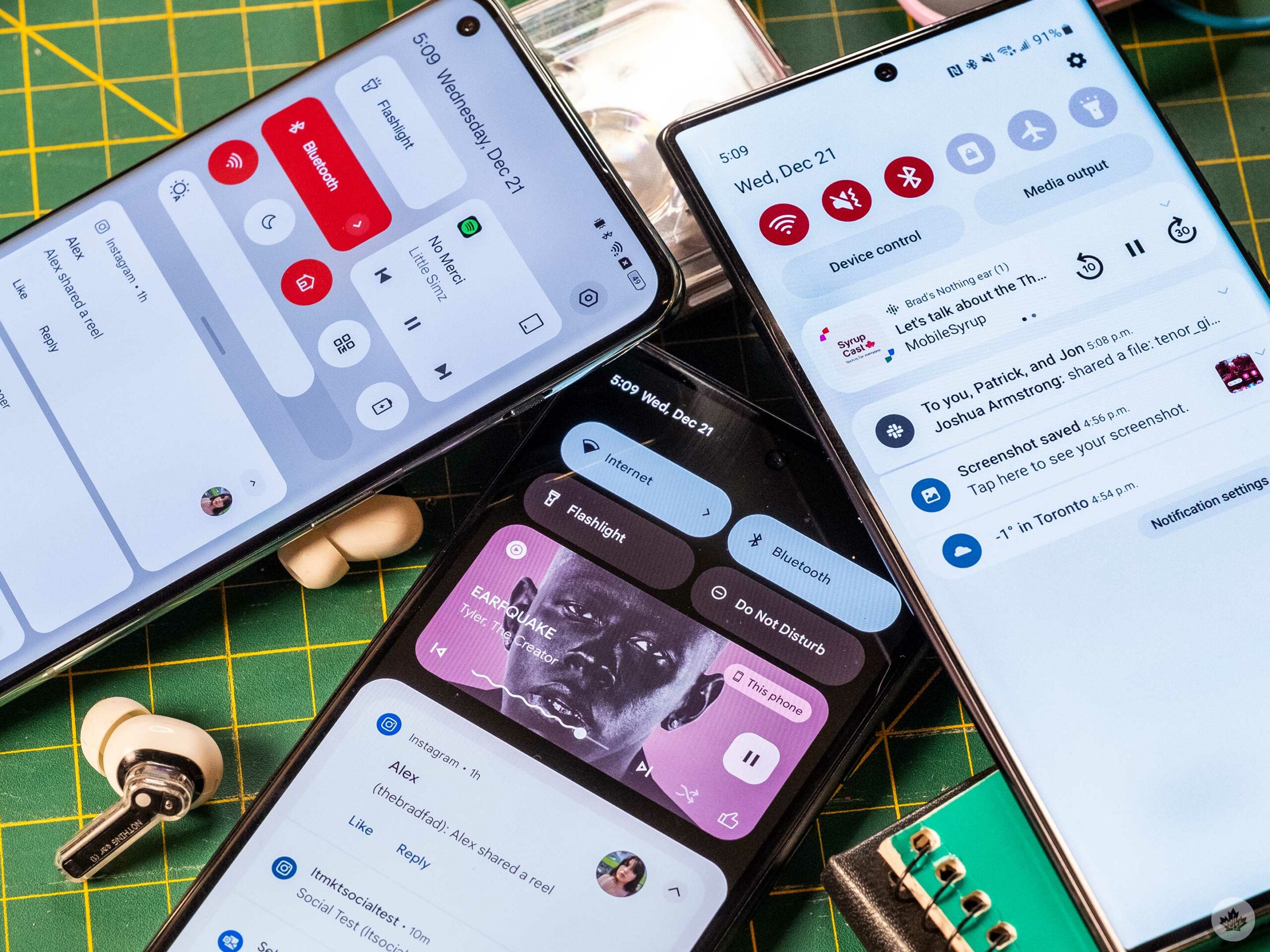
Where you’ll run into these adaptive colours the most are the notification shade and the Android Messages app. The default keyboard should adapt as well. All three companies do a good job of adding pops of colour to the notification shade, but OnePlus feels like it’s shoehorned it in. At the same time, both Google and Samsung have more deliberate theming, tying the notifications and quick toggles into the overall ecosystem. OxygenOS 13 does get some points for having more quick access to things at once, but Samsung makes its quick toggles very easy to use with one hand.

One area that can add a lot of personality to a phone is the ‘Now Playing’ quick toggle. In this regard, Google takes the cake with its large and colourful block that even includes the super fun squiggly line to show your listening progress. OnePlus’ implementation is smart since it takes up the least space, and Samsung feels like it’s barely even trying here. Its basic notification is unappealing, and the podcast controls are wonky, which throws off the design’s balance.

This slideshow requires JavaScript.

Samsung has very nice animations in One UI 5 that make it feel great and snappy. OnePlus has new animations too, but by comparison, they’re simple and slow. They don’t have the speed and bounce that make Samsung so satisfying. Google sits on the opposite side of the spectrum with bouncy animations that feel slightly slower than Samsung’s. The animations don’t make or break any system, and if you find them slow, you can always speed them up using developer settings on Android.

Another toggle that makes its way into this conversation is how each manufacturer handles volume controls. Samsung and Google take much better care to colour-match their volume controls, but OnePlus has the added flexibility of being simpler (on some phones) due to its physical mute switch.

This slideshow requires JavaScript.

Google solves this lack of an alert slider with a software version that appears when you hit the volume buttons. On the other hand, Samsung forces users to open the secondary volume pane to control notification volume. And even when you get to that second page, it’s confusing and unlabelled. Both Google and OnePlus keep things more straightforward.

What Samsung can teach the others
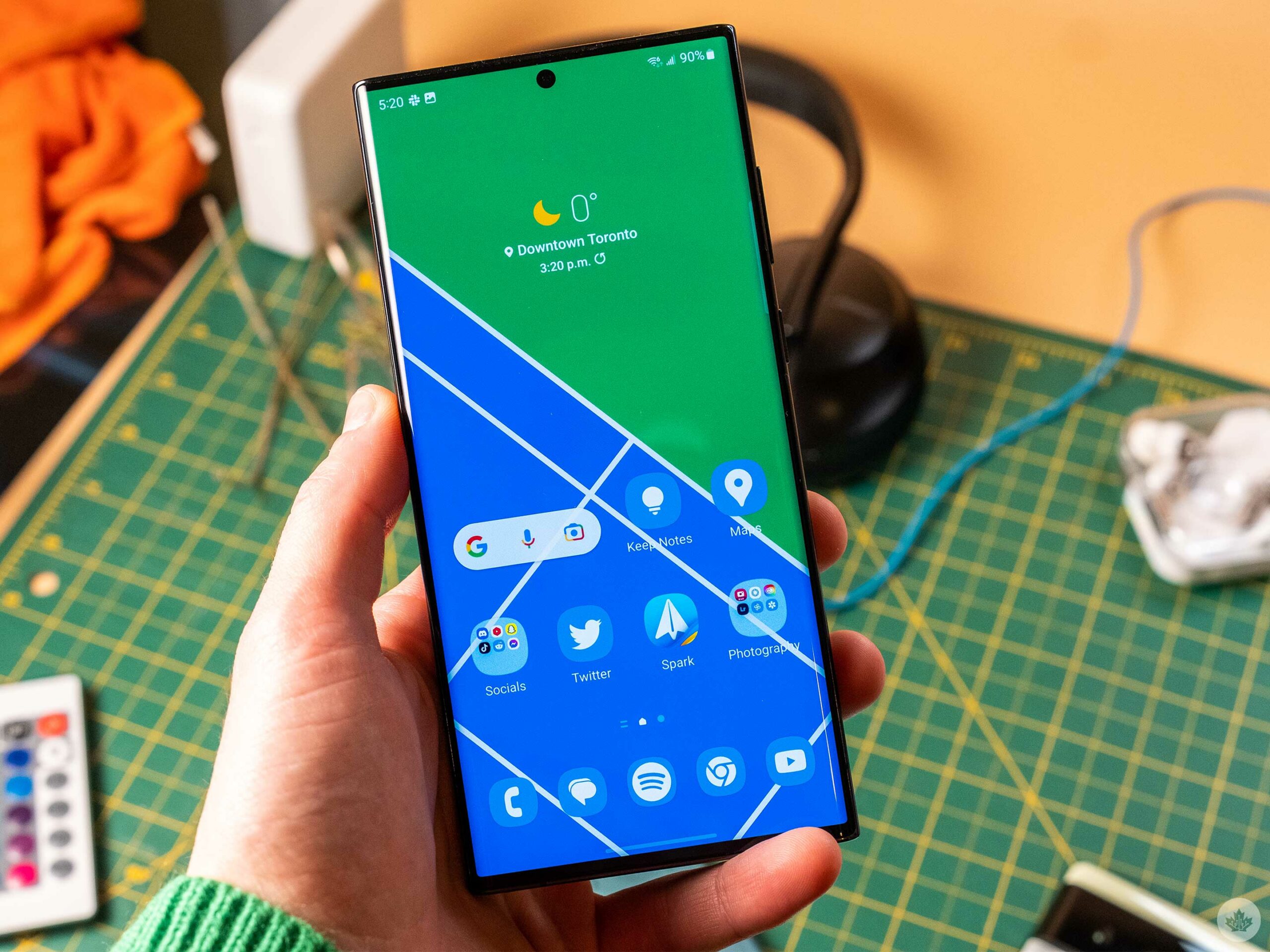
Samsung has released one of the most compelling Android builds this year due to One UI five’s heavy emphasis on customization. Beyond colourful app icons and accents, the Korean tech giant now lets users set custom ringtones and wallpapers for contacts. The company also stresses that it’s made the lock screen easier to customize, but compared to iOS it feels somewhat limited, and the choices it presents are mostly dull or terrible.

Where Samsung could learn a thing or two is in how it deals with its multiple features, all operating systems need to handle this better, but Samsung really needs to simplify things. For instance, there are multiple ways to do everything from notifications to media control to adding wallpapers and more.

This slideshow requires JavaScript.

When you’re using the OS at a surface level, it feels and looks better than ever before, but once you get into the settings and start using the phone, it quickly becomes as complicated and convoluted as always.

Can OxygenOS 13 teach us anything?

OxygenOS is still in a transitional phase between OnePlus and Oppo. This isn’t necessarily bad since there’s a lot of good packed inside, but it’s still rougher around the edges compared to One UI 5 and the Pixel launcher.

I like the giant 3×3 folder that lets you keep more apps on your home screen in an appealing way. However, it only works when you’re home screen is set to display apps in a 4×6 orientation. OnePlus also stubbornly believes that its default widget should have red 1s in it, which is especially annoying in this age of customization. For example, I want to show off the brand on the lock screen with a custom widget, but I don’t want it to clash with my wallpaper.

This slideshow requires JavaScript.

Beyond that, OnePlus is starting to emulate Samsung more, which may or may not be a good thing. For instance, the company is using more notifications for features throughout the OS, and it even has a quick access side panel that stores apps, offering a copy of Samsung’s Edge panels. The feature can be disabled, but I worry most users will find it annoying as they try to swipe from the side to go back.

One thing OnePlus does well is integrating screentime notifiers naturally into the operating system. For instance, the Always-on display shows users when and how many times they’ve used their phone throughout the day. To build on this, the company has an app called Wellpaper that does similar things to the wallpaper. However, the fact that this isn’t built into the phone properly makes it feel like an afterthought. There’s something smart about presenting users with an ambient way to gauge their screen time, and I wish other companies would adopt similar ideas.

What does the Pixel Launcher bring to the table?

Two years into Material You’s life cycle and Google isn’t as far ahead in the colour adaptive world as it once was. That said, it’s still leading in a few categories, and its simplicity should not be taken as a lack of features.

While Samsung throws everything at the wall to see what sticks, Google is very targeted and doesn’t jam new features into every nook and cranny. It also doesn’t overload users with choices, making it feel like you’re more in control of your phone.

This slideshow requires JavaScript.

The other key feature the Pixel launcher has is a robust system search tool. It’s still not iOS level, but it feels like a more vital part of the operating system compared to Samsung and OnePlus. When you open the app drawer on the Pixel, you can even set it to have the keyboard open by default. It’s something everyone should do since it makes doing quick web, settings or app searches just a swipe away. The search feature can even pull items out of apps, such as surfacing chats when you type in a contact’s name.

Once again, this lends itself to simplicity which is the main thing the Pixel launcher does right. It’s not trying to give users every feature under the sun. Instead, it predicts what people will want to do the most and makes that easy. The software mute toggle is another excellent example of this.

Who has the best Android skin?
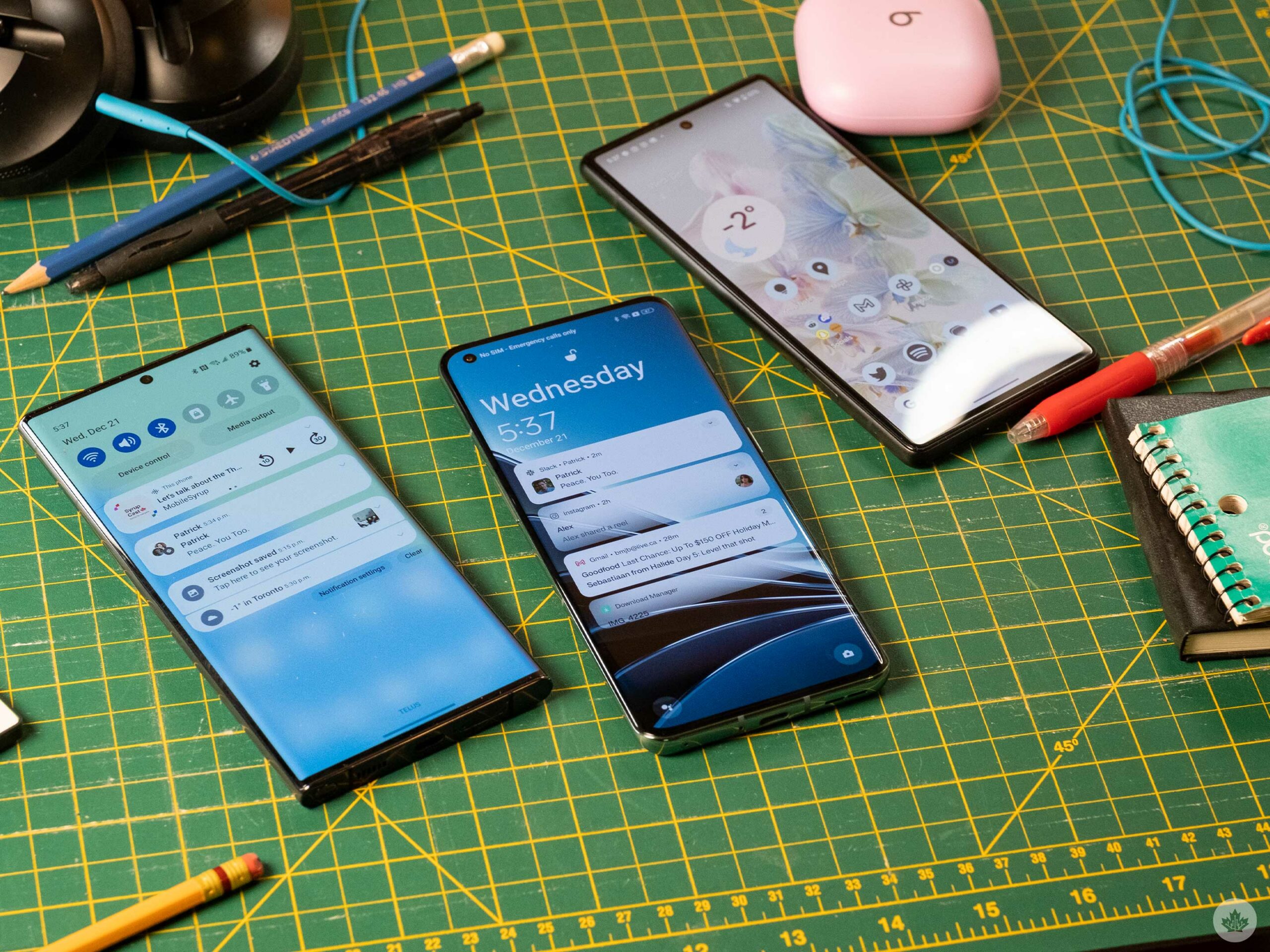
The best Android launcher is likely subjective, but I think the Pixel launcher takes the crown. I wish that it would offer a little more lock screen customization like Samsung and Apple, but at the end of the day, Google’s design language is so strong on the Pixel that it’s hard to hate on such a unified look.

Samsung’s array of features means that a lot of people are hooked on one. This works well for Samsung, and there’s no denying that things such as the S Pen, Edge Pannels, Dex and others are great for productivity. But most people use their phones as a social media browsers with a camera, and for that, the Pixel Launcher feels easier.

Categories
Mobile Syrup

Driver blames his Tesla’s Full Self-Driving for an eight-car pileup

A Tesla driver is blaming their vehicle’s Full Self-Driving software for causing an eight-car pileup in the Yerba Buena Tunnel in California in November, according to a California Highway Patrol traffic cars report obtained by CNN News via The Verge.

According to the driver, their Tesla’s software hit the brakes unexpectedly, causing the eight-car pileup, with nine people suffering minor injuries, and one hospitalization. Four ambulances were rushed to the scene.

The Tesla in question was a Model S, and it was reportedly travelling at roughly 55 mph (88.5 km/h) before making a sudden and unsafe lane change and unexpectedly braking, causing the vehicle to slow down to 20 mph (32 km/h).

The abrupt braking caused the vehicles behind the Tesla to crash into one another.

“California Highway Patrol said in the Dec. 7 report that it could not confirm if “full self-driving” was active at the time of the crash. A highway patrol spokesperson told CNN Business on Wednesday that it would not determine if “full self-driving” was active, and Tesla would have that information,” wrote CNN.

It’s worth noting that Tesla’s Full Self-Driving software is already under investigation by The National Highway Traffic Safety Administration (NHTSA) in regard to a Model S accident that left three passengers dead. Read more about it here.

Image credit: KTVU FOX 2 San Francisco

Source: CNN News, via The Verge

Categories
Mobile Syrup

PlayStation reveals seven gaming trends throughout 2022

PlayStation has shown off seven trends in PlayStation gaming throughout 2022.

  • 2022 saw a lot of cats in gaming, with titles like Stray, Ghostwire Tokyo, Sonic Frontiers, Cult of the Lamb and Persona 5 
  • Games like God of War: Ragnarok, The Last of Us Part 1 and Horizon Forbidden West had adjustable settings and emphasized accessibility allowing everyone to play.
  • Crazy sports games like Windjammers, OlliOlli World, Curse to Golf, and Rollerdome brought crazy physics to ordinary sports.
  • We got to see some diverse battle royales like Deathverse: Let It Die, Rumbleverse, and Call of Duty: Warzone, and Epic brought Unreal Engine 5 to Fortnite
  • Quite a few games let you play with friends, like Dead By Daylight, Evil Dead: The Game, Ghostbusters: Spirit Unleashed, Back 4 Blood and Resident Evil Re: Verse. 
  • Free-roaming games like Elden Ring, Sonic Frontiers, Stray, Horizon Forbidden West, and God of War: Ragnarok let you travel their worlds and explore.
  • Lastly, Amicia and Hugo from A Plague Tale: Requiem, Kratos and Atreus from God of War: Ragnarok show us how important family is. This includes Teenage Mutant Ninja Turtles: Shredder’s Revenge and the family you make in Persona 5: Royal and The Last of Us Part: 1.

Did you play any of these trends? While I haven’t had many cats in my games, there was a lot I had a lot of exploring in Elden Ring, God of War: Ragnarok and even Weird West. And while I haven’t played much of A Plague Tale: Requiem, that game and God of War: Ragnarok definitely inspire confidence and love in family.

Source: PlayStation Blog