Categories
Mobile Syrup

OnePlus is giving you a chance to win a OnePlus 8 Pro for $1

OnePlus is currently holding an ‘Early Access to Black Friday’ event where you can get access to a $1 ‘Phone Mystery Box.’

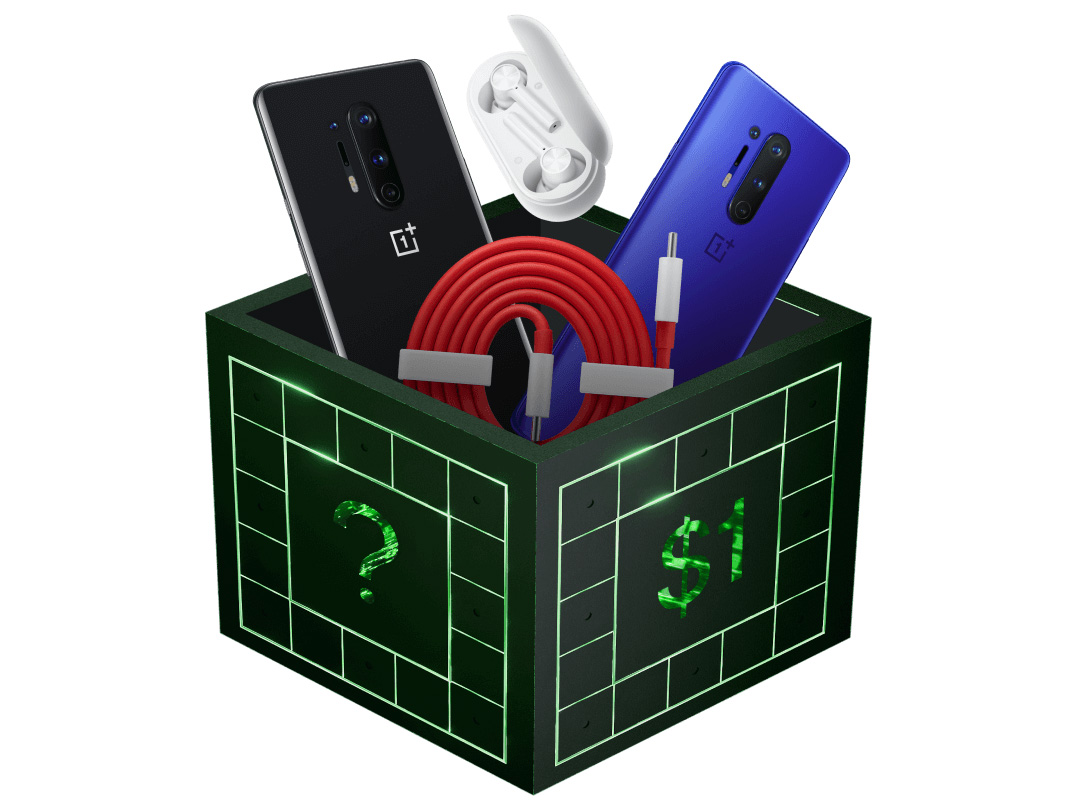
The phone mystery box, which goes live on OnePlus’ website can contain either a OnePlus 8 Pro, a pair of OnePlus Buds Z earbuds or a charging cable.

The box will go live as an ‘open sale,’ at 10am ET on October 31st, with only 100 boxes available to purchase in first come, first served basis. 10 of the hundred boxes will have a OnePlus 8 Pro, while 35 contain a pair of OnePlus Buds Z. The remaining 55 boxes contain fast charging cables.

The availability of the boxes is by invitation code exclusively. To get your invitation code, head to the OnePlus website and click on ‘Subscribe Now’ under the “Early Access to Black Friday 2022” banner. Enter your email and you’ll soon receive an invitation code.

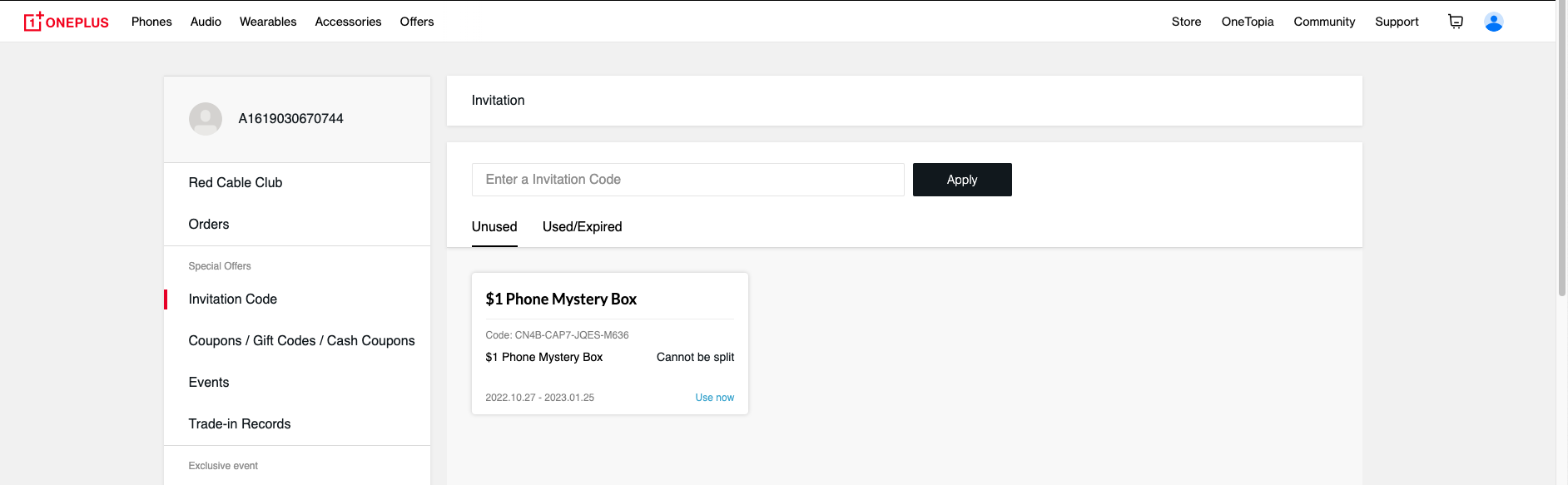
Once you have the code, head to the OnePlus website again and navigate to your profile. Click on ‘Invitation Code’ on the left-aligned bar and enter the code. Once entered, the section should look like the screenshot below:

On October 31st at 10am ET, you’ll be able to click on the ‘Use Now’ button seen in the screenshot above to purchase the mystery box. It’s worth noting that you can claim only one invitation code per account.

Check out OnePlus’ early Black Friday offers here.

Image credit: OnePlus

Source: OnePlus

Categories
Mobile Syrup

Musk finally reveals why he wants to acquire Twitter

Tesla CEO Elon Musk has revealed for the first time why he intends to acquire the micro-blogging platform Twitter.

In a recently published tweet addressed to current and potential Twitter advertisers, Musk said that there has been a lot of speculation regarding why he bought Twitter, and “most of it has been wrong.”

“The reason I acquired Twitter is because it is important to the future of civilization to have a common digital town square, where a wide range of beliefs can be debated in a healthy manner, without resorting to violence,” writes the world’s richest man.

Musk fears that as people’s ideologies bifurcate, social media too will splinter, ultimately generating hate and division among people. “In the relentless pursuit of clicks, much of traditional media has fueled and catered to those polarized extremes, as they believe that is what brings in the money, but, in doing so, the opportunity for dialogue is lost,” he said.

On the other hand, Musk also noted that the platform can not become a “free-for-all hellscape,” and that there will be consequences for those who take advantage of the freedom of speech the platform intends to offer under Musk’s leadership. “Our platform must be warm and welcoming to all, where you can choose your desired experiences according to your preferences,” said Musk.

“I didn’t do it [buy Twitter] to make money,” said Musk. “I did it to try to help humanity.” This is a rather over-the-top statement, but at least this clarifies Musk doesn’t intend to become some sort of a social media overlord with the acquisition.

Another reason why Musk acquired Twitter is that he thinks he can fix advertising on the platform. He says when done right, advertising in itself can be a form of content that can delight, entertain and inform users.

“Low relevancy ads are spam, but highly relevant ads are actually content!” he writes.

Musk added that under his leadership, he aspires for Twitter to be the “most respected” advertising platform in the world that can strengthen brands and help enterprises grow.

It’s worth noting Musk’s acquisition of Twitter hasn’t formally been completed yet. He revived his original $44 billion USD (about $59 billion CAD) acquisition offer in early October, and subsequently, the Twitter vs. Musk trial that was initially set to take place on October 17th was postponed to November.

According to Kathaleen St. Jude McCormick, head of the Delaware Chancery Court, Musk has until tomorrow, Friday, October 28th, to close the acquisition deal.

Source: @elonmusk

Categories
Mobile Syrup

Xbox will likely raise the price of Xbox Game Pass and consoles in the future

Along with revealing that Xbox Game Pass accounts for 15 percent of Microsoft’s gaming revenue, Xbox head Phil Spencer said that it will likely raise the price of its Xbox consoles and services in the future.

“We’ve held price on our console; we’ve held price on games and our subscription,” said Spencer during the Wall Street Journal’s Tech Live conference. “I don’t think we’ll be able to do that forever. I do think at some point we’ll have to raise some prices on certain things, but going into this holiday we thought it was really important that we maintain the prices we have.”

Sony recently increased the cost of the PlayStation 5 in Canada to $649.99 from $629.99 for the Disc version and $519.99 from $499.99 for the Digital Edition, so Microsoft considering increasing the cost of the Xbox Series X/Xbox Series S isn’t surprising.

On the other hand, the price of Xbox Game Pass going up also isn’t shocking, especially with the release of Bethesda’s Starfield looming and Microsoft’s acquisition of Activision Blizzard set to likely go through. Several years after the game subscription platform’s launch, it remains one of the best deals in gaming.

Xbox Game Pass is available on Xbox One, Xbox Series X/S, PC and Android and iOSGame Pass for Console and PC Game Pass each cost $11.99/month.

Further, Xbox Game Pass Ultimate costs $16.99/month and is required for Xbox Cloud Gaming to mobile devices and browsers.

Source: The Wall Street Journal Via: The Verge

Categories
Mobile Syrup

Microsoft’s Xbox Game Pass accounts for 15 percent of its gaming revenue

During The Wall Street Journal’s Tech Live conference, Phil Spencer, the head of all things Xbox at Microsoft, said that Xbox Game Pass is profitable and that revenue generated from the service accounts for 15 percent of the tech giant’s gaming revenue.

“Game Pass as an overall part of our content and services revenue is probably 15 percent I don’t think it gets bigger than that,” said Spencer “I think the overall revenue grows so 15 percent of a bigger number, but we don’t have this future where I think 50–70 percent of our revenue comes from subscriptions.”

Spencer went on to say that Microsoft is experiencing “incredible” growth with PC Game Pass, but that Xbox Game Pass subscriber numbers have slowed. Microsoft CEO Satya Nadella recently revealed that PC Game pass subscribers have grown 159 percent year-over-year.

“On console I’ve seen growth slow down, mainly because at some point you’ve reached everybody on console that wants to subscribe.”

In Microsoft’s latest earnings report, the company revealed that Xbox gaming revenue hit $3.61 billion USD (about $4.8 billion CAD) for the year. The tech giant also recently outlined plans to build an Xbox mobile gaming store with the help of Activision Blizzard’s catalogue of mobile titles to compete with Apple’s and Google’s respective app stores.

Xbox Game Pass is available on Xbox One, Xbox Series X/S, PC and Android and iOS in betaGame Pass for Console and PC Game Pass each cost $11.99/month.

Further, Xbox Game Pass Ultimate costs $16.99/month and is required for streaming (which Xbox refers to as ‘Cloud’) to mobile devices and browsers. On top of that, this tier includes Game Pass for both Console and PC, as well as subscriptions to Xbox Live Gold and EA Play.

Source: The Wall Street Journal Via: The Verge

Categories
Mobile Syrup

Koodo launches ‘Pick Your Perk’ plans with options like Rollover Data

Telus flanker brand Koodo rolled out a change to its plans, adding a ‘Pick Your Perk’ option that lets customers select one free add-on for their plan.

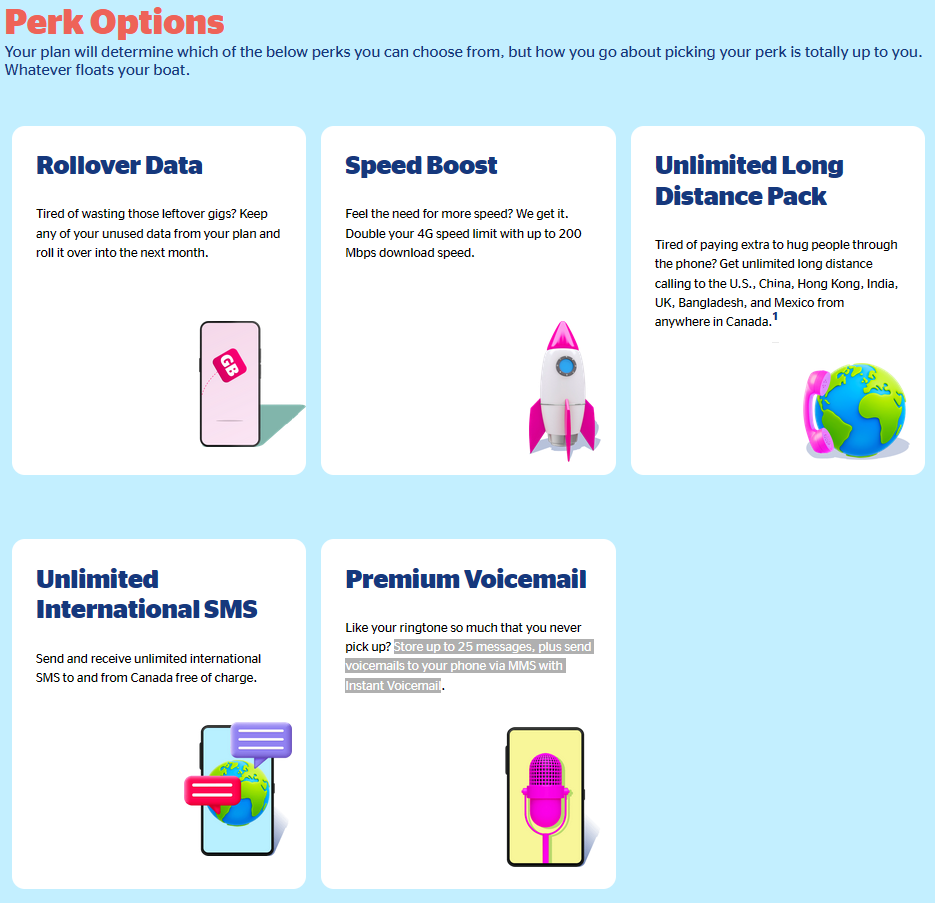
In total, there are five perk options, although which ones are available depends on which plan you choose (only Koodo’s most expensive plan has access to all five perk options). The perk options are:

  • Rollover Data – “Keep any of your unused data from your plan and roll it over into the next month.”
  • Speed Boost – “Double your 4G speed limit with up to 200 Mbps download speed.”
  • Unlimited Long Distance Pack – “Get unlimited long distance calling to the U.S., China, Hong Kong, India, UK, Bangladesh, and Mexico from anywhere in Canada.”
  • Unlimited International SMS – “Send and receive unlimited international SMS to and from Canada free of charge”
  • Premium Voicemail – “Store up to 25 messages, plus send voicemails to your phone via MMS with Instant Voicemail”

Koodo’s Pick Your Perk options.

Customers can’t select a perk when checking out on the company’s website. Instead, Koodo directs them to head to Self Serve, select ‘Mobile services’ from the menu, then ‘My add-ons’ and ‘Manage perks.’ Customers can also use that menu to change their perk if they want, but the new perk won’t apply until the first day of their next bill cycle.

It’s worth noting that the Unlimited International SMS perk used to be included in some Koodo plans. Instead, all Koodo plans now include unlimited text and picture messaging.

This doesn’t apply to the CRTC-mandated starter plans, most of which still include unlimited international messaging. Moreover, those plans don’t include the ‘Pick Your Perk’ option, same with Koodo’s $27/mo calling and texting plan with no data.

Below, you can find a list of which plans have which perk options:

  • $45/mo 6GB – Premium Voicemail, Unlimited International SMS
  • $55/mo 8GB – Premium Voicemail, Unlimited International SMS, Rollover Data
  • $60/mo 10GB – Premium Voicemail, Unlimited International SMS, Rollover Data, Speed Boost
  • $65/20GB – Premium Voicemail, Unlimited International SMS, Rollover Data, Speed Boost, Unlimited Long Distance Pack

Koodo’s FAQ about the Pick Your Perk plans notes that customers can purchase any of the unselected perks available with their rate plan as an add-on in Self Serve. MobileSyrup has reached out to Koodo for more details about how much additional perks cost.

A few other interesting tidbits of information about rollover data: Koodo’s rollover data perk doesn’t work with Easy Roam “for now.” Koodo’s website says rollover data “isn’t accessible while roaming,” but if you have leftover data, you can still use it next month.

Additionally, rollover data only lasts one month. Per Koodo’s FAQ page:

“Any data leftover from your plan’s data bucket in the current month will get added to your data bucket for next month. Your Rollover Data will get used automatically after you use all of your regular plan data. You can only keep your Rollover Data for one month, so any unused Rollover Data at the end of the month will expire.”

You can learn more about Koodo’s Pick Your Perk plans here.

Categories
Mobile Syrup

U.S. Justice Department investigating Tesla self-driving claims

The U.S. Department of Justice reportedly launched a criminal probe into Tesla’s self-driving vehicle claim.

According to Reuters, three people familiar with the matter told the publication about the probe. The previously undisclosed investigation started last year following over a dozen crashes, some fatal, involving Tesla’s Autopilot automated driving technology. The people told Reuters that Autopilot was activated during the accidents.

Tesla CEO Elon Musk has repeatedly and publicly promised that self-driving cars were coming but hasn’t yet delivered. As noted by The Verge, Musk went from saying Tesla would have 1 million robotaxis on the road by the end of the year to 1 million people in the Full Self-Driving (FSD) beta. However, those are very different things.

Tesla vehicles come with a driver assistant feature called Autopilot, but for an extra $19,500 in Canada, customers can upgrade it to FSD. But despite what Musk has said and the arguably misleading name, FSD still requires driver supervision. Tesla’s website notes as much when you select the FSD add-on, which Reuters says could complicate the Justice Department’s case.

FSD has been a tricky feature for Tesla. Fans love it (so much so that some have sought to put children in harm’s way to prove it works), and critics have repeatedly pointed out safety concerns with Tesla using regular people to beta test FSD. The U.S. National Highway Traffic Safety Administration (NHTSA) is investigating 16 crashes where Tesla vehicles using Autopilot crashed into stationary emergency vehicles, leading to 15 injuries and one fatality.

Moreover, regulators have accused Tesla of false advertising, and customers have sued the company for allegedly misleading them about the capabilities of FSD.

So far, most of this seems to have had little effect on Tesla or Musk, but a Justice Department investigation carries the risk that Tesla or its executives will be charged criminally. Reuters reports that federal prosecutors in Washington and San Francisco are investigating whether Tesla’s claims about Autopilot and FSD misled customers.

Source: Reuters, The Verge

Categories
Mobile Syrup

Apple halts gambling app ads in App Store following criticism

Apple announced on October 25th that users would soon see new ad placements from Apple Search Ads on the App Store. The update was meant to make it easy for advertisers to promote and drive discovery of their apps in certain sections of the App Store, like the ‘Today tab’ and the ‘You Might Also Like’ section.

Mere hours after the new ad placements went live, industry developers were quick to point out how their App Store feed was full of unsavoury and off-putting ads related to gambling apps, as shared by MacRumours.

Developer Simon B. Støvring said, “With Apple’s recent changes to ads on the App Store, your product pages may now show ads for gambling apps,” while podcast app Overcast’s developer Marco Arment was displeased that ads for gambling apps were showing up under his app in the ‘You Might Also Like’ section.

Legal expert Florain Mueller condemned Apple’s move last week by saying that ads on the Today tab and product page campaigns are just another way for it to increase its effective app tax rate, “forcing developers to buy ads on their own app pages in order to avoid that others steer customers away from there.”

Subsequently, in a statement shared by MacRumours, Apple said that “We have paused ads related to gambling and a few other categories on App Store product pages.” While that should stop gambling ads from showing up on app pages for now, it doesn’t address the issue of app developers needing to buy ads on their own app pages to keep competitors from advertising there instead.

Source: MacRumours

Categories
Mobile Syrup

A family business: Jay Y. Lee selected as Samsung’s new executive chairman

Jay Y. Lee now fills the top position at Samsung Electronics.

Now serving as the company’s executive chairman, Samsung’s board said the company required “accountability and business stability.”

“The board cited the current uncertain global business environment and the pressing need for stronger accountability and business stability in approving the recommendation,” Samsung says in a press release.

Lee, the grandson of Samsung’s founder, has been to prison twice since 2017 following a bribery scandal. He received a presidential pardon in August, allowing him to take formal control of the company.

As The Verge reports, people already viewed Lee as the company’s leader following the death of a former executive, and Lee’s father, in October 2020.

Source: Samsung Via: The Verge 

Categories
Mobile Syrup

Google’s Nest Wifi Pro is a decent upgrade over its predecessor

I’ve been using Google’s Nest’s Wifi router and two Points in my home for the last few years.

While the experience has been relatively solid, I’ve encountered a few issues. Along with finding a “great” connection between Points being a finicky process (I eventually settled for “good”), the Nest Wifi occasionally drops my internet. Frustratingly, it doesn’t always intelligently switch between nodes or my devices aren’t smart enough to know what Point to connect to.

This often results in my smartphone being connected to the Nest Wifi in my office on the top floor of my home or my Apple TV 4K connecting to the basement Point instead of the one a few feet away from it. Of course, this could be blamed on the fact that I live in a 1,100 sq. ft. townhouse, and a single 2nd-gen Nest Wifi router can cover 2,200 sq. ft, possibly creating confusion with the signal.
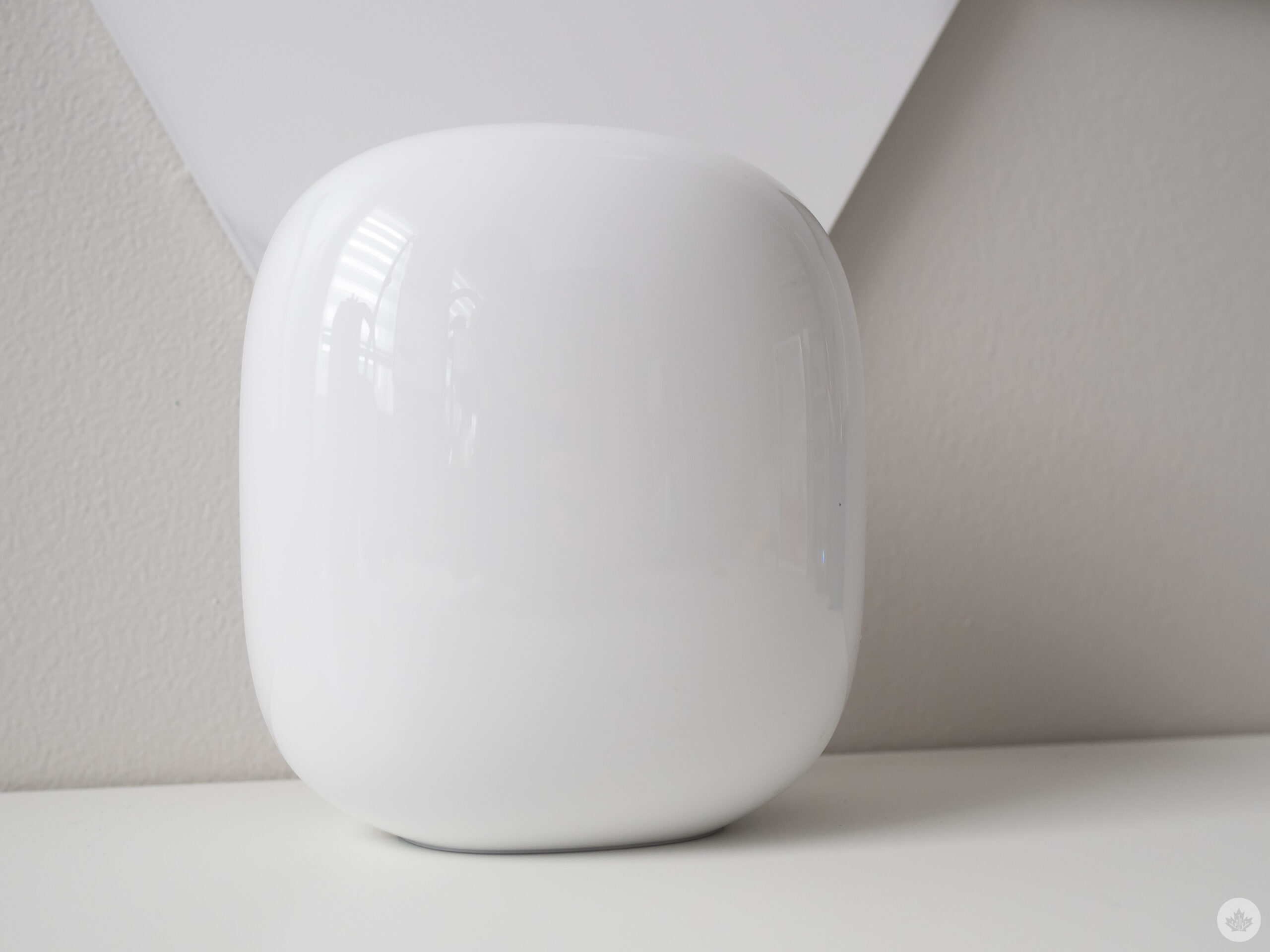
I have upwards of 30-40 devices connected at a time, smart home devices in my backyard and at the front of my home, so painting a reliable mesh connection where great Wi-Fi is accessible everywhere is what I’m always after. Cutting my setup down to one Nest Wifi router or even just a single router and a Point didn’t fix this, with my garage and my backyard becoming notable dead zones.

This is (hopefully) where the Nest Wifi Pro comes in to save the day.

Pro mesh

First off, I tested a single Nest Wifi Pro on its own to see if it was capable of blanketing my relatively small house with reliable Wi-Fi. Besides the Nest Wifi Pro in my office, I hit pretty impressive speeds of 844Mbps download/30Mbps upload over a wired connection (I pay for gigabit internet via Cogeco but usually get between 750Mbps and 850Mbps. Over Wi-Fi with Speetest, on the other hand, I only hit 750Mbps download/25Mbps upload with my iPhone 14 Pro directly beside the Nest Wifi Pro.

When I went down to my living room, that speed dropped down to between 30-150Mbps download and between 3Mbps-5Mbps upload. When I headed down to my above-ground basement, the situation became worse with 20Mbps download and 1Mbps upload. Placing this in context with the speeds I received with my Nest Wifi router and two Points, the results were pretty brutal (each Nest Wifi covers 2,100 sq. ft. and accompanying Points cover 1,500 additional sq. ft., while the Nest Wifi Pro claims to cover 2,200 sq. ft. on its own).
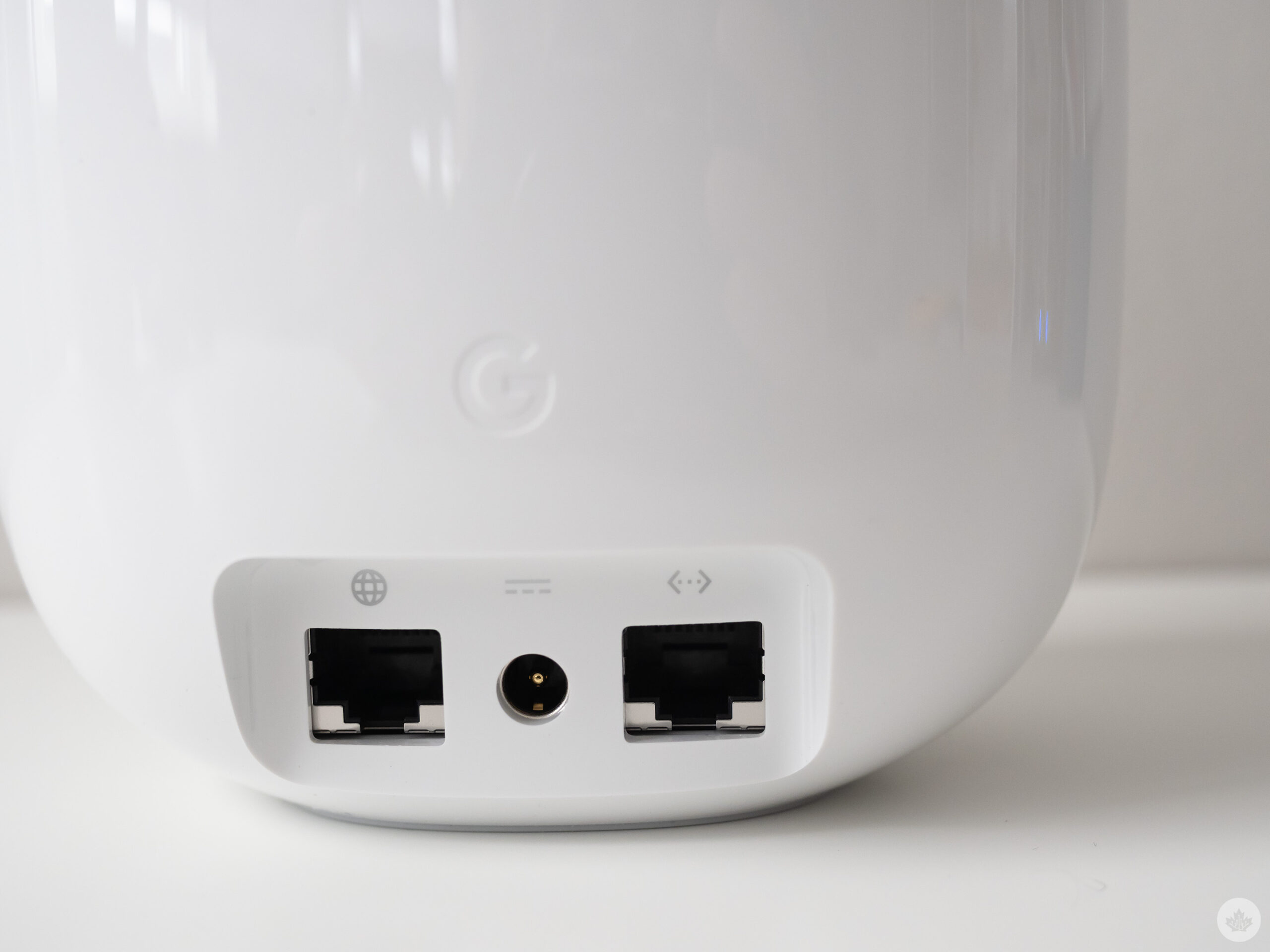
Nest Wifi Pro back

It’s clear a single Nest Wifi Pro won’t work for my home’s layout, so I set up two additional Points hoping that it would solve my issue. With the Nest Wifi Pro, the setup process is relatively simple and done through Google’s Home app, but I’ve still never been able to get the setup QR codes to scan consistently (I resorted to inputting the code on the bottom of the Wifi Pro manually).

I placed the two additional Nest Wifi Pros in the same location I put the Nest Wifi Points. Unfortunately, I ended up with similar results and needed to move them around slightly (I think the “weak” signal issue may have been caused by interference from the Arlo Ultra Base Station I moved to my living room). After a few minutes of experimentation, I was able to get a “good” connection between all points that sometimes turned into a “great” connection.
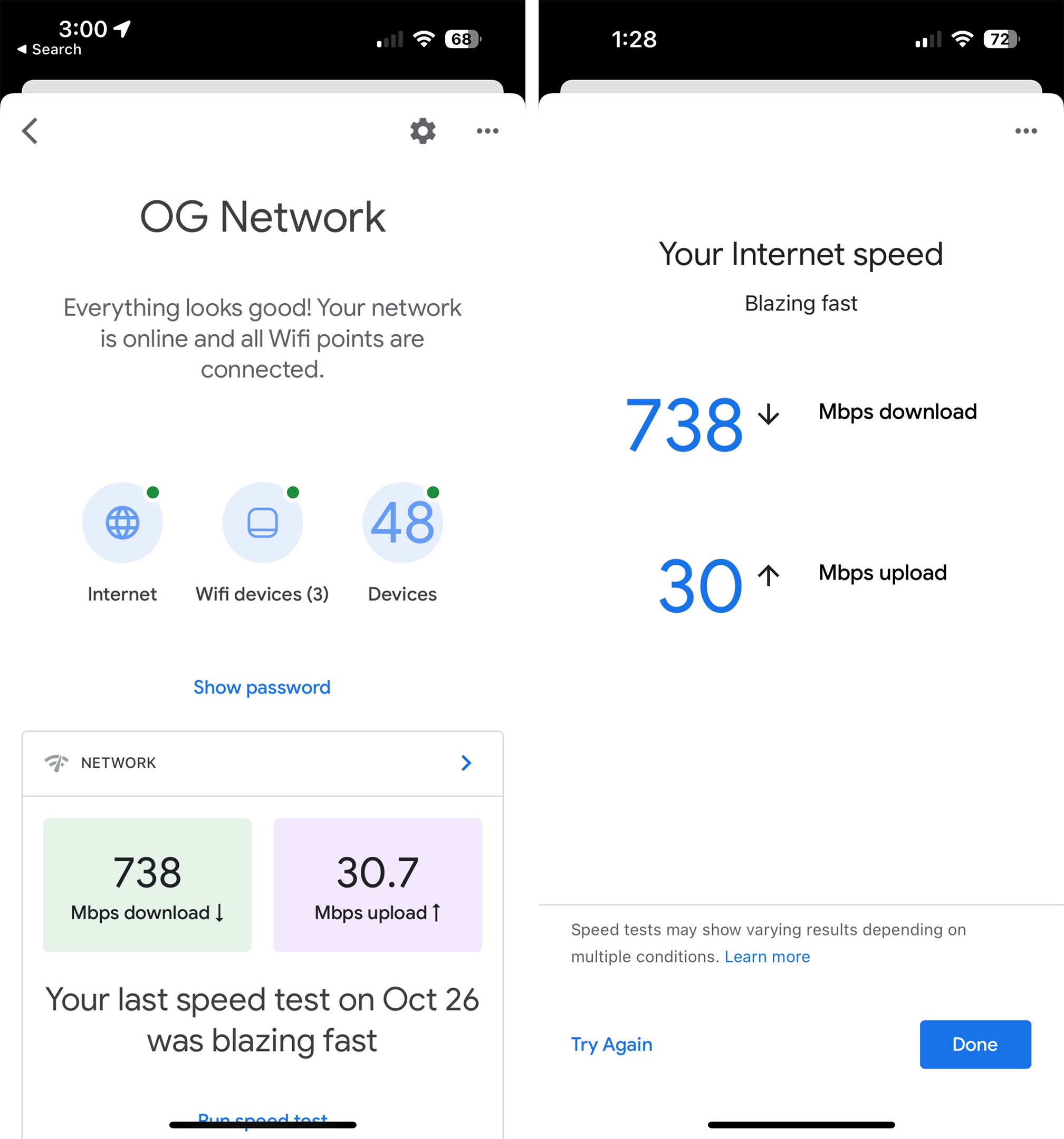
Nest Wifi Pro screenshotSo how did this improve my network speeds? Through the Nest Wifi Pro in my living room, I was able to get roughly 230Mbps – 300Mbps download and 25Mbps upload, a pretty notable improvement over the single router and a jump over the 150Mbps I typically received with the Nest Wifi Point. In my basement, I received about 330Mbps, which is slightly above the speeds I received from the living room Nest Wifi Pro.

I’ve only had the mesh system set up for a few hours, but it’s been reliable and snappy so far. It also seems like devices more intelligently switch between Nest Wifi Pro units compared to the standard Nest Wifi and its Points. I’ll continue testing the Nest Wifi Pro over the next few weeks and will update this story if I begin to encounter issues.

Everything new

Other new Nest Wifi Pro features include the return of a built-in ethernet port. This is a great move, and I don’t understand why Google ditched the port with the 2nd-gen Nest Wifi after offering it in the Google Wifi. This lets you jack in with a direct wired connection when it’s necessary. For example, I moved the Arlo Ultra’s base station to my living room, giving it a much stronger connection to the wireless camera in my backyard, and I’m also considering connecting my Apple TV 4K directly to the device.

Other new features include Wi-Fi 6E, which offers faster speeds and uses the less crowded 6GHz band. Of course, like all routers that support the latest form of Wi-Fi, you need compatible devices. I cover the tech industry and review products for a living, and as far as I’m aware, I don’t own a single device that supports Wi-Fi 6E (even Apple’s iPhone 14 series only supports Wi-Fi 6).

The two most notable devices that support Wi-Fi 6E are Google’s Pixel 7 line and Samsung’s Galaxy S22 Ultra.

I’m sure that will change over the next few years, but for now, I’m left out of the 6E fun, and most other people will be too. Like all new routers, the Nest Wifi Pro supporting Wi-Fi 6E will be future-proofing more than anything.
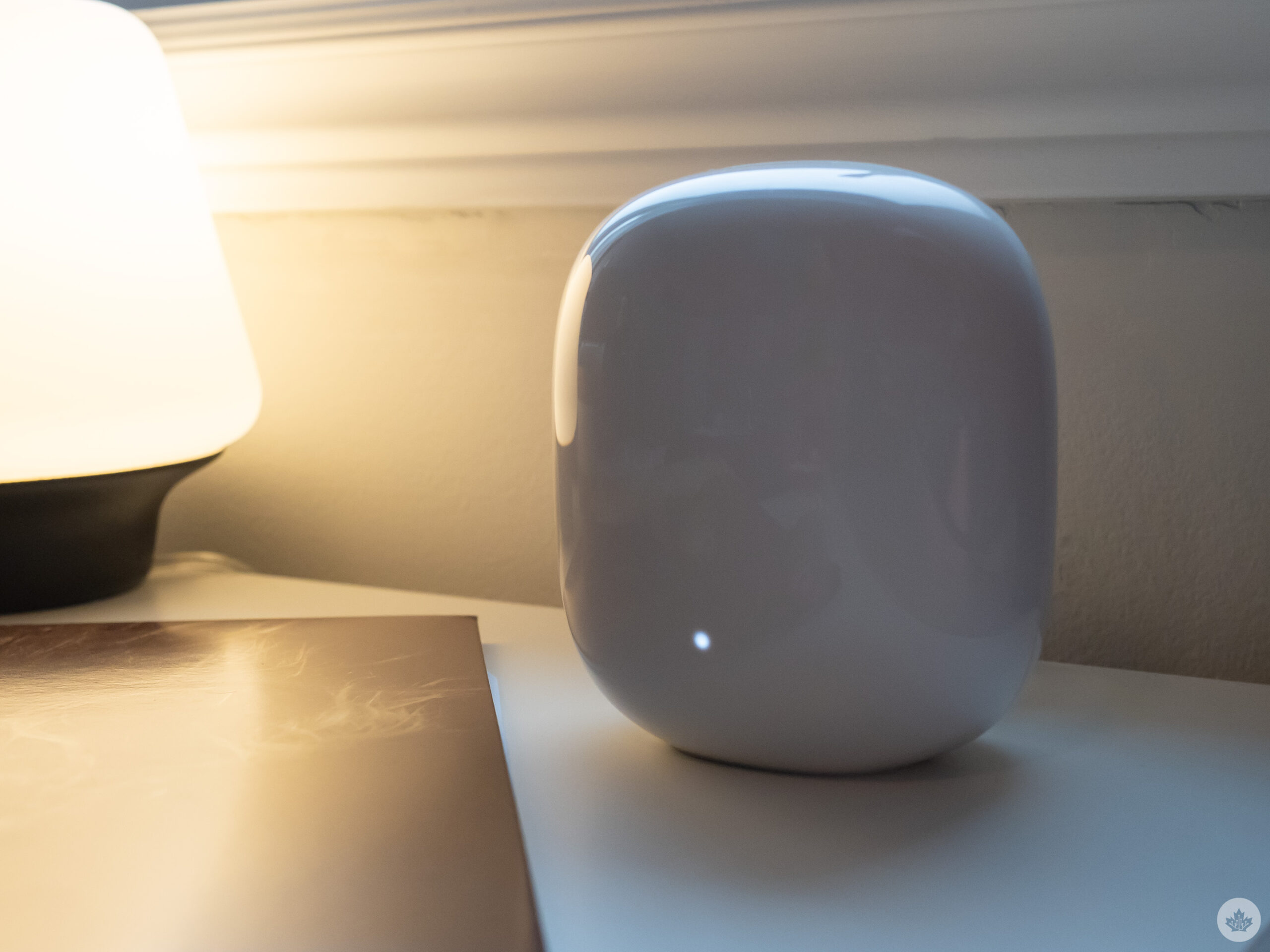
Nest Wifi Pro Speaking of preparing for the future, the Nest Wifi Pro will also work as a Thread border router once Google updates it with Matter support. Matter, formerly called Project CHIP, is the next big thing in smart home tech set to improve how devices communicate with each other. Thread is a wireless networking technology designed specifically for IoT and smart home devices. It relies on border routers (like the Nest Wifi Pro) to connect devices instead of weighing down your Wi-Fi connection with them.

Unlike the Nest Wifi, there are no Points with the Wifi Pro. Every Nest Wifi can be the base router. This also means that the Nest Wifi Pro isn’t compatible with earlier generations of Nest Wifi, and it doesn’t include Google Assistant/Smart Speaker support, forcing me to move some of my Google Home/Nest devices around to maintain voice assistant coverage across my home. While this isn’t surprising, it’s still disappointing, especially for anyone considering upgrading and hoping to continue using their Nest Wifi Points.

It’s worth mentioning that I’m not a fan of the Nest Wifi Pro’s design. It’s very glossy (as you can see from the photos in this story), unlike the matte Nest Wifi, which attracts more fingerprints and dust. In Canada, the Nest Wifi Pro is only available in ‘Snow’ and ‘Fog,’ while our counterparts in the U.S. get cool colours like ‘Linen’ and ‘Lemongrass.’ Of course, this is a router that sits staticly in your home, so the design doesn’t matter that much, but still, I prefer the understated look of the Nest Wifi to the new Nest Wifi Pro.

Returning features

Like Google’s Nest Wifi, the Wifi Pro is managed through Google’s Home app. Within the app, you can set up a family Wi-Fi connection that pauses the connection on kids’ devices at bedtime, a guest network and manage all of the devices connected to the router. The mesh router also automatically prioritizes high-bandwidth traffic like gaming and video calls and optimizes its band use, just like its predecessor.

Nest Wifi Pro vs Nest WifiI’m still not sure if the upgrade to the Nest Wifi Pro is worth it for most people. For someone like myself that has dozens of devices connected in their home at the same time and has craved a solid mesh signal for years, I’m impressed with the improvements Google has made to its route with the Wifi Pro. I plan to spend more time with Google’s Nest Wifi Pro in the coming days and will update this story with more impressions.

Google’s Nest Wifi Pro releases on October 27th. A 1-pack costs $269.99 and a 3-pack costs $529.99.

Categories
Mobile Syrup

Snapchat rolls out new Director Mode feature worldwide

Snapchat users around the world can now access ‘Director Mode.’

Available to iOS and Android users, Director Mode features new cameras and editing tools, giving users further control over the creative process.

It can be used alongside Dual Camera, another feature Snapchat recently launched that allows users to simultaneously use the front-facing and back-facing cameras.

Director Mode can be accessed through the ‘Director Mode’ icon in the camera toolbar. Alternatively, users can select the ‘create’ button in Spotlight to begin.

See how it works in the video below.

Image credit: Snapchat