Categories
Mobile Syrup

Apple expands Stage Manager to older iPads in latest iPadOS 16 beta

One of the more exciting features coming to iPads with iPadOS 16 is Stage Manager, which will finally allow iPad owners to use multiple apps simultaneously in an almost desktop-like experience with windowed multitasking. Now, it looks like Apple will bring Stage Manager to more devices, with some major caveats.

Apple earned some ire from iPad owners for restricting Stage Manager to iPads with its new M1 chip. There didn’t seem to be much of a hardware reason for the restriction, especially when devices like the base level iPad Air, which had the M1 chip but lacked other supposedly necessary capabilities, were set to get Stage Manager. Then, Apple delayed iPadOS 16, reportedly over issues with Stage Manager.

However, in the latest iPad OS 16 beta, Stage Manager is available on older iPad Pros. Specifically, Engadget reports that Stage Manager now works on the 11-inch iPad Pro (first gen and later) as well as the 12.9-inch iPad Pro (third gen and later), including the models with A12X and A12Z chips.

The caveat? iPad Pros not running the M1 chip won’t have access to Stage Manager on external displays. On the one hand, this is a bummer for anyone who wanted to use their old iPad Pro for some multi-monitor multitasking (although honestly, who buys an iPad for serious multitasking work?). On the other, this means Stage Manager will benefit more iPad owners by enabling much better multitasking.

The fifth iPadOS 16 developer beta also removes external display support for Stage Manager on M1 iPads, but that should be a temporary change while Apple continues working out the bugs. External display support should return in a software update later this year. In a statement to Engadget, Apple said:

“We introduced Stage Manager as a whole new way to multitask with overlapping, resizable windows on both the iPad display and a separate external display, with the ability to run up to eight live apps on screen at once. Delivering this multi-display support is only possible with the full power of M1-based iPads. Customers with iPad Pro 3rd and 4th generation have expressed strong interest in being able to experience Stage Manager on their iPads. In response, our teams have worked hard to find a way to deliver a single-screen version for these systems, with support for up to four live apps on the iPad screen at once.

“External display support for Stage Manager on M1 iPads will be available in a software update later this year.”

Of course, it also remains to be seen how well Stage Manager works on A-series chips. We’ll likely get answers about that sooner or later. Though, given the business of Stage Manager so far, it may make sense to wait until a more stable version is available before doing any serious testing.

Image credit: Apple

Source: Engadget

Categories
Mobile Syrup

Where to stream Hocus Pocus 2 in Canada

Nearly 30 years later, the witches are back.

On September 30th, the sequel to the fan-favourite 1993 Halloween movie, Hocus Pocus, will be released. The appropriately titled Hocus Pocus 2 sees the Sanderson sisters returning to present-day Salem to seek revenge, forcing three high-school students to band together and stop them.

Of course, Hocus Pocus wouldn’t be the same without Better Midler, Kathy Najimy and Sarah Jessica Parker, and all three actresses are back in their respective roles of Winnie, Mary and Sarah. Hannah Waddingham (Ted Lasso), Tony Hale (Arrested Development) and Sam Richardson (The Afterparty) have also joined the cast of the Anne Fletcher-directed sequel.

In Canada, the way to watch Hocus Pocus 2 is quite simple: through Disney+. Starting September 30th, the film will be available on the platform at no additional cost with a subscription. Disney+ costs $11.99 CAD/month or $119.99/year. The original Hocus Pocus is also streaming on Disney+ Canada.

It’s worth noting that Disney Canada has also created a special Hocus Pocus pop-up to promote the sequel. From September 30th to October 2nd, you can visit Toronto’s Eaton Centre or Richmond, B.C.’s Richmond Centre to check it out. Quebecers, meanwhile, can head to the Carrefour Laval between October 7th and 9th.

Image credit: Disney

Categories
Mobile Syrup

Walmart releases two metaverse experiences in Roblox

Earlier this year, a Walmart metaverse video went viral that showed how Walmart imagines the future of grocery shopping to be. The video in question was made back in 2017, and its sole purpose was to impress influencers at SXSW (South by Southwest Festival) and get an edge over the competition by showing off a virtual shopping experience.

Walmart never implemented this vision — that is, until now.

The multinational retailer has revealed two metaverse worlds developed in the game RobloxWalmart Land and Walmart’s Universe of Play.

The reveal trailer shows the virtual world as having a blimp, an island with clothing, a swimming area, and some sort of mini-games. According to CNBC News, the islands also feature a music festival area and a “Verch” (Virtual Merchandise) area. Get a load of that.

The virtual worlds are aimed at the younger audience and would serve as “a testing ground for Walmart as it considers moves in the metaverse and beyond,” said William White, Walmart’s chief marketing officer, in a statement given to CNBC News.

“How are we driving relevance in cultural conversation? How are we developing community and engagement? How are we moving the needle from a brand favorability [standpoint] with younger audiences?” said White. “That’s what we’re trying to accomplish here.”

It’s worth noting that Walmart currently won’t make any money off of the virtual worlds, but it surely is a good tactic to attract young shoppers, who would see the virtual store and the “Verch” it has to offer and might be persuaded to ask their parents to buy them something from the retailer, be it in-store or online.

CNBC News does note that Walmart could make money from the virtual worlds in the future by charging brands to be included in its metaverse as a type of advertisement or source of visibility.

Check out the retailer’s Roblox metaverse trailer below:

Image credit: Walmart

Source: @WalmartInc Via: CNBC News

Categories
Mobile Syrup

Xbox unveils ‘Mineral Camo Special Edition’ controller

A new camo-themed Xbox Wireless Controller has been announced.

The gamepad, dubbed the ‘Xbox Wireless Controller – Mineral Camo Special Edition,’ is Xbox’s fourth in its ‘Camo’ lineup, after ‘Night Ops Camo,’ ‘Arctic Camo’ and ‘Daystrike Camo.’

The Mineral Camo blends mineral blue, bright and dark purple and aqua into a camouflage pattern. Xbox says its unique ocean-themed tones were inspired by geode crystals.

Like all other modern Xbox controllers, the Mineral Camo can be used on Xbox consoles, PC and mobile devices. It’s available now via the Microsoft Store for $79.99 CAD. Razer is also selling a matching charging stand for $49.99 USD (about $68.50 CAD).

Source: Xbox

Categories
Mobile Syrup

Google Pixel Watch fast pair notification appears on Redditor’s phone

Man, Google’s devices are getting leaked this week.

A Redditor in Sydney, Australia, was in a shopping mall and received a prompt by a Fast Pair notification to set up a Google Pixel Watch. The notification showed a picture of the wearable in black with its obsidian band.

The notification said that the device app is required to start setup, with an option to go to Google Play.

This notification seems possible. Wear OS 3 requires its manufacturers to make their own Wear OS companion app. And it was previously reported that Google is working on one for the Pixel Watch.

Google will officially unveil the Pixel 7, 7 Pro and the Pixel Watch on October 6th, where we’ll learn more about the companion app and the device itself.

Source: Reddit, Via: 9to5Google

Categories
Mobile Syrup

New Google Lens feature brings ‘Find Image Source’ to Android

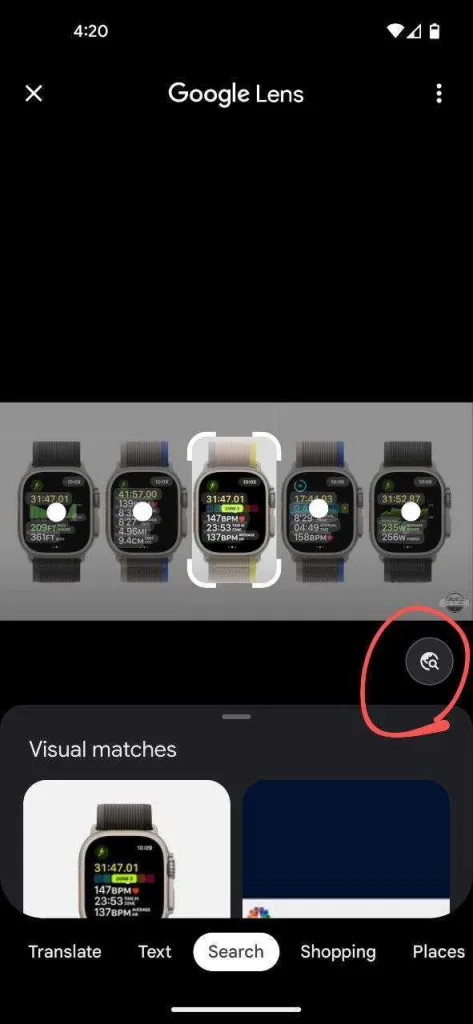
Google is adding a new feature to Lens on Android that allows users to be redirected to Google Image Search on the web, with the image and related queries auto-populated.

First reported by 9to5Google, some users are now seeing a new ‘circular globe with a magnifying glass’ button on the bottom right of their Google Lens-analyzed images. Clicking on the globe button, reportedly called ‘Find Image Source,’ redirects users to Google Image Search, with relevant search queries for the image already populated.

For example, if you run an image of the new Apple Watch Ultra in Lens, and click on the globe button, the app will redirect you to Search on the web, with search results for Apple Watch Ultra image auto-populated, as seen in the screenshots below:

The addition is likely because users prefer Google’s Search results due to Lens being a hit-and-miss. Chrome on the web already offers the same reverse image search feature. You right-click on an image you find online and click on ‘Search image with Google Lens.’ Now, the functionality is being extended to the mobile app.

The ‘Find Image Source’ button isn’t live for all Google Lens Android users yet, but it should completely roll out over the coming weeks. We’re uncertain if the feature is coming to iOS.

Image credit: 9to5Google

Source: 9to5Google

Categories
Mobile Syrup

Intel unveils Unison to easily connect smartphones and PCs

Intel kicked off its two-day Innovation 2022 event in San Jose, California, with a flurry of announcements ranging from new computer chips to new software to connect phones and PCs.

Dubbed ‘Unison,’ Intel’s new smartphone x PC connection solution is based on technology developed by Screenovate, a company Intel acquired late last year. Intel says Unison will start rolling out to select Evo devices running 12th Gen Intel Core processors from Acer, HP, and Lenovo “this holiday season.” Early next year, Unison will expand to Evo design running on 13th Gen devices.

But, what is Unison? In short, it’s software that will make files, messages, notifications, calls and other items on your smartphone available on your PC. Unison will enable people with Intel laptops to send and receive text messages from their phone on their PC, make and receive voice calls, manage notifications, and enable file and photo transfers between PC and phone. Plus, this can all happen wirelessly through various connectivity solutions, including local Wi-Fi, peer-to-peer connection over a network, Bluetooth and Bluetooth Low Energy (LE).

Starting with Evo

MobileSyrup sat down with Josh Newman, vice president and interim general manager of Mobile Client Platforms at Intel, to chat about Unison.

“The next thing people really want, especially those really advanced laptop users… [is] seamless connection across their devices,” Newman said.

“And so we took it on ourselves to create the right technologies and IPs for that experience. And that’s what led us to the Screenovate acquisition that we announced earlier this year.”

Moreover, Newman said Intel was able to help scale the technology with its Wi-Fi and Bluetooth connectivity stack. He also highlighted that Intel Unison was “architected for openness” and uses open communications APIs and interfaces.

Finally, Unison should be available for Canadians, too, so long as supported 12th and 13th Gen Evo products are available for Canadians (Newman says there’s “nothing that’ll prevent the availability in Canada,” which is good news).

As for starting Evo, Newman described that as a “pragmatic” decision. Intel wanted to keep the focus on a small set of systems and work closely with manufacturers to ensure a quality experience. The company does plans to scale Unison in the future.

What sets Unison apart?

At this point, you might be wondering what’s the point of Unison. After all, there are plenty of smartphone-to-PC solutions out there, such as Microsoft’s ‘Phone Link‘ app, Google’s web-based Messages solution for sending texts from an Android phone using your PC, or Dell’s Mobile Connect app.

“While there are other solutions that do different aspects of this phone-to-PC connection well, most of them have limitations. The biggest one is working with iPhones,” Newman said. “Unison will work with Android or iPhone.”

More than just support for iPhone, Newman emphasized that Unison also stands apart thanks to its deep integration with Intel hardware, such as tuning the power and performance and diving deep into Wi-Fi and Bluetooth drivers to squeeze “every last bit of power efficiency and performance.”

Of course, it remains to be seen how this all stacks up in real-world use. If Unison can deliver a high-performance experience without significantly impacting battery life, that could be a major win for the software.

Unison security and phone app

Newman also touched on security and privacy, highlighting Intel’s “security-first mindset” and the company’s work with IT to show them Unison “meets the security grade that they expect.”

When asked about Unison possibly supporting data tethering, Newman said that version one wouldn’t include it but that it was “definitely something that we want to look at.”

Once Unison arrives, people with supported Intel PCs will need to download an application on their smartphone to connect the devices. Newman described the app as “lightweight” and described scanning a QR code to establish the connection between phone and PC.

“And at that point, they just connect. And then every other time it’s connected, you don’t have to go and intervene on the phone and reopen the app or do any settings or anything like that. It’s just at that point they know each other,” Newman said.

Ultimately, Unison seems like it could be an excellent solution for connecting your smartphone and PC. It remains to be seen how well Unison works in practice, but Intel certainly seems excited about it.

“[Unison] will solve real problems for real people doing real things. And that gets me excited,” Newman said.

Categories
Mobile Syrup

Intel unveils 13th Gen desktop CPUs at Innovation 2022 event

Intel kicked off its Innovation 2022 event in San Jose, California by unveiling its new 13th Gen Intel Core processors. Once again, the Core i9 desktop CPU headlined, with Intel claiming the i9-13900K as the “world’s fastest desktop processor.”

According to details shared by Intel, the 13th Gen CPU family includes a total of six unlocked processors with up to 24 cores and 32 threads, plus blazing clock speeds of up to 5.8GHz. In all, there will be 22 processors in the 13th Gen Core desktop family that will work with existing Intel 600 chipset motherboards or new Intel 700 chipset motherboards.

Moreover, the 13th Gen CPUs will support both the latest DDR5 memory and continue support for DDR4 memory.

Intel’s 13th Gen chips build on a “matured Intel 7 process” and x86 performance hybrid architecture to further boost performance. The company claims up to 15 percent better single-threaded performance and up to 41 percent better multi-threaded performance. Those numbers match up with previously leaked information.

The Intel Core i9-13900K sports eight ‘performance’ P-cores and 16 ‘efficient’ E-cores for 24 cores total, and 32 threads. It can hit up to 5.8GHz clock speed.

Intel highlighted other features of its 13th Gen desktop chips that can help squeeze more performance out of the silicon. Adaptive Boost and Thermal Velocity Boost, available on unlocked Core i9 SKUs, opportunistically boost clock frequencies based on power and thermal headroom. The increase in E-cores across Core i5, i7, and i9 CPUs boosts multi-threaded performance. There’s PCIe Gen 5 support for up to sixteen lanes off the processor, and up to two times the L2 cache and increased L3 cache.

Intel’s unlocked ‘K’ 13th Gen desktop CPUs, as well as the Intel Z790 chipset, will be available starting October 20th, 2022. Intel will have more details on the est of its 13th Gen CPU family at a later date.

Intel announced its Arc A770 GPU at Innovation 2022 as well. The GPU will be available starting October 12th at $329 USD (roughly $452.93 CAD).

Along with the new CPUs, Intel also detailed its Unison solution for connecting smartphones and PCs. You can check that out here.

Header image credit: Intel

Categories
Mobile Syrup

iOS 16 causes issues with Cinematic Mode videos in Final Cut Pro, iMovie

Apple’s latest software update for iPhones, iOS 16, brought quite a few bugs with it. Some have been fixed, while others have only just been discovered. Most recently, iOS users uncovered a bug with ‘Cinematic Mode’ that breaks support with iMovie and Final Cut Pro.

9to5Mac spotted reports on Apple’s support forums and on Reddit about the issue. Both of Apple’s video editors show errors when attempting to open Cinematic Mode video recorded on devices running iOS 16.

“It seems that iOS 16 broke this feature in FCP, which will show a “The cinematic effect cannot be activated” error (and according to other users the latest iOS 16.1 and macOS Ventura betas also don’t resolve the issue),” wrote ‘Ulmi‘ on Apple’s support forum.

As noted by 9to5, it seems Apple hasn’t acknowledged the issue yet, and there doesn’t appear to be a fix on the horizon. Worse, with Apple not planning to roll out macOS Ventura until October, it’s possible there could be a wait before the company updates its apps to fix the problem. That said, if the issue is on the iOS side, an update there might resolve the issue.

In the meanwhile, some users are working around the problem by editing the clips on their iPhones and then sharing the videos to their Macs over AirDrop.

Apple first released Cinematic Mode alongside the iPhone 13 line last year. You can learn more about the feature here.

Source: Apple support, Reddit Via: 9to5Mac

Categories
Mobile Syrup

OneUI Beta 5 lock screen customization looks eerily similar to iOS 16

One of the primary attractions of iOS 16 is that it finally allows users to customize their lock screen, a feature that Android users have long enjoyed. When paired with the iPhone 14 Pro’s Dynamic Island, it gives a distinct look to a locked iPhone.

The distinctions, however, don’t last long. We already know that Android applications like ‘dynamicSpot’ allow Android users to experience the Dynamic Island-style cut-out without having to buy a new iPhone 14 Pro, and now, Samsung’s OneUI Beta 3 seems to offer a similar lock screen to iOS 16.

First spotted by TechDroider founder Vaibhav Jain (@vvaiibhav), via 9to5Mac, the way users would customize their lock screen in OneUI Beta 5 appears very similar to Apple’s approach.

The ability to change clock style font and a similar colour palette, alongside a wallpaper filter option for different colour tones, and the wallpaper picker option, all look similar on both operating systems. Additionally, the way to customize the lock screen is identical, too — by long-pressing the lock screen.

It’s worth noting that the ability to change clock styles, via GoodLock, has been available since OneUI 4.1.1. That said, the new update adds the ability to change clock fonts and a wallpaper filter option — both of which look similar to iOS 16 in terms of UI — alongside the ability to long press to enter lock screen customization interface.

Check out more comparison photos in the tweet below:

Image credit: @vvaiibhav

Source: @vvaiibhav