Qualcomm unveiled several new products at MWC Barcelona 2022 covering various connectivity categories. The San Diego, California-based semiconductor company detailed its new Snapdragon X70 Modem-RF platform, a new FastConnect 7800 subsystem, two new Snapdragon Sound platforms, and finally a new Snapdragon Connect badge for products.
There’s a lot to unpack, so we’re going to move pretty quick. You can find more details on Qualcomm’s website for the announcements below as well.
Starting with the Snapdragon X70, the new modem uses the ‘Qualcomm 5G AI Suite’ to leverage AI-powered optimizations for mmWave and Sub-6 5G. Qualcomm says it’s the world’s first 5G AI processor in a modem-RF system and notes several benefits brought by AI, including:
“AI-based network selection for superior mobility and link robustness”
“AI-based adaptive antenna tuning for up to 30% improved context detection for higher average speeds and coverage”
“World’s 1st AI-based mmWave beam management for superior mobility and coverage robustness”
“AI-based channel-state feedback and dynamic optimization”
Qualcomm claims the X70 can hit up to 10 Gigabit 5G downloads as well as improve upload speeds, latency, coverage and power efficiency. I can’t wait to see how the X70 performs in real-world tests.
Along with the X70, Qualcomm’s new FastConnect 7800 subsystem for Wi-Fi and Bluetooth boasts big performance gains and Wi-Fi 7 support. That latter feature is particularly interesting given it feels like Wi-Fi 6 and 6E still haven’t hit mass adoption.
Qualcomm says the FastConnect 7800 supports peak speeds of 5.8Gbps and latency below 2 milliseconds, Bluetooth 5.3, and more.
The FastConnect 7800 ties into Qualcomm’s Snapdragon Sound platform too — the company has two new ultra-low power wireless audio platforms dubbed Qualcomm S5 Sound (QCC517x) and Qualcomm S3 Sound (QCC307x). Both support Snapdragon Sound tech, enabling higher quality audio, reduced latency, lossless audio, and optimized Low Energy (LE) Audio experiences.
Since all that can be a bit hard to take in, Qualcomm also introduced its Snapdragon Connect badge. Devices with Snapdragon Connect “ship with best-in-class 5G, Wi-Fi, and Bluetooth technologies.” Snapdragon Connect will be available for various devices including smartphones, laptops, VR/AR headsets, and cars.
For more on Qualcomm’s latest announcements, check out the company’s website.
The Pokémon Company is having a huge year already with LegendsArceus, and now the company has announced two new mainline games set to come in 2022: Pokémon Violet and Pokémon Scarlet.
The titles are set in a new region in the Pokémon universe and feature three entirely new starters. Violet and Scarlet feature a grass cat-like named Sprigatito, a Fire-type croc called Fuecoco and the Water-based duckling, Quaxly.
Sprigatito has the Overgrow ability, Fuecoco has Blaze and Quaxly is equipped with Torrent. You can learn more about the starters on Nintendo’s website. Strangely, the main characters in Scarlet and Violet will wear different outfits. This seems strange to me given the last few titles in the series allow players to customize their outfits anyways.
The character models look more detailed than they have in other Pokémon titles and include subtle shading on characters’ cheeks, clothes and legs. It also appears that Game Freak might avoid any tree-based controversy this time around, as the screenshots show off a wide variety of flora in the new region.
The game is set in an open world where Pokémon roam free, similar to the recently released Pokémon Arceus Legends. We haven’t seen any gameplay of the new titles yet, so it’s unclear if they’ll play more like Arceus or a more mainline series game.
With a 2022 release date, it’s likely Pokémon Violet and Scarlet will release before the holiday season, but we’ll have to wait for Nintendo or Game Freak to reveal more information in the coming months.
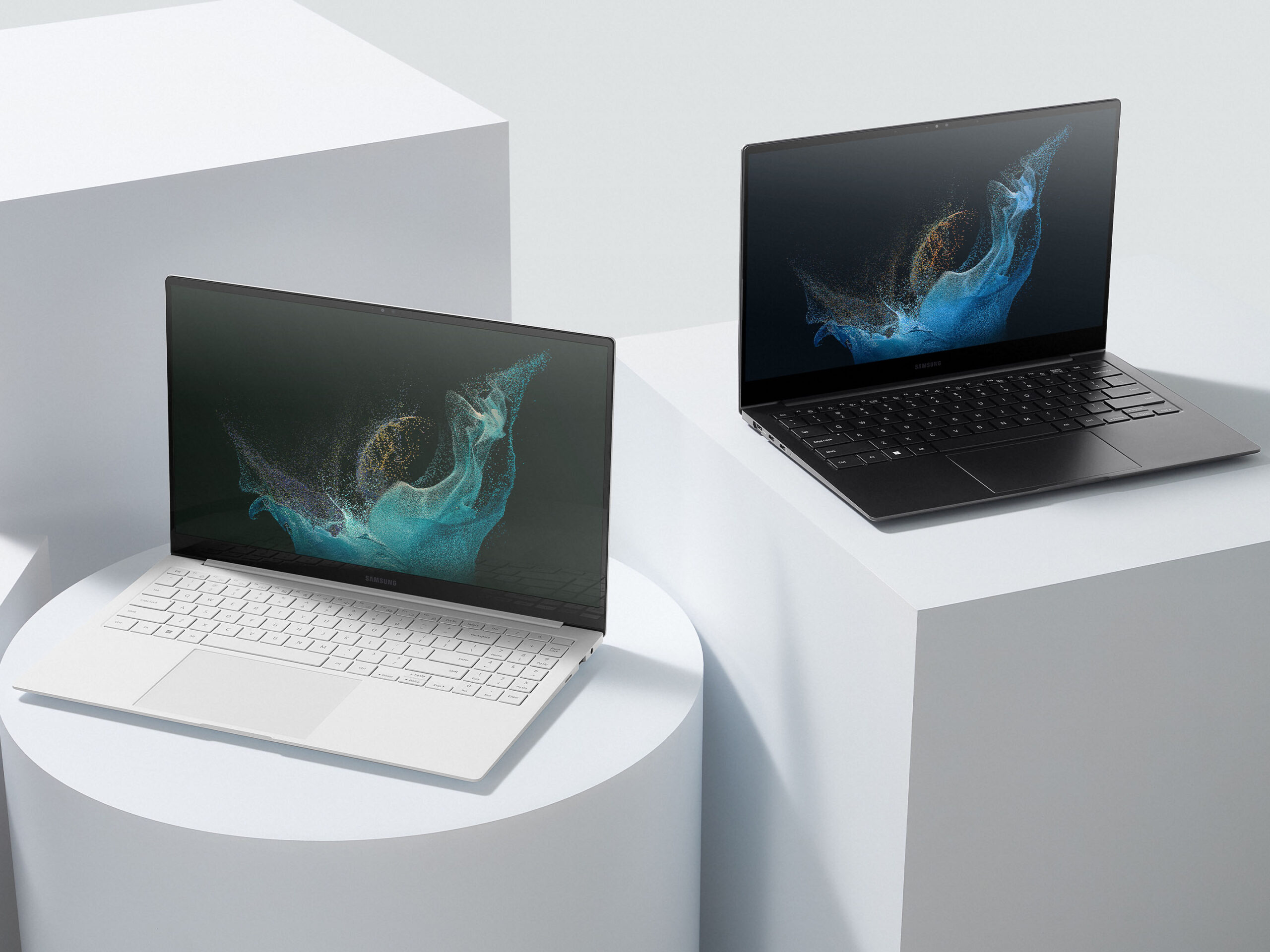
Samsung has unveiled its latest Windows laptops, the Galaxy Book2 Pro and Book 2 Pro 360, at MWC. The new laptops build on last year’s Galaxy Book Pro with new features, improved hardware, Windows 11 and more.
There’s plenty to unpack with the Book 2 Pro and Pro 360, but before we dig into specs, there are some highlight features worth making note of. Chief among them is Samsung’s ‘Multi Control,’ which allows Galaxy Book users to control their Samsung Galaxy Tab S8 with the Galaxy Book’s keyboard and mouse.
If that seems familiar, it’s probably because it’s practically identical to Apple’s ‘Universal Control’ feature. That said, Apple’s Universal Control hasn’t actually launched yet — it’s still in beta and, at this rate, it seems like Samsung might actually beat it to the punch.
Samsung also touted the security features of its new laptops. Another highlight was the 87° 1080p webcam with ‘Auto Framing’ that tracks subjects to keep them in frame, like Apple’s Center Stage. Bixby will also make its way onto the Book 2 Pro and Pro 360 so you can continue to not use it on your laptop as well as your smartphone now.
Samsung Galaxy Book 2 Pro in Silver and Graphite.
As for specs, the Book 2 Pro and Pro 360 both seem loaded. Both laptops sport 12th Gen Intel Core i5 or i7 chips with Intel Evo certification, up to 32GB of RAM, and up to 1TB of storage. All the laptops use Intel’s Xe integrated graphics, although the 15.6-inch Book 2 Pro will also have access to Intel Arc graphics.
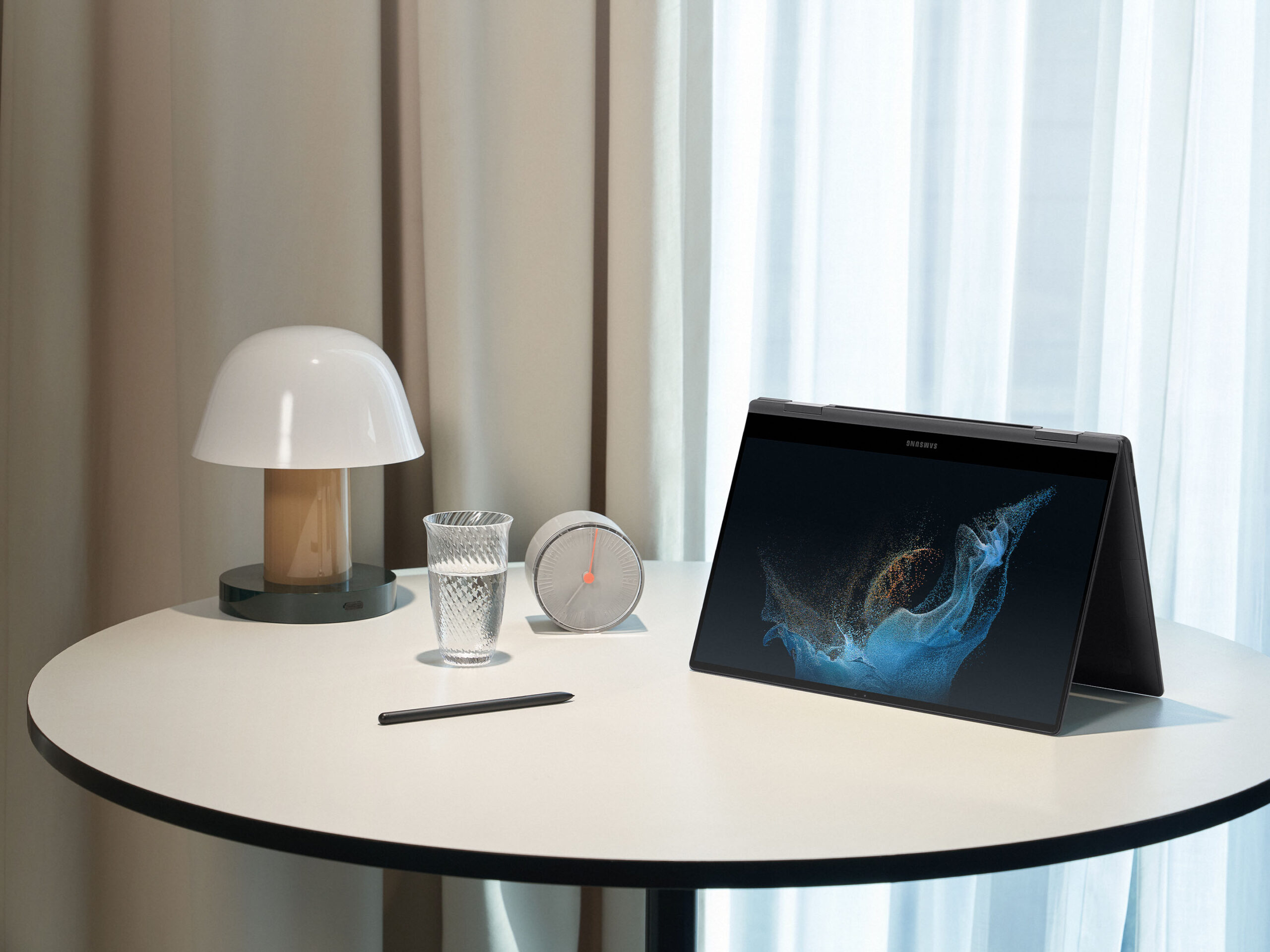
On that note, both laptops some in 13.3- and 15.6-inch options with SuperAMOLED FHD (1920×1080 pixel) screens, with the Pro 360 offering a 360° hinge and S-Pen support (thankfully, one comes in the box). The laptops support Wi-Fi 6E, Bluetooth 5.1, fingerprint authentication and more. The 15.6-inch Book 2 Pro also has 5G available.
Galaxy Book 2 Pro in ‘tent mode’
Overall, these new Galaxy Books look impressive, although it, unfortunately, looks like they’ll come loaded with Samsung software like last year’s Galaxy Book. For anyone deeply committed to the Samsung ecosystem, that may be welcome, but for everyone else, it’s more bloat to uninstall from your new PC.
Samsung says the Galaxy Book 2 Pro and Pro 360 will be available in ‘Silver,’ ‘Graphite,’ and ‘Burgundy’ (only for the Pro 360) and will launch in April.
This past week, we caught a glimpse of what are likely the first renders of the Pixel 7 and Pixel 7 Pro. According to the renders based on leaked information, not much has changed regarding the smartphones’ overall design.
If you’re like me, you might be a bit disappointed by the leaked images. I would have liked to see a cleaner design that ditches the protruding camera lenses, completely removing the controversial visor. However, the dual-tone colour is a nice touch, but if this section of the phone was completely flesh to the rear, that’d be a lot more appealing.
Additionally, an under-display front-facing camera would be welcome as well. Specs-wise, the Pixel 7 and Pixel 7 Pro reportedly feature a Tensor 2 chip, 12GB of RAM, 10x optical zoom and more. Some sort of cinematic video mode would be useful new functionality, and I personally would like ‘Active Edge’ back, the feature that allows users to squeeze the sides of the smartphone’s frame to activate Google Assistant and more.
There’s a lot more I want from the Pixel 7 series, but above are just a few features that instantly come to mind. We want to know in the comments below: what do you want to see from Google’s upcoming Pixel 7 and Pixel 7 Pro?
Technology is ever-evolving. Smartphones today feature high RAM, top-of-the-line cameras, impressive refresh rates and long-lasting batteries. What I mean by that is smartphones today are more than capable of performing strenuous and power-hungry activities with ease — including activities like streaming.
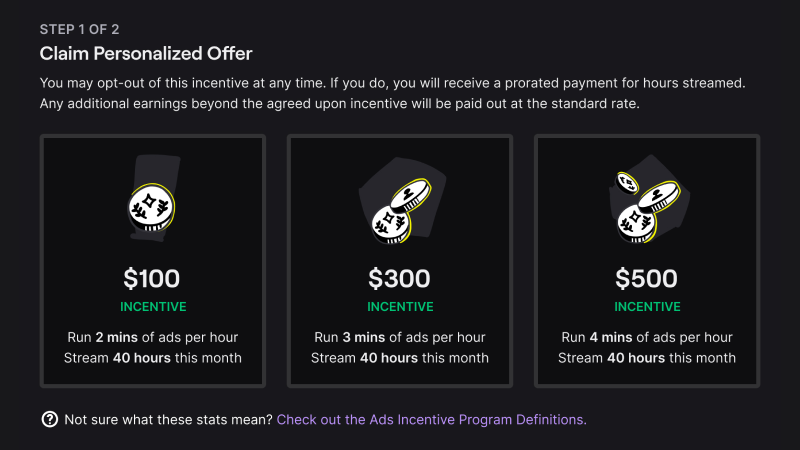
Streaming on Twitch has become a popular activity, and with the recent introduction of the platform’s Ads Incentive Program (AIP, pronounced ‘ape’), streamers are able to earn a “predictable monthly income” simply by streaming for a set amount of hours while airing ads (first screenshot below).
Image credit: Twitch
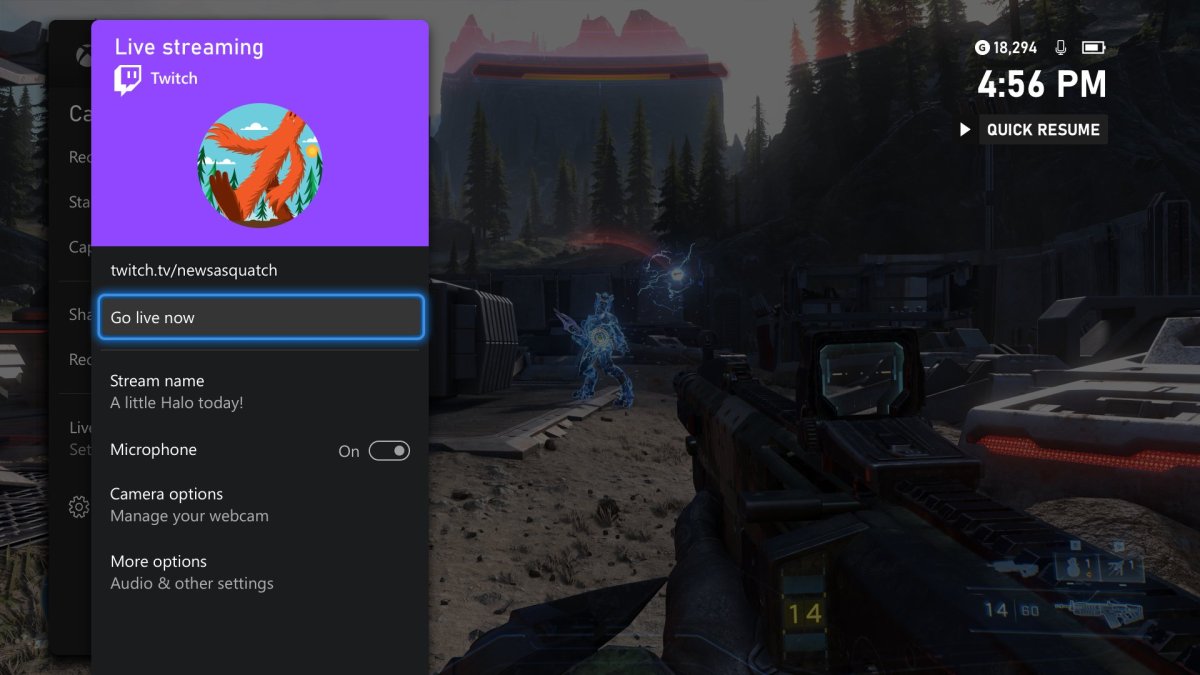
Image credit: Xbox
While streaming on Twitch is dominated by PC users, updates like this one (second screenshot above) allow console gamers to live stream their content with ease. If you already stream on Twitch, or consider it a potential activity you want to dive into but don’t want to go all out purchasing the right equipment, fret not; you can start your journey by streaming right off your smartphone.
While there are (and were) multiple platforms for live streaming, including YouTube Gaming, Facebook Live and the now-dead Mixer, this article focuses solely on the king of streaming viewership — Twitch, and how you can stream on it directly from your smartphone.
There is no minimum spec requirement for streaming from a smartphone, and all devices, including tablets that support the Twitch app, can be used. However, no spec requirement doesn’t mean that you’ll get the optimal experience with a laggy old device. You also have to keep in mind that streaming will drain your device’s battery pretty quickly, and if you choose to do IRL (in-real-life) streams and show yourself or your surroundings, you’ll have to make sure your stream doesn’t look like it is being broadcasted from a potato.
That being said, let’s dive into how simple it is to live stream on Twitch directly from a smartphone/tablet.
Firstly, you’ll have to download the Twitch app for iOS or Android, depending upon the device you’re using. If you already have a Twitch account — great; if not, make one — it shouldn’t take more than five minutes.
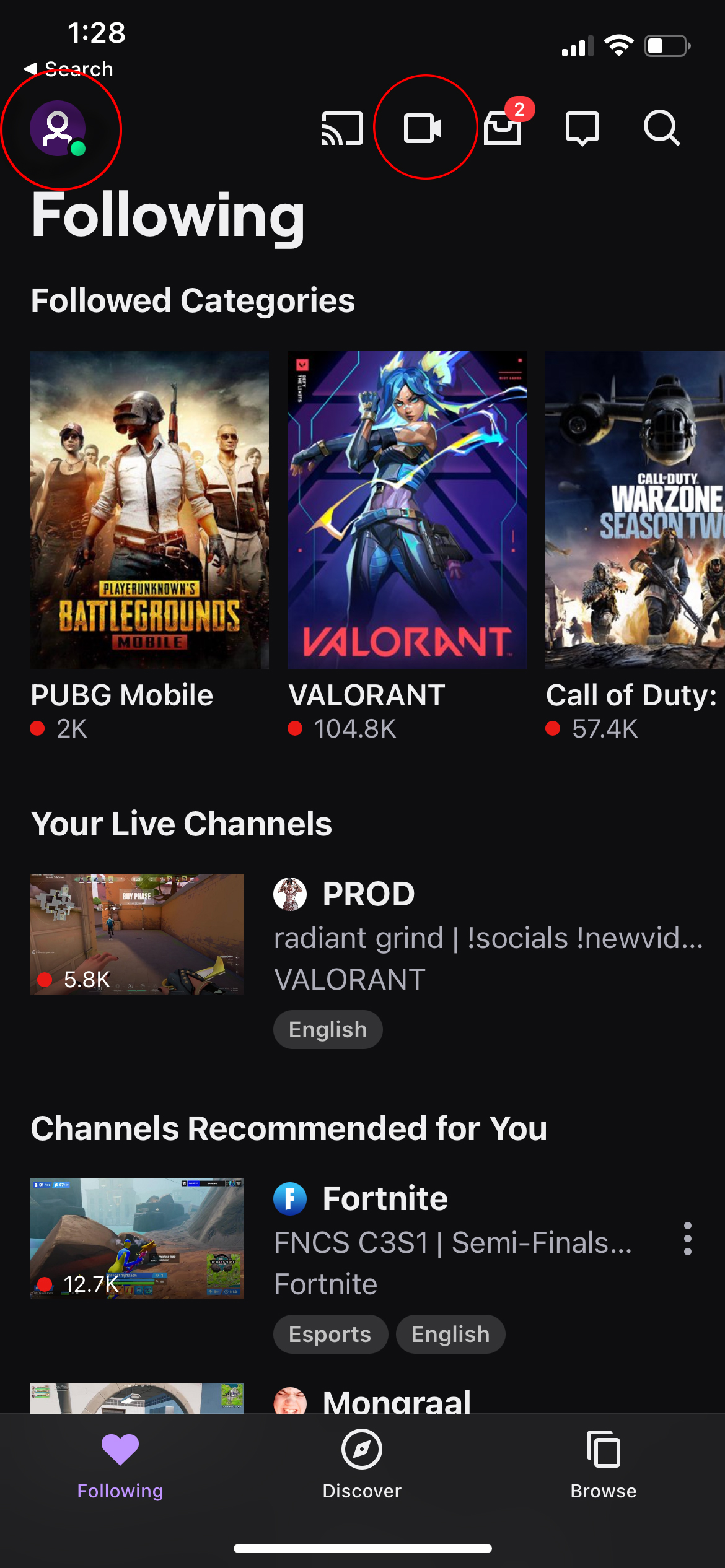
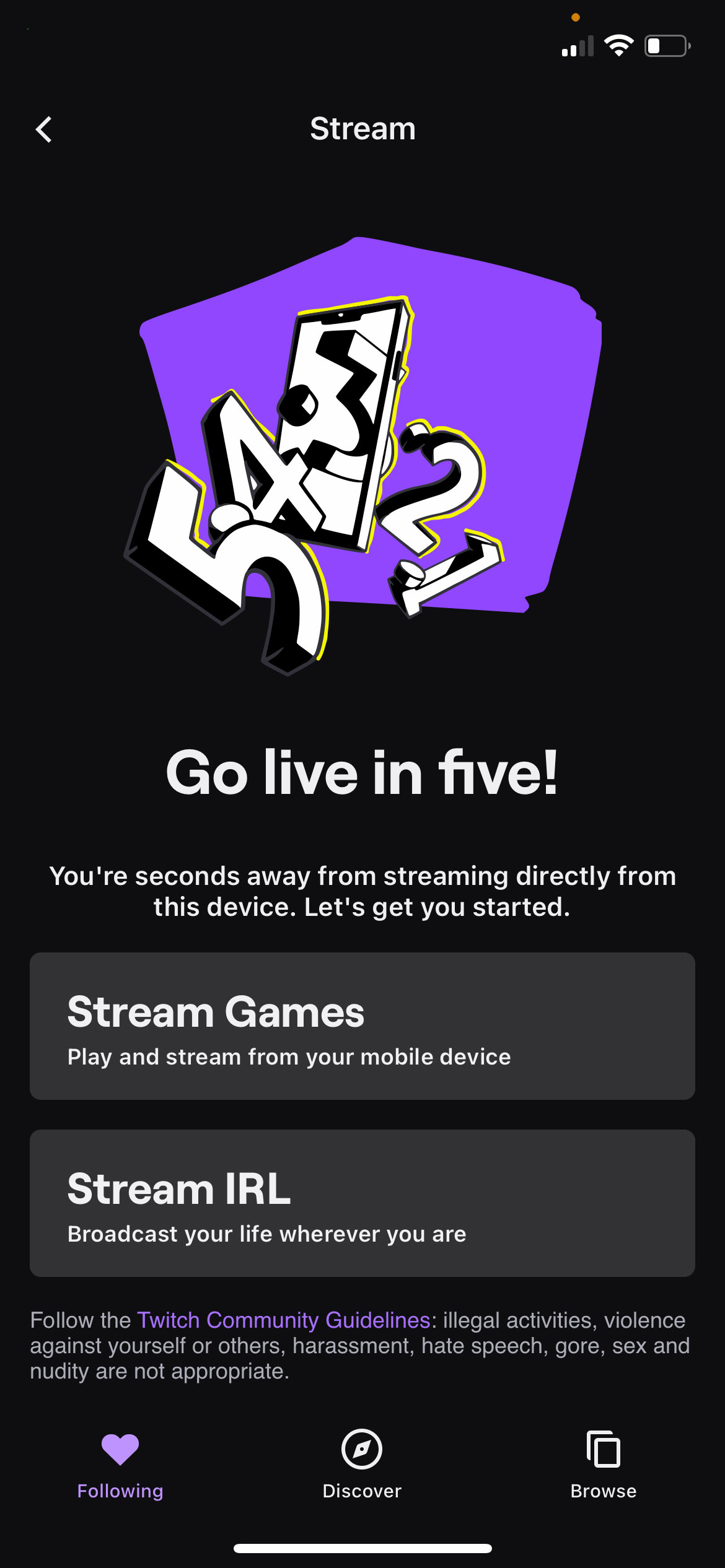
Once logged in, your home screen will look something like the screenshot below. From there, you have two options to go live, both circled in red:
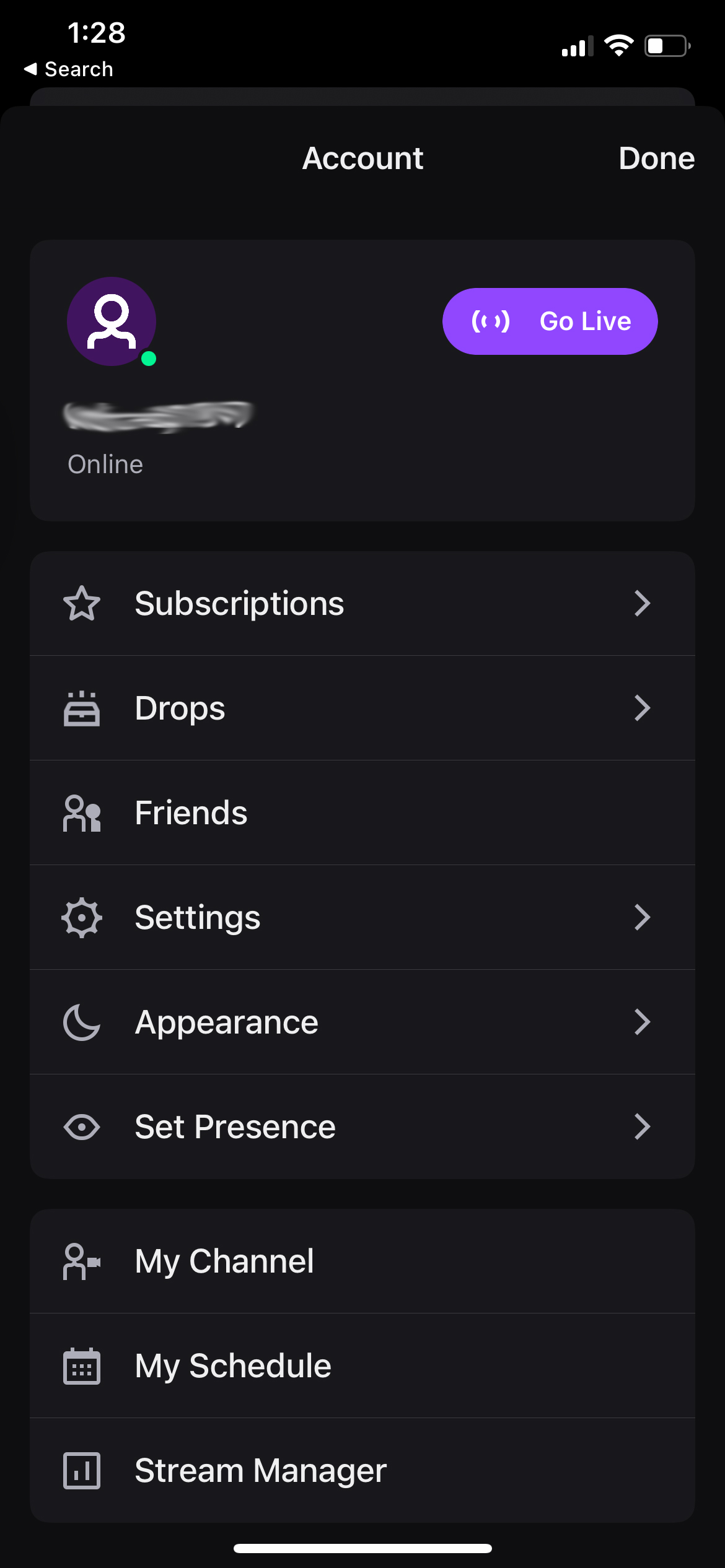
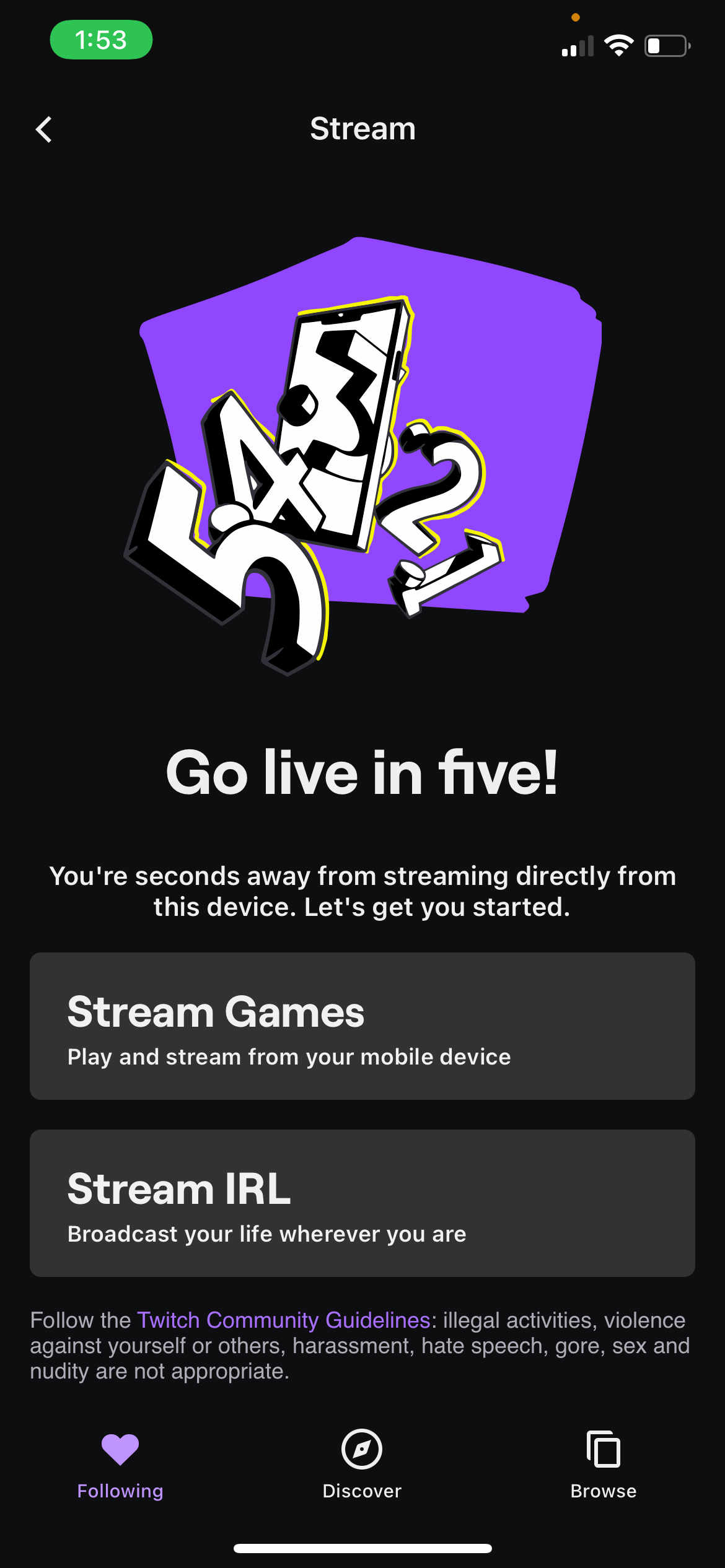
Clicking on the profile icon (first red circle) would take you to the settings section, from where you can click on the ‘Go Live’ button, whereas clicking on the video camera icon (second red circle) would take you straight to the streaming section, as shown below:
Now, depending on what you wish to stream, i.e. games or your IRL adventures, you can choose one of the two options.
“Stream IRL” lets you use your front and back cameras to show your viewers where you are and what you’re doing, whereas with “Stream Games,” you’re basically sharing your device’s screen.
Let’s start with “Stream Games.”
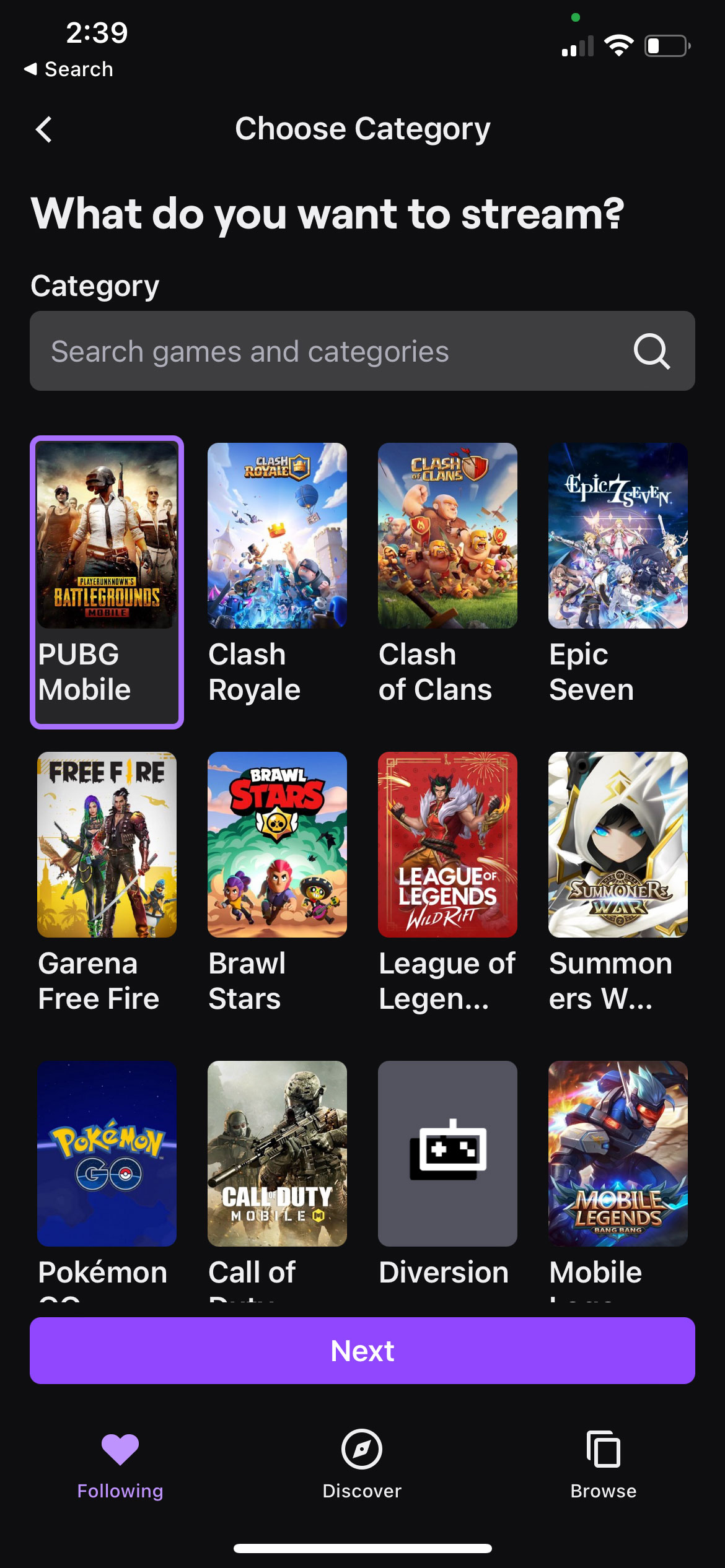
Upon clicking it, you’ll be taken to the category screen, where you can select the title you wish to stream.
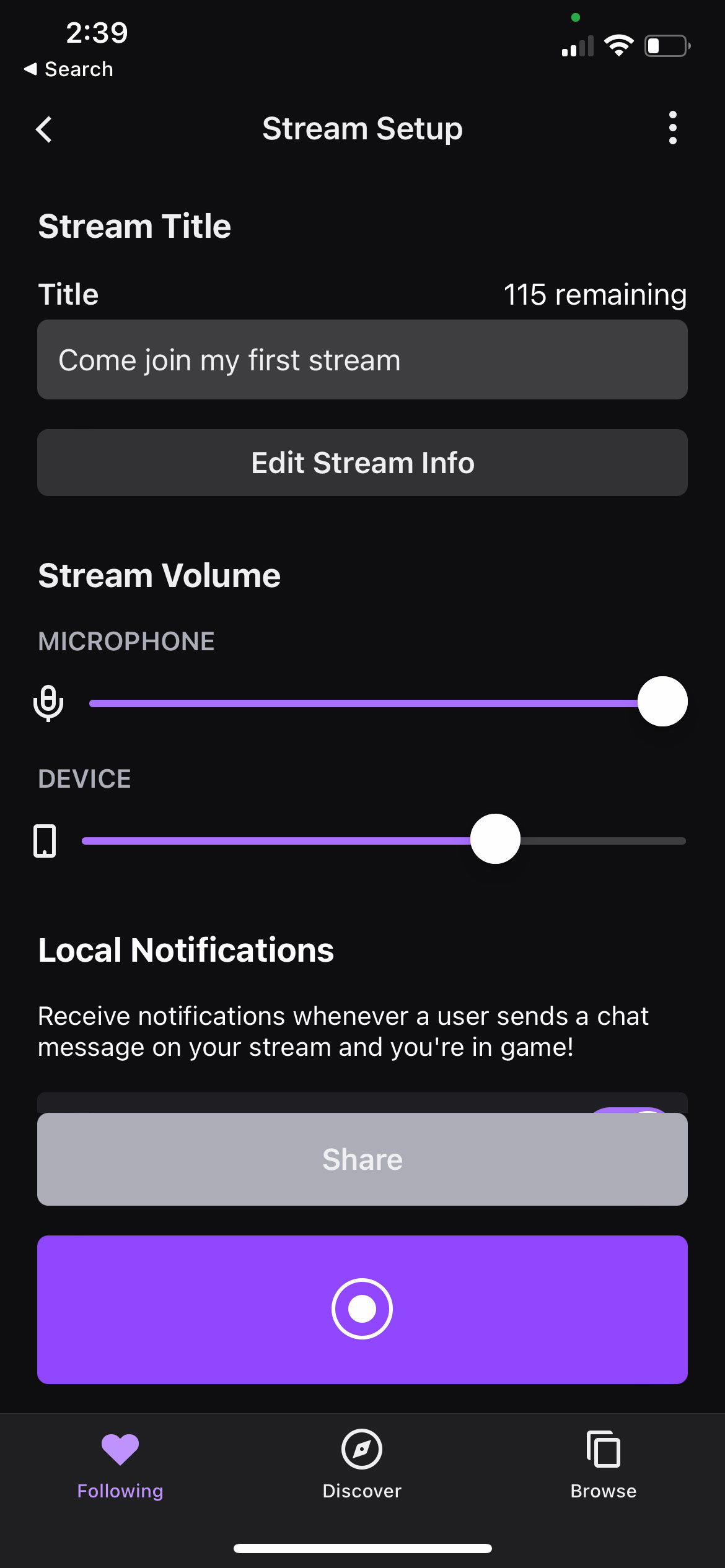
Then you set up your stream with its title, your microphone sensitivity, and the device’s volume. This is also where you enable or disable notifications from your chat, which would pop up like a normal text notification, along with an option to save your stream for up to 60 days.
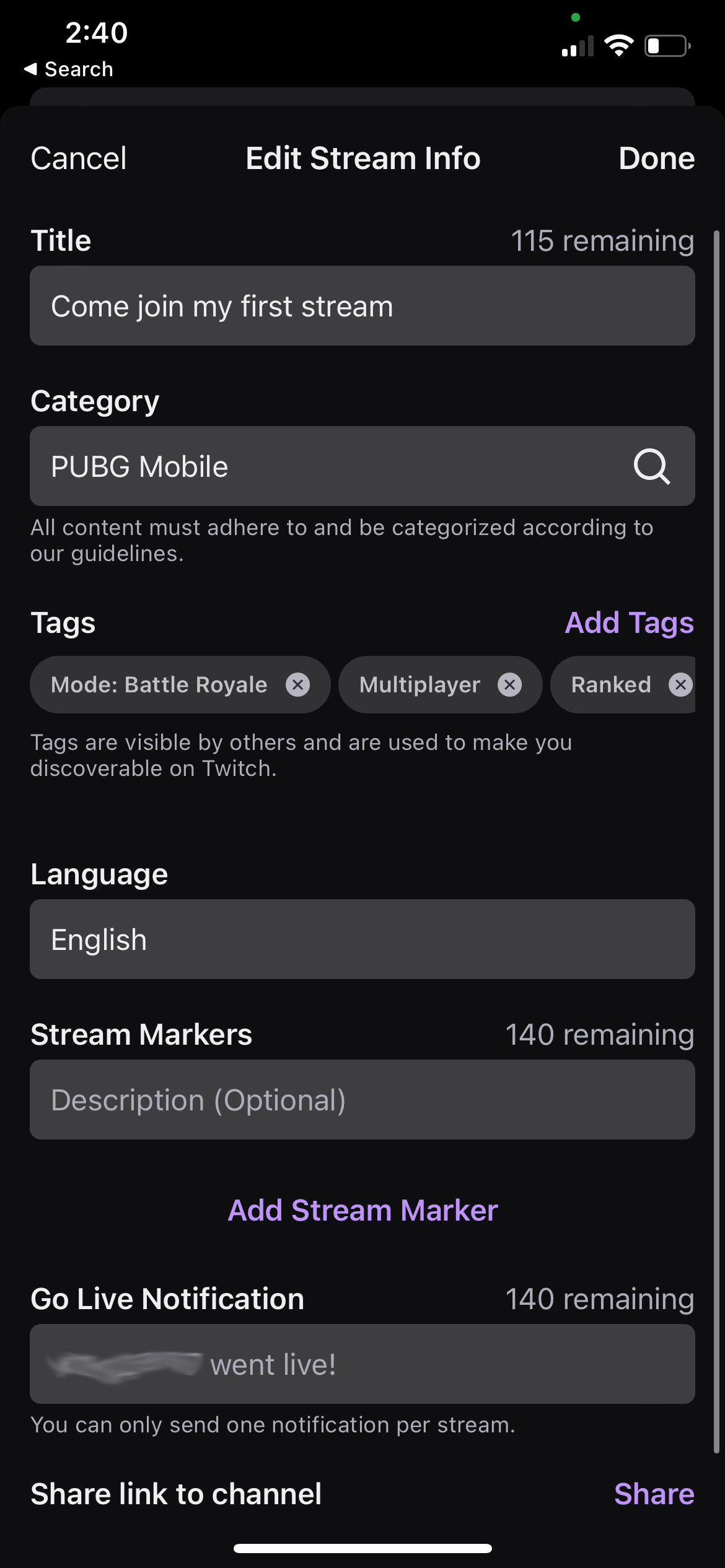
Clicking the “Edit Stream Info” button allows you to set tags, allowing people with similar tastes to discover you and this is also where you can set a “Going Live Notification” that lets all your followers and subscribers know that you’re streaming.
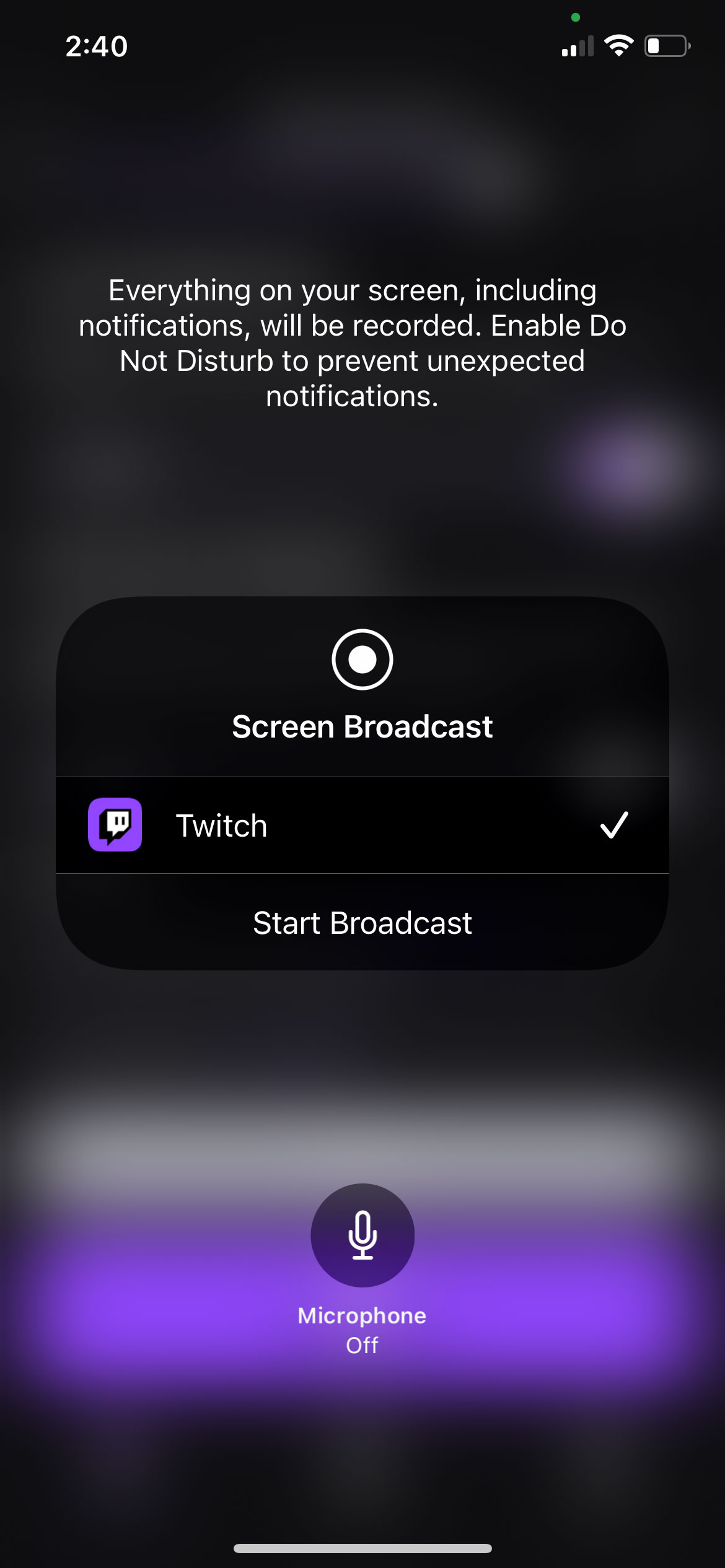
Finally, you click the big purple ‘live’ button and you’ll be presented with a disclaimer informing you that everything on your screen will be broadcasted, and that includes any pop-up notifications would be visible to all your viewers. Turning on the do not disturb is a good way to avoid any embarrassment.
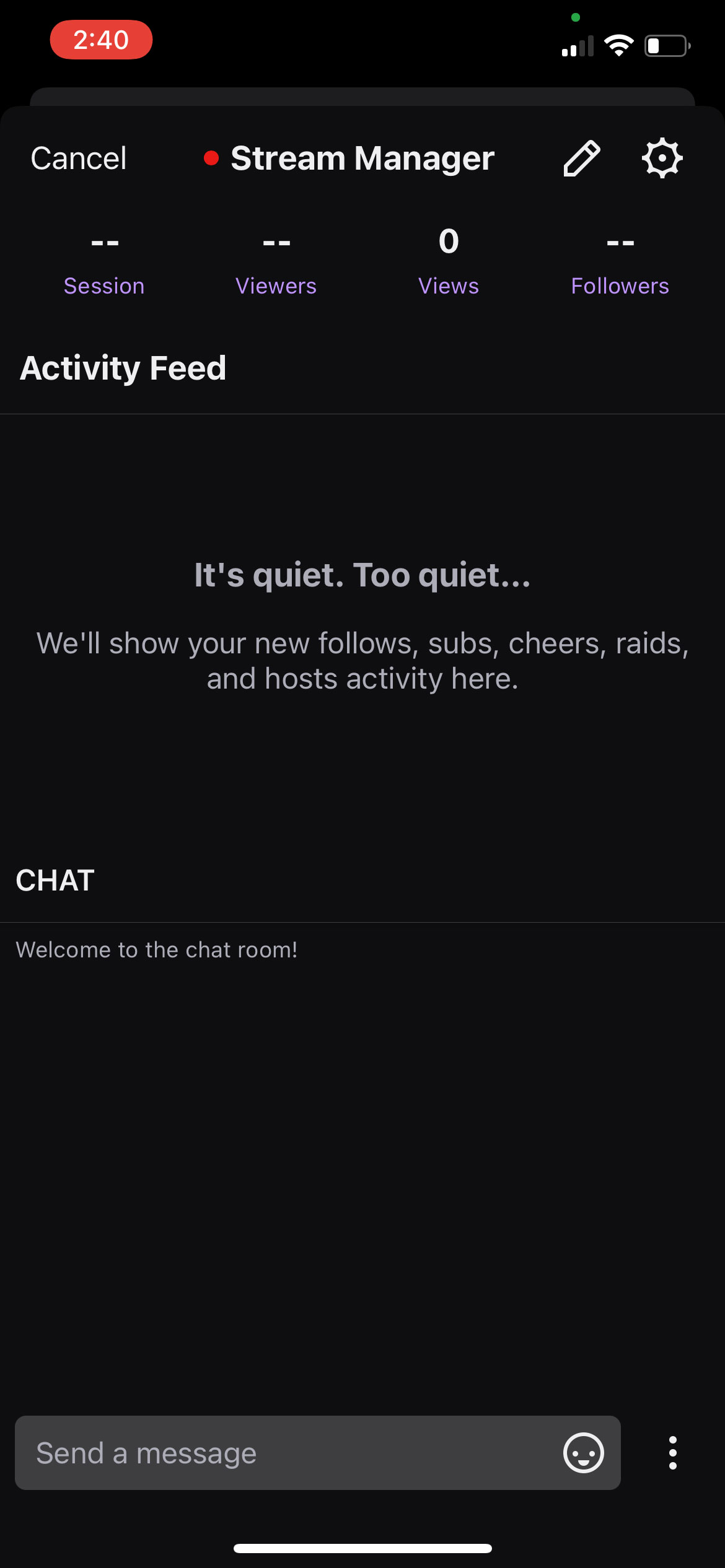
Click on “Start Broadcast” and your device’s screen will be broadcasted live. You can then switch to the title you wish to stream, and switch back to Twitch whenever you want to read your chat or check the stream statistics.
Screenshots below can guide you through the process mentioned above:
This is where you choose the title you want to stream.
Then you set up your stream with its title, your microphone sensitivity, device’s volume and other information.
This is where you set tags, allowing people with similar tastes to discover you.
Finally, you click the big purple ‘live’ button and you’ll be presented with a disclaimer.
Click on “Start Broadcast” and your device’s screen will be broadcasted live.
It’s worth noting that while streaming games, only whatever is happening on your device will be shared with the viewer, and your camera will not be enabled.
Streaming IRL, however, allows you to share live footage from your camera. It works similarly to streaming games.
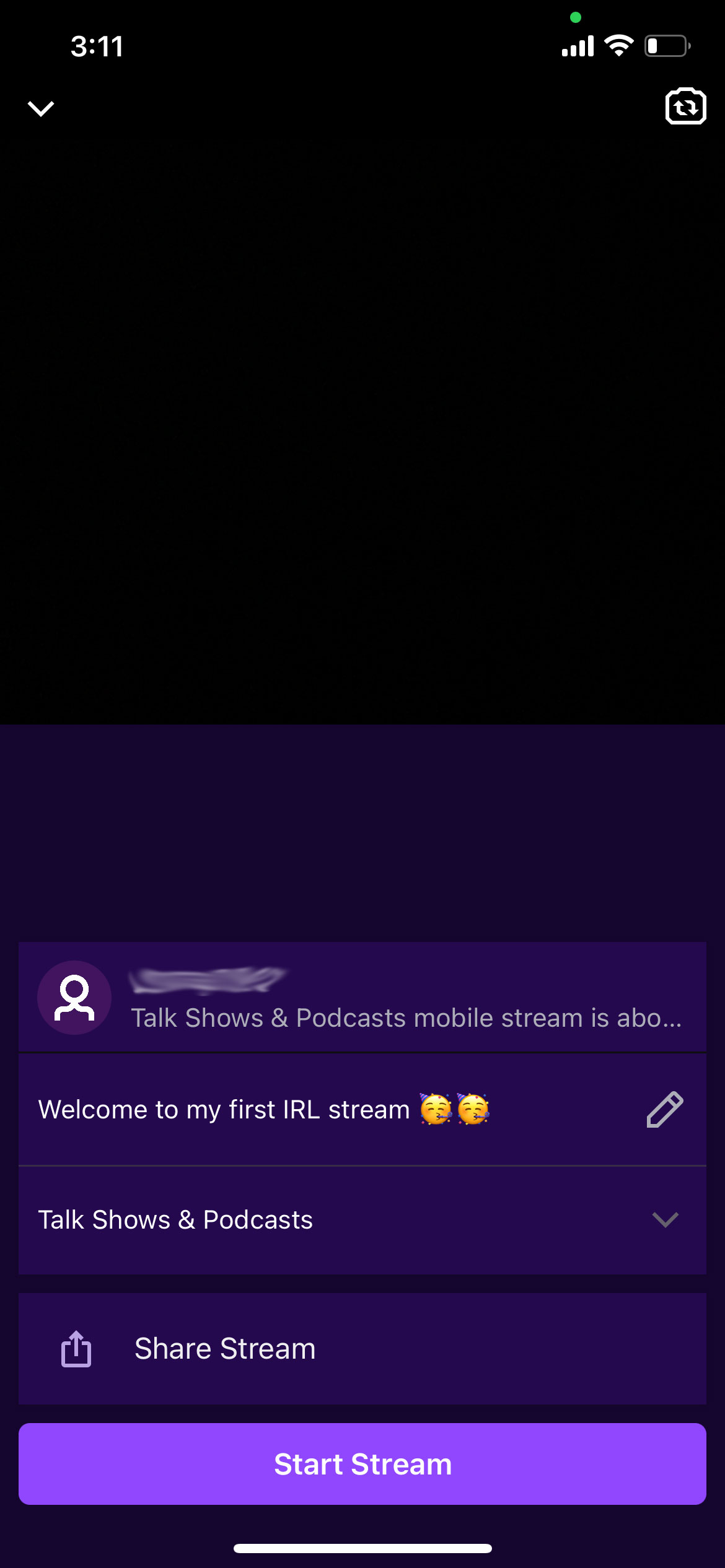
You click on the “Stream IRL” option and you’ll be presented with a stream set up screen. This is where you select your stream’s title (Welcome to my first IRL stream🥳🥳 in the screenshot below) and the category it falls under. Categories include ‘Talk Shows and Podcasts,’ ‘Just Chatting,’ ‘ASMR,’ Pools, Hot Tubs, and Beaches,’ ‘Special Events,’ ‘Fitness & Health’ and many more.
See screenshots below for reference:
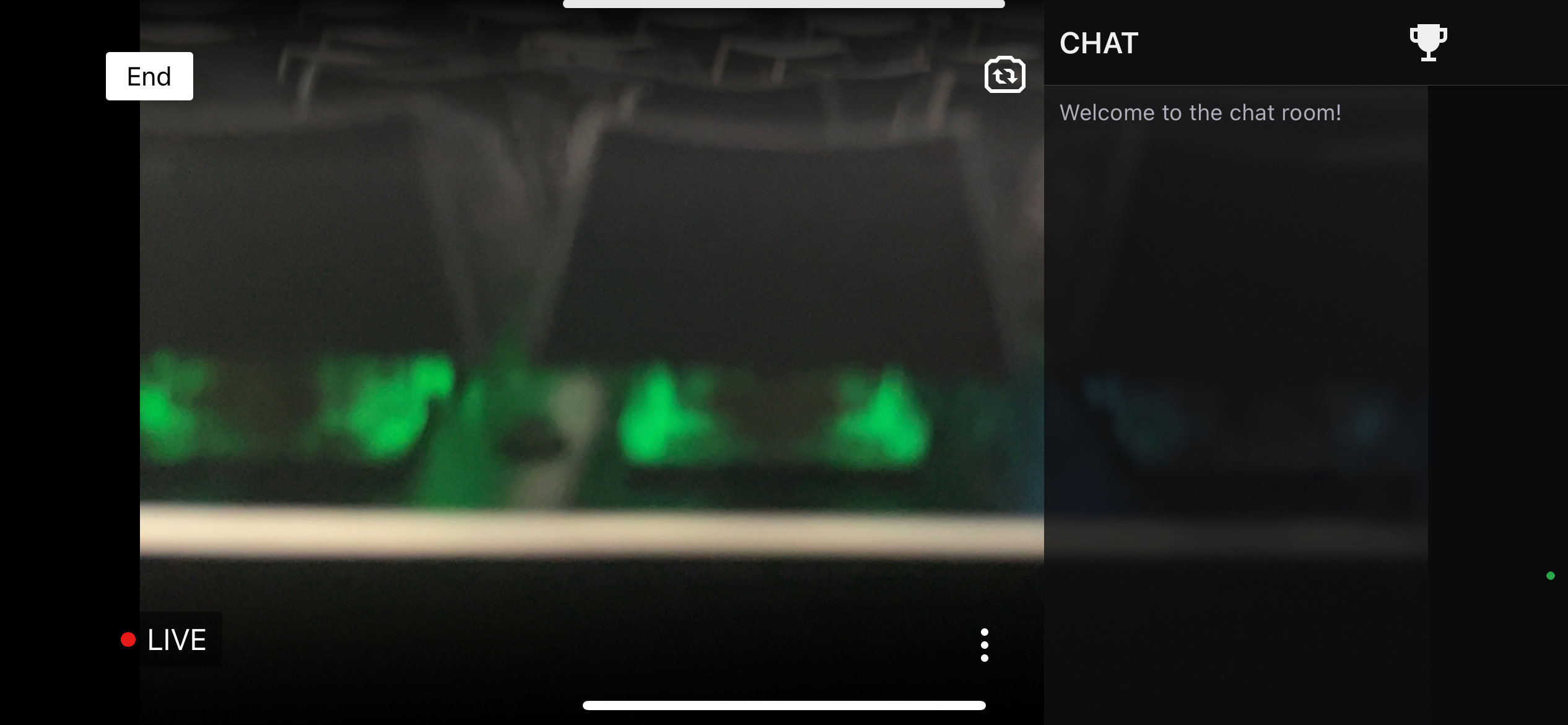
Once you’ve set up all information about your stream, click on the ‘Start Stream’ button and rotate your device to landscape mode (sadly, you can not stream in portrait mode) and the cameras start rolling, albeit with a three-second countdown.
Once live, you’ll see your stream the way your viewers are watching, and your chat will be placed on the right side. You can then switch between the front and back cameras, though you can not type in your own chat. When you’re finished, press the “End” button on the top left to conclude the stream.
Lastly, make sure you have a reliable internet connection to avoid any hiccups, and you’ll be ready to start your live streaming journey. Don’t be disheartened if you don’t pull in astronomical numbers in your first few streams, even the biggest streamers today used to struggle with viewership. Just stick to your niche and stream consistently and you’ll open up a lane that rewards you psychologically and financially.
Every week, MobileSyrup outlines some of the most notable movies and TV shows that recently hit Canadian streaming platforms.
Our ‘Streaming in Canada’ column typically focuses on new content from Amazon Prime Video, Crave and Netflix, but other services like Apple TV+ and Disney+ will be mentioned when relevant. Premium video on demand (PVOD) platforms are also fair game as movies continue to come to digital early amid the COVID-19 pandemic.
Finally, we’ll highlight shows or movies that are made by Canadian companies, involve notable Canadian cast or crew and/or are filmed in Canada.
Charli XCX: Alone Together [Amazon Original]
While in quarantine during the COVID-19 pandemic, singer-songwriter Charli XCX enlists her fans to help her make a new album.
Amazon Prime Video Canada premiere date: February 25th, 2022 Genre: Music documentary Runtime: 1 hour, 7 minutes
The full list of movies and shows hitting Amazon Prime Video in February can be found here.
Crave
Cry Macho
A former rodeo star is hired to return a young boy in Mexico to his father in the U.S.
Based on N. Richard Nash’s 1975 novel of the same name, Cry Macho was directed by Clint Eastwood (Unforgiven) and stars Eastwood, singer-songwriter Dwight Yoakam (“Honky-Tonk Man”) and Eduardo Minett (Como dice el dicho).
Original theatrical release date: September 17th, 2021
Amazon Prime Video Canada premiere date: February 25th, 2022 Genre: Music documentary Runtime: 1 hour, 7 minutes
Nicole Beharie (Miss Juneteenth), Colman Domingo (Euphoria), Jonathan Majors (Lovecraft Country), Denzel Whitaker (The Great Debaters), and Jeffrey Wright (Westworld) recite the words of famous American anti-slavery activist Frederick Douglass.
Based on Mike Isaac’s book of the same name, Super Pumped: The Battle for Uber explores the rise and fall of Uber founder Travis Kalanick.
The series stars Joseph Gordon-Levitt (The Trial of the Chicago 7) as Kalanick, Uma Thurman (Pulp Fiction) as Ariana Huffington, Kyle Chandler (Friday Night Lights) as Bill Gurley and Hank Azaria (The Simpsons) as Tim Cook. It’s also worth noting that Quentin Tarantino (Pulp Fiction) is the narrator.
Created by Brian Koppelman and David Levien (Billions), The Battle for Uber is the first installment in Showtime’s Super Pumped anthology series about a story that rocked the business world to its core.
Crave premiere date: February 27th, 2022 (first episode, new episodes every Sunday) Genre: Drama Runtime: Seven episodes (about one hour each)
A standard Crave subscription is priced at $19.99/month, with Starz costing an additional $5.99/month. A mobile-only subscription is also available for $9.99/month.
The full list of movies and shows hitting Crave this month can be found here.
Disney+
No Exit [Star Original]
After getting stuck during a blizzard with strangers at a mountain stop, college student Darby Thorne discovers a kidnapped child belonging to one of the people inside.
Based on Taylor Adams’ 2017 novel of the same name, No Exit was directed by Damien Power (Killing Ground) and stars Havana Rose Liu (The Sky is Everywhere), Danny Ramirez (The Falcon and the Winter Soldier), David Rysdahl (The Revival) and Dennis Haysbert (Lucifer).
The Proud Family: Louder and Prouder [Disney+ Original]
Disney has revived Bruce W. Smith’s popular Disney Channel animated series about African-American teen Penny Proud and her family.
Returning voice talent includes Kyla Pratt as Penny Proud, Tommy Davidson as Oscar Proud, Paula Jai Parker as Trudy Proud, JoMarie Payton as Suga Mama, Cedric the Entertainer as Uncle Bobby, Karen Malina White as Dijonay Jones and Alisa Reyes as LaCienega Boulevardez.
Disney+ Canada premiere date: February 23rd, 2022 (first two episodes, new episodes every Wednesday) Genre: Animated comedy Runtime: 10 episodes (around 30 minutes each)
The full list of movies and shows hitting Disney+ this month can be found here.
Netflix
Cat Burglar [Netflix Original]
Charlie Brooker (Black Mirror: Bandersnatch) returns with another “choose-your-own-adventure” Netflix special — this time about an animated cat who tries to steal paintings.
The special features the voices of James Adomian (The Late Late Show with Craig Ferguson), Alan Lee (Sword Art Online) and Edmonton’s Trevor Devall (Disney XD’s Guardians of the Galaxy).
One hundred years after the events of Vikings, the Viking Age begins following the Battle of Stamford Bridge in 1066.
Vikings: Valhalla was created by Jeb Stuart (Die Hard) and stars Sam Corlett (Chilling Adventures of Sabrina), Frida Gustavsson (The Witcher) and Leo Suter (Victoria).
Netflix Canada premiere date: February 25th, 2022 Genre: Historial drama Runtime: Eight episodes (45 to 60 minutes each)
Ukraine’s Vice Prime Minister and Minister of Digital Transformation Mykhailo Fedorov has asked Apple CEO Tim Cook to block Russian citizens from accessing the App Store amid the ongoing invasion.
Fedorov tweeted a purported copy of an official request to Cook, writing that “modern technology is perhaps the best answer to the tanks, multiple rocket launchers (hrad) and missiles.”
I’ve contacted @tim_cook, Apple's CEO, to block the Apple Store for citizens of the Russian Federation, and to support the package of US government sanctions! If you agree to have the president-killer, then you will have to be satisfied with the only available site Russia 24. pic.twitter.com/b5dm78g2vS
Fedorov also appeals to Russia’s youth and active population to resist the invasion. However, it’s possible that restricting App Store access could block Russian citizens from apps and services used to coordinate resistance.
Spotted by CNET, a tweet from UC Irvine Law Professors and former UN Special Rapporteur on free speech David Kaye warns of the possibility.
i very much sympathize with the instinct but wonder how cutting off russian citizens' access to the app store would affect their ability to communicate, protest, organize, use VPNs… https://t.co/drhkWvLwOP
CNET notes that Ukraine appears to be trying various technology-based defences, including reportedly recruiting its hacker community to protect infrastructure and report on Russian military movements.
Valve co-founder and president Gabe Newell isn’t interested in doing a Steam game subscription service but is open to bringing Microsoft’s Game Pass to Steam.
Newell did an interview with PC Gamer about the recent Steam Deck release. However, the publication also asked him whether Valve wanted to make its own subscription service like Microsoft’s Game Pass.
“I don’t think it’s something that we think we need to do ourselves, building a subscription service at this time. But for their customers it’s clearly a popular option, and we’d be more than happy to work with them to get that on Steam,” Newell said.
“We’ve talked to people there quite a bit about that topic. If your customers want it, then you should figure out how to make it happen. That’s where we’re at.”
So, it sounds like we won’t see a “Steam Pass” subscription (or whatever Valve would call it). However, Microsoft’s Game Pass on Steam is also quite intriguing. Some people have had issues with how the service handles installing and managing games on PC, while other games have had issues or missing features on Game Pass. If people were able to use Steam to handle game installs instead, it might make Game Pass more popular.
Moreover, as PC Gamer points out, there is precedent for Steam hosting other subscription services. EA added its EA Play subscription to Steam in 2020. Moreover, Steam support for Game Pass could open the subscription up to Steam Deck owners. Currently, Steam Deck runs Linux, which means Game Pass isn’t available — it uses Microsoft’s Xbox app, which doesn’t exist for Linux.
That said, PC Gamer notes that Steam Deck owners may be able to play Game Pass without the need for Linux support in the future. Valve and AMD are reportedly still working on driver compatibility to allow installing Windows on Steam Deck — once that’s sorted out, Steam Deck owners may be able to install Windows and access Game Pass that way.
Regardless, Game Pass on Steam depends on Microsoft too. Valve is clearly open to the idea, but it remains to be seen if Microsoft is — judging by previous comments, it might be. In August 2021, Xbox boss Phil Spencer said there were “no plans to bring [Game Pass] to any other kind of closed platforms right now” in response to questions about putting the subscription service on the Nintendo Switch.
Instead, Spencer said the team was focussing on “open platforms” but acknowledged that Xbox was open to discussions about bringing the “full experience to a device that players want.” Maybe that sentiment includes game distribution platforms like Steam too.
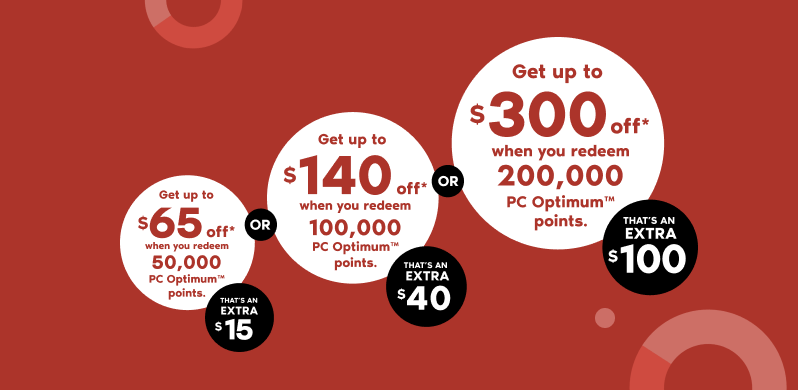
The event effectively offers bonus points when you redeem certain amounts of PC Optimum points on purchases, resulting in an extra discount. The three tiers of bonus points are as follows:
Redeem 50,000 points for up to $65 off (normally $50 off)
Redeem 100,000 points for up to $140 off (normally $100 off)
Redeem 200,000 points for up to $300 off (normally $200 off)
Ultimately, that means you get more if you redeem more points. Plus, it’s worth noting that Shoppers sells various electronics — for example, you could redeem 200,000 points to get $300 off a Nintendo Switch, meaning you just pay $79.99 for the console.
Shoppers’ redemption event runs from February 25th to March 2nd, so if you’re looking to make any big purchases and have a ton of points saved up, now might be the time to use them.
However, there are a few caveats to keep in mind, as highlighted by the deal experts over at RedFlagDeals. First, customers pay taxes on the entire amount of the purchase. Second, customers can’t redeem the points for gift cards. Third, customers can’t use multiple bonus redemptions in one transaction. Finally, customers can’t earn points on the redeemed amount, but can still earn points on the amount leftover.
Those are all good things to keep in mind for anyone planning to take advantage of the bonus redemption event.
You can learn more about the Shoppers Drug Mart redemption event here.
FromSoftware’s latest game, Elden Ring, has already proven quite popular and has seen high scores from critics across the board. Unfortunately, problems with the Xbox version of the game are preventing some players from fully enjoying the experience.
According to Windows Central, a version mismatch issue on Xbox is causing Elden Ring’s online systems for co-op, messages, and PvP to fail. Publisher Bandai Namco has reportedly failed to acknowledge the problem.
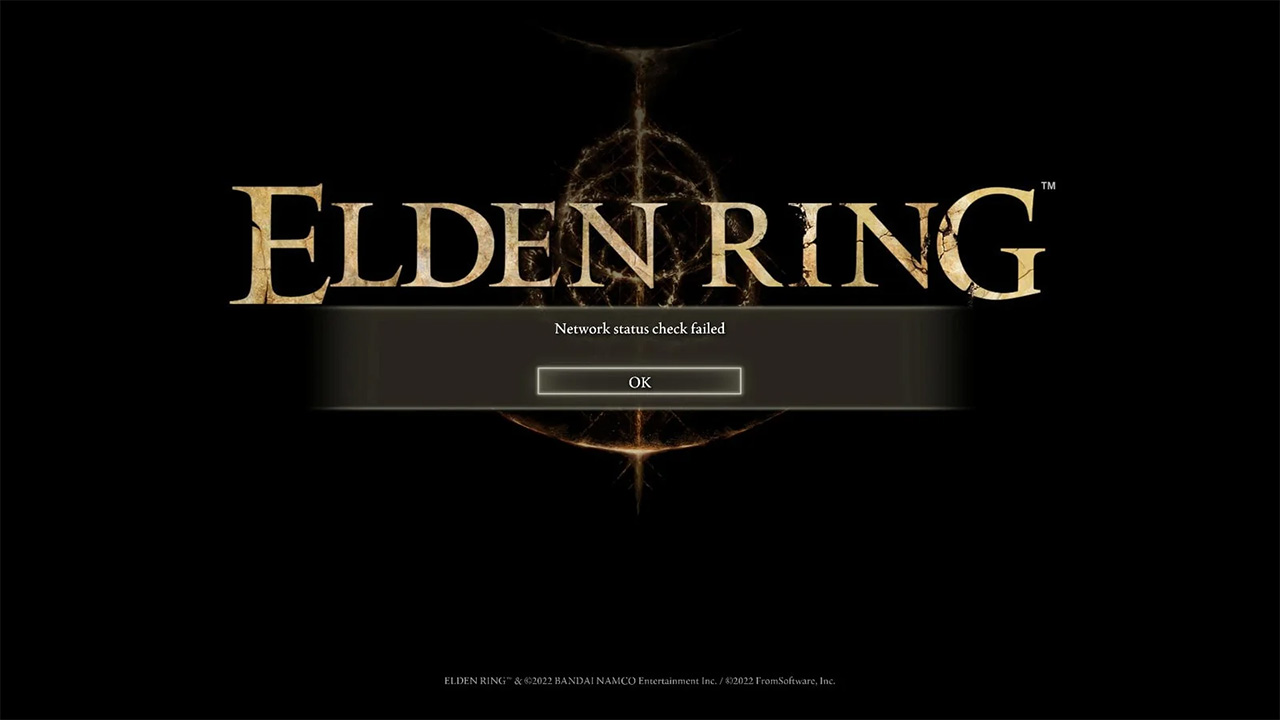
Windows Central reports that users on ‘Calibrations Ver. 1.0.2.1’ and app ‘Ver. 1.02’ shouldn’t have problems connecting to the Xbox online systems. However, many players haven’t received the update yet, leading to warnings that the ‘Network status check failed.’
Image credit: Windows Central
Since the issues appear to impact online systems only, those who want to take on Elden Ring solo should still be able to play. In classic FromSoftware style, Elden Ring is quite difficult — however, this time around, the game includes a way to summon AI-powered companions that can help players through challenging encounters.
Hopefully, a fix comes soon for Xbox players hoping to enjoy Elden Ring with friends.