Costco is warning its customers in Canada to be cautious of several scams through texts.
The first text message tells customers to claim their Capital One Costco Mastercard Cash Back reward by clicking a link.
“The text is a SCAM,” the company said in a recent update. No digital coupons are associated with the reward, Costco said, which will be mailed to eligible customers.
Another scam presents a link for customers to claim a reward associated with the ‘Executive’ membership level. This is also a scam, as Costco said it mails the reward to applicable parties.
The company said it has also seen an increase in survey scams, which claims to give users a free prize if they respond to a survey online.
“We do not ask customers to provide personal information online or via text. The only online request by Costco for personal information is through our official website, Costco.ca.”
Costco is warning its customers not to respond to unverified emails or provide and personal information through email of text. Canadians should also consider filing a report through the Canadian Anti-Fraud Centre, the company wrote in the post.
At the MWC event in Barcelona, Spain today, OnePlus showed off its latest concept mobile device, and it’s undoubtedly ‘cool.’
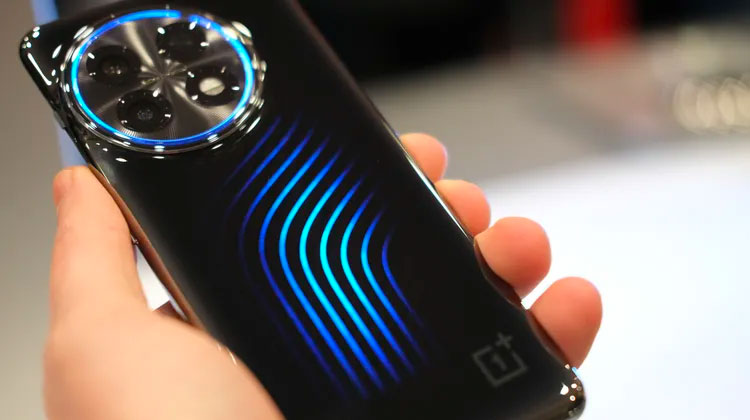
The concept device is based on the OnePlus 11 and features a distinctive glowing blue pipeline design on its back, which represents the cooling liquid of its new “Active CryoFlux” cooling technology, as shared by The Verge.
The Active CryoFlux technology, according to OnePlus, is not just for show. It allows the device to maintain cool temperatures under load, resulting in better gaming performance and faster charging speeds. Accessories like Razer’s phone cooler and the Asus ROG Phone6 Cooling Fan offer similar cooling features but with the added weight, size and noise of the accessory.
Performance-wise, OnePlus said that the cooling technology allows the concept device to drop by 2.1 degrees Celsius in temperature while gaming, resulting in an increase in performance of between 3 and 4 frames per second. Similarly, while charging, the cooling system can reduce temperatures by 1.6 degrees Celsius, which could result in faster charging times by 30 to 45 seconds.
The performance benefits aren’t all that monumental and were not demonstrated during the MWC event. However, OnePlus claimed that an “industrial-grade piezoelectric ceramic micropump” drives the cooling liquid through the device’s pipelines, and it occupies less than 0.2cm² of space. The Verge says that despite the cooling system, “the phone didn’t feel especially thick or heavy in the hand.”
It is currently unknown if or when the Active CryoFlux technology would make its way to a future commercially available OnePlus device.
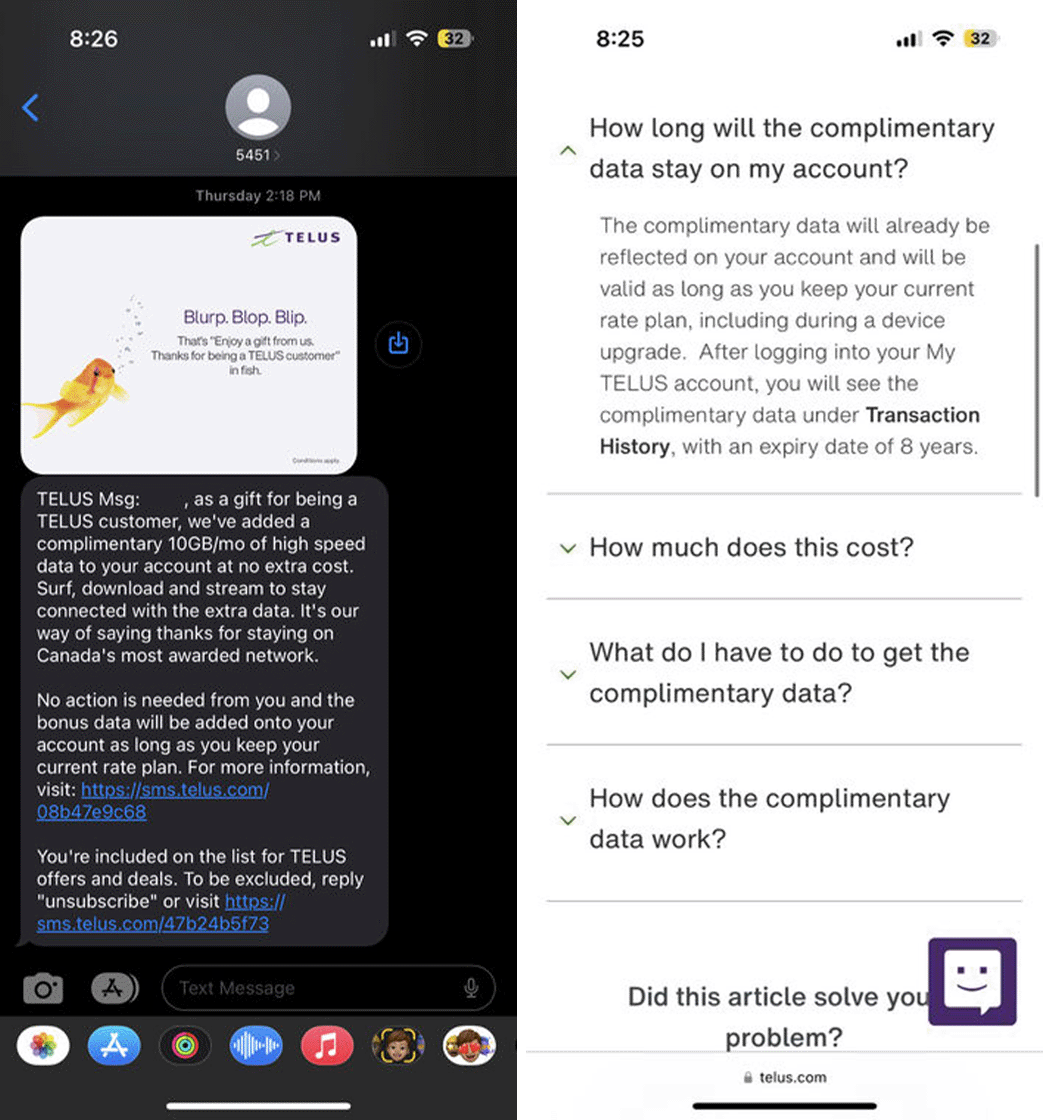
Rogers isn’t the only major carrier offering extra data to customers. Some Telus customers also received an offer of 10GB of extra data that’s set to expire after eight years.
The Telus 10GB bonus data offer | Image credit: 247DealSeeker
The first screenshot is of a text message from Telus, which says that it “added a complimentary 10GB/mo of high speed data to your account at no extra cost” as a “gift” for being a customer. The message goes on to explain that the customer doesn’t need to do anything, and the bonus data will be added to the account “as long as you keep your current rate plan.”
Of course, that second part isn’t entirely true, at least based on the second screenshot of a Telus FAQ page about the complimentary data, which says:
“The complimentary data will already be reflected on your account and will be valid as long as you keep your current rate plan, including during a device upgrade. After logging into your My TELUS account, you will see the complimentary data under Transaction History, with an expiry date of 8 years.” (Emphasis ours)
The Telus offer differs from Rogers’ version in a couple significant ways — first, it requires no action from the customer to activate. More importantly, the Telus offer lasts much longer than the Rogers one, which is set to expire after 24 months.
Unfortunately with deals like this, your mileage may vary. Telus customers should definitely keep an eye out for a message from the carrier about the extra data, but if you don’t get the message you might just be out of luck.
Samsung is having a great sale on select monitors today. If you’re in the market to add another level to your work or gaming experience, check out these deals below.
MobileSyrup utilizes affiliate partnerships. These partnerships do not influence our editorial content, though we may earn a commission on purchases made via these links that helps fund the journalism provided free on our website.
I’ve spent the past week and a half using Razer’s latest PC gaming soundbar, the Leviathan V2 Pro, and I can confidently say that it doesn’t disappoint, but it also isn’t for everyone.
Razer touts the soundbar as a one-stop PC audio solution, and it is just that.
Minimalist design for a gaming soundbar
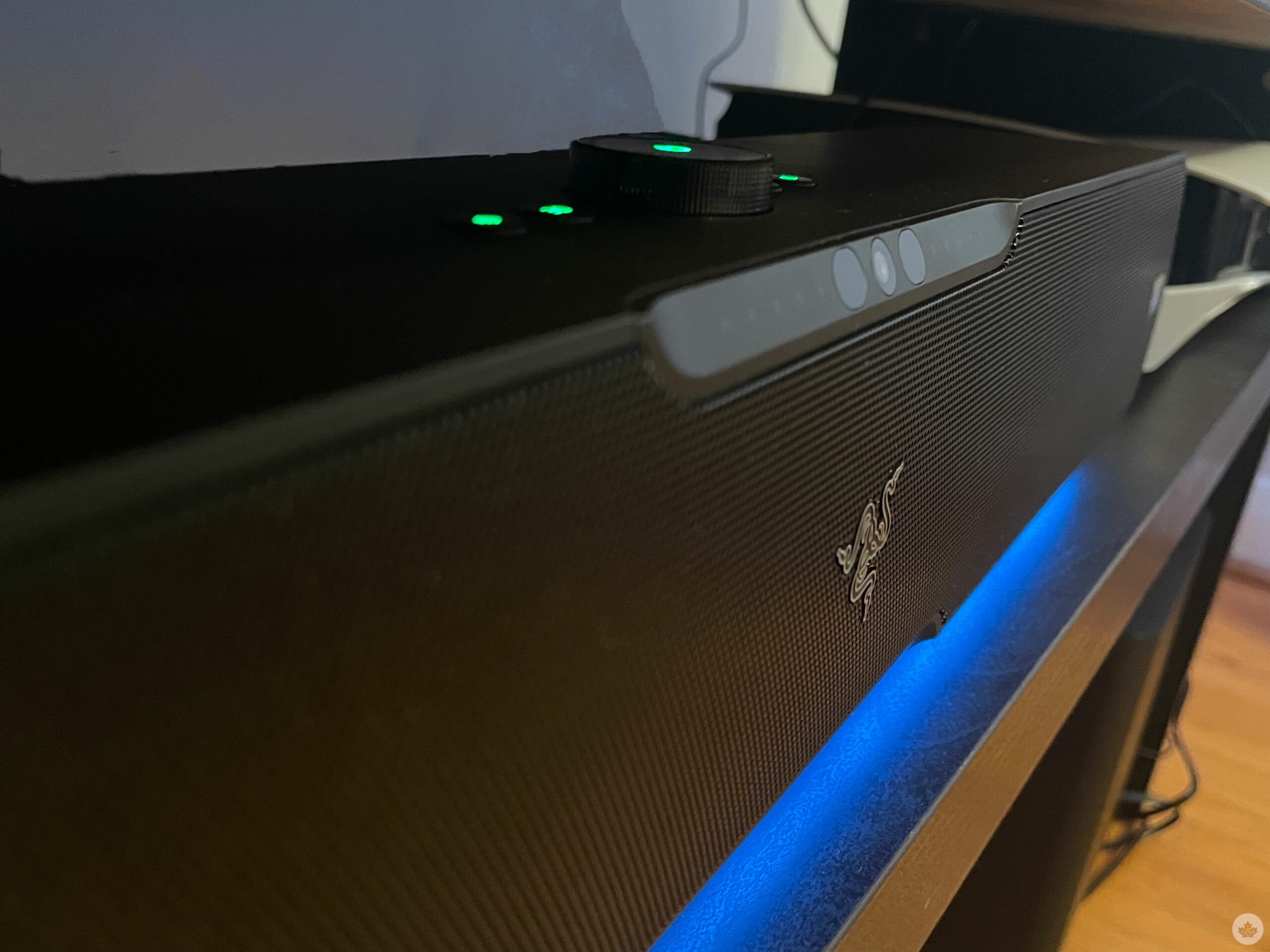
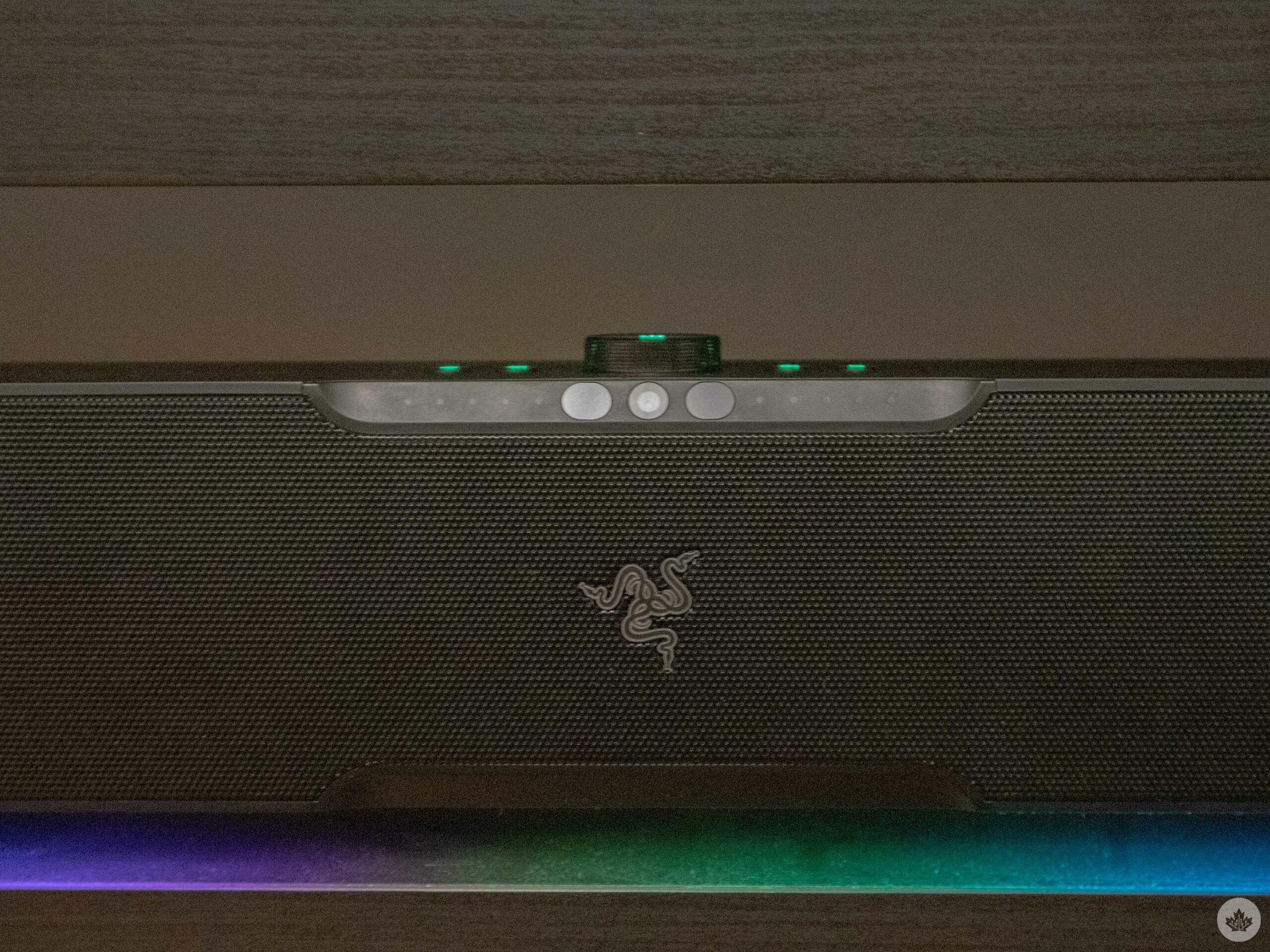
The Leviathan V2 Pro is a regular-looking soundbar. What I mean by that is it doesn’t feature any tacky gamer-esque elements. But it’s not plain and boring, either. The soundbar features a premium-looking black mesh grille in the front with a matte body. The buttons to control the V2 Pro are positioned neatly on top and include a volume knob that also doubles as a power on/off button, and four smaller round buttons to adjust equalizer presets, audio modes, RGB lights and inputs.
The Leviathan V2 Pro is designed to sit right in front of you on your desk and be positioned under your monitor. In my case, the monitor’s bottom bezel is fairly high, and I place the monitor further away on my desk, resulting in no inconvenience. However, some PC users, especially while gaming, prefer having their monitor placed close to them at a slanted angle. I would imagine the soundbar would get in the way in those situations, as it comes in at 4.5-inches tall. The single-firing subwoofer isn’t too huge either, coming in at 10.2-inches x 11.6-inches x 10.2-inches. The ideal position for it is under your desk near your feet, so that shouldn’t take up any extra space on your desk.
The front of the soundbar houses an IR (Infrared) camera that tracks the user sitting right in front of it (more on it later). On each side of the IR camera are LED lights that indicate which audio mode you’re currently on, and if the soundbar is able to track your head or not.
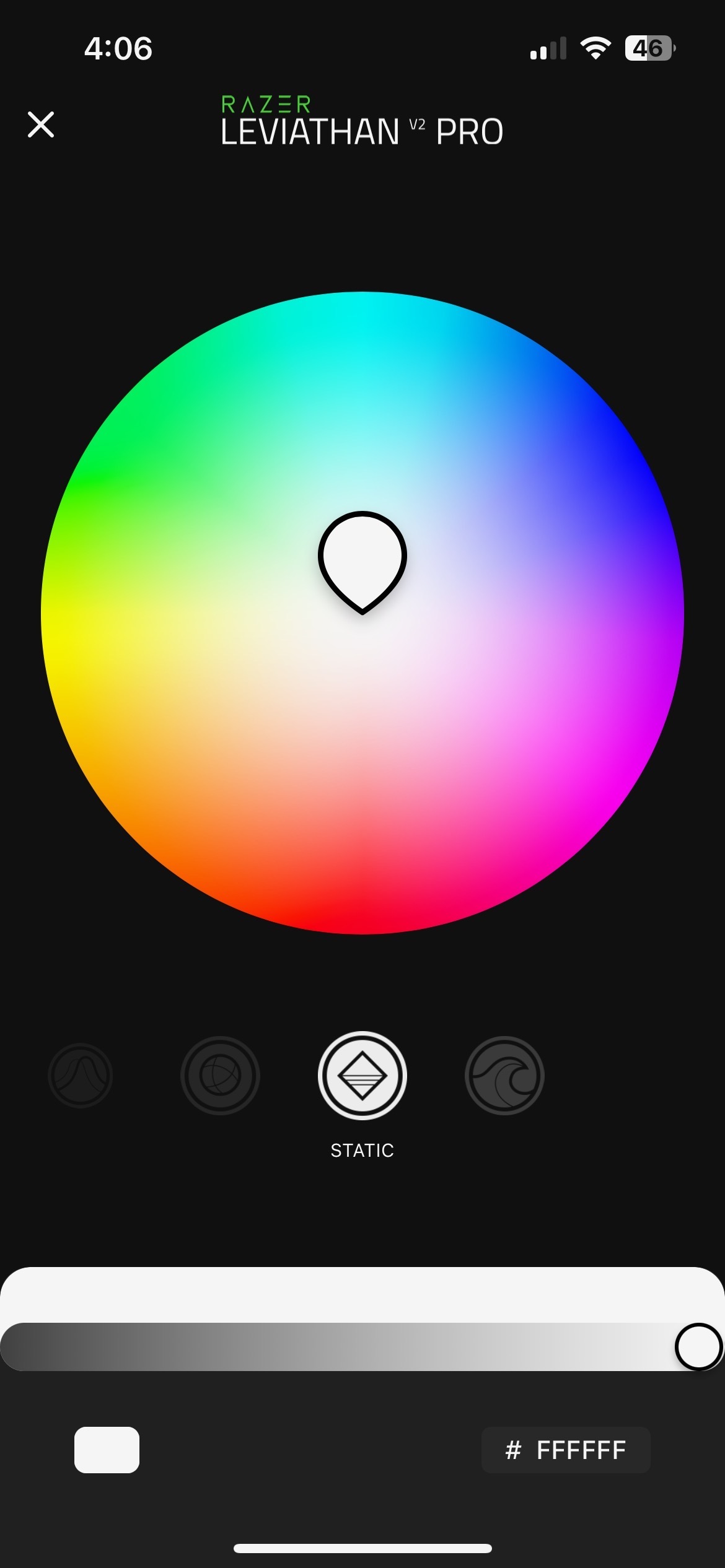
And, of course, RGB lights. Through the bottom of the soundbar runs a customizable Razer Chroma RGB light strip that doesn’t scream “GAMER!” but adds a fun element.
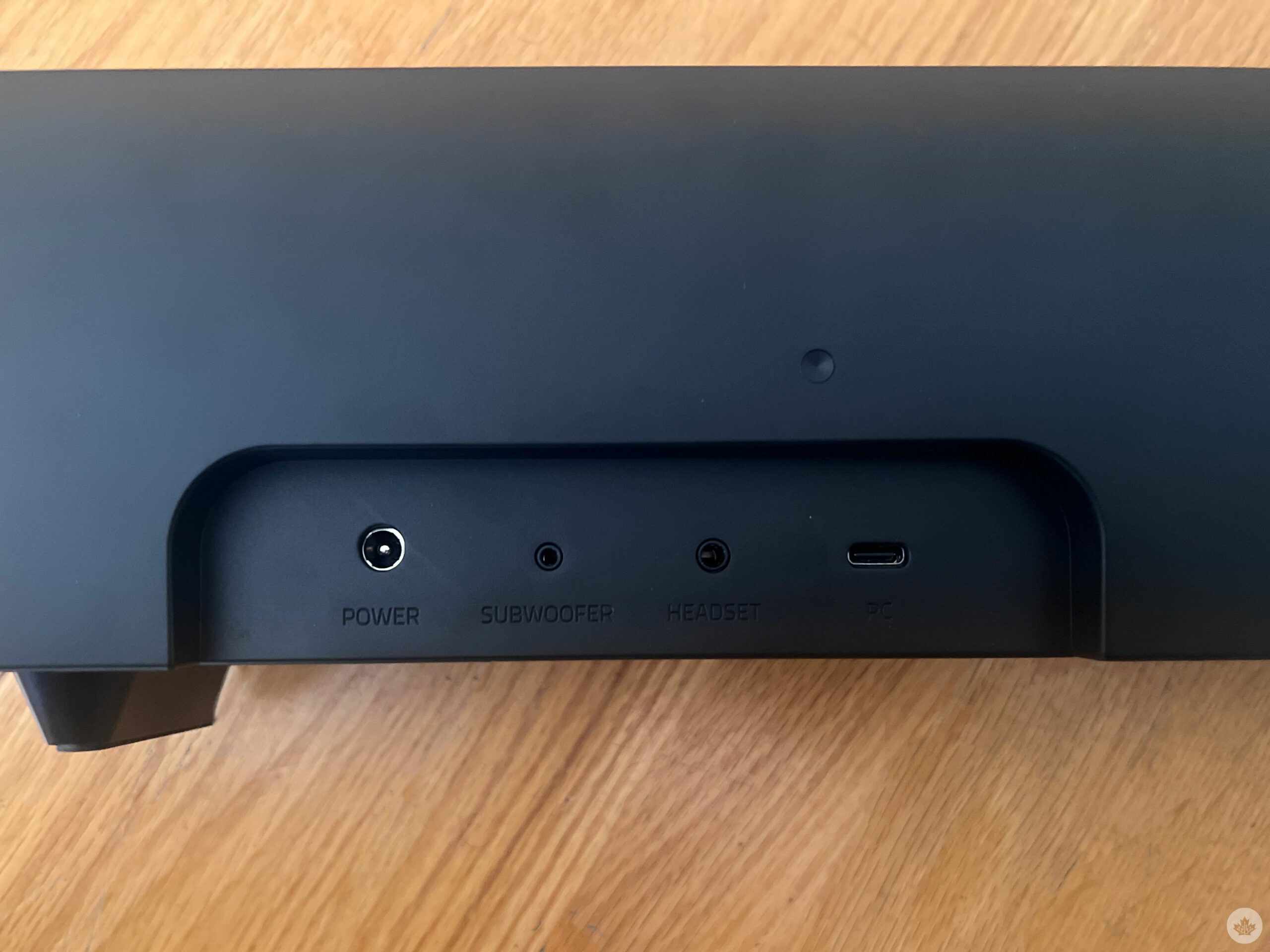
On the rear, the soundbar features a regular power port, followed by a subwoofer output port, a 3.5mm headset port and a USB Type C port.
Connectivity is easy, and customization options are abundant
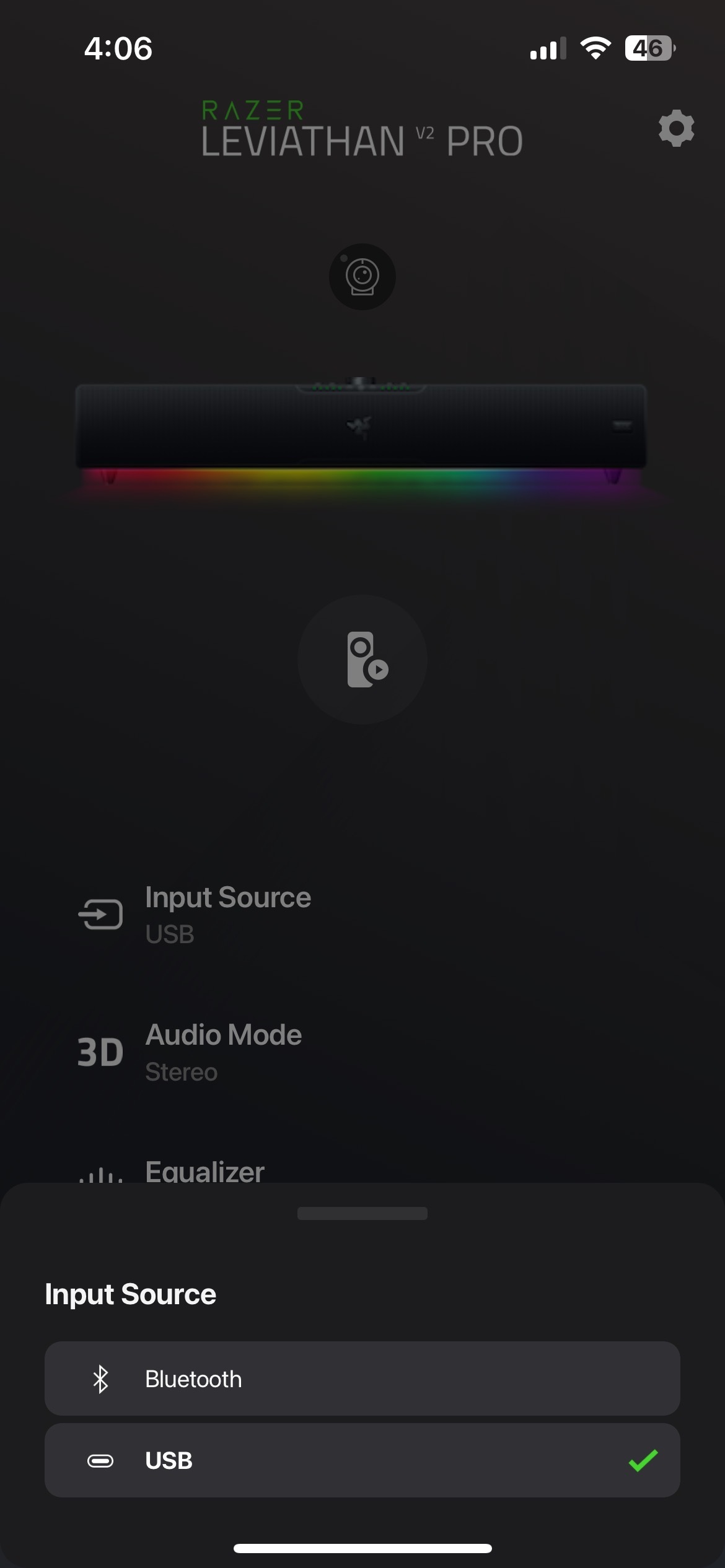
Razer has designed the Leviathan V2 Pro to work best with a PC, though it’s also compatible with Bluetooth devices such as mobile phones, tablets, and the Nintendo Switch. On PC, connecting the soundbar is no hassle thanks to a USB-C to USB-A plug-and-play connection. Similarly, Bluetooth 5.0 allows for a seamless, fast and low-input delay connection with mobile devices.
It’s worth noting that the soundbar and the subwoofer require their own power outlets, and considering that the ports around your PC would already be occupied with the monitor and accessory wires, you’ll need to purchase an extra extension. Connecting the subwoofer to the soundbar is fairly simple, with an input/output wire for each end, though a wireless subwoofer would have served me better. Ever since I’ve moved to a new house, my cable management has gotten awful, and tucking away thick power cables for both the soundbar and the subwoofer has been a pain without a wire management tray.
Further, you can also plug your headphones directly into the 3.5mm slot on the rear of the soundbar to switch between the two devices with ease.
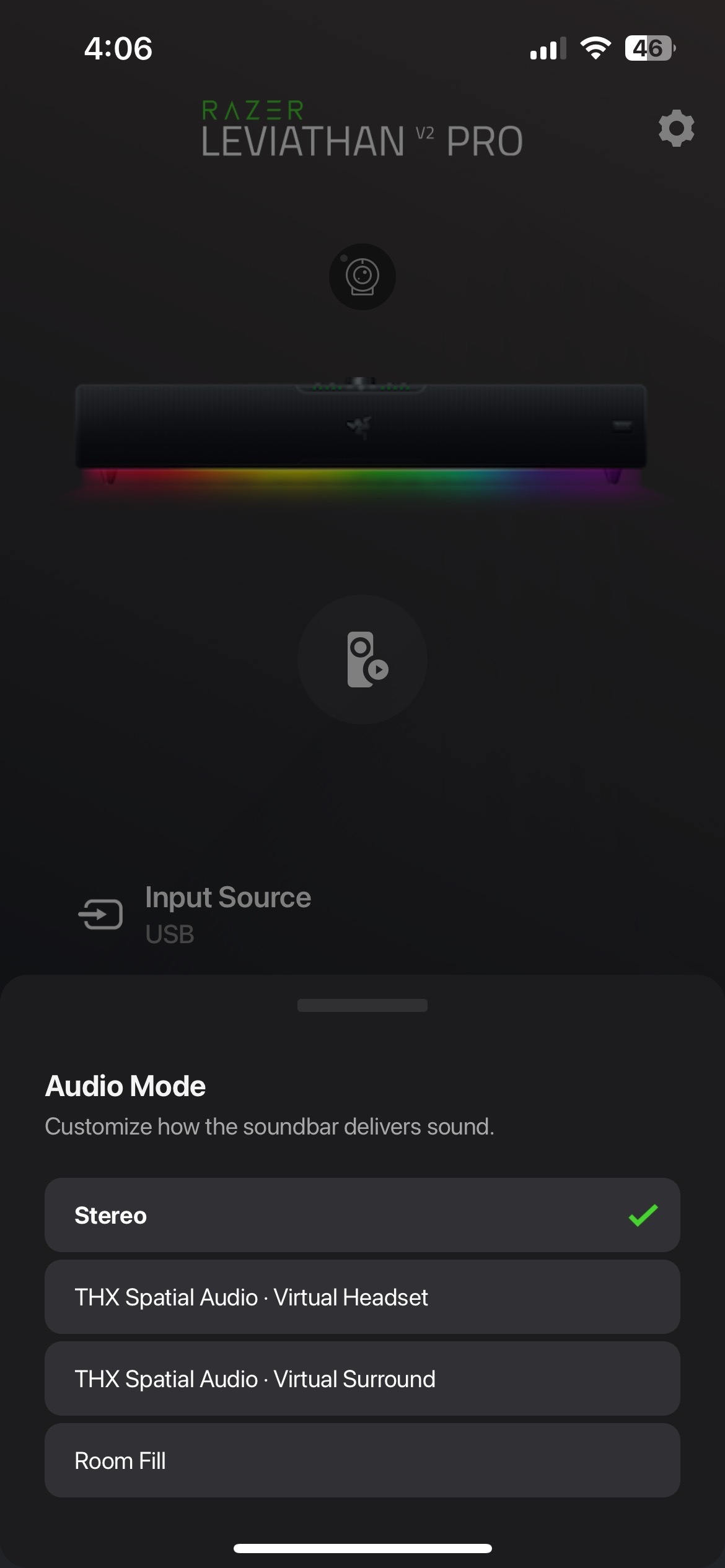
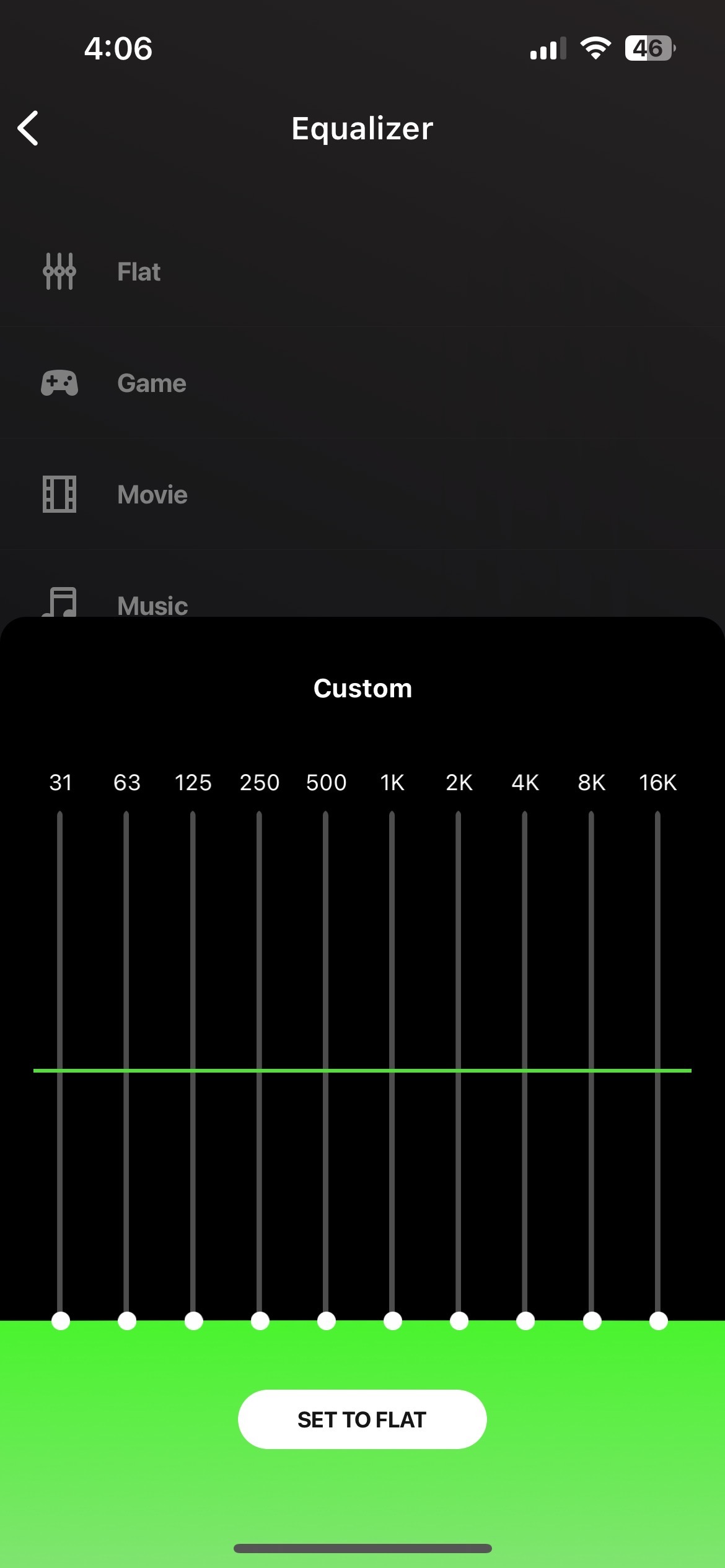
The audio modes for the soundbar can easily be adjusted from the top-placed buttons, but the Razer Synapse app for PC and the Razer Audio app for iOS and Android offer a much wider range of customization. I found myself using the mobile application more often than the PC one just because of the ease of accessibility, though none of the apps offer anything that the other doesn’t. Both apps allow you to switch between modes, including Virtual Headset, Virtual Surround, Stereo and Room Fill. The equalizer also has some presets, including Flat, Game, Movie and Music, though you can adjust the sound and bass according to your own preference as well.
The Leviathan V2 Pro sounds incredible
A good soundbar primarily needs to have good audio quality, and the Leviathan V2 Pro certainly delivers. It’s worth noting that the soundbar itself doesn’t have built-in woofers, so using it by itself wouldn’t offer very pleasing results. With the subwoofer connected, though, the Leviathan V2 Pro doesn’t feel any less capable than a full-fledged home theatre that wouldn’t fail to piss off your neighbours.
The most interesting feature that the Leviathan V2 Pro offers is its beamforming virtual headset mode. I had a lot of fun trying out the feature, but is it enough to replace an actual headset? The feature essentially employs the front-positioned IR camera to scan where your head and ear are and beam audio waves directly to them.
The feature isn’t a trick to sell the soundbar; it actually works quite well. For me, using the mode for the first few minutes felt very weird. Not uncomfortable-weird, but more like fascinating-weird. While using the mode, it actually felt like I was wearing virtual headphones, with audio consistently beamed directly to my ears, even if I changed my position or swayed my head from side to side.
This brings us back to the question: can the Leviathan V2 Pro replace an actual headset? Well, in some cases, yes. Playing Marvel’s Spider-Man: Miles Moraleswith the mode turned on was enjoyable, with all kinds of sound effects from the game beamed directly to my ears. Titles that don’t require absolute sound accuracy, like FIFA 23 or God of War, for example, are a pleasure to play with the head tracking mode turned on, but for more competitive games where you need to hear where exactly your enemies are coming from, I would still prefer a regular headset. Not only because the positional audio is more accurate with regular headphones, but also because I’d have to keep the soundbar at a fairly high volume when gaming, and that wouldn’t always suit well with my housemates.
Similar to the Virtual Headset mode, Virtual Surround also uses the front-positioned IR camera accurately replicates a 7.1 surround sound experience, with audio beaming to you from each side of the room in a stage-like experience. It’s quite remarkable that I can sway from side-to-side and still consistently feel like I’m positioned at the center of the soundstage.
What’s missing is built-in tweeters. I feel that sometimes the vocals feel muddy and in-game audio effects feel dull due to the lack of tweeters. That doesn’t necessarily mean that the high-end and treble are entirely missing, nor does it completely make or break the Leviathan V2. It’s just that the soundbar can’t replicate actual headphones in that aspect.
The Razer Leviathan V2 Pro isn’t cheap, given it costs $549.99. But for what you’re getting, spending that much is justifiable. Leviathan V2 Pro soundbar is an excellent addition to a PC setup for gamers and non-gamers alike, with its sleek and simple design, multiple audio modes, and unique beamforming virtual headset and virtual surround modes. The Razer Synapse and Razer Audio apps offer a wide range of customization options, and the soundbar is compatible with Bluetooth devices. The sound quality is impressive, but the lack of built-in woofers means that the subwoofer is essential for an optimal listening experience. The Razer Synapse and Razer Audio apps offer a wide range of customization options, and the soundbar is compatible with Bluetooth devices.
I wouldn’t buy the soundbar if I wanted it to double as a home theatre setup for my TV. The Leviathan V2 Pro would have been a much more capable soundbar with support for TVs, but Razer seems adamant to limit it to PCs and Bluetooth connections. I also wouldn’t buy this soundbar if your housemates or neighbours disapprove of loud music and thumping bass. Further, the soundbar and subwoofer require their own power outlets, which can be a hassle for cable management.
While the Leviathan V2 Pro doesn’t completely replace a gaming headset, it is undoubtedly a worthwhile investment for those looking for a high-quality PC audio solution.
MobileSyrup utilizes affiliate partnerships. These partnerships do not influence our editorial content, though we may earn a commission on purchases made via these links that helps fund the journalism provided free on our website.
Setting up an eSIM with my iPhone 14 Pro was simple.
I scanned the QR code Rogers sent me, and boom, it was loaded into my phone within two minutes.
Dealing with all the repercussions of not having a SIM card to move between phones was another story.
I did need to dive into the Cellular settings on my phone and remove my old number, which stayed in my phone since you can technically have a SIM card and an eSIM in most modern phones. Most people will need to keep both SIMs in their phones for a bit longer if they plan to move their old number to their new plan. This is because your old carrier will send you a verification text asking if you want to move your number over.
If you plan to do this, you need to call Rogers support and have your previous account number from your old plan handy. After a brief call, and verifying that I wanted to cancel my Telus plan, I was mostly set up.
However, for some reason, my iPhone was confused by this. I know the port forward worked because people could text and call my original number, but when I sent texts out, they came back as if I were the sender and receiver. The bug didn’t affect other people, but it made texting really annoying.
After about two days, my Rogers account finally updated over from the new number to my original, but my iPhone still wasn’t reading the new number. After some fiddling around with the phone I turned the SIM profile off and back on in the Cellular settings, and it switched to my original Ottawa Valley number.
However, that wasn’t my last hurdle. Since I switch phones often, I need a SIM card to move my data between devices physically. Realistically, this could be solved if the Rogers app could regenerate QR codes that could move my number from one phone to another, but it doesn’t. Apple has solved this by letting you move an eSIM from one nearby iPhone to a new phone, but it’s still limited and not nearly as convenient as just moving a small chip from one device to another.
Therefore, a support agent told me that I could go to a store and they should give me a free card and set it up. The next day I headed down to the Rogers store near me and told the sales associate my story. He having me a knowing nod, making me think this has happened before to him, and then set up a physical SIM for me in a few minutes.
After that, the eSIM was disabled in my phone, I popped in the new SIM, restarted my phone and was good to go. Oddly, the eSIM info stayed in my phone even though it had the same phone number as the new physical SIM. I simply deleted it from my Cellular settings and now everything runs just like normal.
The headset, which only works with the PlayStation 5 console, sports eye-tracking, front cameras, haptic feedback, adaptive triggers and new Sense controllers.
The PS VR2 launches with 40 games coming during, or shortly, after its release, including Horizon Call of the Mountain, Star Wars: Tales from the Galaxy’s Edge, Before Your Eyes, Creed: Rise to Glory Championship Edition, Resident Evil Village and Gran Turismo 7.
In Canada, the PS VR2 costs $750. An $819.99 Call of the Mountain bundle is available that includes the game and the headset.
Did you buy the PS VR2? Are you planning to buy it? Let us know in the comments below or tweet us @MobileSyrup.
Every week, MobileSyrup outlines some of the most notable movies and TV shows that recently hit Canadian streaming platforms.
Our ‘Streaming in Canada’ column typically focuses on new content from Amazon Prime Video, Crave and Netflix, but other services like Apple TV+ and Disney+ are mentioned when relevant. Premium video-on-demand (PVOD) platforms are also fair game as movies continue to come to digital early.
Finally, we’ll highlight shows or movies that are made by Canadian companies, involve notable Canadian cast or crew and/or are filmed in Canada.
Amazon Prime Video
The Consultant [Amazon Original]
Amazon Prime Video Canada premiere date: February 23rd, 2023 Genre: Dark comedy, thriller Runtime: Eight episodes (30 to 36 minutes each)
A mysterious consultant joins a struggling gaming company and seemingly starts taking over.
The Consultant was created by Tony Basgallop (Servant) and stars Christoph Waltz (Inglorious Basterds), Nat Wolff (The Stand), Brittany O’Grady (The White Lotus) and Aimee Carrero (The Menu).
An Amazon Prime Video subscription is included at no additional cost with an Amazon Prime membership, which is priced at $99/year.
The full list of movies and shows hitting Amazon Prime Video Canada this month can be found here.
Apple TV+
Liaison [Apple Original]
Apple TV+ Canada premiere date: February 24th, 2023 (first episode, new episodes every Friday) Genre: Spy thriller Runtime: Six episodes (around one hour each)
Apple’s first French and English language series follows two ex-lover agents who must work together to stop international cyberattacks in the U.K.
Liaison was created by Virginie Brac (Cheyenne & Lola) and stars Eva Green (Casino Royale) and Vincent Cassel (Black Swan).
The Reluctant Traveler with Eugene Levy [Apple Original]
Apple TV+ Canada premiere date: February 24th, 2023 Genre: Travel documentary Runtime: Eight episodes (33 to 38 minutes each)
Hamilton, Ontario’s Eugene Levy (Schitt’s Creek) goes outside of his comfort zone to travel to beautiful locations across the world, including Costa Rica, Italy, Japan and South Africa.
Stream The Reluctant Traveler with Eugene Levy here.
The full list of movies and TV shows hitting Apple TV+ this month can be found here.
Crave
Party Down (Season 3)
Crave premiere date: February 24th, 2023 (first episode, new episodes every Friday) Genre: Comedy Runtime: Six episodes (around 30 minutes each)
Ten years after the end of the cult comedy series, the gang is back to take on more random parties and oddball guests across Los Angeles.
Original cast members Adam Scott (Henry), Ken Marino (Ron), Ryan Hansen (Kyle), Martin Starr (Roman), Jane Lynch (Constance) and Megan Mullally (Lydia), while newcomers include Jennifer Garner (Alias), Tyrel Jackson Williams (Brockmire) and Zoë Chao (The Afterparty).
Crave premiere date: February 25th, 2023 at 8pm ET Genre: Concert special Runtime: 1 hour, 35 minutes
Toronto singer-songwriter The Weeknd performs hit songs like “Starboy,” “Blinding Lights” and “Can’t Feel My Face” in front of a sold-out crowd in Los Angeles.
A standard Crave subscription is priced at $19.99/month, with Starz costing an additional $5.99/month. A mobile-only subscription is also available for $9.99/month.
The full list of movies and shows hitting Crave this month can be found here.
Disney+
Bruiser [Star Original]
Disney+ Canada premiere date: February 24th, 2023 Genre: Coming-of-age drama Runtime: 1 hour, 41 minutes
14-year-old Darious turns to charismatic drifter Porter for help after being beaten up, only to discover a dangerous secret that threatens to rip his family apart.
Bruiser was co-written and directed by Miles Warren (Huntress) and stars Trevante Rhodes (Moonlight), Toronto’s own Shamier Anderson (Wynonna Earp) and Jalyn Hall (Till).
The full list of movies and shows hitting Disney+ Canada this month can be found here.
Netflix
Outer Banks (Season 3) [Netflix Original]
Netflix Canada premiere date: February 23rd, 2023 Genre: Teen drama Runtime: Ten episodes (45 minutes to 1 hour, 19 minutes each)
The Pogues head to the Caribbean and beyond as part of a dangerous rival’s hunt for a legendary lost city.
Outer Banks was created by Josh and Jonas Pate (Good vs Evil) and Shannon Burke (Into the Savage Country) and stars Chase Stokes (Tell Me Your Divas), Madelyn Cline (Glass Onion: A Knives Out Mystery), Madison Bailey (Black Lightning) and Jonathan Daviss (Do Revenge).
Netflix Canada premiere date: February 24th, 2023 Genre: Family comedy Runtime: 2 hours, 7 minutes
Kevin’s family becomes famous after discovering a ghost in their new home, leading them to become targets of the government.
We Have a Ghost was written and directed by Christopher Landon (Happy Death Day) and stars David Harbour (Stranger Things), Jahi Di’Allo Winston (Queen & Slim), Tig Notaro (Army of the Dead), Jennifer Coolidge (The White Lotus) and Anthony Mackie (Captain America: The Winter Soldier).
The full list of movies and shows hitting Netflix Canada this month can be found here.
Paramount+
Babylon
Original theatrical release date: December 23rd, 2022
Paramount+ Canada premiere date: February 21st, 2023 Genre: Concert special Runtime: Period black comedy-drama
Several ambitious dreamers experience a rise and fall during Hollywood’s transition from silent to sound films.
Babylon was written and directed by Damien Chazelle (La La Land) and features an ensemble cast that includes Margot Robbie (I, Tonya), Brad Pitt (Once Upon a Time in Hollywood), Diego Calva (Narcos: Mexico), Jean Smart (Hacks) and Jovan Adepo (Fences).
14Here’s a recap of everything that happened in Canada’s telecom sector this week.
Business
Cogeco has acquired the once-independent internet service provider Oxio. The company did not disclose the purchase price.
The Canadian Radio-television and Telecommunications Commission (CRTC) has launched a new consultation on telecom outages. Interested parties have until March 24th to provide comments.
Harsh weather conditions caused service problems for some Bell and Virgin Plus customers in Southern Ontario.
Xplore and Bell have secured funding from the Government of Canada and the Province of Newfoundland and Labrador for high-speed internet projects.
Deals
Virgin Plus and Koodo revealed new double data deals on select plans when customers use their own devices.
Some Rogers customers might be able to access 10GB of additional data for 24 months at no extra cost. Customers should check their MyRogers account to see if the deal is available.
Looking back, though, it was certainly imperfect. The resolution drawbacks were fairly significant, you still had to use the PS4’s DualShock 4 controller and there were some odd cut-to-black moments for certain transitions when protagonist Ethan Winters was moving, like dropping from a ladder. To be fair, it’s clear that such concessions were necessary for a first-gen VR experience, but it nonetheless makes the experience feel a tad dated in hindsight.
None of that is an issue with Resident Evil Village, the franchise’s second outing that’s fully playable in VR on PlayStation. (Sadly, Resident Evil 4 VR is an Oculus Quest 2 exclusive.) Where RE7 translated somewhat awkwardly to VR, Village feels absolutely built for it. Across the board, Capcom has smartly leveraged the PlayStation VR2‘s beefier specs and unique features to take an already great game and deliver an experience that is, hands-down, one of the best I’ve ever had on VR, even after only a couple of hours.
That starts with the visuals. On a base level, the PS VR2’s 4K HDR support already puts it well above the 1080 HDR of its predecessor. What’s more, the PS VR2 leverages eye-tracking to improve the fidelity of what you’re directly looking at by reducing image quality in your peripheral. In other words, Village is remarkably crisp in VR, with the game’s realistic character models, solid art direction and intricately designed levels all looking quite sharp. I’m also not normally someone who notices the implementation of 3D Audio (spatial sound), but I absolutely felt the difference here, adding to the immersion as all kinds of vampires, ghouls and other creatures hissed at me from the shadows.
But beyond that, the game’s cinematic presentation truly comes to life in VR. When a gruesome Lycan tackles you to the floor, snarls through its blood-soaked fangs and takes a bite out of you, it’s frighteningly up-and-close-and-personal. Running through the sadistic Heisenberg’s trap-infested catacombs feels like a thrilling rollercoaster ride thanks to the ability to freely rotate your head as you slide down a slope. And yes, seeing everyone’s favourite tall vampire, Lady Dimitrescu, tower above you is genuinely chilling. It’s one thing for Capcom to tell us she’s 9’6″ — it’s another to see that represented, to scale, in VR. Village wasn’t a terribly scary game on the whole outside of the horrifying Beneviento house, but seeing the game’s nightmarish assortment of enemies from this new perspective absolutely makes them more fearsome.
More importantly, though, VR dramatically builds upon Village‘s already satisfying gameplay mechanics. As mentioned, RE7 in VR was limited to the DualShock 4, which made the headset feel more like an add-on than the actual main event. Village, on the other hand, is playable entirely with the PS VR2’s comfortable motion-controlled Sense gamepads — a setup that offers two key benefits.
First, you can now fully interact with your surroundings by moving your arms, whether that’s reaching down to pull open a drawer, sliding a lock on a gate, or rotating an ornate tablet for a puzzle. Considering a key part of Resident Evil is scouring every nook and cranny to find precious ammo, herbs and other resources, the motion controls make otherwise basic activities feel far more engaging.
Of course, full control over Ethan’s arms extends to combat. At any time, you can swing your arms upward in a blocking position to protect against upcoming attacks or make slashing and stabbing gestures for knife attacks. Through this interactivity, Village‘s rudimentary melee combat feels genuinely engrossing, especially when you’re low on ammo and have to desperately fall back on it. Capcom has even made it so the knife will automatically return to the sheath on Ethan’s left arm should you drop it. While this may break the immersion a bit, it’s worth it so you don’t have to try fumbling around to pick it up. The same applies to the other weapons that Ethan will acquire. And on that note — first-person gunplay with the Sense controllers is an absolute blast. So much so, in fact, that it’s hard to believe I ever settled for using a controller and VR setup with RE7. That’s because it feels so intuitive. Naturally, aiming anything with motion controls will automatically feel more immersive than analogue sticks, and that’s before you factor in the differences between each gun. For example, reloading your handgun means you have to physically grab a clip from your hip, push it into the bottom of your firearm and then pull back the slide on top. Your shotgun, meanwhile, requires you to load shells one at a time and then pump the barrel between each shot.
This sounds fairly simple, but when you have a group of beasts just a few feet away, this real-time, multi-step process is a real game-changer. Indeed, there’s a nail-biting tension as you pepper an enemy until he falls, only for your clip to go empty as he starts to get back up, leading you to frantically have to reload your gun, aim and fire before he lunges at you. (For this reason, I didn’t bother with managing two weapons through dual-wielding, one of the VR version’s new features, but that’s still an undeniably cool option to have.) An added benefit to all of this? It addresses two of my only issues with Village — the downplaying of horror in some sections and the game becoming too easy by the end as Ethan becomes a walking armory. When you have to fend off macabre foes who are quite literally up in your face through skin-of-your-teeth gunplay, things definitely feel scarier and more challenging.Honestly, my only gripes with Village‘s VR version are pretty minor. You have to download a separate free file on the PlayStation Store that works alongside your copy of the base game, so your previous saves unfortunately can’t be carried over. There are also some jarring moments in cutscenes where Ethan may automatically move where you’re not looking, resulting in some brief disorientation. On the whole, it’s a lot smoother and more natural than RE7, leading me to feel no motion sickness, but these (few and far in between) instances are still worth mentioning.
Resident Evil games have always been designed with replayability in mind, which is undeniably valuable for many, but I’ll confess that I’m generally not inclined to revisit the same campaigns for bonus weapons and other unlockables. However, Village is one that I absolutely intend to see through to the end another time on PS VR2. The heightened atmosphere, jaw-dropping sense of scope and gripping combat afforded by the headset make this a legitimately transformative version of Resident Evil Village. Outside of Horizon Call of the Mountain, this is easily the PS VR2’s killer app.
Resident Evil Village‘s VR mode is available for free to anyone who owns the standard or Gold Edition of the base game. It’s worth noting that yet-to-be-revealed PS VR2 content is also in development for the upcoming Resident Evil 4 remake.






 The front of the soundbar houses an IR (Infrared) camera that tracks the user sitting right in front of it (more on it later). On each side of the IR camera are LED lights that indicate which audio mode you’re currently on, and if the soundbar is able to track your head or not.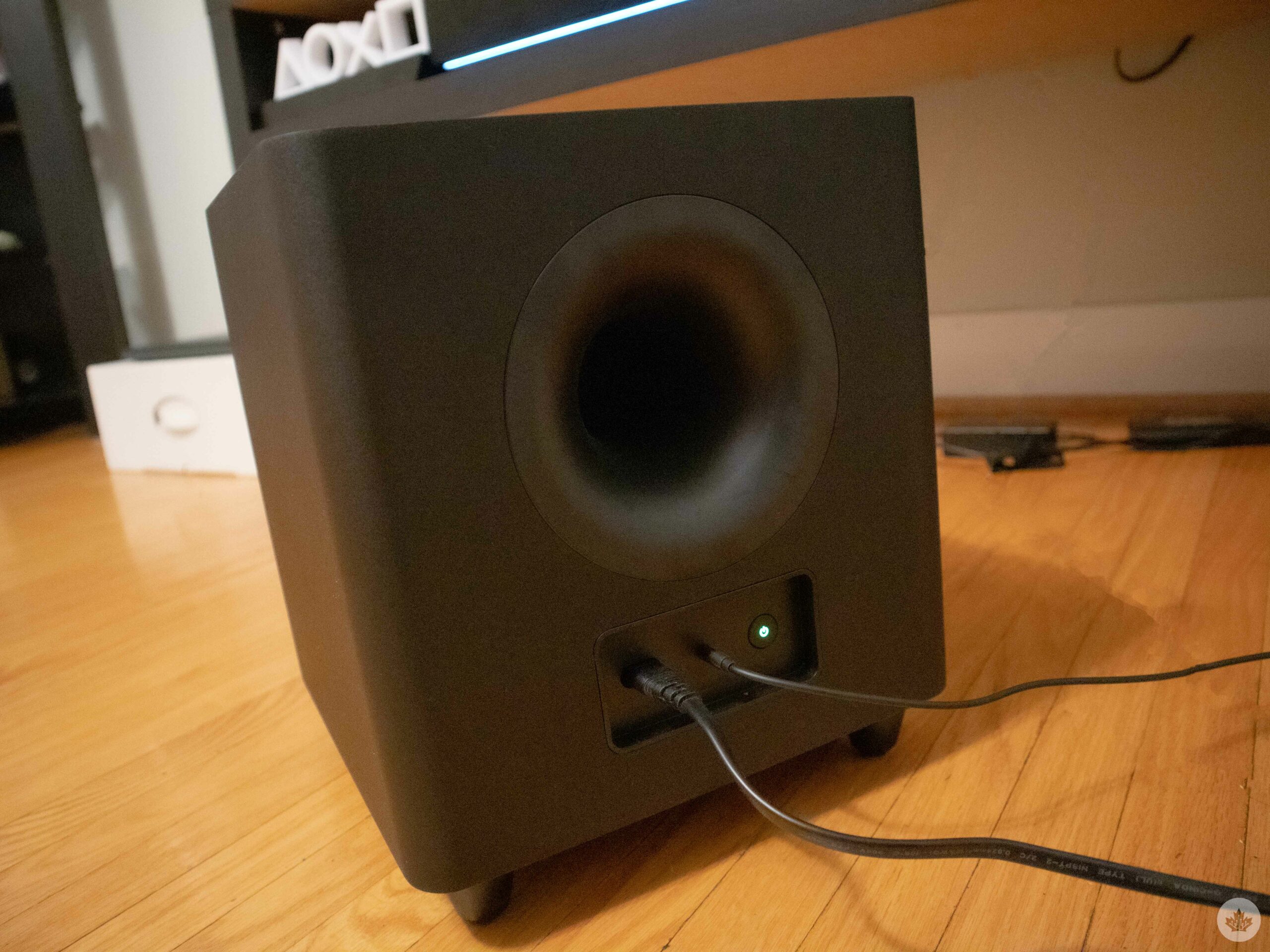
 It’s worth noting that the soundbar and the subwoofer require their own power outlets, and considering that the ports around your PC would already be occupied with the monitor and accessory wires, you’ll need to purchase an extra extension. Connecting the subwoofer to the soundbar is fairly simple, with an input/output wire for each end, though a wireless subwoofer would have served me better. Ever since I’ve moved to a new house, my cable management has gotten awful, and tucking away thick power cables for both the soundbar and the subwoofer has been a pain without a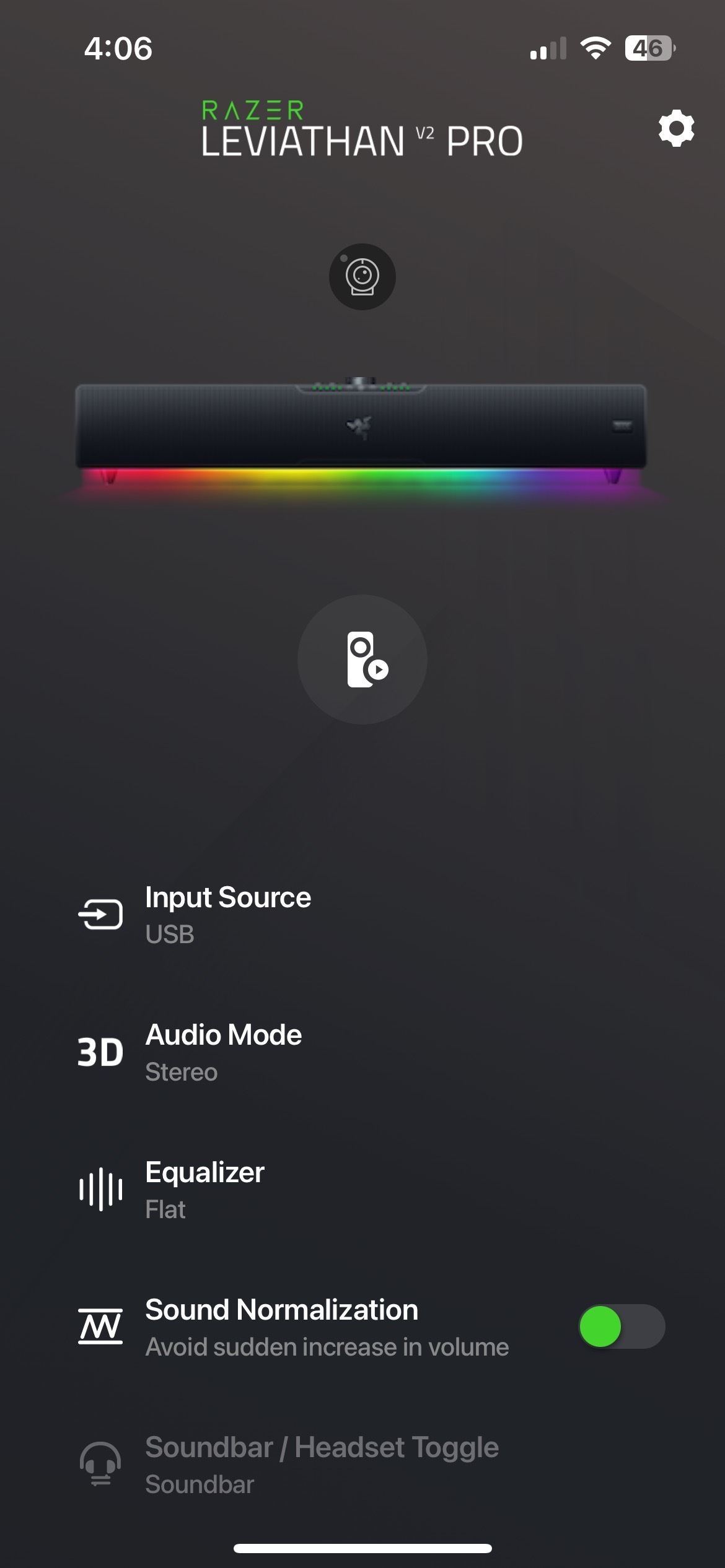
 This brings us back to the question: can the Leviathan V2 Pro replace an actual headset? Well, in some cases, yes. Playing


 More importantly, though, VR dramatically builds upon Village‘s already satisfying gameplay mechanics. As mentioned, RE7 in VR was limited to the DualShock 4, which made the headset feel more like an add-on than the actual main event. Village, on the other hand, is playable entirely with the PS VR2’s comfortable motion-controlled Sense gamepads — a setup that offers two key benefits.
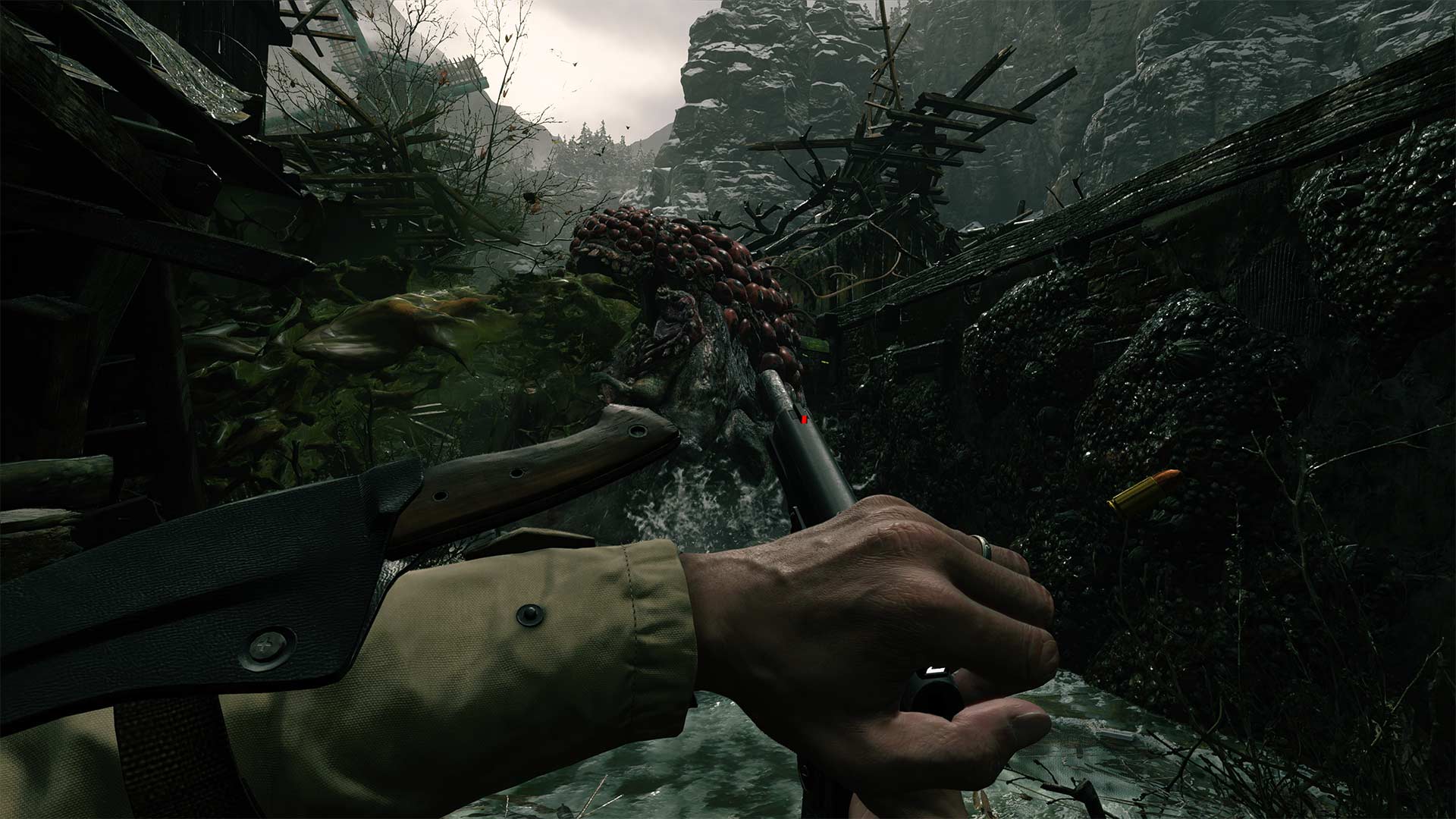 And on that note — first-person gunplay with the Sense controllers is an absolute blast. So much so, in fact, that it’s hard to believe I ever settled for using a controller and VR setup with RE7. That’s because it feels so intuitive. Naturally, aiming anything with motion controls will automatically feel more immersive than analogue sticks, and that’s before you factor in the differences between each gun. For example, reloading your handgun means you have to physically grab a clip from your hip, push it into the bottom of your firearm and then pull back the slide on top. Your shotgun, meanwhile, requires you to load shells one at a time and then pump the barrel between each shot.
 Honestly, my only gripes with Village‘s VR version are pretty minor. You have to download a separate free file on the PlayStation Store that works alongside your copy of the base game, so your previous saves unfortunately can’t be carried over. There are also some jarring moments in cutscenes where Ethan may automatically move where you’re not looking, resulting in some brief disorientation. On the whole, it’s a lot smoother and more natural than RE7, leading me to feel no motion sickness, but these (few and far in between) instances are still worth mentioning.