Apple has “fully resumed” advertising on Twitter, according to the company’s CEO, Elon Musk.
Musk shared the news on Saturday during a live Twitter Spaces, Bloombergreports. The billionaire told his 90,000 listeners the tech giant is the largest advertiser on the platform.
The statement is in stark contrast to tweets Musk made a week ago, accusing Apple of hating “free speech in America” and threatening “to withhold Twitter from its App Store.”
Musk met with Apple CEO Tim Cook soon after his tweet storm and later admitted the tech giant “never considered” removing Twitter from the App Store.
LG Smart TV owners can claim three months of free Apple TV+ starting this week.
According to an LG press release spotted by iPhone in Canada, the company will give free Apple TV+ to those with compatible 4K and 8K LG Smart TV models from 2018 to 2022 running webOS 4.0 to webOS 2022. Customers can redeem the offer by accessing the Apple TV+ app via a compatible LG Smart TV and following the redemption instructions.
In the fine print, LG notes that the promotion applies to countries where Apple TV+ is available (which would include Canada), but the start day may vary by region. The offer ends on January 31st, 2023.
LG Canada’s website didn’t include any additional details about the offer, but it did list another offer: five months of free TSN for those who purchase an eligible LG TV between November 4th, 2022 and December 15th, 2022. You can learn more about that here.
MobileSyrup utilizes affiliate partnerships. These partnerships do not influence our editorial content, though MobileSyrup may earn a commission on purchases made via these links.
Seems like Monday is the best day to score deals on Anker accessories. The company has discounted some of its most popular chargers, cables and portable chargers, some to the tune of 30 percent.
MobileSyrup utilizes affiliate partnerships. These partnerships do not influence our editorial content, though we may earn a commission on purchases made via these links that helps fund the journalism provided free on our website.
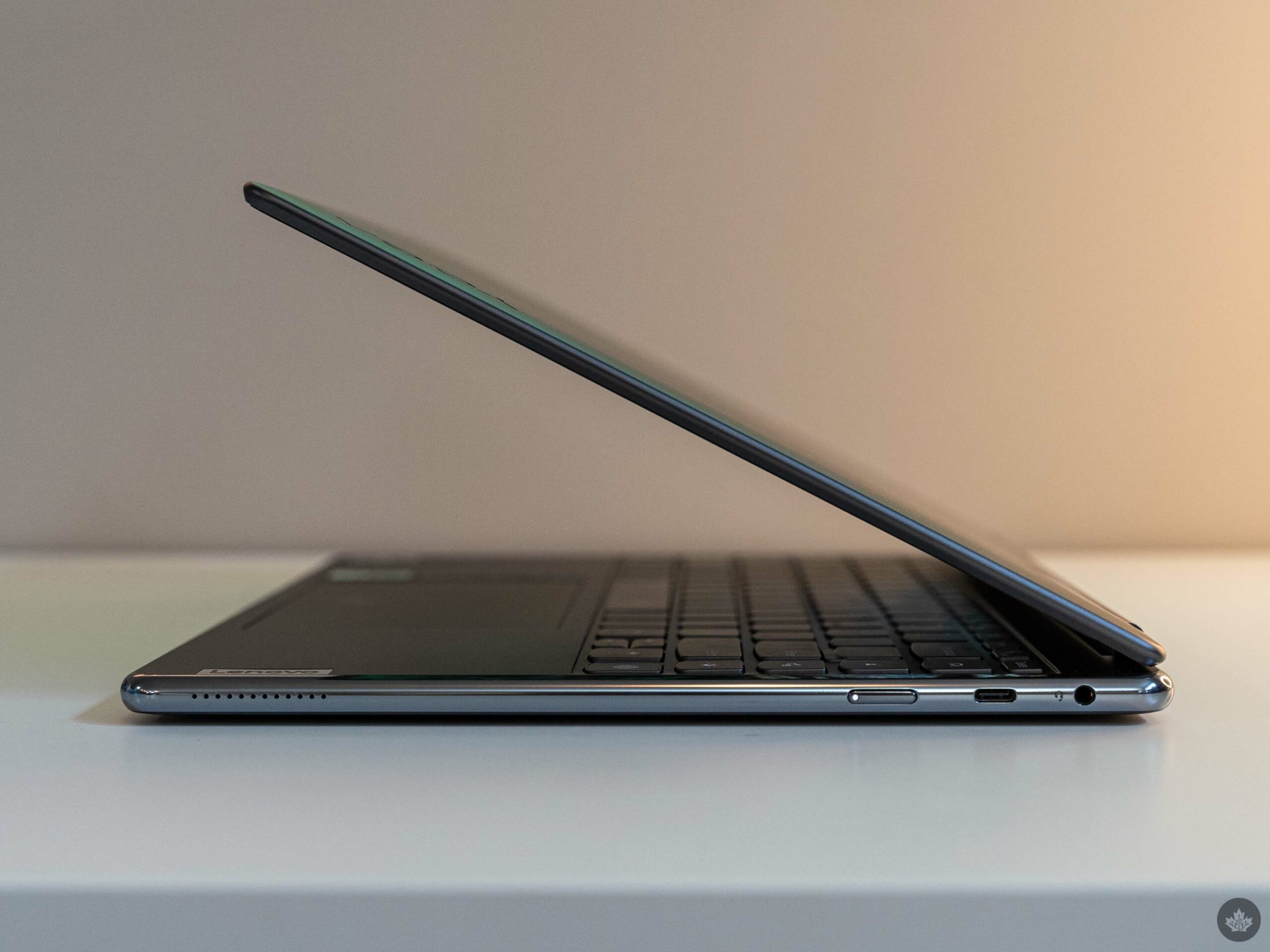
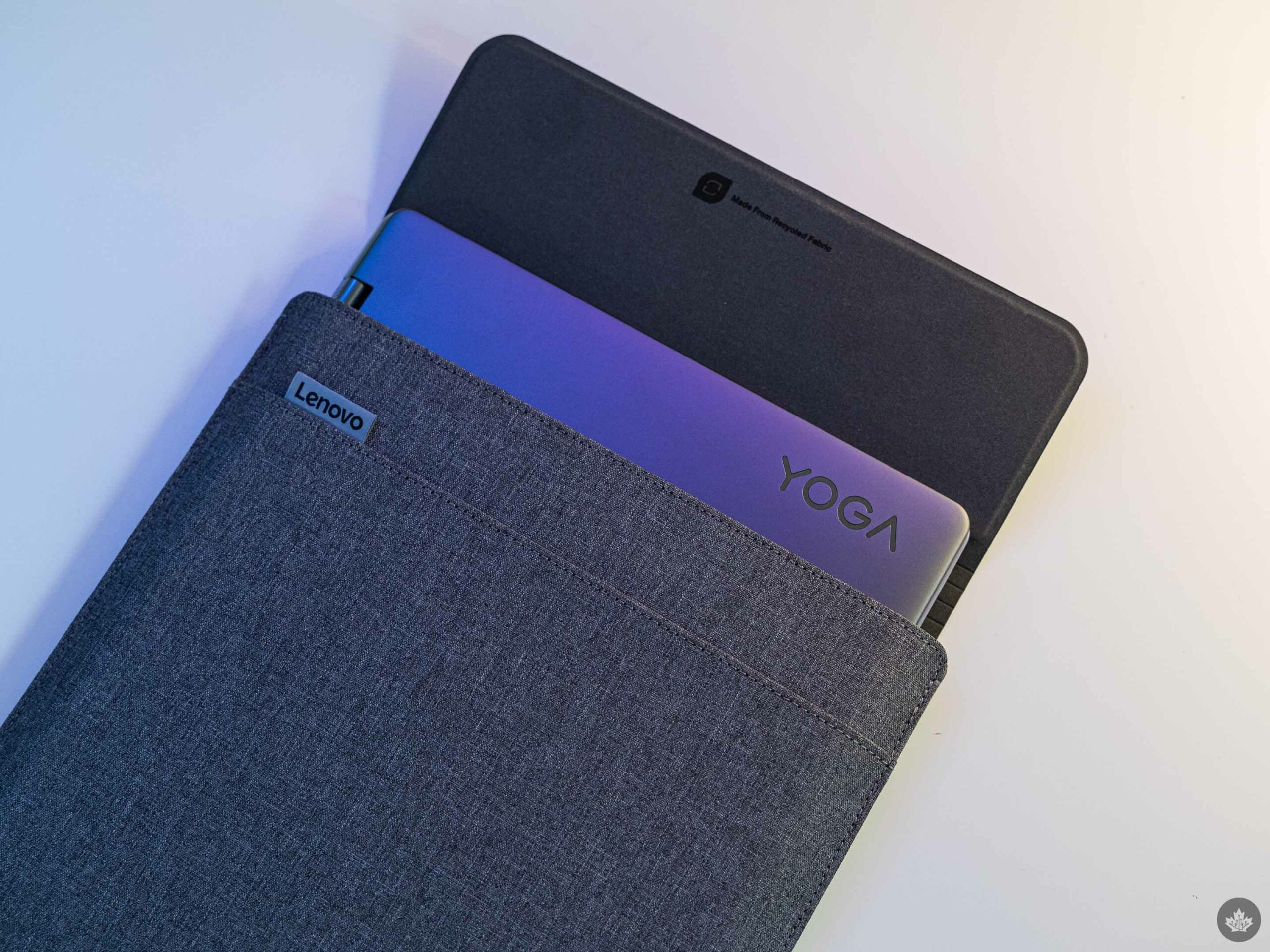
It’s been a few years since I’ve tested a Lenovo Yoga laptop and the company’s latest Yoga 9i is surprisingly great. Sporting a new design with rounded edges and a stylish aluminum chassis, the 9i offers a solid 2-in-1 computing experience.
While the Yoga 9i isn’t exactly the most powerful PC around, it can handle most common computing needs, from browsing social media to word processing. It’s a great balance between high-end, powerful laptops and the lower-end laptops that trade premium materials for plastics.
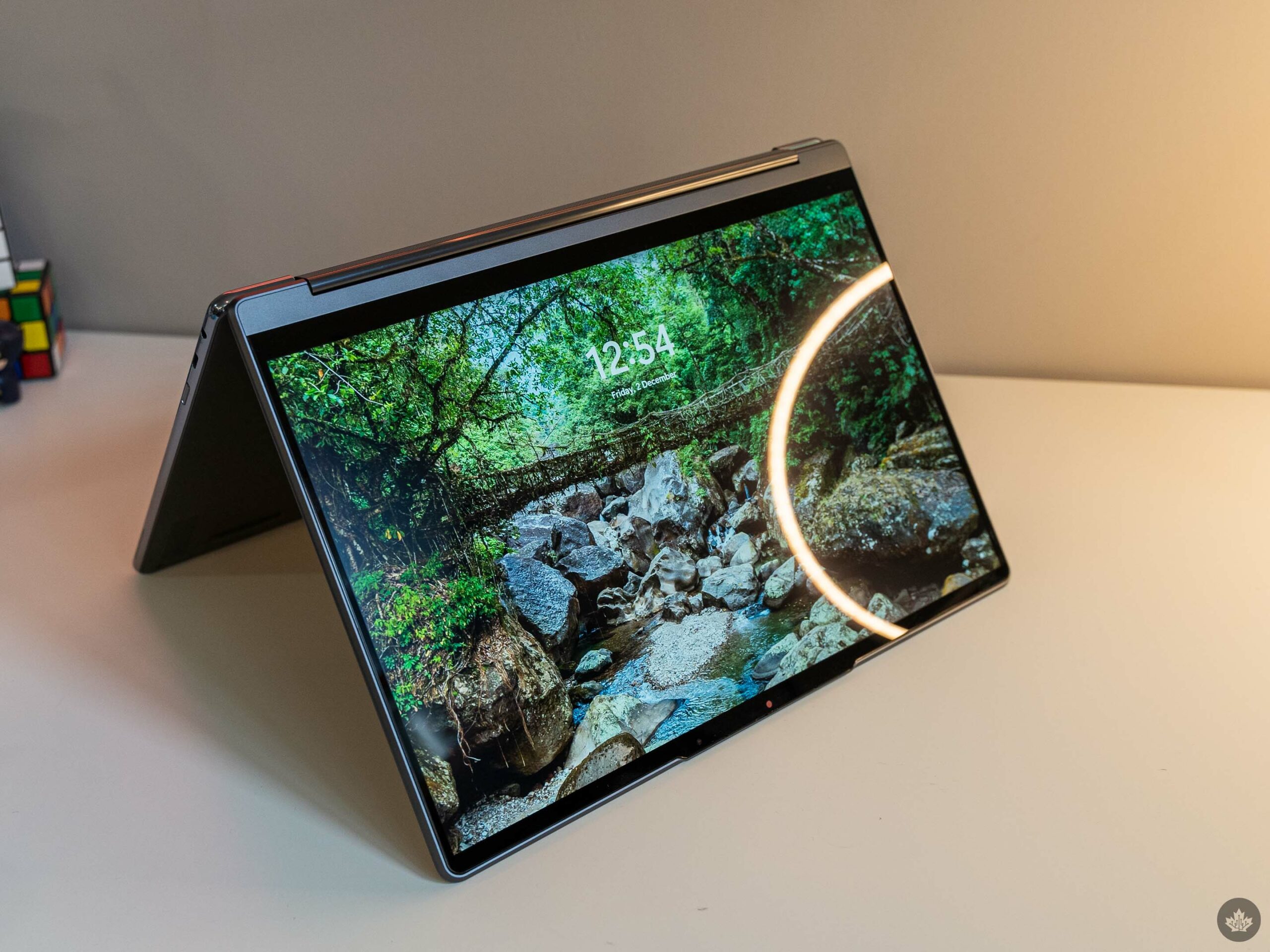
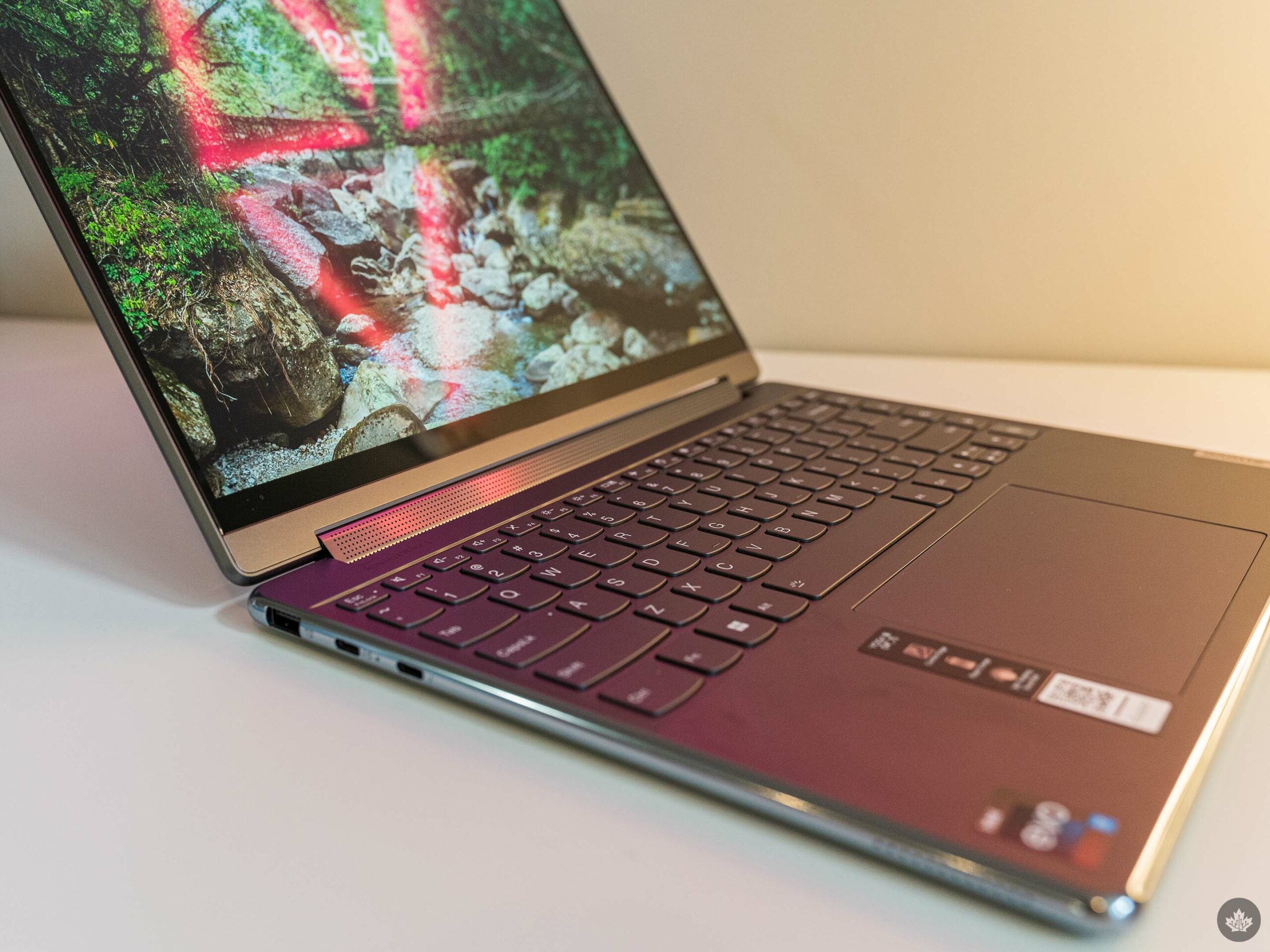
The downside to this approach is that you don’t get as much performance for your dollar, but you get other benefits. The Yoga line’s signature soundbar hinge returns and the 360-degree hinge lets users get a tablet-like experience from their laptop without needing to buy a separate device.
Overall, I really like the Yoga 9i – my biggest complaint remains Lenovo’s odd pricing strategy and bloatware, but if you can nab the Yoga 9i on sale, it’s an excellent PC.
Specs
Display: 14.0″ WUXGA (1920 x 1200) IPS, anti-glare, touchscreen with Dolby Vision, 400 nits, 16:10 aspect ratio
Processor: 12th Gen Intel Core i7-1260P
Memory: 8GB
Storage: 256GB SSD
Dimensions: 15.2mm x 318mm x 230mm / 0.6″ x 12.52″ x 9.06″
Weight: 1.4kg / 3.09lbs
Camera: 1080p FHD IR Camera with Privacy Shutter, face recognition
Operating System: Windows 11
Battery: Up to 23 hours of local 1080p playback
Connectivity: Wi-Fi 6E, Bluetooth 5.1
Sensors: Fingerprint sensor
Ports: 2x USB-C Thunderbolt 4, 1x USB-C 3.2 Gen 2, 1x USB-A 3.2 Gen 2, Headphone/mic combo
Graphics: Intel Iris Xe graphics
Note: the above specs apply to the model I tested. You can find a full spec sheet here.
12th Gen Intel gets it done
In my experience using the Yoga 9i, the performance was fairly solid. Intel’s 12th Gen i7-1260P did quite well both in real-world use and in benchmarks. My typical workflow, which involves running tons of Firefox tabs, Photoshop, Slack, and streaming music through Spotify, all ran relatively smoothly on the Yoga 9i.
The biggest issues I ran into were related to the low memory on my review unit. The 9i I tested only had 8GB of RAM, which limited my multitasking capabilities more than I expected. On more than one occasion, I encountered apps locking up or crashing outright just because there wasn’t enough memory to go around.
I’d strongly recommend getting a configuration with 16GB of RAM if you’re a heavy multitasker. Oddly, only the i7 variant of the 9i can come with 8GB of RAM, with the i5 version being locked to 16GB.
Despite the lower memory, I found the Yoga 9i benchmarked very well, beating out the Surface Laptop 5 despite having less memory and a similar processor. Given the similarity in CPUs, I’d attribute the difference at least partially thermals – the Yoga 9i is thicker than the Laptop 5 and the fans would kick on sooner and run louder to keep things cool.
Still, Intel's 12th Gen CPUs so far seem impressive, although they still suffer in the battery department.
Rounded edges are sick
I’m a big fan of the Yoga 9i’s design, especially the rounded edges. It makes for a very unique laptop, but there’s a practical benefit too. When using the Yoga 9i in tablet mode, it’s more comfortable to hold than other laptops with sharper angles.
More than that, I think the polished edges mixed with the matte surface look fantastic. The chassis is a tad thick for my liking, but I’m such a fan of the looks I’d happily give that a pass.
I’d like to see more laptop manufacturers take unique designs like Lenovo did with the Yoga 9i. Not every laptop needs rounded edges, but new and different approaches can make for unique styles.
On another note, the display is excellent as well. Sure, it’s not super high resolution, but 1080p remains a solid experience at the 14-inch size. I also appreciate the 16:10 aspect ratio – the extra height makes for a better experience working in long vertical documents.
It’d be nice if Lenovo shrunk the bezels a little on the Yoga 9i, but they’re certainly not egregious.
The Yoga 9i trackpad puts others to shame
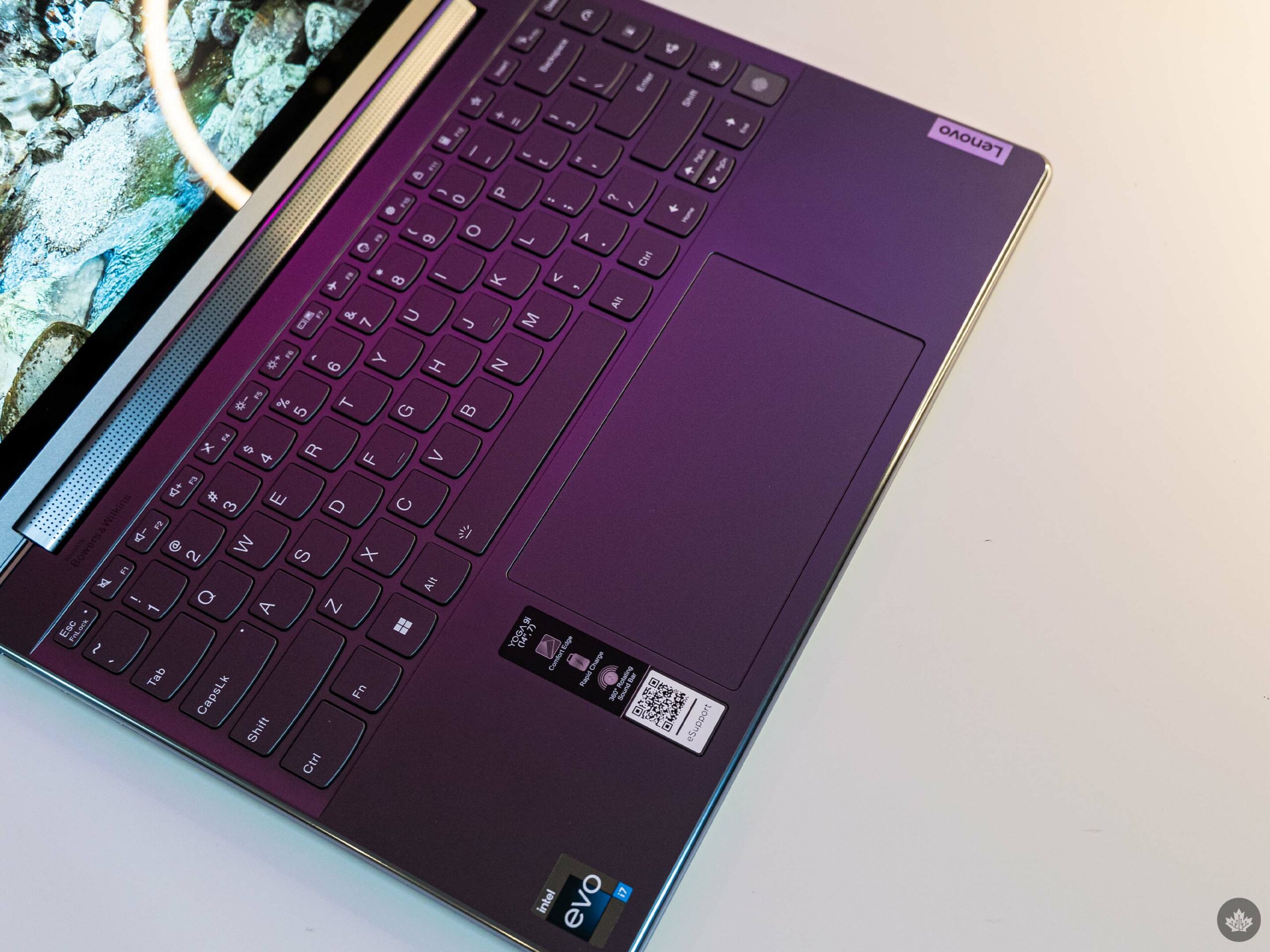
It feels like someone finally heard my plea. Lenovo equipped the Yoga 9i with one of the biggest trackpads I’ve ever seen. This thing is massive. And I love it.
As someone who regularly uses multiple monitors, having this giant trackpad is a dream come true. I still prefer using a mouse when I can, but at least with this I still feel productive zipping from screen to screen, moving windows around, dragging files and more.
Frankly, the Yoga 9i sets the bar for trackpad size – anything less misses the mark.
As good as the trackpad is, I wish Lenovo put as much effort into the keyboard. The keyboard isn’t bad by any stretch, but it’s not my favourite to type on. It lacks crisp, tactile feedback, offering up an almost mushy experience instead. It’s not the worst I’ve used, but it could certainly be better.
Another frustration with the keyboard is the line of extra keys on the right side. On one hand, the four shortcut keys could be helpful, but I found I hit them by accident more often than not. The top key (and the one I accidentally pressed the most) cycles the Yoga 9i through three performance modes. The next button launches Lenovo’s ‘Smart Appearance’ software that can replace your video background, frame your face, apply eye contact correction, and more. The next button toggles different sound profiles, and the final button is a dedicated toggle to switch Windows between light and dark mode.
Finally, the hinge speaker remains a great addition. It’s not the best speaker out there, but it did the job well for watching videos on the laptop. I enjoyed it less for listening to music, and ultimately most people would be better off with a decent set of headphones over the hinge speaker, but it’s a nice addition nonetheless.
Have you found yourself having to take more than one screenshot of a webpage when you’re trying to share it with friends or family? Normally, when you snap a screenshot, you can only capture the area of a webpage that is visible on your screen.
If you’re trying to capture a wide enough space as a screenshot, like an article, tutorial or a bunch of images on a webpage, you’d typically find yourself taking one screenshot, scrolling down, and then taking a second screenshot. However, there is a way to take full webpage screenshots on Chrome, be it on a Windows or Mac machine or on an Android or iOS device.
Windows/Mac
The instructions to capture full Chrome webpage screenshots on both Windows and Mac machines are the same.
Follow along the instructions and screenshots below:
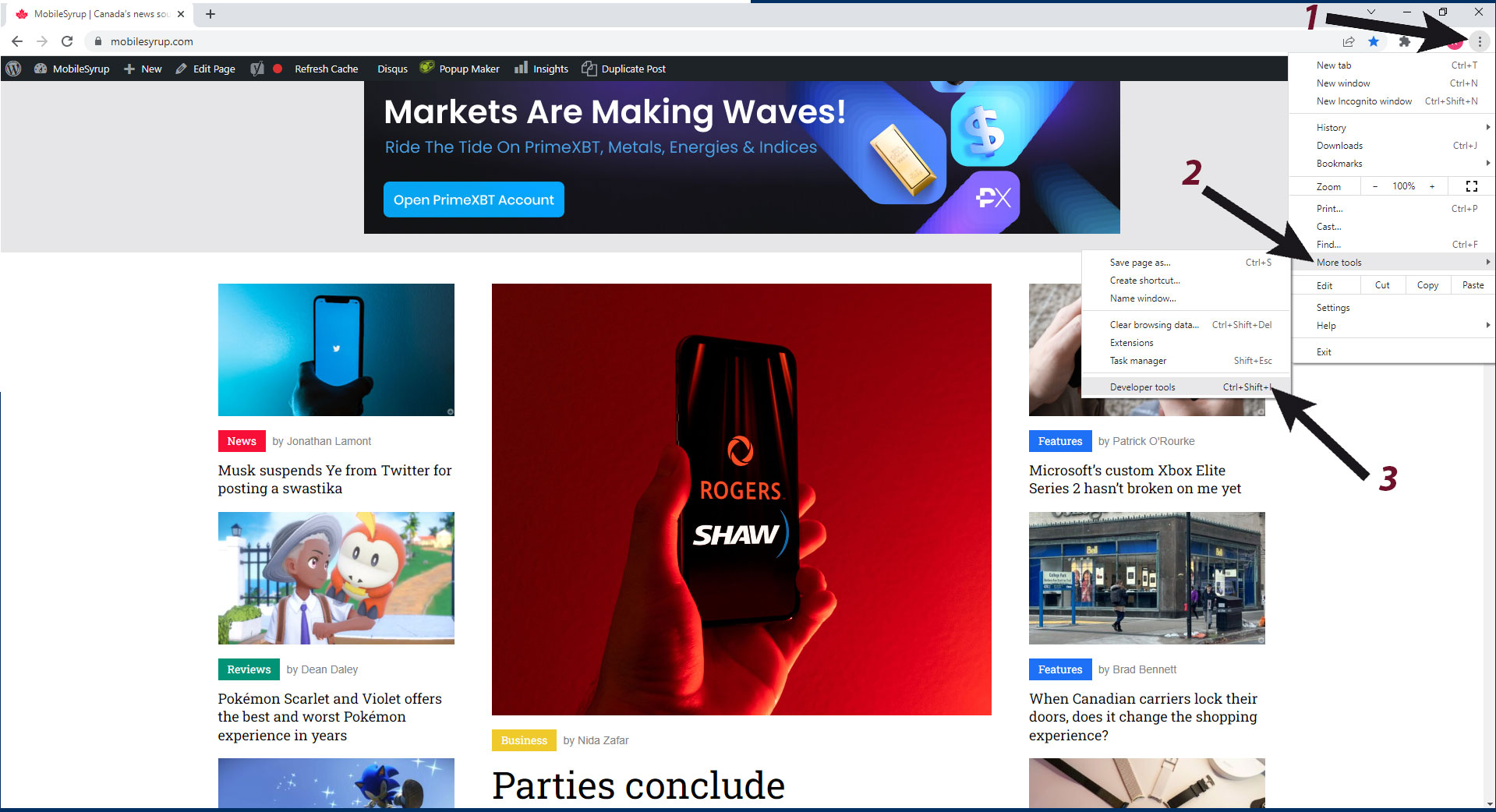
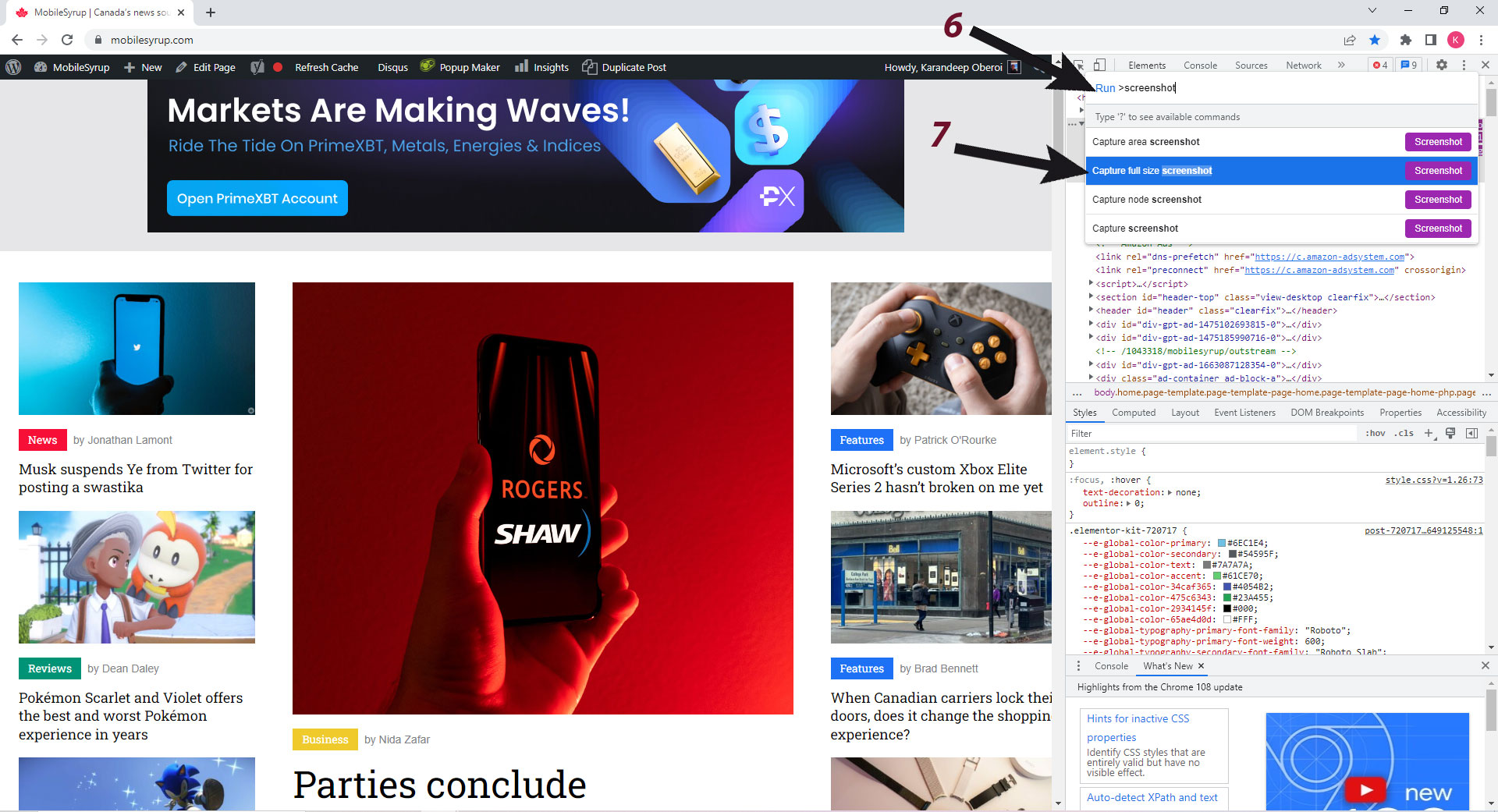
1. Click on the three dots on the top right to pull out the additional options menu and
2. Click on ‘More tools, followed by
3. ‘Developer tools’
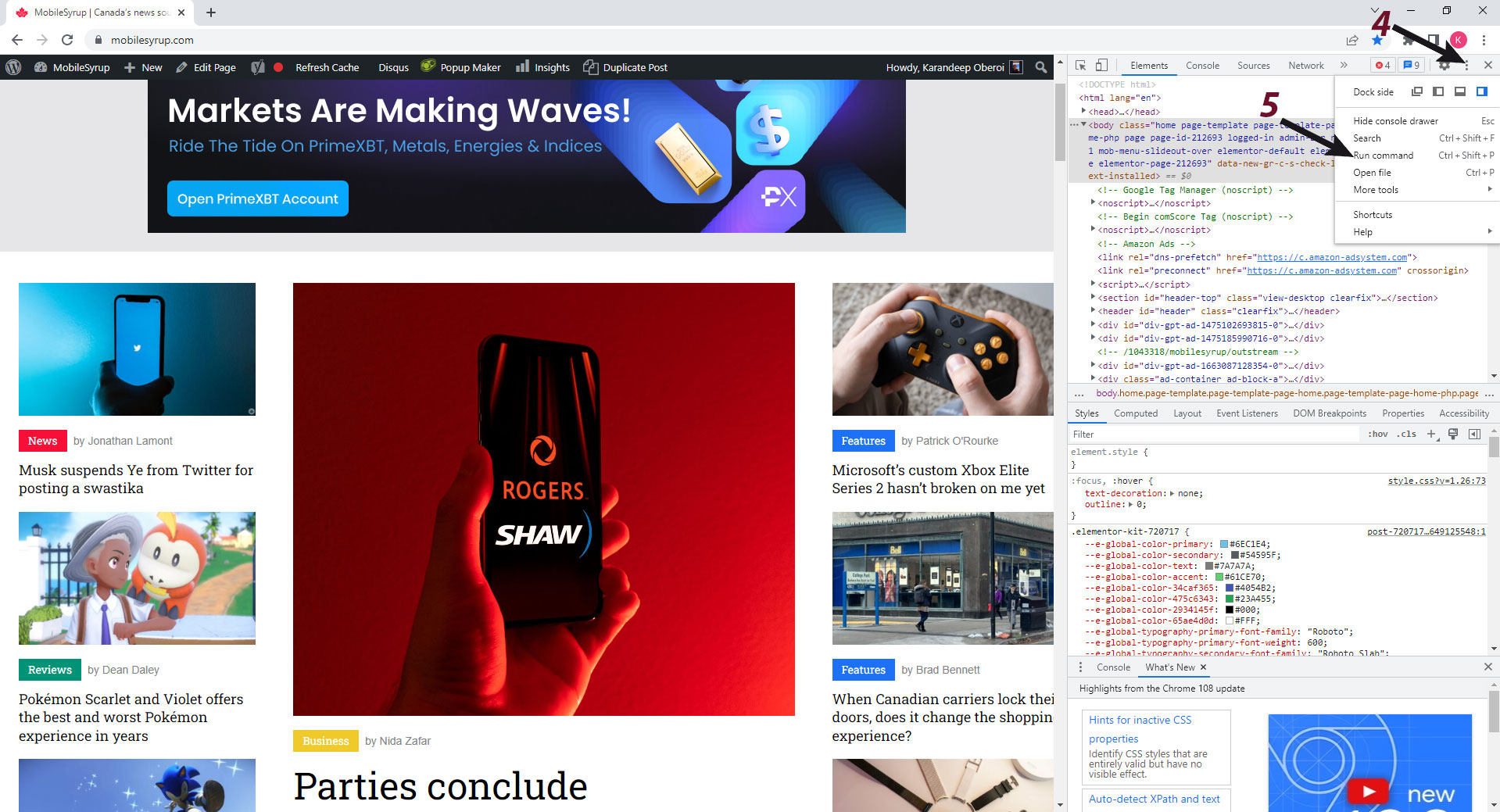
4. A new ‘Elements’ page inspect menu should pop up. Click on the three dots again, but the ones that appear on inspect menu
5. Click on ‘Run Command’
6. In the run command menu, type in ‘Screenshot,’ and
7. Select the ‘Capture full size screenshot’ option.
Within a few seconds, a PNG format screenshot of the full webpage will be downloaded to your PC. It would look something like this.
Android
Although not identical, taking full-screen Chrome screenshots on an Android device looks similar to how it’s done on a PC.
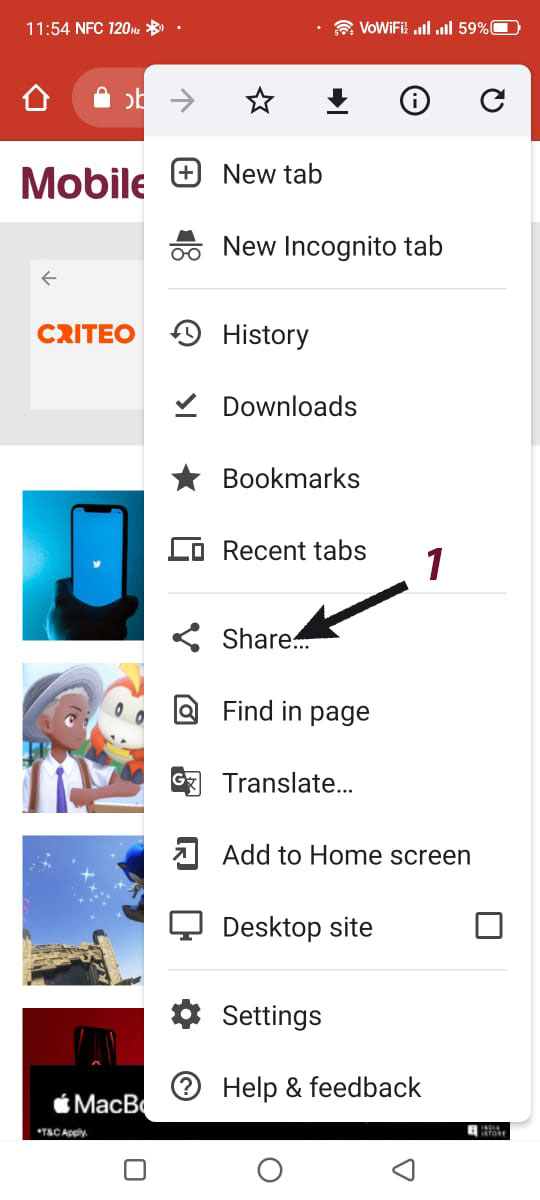
1. You head to the page of your choice and click on the three dots on the top right, followed by tapping on ‘Share.’
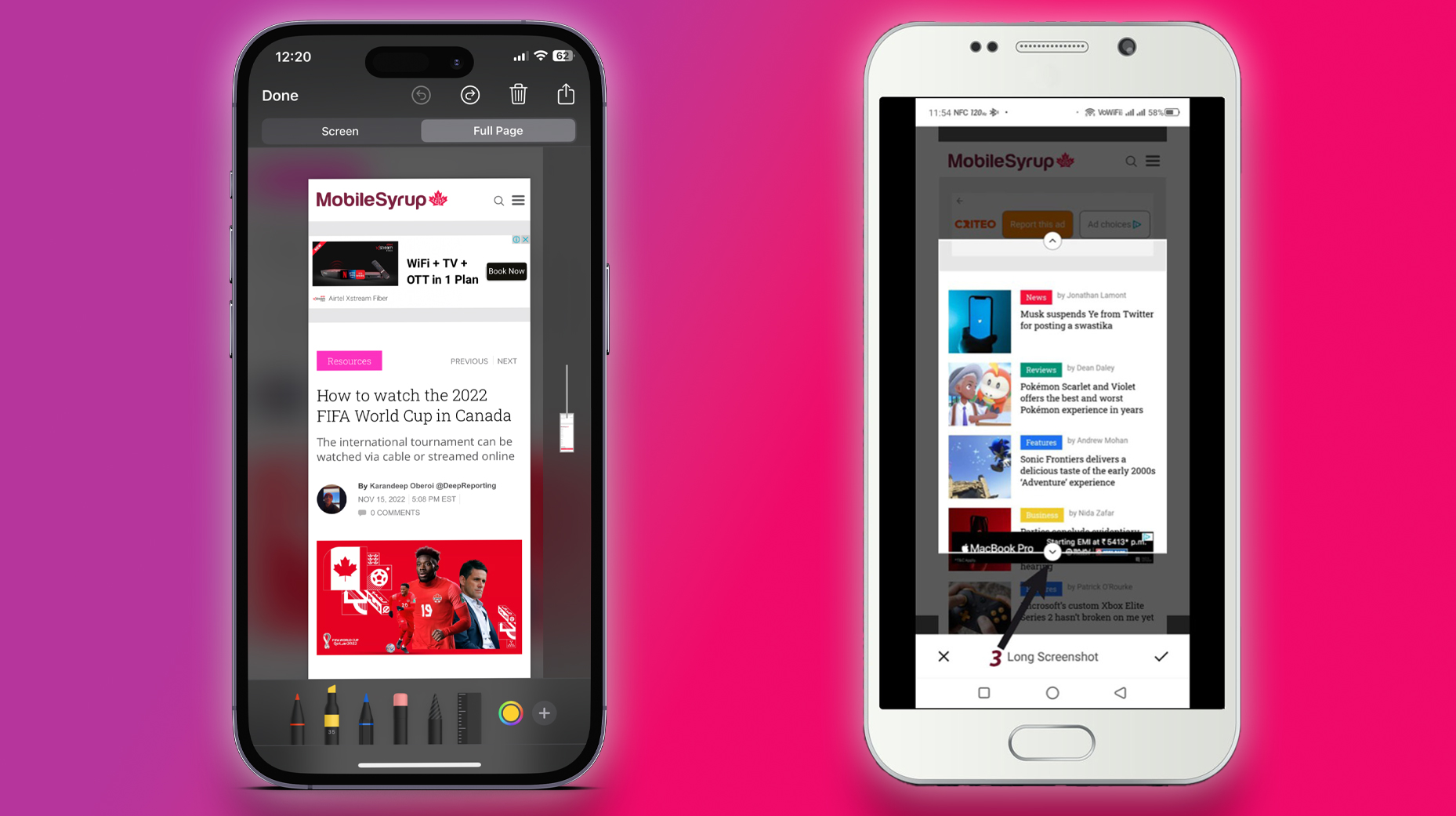
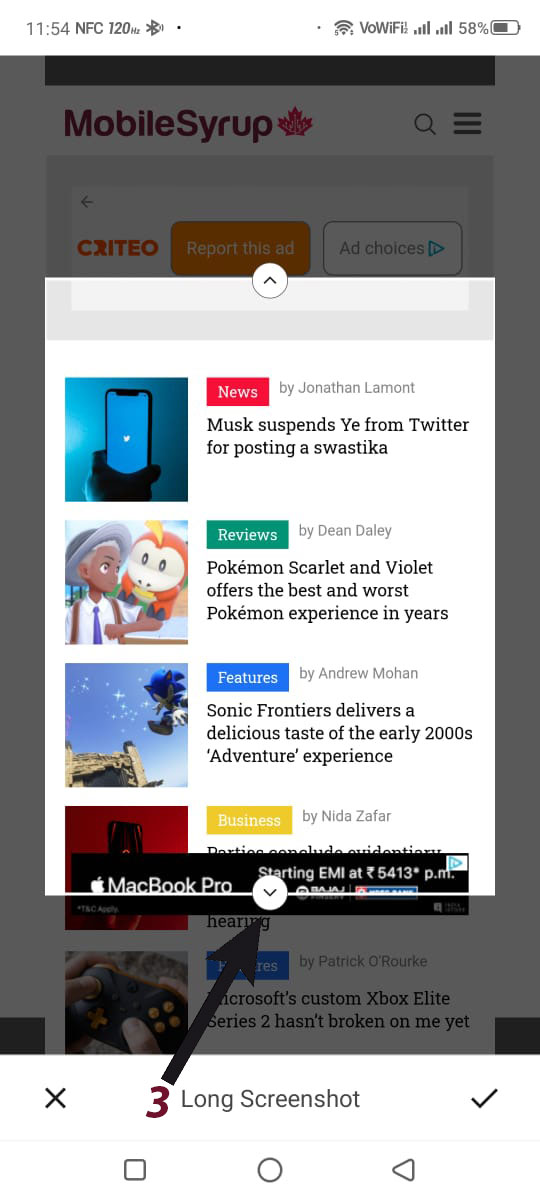
2. It should pull up a tab that lets you share the webpage via messaging apps, though we’re more interested in taking a screenshot. You will then see a ‘long screenshot’ option in the tab, as seen in the image below. Click on it.
3. You now have the option to adjust the page screenshot length with the help of interactive arrows. Pull the bottom arrow down all the way to the end of the webpage to screenshot the whole page, or stop halfway through to just capture what you need. Tap on the ‘tickmark’ icon and proceed to save the screenshot.
The final full webpage screenshot should look something like this.
iOS
Taking full webpage screenshots on iOS is much easier.
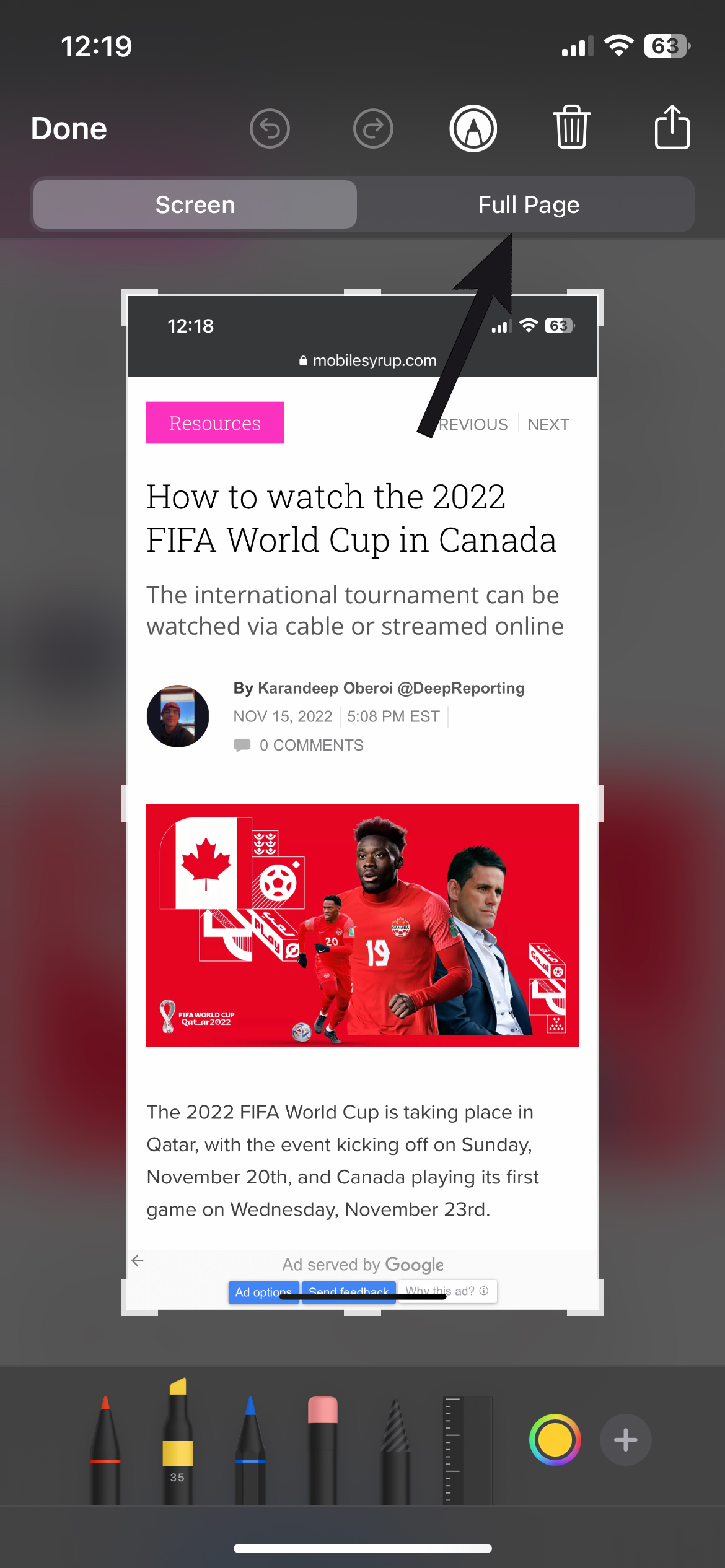
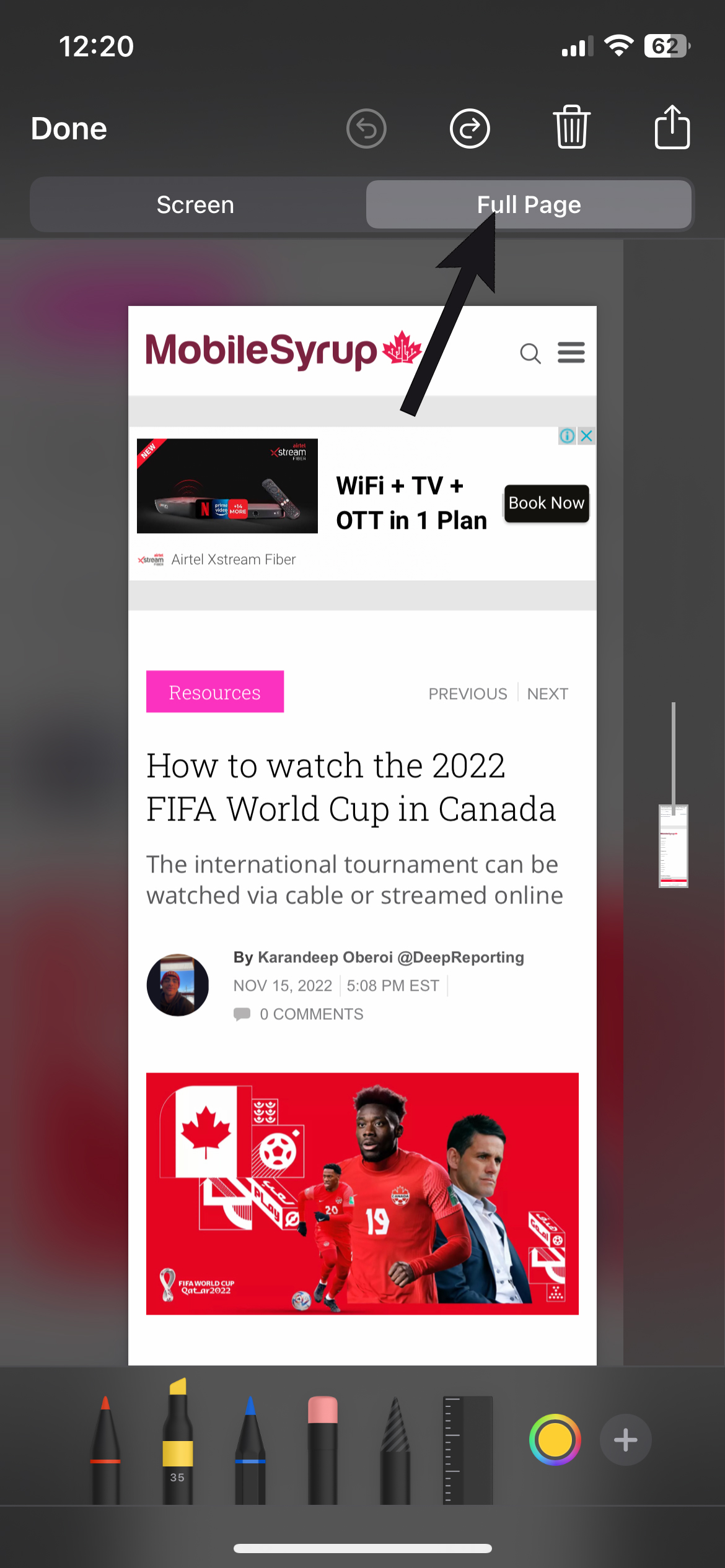
You simply head to the page you’re looking to share and take a regular screenshot by pressing the power and volume-up button. Toggle the screenshot from ‘Screen’ mode to ‘Full Page’ and tap on ‘Done.’
You should now be able to save or share the screenshot, albeit in PDF form. The shared file should look something like this.
It’s worth noting that this way of capturing full-screen screenshots works on Safari as well.
It’s just about the end of the year, and next week is Geoff Keighley’s The Game Awards, a celebration of the games that launched throughout 2022. If you haven’t voted for your game of the year yet, check out the site here.
With that in mind, this week’s Community Question is: what was your favourite game this year?
For myself, it’s hard to say. I absolutely loved God of War Ragnarök. I think it’s a title that everyone with a PlayStation 4/5 needs to play. The action-adventure game tells the story of a man and his teenage son living through the Norse apocalypse. However, while I really enjoyed Ragnarök, my game of the year is Elden Ring.
I’m a massive fan of Soulsborne games, and the world of the ‘Lands Between’ is incredibly beautiful and filled with grotesque and strange yet, beautiful monsters (and in the game I’m basically a Targaryen, without the incest). The awesome weapons, cool spells, and the fact that it’s an entirely new IP are what make it my game of the year.
Let us know in the comments below what your favourite game of the year is.
WatchOS 9 brought several new additions to the Compass app, including the new ‘Backtrack’ feature. Here’s how to get the most out of it.
First, the compass face is easier to read, with oversized numbers and directions in the centre of the app. Compared to the older version, it’s easier to glance down and get a quick reading from your wrist.
Beyond the new look, tapping on the ‘feet icon’ in the bottom right of the screen starts backtrack mode. This drops a pin where you are and shows you a route back to that location when you walk away. This can be really helpful for people who like to explore the woods without sticking to a trail. Once ready to return from your hike, tap the pause button and choose the ‘Retrace steps’ option. This is more useful than just following the line in backtrack mode since it makes the navigation dot and line on-screen move more like turn-by-turn navigation in Apple or Google Maps.
It’s also worth noting that you can turn the Digital Crown to zoom in and out of the centre of the compass to show a map.
This slideshow requires JavaScript.
The icon in the bottom left of the screen allows you to drop pins to label places. This option lets you name the place and selelct the colour and icon for the label you’re dropping on the map. You can add these labels to some of the watch faces with Complications, but unfortunately, they don’t pop up in Apple Maps. Because of this, the only way to manage them is in your Compass app, which isn’t easy. Regardless, it can be a helpful feature in a pinch or on a few weekend hikes.
The final button expands the data you get from the compass by showing your elevation, incline, longitude and latitude. Further, you can set a bearing here if you’re trying to use the compass to navigate somewhere. You should also know that the compass is set to magnetic North by default, and you’ll need to change it to true North to open the Settings app on the Apple Watch.
To use the most up-to-date version of the Compass app, you’ll need an Apple Watch Series 6 or later, Apple Watch SE (1st-gen) and later, or the Apple Watch Ultra. You also need to be on watchOS 9. Older Apple Watch models can still access a basic Compass app, but it doesn’t have the Backtrack or ‘Waypoint’ features.
You can learn more about the Apple Watch Compass app from Apple’s Support page.
Every week, MobileSyrup outlines some of the most notable movies and TV shows that recently hit Canadian streaming platforms.
Our ‘Streaming in Canada’ column typically focuses on new content from Amazon Prime Video, Crave and Netflix, but other services like Apple TV+ and Disney+ are mentioned when relevant. Premium video on demand (PVOD) platforms are also fair game as movies continue to come to digital early amid the COVID-19 pandemic.
Finally, we’ll highlight shows or movies that are made by Canadian companies, involve notable Canadian cast or crew and/or are filmed in Canada.
Amazon Prime Video
Three Pines [Amazon Original]
Chief Inspector Armand Gamache he investigates a string of murders in a small Canadian village.
Three Pines is based on Toronto author Louise Penny’s Armand Gamache novels and stars Alfred Molina (The Normal Heart), Vancouver’s Roussif Sutherland (Reign), Cardston, Alberta’s Elle-Máijá Tailfeathers (Night Raiders) and Anzac, Alberta’s Tantoo Cardinal (Dances with Wolves). The series was also filmed in Quebec.
Amazon Prime Video Canada release date: December 2nd, 2022 (first two episodes, two new episodes every Friday) Genre: Mystery Runtime: Eight episodes (around one hour each)
The full list of movies and shows that hit Amazon Prime Video Canada this month can be found here. A round-up of December’s new content is available here.
Apple TV+
Slow Horses (Season 2) [Apple Original]
Lamb is on high on alert after a former spy is found dead.
Based on Mick Herron’s novel of the same name, Slow Horses stars Gary Oldman (The Darkest Hour), Olivia Cooke (Bates Motel), Jonathan Pryce (The Two Popes), Kristin Scott Thomas (Four Weddings and a Funeral) and Jack Lowden (Dunkirk).
Apple TV+ Canada release date: December 2nd, 2022 (first two episodes, new episodes every Friday) Genre: Spy thriller Runtime: Six episodes (around one hour each)
Scarborough, Ontario’s own Eric Bauza (Looney Tunes) hosts this series about the history of our favourite cartoons and how they shaped us today, featuring interviews with the likes of Toronto’s Tara Strong (Fairly Odd Parents), Canada-raised Cree Summer (Rugrats), Ben Schwartz (Sonic the Hedgehog) and Toronto’s Domee Shi (Turning Red).
CBC Gem release date: December 2nd, 2022 Genre: Documentary Runtime: Six episodes (22 to 26 minutes each)
Stream Stay Tooned here. Note that CBC Gem is free with ads or $4.99/month for ad-free viewing.
Crave
Branson
Shortly before going on his spacecraft flight in July 2021, billionaire entrepreneur Richard Branson sits down with director Chris Smith (100 Foot Wave) to reflect on his life and career.
Crave release date: December 1st, 2022 (first episode, new episodes Thursdays at 10pm ET) Genre: Documentary Runtime: Four episodes (around one hour each)
In 2016, Quebecers Isabelle Lagacé and Mélina Roberge were implicated in one Australia’s largest-ever cocaine seizures. Now, Lagacé, one of the so-called “Cocaine Cowgirls,” is talking about it all happened.
Crave release date: December 2nd, 2022 (French and English) Genre: Documentary Runtime: Three episodes (43 minutes each)
Stream Cocaine, Prison & Likes: Isabelle’s True Story here.
George & Tammy
This miniseries tells the story of the country music power couple, Tammy Wynette and George Jones.
All six episodes were directed by Hamilton, Ontario-raised John Hillcoat (Lawless) and stars Jessica Chastain (Zero Dark Thirty), Michael Shannon (Nocturnal Animals), Steve Zahn (The White Lotus) and Vancouver’s Kelly McCormack (A League of Their Own).
Crave release date: December 2nd, 2022 Genre: Drama Runtime: Six episodes (around one hour each)
A standard Crave subscription is priced at $19.99/month, with Starz costing an additional $5.99/month. A mobile-only subscription is also available for $9.99/month.
The full list of movies and shows that hit Crave in November can be found here. A round-up of December’s new content is available here.
Disney+
Diary of a Wimpy Kid 2: Rodrick Rules [Disney+ Original]
Greg takes on his biggest challenge yet: surviving a weekend alone with Roderick and his list of rules.
Based on Jeff Kinney’s Wimpy Kid books, Diary of Wimpy Kid 2 was directed by Luke Cormican (feature directorial debut) and features the voices of Brady Noon (The Mighty Ducks: Game Changers), Ethan William Childress (Mixed-Ish) and Toronto’s Chris Diamantopoulos (The Wonderful World of Mickey Mouse) and Vancouver’s Hunter Dillon (Hollie Hobbie).
Disney+ Canada release date: December 2nd, 2022 Genre: Animated, family Runtime: 1 hour, 16 minutes
The full list of movies and shows that hit Disney+ in November can be found here. A round-up of December’s new content is available here.
Netflix
Scrooge: A Christmas Carol [Netflix Original]
On Christmas Eve, Ebenezer Scrooge has one night left to face his past and change the future.
Scrooge: A Christmas Carol was directed by Stephen Donnelly (Monster High: Welcome to Monster High) and stars Luke Evans (Nine Perfect Strangers), Olivia Colman (The Favourite) and Jessie Buckley (The Lost Daughter).
This past week featured a plethora of telecom news, including 5G growth, the Rogers-Shaw hearing, and the dip in Starlink’s speeds.
As a recap, here’s almost everything that happened in Canada’s telecom sector.
Business
Ian Scott has spent the last five years as the chair of the Canadian Radio-television and Telecommunications Commission (CRTC). But if the opportunity presents itself, he’s ready to do it again. “It’s an important organization, and it’s important work. I have the utmost respect for it and its staff,” Scott told MobileSyrup in a sitdown interview. Read the full interview exploring Scott’s time as chair here.
Shaw saw its wireline subscriber count decrease by 40,000 in the third quarter of 2022, its recently released financial report shows. However, it records growth in its wireless business, adding 52,900 customers. Nearly half of the subscribers, 25,000, are postpaid.
SaskTel is continuing to expand its 5G presence across Saskatchewan. The telecom provider now offers 5G in Baildon,Craik,Davidson,Ituna,Turtleford,and theNekaneetFirstNation. Residents with applicable devices and plans now have access to speeds up to 1.2Gbps.
Starlink’s speeds in Canada have declined over the last quarter, a recent analysis from Ookla reveals. SpaceX’s satellite internet provider saw download speeds drop 14 percent. Download speeds sit at 65.80Mbps, and upload speeds are 9.21Mbps. Comparatively, fixed broadband speeds improved by eight percent in Canada.
5G subscribers are continuing to grow around the world, and according to Ericsson’s November Mobility report, global subscriptions will hit 5 billion in 2028. North America will lead the subscription growth, representing an estimated 91 percent of 5G users by 2028.
The digital equity gap in Canada continues to be a problem, a study from Deloitte’s Future of Canada Centre states. Access to digital technology and skill development largely represent the gap, disproportionately impacting Indigenous peoples, racialized communities, and recent immigrants, among others. Income is the single most important factor in utilizing high-speed internet. Access also plays a major role.
The CRTC is now accepting applications for the Broadband Fund. Now in its third round, the fund pays for projects that will improve broadband internet and mobile wireless services across the country. The third round has $750 million to award over five years.
Parties involved in the Competition Tribunal’s hearing into the Rogers-Shaw hearing have concluded the evidentiary portion. The four-week-long hearing featured testimonies from various witnesses, ranging from company executives to professors. The parties will present their oral arguments on December 13th and 14th.
Government
Canadians filed 12,790 complaints about their service providers this year, according to the Commission for Complaints for Telecom-Television Services’ (CCTS) annual report. While complaints decreased by 25 percent compared to last year, problems relating to wireless roaming charges and device financing plans skyrocketed.
Deals
While Black Friday and Cyber Monday have ended, carriers continue to present deals. Fido, Koodo, and Virgin have all released a variety of new deals. More details are available here.
Public Mobile is offering new and existing customers holiday awards. Users can claim 2GB of bonus data and 500 minutes of free international calling on a one-time basis. Customers have until December 31st.
It’s easily my favourite game of the year, and certainly an all-timer for me on the whole. But while I had the biggest emotional connection to Kratos and Atreus’ journey, there’s another 2022 game that I recently beat which had one of the most fascinating and unique stories I’ve ever seen in a game: Immortality.
It’s the latest game from Sam Barlow, the creator of the 2015 FMV game Her Story and its 2019 spiritual successor, Telling Lies. Like those two titles, Immortality features an assortment of pre-recorded live-action video files through which you have to piece together the larger story.
While FMV experiences have been around for many years, it’s Barlow and developer Half Mermaid Productions’ execution that truly sells Immortality. In the game, you have to figure out what happened to Marisa Marcel, a model-turned-actress who starred in three unreleased movies. As the player, you go through clips of each film — the 1968 gothic romance film Ambrosio, the 1970 mystery Minsky and 1999 thriller Two of Everything. In any given clip, selecting a person or object of interest will jump you to a corresponding piece of footage from one of the other films or behind-the-scenes recordings. Sometimes, this is as obvious as clicking Marissa or one of her co-stars, but elsewhere, it might relate to something seemingly insignificant in the background, like a piece of fruit. This mechanic, which Barlow has dubbed “the match cut,” is incredibly innovative. The ways in which the games 202 clips are connected are staggering, and I can’t imagine the sort of flow chart that was created to map it all out.
It also helps that the three fictional films are also just remarkably well done. Besides tapping into different time periods, they each have their own distinct style and tone, with sharp dialogue and incredible performances across the board. Of particular note is Manon Gage, the newcomer who portrays Marissa, who has to juggle three different roles throughout the films on top of quickly shifting to the real Marissa when the camera stops rolling. It’s a mesmerizing performance and cements her as an up-and-coming actress to look out for. Charlotta Mohlin (Agents of S.H.I.E.L.D.) is another magnificently commanding presence, although her role is a surprise I won’t dare reveal.
Indeed, it’s difficult to say too much more about Immortality without going into spoiler territory, as the game is best experienced going in as dark as possible. But suffice it to say that there are many layers to this tale. With the help of writers Barry Gifford, Amelia Gray and Allan Scott, Barlow has penned a time-hopping narrative that’s just dripping with intrigue. You know there’s something else going on here, but you can’t quite put your finger on it — a feeling that only increases as you get to learn more about Marissa and the rest of the cast. What’s more, Barlow graciously respects your intelligence and leaves it up to you to figure things out — something many games, including God of War Ragnarök, often fail to do. In fact, you can technically “beat” the game within a handful of hours, but you’re rewarded for digging deeper through clips to unlock well-hidden revelations. The moment I discovered the first of these is one of the most bone-chilling and surreal moments I’ve ever experienced in a game.
Because sure, it’s clear pretty early on that Barlow is making a commentary on art and the filmmaking process, but how he explores those themes — and uses the game’s mechanics to make you, the player, an active participant in it — is downright brilliant. It’s the sort of story that could only be told in a game due to its interactivity, and it’s a wholly original one, at that. If you’re subscribed to Netflix, you can play Immortality for free right now on Android or iOS, one of the best value propositions for the streamer’s fledgling gaming platform. It’s also on Xbox and PC, plus Xbox Game Pass, which is where I played it.
If you’re at all a fan of narrative in games, you absolutely should play Immortality.
(Note: a controller is recommended to pick up on vibrational cues.)