Categories
Mobile Syrup

Here’s how you can export your Cyberpunk 2077 progress from Stadia to PC/console

Cyberpunk 2077 players that played the game on Stadia now have a way to rescue their game progress from the dying platform.

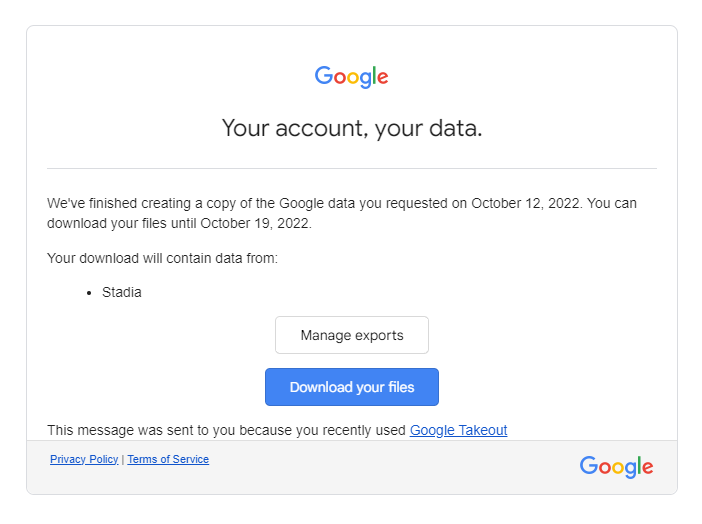
If you’re looking to salvage your progress from Stadia, you’ll have to use Google’s Takeout service to export your data as a downloadable archive file and bring it over to your PC.

It’s worth noting that if you want to save your game files, you’ll have to do so before January 18th, 2023 (the day Stadia shuts down). Follow the steps below:

  1. Head to Google Takeout
  2. Click on ‘deselect all’ and select ‘Stadia’
  3. Choose your preferred destination for the export, i.e. via email, Drive, Dropbox, etc
  4. Under ‘Frequency,’ select ‘Export Once’
  5. Choose ‘.zip’ as the file type and ‘2GB’ as the file size
  6. Click on ‘Create export’
  7. Download the exported file from the preferred destination that you chose in step 3
  8. Extract the game files from the .zip folder
  9. Locate your Cyberpunk 2077 files under /Takeout/Stadia/GAMING/GAME_SAVE
  10. Save those files in a separate folder and paste the folder in %userprofile%Saved GamesCD Projekt RedCyberpunk 2077 on your PC (provided you have the game installed on your PC)

Once you’ve followed the steps above, you can continue Cyberpunk 2077 where you left off on PC. To sync the data to a console, simply start Cyberpunk 2077 on your PC via the RedLauncher.

Make sure the cross-platform saves are enabled in the in-game Settings and load the files you’ve just imported from Takeout. Save the game again, and the data should sync with the cloud and appear on your console. Note that you need to be using the same GOG account on your PC and console.

Source: CDProjektRed

Categories
Mobile Syrup

Did you get your Pixel 7 or Pixel Watch a day early?

We’ve heard that some Canadians are getting their Pixel Watch and Pixel 7 devices today, despite the phone launching tomorrow, October 13th.

In fact, MobileSyrup pre-ordered a Pixel 7 Pro for our new contest (check it out here), and we also received the device a day early.

This isn’t the first time this has happened. This past February, Brad Bennett received his Galaxy S22 Ultra pre-order two days early.

While pretty cool, this is likely only for those who pre-ordered the devices. You won’t be able to head to stores and buy the Pixel 7 or Pixel Watch until tomorrow.

Let us know in the comments below if you received your Pixel 7 device a Pixel Watch early.

Also, if you didn’t pre-order any of Google’s devices and want to make an informed choice, we have three reviews focused on Google’s new products:

Pixel 7 review 
Pixel 7 Pro review 
Pixel Watch review 

Categories
Mobile Syrup

Shazam iOS app now offers exclusive artist wallpapers for iPhone and Apple Watch

A new Shazam update is bringing exclusive and downloadable artist wallpapers for iPhone and the Apple Watch directly to the Shazam app.

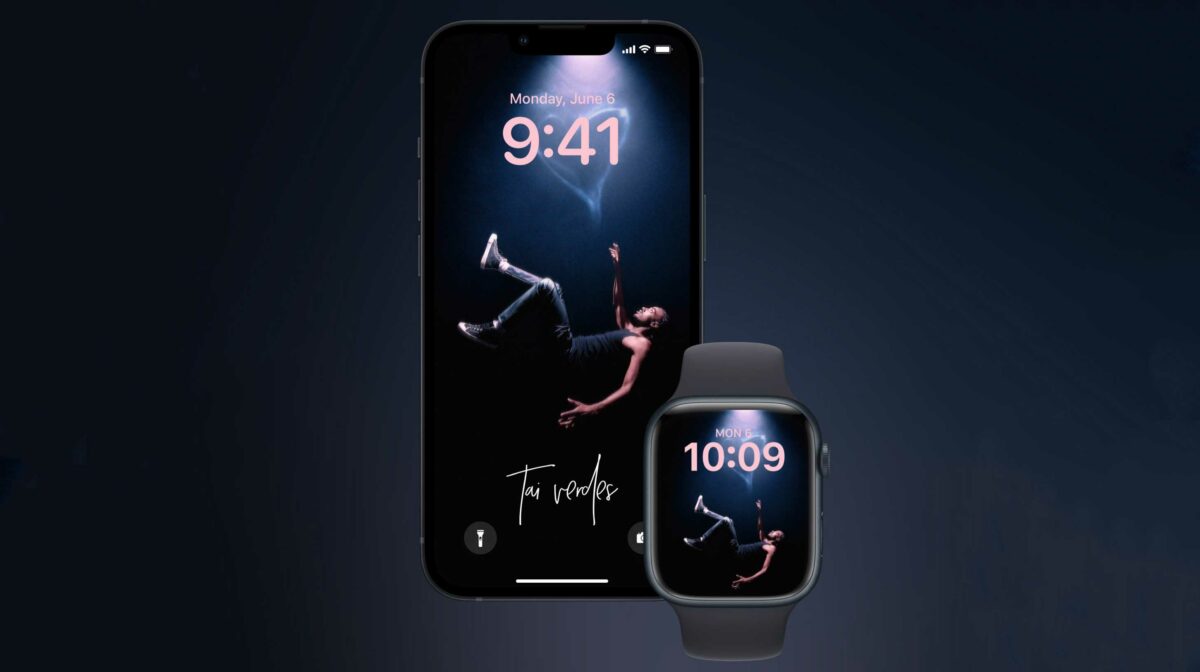
Found by @SteveMoser and shared by 9to5Mac, it appears that the wallpapers are photos of the artists taken during concerts.

Currently, artist Tai Verdes is one of the first to add exclusive wallpapers to Shazam to promote his “HDTV Tour.”

While the feature doesn’t seem to be live in my Shazam app, 9to5Mac says when you open an artist page on the app, you’ll see a new “Exclusive Downloads” section where you can find free downloadable wallpapers and Watch Faces. “The app provides a nice preview of how the wallpaper will look on the lock screen of the iPhone and on the Apple Watch,” wrote the publication.

It’s worth noting that these wallpapers are provided by the artist to Shazam/Apple, so it might take a while before you can find exclusive wallpapers of your favourite artist on the app.

Download the Shazam app for your iPhone here.

Image credit: @taiverdes

Source: 9to5Mac

Categories
Mobile Syrup

Microsoft offers first look at Android 12L running on Surface Duo

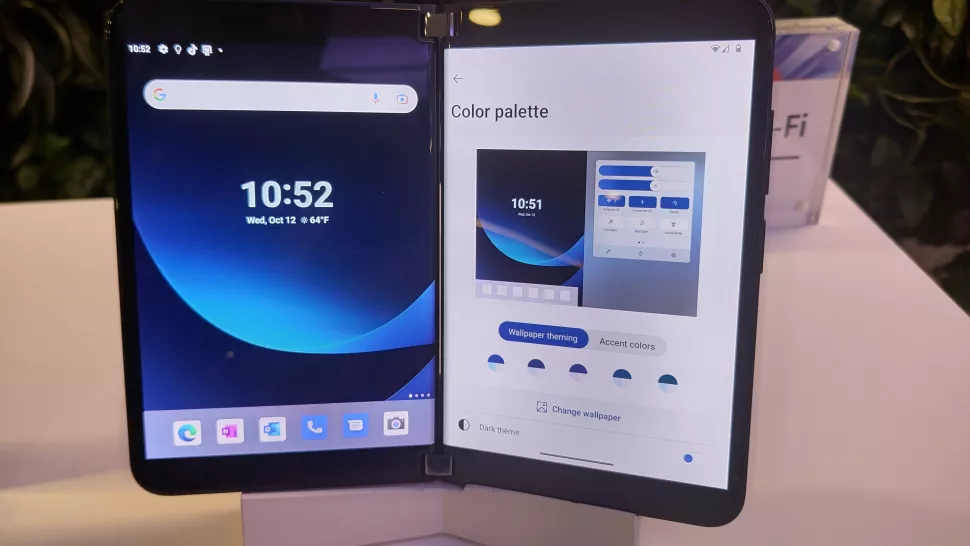
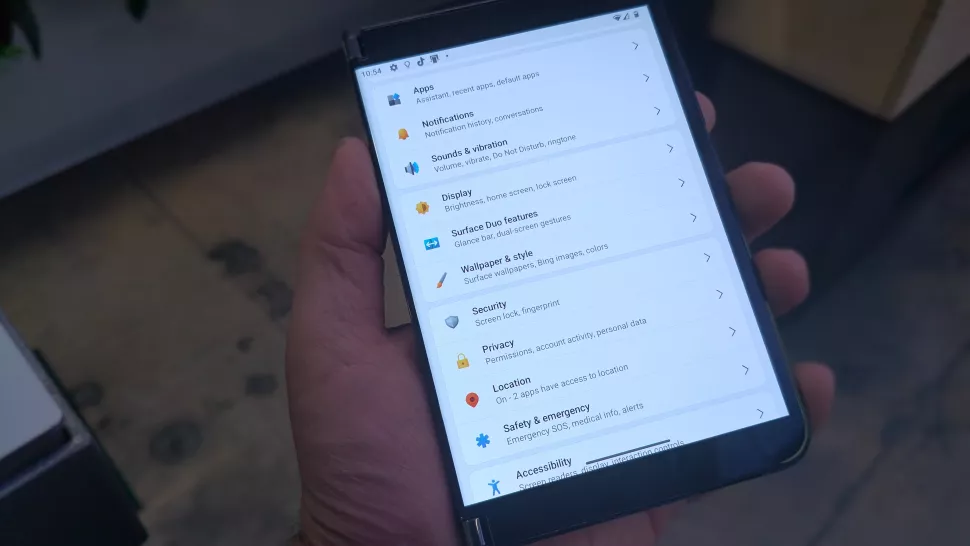
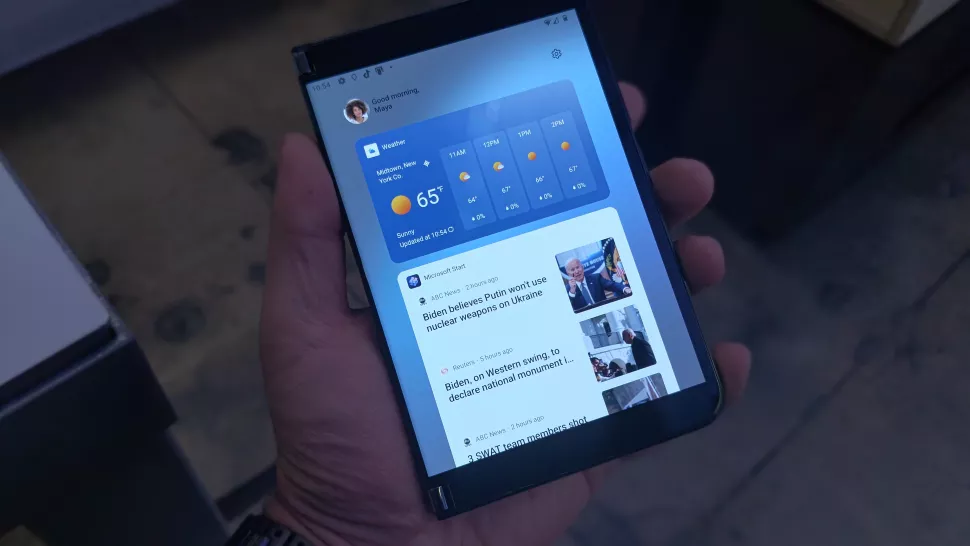
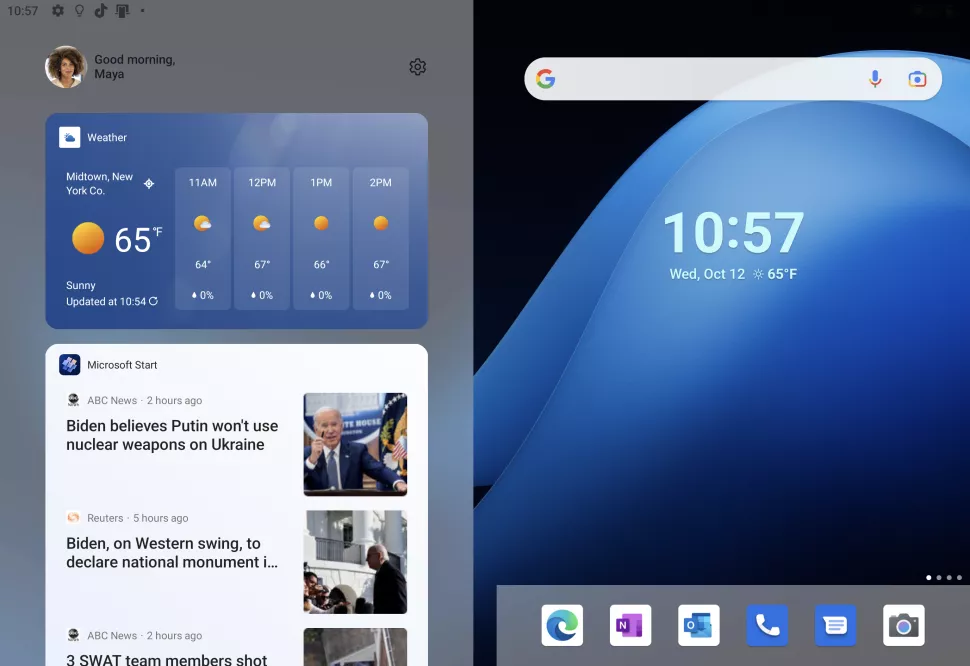
At its hardware event yesterday, October 11th, Microsoft showed off the first looks of how Android 12L looks on the Surface 2 with clean design influences from Windows 11, as shared by WindowsCentral.

Samsung has already shifted its foldables and tablets to Android 12L, and Microsoft was expected to follow suit.

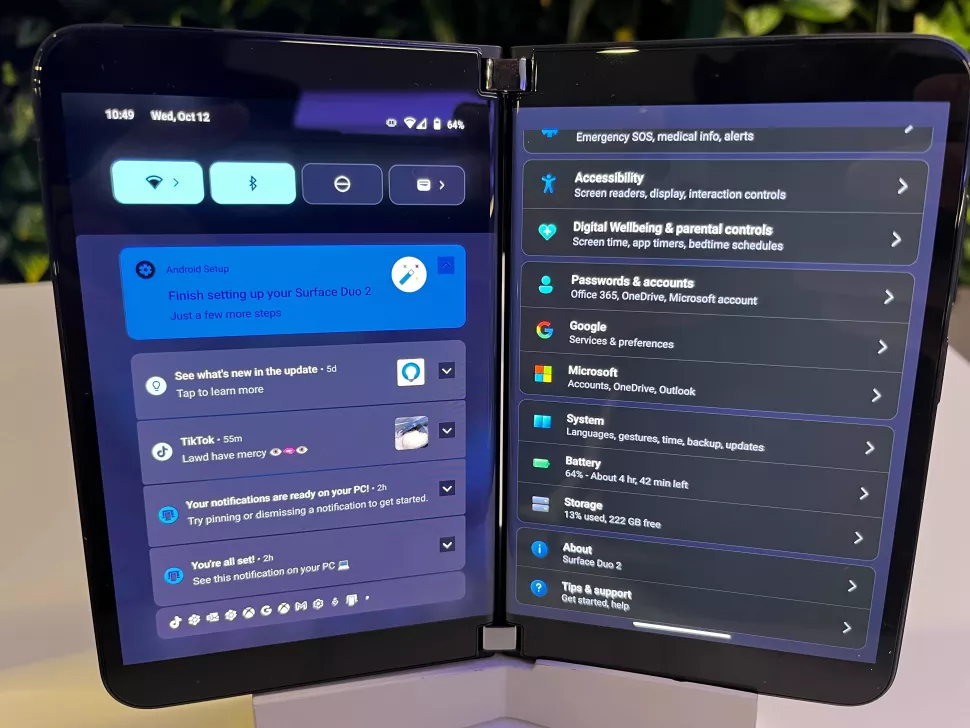
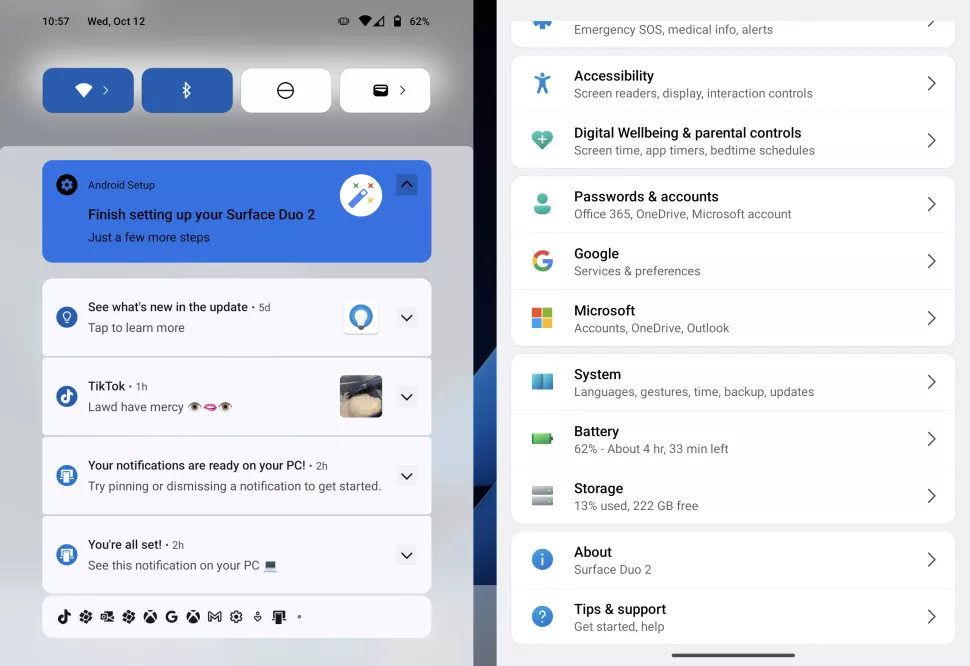
According to screenshots shared by WindowsCentral, the update would bring a new notification panel, blur effects, and a redesigned settings app with Windows 11-influenced icons to the foldable. This marks the first time Microsoft is applying its own design touches to an Android OS, making the Surface Duo feel like an extension of Microsoft’s Windows PCs while also offering a familiar and user-friendly Android experience.

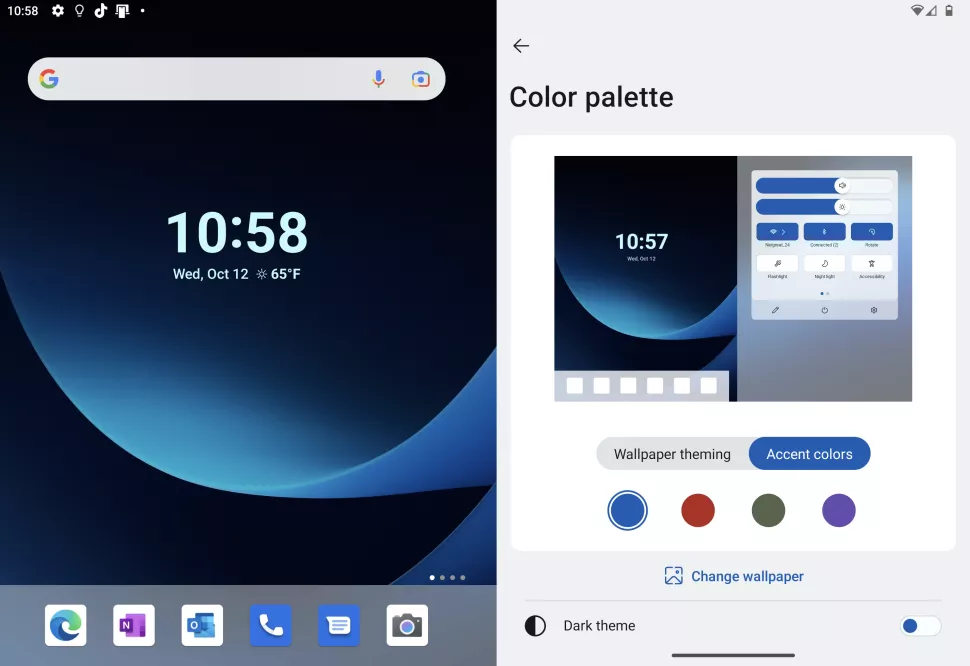
In addition to a redesigned UI, the Surface Duo will also get Android 12L’s Material You accent colours based on the wallpaper you have. Microsoft has told WindowsCentral that Android 12L for the Surface Duo will “begin rolling out later this year.” The update will likely be available for both the Surface Duo 1 and Surface Duo 2.

Check out some screenshots of Android 12L on the Surface Duo below:

Image credit: WindowsCentral

Source: WindowsCentral

Categories
Mobile Syrup

Ride with zombies with this new Waze Halloween experience

In time for Halloween, Waze is adding zombies as an experience to the navigation app.

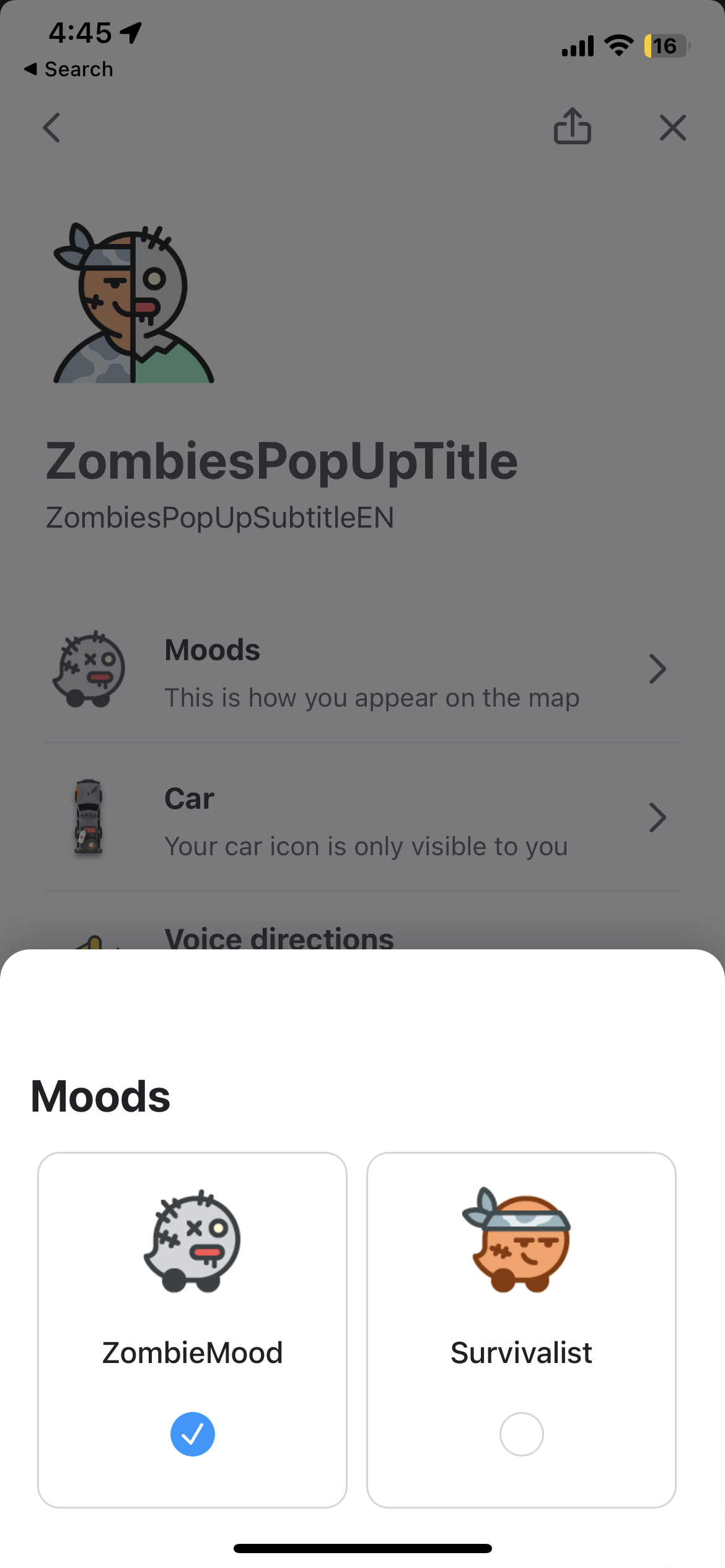
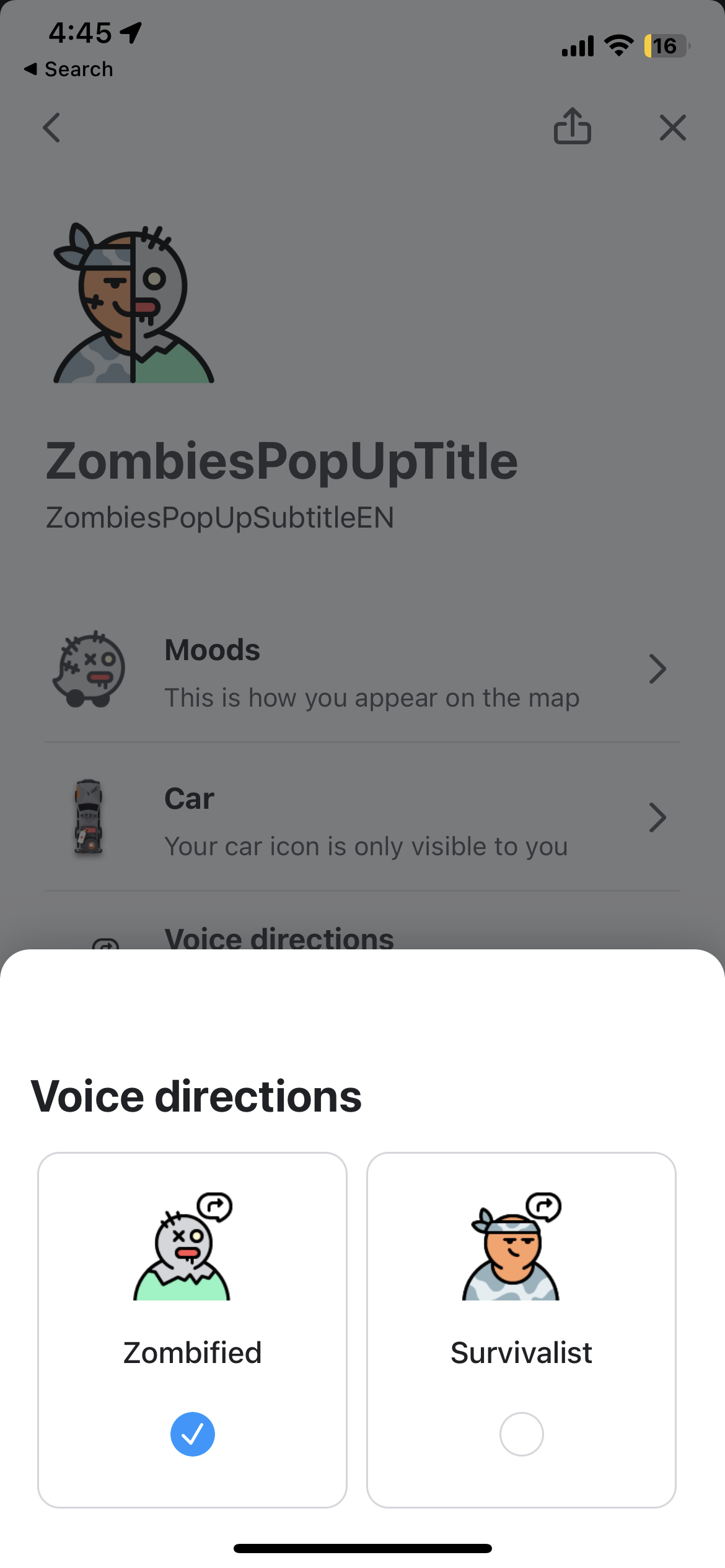
“You can choose to team up with an expert escapist to avoid the Zombies, or take your chance and get to know a member of the undead with a Zombie itself,” wrote Waze in its blog post.

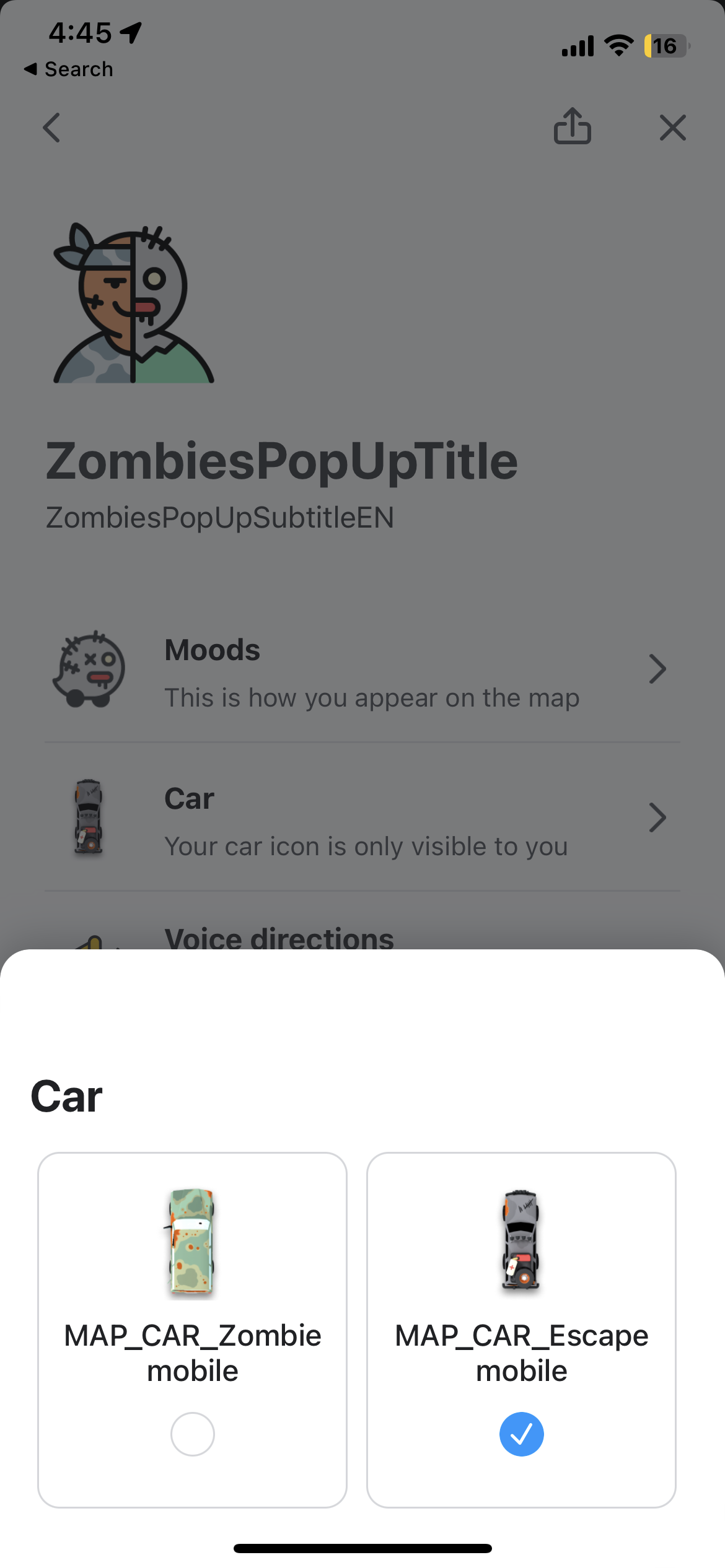
You can set a survivalist’s voice as the chief direction-giver in the app, and as an extra, they will also drop hints as to how to stay away from zombies. In addition, users can set the ‘Survivalist Mood’ to change their vehicle icon to an ‘Escapemobile.’

On the other hand, if you prefer to join the dark side, select the Zombie voice navigation to have a zombie give you directions. To get the full zombie experience, you can also ride in the ‘Zombiemobile’ by switching to the ‘Zombie Mood.’

It’s unclear how long the zombie theme will be available on Waze. It is likely to be available until after Halloween.

You can enable the new mood by navigating to the ‘My Waze’ section of Waze’s settings and selecting ‘Drive with Zombies.’ Alternatively, you can enable the setting by opening this link directly from your mobile.

Image credit: Waze

Source: Waze

Categories
Mobile Syrup

Some AirPods Pro (2nd-Gen) users report experiencing audio drift issues

I really like Apple’s AirPods Pro (2nd-Gen), but my experience over the last few weeks hasn’t been entirely perfect.

As first reported by 9to5Mac, several AirPods Pro 2 owners have turned to Reddit to outline issues tied to annoying audio drifting and, in some cases, audio randomly increasing and decreasing.

While it’s still unclear, the problem is likely tied to ‘Adaptive Transparency’ and active noise cancellation (ANC). The wireless earbuds’ new Adaptive Transparency feature levels out the volume when Transparency mode is enabled to prevent loud sounds like a car horn from blasting through the AirPods Pro too noisily.

It’s also worth noting that in most of the reports, users have Spatial Audio and dynamic head tracking disabled. I haven’t run into audio drifting problems at all.

Over the last few weeks, I’ve encountered the occasional AirPods Pro mild audio spike, but I assumed it was tied to a Spatial Audio glitch or perhaps me not setting up Personalized Spatial Audio properly (I haven’t had the opportunity to troubleshoot the issue much). The main problem I’ve run into is that the AirPods Pro (2nd-Gen) will sometimes display as connected to my iPhone 14 Pro or MacBook Pro (2021), but whenever I play audio, nothing comes from the buds. Usually, a quick manual disconnect and reconnect solves the problem, but it’s still annoying.

Apple hasn’t released a statement about the issue, but based on these reports, the problem seems to be tied to software. Hopefully, the tech giant releases an update soon that solves the issue.

For more on Apple’s new AirPods Pro, check out my review.

Source: Reddit (TutorPuzzleheaded187) Via: 9to5Mac

Categories
Mobile Syrup

Apple Music is now available on Xbox

Apple Music has launched on Xbox consoles.

An app for the music streaming service can now be downloaded from the Xbox Store on Xbox One and Xbox Series X/S. Once downloaded, you can listen to music in the background, even when playing games.

This comes nearly one year after the Apple Music app launched on PlayStation 5. Spotify has been available on Xbox Series X/S and PS5 since the consoles launched in November 2020.

In Canada, Apple Music costs $9.99/month for an Individual membership and $14.99/month for a Family plan. The service is also included in Apple One subscription bundles, which start at $15.95/month and include services like Apple Arcade and Apple TV+.

Categories
Mobile Syrup

Here are the changes to Canadian mobile rate plans this week [October 13 – October 19]

With over 13 wireless providers in Canada, it can be difficult to keep track of the latest promotions and cell phone rate plan changes. 

MobileSyrup will compile the latest weekly rate plan deals every week. You can also check out our guide on plans across Canada to find the right plan for you.  You can compare from 47,842 options and 13 providers in Canada to find the best option.

It’s worth noting that rate plans are always subject to change and that we’ll do our best to keep this list updated as accurately as possible.

Canadian carrier rate plan changes this week

Noticeable price changes:

New Deals:

  • Get a credit of up to $200 towards a new Apple Watch when you trade in an eligible smartwatch
  • Student Offer : Get 15GB data for 45/mo with proof of enrollment. QC

Ongoing deals:

  • Add a family member and get 15GB of unlimited data for only $35/mo in QC, for $45 in MB & SK and for $55 in main regions
  • Switch your business to Canada’s best 5G network and get a credit of $600 per line
  • Get 15GB of unlimited data for $45 in MB & SK and 20GB for $55/mo in main regions.
  • Get bonus Crave Mobile for 24 months with Unlimited Share Plans Ultimate 40 and 40 (Canada & U.S.) in QC and Ultimate 45 and 50 in main regions.
  • Get 500MB bonus data/mo. with automatic monthly top-up options with the $30, $40, $45 & $55 prepaid plans
  • Buy a new phone online and save $50
  • Connect your other devices and enjoy unlimited data from $10/mo.
  • Get 3 months of Apple TV+ when you buy an iPhone or iPad.
  • limited time offer – Get 3 months of Apple Fitness+ free when you buy an Apple Watch
  • Trade in your old device and save. Get a credit up to $700 when you trade in your old phone.
  • Get Crave Mobile for 24 months
  • Pay even less per month with the Device Return Option.
  • Various phone accessories on sale
  • Pair Bell mobility with your Bell service and get 20GB of data for just $50/mo. in QC and for $65/mo. in ON.
  • Save $20/mo. for every family member you add to your account.(QC)
  • Get up to 500 MB bonus data/mo. when you sign up for Automatic Monthly or Automatic Monthly/Low Balance Top-Up option on eligible plans.

Noticeable price changes:

Ongoing deals:

  • Save up to $35 per month for 12 months on unlimited Fido Home Internet when you pair with a Mobile plan. That’s up to $420 in savings! ON
  • Save up to $25/mo for 12 months on Fido Home Internet
  • Get your certified pre-loved phones starting from just $3/month.
  • Fido postpaid customers get new deals and giveaways, with Fido XTRA.
  • Get 5 extra hours of unlimited data every month at no extra cost. Available with Data, Talk & Text plans.
  • TABLETS AT $0 DOWN AND 0% INTEREST with financing on select plans for $10/month when you add a line to your account.
  • Trade in select devices and get a minimum credit of $100
  • One Month Free Service when you invite your friends and they join Fido. 

Browse Fido cell phone plans

Noticeable price changes:

New Deals:

  • Get 10 GB bonus per year in Canada with 15GB Canada plan
  • Work from home seamlessly with the powerful Unlimited 400 Internet plan at just $70/month.

Ongoing deals:

    • TV 10 choices Sports option + Unlimited 60 Internet plan = all your sports and much more for only $114/month.
    • For studies and entertainment, count on the performance of the Unlimited 60 Internet and save $12/month.
    • Get up to $500 in credit when you trade in your old phone.
    • With a TV or TV App plan, you can enjoy all Vrai and Club illico content as much as you want for 6 months.
    • Subscribe to the QUB musique Family plan at the exclusive rate of $9,99/month your Videotron Mobile plan.
    • Get 100 GB bonus per year along with $15 monthly savings with all-Inclusive 20GB, 40GB and 50GB plan
    • Add the TV App Basic service plan to any Internet plan for only $5 more per month.
    • Monthly savings on various smart phones
    • Save big when you buy a new phone! It’s easy—bring in your old device and save up to $500
    • Take advantage of monthly discount with multiline $5 to $15 per line each month (depends on number of lines)
    • Sale on phone cables, chargers and audio accessories

Noticeable price changes:

New deals:

  • Save the $50 connection fee when you shop online at Koodo.

Ongoing deals:

  • Limited time off: Get 10 gigs for only $45/month. Plus, get $50 in savings when you shop online.
  • For a limited time, get select Certified Pre-owned iPhones starting at $3/month with the Tab.
  • For a limited time, when you refer your friend to Koodo, you can both take $25 off your bill.
  • Get bonus 500MB data per month with Automatic Top-Up on all prepaid Base plans except $15 plan which comes with 250MB bonus per month.
  • Prepaid SIM cards are now $10 for a limited time

Browse Koodo cell phone plans

Noticeable price changes:

New deals:

  • Get 5 Roam Like Home days at no cost every year (up to $75 value).

Ongoing deals:

  • Student mobile plans starting at just at $45/month in MB, SK & QC and $55/month in ON
  • For a limited time, add a Rogers Infinite mobile plan to your home services for just $60/mo and enjoy unlimited data, including 25GB of high-speed shareable data (ON)
  • Get Apple Watch Series 8 starting from $29.11/mo with financing and get your smartwatch plan free, both for 24 months when you activate on select plans.
  • Score the ultimate Samsung S22 128GB + Galaxy Buds2 bundle for only $32.17/mo for 24 months with financing on a Rogers Infinite plan with Upfront Edge when you return your device within 2 years.
  • Limited time offer on Infinite 20GB plan for $65/month and $45/month for additional lines in QC
  • Refer your friends and save up to $300 per year
  • Stay connected anywhere with the new plan for data-only mobile internet. Get 50GB/mo for $120/mo, then pay only $10 for every 10 GB above this plan limit for the first 3 months.
  • Promotional data plan for individual plans on $45/mo 6GB plan, $50/mo 10GB plan and $55/mo 15GB plan.(QC)
  • Sign up for Disney+ through Rogers and get 6 months on select Rogers Infinite plans

Browse Rogers cell phone plans

Ongoing deals:

    • Save $180 on LivingWell Companion Go
    • Get iPhone 14 Pro and save up to $530 with Bring-It-Back
    • Add Pik TV for only $10/mo with TELUS Internet.
    • Bundle a new Apple Watch with TELUS Health Companion from $54/month.
    • iPhone 14 + Apple Watch SE. Incredibly powerful together.
    • Enjoy AirPods Pro on us when you get PureFibre 1.5 Gigabit Internet (BC &AB)
    • Get 50GB of high-speed CAN-U.S. data for $105 per mo. Perfect for digital nomads and snowbirds alike.
    • Get a FREE $400 TELUS prepaid Visa. (BC&AB)
    • Earn a reward worth $50 when you refer a friend to TELUS.
    • It’s only $10 extra per month to double your data.
    • Save $40 on all SmartWear devices
    • Get Stream+ for as low as $20 per month on select Unlimited plans
    • Join the TELUS Exclusive Partner Program and save more.
    • Bundle your services and get up to $40 off each month (QC)
    • Save big on the flashiest phones with Bring‑It‑Back
    • Get a bonus 500MB of data when you sign-up for Auto Top-up on $30, $40, $45 & $55 prepaid talk, text & data plans
    • Get a bonus 100MB of data when you sign-up for Auto Top-up on $25 prepaid talk & text plan

Browse Telus cell phone plan

Noticeable price changes:

New deals:

  • For a limited time, get a $30 bill credit when you purchase a Certified Pre-Owned phone.

Ongoing deals:

  • For a limited time, get an additional 2GB of data every month for free for 12 months on plans $25/mo+, exclusively online.
  • For every dollar you spend, you’ll make 15% of it back in points.
  • Reward – Welcome Present Get 5 points.
  • Earn up to 20 points per month by helping the Public Mobile community online.
  • Earn 10 points for every 12 months you stay
  • Earn 1 point for every month a friend you refer stays
  • Free Public Mobile SIM Card included with each purchase of a Certified Pre-Owned phone.

Browse Public Mobile cell phone plans

Ongoing deals:

  • Exclusive Quebec offer – Get 5GB of bonus data on plans $35+ as of your second anniversary date.
  • 500MB bonus with Autopay on all Talk, Text & Data plans.
  • Chatr Refer a Friend Program – Get up to $150 in credits over 10 months to use towards your top up.
  • 250MB bonus with Autopay on Talk & Text $15 Plan

Browse Chatr cell phone plans

Noticeable price changes:

Ongoing deals:

    • Get Bonus 500MB data with unlimited Province wide $31, $35, $40, $50 and $55 prepaid plans!
    • Value-packed mobile plans and home internet. Now $61/Mo when you bring your own phone + free $50 visa prepaid card
    • Back to school value packed plan : 5GB for $35 when you bring your own phone. QC 8GB for $55/mo. when you bring your own phone. ON
    • Internet + TV from $64/mo. plus get a $50 visa prepaid card
    • Hot offer! Get 25 Mbps for the same promo price as 10 Mbps + Get a $50 Visa prepaid card with $39/mo plan. Get $50 Visa Prepaid card with $50/mo, $53/mo & $70/mo internet plans
    • Get Bonus 500MB data with unlimited Canada wide $34, $38, $43, $53 & $58 prepaid plans.
    • Get 250MB Bonus Data with Unlimited Canada wide $25 plan and with Unlimited province wide $22 and $29 plan
    • Get TV starting from $25/mo in QC and $35 in ON
    • Get a new phone. Plans starting from $27/mo
    • The new Google Pixel 6a plus member benefits. Plus get 3 months of Youtube Premium and Google One
    • Add a line for $10/mo. and make calls and send messages with your Apple Watch SE and leave your phone at home.
    • Limited time offer on $45 and $55/mo ($55 includes 15GB + Bonus 5GB of Data) data, talk & text plans.
    • 100MB Bonus Data on the $15 prepaid plan with PPU with AutoPay option.
    • GET AN ANNUAL PLAN. Activate an annual prepaid plan with 400 local minutes and 400 global texts for $100/year when you bring your own phone.
    • Shop online and get $50 waived of connection service fee.
    • Hot phones starting from $0 down, 0% APR
    • Refer a Friend to get $50 in bill credits each when they join the Virgin Plus party.
    • Crave is available as an add-on for TV for only $20/mo. hook up today and get 2 months free
    • Get a Google Chromecast when you hook up with TV on a 6-month term
    • Get up to $700 off a hot new device when you trade in your old one.

Browse Virgin Plus cell phone plans

Noticeable price changes:

Ongoing deals:

  • iPhone 14 Pro & 14 Plus – Pre-order now on Big Gig Unlimited data plans starting at 45/mo.
  • Get 1.5GB of data for $19/mo. for 12 months
  • Bring your own phone deals : 10GB for $30/mo. and 20GB for $40/mo.
  • Save up to $10/mo. for 24 months when you add a new Postpaid line
  • Bring your own phone plans – 25GB(20+5GB Bonus) for $50/mo, 30GB(20+10GB Bonus) for $60/mo, 35GB(15+20GB Bonus) for $70/mo and 50GB(35GB+15GB Bonus) (Canada/U.S.) for $75/mo
  • Enjoy one free month of Visual Voicemail when you sign up in-store or online for a Freedom Phone Line
  • Get unlimited talk and text starting at $99 per year. New Prepaid activations only.
  • Refer a friend and get a $25 service credit for each referral. Save up to $250 a year

Ongoing deals:

    • Save $10/mo. for 6 months when you sign up for noSTRINGS Talk, Text + Data or Unlimited plans.
    • Upgrade your device and get 15 GB of data for just $85/mo.
    • Purchase a Wireless Device Protection Plan and get 3 months free.
    • Sign up for maxTV & Internet to get big savings. Plus, get Optimum In-home Wi-Fi free for the first 12 months
    • Save $200 on Apple Watch Series 6 GPS and GPS + Cellular.
    • Get 10% off when you buy 2 or 20% off when you buy 3 or more regular priced cases, screen protectors, and/or chargers.
    • Sign up for new wireless service and save $15/mo. on your wireless plan for 24 months.
    • Save $20/mo. off an eligible voice & data plan when you bring your own phone or buy a phone at a full price!
    • Get big savings on wireless plans, crazy fast internet speeds, and binge-worthy TV.
    • Big deals on maxTV Stream media boxes for a limited time.
    • Get up to $600 in-store credit toward a new wireless device and accessories when you trade in your old device.
    • Sign up for SaskTel Internet on a monthly plan and save 50% for 3 months + get Optimum In-home Wi-Fi for only $5/mo. for first 3 months
    • Sign up for SaskTel Internet on a 2-year contract and get Optimum In-home Wi-Fi free for 12 months
    • Switch to a 2-year Internet contract plan and save $10/mo. off the regular price
    • Sign up for SaskTel Internet on the infiNET 300 plan and get this special deal + get Optimum In-home Wi-Fi free for the first 12 months
    • Upgrade to the next fastest plan at no additional cost for 1 month
    • Get unlimited calling with our Anytime North America Long Distance plan—all for one low monthly price
    • Get our 10 most popular calling features, including Call Display & Name Display, for just $10/mo. Add on Voice Mail for only $2/mo. more
    • Get 3 months of Apple Fitness+ free when you buy an Apple Watch.
    • Sign up for noSTRINGS Prepaid Auto Top-ups and get a $20 bonus
    • Bring your Google Pixel and save $600

Noticeable price changes:

New Deals:

  • Bundle home services with Mobile and save $120/year
  • Refer a friend to Eastlink Mobile and you both get a $25 credit.

Ongoing deals:

    • Family Share your Unlimited Data and save $1800 over 24 months
    • Add Mobile to other popular Eastlink services and save up to $15/month!
    • Get a $50 welcome credit when you sign up for a new mobile data plan online
    • Get 3 months of Apple TV+ free when you buy an Apple device.
    • Order your Bundle anytime online get $200 welcome credit
    • Get the Smartphone you Want for $0 Down with easyTab
    • Save $69.95 when you DIY and save the installation fee
    • Get up to $200 When you Switch to Eastlink
    • Change your mobile data plan anytime for free
    • Free Whole Home WiFi Perfected with all Bundles and Internet plans
    • Bring Your Own Device and Enjoy Data Plans

Browse Eastlink cell phone plans 

Noticeable price changes:

Ongoing deals:

  • Activate your first Fizz plan using the referral code of a friend and you’ll each get a $25 referral bonus.
  • Mix & match your plans from $61/month.
  • A supercharged voicemail for IOS and Android phones, at only $2 per month
  • Enjoy a 12-month warranty on new phones and a 6-month warranty on Preloved phones
  • The higher the level you’re at, the more rewards you get to choose from to add value to your monthly plan.
  • Any unused mobile data will be rolled over to the next month.

Browse Fizz cell phone plans 

Noticeable price changes:

Ongoing deals:

  • Experience Fibre+ Gig speeds for only $99/mo and connect more devices with next-gen WiFi 6 tech.
  • Bill credits with : Fibre + Internet and Fibre + Internet & TV
  • Order your plan online and save an extra $50
  • Upgrade to Fibre+ Gig 1.5 Internet for exclusive savings on Mobile.
  • If you’re looking for a lower-level TV plan than Total TV, check out the Limited TV plan for $25/mo.
  • Rollover Data any time for just $10/GB and carry over unused data for up to 90 days

Browse Shaw cell phone plans

Ongoing deals:

  • $25 off + free SIM Card with the purchase of a phone and a $50 top up
  • $25 off Sky Elite phone with a $50 top up plus Free SIM. 

Browse cell phone plans

Ongoing deals:

  • Get an additional five percent of the value of every Top-Up in points when you sign up for Auto-Allowance or Allowance with your PC Financial Mastercard or PC Money
  • 20,000 PC Optimum points after two months of service
  • Get 1GB of bonus data every month when you sign up for an Automatic Top-Up option, eligible on plans that have data.

Browse cell phone plans

New deals:

  • Unlimited Canada-Wide & US Calling Plan (include 5GB bonus data) – 20.5GB for $60/mo and 25.5GB for $70/mo in QC

Ongoing deals:

    • Get talk, text and up to 8GB of data for $35/mo (includes 5GB bonus data) QC for 12 months
    • Unlimited Canada-Wide & US Calling Plans that include the 5GB of bonus data- 15.5GB with automatic top-up for $50/mo (QC)
    • Unlimited Canada-Wide & US Calling Plan – 10.5GB with automatic top up for $50/mo (ON, SK)
    • 750MB with automatic top-up for $15/mo Canada-wide data only plan, 250MB for $15/mo with 100 minutes Canada-wide calling plan (ON, SK, QC).
    • A one-time $10 SIM Card charge applies for new activations.
    • Unlimited Canada-Wide calling plan – 1GB data with automatic top-up for $25/mo and 5GB bonus data included with the 8GB for $35/mo and 10GB for $40/mo plans(QC)
    • Get bonus data with Lucky Rewards.
    • Get 250MB/mo. of bonus data after making 6 monthly payments.
    • Unlimited Canada-wide calling plan – 1GB data with automatic top-up for $25/mo, 3GB for $35/mo, 5GB for $40/mo (ON, SK)
    • Get a cheap phone plan from $15/mo.
    • 500MB with Automatic Top-Up on $24, 3.5GB with Automatic Top-Up on $33, 11.5GB with Automatic Top-Up on $43 plans for QC.

Browse cell phone plans

Categories
Mobile Syrup

Pixel 7 Review: Well refined

It feels like Google’s Pixel line finally got a boring, iterative update — an ‘S’ year, if you will — and it may be the best thing to happen to Google’s smartphone line in a long time.

The ‘S’ year term comes from Apple’s old pattern of launching a big iPhone update followed by a minor, iterative update denoted with an S (iPhone 5, iPhone 5s, iPhone 6, iPhone 6s, etc.). That naming scheme has gone away, and the pattern has changed, but the general cycle of big updates followed by iterative updates remains.

The Pixel 7 is most definitely an ‘S’ update, boasting almost exactly the same design as the Pixel 6, but with a few minor tweaks and improvements (plus a few new features mostly enabled by an improved Tensor chip and software). Some might be inclined to criticize Google for pulling an Apple and rolling out an iterative update, but I think it’s exactly what the Pixel line needs.

Here’s the thing: the Pixel line hasn’t had a truly recognizable identity. Most people can identify an iPhone when they see one. To a lesser extent, Samsung’s Galaxy S phones have a consistent, recognizable design. Aside from the two-tone back panel, each Pixel phone has looked fairly unique
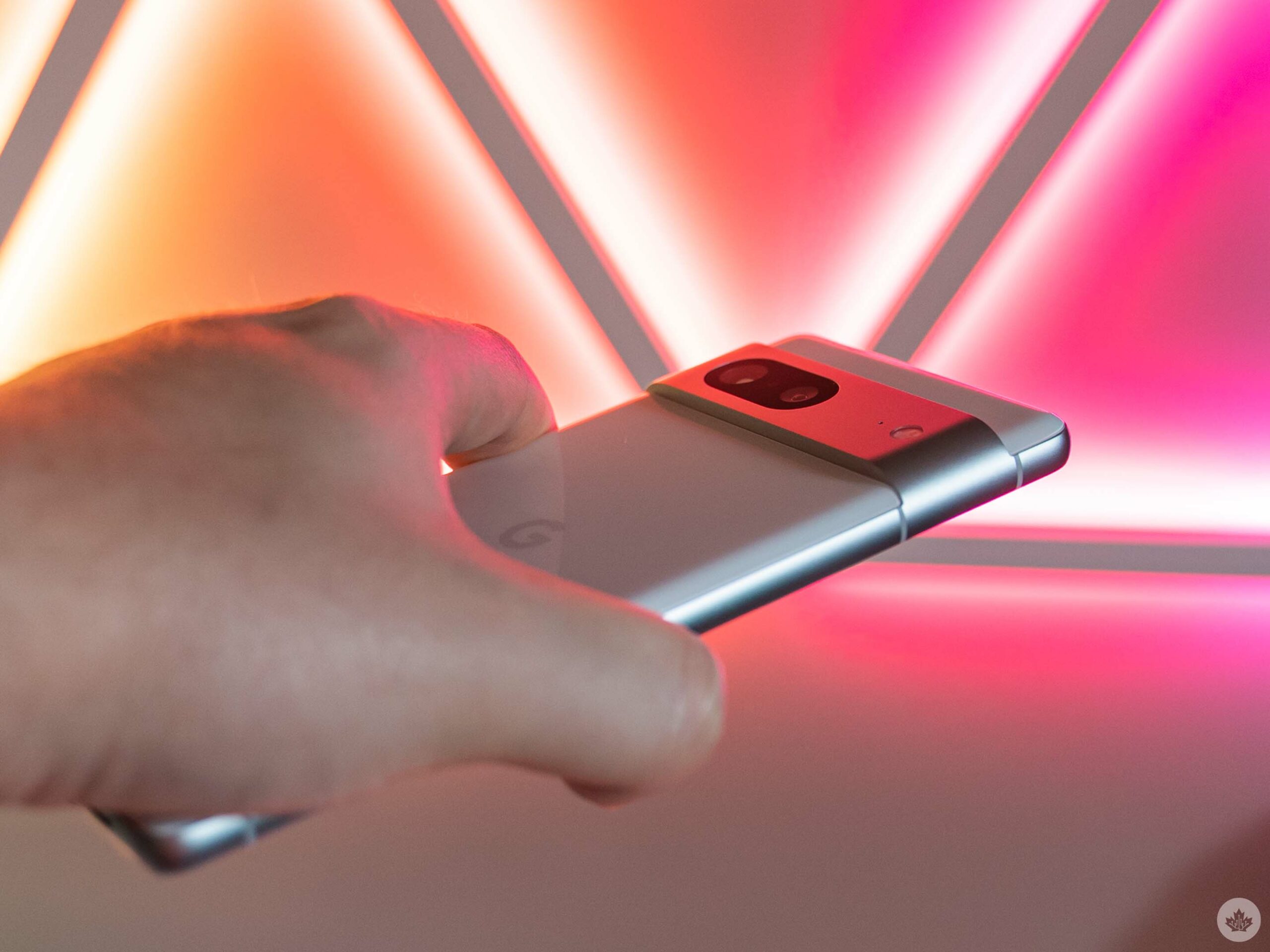
Like it or not, Google has chosen the Pixel 6 design with its recognizable camera visor and decided to stick with it. And by avoiding the effort of redesigning the phone this year, it’s allowed Google to refine the Pixel 6 design into something better on the Pixel 7, as well as bring quality improvements to other areas of the phone.

If you want to learn more about the Pixel 7 Pro, check out the full review here. You can also read the Pixel Watch review here.

Specs

Pixel 6

Pixel 7

Pixel 7 Pro

Pixel 6a

Display

6.4-inch FHD+ (1080 x 2400) OLED display, 411ppi, 90Hz refresh rate

6.3-inch FHD+ (1080 x 2400) OLED display, 416ppi, 90Hz refresh rate

6.7-inch, (1440 x 3120) QHD+ display, 512ppi, 10-120Hz refresh rate

6.1-inch FHD+ (1080 x 2400) OLED display, 429ppi, 60Hz refresh rate

Processor

Tensor

Tensor G2

Tensor G2

Tensor

RAM

8GB of RAM

8GB of RAM

12GB of RAM

6GB of RAM

Storage

128GB, 256GB

128GB, 256GB

128GB, 256GB, 512GB

128GB

Dimensions (in.)

160.4 x 75.1 x 8.2mm

6.1 x 2.9 x 0.3in (155.6 x 73.2 x 8.7mm)

6.4 x 3.0 x 0.3in. (162.9 x 76.6 x 8.9mm)

152.2 x 71.8 x 8.9 mm

Weight

207g

197g (6.9oz)

212g (7.5oz)

178 grams

Rear Facing Camera

50-megapixel (primary) + 12-megapixel (ultrawide)

50-megapixel (primary) + 12-megapixel (ultrawide)

50-megapixel (primary) + 48-megapixel (telelphoto, x5 zoom) + 12-megapixel (ultrawide)

12.2-megapixel (primary) + 12-megapixel (ultrawide)

Front Facing Camera

8-megapixel

10.8-megapixel

10.8-megapixel (ultrawide)

8-megapixel

OS

Android 12

Android 13

Android 13

Android 12

Battery

4,600mAh

4,355mAh

5,000mAh

4410mAh

Network Connectivity

LTE/ 5G

LTE/ 5G

LTE/ 5G

GSM / HSPA / LTE / 5G

Sensors

Fingerprint (in-display), accelerometor, gyro, proximity, compass

Fingerprint (in-display), accelerometor, gyro, proximity, compass

Fingerprint (in-display), Face Unlock, accelerometor, gyro, proximity, compass

Fingerprint (in-display), accelerometor, gyro, proximity, compass, barometer

SIM Type

Nano SIM, eSIM

Dual SIM (single nano-SIM and eSIM)

Dual SIM (single nano-SIM and eSIM)

Nano SIM, eSIM

Launch Date

October 28, 2021

October 13, 2022

October 13, 2022

July 28, 2022

Misc

Colours: Kinda Coral, Sorta Seafoam, Stormy Black | IP68 water and dust resistance

Colours: Obsidian, Snow, Lemongrass

Colours: Obsidian, Snow, Hazel

No headphone jack / colours: Chalk, Charcoal, Sage

Display

Pixel 6

6.4-inch FHD+ (1080 x 2400) OLED display, 411ppi, 90Hz refresh rate

Pixel 7

6.3-inch FHD+ (1080 x 2400) OLED display, 416ppi, 90Hz refresh rate

Pixel 7 Pro

6.7-inch, (1440 x 3120) QHD+ display, 512ppi, 10-120Hz refresh rate

Pixel 6a

6.1-inch FHD+ (1080 x 2400) OLED display, 429ppi, 60Hz refresh rate

Processor

Pixel 6

Tensor

Pixel 7

Tensor G2

Pixel 7 Pro

Tensor G2

Pixel 6a

Tensor

RAM

Pixel 6

8GB of RAM

Pixel 7

8GB of RAM

Pixel 7 Pro

12GB of RAM

Pixel 6a

6GB of RAM

Storage

Pixel 6

128GB, 256GB

Pixel 7

128GB, 256GB

Pixel 7 Pro

128GB, 256GB, 512GB

Pixel 6a

128GB

Dimensions (in.)

Pixel 6

160.4 x 75.1 x 8.2mm

Pixel 7

6.1 x 2.9 x 0.3in (155.6 x 73.2 x 8.7mm)

Pixel 7 Pro

6.4 x 3.0 x 0.3in. (162.9 x 76.6 x 8.9mm)

Pixel 6a

152.2 x 71.8 x 8.9 mm

Weight

Pixel 6

207g

Pixel 7

197g (6.9oz)

Pixel 7 Pro

212g (7.5oz)

Pixel 6a

178 grams

Rear Facing Camera

Pixel 6

50-megapixel (primary) + 12-megapixel (ultrawide)

Pixel 7

50-megapixel (primary) + 12-megapixel (ultrawide)

Pixel 7 Pro

50-megapixel (primary) + 48-megapixel (telelphoto, x5 zoom) + 12-megapixel (ultrawide)

Pixel 6a

12.2-megapixel (primary) + 12-megapixel (ultrawide)

Front Facing Camera

Pixel 6

8-megapixel

Pixel 7

10.8-megapixel

Pixel 7 Pro

10.8-megapixel (ultrawide)

Pixel 6a

8-megapixel

OS

Pixel 6

Android 12

Pixel 7

Android 13

Pixel 7 Pro

Android 13

Pixel 6a

Android 12

Battery

Pixel 6

4,600mAh

Pixel 7

4,355mAh

Pixel 7 Pro

5,000mAh

Pixel 6a

4410mAh

Network Connectivity

Pixel 6

LTE/ 5G

Pixel 7

LTE/ 5G

Pixel 7 Pro

LTE/ 5G

Pixel 6a

GSM / HSPA / LTE / 5G

Sensors

Pixel 6

Fingerprint (in-display), accelerometor, gyro, proximity, compass

Pixel 7

Fingerprint (in-display), accelerometor, gyro, proximity, compass

Pixel 7 Pro

Fingerprint (in-display), Face Unlock, accelerometor, gyro, proximity, compass

Pixel 6a

Fingerprint (in-display), accelerometor, gyro, proximity, compass, barometer

SIM Type

Pixel 6

Nano SIM, eSIM

Pixel 7

Dual SIM (single nano-SIM and eSIM)

Pixel 7 Pro

Dual SIM (single nano-SIM and eSIM)

Pixel 6a

Nano SIM, eSIM

Launch Date

Pixel 6

October 28, 2021

Pixel 7

October 13, 2022

Pixel 7 Pro

October 13, 2022

Pixel 6a

July 28, 2022

Misc

Pixel 6

Colours: Kinda Coral, Sorta Seafoam, Stormy Black | IP68 water and dust resistance

Pixel 7

Colours: Obsidian, Snow, Lemongrass

Pixel 7 Pro

Colours: Obsidian, Snow, Hazel

Pixel 6a

No headphone jack / colours: Chalk, Charcoal, Sage

Cut from the same cloth
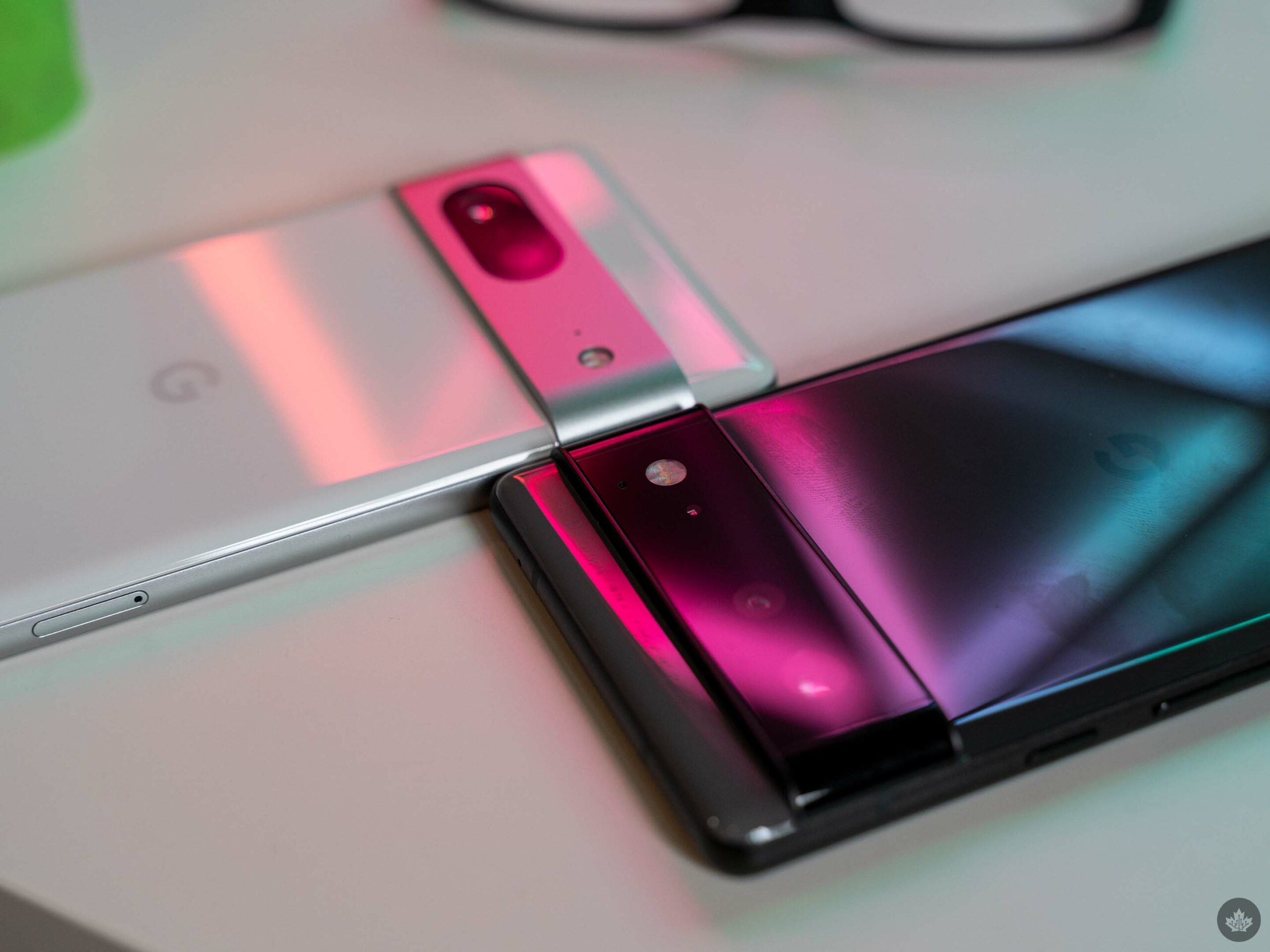
At least the ‘Snow’ Pixel 7 doesn’t show finger smudges as much.

The Pixel 6 and 7 are so similar, it’s hard to argue anyone should make the upgrade from the 6 to the 7. Looking at the two phones specifically could help someone choose between the newer Pixel 7 or save some money with the Pixel 6 (if they can find it on sale elsewhere since it’s no longer available from Google). Plus, understanding what’s different between the Pixel 6 and 7 helps focus on what’s improved on the latter.

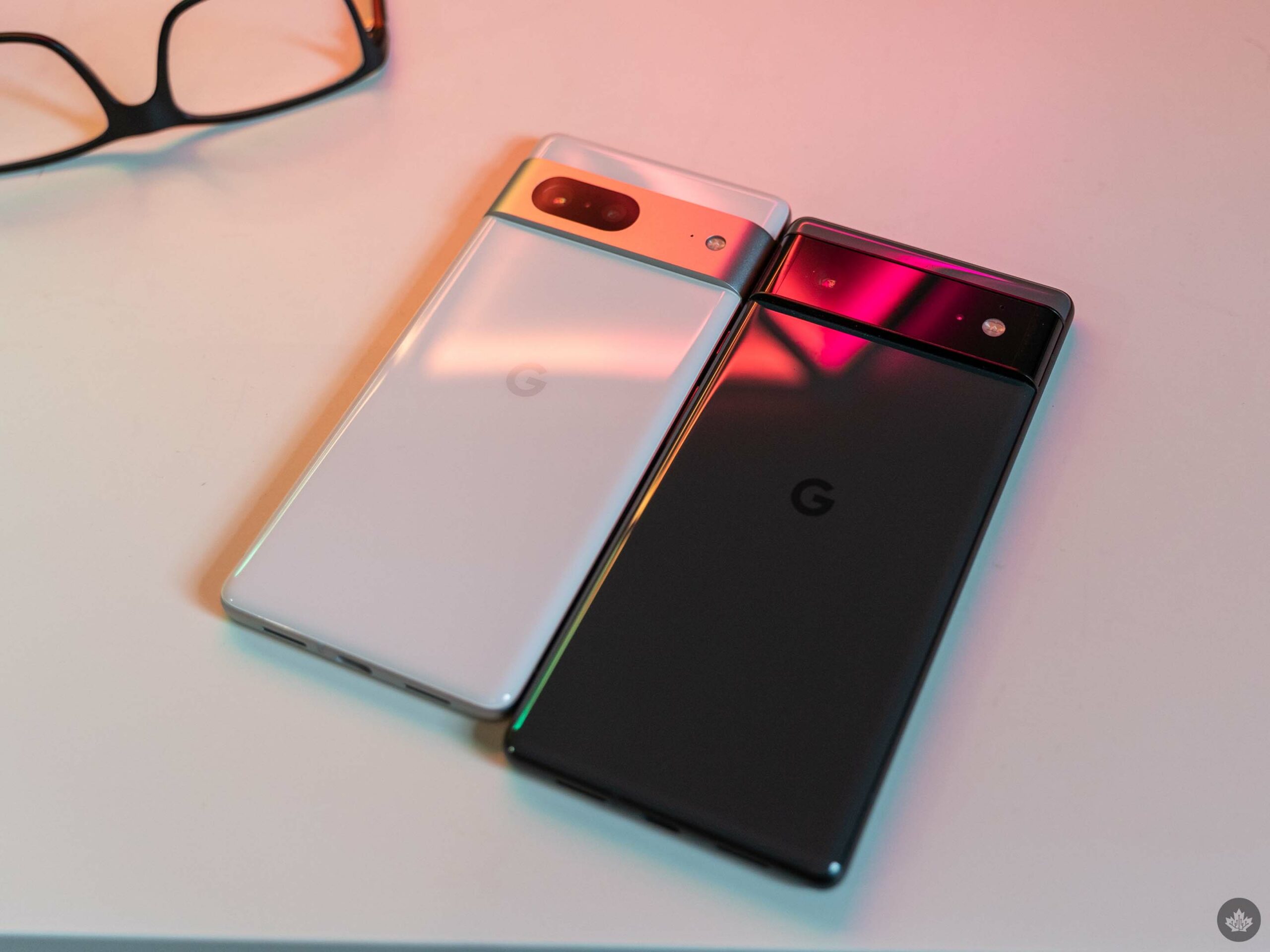
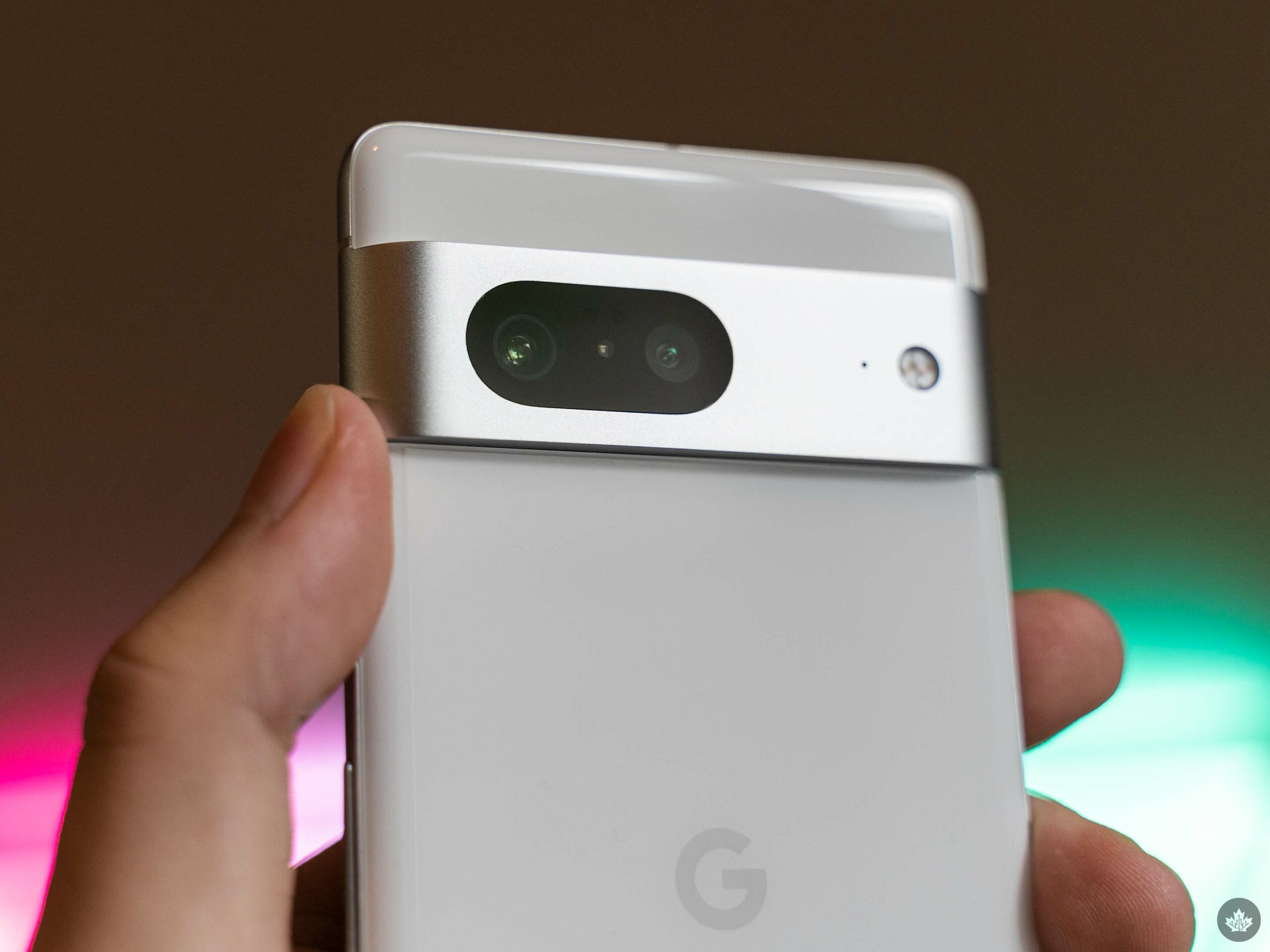
First, there’s the design. As I mentioned, these phones look incredibly similar, with a glass front and back (made with Gorilla Glass Victus this time) and a camera visor sporting two cameras – a primary 50-megapixel shooter and a 12-megapixel ultrawide. The Pixel 7 sports a matte aluminum frame just like the Pixel 6, although this time around, the frame sports different colours matching the phone’s back panel. The Pixel 6 had a matte black frame regardless of the phone’s colour.

Moreover, the frame wraps around and covers the camera visor this year, adding a more unified look. Aside from looking better, I think the aluminum camera bar adds a level of protection compared to the glass visor on the Pixel 6.

Just as slippery
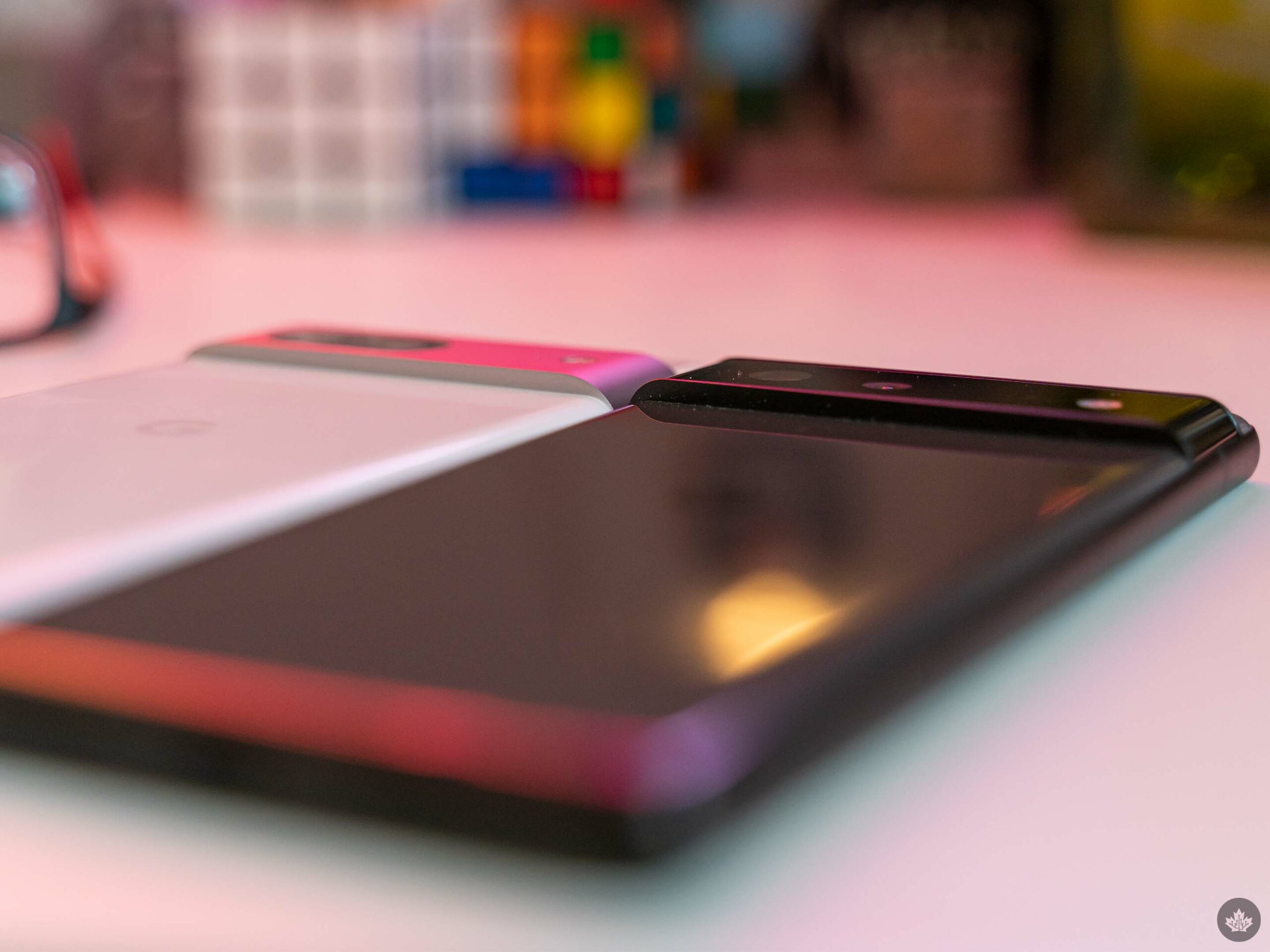
The Pixel 7 didn’t carry on the tradition of a two-tone back with a different colour above the camera bar (arguably, the visor itself now acts as the second colour tone). The smartphone remains just as slippery as the Pixel 6, although the slightly smaller size makes it a little easier to grip for the small-handed folks like myself.

The Pixel 7 is a little lighter, smaller, and narrower too, which helps in that regard. That’s in part because the screen is slightly smaller (6.3-inch vs 6.4 on the Pixel 6).

Still, you’ll want to invest in a good case. Google has not brought back the matte glass textures that made previous Pixels so wonderfully grippy, and that remains one of my biggest gripes with the Pixel 7.

As an example of how slippery the Pixel 7 is, it slid off my counter with no provocation and tumbled a few feet onto tile floor. Despite ending my multi-year streak of not dropping review phones before the review went live, the Pixel 7 didn’t break (although the tile did put a sizable scratch in the aluminum frame). Another reason to get a case: the frame is durable, but scratches easily.

Better display, but still 90Hz
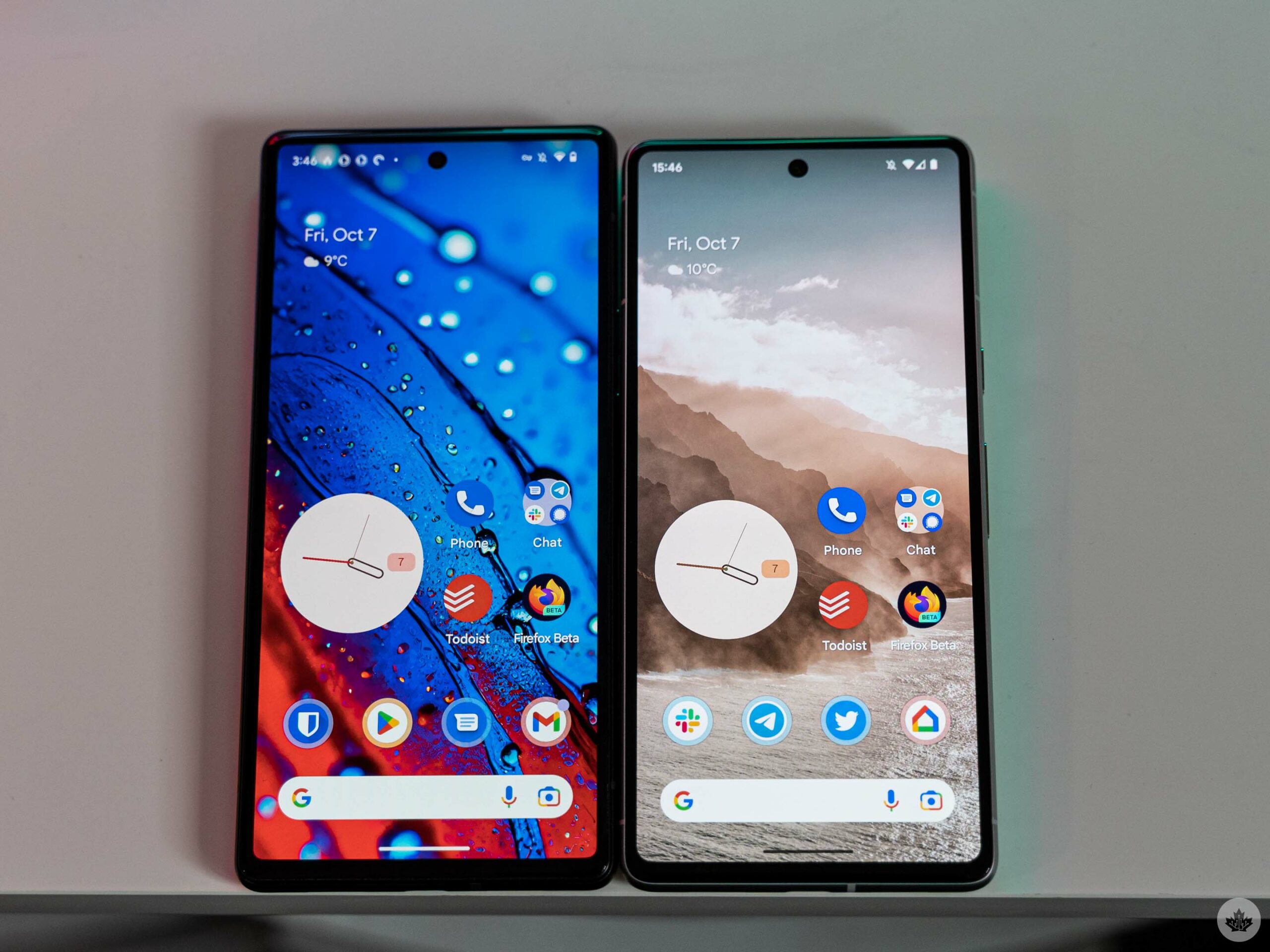
Pixel 6 (left) and Pixel 7 (right).

Despite being a nearly identical display on paper, the Pixel 7’s screen seems to be more high-quality than the Pixel 6. The 6.3-inch FHD+ 1080 x 2400 pixel resolution OLED screen is the same resolution as the Pixel 6, but with a slightly higher pixel density.

However, where it really stands out is brightness, both low and high. The Pixel 7 boasts up to 1,000 nits brightness for HDR and 1,400 nits peak brightness. I found the display to be very viewable outdoors in my brief time with it. On the low end, I also noted that the Pixel 7 doesn’t exhibit the discolouration issues the Pixel 6 did.

If you haven’t noticed this for yourself, the Pixel 6 screen (and many of the 90Hz panels featured in past Pixel phones) often showed discolouration at low brightness, especially with grey tones like the ones commonly used throughout Android’s dark mode. The most common seemed to be a slight green tint to grey shades, but I’ve noticed purple tints too. Regardless, the OLED panel in the Pixel 7 appears to be higher quality and more consistent than the Pixel 6 display.

As someone who prefers the smaller Pixel phones, it’s a nice change of pace not to be disappointed (and actually to be happy) with the display in the smaller Pixel model this year.

Not a battery champ, but it gets the job done
Like the exterior design, the inside of the Pixel 7 didn’t see many significant changes. Like the Pixel 6, the Pixel 7 sports 8GB of RAM and 128 or 256GB of storage. However, Google did bump up the processor with its new Tensor G2 chip.

The search giant claims Tensor G2 has lower power consumption than Tensor while also boosting performance. For the power consumption claim, well, it really comes down to how you use the phone. I do think there’s something to the lower power consumption as the battery seems to be doing about as well as, if not better than, my Pixel 6 on average despite being smaller (4,355mAh vs. 4,600mAh in the 6).

Despite having a smaller battery, the Pixel 7 surprised me with battery life that matched or beat the Pixel 6. Unfortunately, it’s tough to make a good assessment in just five days, so I’ll be keeping a close eye on it going forward, but initial impressions are good.

I made it to the end of most days with about 40 percent left in the tank and about four hours on average of screen-on time. Heavy users could likely drain the battery quicker, but it’s been good for me so far.

Fly like a G2
On the performance side, Tensor G2 benchmarked better than the Tensor chip, with my Pixel 7 clocking 1,023 single-core and 3,004 multi-core scores in Geekbench. The Pixel 7 Pro my colleague Dean Daley reviewed scored slightly better.

Interestingly, the single-core score was about on par with the Pixel 6, 6a and 6 Pro, which all landed around the 1,020 mark, while the Tensor G2 was about 200 points better with multi-core.

Widening the lens to look at other devices sporting chips from Qualcomm and Apple, Tensor G2 remains on the lower end in terms of performance. That’s not a huge surprise, though, given that Google’s focus with Tensor G2 is to boost the Pixel’s on-device machine learning (ML) capabilities.

Those capabilities are central to core Pixel features like Google Assistant, voice typing, translation, and various camera functions – most of which Google improved in some way with Tensor G2.

Before we move on, it’s also important to keep in mind that benchmarks seldom tell the whole story. Even though the Pixel 7 loses on the performance front, it always felt snappy. Moreover, it handled my daily use with ease, which includes messaging friends and family, taking pictures and videos of my daughter, work tasks like email and Slack, watching the occasional YouTube video, browsing social media, listening to music or podcasts, and even playing some games like MTG: Arena.

Small improvements to an already excellent camera
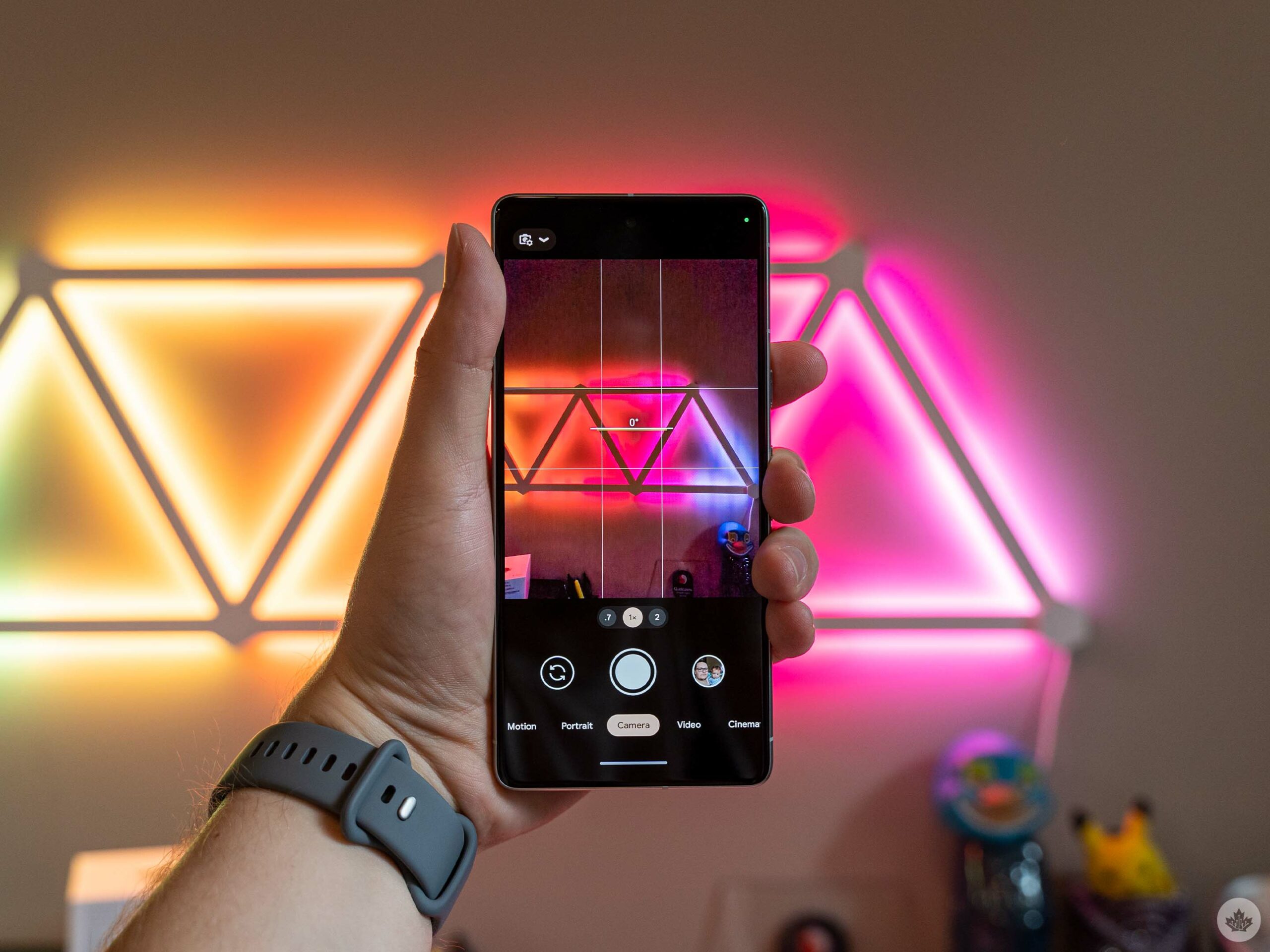
One area that saw a lot of benefits from Tensor G2 was the Pixel 7 camera. The handset once again has a 50-megapixel primary sensor and a 12-megapixel secondary sensor, both of which perform very well.
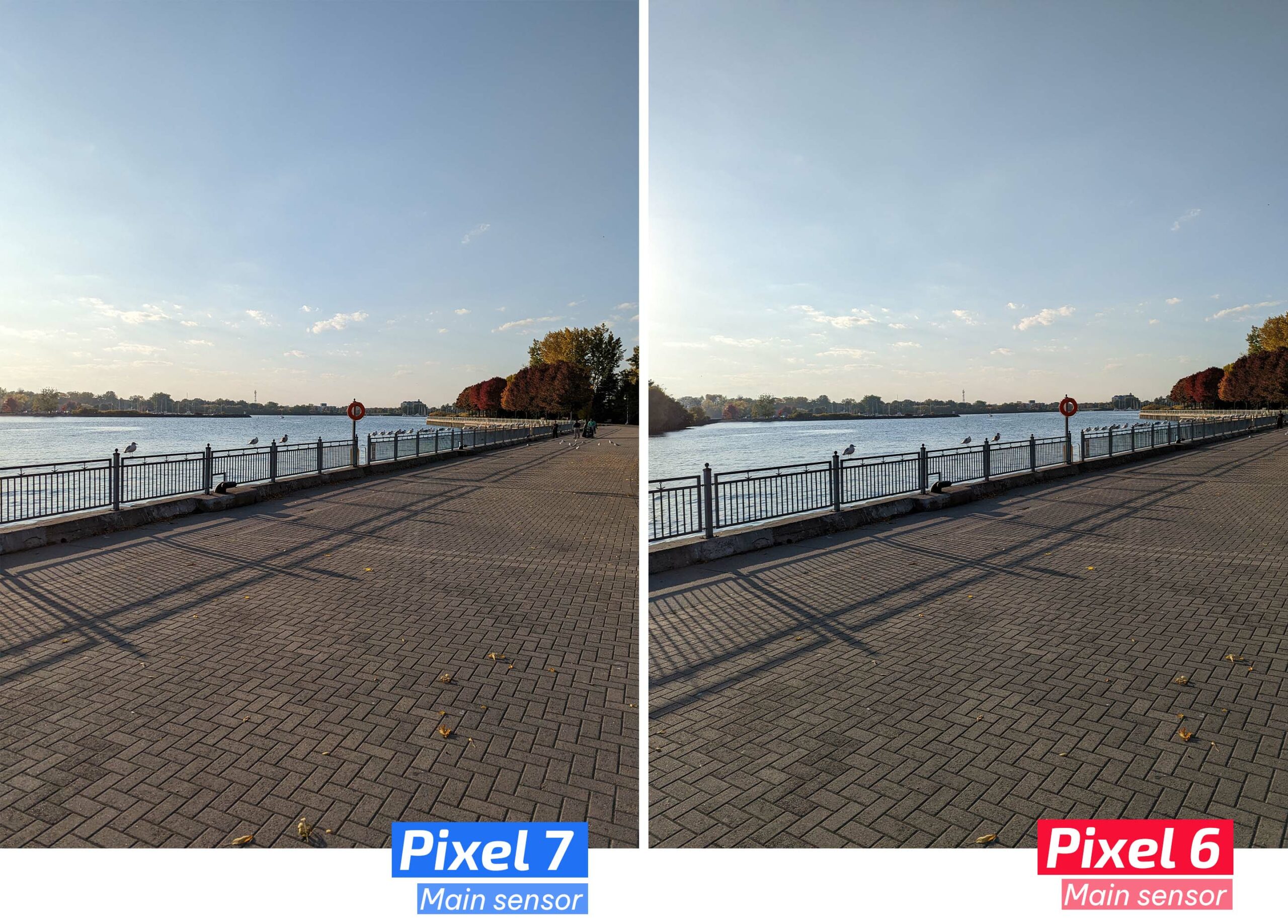
In most side-by-side comparisons, the Pixel 7 and Pixel 6 produce very similar results from the rear cameras. However, not all is equal.
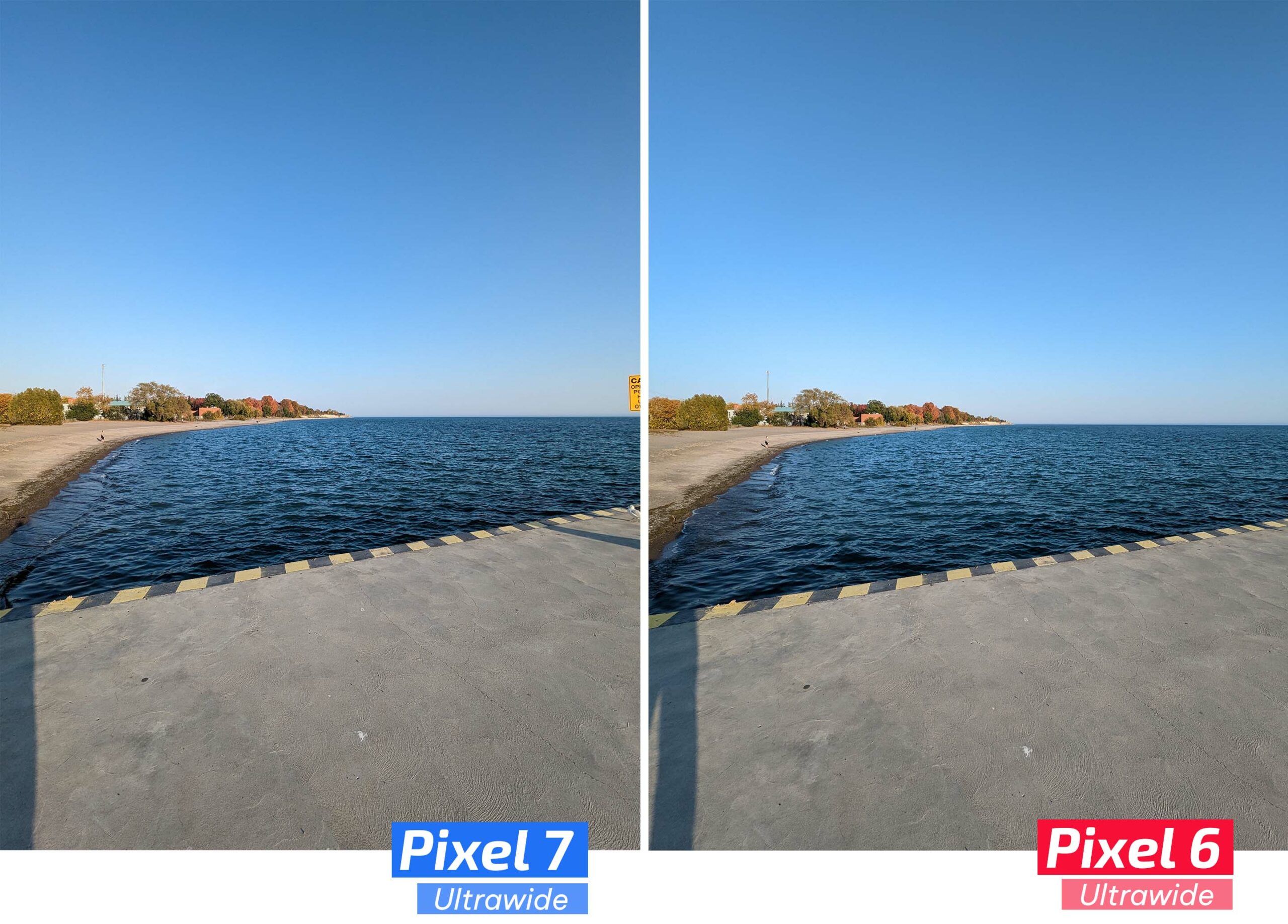
For example, Google introduced a new zoom technique in the Pixel 7 which uses sensor cropping to produce a “zoomed” image. For most pictures, the Pixel 7 (and 7 Pro) use pixel binning techniques to create a 12-megapixel image from the 50-megapixel sensor, effectively turning every four pixels on the sensor into roughly one pixel in the image.

PXL_20221011_214447861
PXL_20221010_142818061
PXL_20221010_193516875
PXL_20221010_194018898
PXL_20221010_194036427
PXL_20221010_194040623
PXL_20221010_194219473
PXL_20221010_194253861
PXL_20221010_195807822.MP
PXL_20221010_200311240
PXL_20221011_212611209
PXL_20221011_212650167
PXL_20221011_212752097
PXL_20221011_212811794
PXL_20221011_212854811
PXL_20221011_213130221
PXL_20221011_214324757
PXL_20221010_194115566

With 2x zoom images, however, the Pixel 7 captures an image using just part of the sensor. This sensor crop can make the subject of a photo look closer than it actually is by effectively shrinking the sensor. It’s not truly ‘zoom,’ but then neither is typically smartphone zoom. Regardless, zoom shots from the Pixel 7 provided more clarity than the Pixel 6 thanks to this technique. Moreover, the Pixel 7 Pro does this with the 58-megapixel telephoto shooter to hit 10x zoom, but you’ll need to check out Daley’s 7 Pro review to learn more.

PXL_20221011_212403688
PXL_20221011_212406930
PXL_20221011_212423714
PXL_20221011_212432503

Another area that benefited from Tensor G2 was Night Sight, which now processes twice as fast. Trying Pixel 6 and 7 side-by-side, the Pixel 7 is noticeably faster. Interestingly, the Pixel 7 camera app also has a slightly different Night Sight UI that lets you select how long it captures.
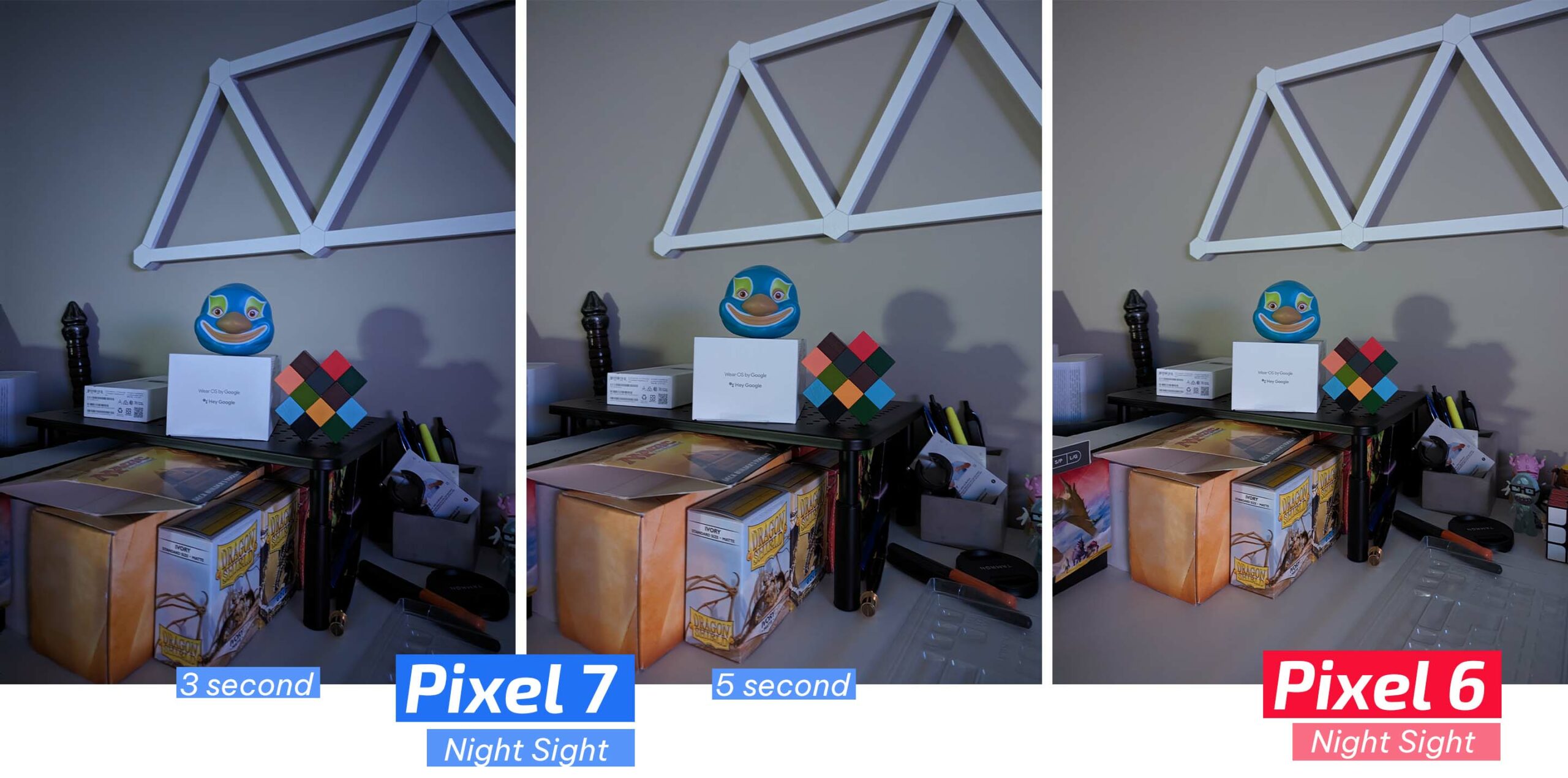
In my test, it captured in three seconds, but I also did another test at the maximum five seconds. The five-second Night Sight was closer in quality to what the Pixel 6 produced, although it still felt slightly faster (but not as fast as the three-second Night Sight).

The Pixel 7 also boasts a better 10.8-megapixel selfie camera, the same as what’s in the Pixel 7 Pro. However, in side-by-side comparisons, the Pixel 7 and 6 selfie camera results were nearly identical. The Pixel 7 selfie camera does have an ultrawide option, which is helpful for taking group selfies.

 

Google says it improved Real Tone on the Pixel 7 as well, expanding the data set with over 10,000 new images to improve how the camera captures various skin tones.

There are several improvements on the video side as well, including 10-bit HDR, 4K 60fps recording support, Active Stabilization, Cinematic Blur and more. You can learn more about some of these in the Pixel 7 Pro review. I haven’t had enough time to play with these but look for a more in-depth look at the video features to come.

5G and other things
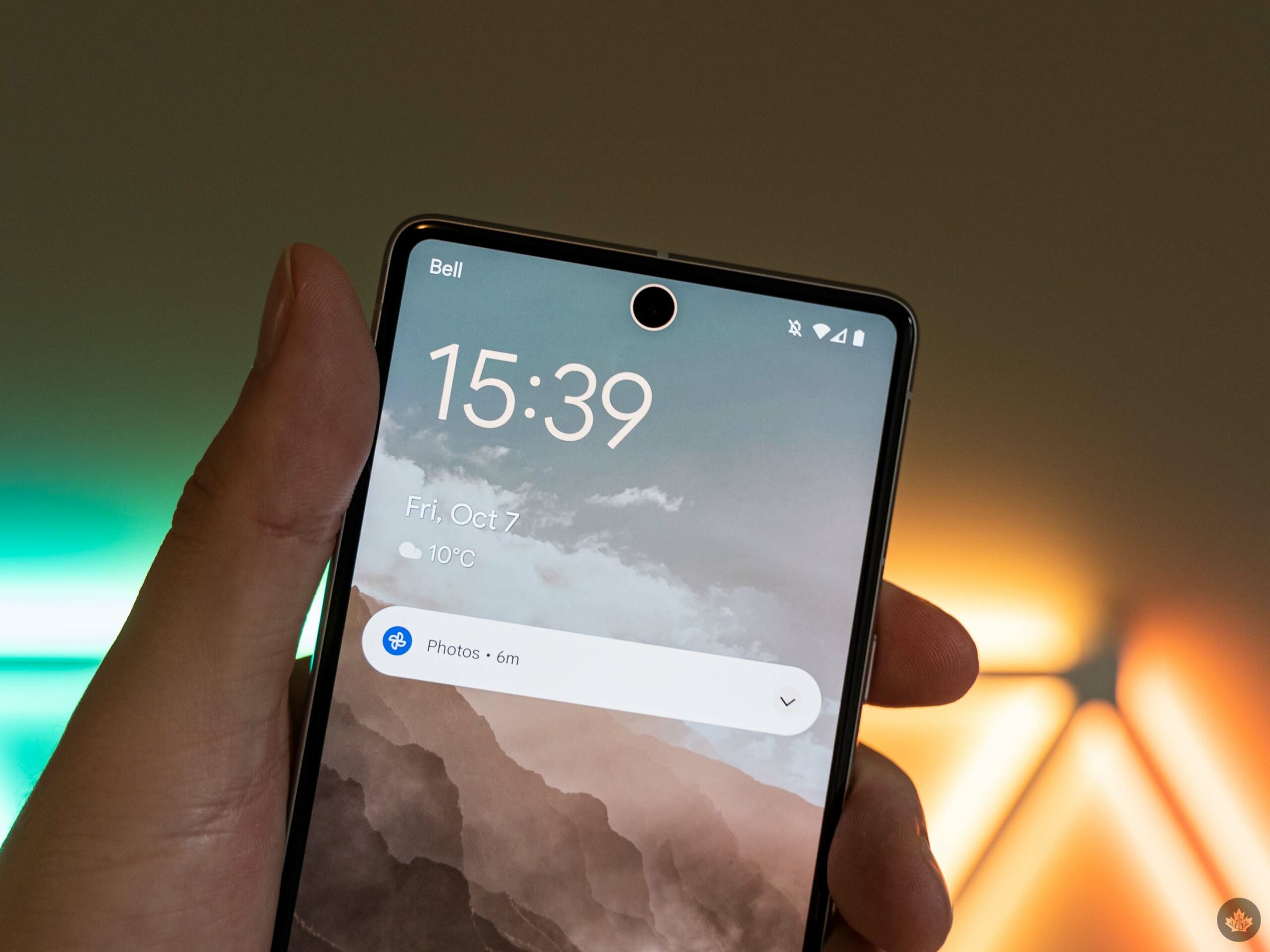
Beyond the camera features, the Pixel 7 offers improvements in other areas. The Recorder app can now automatically add speaker labels to make it easier to identify who said what when reviewing transcriptions.

Similarly, the Pixel 7 features faster ‘Direct My Call,’ which improves the experience of navigating option menus when calling a business. There are also ML enhancements to calls, which Google dubs ‘Clear Calling.’ Unfortunately, I haven’t tested this as much as I’d like in the last five days, but the calls I received sounded clear, and the person on the other end could hear me well too.

Pixel 7’s face unlock doesn’t do much to change the experience with the phone. Since it just relies on the camera and doesn’t use extra hardware (like the iPhone or the Pixel 4) to increase security, the Pixel 7 face unlock only works for unlocking the screen. The fingerprint scanner is still required for more secure features, like authenticating payments or unlocking secure apps (banks, password managers, etc.).

The only real benefit is that the face unlock often works faster than the fingerprint scanner, which means unlocking the Pixel 7 is surprisingly fast. Moreover, kudos to Google for setting up the system so that tapping the area where you scan your fingerprint also opens the phone once it’s been unlocked with your face – most of the time I try to unlock the phone with my thumb and face unlock beats the fingerprint scanner to it, but the phone still unlocks seamlessly.

A common issue people had with the Pixel 6 was with its signal; at least so far, it seems like the Pixel 7 has improved that too. Over the Thanksgiving long weekend, I visited family in the Brechin, Ontario area and noted I had more bars and better service on the Pixel 7 than I had on previous trips with the Pixel.

Moreover, running Ookla Speedtests on Bell 5G at my apartment in Whitby, Ontario, yielded slightly better results on the Pixel 7, with an average download speed of about 130Mbps and an upload of about 6Mbps, compared to about 100Mbps and 4Mbps, respectively on the Pixel 6. That said, I had noticed previously on my Pixel 6a, which also sports a first-gen Tensor chip, that I had better speeds in Toronto than in Whitby. I haven’t had a chance to compare the Pixel 7 in Toronto yet.

Still, it seems like Tensor G2 at least somewhat improves signal issues, but as I’ve said before, 5G in Canada remains underwhelming.

Categories
Mobile Syrup

Save up to $25 on six Nintendo Switch exclusives

Nintendo of Canada is offering up to $25 off six Switch exclusives.

From October 11th to 12th, you can snag the following games at discounted prices, exclusively from Amazon:

Additionally, you can buy Animal Crossing: New Horizons for $79.95 and get its Happy Home Designer expansion at no additional cost ($33 value).

Image credit: Nintendo

Source: Nintendo