Categories
Mobile Syrup

Apple to reportedly introduce USB-C charging to AirPods and Mac accessories by 2024

Apple is planning a major transition to USB-C in the wake of the European Union (EU) approving its USB-C mandate. The company is reportedly working towards adopting USB-C charging across AirPods, AirPods Pro, and AirPods Max, according to a new report. Additionally, many Mac accessories will also drop Lightning connectivity.

The EU recently voted to make USB-C a “common port” across the region. The vote was passed in favour of mandating manufacturers to integrate USB-C across new phones, tablets and earbuds/headphones released in the EU by the end of 2024. Further, the mandate requires laptops to support USB-C charging by spring 2026.

Many Apple devices, including its MacBook line, already support USB-C charging. However, not all devices do. For example, the iPhone, AirPods and several Mac accessories still utilize Apple’s proprietary Lightning port. Bloomberg’s Mark Gurman believes that the AirPods line will adopt the USB-C standard by 2024.

Additionally, Mac accessories like Magic Keyboard, Magic Mouse, and the Magic Trackpad will offer USB-C support by as early as 2023. Gurman believes that as Apple looks at the next major refresh for the iMac and Mac Pro, the opportunity for new accessories also opens up. “I think it’s a safe bet that those accessories will move to USB-C in their next incarnation,” Gurman says.

Gurman also expects next year’s iPhone 15 to leverage USB-C charging. “The iPhone 15 is essentially a lock to get USB-C in the fall of 2023,” he says. This would put the iPhone a year ahead of the mandated change per the EU.

With this in mind, USB-C charging may only be a stopgap for Apple’s long-term plan. Gurman says the goal of the Cupertino company is to reach inductive charging “at some point in the next few years.” The further adoption of wireless charging would also sideline the EU’s legislation as the mandate doesn’t currently cover wireless charging.

Source: Bloomberg Via: Engadget

Categories
Mobile Syrup

Apple’s Crash Detection feature is causing accidental calls to 911 on rollercoasters

Upon the launch of the iPhone 14, Apple introduced its Crash Detection feature. The Cupertino company designed the feature to alert nearby authorities when the phone detects a car accident. However, one unforeseen result is that rollercoasters are triggering the feature and calling 911 accidentally.

Over the past month since the rollout of Crash Detection across iPhone 14, Watch Series 8, SE, and Ultra, authorities have begun receiving accidental alerts. Apparently, rollercoasters have been simulating the impact of a car crash, setting off the Crash Detection sensors. The feature utilizes the gyroscopic sensor and high-g accelerometer in order to gauge a car crash. When activated, the device displays an alert and calls emergency services if the alert isn’t dismissed within 20 seconds.

Examples of these accidental calls are surfacing online. In one instance, an iPhone 14 user riding a rollercoaster at Kings Island amusement park. Located in Cincinnati, the owner’s phone triggered the Crash Detection while riding. This sent a call to emergency services along with an audio message. This message contains an alert that the user has been in a crash and provides authorities with their location. In this instance, Warren County authorities received the alert, which was recorded over audio of the rollercoaster and rider screams. Authorities were then dispatched, despite no accident taking place.

As one can imagine, this does create some issues not only for emergency services but for rollercoaster riders as well. Since the release of the iPhone 14, Warren Country has received six emergency calls triggered by park rides. WSJ reporter Joanna Stern notes that this issue is being experienced across multiple parks.

As of now, there’s no failsafe to prevent the feature from triggering while on a ride. Theoretically, Apple could provide an update to allow a temporary pause in the iPhone’s crash detection while riding a rollercoaster. Alternatively, users can put their devices on airplane mode while attending an amusement park. Additionally, users can manually disable the feature on their iPhone 14 or Apple Watch.

Image credit: Apple

Source: The Verge

Categories
Mobile Syrup

Xbox’s Phil Spencer might have just teased Microsoft’s streaming console

Phil Spencer, the head of all things Xbox at Microsoft, might have just revealed the tech giant’s upcoming game streaming box, currently codenamed ‘Keystone.’

In a recent tweet shared from his personal Twitter account celebrating the 25th anniversary of Bethesda’s Fallout franchise, a small Xbox Series S-like console can be seen near the top of the image, slightly below a replica Witcher sword.

This could be Spencer teasing the still unrevealed device, or it could be just some sort of a small Xbox Series S toy. Phil Spencer has done this in the past, though. For example, leading up to the Xbox Series S’ reveal, the Xbox exec hid the console in the background of several public videos.

Back in May, Microsoft confirmed the Keystone codename and that it’s working on a streaming device designed to be “connected to any TV or monitor without the need for a console,” in a statement to Windows Central.

It’s unclear when Xbox’s anticipated game streaming device will be revealed, but if Spencer is teasing it in the background of videos, we’ll likely see it in the coming weeks. With Google’s Stadia platform now dead, Microsoft’s Xbox Cloud Gaming service has little competition in the space beyond services like Sony’s PS Now and Nvidia GeForce.

Image credit: @XboxP3

Categories
Mobile Syrup

Paramount’s potential merger with Showtime may impact Crave’s catalogue

Paramount Global is reportedly looking at restructuring Showtime and its future. As Showtime CEO David Nevins plans his exit later this year, Showtime may end up merging with Paramount+. If so, the Showtime merger could impact the catalogue on Crave, which is owned by Bell.

Showtime has long been treated as a premium cable network. Over the years, the network has seen the likes of the hit series Dexter, Weeds, Homeland, Billions, and Yellowjackets. It’s long been a success for Paramount. However, its future as an independent network may be numbered.

Recently, Paramount Global announced that Showtime’s network business is being handed to Chris McCarthy, who oversees MTV, Comedy Central, and Paramount+. This exchange in leadership also comes with the plan to merge Showtime with Paramount+. In doing so, Paramount Global can help utilize Showtime’s catalogue to leverage its streaming service better.

As content continues to be an asset in the streaming wars, Showtime can help Paramount reach its goals. According to those familiar with the matter, the company has its eyes set on becoming one of the fifth-biggest streaming services around the globe. This would see Paramount+ next to Netflix, Prime Video, Disney+, and HBO Max.

If Showtime does indeed merge with Paramount+, this could leave Crave users with less programming. Although Crave offers many original series as well as a substantial amount of HBO content, Showtime’s catalogue is well-supported.

Currently, Crave offers many Showtime originals like the aforementioned Dexter and Homeland. Additionally, Crave subscribers can keep up with weekly episodes of American Gigolo, Let the Right One In, and more. Showtime also offers many documentaries and one-off specials.

Paramount has not made a final decision regarding Showtime’s merger with Paramount+. Therefore, there’s no telling how it may affect Crave. However, given that the streaming service is available in Canada, Showtime’s content may be lifted from Crave and placed on Paramount+ once any contractual agreements run their course.

Crave offers plans for as little as $9.99 per month. However, to access all of Crave’s content on any device, the $19.99/month Crave Total plan is required.

Source: CNBC

Categories
Mobile Syrup

When should you buy a new iPhone?

Many of us love buying a new iPhone.

Whether you’re an Apple fan (like me) or a Gen Z who lives on their device (also like me), buying a new iPhone is an exciting experience. On the other hand, purchasing a new iPhone is viewed more as a chore for some.

Perhaps it’s because of fancy marketing or because smartphone manufacturers have an annual release cycle. Either way, many of us are conditioned to think that we should be buying a new iPhone every year. Obviously, very few people do. Some wait two, three or four years, or even longer.

I recently wrote about why someone may want to consider not upgrading to an iPhone 14 and instead consider purchasing an iPhone 12 or 13. This got me thinking about when it’s the right time to buy a new iPhone.

iPhones are built to last years

I know this may seem surprising, but Apple wants you to keep your phone longer than a year. Around 2017 with the release of the iPhone X, Apple’s strategy around iPhone sales changed. It was becoming clear that fewer people were buying iPhones on a one or even two-year cycle. Instead, consumers were buying phones every three or four.

The iPhone 6 is a perfect example of this. The iPhone 6 was (and still is) Apple’s most popular iPhone, and the device many iPhone 6 owners upgraded to three or four years after buying their iPhone 6.

Taking note of this trend, Apple shifted its strategy. Instead of telling you why you needed to buy the latest iPhone every year, Apple shifted its marketing to push consumers toward buying an iPhone because it will last for years.
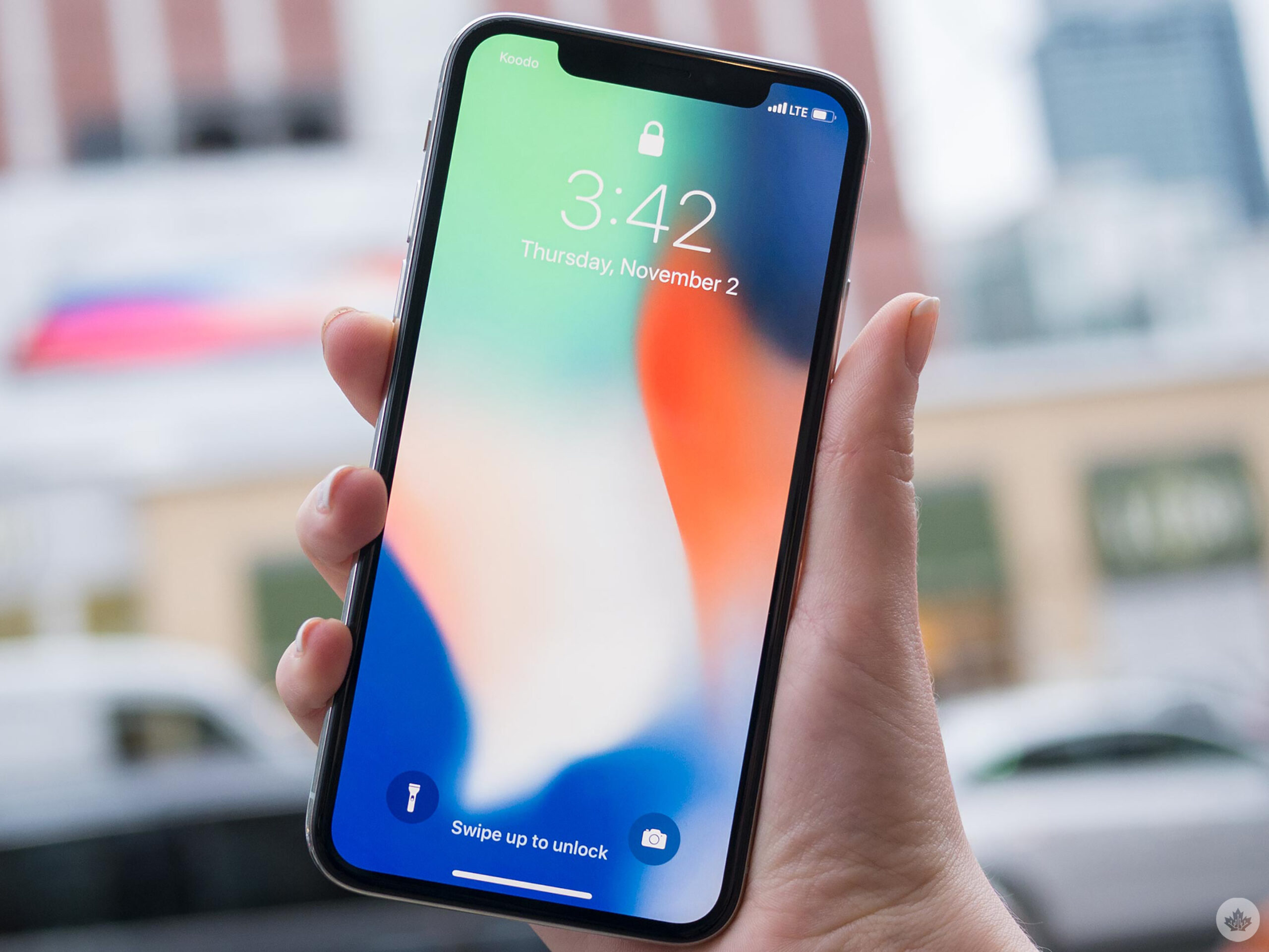
Apple can adopt this strategy for a few reasons. First, the tech giant has become famous for offering several years of iOS updates for older phones, unlike its Android competitors (the latter are lucky to get two years worth depending on the device). Second, Apple uses premium materials like aluminum, stainless steel and glass instead of plastic. Third, Apple uses its own custom silicon processors that are technologically years ahead of any competition. This allows your iPhone to still feel fast years after its release.

Because of these competitive advantages, Apple can charge a premium price for their products that many are (mostly) happy to pay. Apple has also made conscious efforts to use 100 percent recycled rare earth minerals in their devices alongside trade-in and recycling plan offers.

The battery sucks

Perhaps the number one reason people say they’re upgrading their iPhones is that their battery life “sucks.” This isn’t surprising as batteries are the most consumable part of your iPhone. As a result, many of us associate upgrades with being driven by device battery life. This isn’t entirely Apple’s fault, though.

Modern lithium-ion batteries aren’t that great. The battery in your iPhone lasts for about 700-1000 cycles. One cycle is when the battery completely drains from 100 percent to 0 percent. For example, if I use my phone for two days and finish both days at 50 percent, I’ve used one battery cycle. Most of us probably use one cycle per day. Likely, ending our days with under 20 percent battery if I were to guess.
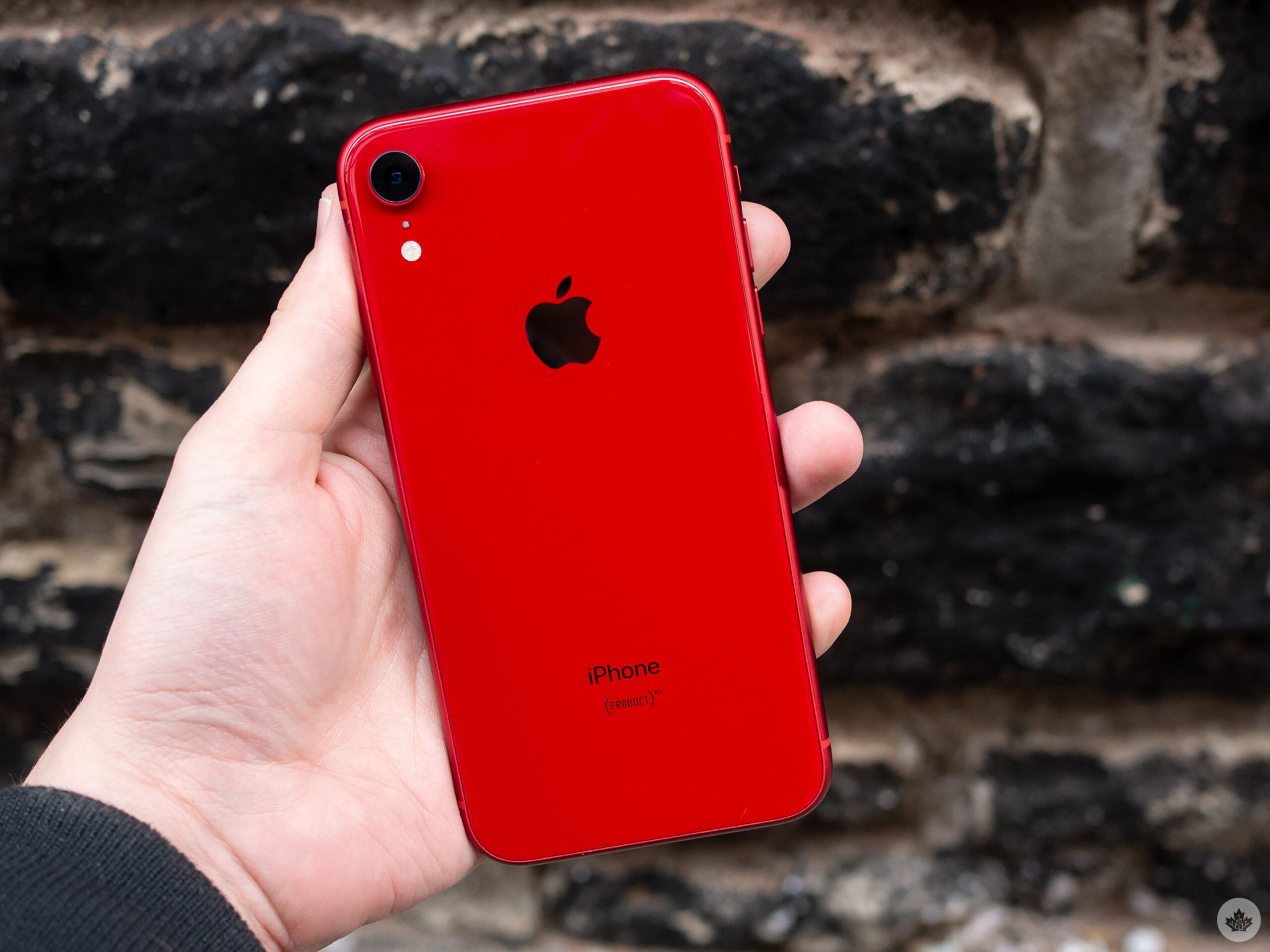
As a result, iPhone batteries only last about two years under expected conditions. This is quite a bit less than the rest of your phone is designed to last. You can always verify your battery’s condition by going to the settings app and navigating to ‘Battery’ > ‘Battery Health & Charging.’ The “maximum capacity” is how much energy your battery can hold compared to when it was brand new.

Apple considers any battery under 80 percent to be an unhealthy cell. Battery health is a great indicator to tell you that you likely don’t need a whole new phone but just a new battery. A new battery can not only make your iPhone last longer but can also improve performance. You can visit your local Apple Store or Apple Authorized Service Provider (AASP) to get your battery replaced with a genuine Apple part. Alternatively, you can install a replacement battery yourself from a vendor like iFixit.

My iPhone is broken

Like replacing your battery, many parts in your iPhone can be repaired. Repairing an iPhone’s glass back would cost nearly as much as buying a new phone for a long time. However, with the iPhone 12 and later, Apple seems to be improving modular repairability.

If the iPhone has a cracked display, shattered back, or even a non-working camera, Apple may be able to replace the broken part for far less than what buying a new iPhone would cost.
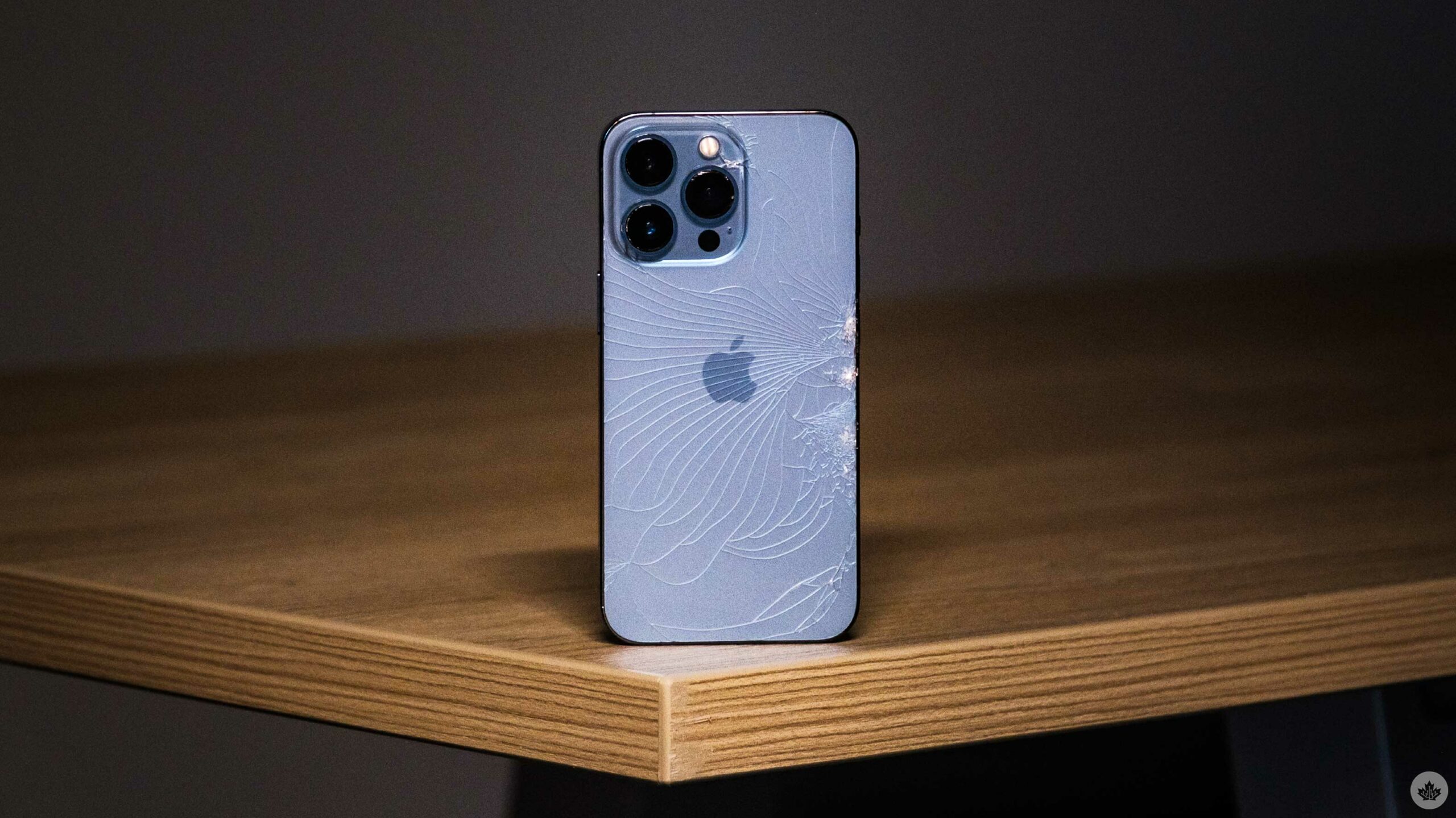
I recommended sticking to your local Apple Store or AASP. Venturing to third-party vendors may seem fine, but they likely won’t be using Apple-genuine parts, and it’s hard to keep third-party shops accountable for their work. When looking at a repair versus a new phone, weigh the costs. You may be pleasantly surprised.

But the reviews?

Watching and reading reviews on the latest tech can be entertaining and informative. Yet, recently, the headlines are starting to repeat themselves. Last year’s iPhone is just as good as this year’s, perhaps with a missing feature or two.

Frankly, that’s not surprising. iPhones are a mature product; there isn’t a lot that can change year-to-year except for minor improvements.

Reviewers typically compare this year’s iPhones to last year’s because they always use the latest device. In reality, most people are using devices a few years old. If you’re coming from an iPhone that is a few years old like Apple intends, you’ll see a massive jump in speed, performance, features and camera quality. In a sense, you’ll get more bang for your buck when upgrading several years later.

I just want a new one

If you want a new iPhone and can afford it, go ahead and buy yourself one. I’m an annual upgrader and buying new tech makes me happy. If you also think this way, do it, but don’t feel like you have to buy the latest phone or your device will be suddenly outdated or you’ll miss out on great features.
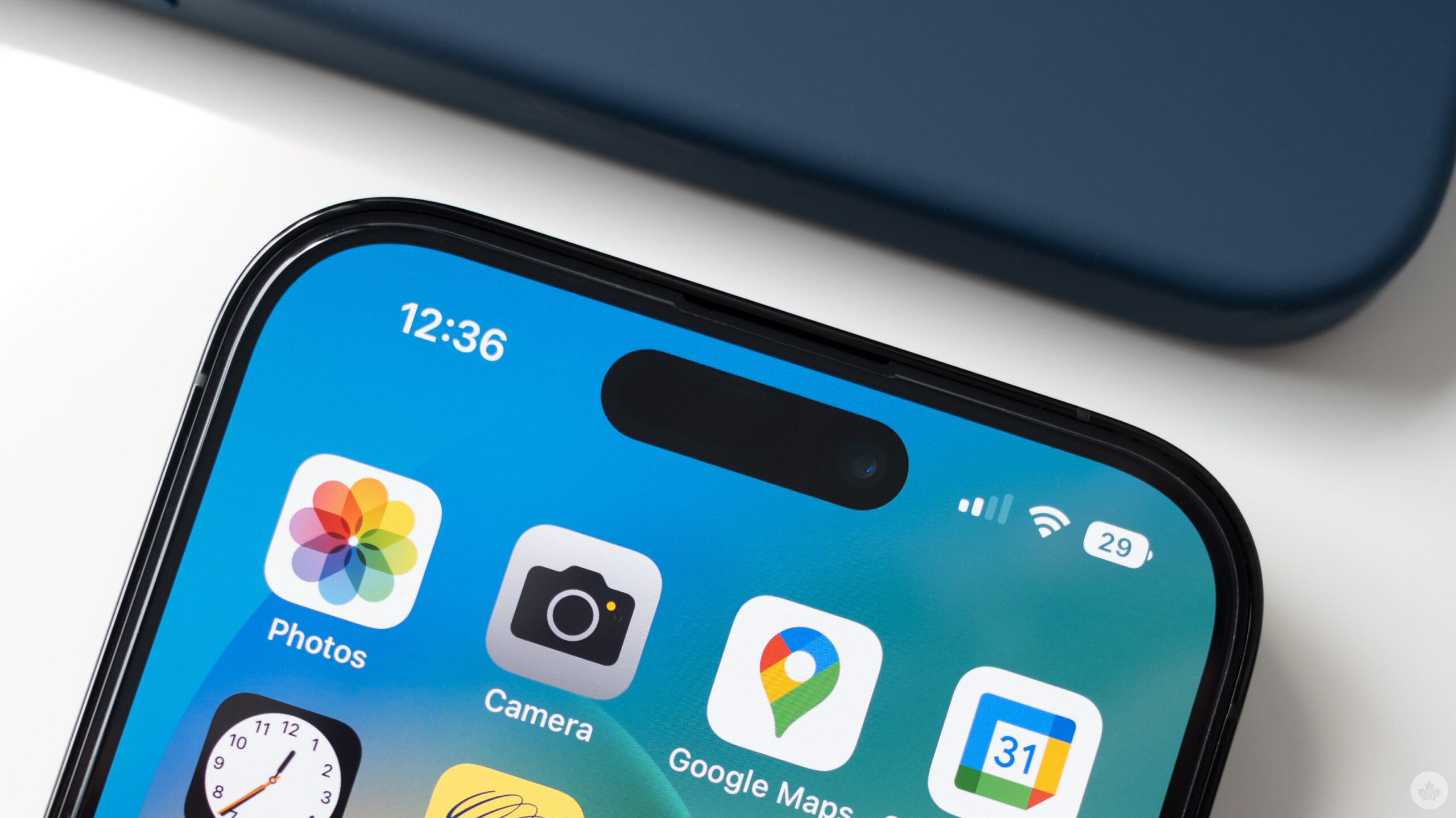
Assuming you buy a new device, consider selling your current phone, giving it to a family member, or trading it into Apple for store credit. Don’t let your old iPhone become drawer junk when it could have another life with someone else.

Here is when you should upgrade

Ultimately, when you buy a new iPhone is unique to your situation. The best time to buy a new iPhone is when you want one and can afford it.

Don’t fall for the marketing traps or the peer pressure that makes you think that you always need the latest smartphone. Instead, help save yourself money and reduce e-waste by keeping your phone longer and ensuring it gets a new home once you are finished with it.

If the latest features aren’t compelling to you, consider getting a new battery to give your current device a refresh. Remember that your phone’s hardware now will be fantastic for years to come.

Categories
Mobile Syrup

Call of Duty Modern Warfare 2 may require a registered phone number to play

As we approach the launch of Call of Duty: Modern Warfare 2, players will need a registered phone number to play.

According to an updated support page on Blizzard’s website, Battle.net may require players to register a phone number to jump into the battlefield. This potentially presents a barrier of entry for some.

Based on details on the website, Battle.net may not accept prepaid plans. This means users on a pay-as-you-go contract from a telecom service won’t be eligible for registration.

“Any mobile phone in a supported country with a data plan and that is not prepaid or a VOIP number, can be used with this service,” the page states.

This appears to be a new requirement Activision Blizzard is instilling in newly launched titles. This controversial decision is also being scrutinized across Overwatch 2. Upon the Early Access launch, players discovered that they were locked out of their accounts due to their phone plans. This issue was also compounded by several DDoS attacks affecting players from accessing the game.

The page continues to state, “Call of Duty: Modern Warfare II, newly created Overwatch 2 accounts, and newly created Call of Duty: Modern Warfare accounts require a phone number.”

Furthermore, the page lists the following:

  • Messaging apps like iMessage (iOS) or WhatsApp (iOS, Android) are not supported.
  • Mobile phones with prepaid plans may not work with the phone notification service.
  • Phone notifications cannot be used with Voice over IP (VoIP), and VoIP numbers that are transferred to a local provider are not eligible for the service.

Call of Duty: Modern Warfare 2 is a premium game with an $89.99 price tag. However, Overwatch 2 is free-to-play. This pricing model typically comes with the assumption that the title offers a lower barrier of entry for players. However, forcing players to have a monthly phone contract in order to play is counteractive to this strategy.

Likewise, Call of Duty: Warzone 2.0 is a free-to-play game and is releasing on November 16th. It’s likely that, once again, players will require a phone plan in order to drop into the new Al Mazrah map. However, this is currently unconfirmed.

Blizzard did apologize for instituting the phone number requirement for long-time Overwatch players. Retroactive to its new requirement, Blizzard states players who have played since June 9th, 2021, will not have to register a number. Whether the community backlash regarding Modern Warfare 2 will have similar results remains to be seen.

Image credit: Activision

Source: VGC

Categories
Mobile Syrup

Nanoleaf partnering with Corsair to sync lights with gaming peripherals

Nanoleaf, the RGB lighting company, is partnering with Corsair on a special integration project. The two companies are bringing their own expertise and will pair it with the others. The aptly named Nanoleaf x Corsair iCUE integration sees the former’s lighting syncing with the latter’s gaming peripherals.

Announced by the two companies, the integration enables users to sync a number of Nanoleaf’s smart lights to what’s playing on the display of the user’s gaming setup. The heightened integration of Corsair products sees this RGB lighting sync across Corsair’s products. This extends across peripherals such as gaming headsets, mice, and keyboards.

“We’ve had an overwhelming amount of interest from our community for this integration, so we couldn’t be more excited to launch the new Nanoleaf x CORSAIR integration,” says Gimmy Chu, CEO and Co-Founder of Nanoleaf. “Our users love getting creative and curating their own custom experiences, and this new integration will allow them to do just that. We can’t wait to see how our users change up the way they play their favourite games with all of the vibrant Scenes and dynamic light shows.”

In order to take advantage of this neat collaboration, users must install and run the iCue software. The app then prompts users to turn on the Nanoleaf integration and add Nanoleaf to the iCue’s lighting. From there, users can select a lighting pattern and “everything will automatically sync to transform your battlestation into an evolved RGB Experience,” according to the company.

Via the iCue software, users can select 13 preset lighting effects. This includes scenes such as ‘Rainbow Wave’ and ‘Rain’. Additionally, users can create their own custom profiles using an infinite number of colour possibilities.

Finally, Nanoleaf has outlined that this collaboration with Corsair works with a number of preexisting products. This includes the Lines Series, Shapes Series, and Canvas Series. Light Panels support is coming in “late 2022.”

Image credit: Nanoleaf

Source: Nanoleaf

Categories
Mobile Syrup

Cloud gaming expected to grow 74 percent despite death of Google Stadia

Cloud gaming has undoubtedly been becoming more popular as far as corporate involvement is concerned. Many goliaths within the tech space are dipping their toe into the space and for a good reason. In 2022, cloud gaming is expected to grow 74 percent year over year and generate over $2 billion.

Currently, Microsoft’s Xbox Game Pass, and Nvidia GeForce Now dominate the space alongside other platforms like Amazon Luna. The accessibility and pool of revenue available within cloud gaming are only getting larger as time goes on. According to data published by Newzoo, 2022 may close out with 31.7 million global consumers. Additionally, the market is on track to generate around $2.4 billion USD (roughly $2.7 billion CAD). If accurate, this could mean that the cloud gaming sector is on pace to grow 74 percent year over year.

Of course, this all comes off the heels of the news that Google is shuttering Stadia. Stadia’s operations have only been in effect for three years. However, due to a rocky rollout of features and software support, Stadia servers are being taken down on January 18th, 2023. Despite this news, cloud gaming’s popularity appears relatively unaffected.

Newzoo believes that the closure of Stadia actually has a positive impact on the cloud gaming market. “The positive developments in the cloud gaming market that we analyze in this report, which support a bright future for the technology, do not evaporate due to Stadia’s shutdown,” Newzoo states.

It credits that a portion of the positive impact stems from Google’s readiness to provide refunds to Stadia players. Upon the confirmation that Stadia is closing, Google assures players that hardware and software refunds are on the way before the termination date. In doing so, Google is avoiding the creation of negative feelings towards cloud gaming in a worst-case scenario.

Stadia’s exit also gives more room for Microsoft, Sony, Amazon, Nvidia, and others to compete. Now, it’s up to these individual companies to leverage their own cloud services to attract former Stadia players as well as attract new adopters.

The gaming analyst believes that cloud gaming is on its way to generating a sizeable sum of $8.5 billion USD ($11.6 billion CAD) by 2025.

Source: GameIndustry.biz via TheGamer

Categories
Mobile Syrup

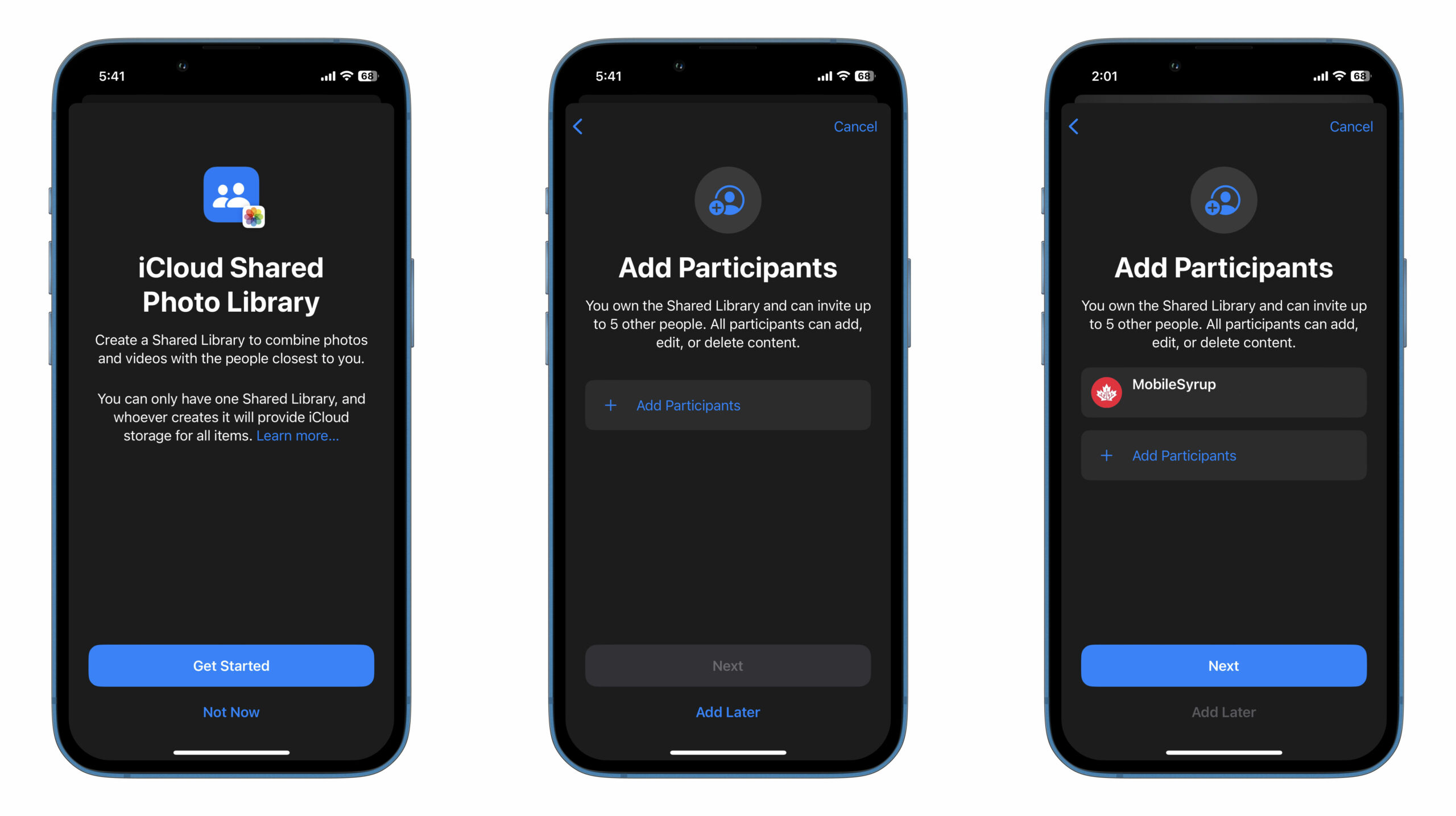
Here’s how to create iCloud Share Photo Libraries in iOS 16.1

After announcing iCloud Shared Photo Libraries as part of iOS 16, Apple pushed back the feature to be released at a later date.

Now, with iOS 16.1 Beta 4, the feature is finally available for users to take advantage of.

iCloud Shared Photo Libraries allow iPhone users to add up to five family members or friends (six people including the host) to a library of photos and videos where each user has access to added images, edit them, delete and contribute as well. Notification toggles allow you to get an alert when an image you added to the library is deleted, whereas a tool in the Camera app allows newly shot photos to be uploaded automatically to the shared library.

As an added bonus, your device will push suggestions for photos to be added to the Shared Library in the For You section of the ‌Photos‌ app.

Here’s how you can enable the feature:

  • Head to Settings and scroll down to ‘Photos.’
  • Make sure ‘iCloud Photos’ are toggled on. This will automatically upload all your images and videos to iCloud.
  • Under ‘Library,’ tap on ‘Shared Library’ and proceed to add the contacts you want to share with.

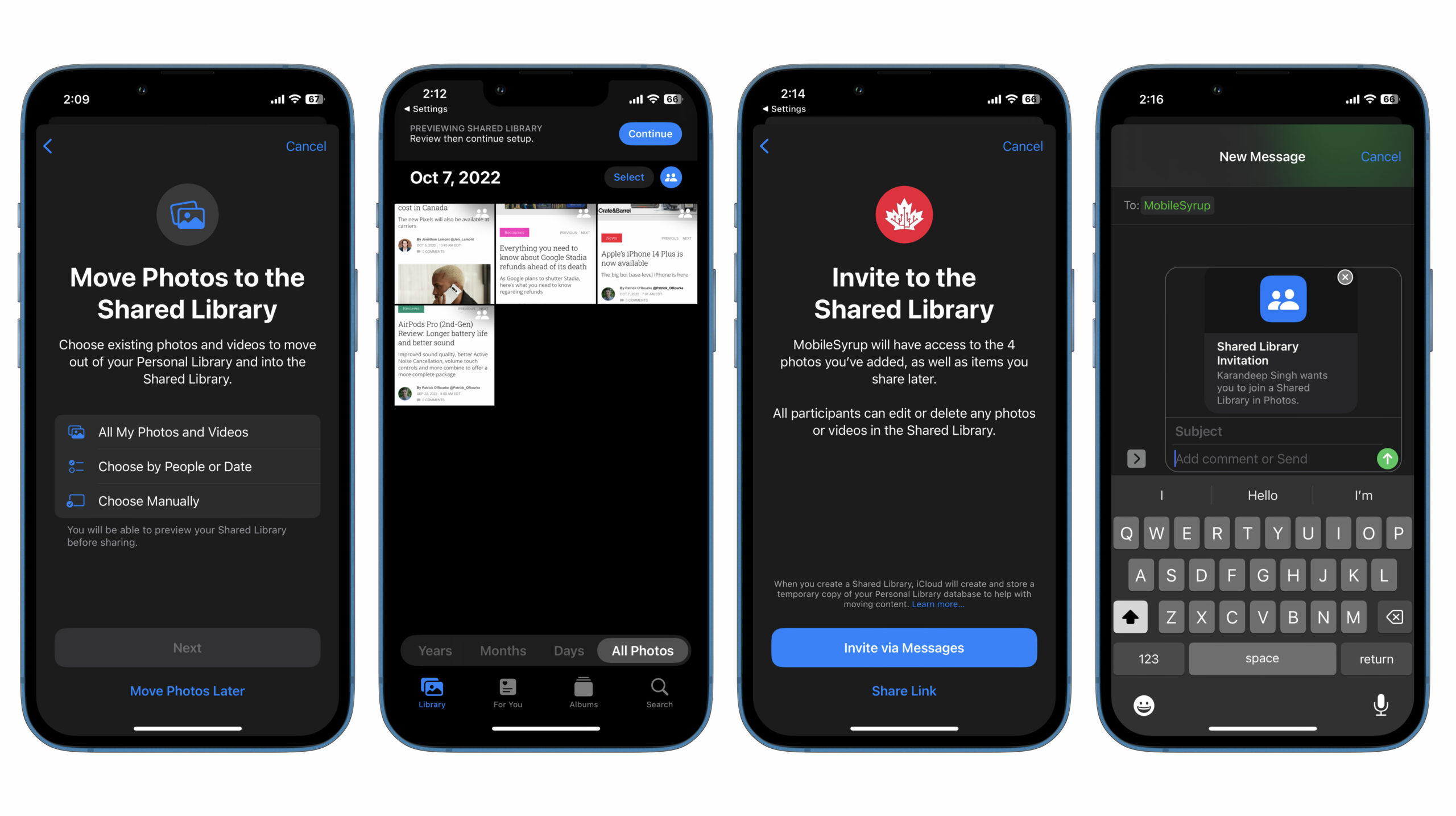
You can then move media to the shared library. You have the option to sync all photos and video at once, choose photos by person or a specific date or manually select each individual photo or video. No matter which option you choose, you’ll be presented with a ‘Review Shared Library’ screen where you can go through the photos and videos that are about to be added to the Shared Library for a final look-over.

Once you’ve made sure the media selected is good to go, you can invite the counterparties to the Shared Library via Messages, or copy the invite link to share via a different platform.

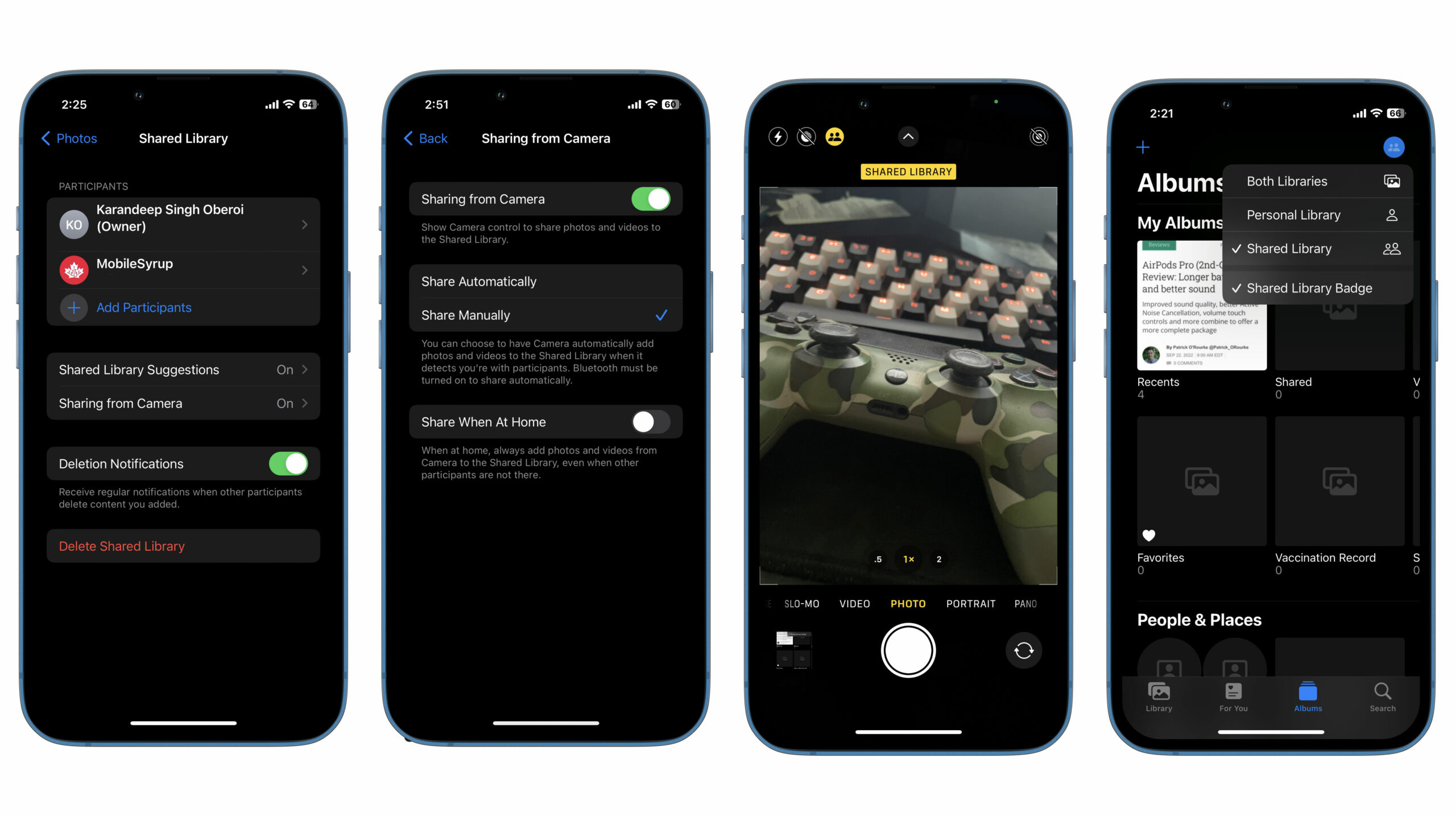
To manage your Shared Library, head to Settings and scroll down to ‘Photos’ and click on ‘Shared Library. Here you’ll be able to see members added to the library, add or remove participants, toggle ‘Deletion’ notifications and delete the library altogether.

This is also where you can enable/disable ‘Shared Library Suggestions,’ and ‘Sharing from Camera.’ The latter can be toggled to ‘Automatic’ or ‘Manual.’ When on ‘Automatic,’ any photos or videos you snap would be added to the Shared Library, provided that the other participants are near you and your phone can detect their phone via Bluetooth. With ‘Manual,’ you decide which new photo or video goes to the Shared Library.

An icon that looks like two people, as seen in the image below, can be tapped directly from the Camera app to add new media to either your personal library or the shared one. You can also switch between your personal and shared libraries to view media directly from the ‘Photos’ app.

Learn about other new features introduced with iOS 16 here.

Categories
Mobile Syrup

My favourite part of Audio-Technica’s AT2020USB-X mic is the mute switch

For years, I’ve used Blue’s ‘Snowball’ microphone for just about everything, from chatting with friends while gaming to recording episodes of the SyrupCast. It’s served me well across a variety of uses, but I recently retired it for Audio-Technica’s new AT2020USB-X microphone.

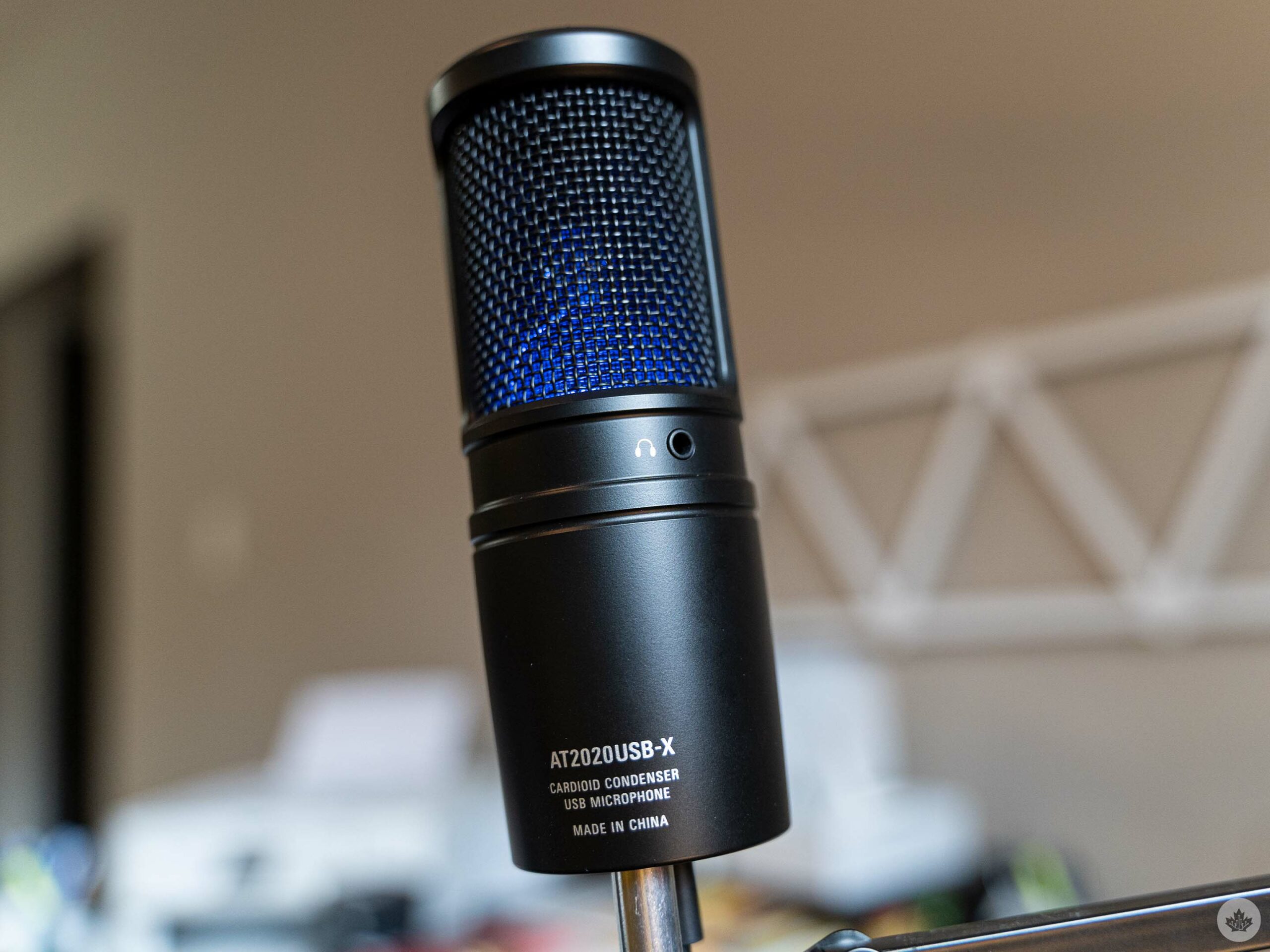
The AT2020USB-X is a cardioid condenser microphone that works over USB that boasts 24-bit/96Hz sampling. It also features a headphone jack for zero-latency monitoring and a capacitive mute switch that, frankly, turned out to be a game-changing feature for me.

Now, I’m no audio expert, but in my time with the AT2020USB-X, I’ve been impressed with its output. You can hear it in action in SyrupCast episode 266 (and I’ll likely continue using it as my main podcasting mic). For comparison, here’s a SyrupCast episode where I use the Blue Snowball.

2That said, at $219 in Canada, the AT2020USB-X is much pricier than the $99.99 Blue Snowball. It is a better microphone and boasts a higher sampling rate than the Snowball, plus I prefer the AT2020USB-X’s USB-C connection to the USB Type-B port on the Snowball.
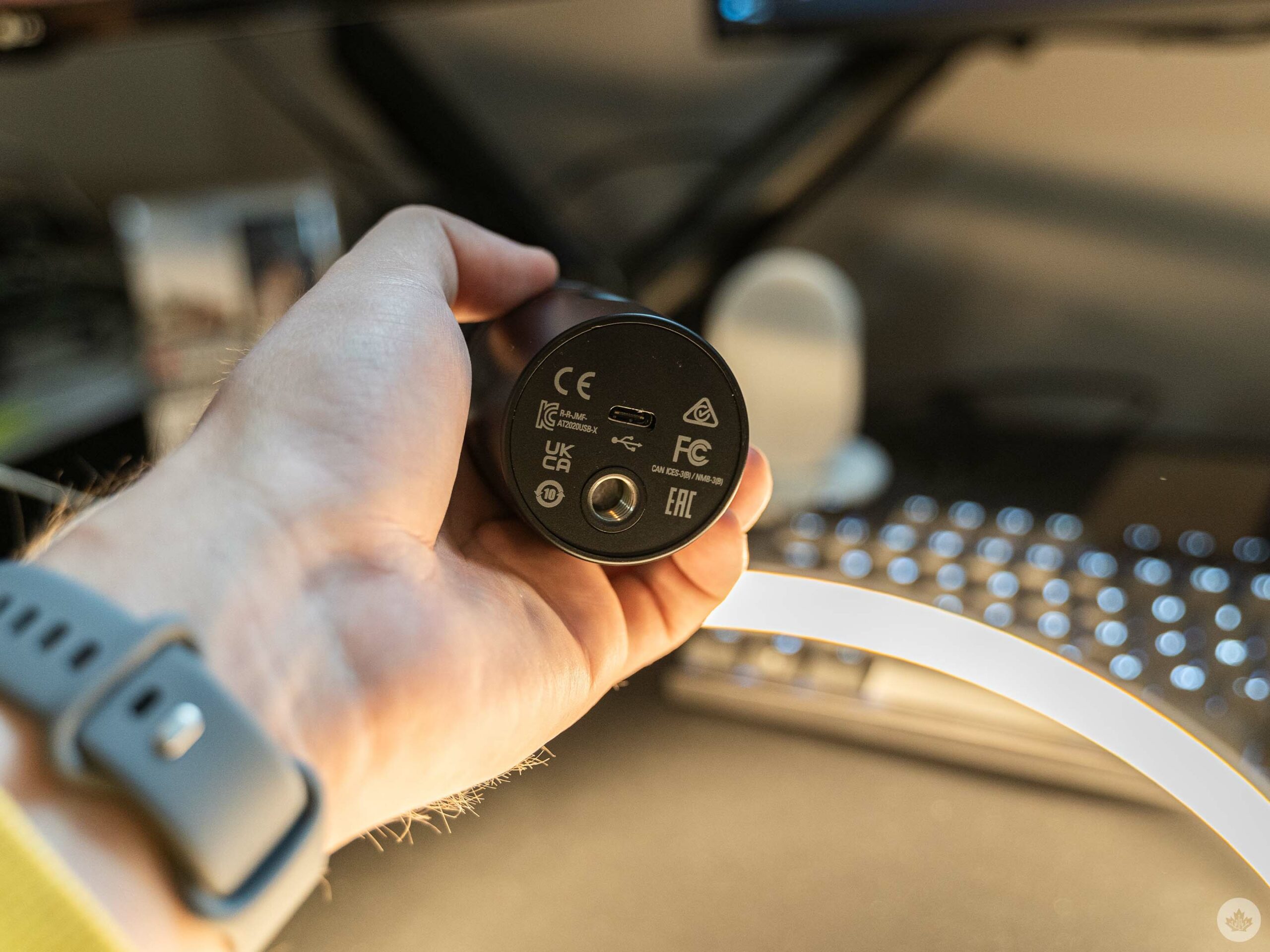
Still, it’s hard to beat the value proposition of the Blue Snowball, which I’ve found to be a consistently strong performer for the cost. If you’re looking to start a podcast, I’d recommend value microphones like the Snowball, while long-time podcasters looking to improve their audio game might want to start considering higher-end options like the AT2020USB-X.

Hands down my favourite feature of the AT2020USB-X is the built-in mute button. ‘Button’ is doing a lot of work here — it’s a capacitive touch button and offers no tactile feedback, which might prove frustrating for some. Still, I loved being able to quickly and easily mute my microphone while recording a SyrupCast so I could grab a drink of water or cough without disrupting whoever was speaking. Sure, I could mute the microphone on my PC, but having the button right there was super convenient.

Furthermore, muting the AT2020USB-X swaps the blue LED to a red glow, adding a fun visual cue.

The mute button will, of course, be quite handy beyond podcasting applications. With the wide variety of virtual meeting software out there, it may be easier for some just to mute their physical mic rather than try and mute themselves in Teams/Meet/Zoom/whatever other meeting software. I also appreciated being able to mute the mic when I wasn’t using it without digging through Windows 11’s awful audio settings.

You can check out the AT20202USB-X on Audio-Technica’s website, where it’s available for $219. Alternatively, it’s on Amazon but at a higher $247.98.

MobileSyrup utilizes affiliate partnerships. These partnerships do not influence our editorial content, though MobileSyrup may earn a commission on purchases made via these links.