Categories
Mobile Syrup

Little-known iOS feature turns screenshot scribbles into perfect shapes

TikTok creator @ramalmedia uncovered a secret iPhone trick that makes scribbling over screenshots much cleaner.

Normally, when you have to show a screenshot to a friend with an emphasis on something on the screen, you’d circle the area of interest or scribble an arrow towards it, as seen in the images below:
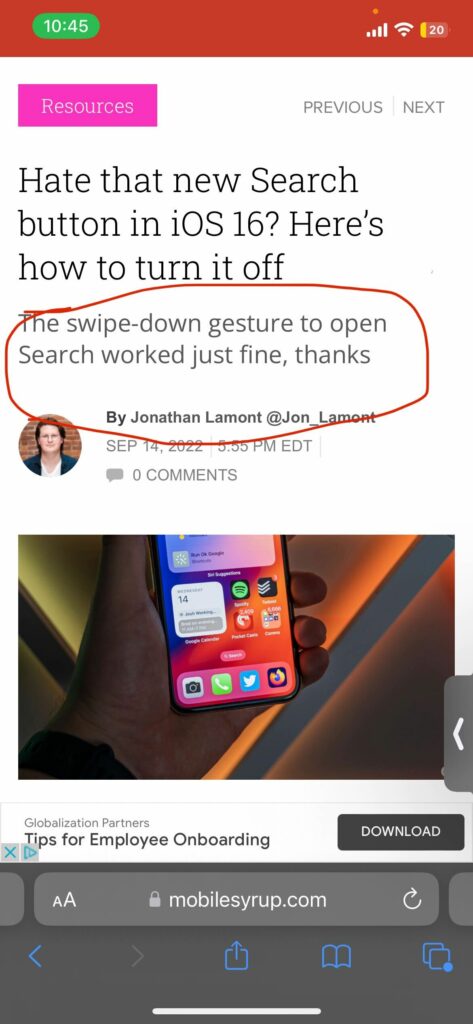
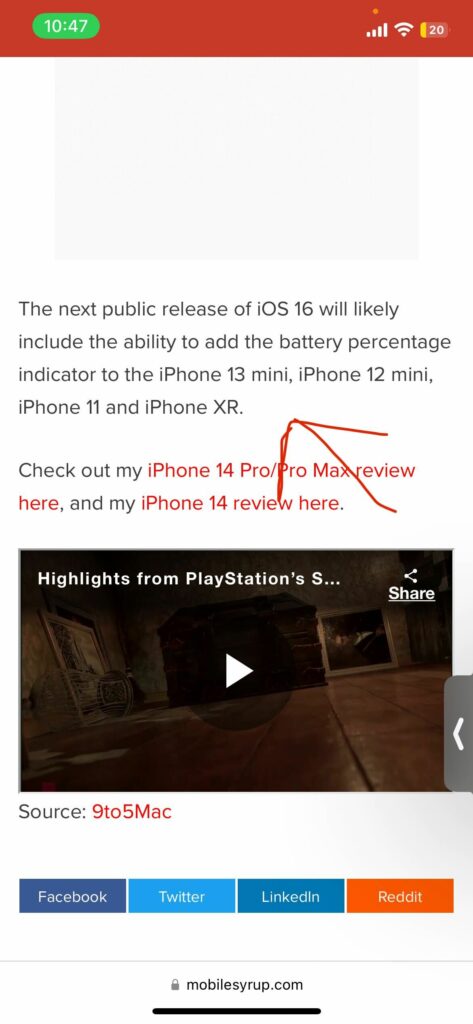
TikTok creator Ramal Media shared a short video (via The Verge) showing that you can scribble any shape over screenshots, and it magically transforms into a perfect shape as long as you hold the scribble down.

In my testing, the feature works when drawing circles, arrows, triangles, squares and rectangles, and makes it easier to highlight a portion of the screenshot. The screenshots above look a lot cleaner when the scribbles are held down, as seen below:
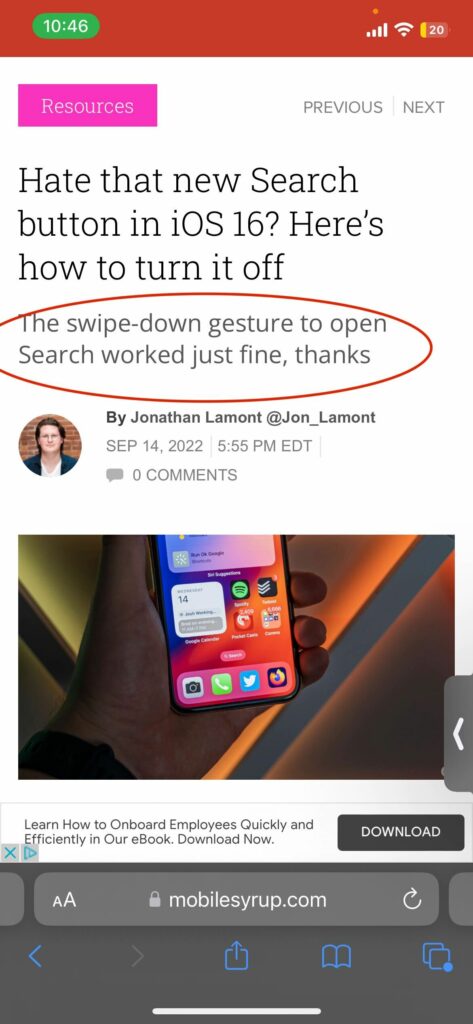
 

We are not entirely sure when Apple added the utility to screenshots, but it surely isn’t a part of the newly-released iOS 16. And while it isn’t a tool you’ll use daily, it’s still a handy trick to know. Other features the screenshot editing app includes are the ability to add a description to the screenshot, add a signature, decrease/increase the opacity of a scribble or magnify a specific area of the screenshot.

In other iPhone screenshot-related news, the iPhone 14 Pro and Pro Max’s Dynamic Island will be visible in screenshots, but only when it’s in use. Read more about it via the link below:

Source: Ramal Media Via: The Verge

Categories
Mobile Syrup

How to change iOS 16’s notification style

iOS 16 has a ton of new features and capabilities, from crazy new lock screen customizations to scheduled emails and more. Along with the lock screen changes, Apple switched up how iOS displays notifications in the Notification Center with a new bottom-up design.

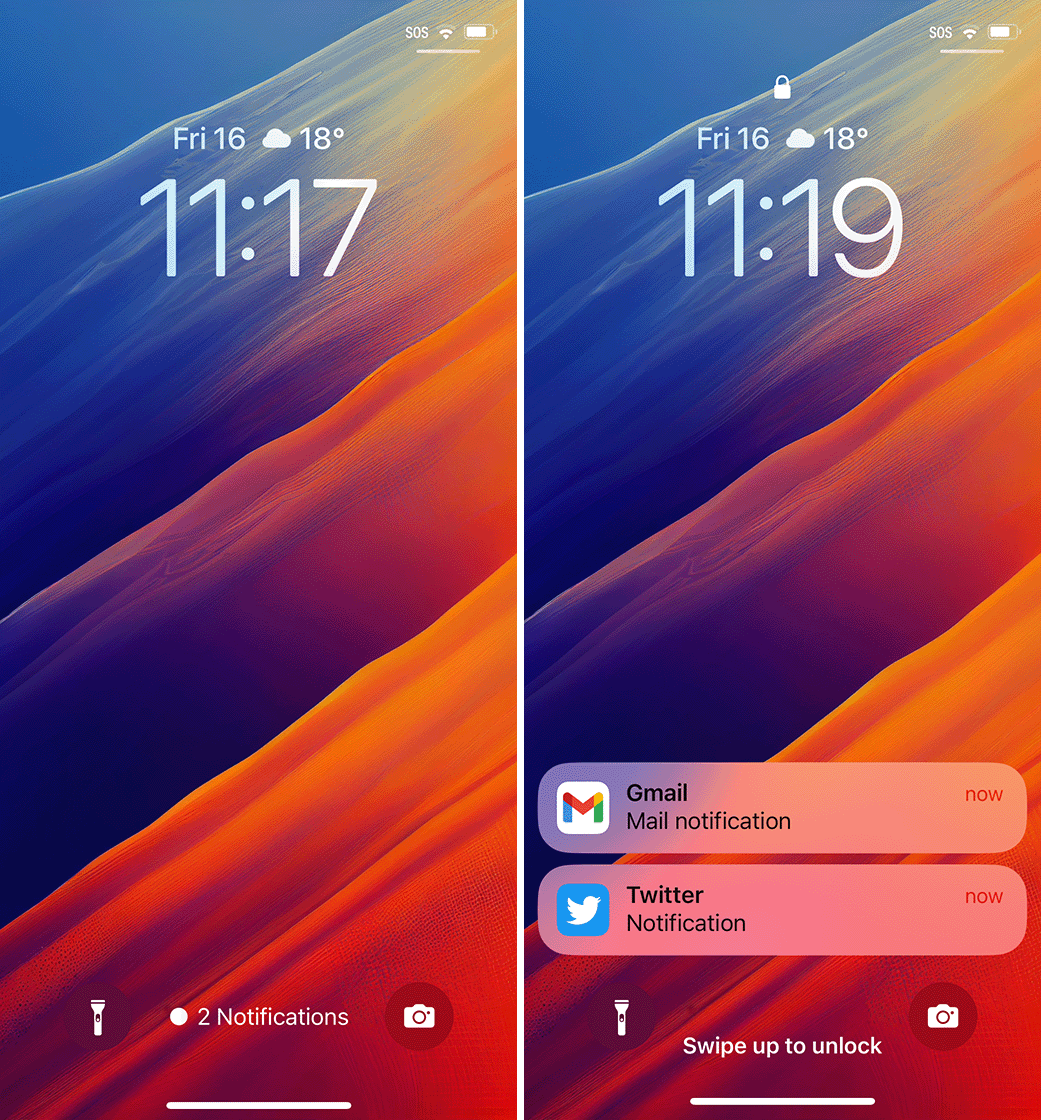
Fortunately, for those who aren’t big on the change, there are some customization options to tweak notifications, although you can’t get the old notification style back. If you head into Settings > Notifications on your iPhone running iOS 16, you’ll see three options for how iOS displays notifications: Count, Stack, or List.

Stack is the new default, which shows your notifications in, well, a stack at the bottom of the display. With this setup, you’ll see one notification with the rest layered underneath it, fading away into the background. Swiping up brings the notifications up into a list that you can scroll through. From there, you can also open notifications, manage them, clear them, and more, just like you would with the old notification view.

iOS 16 notification settings and the Stack option.

Next up, Count. This view collapses all the notifications into a single line of text that tells you how many notifications you have. It sits at the bottom of the screen between the flashlight and camera buttons. This gives you the best view of your lock screen and overall looks the cleanest but gives you the least amount of information. Once again, you can swipe up to view your notifications.

Left: Count notification option. Right: List option.

As an added bonus, if you’re using the other notification options and you want to collapse everything into the Count style, you can swipe down to minimize the notifications.

Finally, the List option is most like the old notification style. This shows a list of notifications that you can expand by swiping up. The list is still bottom-aligned to keep the fancy new lock screen widgets in view, but it’s still as close as you’re going to get to the old iPhone lock screen.

Via: 9to5Mac

Categories
Mobile Syrup

iPhone 14, 14 Pro having iMessage, FaceTime issues after set up

Apple warned that those setting up new iPhone 14 or 14 Pro devices may have issues setting up iMessage and FaceTime.

Per an Apple support document spotted by 9to5Mac:

“iMessage and FaceTime might not complete activation on iPhone 14 and iPhone 14 Pro. Update to the latest version of iOS to address the issue.”

Apple goes on to explain that after setting up a new iPhone 14 or 14 Pro, some people may not receive iMessages or FaceTime calls, conversations in messages might show up as two separate threads, and recipients might see your messages coming from the wrong account (such as your email address if you had selected your phone number).

Oh, and most devastating of all: some people might see a green message bubble instead of a blue one. An unfortunate side effect of relying on iMessage for high-quality texting is that when iMessage breaks, you end up falling back to SMS (the green bubbles), a years-old standard that has not kept up with modern messaging expectations. Tim Cook seems to think the solution to green bubble problems is buying an iPhone, but apparently, that doesn’t include the newest iPhones.

Before you panic over having to send a green bubble like the Android plebs, you should know that Apple has fixed the problem with iOS version 16.0.1, which dropped yesterday. iOS 16.0.1 includes a few bug fixes for the new iPhones, including an issue photos may appear soft when zooming in landscape.

The update should fix iMessage and FaceTime activation issues, getting you back into the blue bubble crew. Most iPhones should prompt you to install the new software during setup, but if that doesn’t happen, you can download the update afterwards by going to Settings > General > Software Update.

If you still have issues after updating, Apple suggests making sure your iPhone is connected to a cellular network and then heading into Settings > Messages > Send & Receive and selecting the phone number you want to use with the Messages app.

Source: Apple Via: 9to5Mac

Categories
Mobile Syrup

Google Messages app is getting three new tools, APK deep divers discover

It looks like Google’s Messages app is getting three new tools regarding voice memos, emoji reactions and more. The APK deep divers at 9to5Google have discovered some new details via the Messages app beta.

The first of the updates coming to the app are transcripts of voice memos. These will automatically translate your recorded messages into text. Reportedly, Google says this is designed for when you’re unable to listen to someone’s recorded messages, you can now just read them.

9to5 says that the experience is slower than voice typing with Assistant on Pixel 6 and doesn’t have the same level of accuracy.

Additionally, Google is opening up emoji reactions by allowing users to pull up a full list of emojis available on their Android phones. Previously, reactions only had seven emojis.

Another update includes a revamped gallery view in the Messages app. Currently, the app sports a horizontal grid when you’re looking to attach an image or screenshot. In a new update, you’ll be able to vertically scroll through your photos, which makes the experience more spacious. That old Gallery button is also replaced with the ‘Folders’  button; however, it offers the same experience.

It’s unclear when these features will hit the Google Messages app.

Source: 9to5Google

Categories
Mobile Syrup

Uber employees didn’t believe a teen hacked its internal system

Employees at Uber did not believe a hacker had gained access to its internal system, despite the hacker stating the system was compromised.

Perhaps it was the way the hacker revealed their presence. “I announce that I am a hacker and Uber has suffered a data breach,” they wrote on the company’s Slack channel.

The range of emojis responding to the message illustrates employees’ disbelief, as seen in the screenshot of the hacker’s message shared on Twitter.

The Washington Post reports the hacker is 18 years old and breached Uber’s internal system for fun.

In a tweet, Uber shared it was aware of the breach.

“We are currently responding to a cybersecurity incident. We are in touch with law enforcement and will post additional updates here as they become available.”

Via: The Verge and The Washington Post 

Categories
Mobile Syrup

Nothing is hinting at a new product announcement ‘coming soon’

Carl Pei’s Nothing is doing well in the countries it launched the Nothing Phone (1) in. The company revealed that it has sold over 100,000 phones in India in the first 20 days of sale, with over 10 million signing up for notifications about the phone’s launch at Indian e-commerce retailer Flipkart (owned by Walmart).

Part of the reason why the phone is doing well is the way Nothing promoted it prior to its launch. Behind-the-scene videos, teaser trailers and constant hints on its social media were a good way for the company to garner potential customer attention, and it seems like the company is doing it again.

Nothing had been holding off on such cryptic teasers since the release of the Nothing Phone 1. However, on Thursday, September 15th, it shared a photo of a butterfly on Twitter, with the caption, “Sublime. Coming soon.”

Parrots were an integral part of Nothing Phone (1)’s teasers, and it looks like, whatever this new device is, will have butterflies in its promotional material. The new device could very well be a second-gen version of Nothing’s Ear (1) or a new red colourway for the Nothing Phone (1), judging by the butterfly’s red and transparent body. On the other hand, it could be a new product all together, like a smartwatch.

The company first teased the Nothing Phone 1 in March, and it wasn’t until July that the device was fully revealed. If Nothing is on a similar roadmap, it wouldn’t be before January that we get a full look at what the company’s new product is.

Source: @nothing

Categories
Mobile Syrup

Win a ‘Space Black’ iPhone 14 Pro with MobileSyrup

The iPhone 14 Pro is available today, and many people are swarming to the Apple Store, Best Buy and carriers to purchase Apple’s new flagship smartphone. However, the cool new device starts at a pricey $1,399, so if you’re unable to buy it yourself, MobileSyrup is here to lend a hand.

Our iPhone 14 Pro contest offers the device for free for one lucky winner. The iPhone 14 Pro we have up for grabs is the ‘Space Black’ 128GB model. Our contest starts September 16th and runs until October 13th. We’ll select the winner Friday, October 14th.

The iPhone 14 Pro features a brighter 6.1-inch display with the new ‘Dynamic Island’ camera and Face ID cutout. Further, the device sports an A16 Bionic chipset and a brand new 48-megapixel main camera.

Here’s what MobileSyrup’s Patrick O’Rouke wrote in his recent review of the iPhone 14 Pro and iPhone 14 Pro Max:

“Just like it’s been for the past several years, Apple’s iPhone 14 Pro and iPhone 14 Pro Max remain one of the most complete and capable smartphone packages out there.”

Subscribe to our newsletter using the form below for your chance to win the Space Black iPhone 14 Pro.

Categories
Mobile Syrup

Chatr sale offers 2GB or 10GB of bonus data on select plans

Rogers’ flanker brand Chatr Mobile is back with another 2GB bonus data offer. Until September 19th, new activations can get 2GB of bonus data for 12 months on $35+ plans.

As with previous versions of this deal, the data bonus will expire if an account becomes inactive or if you change your plan, so make sure you lock in a plan you’ll want for at least one year.

Customers can also gain a bonus 500MB each month if they sign up for Chatr’s auto-pay system, for a total of 2.5GB of extra data.

The one exception to all this is Chatr’s $45/mo 5GB plan, which has a back-to-school deal with a bonus of 10GB of data per month for 12 months. The $45 plan isn’t eligible for the 2GB bonus, which honestly is fine since you’re getting 10GB instead.

It’s worth noting that the student deal was supposed to end on September 8th, but now Chatr lists the end date as September 20th. If you’re looking for a low-cost plan with tons of data, this may be the way to go.

You can check out all of Chatr’s plans here.

Categories
Mobile Syrup

Best Buy’s refreshed Top Deals are live until September 22

Best Buy Canada’s refreshed list of Top Deals with storage solutions, printers, PC peripherals, smart home tech and fitness wearables is live now.

Top Deals mentioned below are available starting today, Friday, September 16th, and expire on Thursday, September 22nd.

Check out some notable deals from the sale below:

PC and Accessories

Logitech M720 Triathlon Wireless Optical Mouse – Black: $49.99 (save $20)

Microsoft Bluetooth Mouse – Matte Black: $23.99 (save $6)

Logitech MX Anywhere 2S Bluetooth Darkfield Mouse – Black: $54.99 (save $25)

HyperX Alloy Origins Core Backlit Mechanical Red-Linear Gaming Keyboard – English: $79.99 (save $20)

Microsoft Bluetooth Red Tracking Desktop Keyboard & Mouse Combo (QHG-00031) – Grey – English: $63.99 (save $16)

Razer Power Up Gaming Bundle with Keyboard, Mouse & Headset: $99.99 (save $50)

Logitech 4K Pro Webcam with HDR & Noise-Cancelling Mics: $199.99 (save $50)

Seagate One Touch 5TB USB 3.0 Portable External Hard Drive (STKC5000404) – Grey: $139.99 (save $15)

LaCie Rugged 5TB USB-C Portable External Hard Drive for PC/Mac (STFR5000800) – Orange: $219.99 (save $10)

WD Easystore 14TB USB 3.0 Desktop External Hard Drive (WDBAMA0140HBK-NESE) – Black: $309.99 (save $90)

HP 15.6-inch Laptop – Natural Silver (Intel Core i5-1235U/1TB SSD/16GB RAM/Windows 11): $899.99 (save $100)

Acer Aspire 3 15.6-inch Laptop – Black (Intel Core i5-1035G1/512GB/12GB RAM/Windows 11): $649.99 (save $150)

Acer 23.8-inch FHD 75Hz 1ms GTG VA LED Monitor (KA242Y ABI) – Black: $149.99 (save $50)

Canon imageClass MF451DW Monochrome All-In-One Laser Printer: $379.99 (save $30)

Canon PIXMA TS3429 Wireless All-In-One Inkjet Printer: $74.99 (save $15)

Smart Home Tech

eufy Cam Pro Wired Outdoor 2K IP Camera – White: $99.99 (save $30)

Arlo Essential Spotlight Wire-Free Indoor/Outdoor 1080p Security Camera – White: $129.99 (save $40)

Arlo Essential Spotlight Wire-Free Indoor/Outdoor 1080p Security Camera -White -3 Pack: $379.99 (save $75)

D-Link mydlink Wi-Fi Smart Water Leak Sensor Starter Kit (DCH-S1621KT): $89.99 (save $10)

Arlo Essential Wire-Free Wi-Fi Video Doorbell – White: $229.99 (save $40)

Google Nest (Wired) Wi-Fi Video Doorbell – Black/White: $208.99 (save $31)

Wearables

Garmin Venu 42mm GPS Watch with Heart Rate Monitor – Silver/Granite: $349.99 (save $90)

Garmin vivomove Sport 40mm Smartwatch with Heart Rate Monitor – Cocoa: $189.99 (save $40)

Fossil Gen 6 42mm Smartwatch with Heart Rate Monitor – Gunmetal: $299.99 (save $160)

Phone Accessories

Razer Kishi Gaming Controller for iOS: $69.99 (save $30)

Razer Kishi Gaming Controller for Android: $59.99 (save $10)

TUFF8 Fitted Hard Shell Case for Galaxy A13 – Clear: $24.99 (save $5)

TUFF8 Fitted Hard Shell Case for Galaxy S22+ (Plus) – Clear: $24.99 (save $5)

Everything Else

ProForm Pro 2000 Folding Treadmill – 30-Day iFit Membership Included: $1,699.99 (save $300)

Canon EOS Rebel SL3 DSLR Camera with 18-55mm Lens Kit – Black: $949.99 (save $50)

Roku Streaming Stick 4K Media Streamer with Remote: $59.99 (save $10)

Dyson Cinetic Big Ball Animal Pro Canister Vacuum – Purple/Iron: $599.99 (save $100)

Sony SRS-XB43 EXTRA BASS Waterproof Bluetooth Wireless Speaker – Black: $279.99 (save $70)

Harman Kardon FLY ANC Over-Ear Noise Cancelling Bluetooth Headphones – Black: $99.99 (save $300)

Find all Top Deals for the week here.

MobileSyrup utilizes affiliate partnerships. These partnerships do not influence our editorial content, though we may earn a commission on purchases made via these links that helps fund the journalism provided free on our website.

Image credit: Best Buy

Categories
Mobile Syrup

Save up to 29 percent on Samsung SD Cards

Earlier this week we mentioned great deals on SanDisk SD Cards, now it’s Samsung’s turn. If you’re looking for additional storage for your tech, check out these deals from Amazon.

MobileSyrup utilizes affiliate partnerships. These partnerships do not influence our editorial content, though we may earn a commission on purchases made via these links that helps fund the journalism provided free on our website.

Source: https://amzn.to/3BI2OuC” target=”_blank” rel=”noopener” data-lasso-id=”485323″>Amazon Canada