TORONTO, CANADA – October 21, 2019: Royal Bank of Canada (RBC) sign at the base of their downtown Toronto headquarters.
RBC has released a new solution to make it easier for customers to split the tab with their dining companions.
Split with Friends allows customers to manage group expenses through the bank’s mobile app. Customers can divide costs between their contacts, request funds, and keep track of who’s paid their share.
Split with Friends requires three steps: enter the amount to divide, select payees, and send requests.
RBC is the only bank in Canada to offer such a feature.
The institution notes the pandemic has changed the way people bank. Since January 2020, RBC mobile users have increased by 23 percent. E-transfers have increased by 74 percent since the onset of the pandemic.
“We’ve all experienced the hassle of splitting bills and sharing expenses on things like group trips and meals. This is another great example of the powerful benefits that clients can access when they bank with RBC,” Sean Amato-Gauci, an executive vice-president at RBC, said in a statement.
RBC’s mobile banking app is available on iOS and Android.
The Nintendo Switch Online mobile app has received a major ‘2.0.0’ update that finally adds a number of basic features.
Most notably, this includes friends lists, so you can now see who’s online and what they’re playing. The update also lets you change your online status and view your own friend code. These are all features that were previously only available on the Switch itself.
It’s unclear why it took this long for the nearly five-year-old app to receive these updates, especially considering the official PlayStation and Xbox mobile apps have offered such functionality for quite some time. That said, Switch Online in general has always lagged behind its peers, as the mobile app is the only official way to chat with friends while playing Switch games online.
The Switch Online update also refreshes the app’s design, per Nintendo’s official notes.
You can download the Switch Online app on iOS and Android.
Berlin, Germany- September 6.,2017., Samsung exhibition pavilion
Samsung confirmed that a hacker group has breached the company’s servers; luckily, personal data wasn’t accessed.
The South Korean phone maker has shared a statement with Bloomberg and SamMobileconfirming data breach. This hacker group is also responsible for Nvidia’s private data breach and threatened to post the data online.
Samsung says that the hackers obtained source code related to Galaxy smartphones and other Android devices, but no personal data of customers or staff was obtained.
There was a security breach relating to certain internal company data. According to our initial analysis, the breach involves some source code relating to the operation of Galaxy devices, but does not include the personal information of our consumers or employees. Currently, we do not anticipate any impact to our business or customers. We have implemented measures to prevent further such incidents and will continue to serve our customers without disruption.
The company says it has put stronger security measures since the breach. It’s unclear why Samsung was attacked, but in Nvidia’s case, the hacker group has been attempting to blackmail the company into going open-source for its GPU drivers and removing crypto mining limiters.
Telecommunications giant Rogers and the Eastern Ontario Regional Network (EORN) have extended 5G access to 10 communities in Eastern Ontario.
Rogers 5G network is now available in the following communities:
Elizabethtown-Kitley
Petawawa
Greater Napanee
Russell
Hawkesbury
Selwyn
Mississippi Mills
South Glengarry
Pembroke
South Stormont
The expansion is part of a $300 million public-private partnership to close the digital divide in Eastern Ontario. EORN, Rogers, the federal government, and the Province of Ontario are partners on the project. Details were first introduced in March 2021.
“Our Government is proud to partner with the Government of Ontario to connect ten additional communities in Eastern Ontario to a strong and reliable 5G network,” MP Francis Drouin, Parliamentary Secretary to the Minister of Agriculture, said in a statement.
“These communities will now have access to an improved cellular connection, allowing residents and businesses to access important essential services wherever they are.”
The investment has already impacted eight communities, including Lindsay, Perth, and Peterborough. At completion, the project will have 300 new cell towers, update 300 pre-existing sites, and deliver mobile connectivity to 113 municipalities and Indigenous communities.
Though Apple’s iPhone SE (2022) event is just around the corner, rumours surrounding what might be revealed during the keynote are still appearing.
Now, it looks like there’s a possibility we might see a green version of the iPhone 13 at the event.
According to YouTuber Luke Miani, Apple has plans to reveal a green iPhone 13 colour during the keynote similar to how it showed off a purple iPhone 12 during its ‘Spring Loaded’ event last year.
The rumoured iPhone 13 colour looks reminiscent of the iPhone 11 Pro/Pro Max’s excellent ‘Midnight Green’ hue, which is a good move by Apple as far as I’m concerned. Miani says that the report comes from his own sources.
That said, I’m not familiar with Miani’s track record as a leaker, so I can’t vouch for how accurate this leak is. However, 9to5Mac deemed the news reliable enough to cover it, so that’s something. Miani also details a rumoured high-end version of the Mac mini in his video called the Mac Studio.
For more on what to expect from Apple’s ‘Peek Performance’ event, follow this link.
The homes have access to internet speeds as fast as 1Gbps per second with unlimited bandwidth.
No term commitments are associated with the service. However, if customers sign up for a Fibre 1000 Unlimited package on a two-year contract, they’re granted a $20 credit to use on their bill for the first year of service.
Interested customers can visit TekSavvy’s website or call 1-519-360-4747.
The most defining factor of the new Galaxy S22 Ultra is its Note-like design and included S Pen, but does the stylus really matter?
Samsung introduced the S Pen alongside the original Note smartphone in 2011, but a lot has changed since then. Modern S Pens come in various sizes so keeping track of them all is almost impossible.
They can use ‘Air Actions,’ take photos, convert your handwriting into text, act as a magic wand, and can even give you the ability to make gifs out of anything on the fly. There’s no doubt that the S Pen is a tool forinternet power users.
I’ve only had the S22 Ultra for two weeks, so I’m a bit of an S Pen amateur, but if you master this little smartphone tool, I’m sure it can become tough to live without.
With all that in mind, let’s look at all the features Samsung’s modern stylus offers.
What the pros know
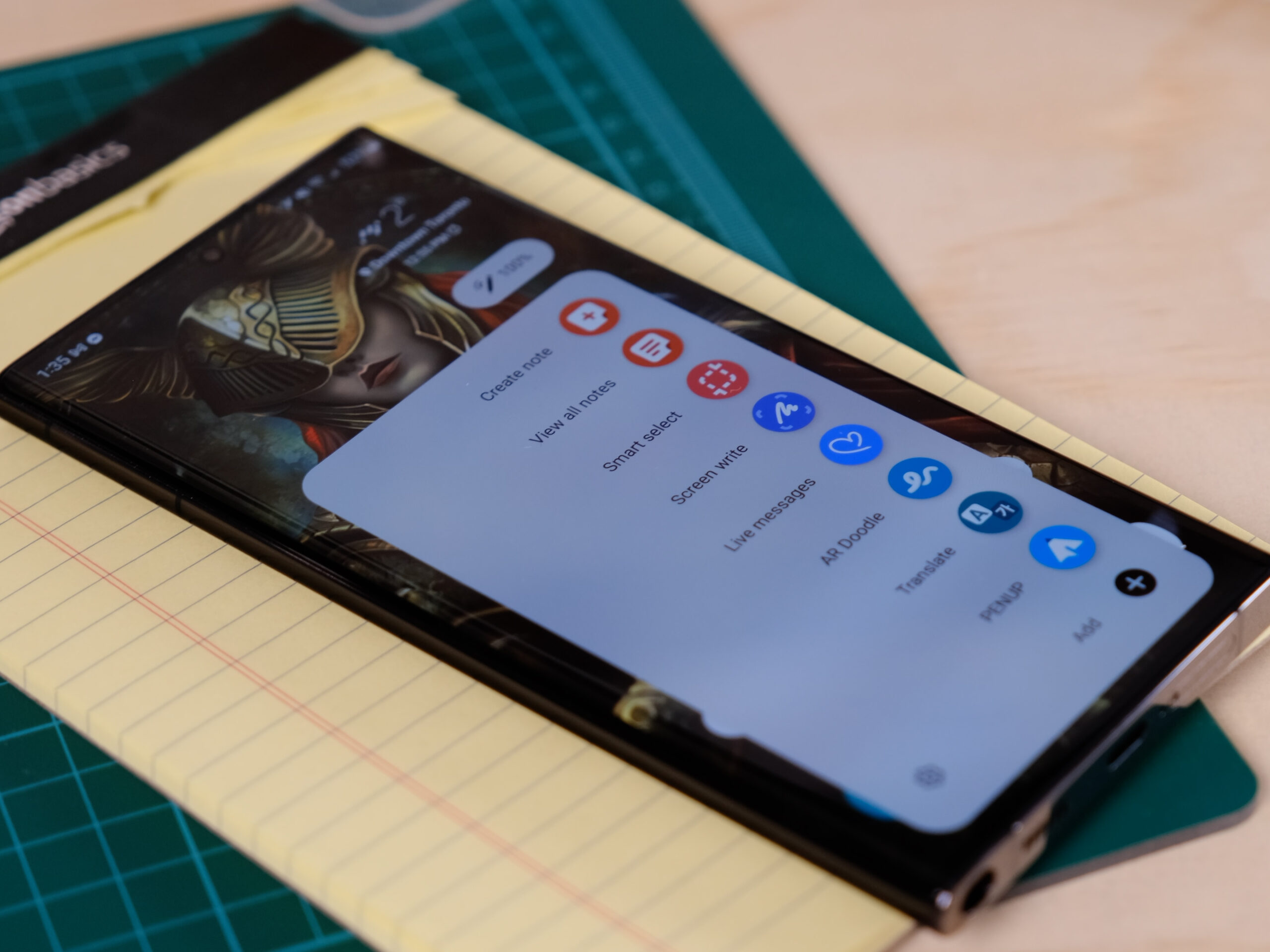
A minimal version of the S Pen menu.
The first rule of the S Pen club is to talk about S Pen club a lot.
The second rule is knowing the differences between the various styluses Samsung sells.
This is where things get tricky since there’s such a wide variety. For example, the mid-range Galaxy Tab S6 Lite still offers a connected S Pen, but it’s not quite as functional as the version in the new S22 Ultra or Tab S 8 series.
Since this is the case, you need to remember that not every S Pen is compatible with all Samsung devices. Take the Galaxy Fold 3, for example. Since it features a softer screen, you need to buy a specific ‘Fold’-branded S Pen for it, or the more universal S Pen Pro with Bluetooth that works on the Fold 3 and pretty much every high-end Samsung device released since 2021.
The full S Pen menu.
It sounds confusing, but as long as you don’t lose the S Pen that came with your device, you’ll be fine.
You’ll also need to know how to open the S Pen menu. On most devices, it appears as a small semi-transparent pen-shaped icon when you start using the S Pen or bring it close to your device. If you can’t see this menu, it could be disabled in settings or your S Pen might be out of charge.
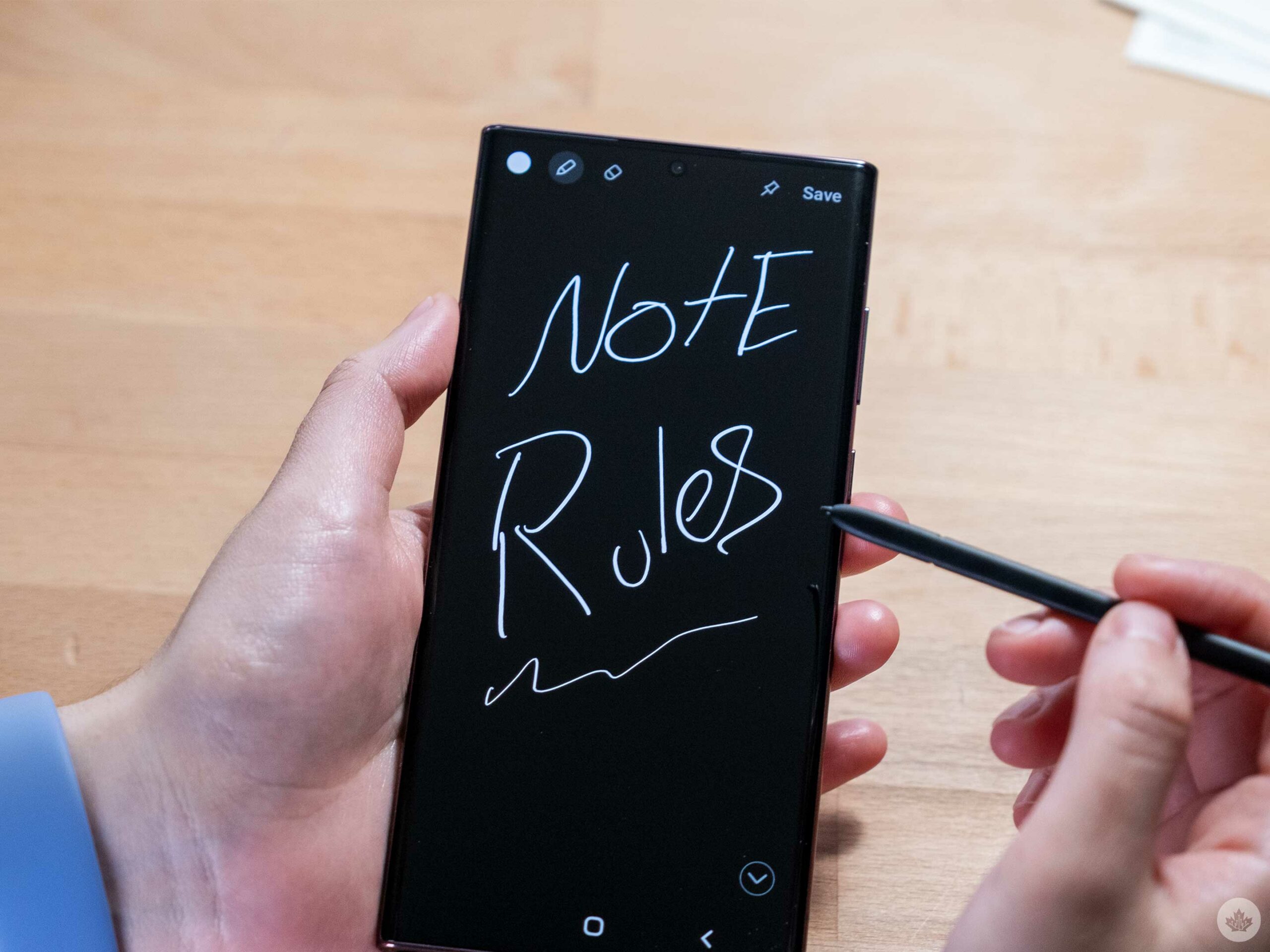
Taking notes is easy
I’ll start with the most well-known S Pen function, only because most people underrate how effective it is as a note-taking tool.
By default, it takes a few actions to open the notepad, but you can set the feature to open instantly after you retract the S Pen from your phone.
This may seem almost inconsequential but ditching the need to open the notepad makes the experience as convenient as picking up a pad of paper and a pen. Sure, it’s simple, but that’s the magic of it.
Making gifs is fun
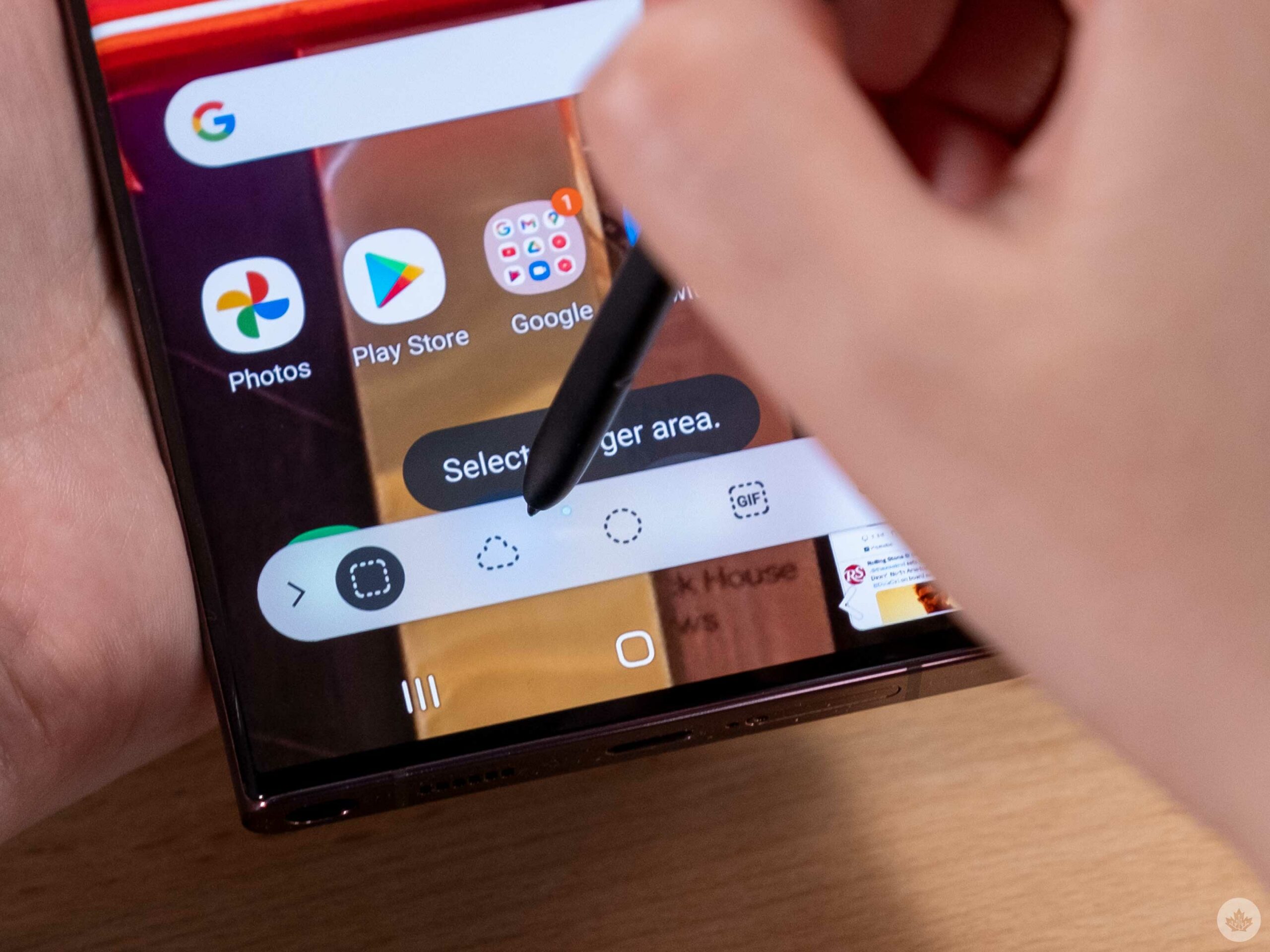
One of the fun power-user settings with the S Pen is the ability to capture areas of your screen to make gifs using the ‘Smart Select’ tool.
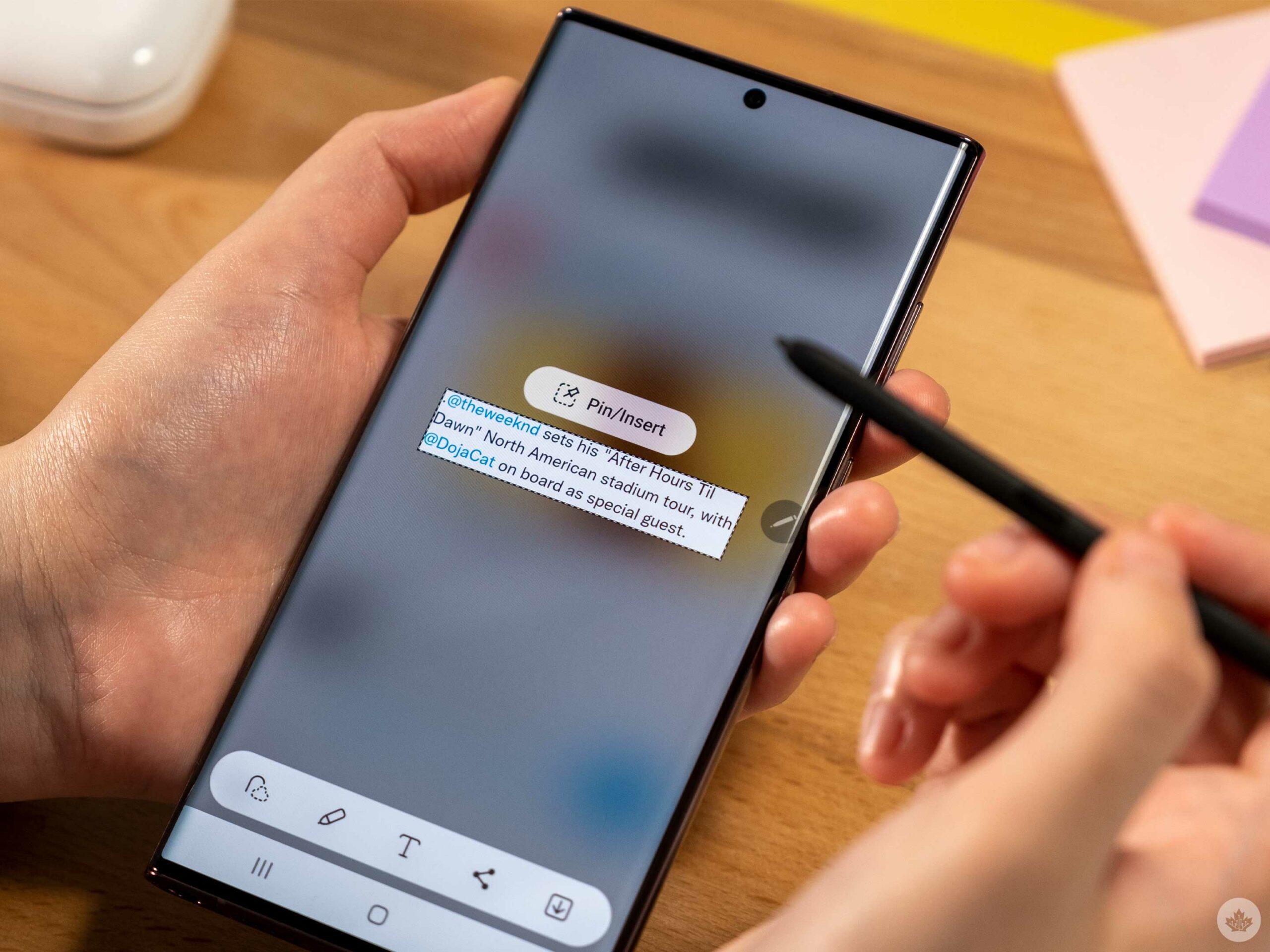
Smart Select is generally meant for taking screenshots of a smaller section of the screen. However, you can also record a gif. This functionality isn’t perfect since you can’t move the screen around, but if your friend sends you a funny video, or you want to clip a joke out of a live stream, this feature comes in handy.
As I mentioned above, Smart Select also lets you take screenshots of areas of your screen, but I rarely find it more convenient than snapping a pic of the full screen and just cropping it.
With Smart Select, you can pin a small screenshot to the top of your screen, which is useful if you need to jot down something that can’t be copied/pasted.
AR Doodles are random but cute
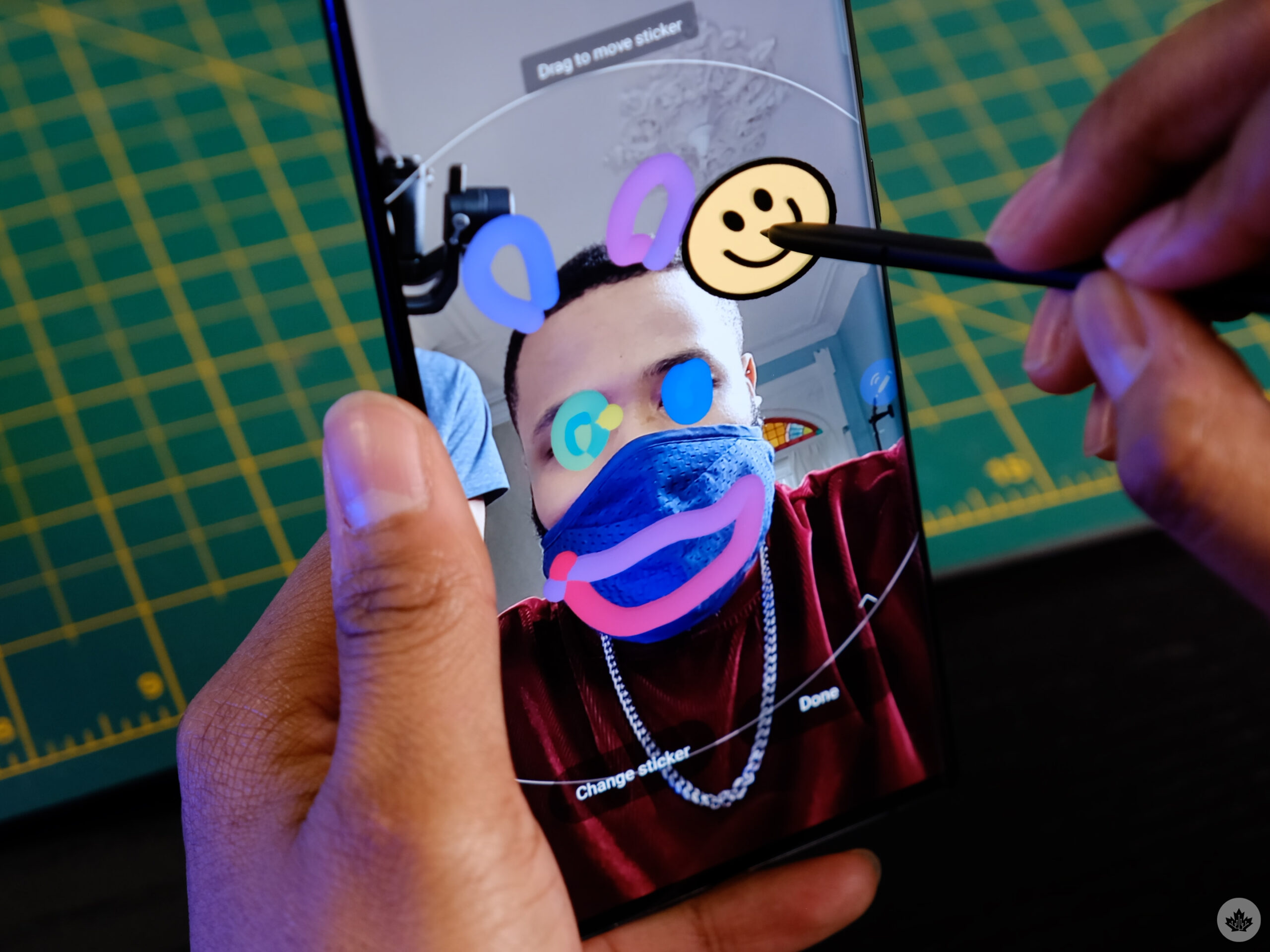
One of the more fun aspects of the S Pen is the ability to draw on yourself or other things through the camera.
Like the gif tool, this can be super fun and incredibly niche.
You launch AR doodles from the S Pen menu or by opening the ‘AR Zone’ located in the ‘More’ section of the camera app. What strikes me about this feature is that it works really well, but I don’t expect many people to jump out of whatever chat app they’re using to make a little doodle video to send to their friends.
Take pictures from a distance
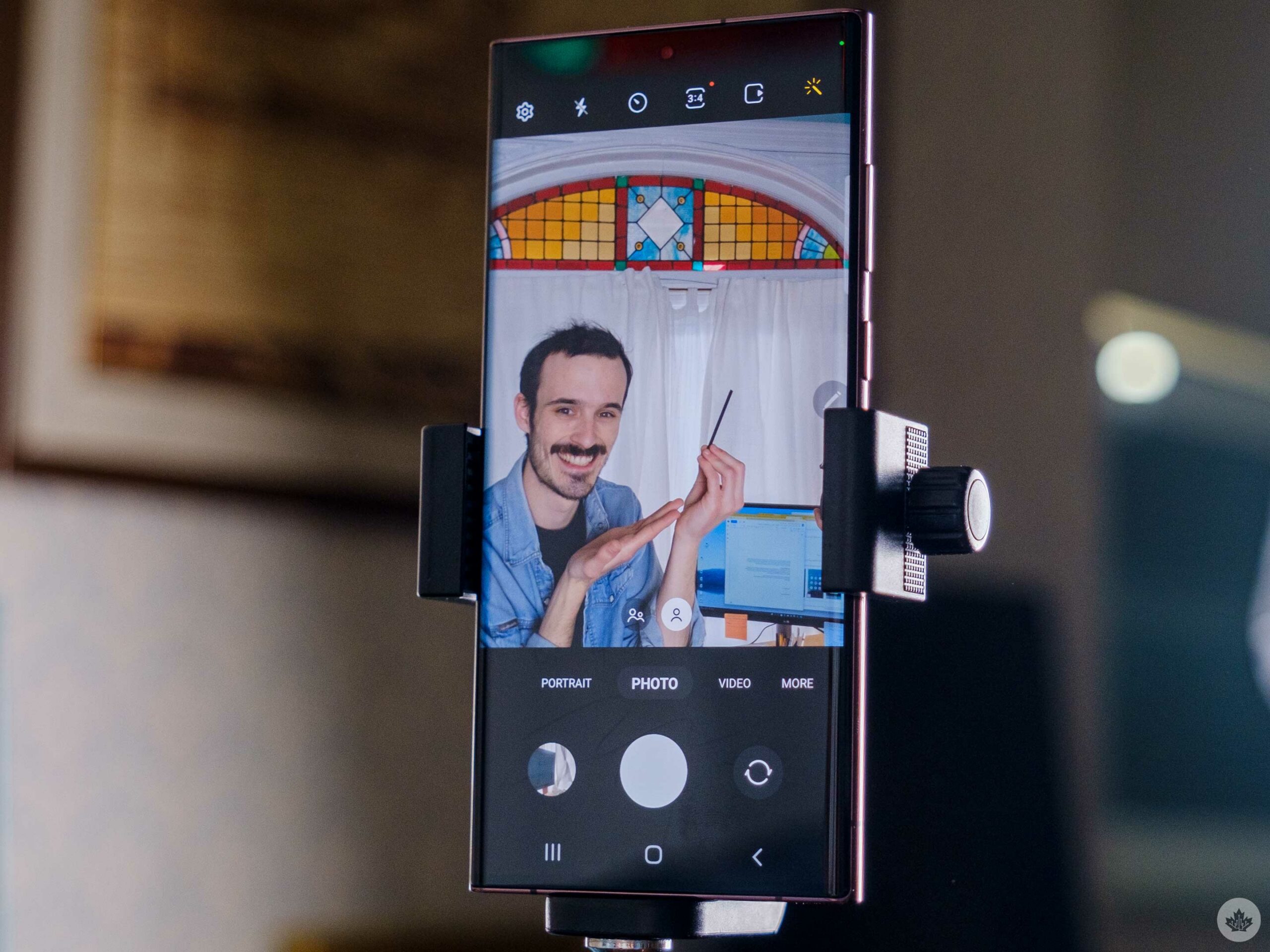
One of the straightforward and often forgotten S Pen features is that the button on the pen can control the camera.
With the S22 Ultra, a single tap takes a picture and a double-tap switches between the rear and front-facing cameras. You can also use ‘Air Actions’ to do a little more with the camera, but we’ll get into that later.
Fill out forms and more
Since the Galaxy S8, Samsung has added the ability for its phones and tablets to understand human handwriting and convert it into text. This means that if you have the ‘S Pen to text’ feature enabled, you can write in Google search bars, text messages and more, and the phone will convert it to standard type.
In my experience, this worked pretty well even with my janky handwriting, but like many of the other S Pen features, it feels weird to pull out the stylus just to do this.
If you already have the S Pen in your hand though it comes across as a bit more intuitive. You just need to make sure the small purple ‘S Pen to text’ scribble icon appears to let you know you’re cleared to write there.
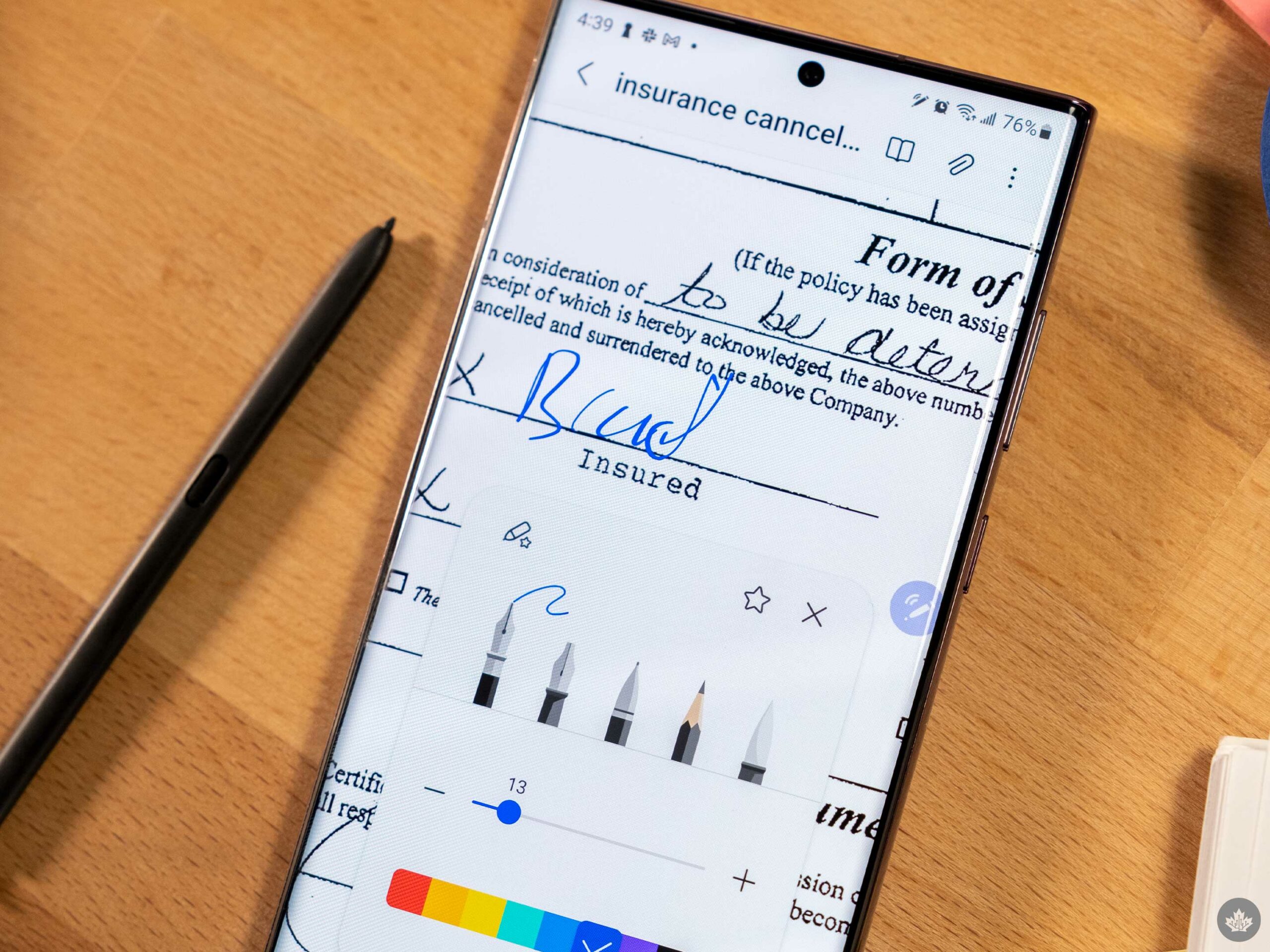
Using the pen you can also sign documents and PDFs. That said, you need to make sure you import those docs to the Samsung Notes application first.
Air Actions and other random controls
Air Actions and Gestures
I don’t know why companies insist on adding weird hand/pen waving gesture controls to their devices. They’re cool when they work, but in most cases just reaching out a little further to actually grab the smartphone saves time and frustration.
Don’t get me wrong, there’s likely a contingent of people out there that use the features, and likely in a way I didn’t expect, but I’d bet this is a niche audience.
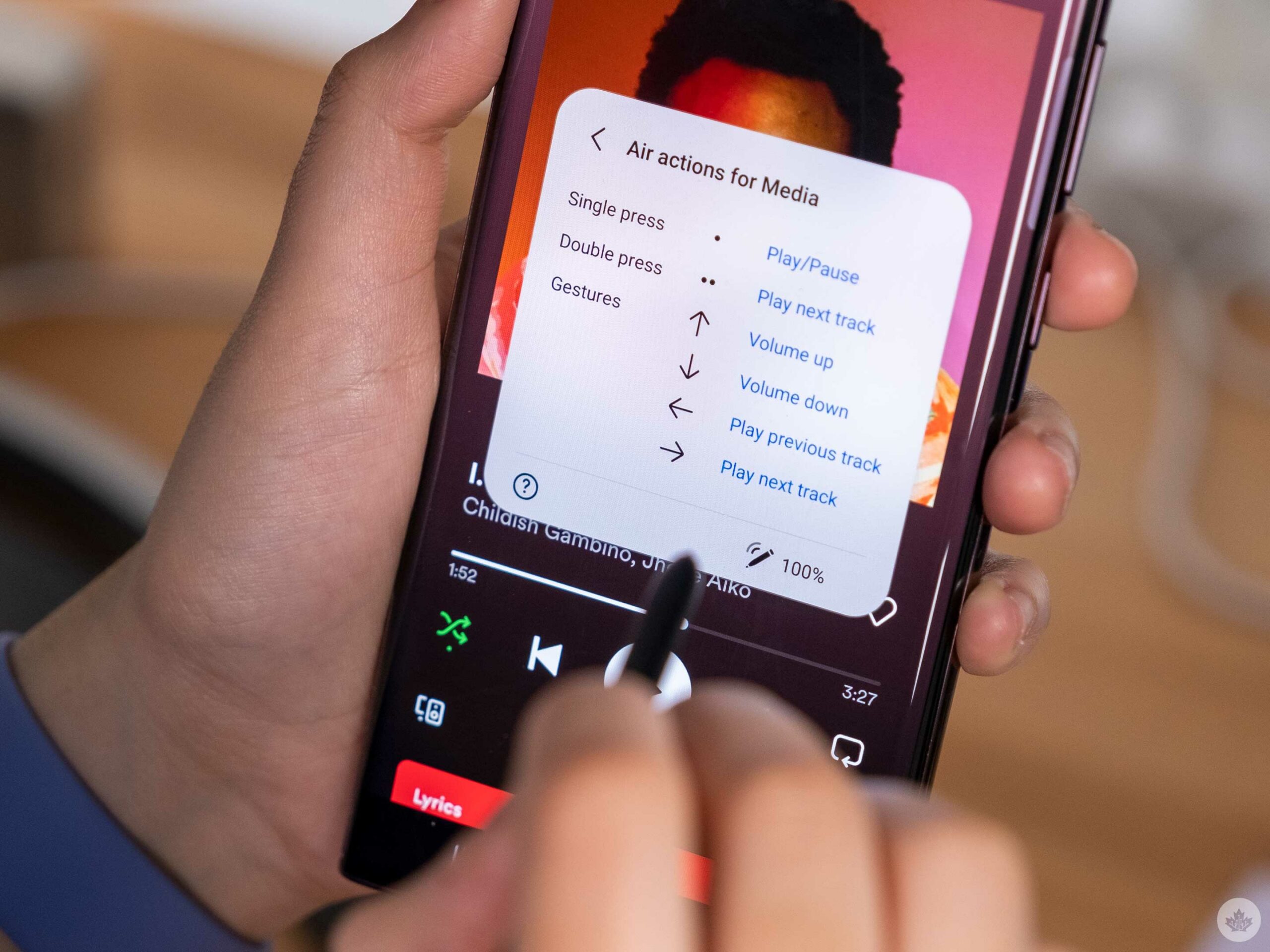
For instance, the S Pen button can play/pause video content or move a slide show along if you’re using your phone to present from.
Moving away from the button, you can also wave the S Pen around like a magic wand to control apps from a distance. With Spotify, you can swipe the pen left and right to navigate through your songs. It’s neat, but when will I ever find myself in a situation where I can’t get to my phone, but I still have the S Pen and I need to change the song? How would I even unlock the device?
The only Air action I think I’d sometimes use was the ability to swing the pen/wand to swipe between camera modes on the S22 Ultra from a distance.
Samsung did make it a bit easier to use these controls, and the S Pen menu does a decent job of trying to educate users on how they can use Air Actions, but this pen excels at being a notepad and not much else.
Read more about the S22 series
For more on Samsung’s Galaxy S22 Ultra, check out our coverage below
This week, Apple officially announced its ‘Peek Performance’ March 8th event following weeks of rumours. The keynote kicks off Tuesday, March 8th at 1pm ET/10am PT, and we’re expecting to see a few notable Apple products revealed.
As mentioned in our ‘what to expect‘ story, we believe a new iPhone SE, iPad Air, MacBook Air and possibly Mac mini might be showcased during the keynote. Further, we expect to see a redesigned, colourful M1-powered Macbook Air and possibly a Mac mini that features Apple’s M1 Pro/Max chip — or even a more powerful new M2 chip.
As always, it’s important to note that this is just speculation based on rumours from the last few weeks.
This week the question at hand is: what do you want to see at this event? Would you like to see an M1 Pro/Max-powered Mac mini in a variety of different colours or an iPhone SE with Face ID?
Tech reporters throw around a bunch of terms in their writing. However, for people immersed in this space regularly, it can be easy to forget that not everybody knows what every tech term means, especially with more common ones.
With that in mind, we’re going to explain some terms — in this piece specifically, memory and storage — to help keep people up to speed. If you already know what these mean, great! But if you don’t, then this is for you.
Memory and storage are words often thrown around that seem like they mean the same thing. Memory relates to random access memory (RAM), which is best described as your computer, phone, or tablet’s short-term memory. It’s “volatile,” and items stored in memory disappear when you turn off your device (or can be pushed out to make room for new items if need be).
Storage, on the other hand, typically refers to things like hard drives and solid-state drives (SSDs), best described as long-term memory. Hard drives and SSDs are different types of long-term storage, with the latter typically being faster and more expensive.
As a simple example, memory/RAM is remembering a phone number that someone gives you, while storage is writing that number down on a piece of paper. Sure, you might be able to remember the number for a while, but there’s a higher chance you’ll forget. If you write it down on a piece of paper and keep it in your pocket, it’ll take a bit longer to get the paper when you need to check the number, but at least it’ll be there when you check the paper.
How to apply memory and storage in your life
To put that into more helpful terms, your computer/phone/tablet uses storage for things it needs to keep permanently. The more storage you have, the more things your device can hold — more pictures, videos, games, apps, etc.
RAM, however, is important for when your computer/phone/tablet needs to work on something. It’s typically much faster than storage, so when you open an app or game, your device loads assets required to run that program from the storage into RAM so they’re readily available.
Having more RAM can help run more programs at once, or allow you to run more intense programs. However, it also doesn’t always make sense to try and get as much RAM as possible since RAM tends to be expensive, while storage is comparatively cheap.
Next time you’re shopping for a device, think about how you use it. Do you like to run a lot of apps at the same time, or open a lot of tabs in your browser? Having more memory might help with those things. Do you use a lot of apps and take a ton of pictures? You may want to invest in a device with more storage to hold all these things.
For most people, 8GB or 16GB of RAM is more than enough on a laptop. With smartphones and tablets, most high-end phones come with somewhere between 4GB and 8GB of RAM which, again, is likely more than enough for most people. People who play games or use their devices for intense tasks like photo or video editing may benefit from more memory than this.
The storage amount tends to matter less since there are often ways to supplement storage. Some devices let you expand the storage — for example, adding an extra hard drive to your computer or a microSD card to your smartphone. Many smartphone companies also offer cloud storage subscriptions — for a small fee, you can back up photos or videos to the cloud, freeing up storage on your device.
Regardless, keep these terms in mind next time you’re shopping for a smartphone, computer, or another device. If you found this helpful, or if you have more questions, let us know down below so we can make more or help you out.
Every week, MobileSyrup outlines some of the most notable movies and TV shows that recently hit Canadian streaming platforms.
Our ‘Streaming in Canada’ column typically focuses on new content from Amazon Prime Video, Crave and Netflix, but other services like Apple TV+ and Disney+ will be mentioned when relevant. Premium video on demand (PVOD) platforms are also fair game as movies continue to come to digital early amid the COVID-19 pandemic.
Finally, we’ll highlight shows or movies that are made by Canadian companies, involve notable Canadian cast or crew and/or are filmed in Canada.
Amazon Prime Video
The Boys Presents: Diabolical [Amazon Original]
Diabolical explores different superhuman stories in the world of The Boys through a variety of animation styles.
Reprising their roles from The Boys are Antony Starr (Homelander), Chace Crawford (The Deep), Elisabeth Shue (Madelyn Stillwell) and Giancarlo Esposito (Stan Edgar), while guest voices include Awkwafina (Shang-Chi and the Legend of the Ten Rings), Vancouver’s own Seth Rogen (Superbad; also executive producer of The Boys), Ben Schwartz (Parks & Recreation), Andy Samberg (Brooklyn Nine-Nine) and Brampton, Ontario’s Michael Cera (Arrested Development).
Notably, some of the episodes were conceived by Rogen, Awkwafina, Samberg and other creators. Meanwhile, the third season of The Boys premieres on June 3rd.
Amazon Prime Video Canada premiere date: March 4th, 2022 Genre: Animated Runtime: Eight episodes (13 to 15 minutes each)
The full list of movies and shows that hit Amazon Prime Video in February can be found here. Meanwhile, a breakdown of March’s lineup is available here.
Crave
F9: The Fast Saga
Dom and his crew face off against Dom’s long-lost brother Jakob, who’s teamed up with Cipher on a world-shattering plan.
F9: The Fast Saga was helmed by veteran Fast & Furious director Justin Lin and features returning Fast & Furious stars Vin Diesel, Michelle Rodriguez, Chris “Ludacris” Bridges, Tyrese Gibson, Nathalie Emmanuel, Sung Kang and Charlize Theron, while John Cena (The Suicide Squad) joins the franchise as Jakob.
Original theatrical release date: June 25th, 2021 Crave release date: March 4th, 2022 Genre: Action Runtime: 2 hours, 23 minutes
This comedy series is loosely based on the life of Stede Bonnet, an eighteenth-century aristocrat who becomes a pirate.
Our Flag Means Death was created by David Jenkins (People of Earth) and stars Rhys Darby (Flight of the Conchords), Taika Waititi (Jojo Rabbit), Kristian Nairn (Game of Thrones) and Rory Kinnear (James Bond series).
Crave release date: March 3rd, 2022 (first three episodes, new episodes every Thursday) Genre: Comedy Runtime: 10 episodes (around 30 minutes each)
Picard embarks on a race against time to save the galaxy’s future while facing a trial from one of his greatest foes.
Picard stars Patrick Stewart in his iconic Star Trek: The Next Generation role, alongside Toronto’s Alison Pill (The Newsroom), Jeri Ryan (Star Trek: The Next Generation) and Brent Spiner (Star Trek: The Next Generation). Whoopi Goldberg and John de Lancie also return from Star Trek: The Next Generation as special guest stars.
Picard is based on Gene Roddenberry’s Star Trek franchise and was created by Akiva Goldsman (A Beautiful Mind), Michael Chabon (The Amazing Adventures of Kavalier & Clay), Kirsten Beyer (Star Trek: Discovery) and Alex Kurtzman (2009’s Star Trek).
Crave release date: March 3rd, 2022 (first episode, new episodes every Thursday) Genre: Sci-fi Runtime: 10 episodes (around 43 minutes each)
After a dysfunctional family moves into a new home where atrocities were committed, the mother is the only one who notices something is amiss, leading her to question whether she’s depressed or possessed.
Shining Vale was created by Jeff Astrof (The New Adventures of Old Christine) and Sharon Horgan (Divorce) and stars Courteney Cox (Friends), Greg Kinnear (As Good As It Gets), Sherilyn Fenn (Twin Peaks) and Mira Sorvino (Mighty Aphrodite).
Crave release date: March 6th, 2022 (first two episodes, new episodes every week) Genre: Horror comedy Runtime: Eight episodes (around 30 minutes each)
Stream Shining Vale here. Note that a $5.98/month add-on is required.
A standard Crave subscription is priced at $19.99/month, with Starz costing an additional $5.99/month. A mobile-only subscription is also available for $9.99/month.
The full list of movies and shows that hit Crave in February can be found here. Meanwhile, a breakdown of March’s lineup is available here.
Disney+
The Dropout [Star Original]
This series chronicles the rise and fall of biotechnology entrepreneur Elizabeth Holmes, who was convicted of criminal fraud.
Based on Rebecca Jarvis’ ABC podcast of the same name, The Dropout was created by Elizabeth Meriwether (New Girl) and stars Amanda Seyfried (Mank) and Naveen Andrews (Lost).
Disney+ Canada Star release date: March 3rd, 2022 (first three episodes, new episodes every week) Genre: Drama Runtime: Eight episodes (50 to 55 minutes each)
Noa begins dating Steve after they meet at the grocery store, only for her to discover that her new boyfriend has unusual romantic appetites.
Fresh was written and directed by Mimi Cave (directorial debut) and stars Daisy Edgar-Jones (War of the Worlds), Sebastian Stan (The Falcon and the Winter Soldier), Montreal’s Charlotte Le Bon (Yves Saint Laurent), Burnaby, B.C.’s Andrea Bang (Kim’s Convenience) and London, Ontario’s Brett Dier (Jane the Virgin).
It’s worth noting that the movie was filmed around B.C.
Disney+ Canada Star release date: March 4th, 2022 Genre: Comedy thriller Runtime: 1 hour, 54 minutes
Two youngsters from rival gangs fall in love until tensions between their friends threaten to ruin everything.
Based on the 1957 stage musical of the same name, West Side Story was directed by Steven Spielberg (Schindler’s List) and features an ensemble cast that includes Ansel Elgort (Baby Driver), Rachel Zegler (debut role), Ariana DeBose (Schmigadoon!) and Montreal’s David Alvarez (American Rust).
Original theatrical release date: December 10th, 2021
Disney+ Canada release date: March 2nd, 2022 Genre: Musical Runtime: 2 hours, 36 minutes
The full list of movies and shows that hit Disney+ in February can be found here. Meanwhile, a breakdown of March’s lineup is available here.
Netflix
The Guardians of Justice [Netflix Original]
This dark satire of superheroes follows a team of superhumans who must control the evil in both the world and themselves.
The Guardians of Justice was created by Castlevania‘s Adi Shankar (no relation) and features the voices of wrestler Diamond Dallas Page, Sharni Vinson (You’re Next) and Derek Mears (Swamp Thing).
Netflix Canada release date: March 1st, 2022 Genre: Superhero Runtime: Seven episodes (22 to 37 minutes each)
The full list of movies and shows that hit Netflix Canada in February can be found here. Meanwhile, a breakdown of March’s lineup is available here.
Premium video on demand (PVOD)
Scream (2022)
Twenty-five years after the original Woodsboro murders, a new Ghostface emerges to terrorize teenagers, which brings Sidney, Dewey and Gale back into the picture.
Scream was directed by Matt Bettinelli-Olpin and Tyler Gillett (Ready or Not) and stars Melissa Barrera (In the Heights), Jenna Ortega (You), Jack Quaid (The Boys), Mason Gooding (Booksmart) and Mikey Madison (Better Things), with returning Scream cast members including Guelph, Ontario’s own Neve Campbell (Sidney), Courteney Cox (Gale), David Arquette (Dewey), Marley Shelton (Judy) and Roger L. Jackson as the voice of Ghostface.
Original Canadian theatrical release date: January 14th, 2022
Canadian PVOD release date: March 4th, 2022 Genre: Slasher Runtime: 1 hour, 54 minutes