Categories
Mobile Syrup

Gary Bowser to pay $10 million in restitution to Nintendo

Canadian Nintendo-modder, hacking tool creator and the reported leader of ‘Team Xecuter,’ Gary Bowser, has agreed to pay $10 million UDS (roughly $12.6 million CAD) to Nintendo to settle a recent lawsuit related to piracy charges, as first reported by EuroGamer.

Bowser and other members of Xecuter were arrested and charged with 11 felony counts in October 2020. Nintendo called the operation an “international pirate ring” and the lawsuit alleges that Bowser infringed on the company’s copyright by making and selling the console hacks.

The most well-known product of Team Xecuter is the SX Pro, a USB device that allows users to bypass Nintendo Switch security measures and run pirated games. The lawsuit also says Bowser has been creating and selling hacking tools for Nintendo devices since 2013, when he created a device to hack the Nintendo 3DS.

It’s worth noting that Bowser’s Xecuter was a for-profit company. This made it unpopular in the modding and emulation communities, which typically prioritize open-source efforts and avoid selling products.

Nintendo has a history of actively hunting down illegal usage of its intellectual property, and it has targeted ROM sites that provide game downloads regularly. For example, Nintendo was recently awarded $2.1 million USD (roughly $2.5 million CAD) in damages after winning a lawsuit against RomUniverse, a pirated game and hack seller.

Via: EuroGamer

Categories
Mobile Syrup

macOS 12.1 update to fix MacBook Pro (2021) notch issues

Apple’s MacBook Pro (2021) is a nearly flawless laptop.

It features a powerful M1 Pro/Max chip, the return of MagSafe/ anSD card slot and a stellar 120Hz screen that, unfortunately, also features a display notch.

While the screen’s notch mostly fades into the background after the first few hours of using the MacBook Pro (2021), some apps still interact strangely with it and get pushed beyond the notch.

According to MacRumors, macOS 12.1 will solve this problem. In Apple’s changelog for the update, the tech giant says that it has solved an issue where “[menu] bar extras may be obscured by the camera housing on 2021 MacBook Pro computers.” For example, the app I use to control my Elgato Ring Light via my Mac constantly hides behind the display notch despite me not having a lot of apps running in the menu bar.

Along with fixing the menu bar bug, the update also seems to solve a MagSafe charging bug with the 16-inch MacBook Pro and several HDR issues with certain apps.

The update is currently available in a developer beta but will likely roll out to all users in the next few weeks. For more on the MacBook Pro (2021), check out my review of the laptop.

Via: MacRumors, The Verge 

Categories
Mobile Syrup

GameStop Canada unveils pre-Boxing Day ‘Be Merry, Be Bright’ sale

Following Black Friday and Cyber Monday, GameStop Canada has revealed its next holiday sale to lead up to Boxing Day.

Running from December 10th to 24th, the ‘Be Merry, Be Bright’ promotion offers savings on a variety of 2021 games. It should be noted that many of these have essentially been carried over from Black Friday/Cyber Monday.

See below for some of the most notable deals:

  • Battlefield 2042 (PlayStation 5/Xbox Series X and S) — $49.99 (regularly $89.99) [PS4/Xbox One version also $49.99, $30 off]
  • Deathloop (PlayStation 5) — $49.99 (regularly $79.99)
  • Luigi’s Mansion 3 (Nintendo Switch) — $54.99 (regularly $79.99)
  • Mario Tennis Aces (Nintendo Switch) — $54.99 (regularly $79.99)
  • NBA 2K22 (PS5/Xbox Series X and S) — $44.99 (regularly $89.99) [PS4/Xbox One version $39.99, $40 off]
  • Ratchet & Clank: Rift Apart (PS5) — $59.99 (regularly $89.99)
  • Super Mario Bros. U Deluxe (Nintendo Switch) — $54.99 (regularly $79.99)
  • Super Mario Odyssey (Nintendo Switch) — $54.99 (regularly $79.99)

The full flyer can be found on Smart Canucks.

Image credit: EA

Via: Lbabinz

Categories
Mobile Syrup

Apple rolls out digital key support for six Hyatt hotels in the U.S.

During its annual WWDC keynote presentation this year, Apple announced that users would soon be able to use the Apple Wallet as an NFC-based house or car key. Now, Hyatt Hotels has announced that iPhone and Apple Watch users will be able to use their device’s wallet as a room key.

The initial rollout is happening for the following Hyatt hotels, all located in the United States:

  1. Andaz Maui at Wailea Resort
  2. Hyatt Centric Key West Resort & Spa
  3. Hyatt House Chicago/West Loop-Fulton Market
  4. Hyatt House Dallas/Richardson
  5. Hyatt Place Fremont/Silicon Valley
  6. Hyatt Regency Long Beach

When you book your Hyatt Hotel reservation, you can add your key to the Wallet app. The procedure works similarly to how you would add a digital reservation, like a movie ticket, to your Apple Wallet.

Once added, the digital key card will display your room number. If for any reason, you need to change rooms or stay longer, your key card can be updated over-the-air without you having to physically go to the front desk/reception.

Further, “when or where a World of Hyatt guest uses a room key in Apple Wallet is never shared with Apple or stored on Apple servers,” reads Hyatt’s release, ensuring that the user’s personal data and location cant be breached.

According to Hyatt, the new feature is currently only available in the above mention hotels, with plans to expand it to all Hyatt locations around the globe.

Learn more about the Apple Wallet feature here.

Image credit: Hyatt Hotels

Source: Hyatt Hotels

Categories
Mobile Syrup

You may be eligible to purchase Apple Care+ if you recently got your iPhone repaired

In most countries, including Canada, you can buy Apple Care+ with the purchase of a new iPhone/Mac, or within 60 days of the device purchase.

Until now, there was no way to get Apple Care+ post the 60-day period.

Now, as reported by MacRumors through information obtained in an internal memo, customers who have had their previously purchased iPhone or Mac repaired at an Apple Store or an Apple Authorized Service Provider are eligible to buy AppleCare+ for the device.

The only condition here is that the iPhone/Mac should have been purchased less than a year ago and should pass a physical inspection.

To make things clear, imagine a scenario where you purchased a new iPhone on January 1st, 2021. At the time of purchase, you denied Apple Care+. Come November, and you’re enjoying the first snow while recording videos to share with friends and family. You slip, drop your iPhone and its screen cracks. You go to an Apple Store or an Apple Authorized Service Provider and pay a hefty fee to get the screen replaced.

At this moment, you are allowed/eligible to purchase Apple Care+ for your iPhone.

The new policy applies to Apple Store and Apple Authorized Service Provider locations in countries where AppleCare+ is available.

Follow the links to learn more about Apple Care+ for Mac and iPhone.

Image credit: Apple

Via: MacRumors

Categories
Mobile Syrup

Here are 2021’s top trending Google search terms in Canada

Google has released its annual ‘Search Trends’ report that highlights what Canadians searched for this year. With the pandemic still lingering late into 2021, you better believe that some of the top search trends are related to COVID-19, vaccines and even Canada Emergency Response Benefit (CERB).

Last year’s search trends highlighted that Canadians were learning about COVID-19, number of cases and worst affected areas, whereas this year’s trends show that we have moved forward and are now chasing recovery by searching for information regarding vaccines and how we can leave the pandemic behind.

The resumption of sporting leagues around the world was prominently reflected in the search trends and so was the increasing popularity and curiosity of the Cryptocurrency market.

Below are some of the top search trends in Canada:

Top Searches

  1. NBA
  2. NHL
  3. COVID vaccine near me
  4. Euro 2021
  5. AMC Stock
  6. GME Stock
  7. Bitcoin price
  8. Gabby Petito
  9. DMX
  10. Squid Game

Top Canadian News Searches

  1. COVID vaccine near me
  2. Federal Election
  3. Severe thunderstorm warning
  4. Afghanistan
  5. Lockdown
  6. Vaccine passport
  7. BC Wildfires
  8. Tokyo Olympics
  9. Lytton fire
  10. Residential Schools

Top ‘Why’ Searches

  1. Why did Prime Minister Trudeau call an election?
  2. Why were Residential Schools created?
  3. Why is it so hot in British Columbia?
  4. Why is lumber so expensive?
  5. Why did Simone Biles withdraw?
  6. Why did Taylor Swift re-record her music?
  7. Why was Prince Philip not king?
  8. Why is Bernie Sanders a meme?
  9. Why did Daft Punk break up?
  10. Why is Squid Game so popular?

Top ‘How to’ Searches

  1. How to get a vaccine passport
  2. How to buy Dogecoin
  3. How to make money from home
  4. How to book a COVID vaccine
  5. How to register to vote in Canada
  6. How to watch the Oprah interview
  7. How to get a QR code for COVID vaccination
  8. How to make hot chocolate bombs
  9. How to apply for CERB
  10. How to get rid of a stuffy nose

Top Movie Searches

  1. Shang-Chi and the Legend of the Ten Rings
  2. Black Widow
  3. Eternals
  4. Dune
  5. Red Notice
  6. Army of the Dead
  7. Halloween Kills
  8. Godzilla vs. Kong
  9. The Suicide Squad
  10. Free Guy

Top TV Show Searches

  1. Squid Game
  2. Bridgerton
  3. Ginny and Georgia
  4. Yellowstone
  5. Manifest
  6. Outer Banks
  7. Cecil Hotel
  8. Loki
  9. Maid
  10. Lupin

Top Musician Searches

  1. Travis Scott
  2. Adele
  3. Morgan Wallen
  4. Daft Punk
  5. Marilyn Manson
  6. Dr. Dre
  7. Olivia Rodrigo
  8. Britney Spears
  9. Lil Nas X
  10. Travis Barker

Top Song Searches

  1. Drivers License – Olivia Rodrigo
  2. All Too Well – Taylor Swift
  3. Deja Vu – Olivia Rodrigo
  4. Easy on Me – Adele
  5. Montero – Lil Nax X
  6. Good 4 U – Olivia Rodrigo
  7. Wants and Needs – Drake ft. Lil Baby
  8. Peaches – Justin Bieber ft. Daniel Caesar, Giveon
  9. Happier Than Ever – Billie Eilish
  10. Industry Baby – Lil Nas X, Jack Harlow

Top Canadian Athlete Searches

  1. Leylah Fernandez
  2. Andre De Grasse
  3. John Tavares
  4. Carey Price
  5. Penny Oleksiak
  6. Jake Evans
  7. Bianca Andreescu
  8. Felix Auger-Aliassime
  9. Denis Shapovalov
  10. Damian Warner

Top Athlete Searches

  1. Tiger Woods
  2. Leylah Fernandez
  3. Andre De Grasse
  4. Simone Biles
  5. John Tavares
  6. Kyle Beach
  7. Emma Raducanu
  8. Carey Price
  9. Aaron Rodgers
  10. Penny Oleksiak

Source: @googlecanada

Categories
Mobile Syrup

Appeals court grants Apple a stay on implementing changes from Epic ruling

The U.S. Court of Appeals placed a stay a prior ruling that Apple would need to allow developers to include links to alternative payment methods outside of Apple’s in-app payment system.

An injunction issued Wednesday afternoon doesn’t reverse the earlier ruling but does put the enforcement on hold until the appeals court can fully hear the case. That process will likely take months.

“Apple has demonstrated, at minimum, that its appeal raises serious questions on the merits of the district court’s determination. Therefore, we grant Apple’s motion to stay part (i) of paragraph (1) of the permanent injunction. The stay will remain in effect until the mandate issues in this appeal,” reads the injunction.

The stay comes after Apple sought to delay the December 9th deadline to implement those changes on the App Store. U.S. District Judge Yvonne Gonzalez Rogers denied Apple’s delay request in November, accusing the company of attempting to extend the deadline by years.

It’s worth noting, however, that the stay only applies to the alternate payments portion of Rogers’ ruling, and not to the second part about user communications, which required Apple to allow developers to communicate with customers through points of contact obtained voluntarily from customers from within apps.

Moreover, The Verge points out that Apple will still be bound by its agreement with the Japan Fair Steering Commission, which will see the company let ‘reader’ apps (Netflix, Spotify, Amazon’s Kindle app, etc.) directly link their customers to their own sign-up sites.

Source: The Verge, 9to5Mac

Categories
Mobile Syrup

Cineplex offering buy one, get one free tickets when you purchase online

Cineplex is currently running a buy one, get one free (BOGO) promotion on ticket purchases made through its website or mobile app.

From December 8th to 12th, buy one movie ticket online and get a second free using the code ‘2021241.’ It’s important to note that the code is only valid on showtimes before December 13th, so you can’t buy a ticket between the 8th and the 12th for something like Spider-Man: No Way Home or The Matrix Resurrections, which premiere December 16th and 21st, respectively.

Still, there are a decent number of notable films playing this week, including Encanto, West Side StoryGhostbusters: Afterlife (co-written and directed by Montreal’s Jason Reitman), Resident Evil: Raccoon City, House of Gucci, Dune and Eternals.

It’s worth noting that Cineplex offered this deal last week as well, but it’s back if you missed it the first time.

Image credit: 20th Century Studios

Source: Cineplex

Categories
Mobile Syrup

First Android 12L beta arrives for Pixel phones, here’s how to get it

Android 12L Beta 1 officially went live for Google’s Pixel phones, although there’s not a whole lot for phone users to try out. 12L is aimed squarely at large-screen devices and so far, most of the major changes only apply to screens that are 600dp wide.

Device-independent pixels (dp) is a way of measuring resolution to maintain how software looks on devices with different screen resolutions (a 1-pixel x 1-pixel dot will look much smaller on a 600ppi screen than it would on a 100ppi screen).
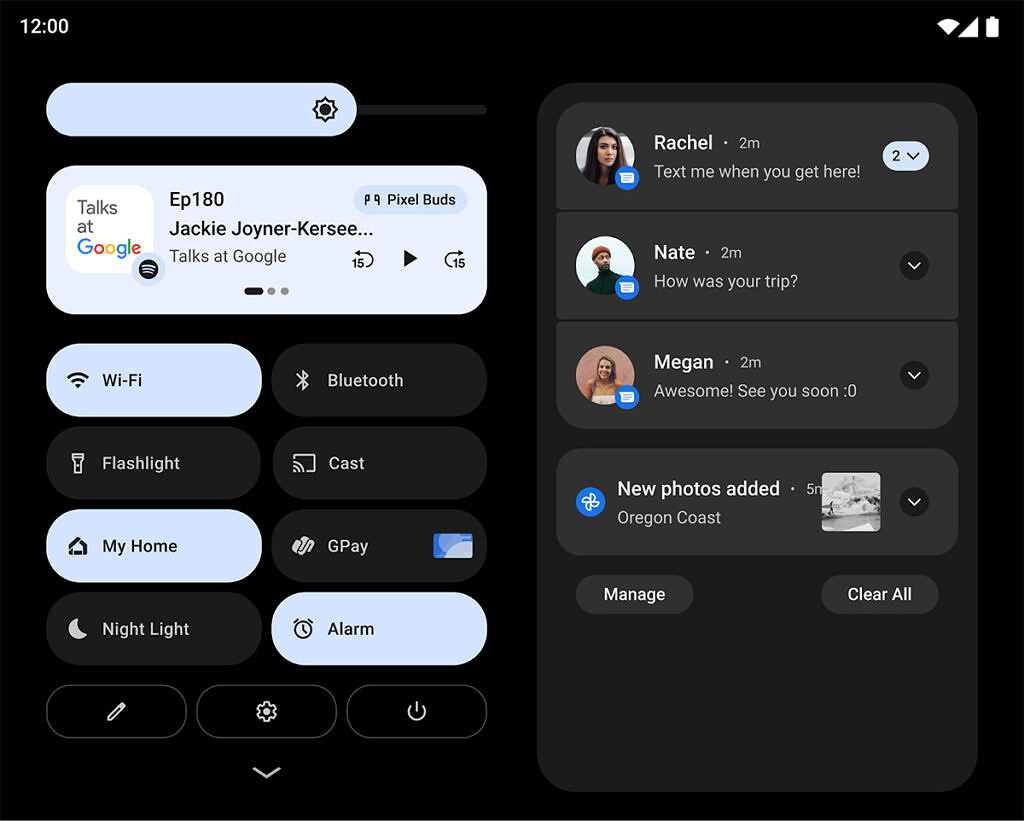
Android 12L notifications for large screens | Image credit: XDA Developers

Some of the major new features that XDA Developers spotted in Android 12L currently only show up on wider screens (and are generally intended to benefit people using devices like tablets or foldables with large displays). For example, Android 12L has a new two-column layout for the notification shade that puts quick settings on one side and notifications on the other. For people using tablets, this new layout makes better use of the display.

Android 12L taskbar in action | Image credit: XDA Developers

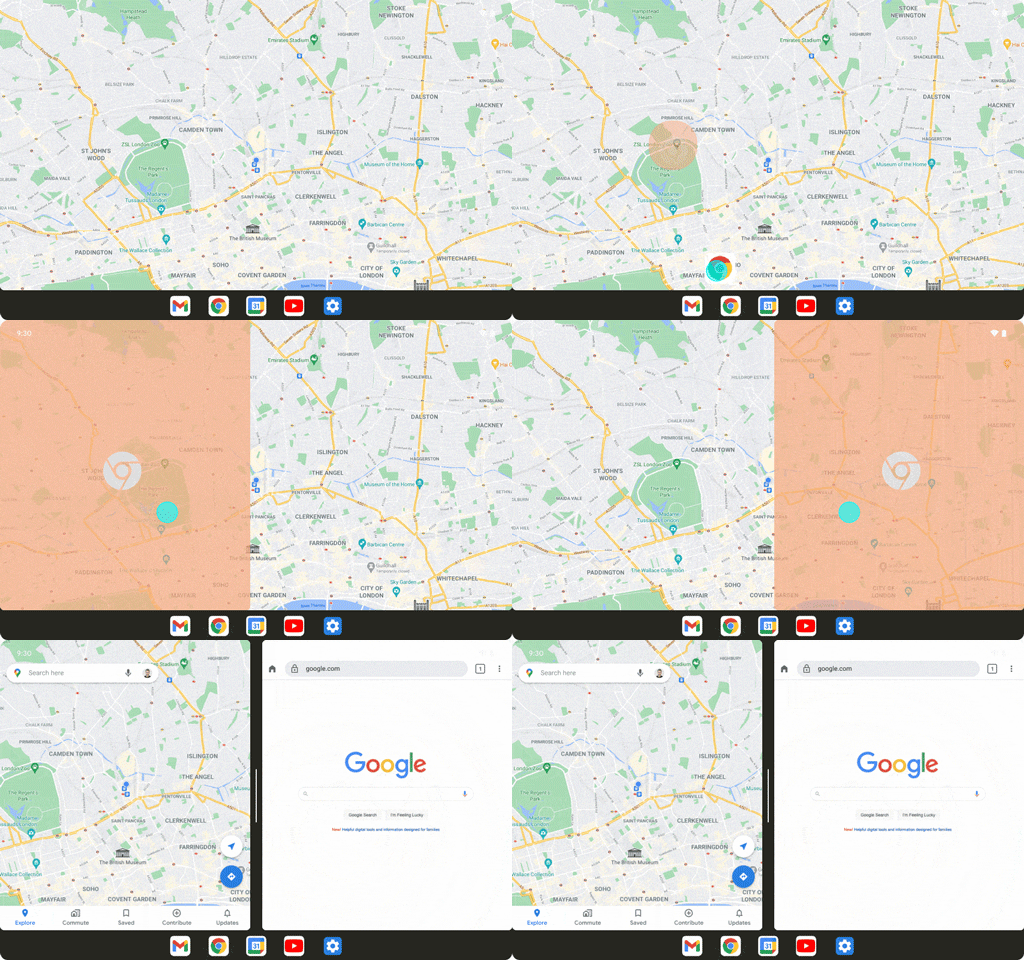
Another new feature is the ‘taskbar,’ which is exactly as it sounds. Large-screen devices running 12L can display a Windows-like taskbar with app shortcuts at the bottom of the screen. Users can easily open apps, or drag apps up from the taskbar to initiate a side-by-side multitasking view.

Other Android 12L changes will likely show up as people start messing around with the beta.

How to install the Android 12L Beta

If you want to go hands-on with the Android 12L Beta, here’s how to do it. First, you’ll need a compatible Pixel phone. The beta is on Pixels ranging from the 3a and 3a XL up to the Pixel 6 and 6 Pro, although 9to5Google notes that the 6 and 6 Pro will get the beta “soon.”

The easiest way to get Android 12L is through Google’s Android Beta Program. I’m going to focus on that since it’s ultimately the best way to do it unless you really, really want to get into the nitty-gritty of flashing it manually. There are plenty of guides on how to do that out there from people much smarter than me.

Finally, keep in mind that once you install the beta, you will need to wipe your phone to revert back to stable Android 12. The only way off the beta without wiping your phone is to ride it out until Android 12L leaves beta. If you’re not comfortable with that, don’t install Android 12L Beta 1. That said, it’s also a good idea to install Android 12L Beta 1 on a different device than the one you use as a daily driver. Beta software tends to have bugs, and it’s a good idea to avoid running the beta on the only smartphone you have just in case something goes wrong.
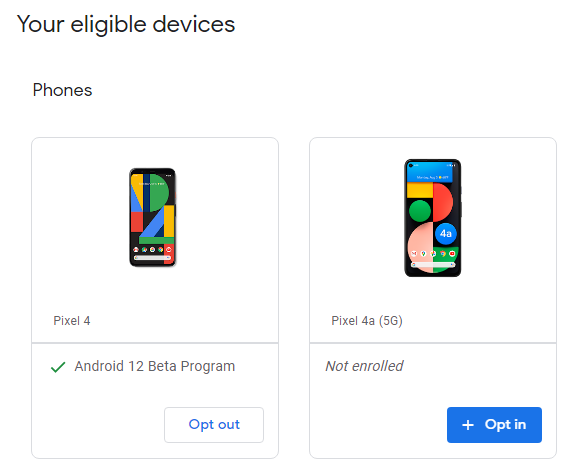
Okay, with all that out of the way, here’s how to do it. First, head to Google’s Android Beta Program website. You’ll need to sign in with the same Google account tied to your Pixel phone. Once you’re signed in, scroll down to ‘Your eligible devices’ and click ‘Opt in’ on the one you want to enroll in the beta. It’s worth noting that the site still details Android 12, not 12L. However, you’ll still get the 12L beta when you enroll a device.

Then, grab that phone and head to Settings > System > System Update and tap ‘Check for update.’ Your phone should show that Android 12L is available, although it may take a few minutes to show up. Once it shows up, you can download and install it like any other update.

On my Pixel 4, the download clocked in at 237MB and it will likely be around the same size for most people. While not the biggest update I’ve seen, it’s still on the large side so you may want to wait until you’re on Wi-Fi before you install it.

And with that, you should be on Android 12L Beta 1. Again, there likely won’t be much that’s different on your smartphone since 12L is aimed at tablets. Still, keep an eye out for new features and enjoy the beta.

Source: XDA Developers, 9to5Google

Categories
Mobile Syrup

Samsung Galaxy S21 FE expected to launch with Android 12 out of the box

Rumour has it that Samsung’s Galaxy S21 FE is finally coming out. The latest leak indicates that the S21 FE will be the first Samsung smartphone to launch with Android 12 out of the box.

According to a firmware update, the S21 FE will sport the new OS with One UI 4.0. Android 12 only launched for the S21 series earlier this week. 

After several delays, Samsung’s Galaxy S21 FE is poised to launch at CES 2022 in early January. The phone was expected to initially launch this summer, and after, we thought the handset would release in October.

Despite Samsung not officially launching the phone, we’ve seen tons of leaks of the device showing off everything from its body to its display while even revealing its specifications.

Source: 9to5Google