Categories
Mobile Syrup

GameStop is offering up to $449 trade-in value on PS4 consoles

Looking to upgrade to a new-gen console? You can get up to $449 in value when you trade in your old PlayStation 4 at EB Games GameStop.

Available only in-store, exchanging your used PlayStation 4 can net you $299.99 to $449.99 in value which will go towards purchasing a new PlayStation 5/Xbox Series X/S console bundle.

Check out the trade-in value breakdown below:

  • PlayStation 4 500GB: $299.99
  • PlayStation 4 Slim 500GB: $329.99
  • PlayStation 4 Slim 1TB: $349.99
  • PlayStation 4 Pro 1TB: $449.99

The deal is in-store only and can’t be combined with other trade offers. GameStop’s page notes that to be eligible for a trade-in, your console must be in full working condition with no alterations. Further, the console’s hardware shouldn’t have been tampered with.

It’s worth noting that you can use the credit only towards buying a new PlayStation 5/Xbox Series X/S bundle. If GameStop doesn’t have new-gen console stock, then you’ll have to wait until the bundles are available.

Also worth noting is that the trade-in offer is only available from today, December 3rd to Sunday, December 5th.

Learn more about the offer here.

Source: GameStop

Categories
Mobile Syrup

Paper Mario is coming to the Switch Online’s Expansion pack

Nintendo is charging forward with its Switch Online Expansion Pack tier despite it being plagued with emulation-related issues.

The next game to hit the subscription service is Paper Mario for the Nintendo 64 on December 10th. The first title in the series, Paper Mario released nearly 20 years ago back in 2001.

Unlike a lot of N64 titles, Paper Mario’s simplistic visuals have aged remarkably well and looked pretty good in high-definition. It’s unclear if Nintendo has plans to fix emulation issues with other titles in the Expansion Pack, including The Legend of Zelda: Ocarina of Time, for example.

In Link’s N64 Zelda outing, there are several problems with the Switch version of the game, including graphical anomalies and delayed button presses.

Nintendo’s new ‘Expansion Pack‘ online tier costs $63.99 for a 12-month individual membership (one account) or $99.99 for a 12-month Family Membership (up to eight accounts). The subscription includes Switch Online, SNES, NES, N64, Sega Genesis and Animal Crossing New Horizon’s first paid DLC, Happy Home Paradise.

Notable launch N64 titles include Mario Kart 64, Star Fox 64, Yoshi’s Story, Mario Tennis 64, Super Mario 64 and more. Along with N64 titles, the subscription also includes access to Sega Genesis games like Ecco the Dolphin, Golden Axe, Contra: Hard Crops, Shining Force and more.

Image credit: Nintendo 

Source: @NintendoCanada 

Categories
Mobile Syrup

Fido reportedly offering some customers 5GB of bonus data again

Another day, another Fido 5GB bonus data offer.

It seems every time I turn around, there’s another RedFlagDeals thread from Fido customers who received a 5GB data bonus offer from the Rogers flanker brand. The original poster didn’t specify any time limits on the offer, but another RFD user confirmed they got the deal too.

Like previous Fido 5GB bonus offers, the extra data will last 15 months and then drop off the account. According to screenshots shared by the RFD users, the data has “no added cost [and] no new contract.”

That said, some other RFD users noted that they had credits on their account (e.g. $5 off per month) and when they claimed the 5GB bonus data offer, it counted as a ‘plan change’ and removed the credit. It’s not clear how widespread that issue is, but it’s something to be aware of if you have a sizeable credit and you see the 5GB offer.

Image credit: Minimo07 on RFD

One user chimed in that they weren’t able to get the 5GB bonus data, but when they checked their account, there was a $60/mo 35GB plan available instead.

Ultimately, your mileage may vary with this offer. If you do miss it this time around, you might be able to claim one in the future — Fido seems to offer 5GB of bonus data fairly often. Back in November, Fido (and surprisingly Koodo) offered some customers 5GB of bonus data for Black Friday. Before that, we covered two instances in October where Fido customers received 5GB of bonus data.

If you’re a Fido customer, you may want to check your MyAccount portal to see if there’s bonus data available for you.

Source: RedFlagDeals

Categories
Mobile Syrup

Microsoft’s new Office UI is rolling out now

Microsoft started rolling out its new Office user interface (UI) to Office 365 and Office 2021 users on Windows.

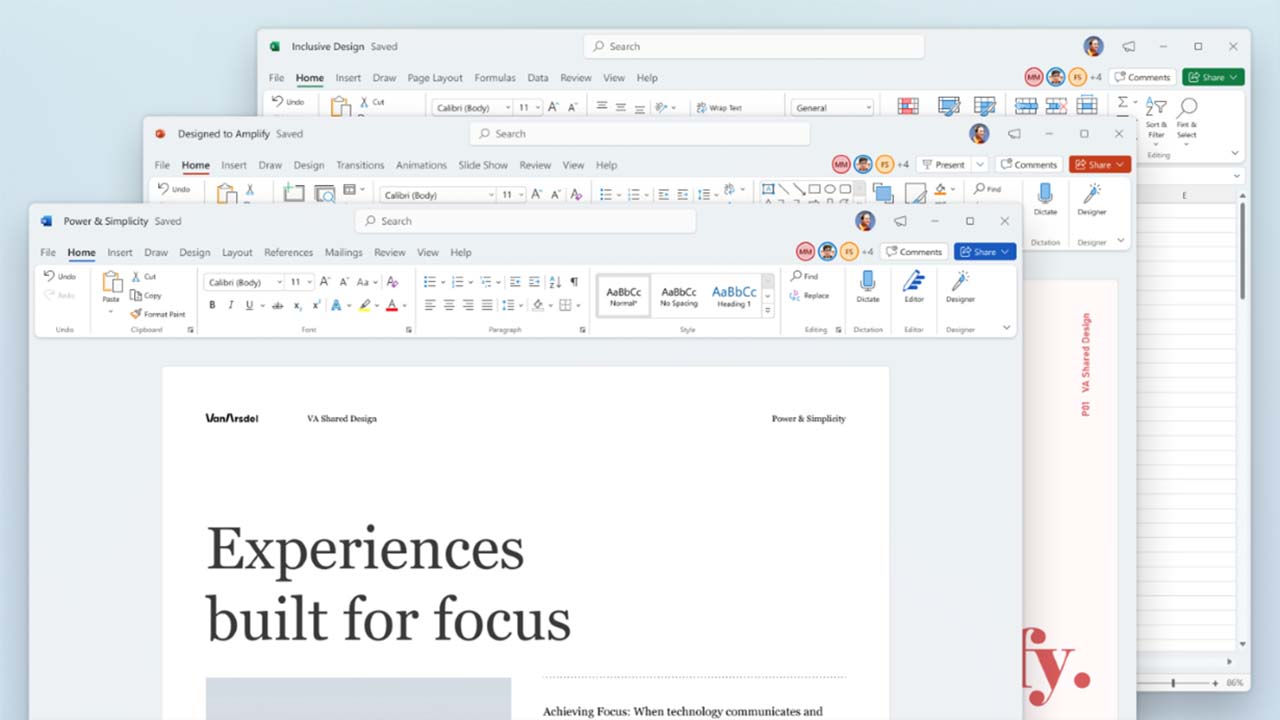
The Redmond, Washington-based company started testing the new UI in the summer. Primarily, the updated look brings Office apps in-line with Windows 11 with a more rounded look to buttons and the ‘ribbon’ bar. Additionally, the new UI features matching colours throughout — blue for Word, green for Excel, etc.

Image credit: Microsoft

Another significant addition is that Office apps will now match your Windows theme settings. In other words, the new UI will swap between light and dark mode based on Windows settings, no need for users to mess with Office’s theme settings (or set up automated switching processes).

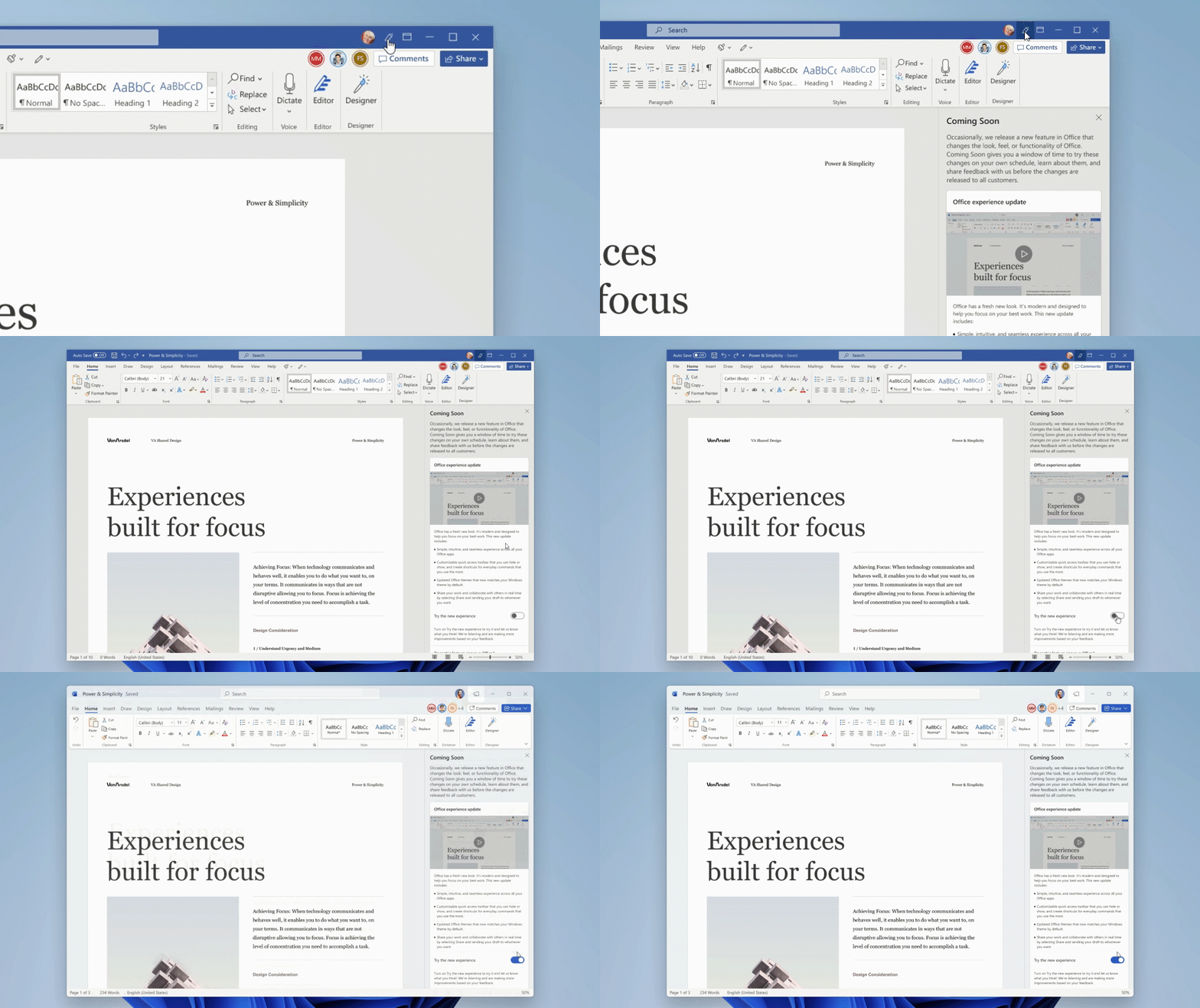
If you have Office 365 or Office 2021, you can toggle the new UI on or off using the ‘Coming Soon’ megaphone icon in the top-right corner. You may also get a pop-up letting you know about the new look — I received one on my desktop and on my laptop after launching Word and opening a document. Microsoft says that it enabled the new look automatically for about 50 percent of ‘current channel subscribers,’ but the change should be live for everyone.

GIF credit: Microsoft

Overall, most of the changes appear to be subtle. Most of them are visual, with (at least as far as I can tell) little change to functionality. That said, Microsoft previously teased more dramatic Office UI changes, which will likely hit the web versions of the apps first (Microsoft likes to test big new features there).

You can learn more about the refreshed Office UI here.

Source: Microsoft Via: The Verge

Categories
Mobile Syrup

Your iPhone can now run Pokémon Go on native refresh rate

Pokémon Go will now feel more responsive on new and old iOS devices, thanks to its latest ‘version 1.191.0 update.’

As first discovered by The Verge, Pokémon Go can now run on your iPhone’s native refresh rate, which means, it’s not capped at 20 FPS anymore. While Niantic’s update release notes don’t specify the new ‘Native Refresh Rate’ feature, it does mention ‘Quality-of-life improvements.’

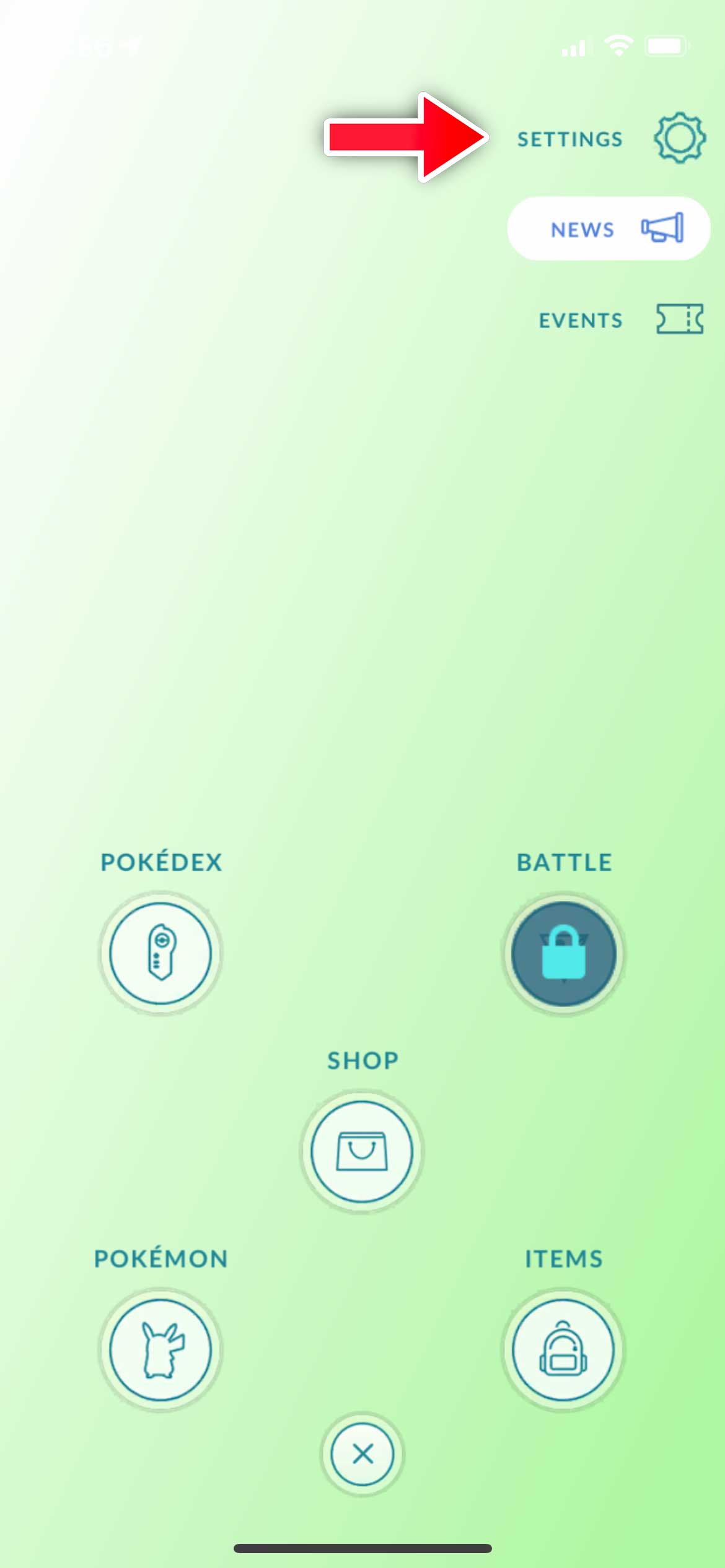
The feature is off by default, quoting high battery drain concerns. Here’s how you can turn the setting on and enjoy Pokémon Go on your iPhone’s native refresh rate:

  1. Tap the Pokeball icon and head to settings
  2. Scroll to the bottom and tap on Advanced Settings
  3. Toggle on Native Refresh Rate

The newer iPhone 13 Pro and Pro Max users are the ones who will benefit the most from this update, owing to the 120Hz ProMotion display.

However, older iOS devices should get a slight FPS boost too.

Via: The Verge

Categories
Mobile Syrup

Microsoft testing new, streamlined way to change default browsers in Windows 11

Microsoft will eventually undo changes in Windows 11 that made it more difficult for users to select a different default browser.

Unfortunately, the improved browser switch tool is still in testing. It’s not clear when Microsoft plans to roll out the updated default browser selection, so it could still be a little while before Microsoft fixes the issue.

Rafael Rivera, the developer behind EarTrumpet, a Windows app that improves the volume control menu, shared the new Windows 11 default browser selector on Twitter after discovering it in the Windows 11 Insider Preview Build 22509. There’s a button at the top of the browser page in the ‘Apps’ part of the Windows 11 settings in Rivera’s screenshots. Pressing that button will set the browser as the default.

Aaron Woodman, vice president of Windows marketing, confirmed to The Verge in a statement that the company “streamlined the ability for a Windows Insider to set the ‘default browser’ to apps that register for HTTP:, HTTPS:, .HTM, and .HTML.”

Windows 11 ditched the simpler Windows 10 default browser switcher, which let users click on the default browser option and select a different browser from a list of installed browsers. Instead, Windows 11 makes users pick a browser from a list of all apps and then set it as the default for each individual file type the browser can open (HTTP, HTML, PDF, etc). The Windows 11 process is more tedious and confusing than it was on Windows 10 — the change was generally met with backlash from users and rival browser makers. Some, like Firefox, added new buttons to help streamline the process.

Those interested can read a lot more about the Windows 11 default browser process here, or a guide on how to change the default here.

Microsoft shouldn’t need to backtrack — it should never have made this change

Although the new default browser switcher in Windows 11 is an improvement, it’s hard to commend Microsoft for fixing a problem it made for itself. The company has a long history of adding changes, prompts and other annoying roadblocks to try and make people use its Edge browser (or dissuade people from switching to another browser). Most recently, Edge started showing prompts when users try to download Chrome.

  1. Microsoft’s revamped Edge browser is actually pretty good (excluding a few odd additions like the ‘buy now, pay later‘ feature in the U.S. that has people understandably upset). As MobileSyrup’s resident browser geek, I find Edge offers better performance than Chrome and generally, it works better for how I work.
  2. That said, Microsoft’s constant attempts to force people to use Edge and hinder switching to other browsers sour many people on Edge before they ever try it. Those same features even get in the way of me using Edge since I prefer to use the beta version to get early access to new features. Microsoft’s browser-switching roadblocks almost always get in the way of me going from default Edge to beta Edge.

Source: Rafael Rivera (Twitter) Via: The Verge

Categories
Mobile Syrup

20 percent of Xbox Cloud Gaming players exclusively use touch controls

Microsoft has revealed to The Verge that 20 percent of people who use Xbox Cloud Gaming exclusively play games with touch controls.

Cloud Gaming, a perk of Xbox Game Pass Ultimate, allows games to be streamed to mobile devices, consoles and PCs. While Xbox controllers are universally supported, developers have the option of enabling “touch controls” in their games to give players a virtual gamepad. More than 100 Cloud Gaming titles support touch controls as of last month.

What’s more, Microsoft told The Verge that 30 percent of players of the following games exclusively use touch controls:

  • Dragon’s Quest XI
  • Football Manager 2022 Xbox Edition
  • Hades
  • Minecraft Dungeons
  • New Super Lucky’s Tale
  • Scarlet Nexus
  • Yakuza: Like a Dragon

According to Microsoft, Xbox Cloud Gaming titles with touch controls have seen an average of double the usage. More information on touch controls can be found here.

Source: The Verge

Categories
Mobile Syrup

The MobileSyrup Team’s Top Holiday Gifts [2021 Edition]

This year, the MobileSyrup team decided to share a few of their personal gift recommendations for the tech enthusiast or gamer in your life.

Our list includes a wide range of products like robot vacuums, keyboards, drones and more. If your friend is into tech, we likely have something on our list that will appear to them.

Below is a link to all of the products outlined in the video above:

Brad Bennett’s pick: Smart Lighting

The recommendation: Aputure MC RGBWW Film Light

Buy at Best Buy Canada for $139.99

Brad Shankar’s pick: Video Games

The recommendation: Marvel’s Guardians of the Galaxy

Buy at Best Buy Canada for $79.99

Jon Lamont’s pick: Keyboards

The recommendation: BlackWidow V3 Mini

Buy at Best Buy Canada for $229.99

The alternative recommendation: Logitech’s Pop Keys keyboard

Buy at Amazon Canada for $145.86

Nida Zafar’s pick: Smartphones

The recommendation: iPhone 13

Buy at Apple Canada for $1,099

Karandeep Oberoi’s pick: Smartphone gimbals

The recommendation: DJI OM5

Buy at Amazon Canada for $177.27

Patrick O’Rourke’s pick: Robot Vacuums

The recommendation: iRobot Roomba j7+

Buy at Best Buy Canada for $1,049

Joshua Armstrong’s pick: Video Games

The recommendation: Pokémon Brilliant Diamond and Shining Pearl

Buy at Best Buy Canada for $79.99

And though he wasn’t able to be in the video, Dean Daley shared his gift recommendation.

Dean Daley’s pick: Gaming console

The recommendation: Nintendo Switch Lite

Buy at Best Buy Canada for $259.99

MobileSyrup utilizes affiliate partnerships. These partnerships do not influence our editorial content, though MobileSyrup may earn a commission on purchases made via these links that helps fund the journalism provided free on our website.

Categories
Mobile Syrup

Telus commits funds to BC agricultural community

Telus is committing to donating $100,000 to the agricultural community in British Columbia through its agricultural subsection.

The funds will assist farmers and their families, farms, and livestock that have been impacted by flooding in the province. $50,000 will go towards the BC Agricultural Council, which provides emergency funds to farmers. The association works with farmers directly to determine their needs.

$50,000 will also go towards veterinary services through the Canadian Veterinary Medical Association and the Society of BC Veterinarians. Comfort kits and network access are also being offered.

“At Telus Agriculture, we are committed to creating better food outcomes, and that commitment includes supporting our agriculture communities when disaster strikes,” president of Telus Agriculture, John Raines, said in a press release.

Social media users can further assist by sharing #HereForFarmers on social media platforms.
The organization will donate $1 for every interaction with the campaign, up to $10,000, to the BC Agricultural Council. The campaign will end on December 14.

Telus previously committed to donating $1 million. Numerous telecom companies, including Rogers, Shaw, and Bell, have also made commitments.

Image credit: ShutterStock

Source: Telus

Categories
Mobile Syrup

Microsoft Edge prompt calls Google Chrome a browser that’s ‘so 2008’

You know that annoying prompt to install Chrome that shows up whenever you access a Google service with a non-Chrome browser? Well, Microsoft decided that was a great idea.

The company’s actually not terrible Edge browser will now show a pop-up prompting users to keep using Edge when they try to download Google Chrome. Neowin originally spotted the pop-ups and The Verge was able to confirm them. They definitely show up on Windows 11 and some reports indicate the prompts appear on Windows 10 too. I haven’t been able to trigger one yet on my Windows 11 PC and it isn’t clear if Edge will show the pop-up for other browsers.

Now, there are a few main differences between the Google and Edge prompts. For one, Google’s prompt is rendered as part of Google’s websites like Search and Gmail, while the Edge prompt appears to be part of the browser UI.

However, both prompts look very similar.
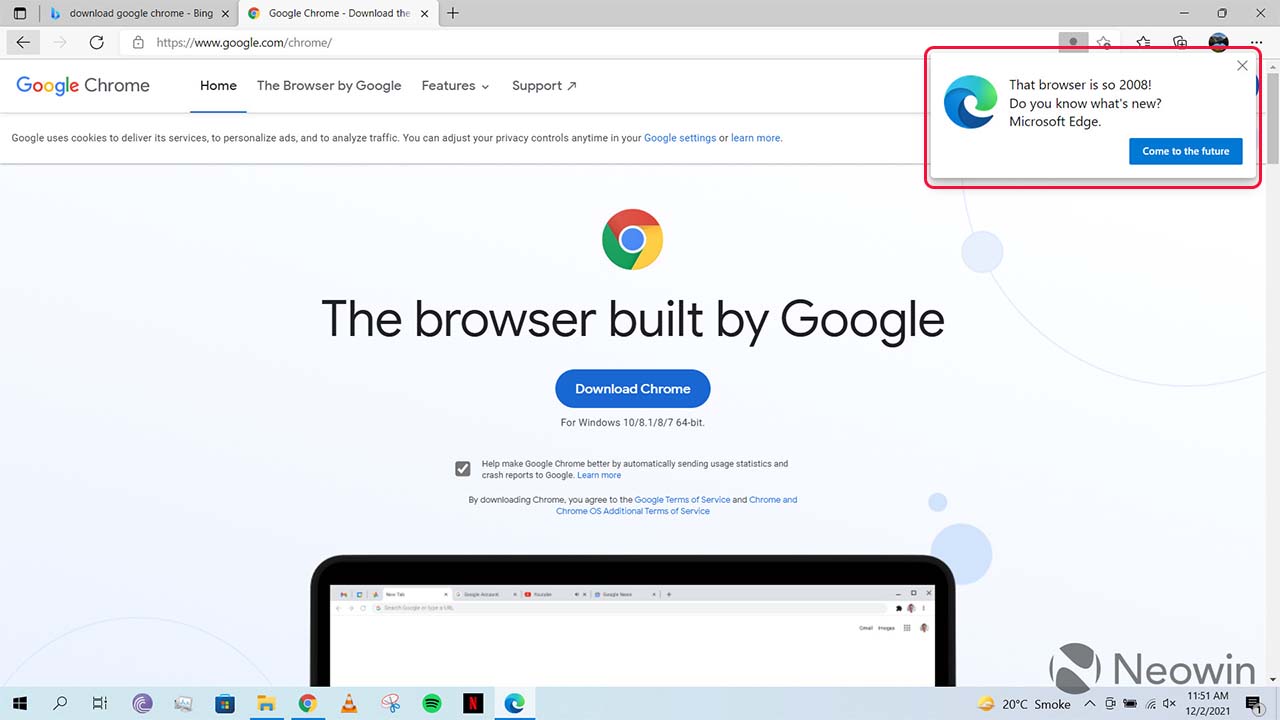
Microsoft Edge’s new prompt discouraging people from using Chrome | Image credit: Neowin

Another major difference is that Google’s prompt has an option to dismiss it, while Edge only shows one button to continue using Edge. I’d say this gives some points to Google, but only barely — the Google prompt perpetually ignores that I’ve declined the offer to use Chrome.
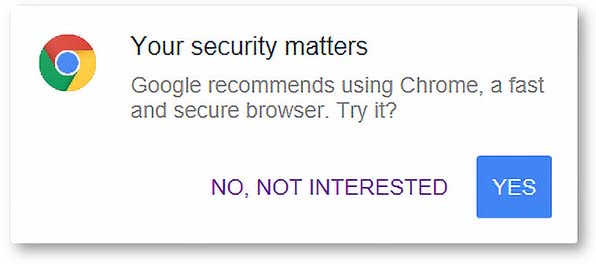
Google’s prompt to use Chrome that appears on the company’s websites | Image credit: Neowin

The final difference is that Edge seems to cycle through various prompts, all of which smack of that classic corporation-trying-to-be-witty-and-failing vibe. Here are some of the variations spotted so far:

  • “Microsoft Edge runs on the same technology as Chrome, with the added trust of Microsoft.”
  • “‘I hate saving money,’ said no one ever. Microsoft Edge is the best browser for online shopping.”
    “That browser is so 2008! Do you know what’s new? Microsoft Edge.”

These new prompts are Microsoft’s latest effort to get people to use its Edge browser. They build on other behaviours, such as messing with Windows’ default browser settings (and making it harder to change those settings in Windows 11), putting prompts in Bing search, warnings in Windows’ settings that Edge is safer than other options and more.

What’s particularly frustrating about this is the new Chromium-based Edge is actually a pretty good browser and, in many ways, I prefer it over alternatives. It’s certainly not a perfect browser, but Edge offers excellent performance on Windows machines and unique features that set it apart from competitors. Maybe if Microsoft marketed Edge on those merits rather than using scummy and annoying tactics, more people would be willing to give it a shot.

Source: Neowin, The Verge