There’s only one more week until Black Friday 2021 🔥. However, as always, Amazon Canada has taken an early lead and heavily discounted several of its Fire TVs.
MobileSyrup utilizes affiliate partnerships. These partnerships do not influence our editorial content, though MobileSyrup may earn a commission on purchases made via these links.
Adobe’s Black Friday / Cyber Monday discounts are back. That means you can get 40 percent off Adobe’s Creative Cloud plans until December 3rd.
The deal includes Adobe’s ‘Creative Cloud All Apps’ plan, which normally costs $69.99 per month in Canada. With the Black Friday 40 percent discount, the plan drops to about $42/mo.
Additionally, Adobe’s offering almost 70 percent off for first-time student customers and 40 percent off Creative Cloud for Teams.
The Adobe deals start on November 15th and run until December 3rd.
Monday, November 15th marks the 50th anniversary of Intel’s first central processing unit (CPU), the Intel 4004.
Officially unveiled in November 1971, the 4004 microprocessor was a slow beginning for the company, but it helped pave the way for computers as we know them today. Processors are ingrained in most aspects of daily life now — laptops, smartphones, game consoles, cars and more rely on these little chips (so much so that the supply of all these things is extremely limited as the world grapples with an ongoing chip shortage).
Image credit: Intel
One of the things I found most interesting about the 4004 is how the numbers stack up to today. The Intel 4004 sported 2,300 transistors compared to the billions you’d find on a current-gen Intel Core processor.
Similarly, the Intel 4004 boasted a circuit line width of 10 microns (about 10,000 nanometers). Intel says its current chips have circuit lines ranging between 45 and 32 nanometers.
Those interested in learning more about the history of the Intel 4004 can check out this page on Intel’s website.
Windows 11 has been out for a bit now and, while I generally like it (and thankfully haven’t had too many issues with it), there’s one big disappointment for me: no automatic dark mode.
I really like using my phone in light mode during the day and dark mode at night and I’d love to have similar functionality on my PC too. Windows 11 also has fantastic light and dark themes, which made me want to do this even more. Thankfully, there’s a fairly simple way to do it if you’re willing to download some third-party software.
My app of choice is ‘Windows Auto Dark Mode,’ but there are other solutions out there too. Windows Auto Dark mode, however, is free and offers a lot of customizability (plus, it already supports Windows 11). Before we go much further, most of this should apply to Windows 10 too — if you want to automate dark mode on your Windows 10 PC, these steps should work too.
How to set up Auto Dark Mode
To start, download Windows Auto Dark Mode from GitHub (click this link and scroll down to the ‘README’ file, then click ‘Download’). Once downloaded, run the setup file provided (it’s a ‘.exe’). Windows may show a warning about installing the software (the developer notes on the README page that it’s because of a missing signature licence). I’ve been running the app for weeks without issue, but if you’re really concerned you can also download a Microsoft-verified version of the app directly through the Windows Store if you’re running Windows 11 (unfortunately, I can’t link to a Microsoft Store page so you’ll have to open the Store app and search for it yourself).
Once everything is set up, you’re good to start automating your dark mode. When you open the Auto Dark Mode app, there are five main options in the menu, so we’re going to run through them in order.
Time
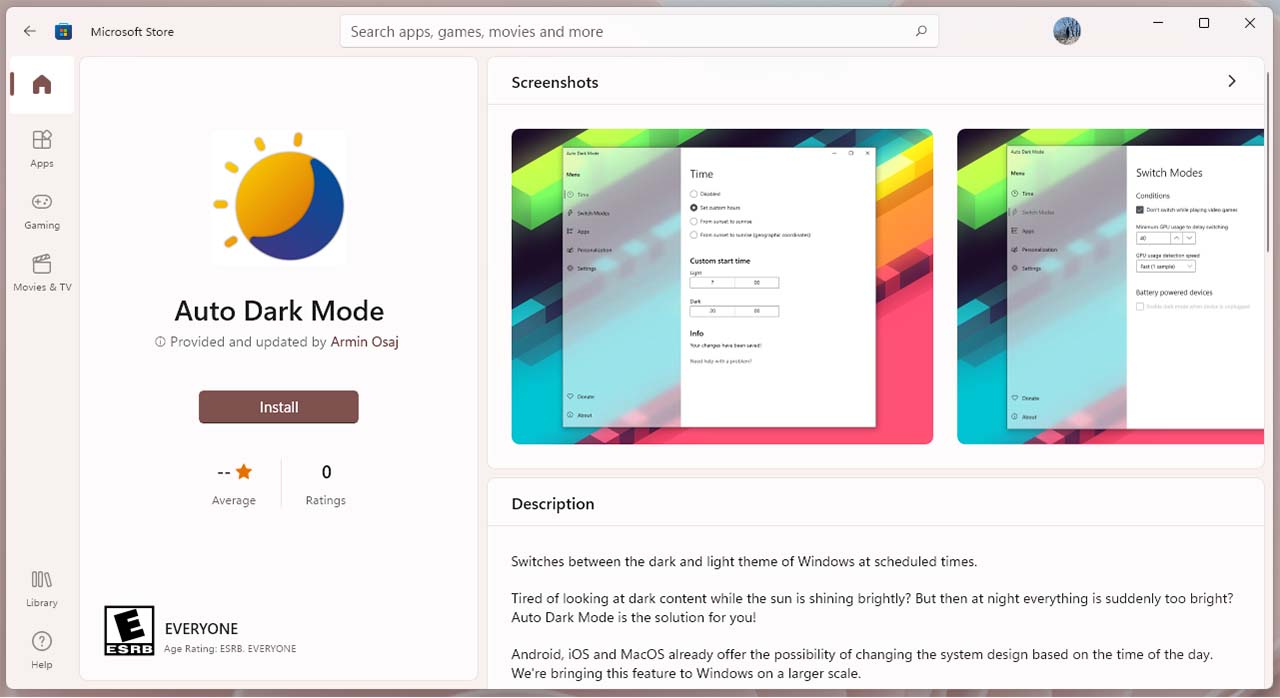
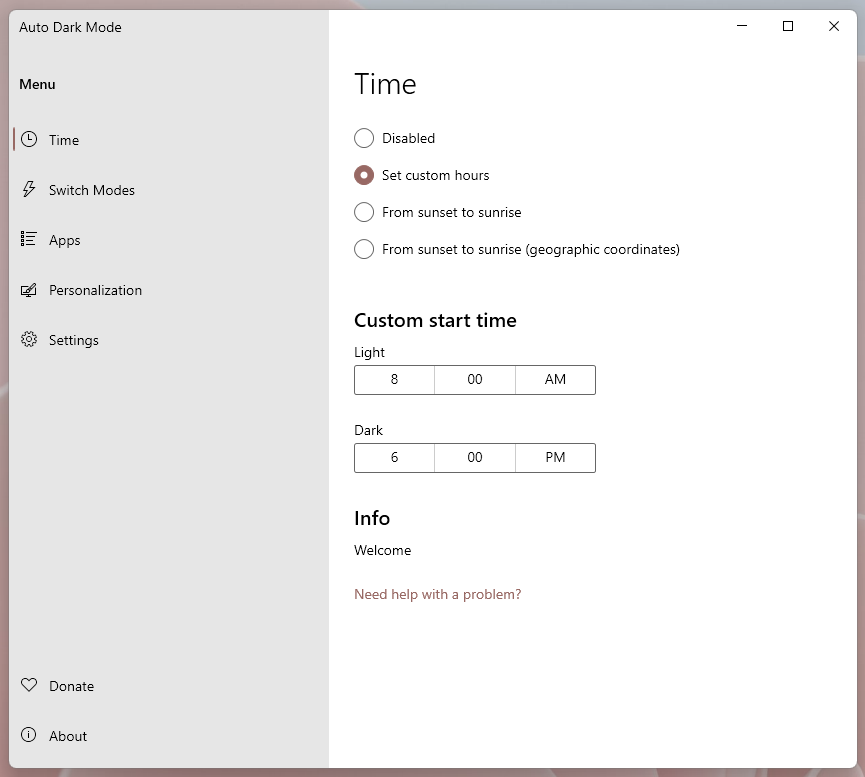
The Time section is all about setting when you want your PC to switch between modes. I ran with the custom hours section and basically set my computer to stay in light mode while I’m working and switch to dark mode after I finish work. However, you can also set Auto Dark Mode to change with sunset and sunrise.
Switch Modes
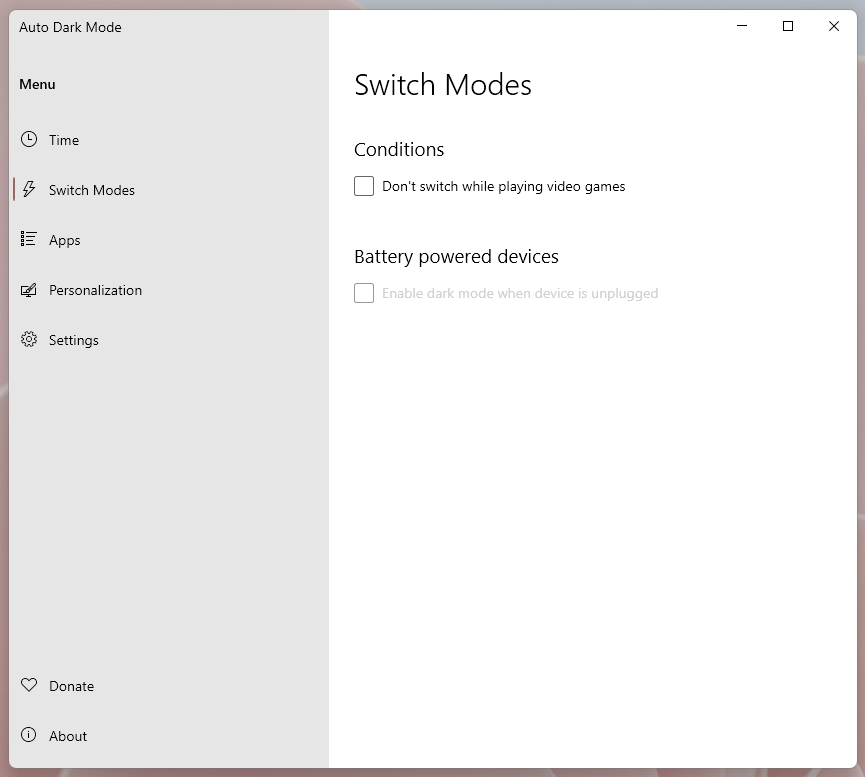
This section includes some options to prevent the switch between light and dark mode if certain conditions are met. First, there’s an option to prevent switching while gaming. If you game a lot, I’d recommend toggling this option on because I’ve found that Windows hits the GPU pretty hard when doing the switch. On a few occasions, I’ve experienced pretty extreme lag because my PC switched from light mode to dark mode while I was in a game.
Similarly, there’s an option to automatically enable dark mode on a battery-powered device when it’s unplugged, which could be helpful in saving power on devices with an OLED screen.
Apps
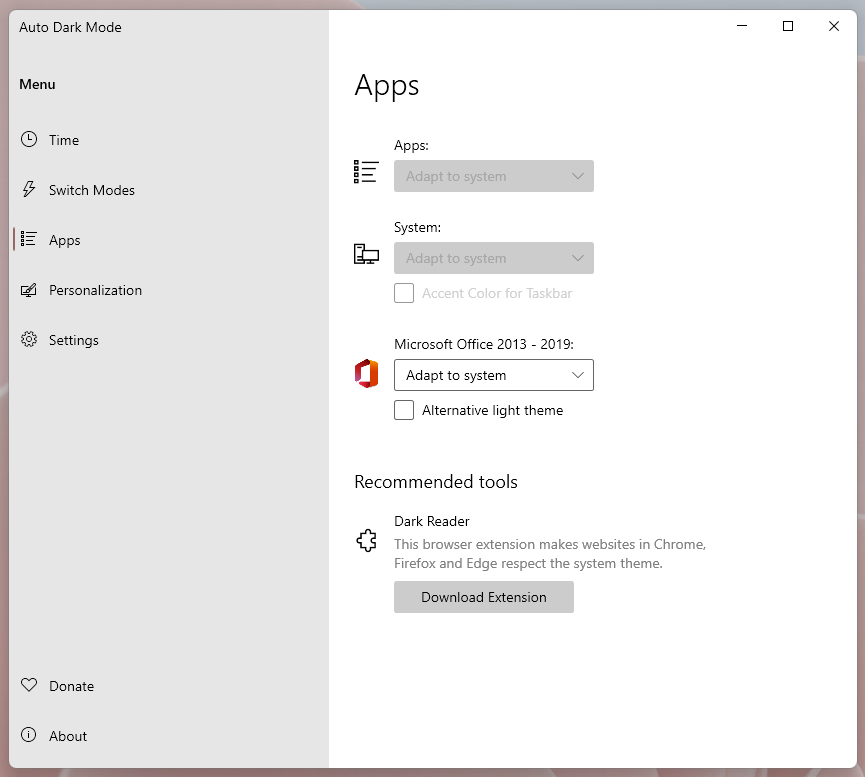
The apps section includes controls for app and system behaviour when switching themes. From here, users can choose whether to have apps and the system follow the system theme or do their own thing. Interestingly, there are also controls for changing Microsoft Office apps specifically. Some of these options won’t matter if you use a Windows Theme (we’ll get into that a little more below).
Finally, this section includes a link to download the Dark Reader browser extension, which converts websites to dark theme. You can configure Dark Reader to follow system settings, which means you can automate it with this tool too.
Personalization
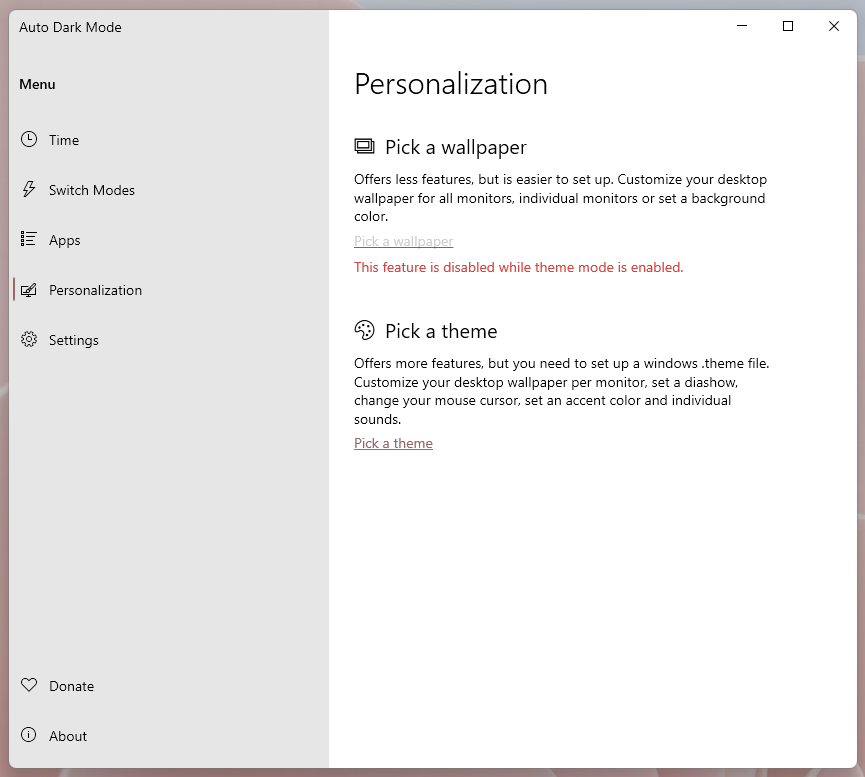
This might be the most important part of the app. When I used Auto Dark Mode on Windows 10, it would change the built-in Windows dark mode switcher. The first ‘Pick a wallpaper’ option allows you to assign a wallpaper for light and dark modes.
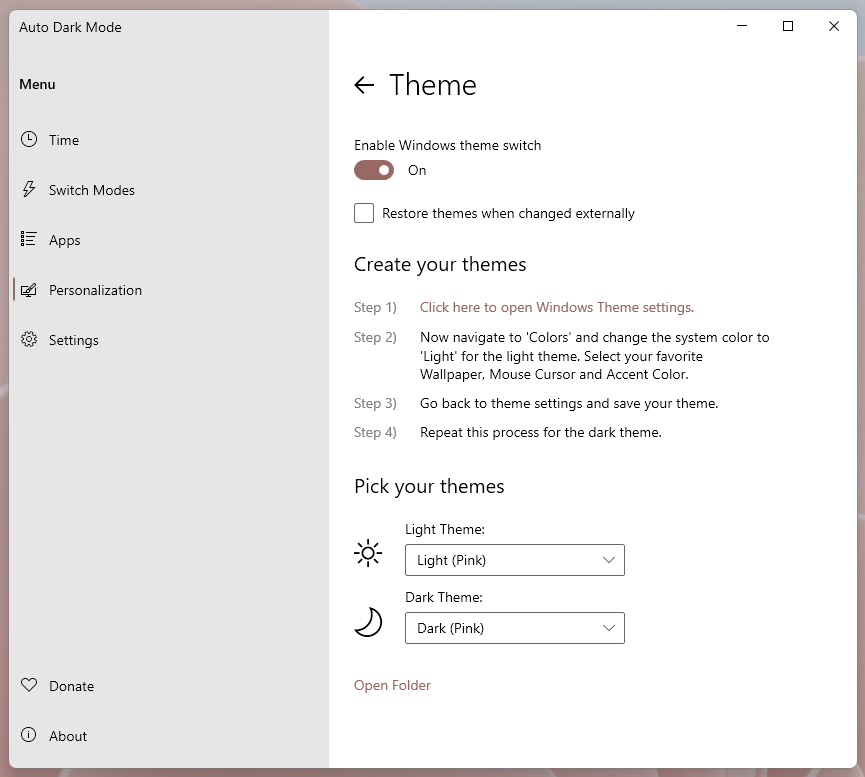
When I first set up Auto Dark Mode in Windows 11, I found it didn’t quite work right with using the built-in system toggle or with any of Microsoft’s built-in Windows themes. Instead, the optimal solution for me was to create a ‘Light’ Windows theme and a ‘Dark’ Windows theme and then use Auto Dark Mode to switch between those. That doesn’t appear necessary anymore, with all of the Windows 11 themes showing up properly in the app for me now.
That said, I think the best way to use Auto Dark Mode is still to switch between themes. This gives you more flexibility since you can use either the included Windows 11 themes, download new themes or build your own.
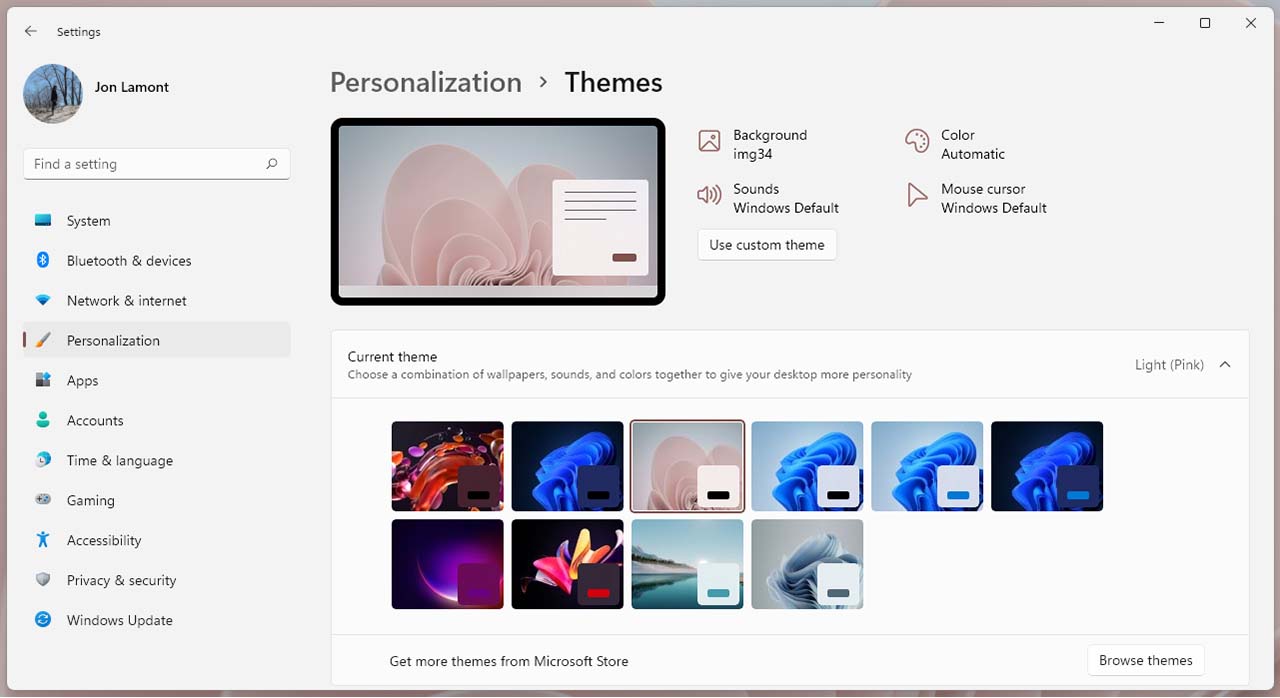
To do that, open the Settings app > Personalization > Themes. There will likely be a few options there already. You can also click the ‘Browse themes’ button to get more from the Microsoft Store. To build your own, click on the four options next to the preview (‘Background, Color, etc).
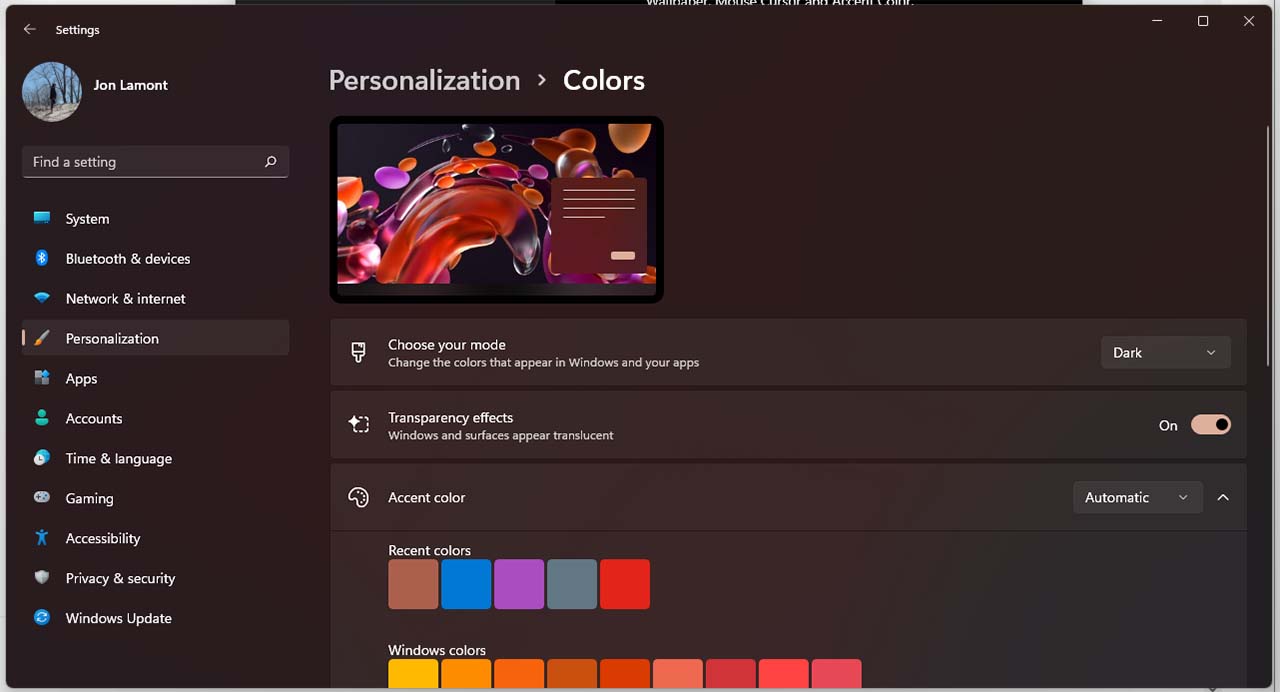
I usually just change the background and colour and leave the others as default, but you can change things up as much as you want. One important note: when you open the colours section, make sure you select the ‘Light’ or ‘Dark’ for the ‘Choose your mode’ option. When you’re done, click ‘Save’ and name your theme.
Once you’re happy with your themes, head back to the Auto Dark Mode app and set one as your Light Theme and one as your Dark Theme. Auto Dark Mode will switch between those options automatically at the time specified in the ‘Time’ section.
Settings
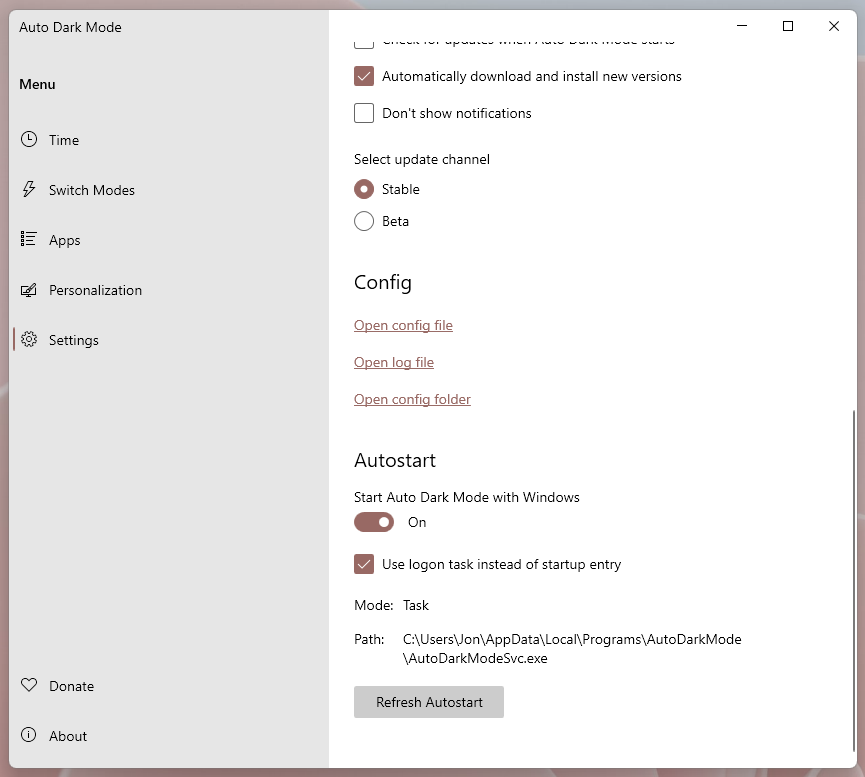
Finally, the Settings menu features a few important items to make note of. First up is auto-updates, which I would advise turning on to make sure the software is kept up to date and nothing breaks.
Another section worth looking at is ‘Autostart.’ This will make sure Auto Dark Mode starts up when you turn on your computer. I encountered a couple issues where Auto Dark Mode wouldn’t switch back to Light mode if I turned off my computer in Dark mode and then turned it back on after the set time to switch back to Light mode. Checking the ‘Use logon task instead of startup entry’ fixed that problem for me. Your mileage may vary, however.
Aside from a few minor issues I encountered when first setting up Auto Dark Mode after Windows 11 came out (most of which appear to be fixed now), Auto Dark Mode works quite well. If you’re like me and like to change up your theme at night, this is a super helpful little tool. You can learn more about it on GitHub.
November 15th marks the 20th-anniversary of the original Xbox’s release, and in celebration of the occasion, for this week’s community question, we want to know your favourite game is that you’ve played on an Xbox console.
We’re not looking for your top OG Xbox title, specifically, but rather the game you had the most fun playing on any Xbox system over the past 20 years.
Below are our team’s answers:
Brad Shankar: Star Wars: Knights of the Old Republic
Patrick O’Rourke: Halo 2
Jon Lamont: The Elder Scrolls: Oblivion
Brad Bennett: Halo: Reach
Dean Daley: Elder Scrolls: Skyrim
Karan Oberoi is a hardcore PlayStation loyalist and has apparently not played a game on an Xbox platform (we’re not sure how that’s possible).
While I selected Skyrim, I could have easily gone with Kingdoms of Amalur, Halo 3, Halo: Reach, Halo 4, Dragon Age: Inquisition, Fable 2 or Fable 3.
In the comments below, let us know your favourite game you’ve played on an Xbox console.
Every week, MobileSyrup outlines some of the most notable movies and TV shows that recently hit Canadian streaming platforms.
Our ‘Streaming in Canada’ column typically focuses on new content from Amazon Prime Video Canada, Crave and Netflix Canada, but other services like Apple TV+ and Disney+ will be mentioned when relevant.
We’ll also highlight shows or movies that are made in Canada, involve notable Canadian cast or crew and/or are filmed in Canada.
Finally, with the COVID-19 pandemic causing many movies to hit digital platforms much sooner than planned, we’ll make note of any major films — as well as other notable streaming service news — that fall into this category when applicable.
Amazon Prime Video
Always Jane [Amazon Original]
This docuseries follows a transgender teenager with big aspirations in small-town New Jersey.
Amazon Prime Video Canada premiere date: November 12th, 2021 Genre: Documentary Runtime: Four episodes (44 to 47 minutes each)
An Amazon Prime Video subscription is included at no additional cost with an Amazon Prime membership, which costs $79 CAD/year.
The full list of movies and shows hitting Amazon Prime Video Canada this month can be found here.
Apple TV+
The Shrink Next Door [Apple Original]
A seemingly normal relationship between a charming psychiatrist and his longtime patient becomes marred by manipulation and dysfunction.
Based on Joe Nocera’s podcast of the same name, The Shrink Next Door and stars Will Ferrell (Anchorman), Paul Rudd (Living With Yourself), Kathryn Hahn (WandaVision) and Casey Wilson (Happy Endings).
Apple TV+ Canada premiere date: November 12th, 2021 (first three episodes, new episodes every Friday) Genre: Dark comedy Runtime: Eight episodes (ADD LATER)
After smoking a magical strain of weed in 1969, a trio of anti-establishment stoners awakens 50 years later in present-day San Francisco.
Based on the cult-classic comic series of the same name, The Freak Brothers features the voices of Woody Harrelson (Three Billboards Outside Ebbing, Missouri), Pete Davidson (Saturday Night Live), John Goodman (The Big Lebowski) and Tiffany Haddish (Girls Trip).
Crave premiere date: November 14th, 2021 (first episode, new episodes every week) Genre: Animated comedy Runtime: Eight episodes (around 30 mins)
A standard Crave subscription is priced at $9.99/month, with Starz costing another $5.99/month and HBO an additional $9.99/month.
The full list of movies and shows hitting Crave this month can be found here.
Disney+
Disney+ Day
This is a big week for the Disney-owned service.
To celebrate its two-year anniversary, Disney kicked off its inaugural annual Disney+ Day celebration on November 12th. As part of that, a slew of announcements was made — you can read more on those here.
For now, though, here’s a list of everything that hit Disney+ on November 12th:
Ciao Alberto (short) [Disney+ Original]
Dopesick (series premiere) [Star Original]
Enchanted
Entrelazados (series premiere, all episodes) [Disney+ Original]
Feast (Short) [Disney+ Original]
Frozen Fever (Short) [Disney+ Original]
Get A Horse! (Short) [Disney+ Original]
Jungle Cruise
Home Sweet Home Alone (series premiere) [Disney+ Original]
The Little Matchgirl (short)
Marvel Studios’ 2021 Disney+ Day Special — explores the “past, present and future” of the Marvel Cinematic Universe
Olaf Presents (all episodes) [Disney+ Original]
Paperman (Short) [Disney+ Original]
Pixar Animation Studios presentation
Shang-Chi and the Legend of the Ten Rings
The Simpsons in Plusaversary (short) [Disney+ Original]
Tangled Ever After (short) [Disney+ Original]
Tick Tock Tale (short) [Disney+ Original]
Under the Helmet: The Legacy of Boba Fett [Disney+ Original]
The World According to Jeff Goldblum (Season 2 premiere, first five episodes) [Disney+ Original]
The full list of movies and shows hitting Disney+ this month can be found here.
Get a close-up look at “the world’s most magnificent creatures.”
Notably, the series is narrated by a slew of celebrities, including Bryan Cranston (Breaking Bad), Rashida Jones (Parks & Recreation), Anthony Mackie (The Falcon and the Winter Soldier), Rebel Wilson (Pitch Perfect series) and Pedro Pascal (The Mandalorian).
Netflix Canada premiere date: November 10th, 2021 Genre: Nature documentary Runtime: Four episodes (44 t0 50 mins each)
In 1920s New York City, a Black woman gets reconnected with a former childhood friend who’s passing as white.
Based on Nella Larsen’s 1929 novel of the same name, Passing was written and directed by Rebecca Hall (Christine) and stars Tessa Thompson (Westworld), Ruth Negga (Preacher) and André Holland (Moonlight).
Netflix Canada premiere date: November 10th, 2021 Genre: Black-and-white drama Runtime: 1 hour, 38 minutes
An FBI agent reluctantly teams up with a notorious art thief to catch a rival criminal.
Red Notice was directed by Rawson Marshall Thurber (Dodgeball: A True Underdog Story) and stars Dwayne “The Rock” Johnson (The Fast & Furious franchise), Vancouver’s own Ryan Reynolds (Deadpool ) and Gal Gadot (Wonder Woman).
It’s worth noting that with a reported budget of $200 million USD (about $250 million CAD), Red Notice is Netflix’s most expensive film to date.
The full list of movies and shows hitting Netflix Canada this month can be found here.
Premium video on demand (PVOD)
No Time To Die
One month after opening in theatres, Daniel Craig’s James Bond swan song is now available on PVOD platforms.
The film follows Bond as he’s pulled out of retirement by the CIA to investigate a kidnapped scientist who holds the key to a deadly bioweapon. No Time To Die was directed by Cary Joji Fukunaga (True Detective) and features the return of Léa Seydoux (Madeleine Swann), Ben Whishaw (Q), Naomie Harris (Eve Moneypenny), Christoph Waltz (Ernst Stavro Blofeld), Jeffrey Wright (Felix Leiter) and Ralph Fiennes (M), while Lashana Lynch (Captain Marvel) and Rami Malek (Mr. Robot) join the cast.
Original theatrical release date: October 8th, 2021
PVOD premiere date: November 9th, 2021 Genre: Spy Runtime: 2 hours, 43 minutes
Nintendo released its Switch Online Expansion Pack back in October, which included access to official emulations of old N64 games like Mario Kart 64 and The Legend of Zelda: Ocarina of Time. However, following the launch, several people took to social media to complain about the quality of the emulation.
You can read the full details here, but in short, users reported input lag, sound delays, frame rate problems and more.
In an interview with The Verge, Nintendo of America president Doug Bowser responded to complaints, saying:
“We’re constantly looking for ways to make our online features and those games better and continuing to add value through more services and more games as we go forward. We take the feedback very seriously, and we’re continuing to look at ways to improve the overall performance. For us, it’s about quality and great content at a great value.”
Although the comment comes off as a rather uninspired PR statement, hopefully Nintendo backs it up with some work to improve the situation for customers.
Bowser also touched on other topics in the interview, including Switch sales — Nintendo cut its sales forecast between April 2021 and March 2022 by 1.5 million units due to the global chip shortage, and Bowser doesn’t expect that to change soon.
Finally, Bowser also talked about Joy-Con drift, a long-running issue plaguing the Switch:
“As we’ve gone through the first five and a half years of the Nintendo Switch, we’ve observed gameplay, we’ve observed as people have returned units how they’ve worn, and we’ve been making continuous improvements overall to the Joy-Con, including the analog stick. This latest version, Nintendo Switch OLED, has the same updated analog stick that’s now available in the original Nintendo Switch and Nintendo Switch Lite.”
Those interested can check out the full interview from The Verge here.
The pre-Black Friday rush is underway, and Canadian tech retailers are all getting in on the action. Some of the best deals we’ve seen this week are on wearable tech at Best Buy, featuring brands like Fitbit, Samsung, and Garmin. Check out the steep savings below:
MobileSyrup utilizes affiliate partnerships and publishes sponsored posts. These partnerships do not influence our editorial content, though MobileSyrup may earn a commission on purchases made via these links.
One of the highlights of Android 12 is the new Material You dynamic theme engine, which can pull colours from users’ wallpaper and implement them into system and app UI elements.
Dubbed ‘Monet,’ the system currently works on Pixel phones. That could change in the future, however — several Android phone manufacturers now appear in Google’s Material Components library.
This is interesting. The source code for Monet (Android 12's wallpaper-based theme system) will be released with Android 12L, but based on this code change for the Material Components library, it looks like a bunch of OEMs are implementing dynamic color support themselves. https://t.co/Oufh9zxDnZpic.twitter.com/9obGYbbMDC
Mishaal Rahman, former editor-in-chief at XDA Developers and now the senior technical editor at Esper, spotted the list and posted the information on Twitter. In short, code included in the Material Components library lists manufacturers that support dynamic colour. You can read the full list below:
Oppo
Realme
OnePlus
Vivo
Xiaomi
Motorola
Itel
Tecno Mobile
Infinix
HMD Global (Nokia)
Sharp
Sony
TCL
Lenovo
Google
Roboelectric
It’s also worth noting, as Android Police points out, that the core software behind extracting colour from the wallpaper and the appearance model are already part of the Android Open Source Project (AOSP), while the colour palette generation algorithm is Pixel exclusive. That’s set to change with Android 12L, since Google is expected to push that code to AOSP.
Unfortunately, it’s possible the above manufacturers could implement their own versions of dynamic theming, particularly the palette generation portion, designed specifically for their Android skins. Android Police notes that Samsung likely already went this route. The company supports dynamic colour theming in the One UI 4 beta, but it’s probably a proprietary solution since the company doesn’t appear in the above list. Likewise, Oppo has its own dynamic colour implementation in ColorOS 12.
Hopefully these brand-specific takes on dynamic colour theming properly leverage the Material Components library since third-party apps reply on it for the colour extraction. If not, colour theming could be limited to the system UI of each manufacturer’s skin if app developers don’t manually add support for each one.
If you’re looking for savings on Apple’s best audio products, there are some decent deals out there.
First up, Amazon Canada has Apple’s AirPods Max on sale for $666.92, down from the regular $779. That’s a discount of $112.38 or about 14 percent. While not the biggest price drop ever, for a relatively new Apple product, it’s not insignificant.
The only downside is Amazon only has the ‘Pink’ AirPods Max colour on sale. If you were hoping to snag a different colour, those are still $779.
You can get the Amazon Canada AirPods Max deal here.
The other deal is at The Source and is a discount on Apple’s AirPods Pro. Regularly $329.99, the AirPods Pro are now on sale for $259.99. That brings the price down by $70 (about 21 percent off).
The Source’s website notes the price will go back to $329.99 on December 1st, so you have some time to act on those ones.
MobileSyrup utilizes affiliate partnerships and publishes sponsored posts. These partnerships do not influence our editorial content, though MobileSyrup may earn a commission on purchases made via these links.