Apple’s iOS 15.1/iPadOS 15.1 update that includes SharePlay and ProRes video capture is now available.
SharePlay, which was initially supposed to launch alongside iOS 15, allows users to watch movies, TV or listen to music together with friends and family remotely.
The update also includes a new Auto Macro toggle for the iPhone 13 Pro/Pro Max, and ProRes video capture, allowing for 30fps/1080p video on 128GB models and 4K on 256GB and above.
To download the update, navigate to ‘Settings,’ ‘General,’ and then ‘Software Update.’
Tesla, like other automakers, is experiencing a shortage of semiconductors, which has resulted in a price hike for its vehicles in the United States. That cost hike is now hitting Canadian buyers with the recent increase in Tesla Model Y pricing.
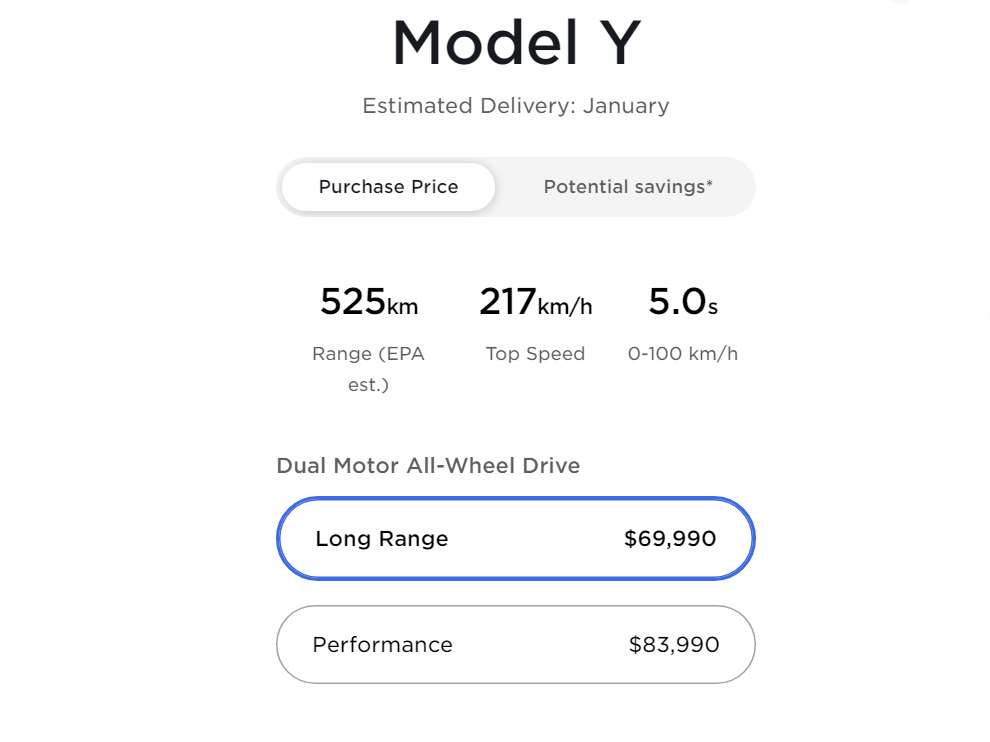
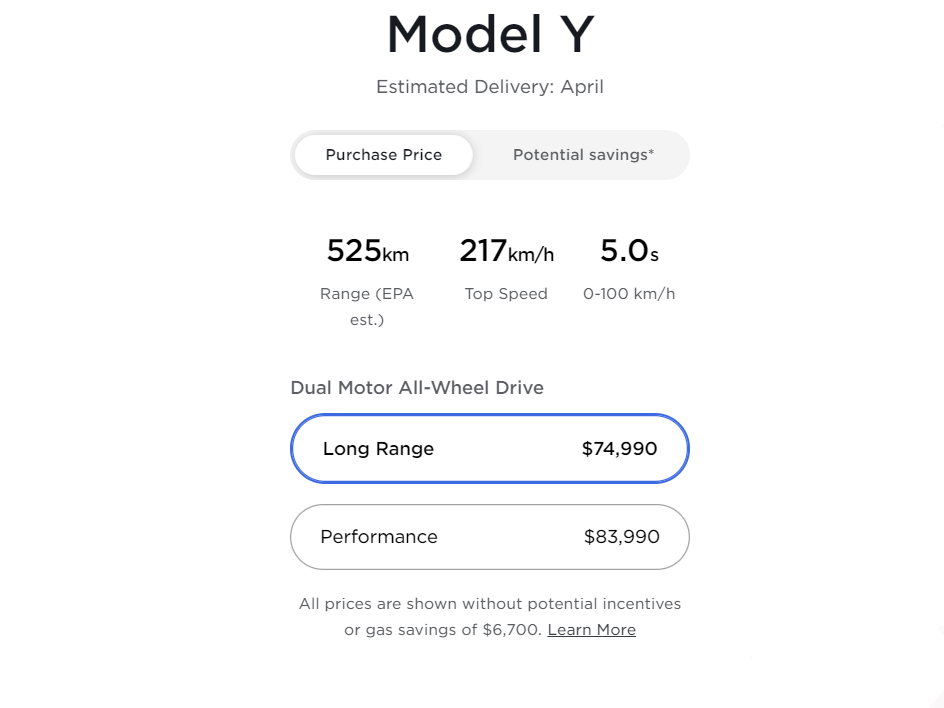
The Model Y Long Range now starts at $74,990, up from $70,990 two weeks ago. The high cost of the car also makes it ineligible for any provincial or federal electric vehicle tax rebates in Canada.
The exact vehicle was priced at $69,990 in mid-August 2021. See images below for reference:
Tesla Model Y August pricing
Tesla Model Y current pricing
Further, compared to last year’s prices, Tesla has increased the cost of other models, including:
Model S Long Range — Mid 2020 price: $105,990 — Current price: $121,990 — Expected delivery: June
Model X Long Range — Mid 2020 price: $112,990 — Current price: $132,990 — Expected delivery: September
While the semiconductor shortage is one of the primary reasons behind the price increase, the growing demand for Tesla vehicles is a contributing factor too. The Model Y Long Range was sold out in Canada in August, with expected delivery dates for January. A quick peek on Tesla’s website now indicates that the EV will be delivered in May, five months after what Tesla initially promised. Further, bugs plaguing Tesla’s Full Self-Driving software aren’t helping the company either.
Xbox owners can now play Steam PC games on their consoles through Nvidia’s GeForce Now streaming service.
This has been made possible through Microsoft’s Edge browser. With it, Xbox gamers have access to GeForce Now’s entire catalogue, which consists of more than 1,000 games. In particular, this gives Xbox gamers a way to play titles that aren’t otherwise available on consoles, such as Counter-Strike: Global Offensive or League of Legends.
As The Verge notes, PC games on Xbox isn’t completely new, as the Parsec cloud service also offers this functionality. However, it still requires you to have a PC that can run these games, which is much more limiting than GeForce Now simply running straight out of your console’s Edge browser. GeForce Now also supports mouse and keyboard, although the input lag from streaming means it might not be ideal.
Tesla CEO Elon Musk said on Twitter that the company has temporarily withdrawn its latest version of Full Self-Driving (FSD) beta software, which was released less than a day ago.
Seeing some issues with 10.3, so rolling back to 10.2 temporarily.
Please note, this is to be expected with beta software. It is impossible to test all hardware configs in all conditions with internal QA, hence public beta.
Update 10.3 was meant to introduce driver profiles with the ability to switch between different characteristics for following distance, rolling stops, and exiting passing lanes. It’s also claimed to better identify other cars’ brake lights, turn signals, and hazard lights while eliminating unnecessary slowdowns. However, Musk says that Tesla is “seeing some issues with 10.3, so rolling back to 10.2 temporarily.”
The new version had already caused issues earlier in the weekend, with Tesla delaying its original release on Saturday. There was “regression in some left turns at traffic lights” discovered by internal quality inspectors, according to Musk. However, he said on Sunday that the firm has moved on with the rollout, stressing that it relies on the public for more information on driving conditions.
Post-release, hard braking events, forward collision alerts, and other system misfires were reported by users that were not present in previous versions of the beta software. Drivers also flocked to social media to express their dissatisfaction with issues like the disappearance of the Autosteer option, troubles with traffic-aware cruise control, and Autopilot panic. Musk did state that Tesla is “working on the issue,” however, he didn’t state when the next version of FSD would be released.
It’s not clear what time on the 25th the software update will become available, but when it does, here’s how to update.
Start by clicking the Apple icon in the top-left corner of the screen on your iMac, Macbook or other Apple computer. Click System Preferences > Click ‘Update Now’ or ‘Upgrade Now.’ Apple notes on its update support website that ‘Update Now’ refers to smaller updates, while the ‘Upgrade Now’ option is for major new versions of macOS with a new name — for example, Monterey. In this case, you’ll want to click ‘Upgrade Now.’
After that, follow any on-screen steps and let your Mac do its thing. When it’s done, you should have macOS Monterey installed.
As with any major software update, it’s a good idea to install it when you won’t need your computer for a while. Plus, you may want to backup any important data before installing the update just in case something goes wrong. You can find more information about Apple software updates here.
Compared to Android 12’s ‘Material You,’ Apple’s iOS 15 update didn’t bring as many visual changes to the iPhone’s interface, and the ones that it did add don’t seem to be highly appreciated. One of the not-so-well-received updates is the Safari redesign.
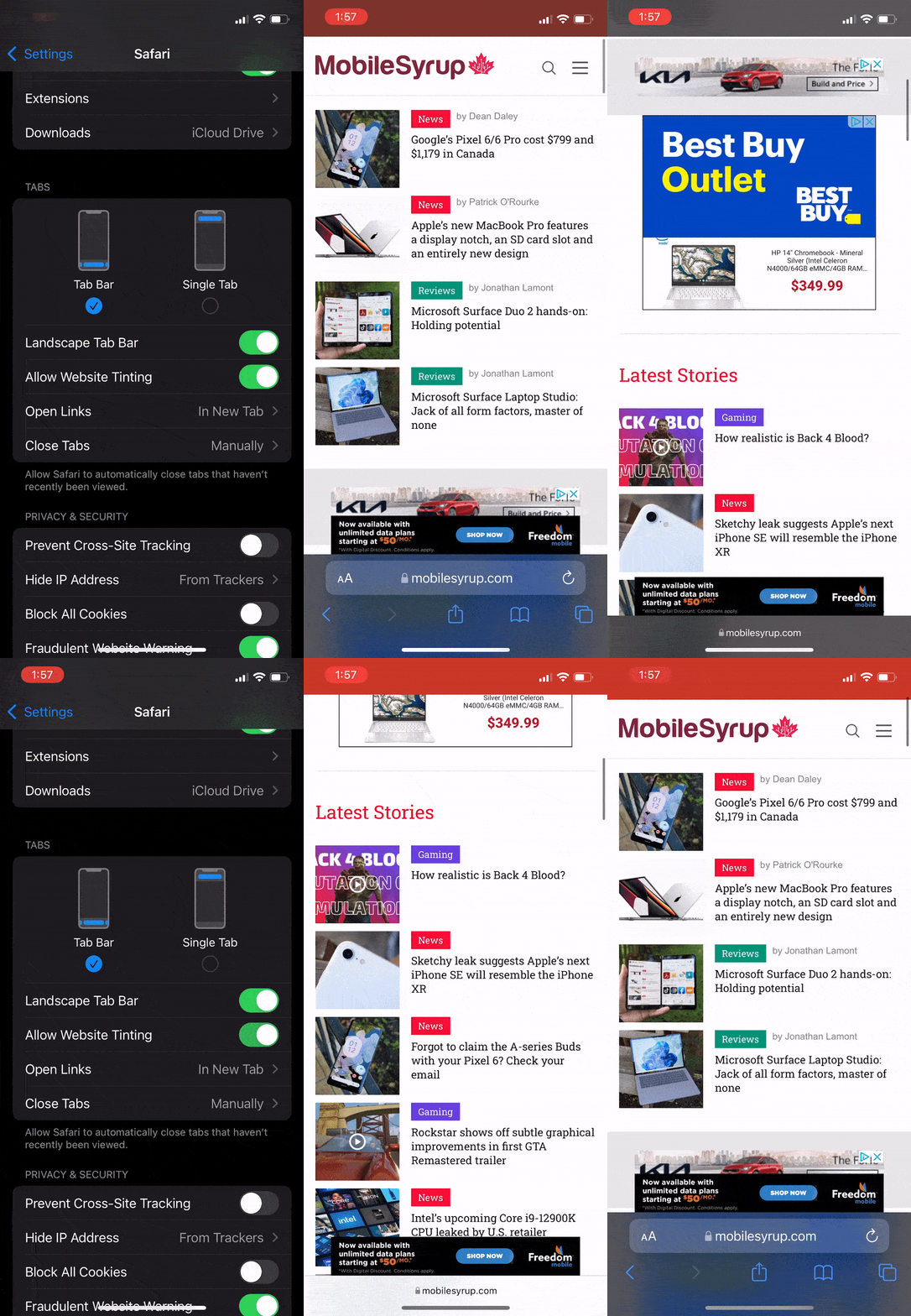
With iOS 15, Apple decided to move the address bar tools from the top of the screen to the bottom, right above the ‘Share,’ ‘Tabs’ and ‘Bookmark’ tools, a change that didn’t bode well with long-time Safari users whose fingers would automatically race towards to top of the screen to access the address bar.
Along with the repositioning of the top bar, Safari now automatically tints the address bar and matches it to the website colours. The latter is a change that I sincerely appreciate because of the unified look it provides, and the former I shun because it messes with my muscle memory.
Luckily, there’s a simple workaround that can allow you to move the address bar back to the top and disable it from tinting:
From Safari
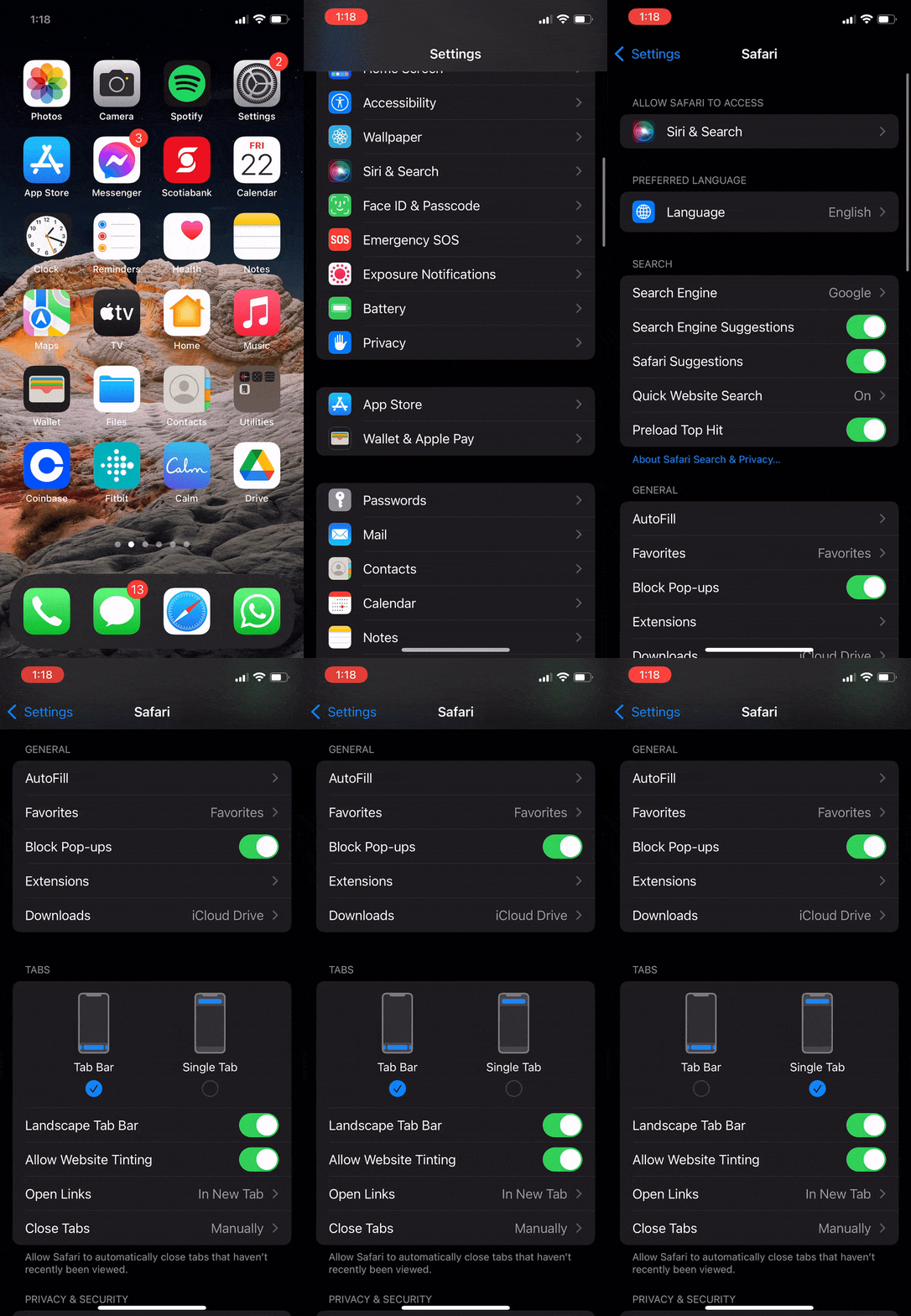
Open a new tab in Safari and tap on the ‘aA’ tool located on the left of the address bar. A new pop-up menu will open where you can select ‘Show Top Address Bar.’ Tap it, and you’ll notice that the address bar moves to the top. Follow the same steps and tap on ‘Show Bottom Tab Bar’ to bring the address bar back to the bottom, if you’re feeling adventurous.
From Settings
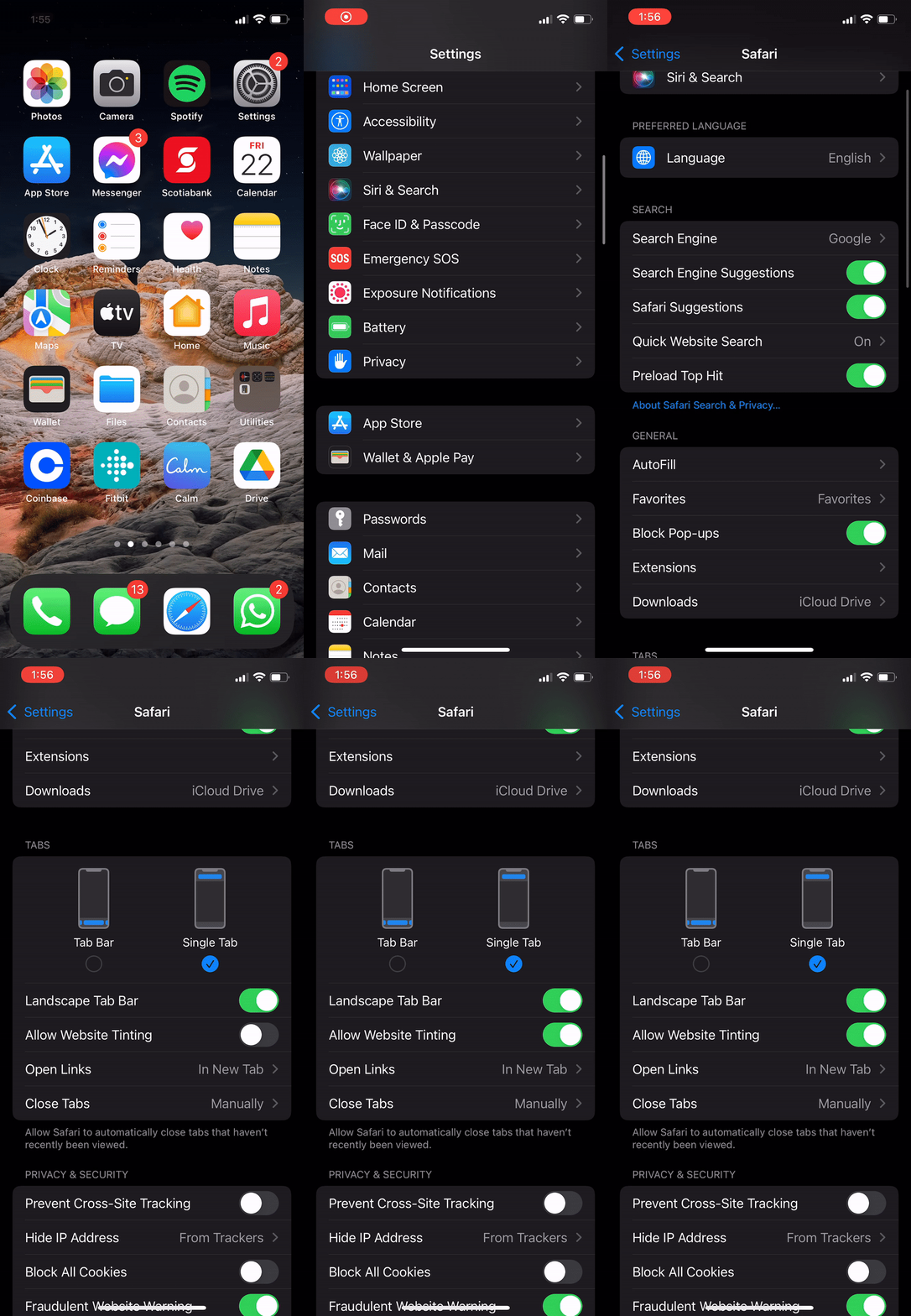
You can also find an option to move the address bar from your iPhone’s settings. Head to settings, scroll down and tap on ‘Safari.’ You’ll see a toggle that lets you switch between the top and bottom address bar.
Website Tinting
While I believe that Website Tinting the address bar is a solid new addition to Safari, and I will be keeping it toggled on, those who want the authentic iOS 14 experience can disable the feature by heading to Settings -> Safari -> and tapping the Website Tinting toggle.
With the launch of Apple’s new software updates this fall, ranging from macOS Monterey to watchOS 7 to iOS 15, one feature that all users will encounter regardless of their device is a new spin on ‘Do Not Disturb’ called ‘Focus.’
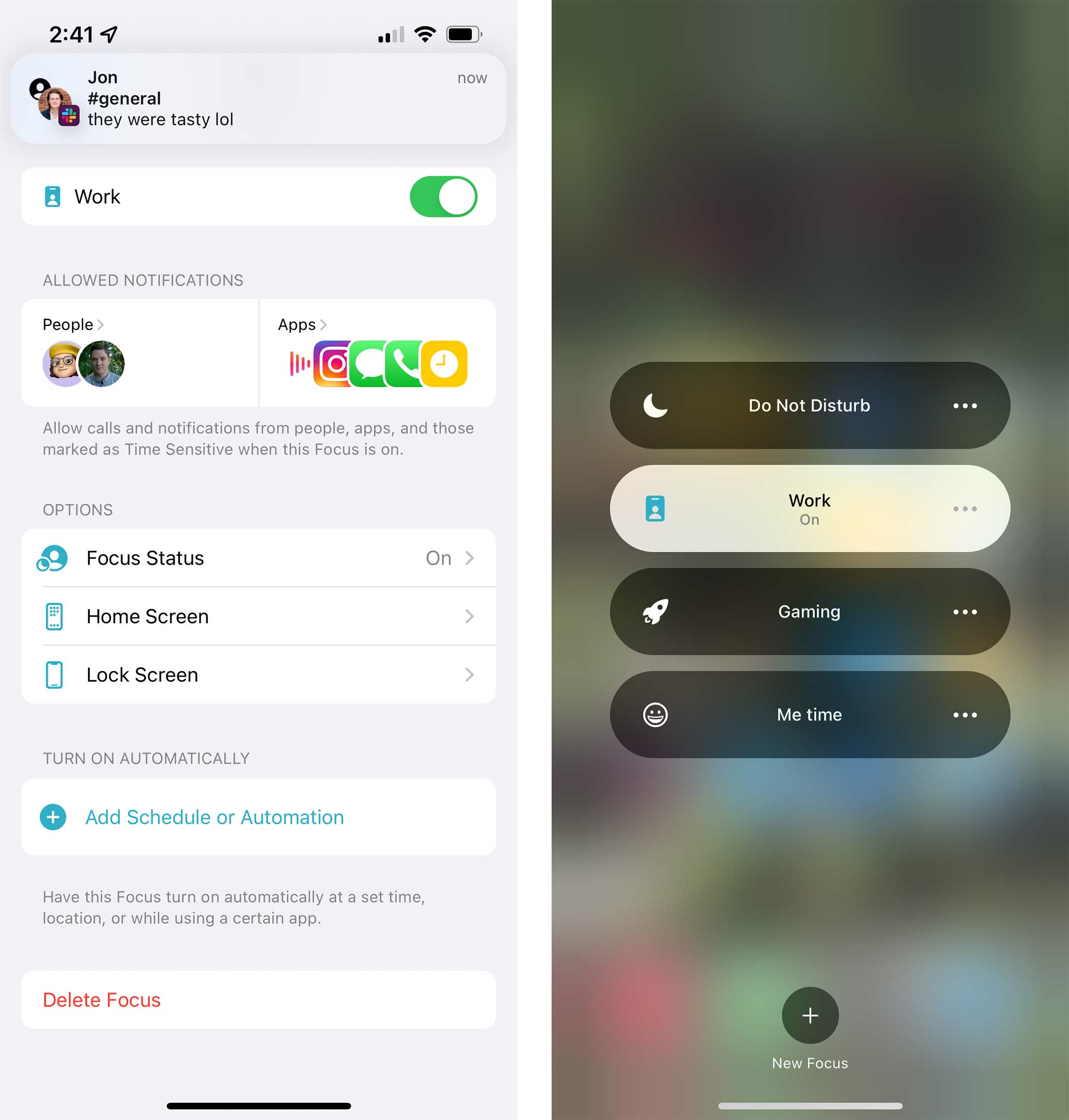
While Do Not Disturb blocks all notifications from reaching you, you can set Focus mode to more subtly restrict who and what can send you notifications at a given time. Basically, this is Apple admitting that its notifications are overwhelming, and ‘Focus’ is a way of solving this problem.
For the purpose of this article, I’ve set up Focus on an iPhone. However, once you have it on one of your Apple devices, it will apply to all your Apple hardware running the latest software. So now that I’ve set up Focus on my Phone, it restricts notifications on my iPad, Apple Watch and MacBook. You can disable this if you’d rather have individual Focus modes on each device.
That said, not all apps can use the feature. For example, some of the critical apps I’d like to block, like Discord, don’t integrate into Focus. Hopefully, that will change as apps update to support iOS 15.
For now, Focus isn’t as helpful as I’d like it to be, and in many situations, Do Not Disturb actually works a bit better since it’s easier to just lock everything down. However, depending on how well you can separate your work time from your play time, this new feature may work well for you.
My Focus mode strategy
To test out the feature, I set up two Focuses — one for work, one for post-work — and Do Not Disturb for when I want to lock things down a little further.
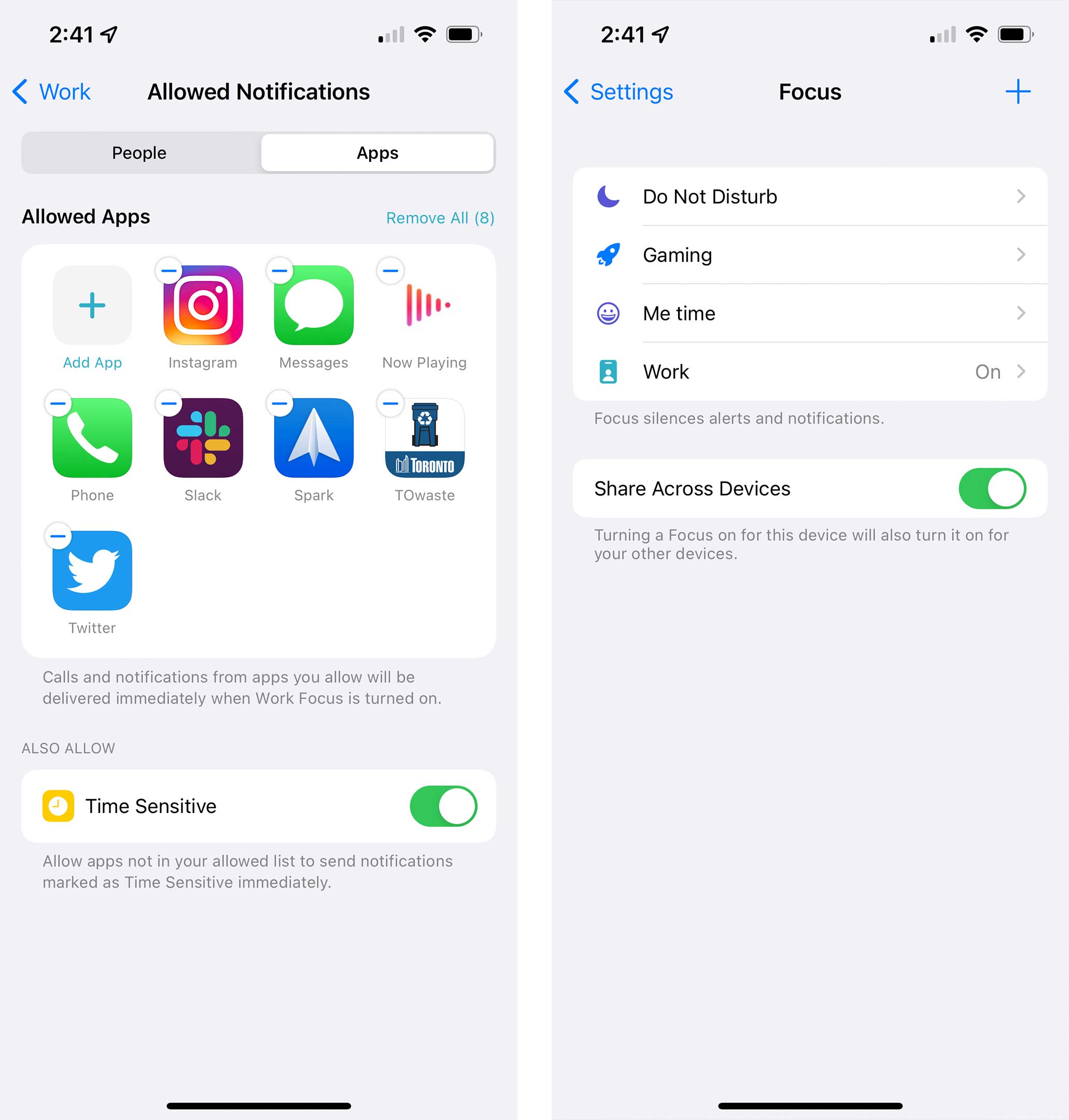
For my work Focus, I kept it fairly open to allow people to call and text me, but I shut down notifications for all apps that don’t relate to work. I also kept notification badges on the Home Screen since I needed to keep track of things during the day.
The after-work Focus is a little less restricted, so I allowed lots of apps to send me notifications, but I decided to try limiting Slack and email. These are a bit tough since I’m not sure how comfortable I am with the possibility that I might miss something important for work. Still, I’ll give it a try. I also turned on a feature to hide notification badges on my Home Screen during this time.
I scheduled both of these to come on automatically during and after work. I also turned off my Do Not Disturb schedule, and I’m hoping with Focus I can just manually use Do Not Disturb when I really want zero distractions.
How to set up your own
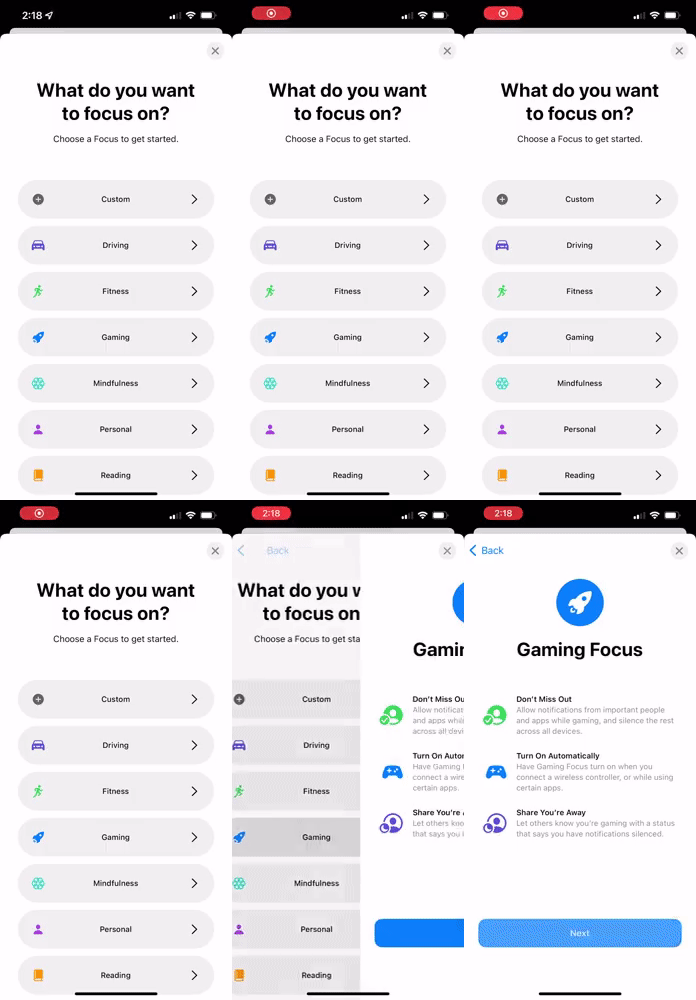
If you want to set up your own Focus mode, there are a few ways to do it on your phone. You can either enter the Focus section in the Settings app or open Control Centre and hold down on the new Focus button.
You can also set one up on your Mac, but since the modes persist across all Apple devices, I find it makes the most sense to run it on your phone since that’s where most people will receive the majority of their notifications.
Once you open the Focus section, you can select a new name for a Focus and then the first thing you’ll need to do is decide what contacts you want to allow to reach you when the mode is enabled. After that, you’ll choose what apps can send you notifications during that time, too.
Once that is set up, you can choose some other settings like if you want home screen badges, or you can even set a custom screen as your home screen during that time which is cool. However, you can only select from the screens you’ve already made. It would have been nice to have an option to create a custom home screen that appears when each mode is enabled.
You can also dim the lock screen and hide notifications from it if you want. Another cool feature allows you to set up automation so the Focus mode can turn on whenever you get to a particular location or open a specific app. For example, Apple showed it being used to turn on a notification blocking mode whenever you open a reading app.
If you don’t want to turn them on automatically, you can manually enable them from Control Centre. The one thing to keep in mind when you do is that your other Apple devices that are running the latest software will enable the same mode. So if you block your notifications in one place, they’ll be blocked everywhere.
Google has finally unveiled its Pixel 6 and 6 Pro flagship smartphones.
Both devices offer great specs and top-of-the-line features, including Google’s Tensor chip, 12GB of RAM for the Pro model, a trio camera setup (also for the Pro model), large batteries and more. The pair of smartphones also feature a sleek new design and up to 256GB of storage. Additionally, the Pixel 6 Pro sports a 120Hz display refresh rate, while the Pixel 6 sports a 90Hz refresh rate.
With all of this in mind, the most intriguing aspect of the Pixel 6 series is its reasonable pricing: the Pixel 6 Pro costs $1,179 and the Pixel 6 costs $799.
Did you buy a Pixel 6/6 Pro, and if so, which device and why? The Pixel 6 Pro is already sold out in the Canadian Google Store, so a lot of people are definitely interested in the handsets.
I’m currently testing the Pixel 6 Pro for my review (coming soon), but I would love to hear your thoughts on Google’s latest flagships.
Every week, MobileSyrup outlines some of the most notable movies and TV shows that recently hit Canadian streaming platforms.
Our ‘Streaming in Canada’ column typically focuses on new content from Amazon Prime Video Canada, Crave and Netflix Canada, but other services like Apple TV+ and Disney+ will be mentioned when relevant.
We’ll also highlight shows or movies that are made in Canada, involve notable Canadian cast or crew and/or are filmed in Canada.
Finally, with the COVID-19 pandemic causing many movies to hit digital platforms much sooner than planned, we’ll make note of any major films — as well as other notable streaming service news — that fall into this category when applicable.
Amazon Prime Video
Chucky
After a vintage doll turns up at a garage sale, an idyllic American town becomes plagued by horrifying murders.
Based on the Child’s Play franchise, Chucky was created by Don Mancini (Child’s Play series) and stars Zackary Arthur (Transparent), Björgvin Arnarson (The Seventh Day), Alyvia Alyn Lind (The Young and the Restless), Vancouver’s Devon Sawa (Final Destination), B.C.-raised Jennifer Tilly (Bullets Over Broadway) and Brad Dourif (Child’s Play franchise) as the voice of Chucky.
It’s worth noting that the series was filmed in and around Toronto.
Amazon Prime Video Canada premiere date: October 19th, 2021 (first episode, new episodes every Tuesday) Genre: Horror Runtime: Eight episodes (around 45 minutes each)
Stream Chucky here. Note that a $12.99/month StackTV subscription is required.
An Amazon Prime Video subscription is included at no additional cost with an Amazon Prime membership, which costs $79 CAD/year.
The full list of movies and shows hitting Amazon Prime Video Canada in October can be found here.
Apple TV+
Invasion [Apple Original]
Created by Simon Kinberg (X-Men series) and David Weil (Hunters), Invasion explores how an alien invasion is seen from different perspectives around the world.
The series stars Sam Neill (Jurassic Park), Toronto’s Shamier Anderson (Wynonna Earp) and Golshifteh Farahani (Extraction).
Apple TV+ Canada premiere date: October 22nd, 2021 (first three episodes, new episodes every Friday) Genre: Sci-fi Runtime: 10 episodes (about one hour each)
The former film is a drama about Áila, who helps another woman through her trauma after an assault by her boyfriend. The Incredible 25th Year of Mitzi Bearclaw, meanwhile, is a comedy about a 24-year-old Indigenous woman who moves back to her reserve to look after her sick mother.
Note that a $15.98/month Crave + Starz subscription or a $19.98/month Crave + Movies + HBO subscription is required.
Crave says it’s added these films in commemoration of 2021 imagineNATIVE Film + Media Arts Festival, which kicked off on October 19th. The service’s full Indigenous Stories Collection can be found here.
Curb Your Enthusiasm (Season 11)
Seinfeld co-creator Larry David’s improv comedy is back, featuring such guest stars as Jon Hamm (Mad Men), Vancouver’s Seth Rogen (Superbad), Woody Harrelson (Three Billboards Outside Ebbing, Missouri), Bill Hader (Barry) and Kaley Cuoco (The Big Bang Theory).
Crave Canada premiere date: October 24th, 2021 at 10:30pm ET (first episode, new episodes every Sunday at 10:30pm ET) Genre: Comedy Runtime: 10 episodes (about 30 minutes each)
Stream Curb Your Enthusiasm here. Note that a $19.98/month Crave + Movies + HBO subscription is required.
Insecure (Season 5)
The fifth and final season of Insecure provides a reflection on, and closure for, Issa and Molly’s friendship and Issa and Lawrence’s love.
Insecure was created by Issa Rae (Awkward Black Girl) and Larry Wilmore (The Daily Show) and stars Rae, Yvonne Orji (Jane the Virgin) and Jay Ellis (Escape Room).
Crave premiere date: October 24th, 2021 at 10pm ET (first episode, new episodes every Sunday at 10pm ET) Genre: Comedy-drama Runtime: 10 episodes (about 30 minutes each)
Stream Insecure here. Note that a $19.98/month Crave + Movies + HBO subscription is required.
A standard Crave subscription is priced at $9.99/month, with Starz costing another $5.99/month and HBO an additional $9.99/month.
The full list of movies and shows hitting Crave this month can be found here.
Disney+
Marvel Studios: Assembled — “The Making of Black Widow” [Disney+ Original]
Go behind-the-scenes on the production of Black Widow, the first film in the Marvel Cinematic Universe’s ‘Phase 4’ and Scarlett Johanson’s super spy’s long-awaited solo outing.
This documentary special features never-before-seen footage on the making of the movie, as well as commentary from the likes of Johansson, Florence Pugh (Yelena), David Harbour (Alexei) and director Cate Shortland.
The full list of movies and shows hitting Disney+ Canada this month can be found here.
Netflix
Inside Job [Netflix Original]
Working at a shadowy government organization, an awkward genius and her dysfunctional coworkers attempt to keep global conspiracies under wraps.
Inside Job was created by Shion Takeuchi (Gravity Falls) and features the voices of Lizzy Caplan (Masters of Sex), Christian Slater (Mr. Robot), Clark Duke (Hot Tub Time Machine) and Andy Daly (Review).
Netflix Canada premiere date: October 22nd, 2021 Genre: Animated sitcom Runtime: 10 episodes (27 to 31 minutes each)
Tyler, Kinsey and Bode dig deeper into the mystery of the keys to unlock more family secrets.
Locke & Key is based on Joe Hill’s graphic novel of the same name and stars Jackson Robert Scott (It), Toronto-born Connor Jessup (Falling Skies) and Emilia Jones (What We Did on Our Holiday). Richmond, B.C.’s Aaron Ashmore (Killjoys) co-stars.
It’s worth noting that Locke & Key was filmed in Toronto.
Netflix Canada premiere date: October 22nd, 2021 Genre: Drama, supernatural horror Runtime: 10 episodes (43 to 53 minutes each)
A prophesized warrior princess fights to save humanity from vengeful gods.
Maya and the Three was created by Jorge R. Gutiérrez and features the voices of Zoe Saldaña (Guardians of the Galaxy), Gabriel Iglesias (“Fluffy”), Diego Luna (Rogue One: A Star Wars Story) and Gael García Bernal (Coco).
Netflix Canada premiere date: October 22nd, 2021 Genre: Animated, fantasy Runtime: Nine episodes (26 to 44 minutes each)
From October 20th to 31st, HauntTV is offering a variety of Halloween-themed programming, including Haunted Hospitals, Evil Encounters, World’s Scariest Hauntings and a sneak peek at Hotel Paranormal, narrated by Ottawa’s own Dan Aykroyd (Ghostbusters).
HauntTV content can be streamed for free on The Roku Channel and Samsung TV Plus.
What are you planning on streaming this week? Let us know in the comments.
In a blog post, Twitter revealed that its algorithm promotes right-leaning content more often than left-leaning content. However, the company isn’t sure why that’s happening.
The findings discussed in the blog post draw from an internal study that looked at how Twitter’s algorithm amplifies political content. In the study, Twitter looked at millions of tweets posted between April 1st and August 15th, 2020 from news outlets and elected officials in Canada, France, Germany, Japan, Spain, the U.K. and the U.S.
In all those countries, except Germany, Twitter found that right-leaning accounts received more algorithmic amplification than the political left. Similarly, right-leaning content from news outlets benefitted from the same bias.
Twitter says it doesn’t know why the data suggests its algorithm favours right-leaning content. The company claims it’s a “significantly more difficult question to answer” because it’s a result of “interactions between people and the platform.”
However, The Vergecites Ph. D. candidate Steve Rathje, who published research explaining that divisive content about political outgroups is more likely to go viral. Rathje told The Verge that negative posts about political outgroups tend to receive more engagement on social platforms like Facebook and Twitter. For example, if a left-leaning politician posts something negative about a right-leaning politician (or vice versa), that negative post will likely receive more engagement.
With that in mind, it’s possible right-leaning posts on Twitter spark more engagement, leading to more algorithmic amplification. Further, it’s worth noting that Germany — the only country where the algorithm didn’t favour right-wing content — has an agreement with Facebook, Twitter and Google to remove hate speech within 24 hours. While the factors may not be related, if the algorithm favours divisive, negative posts, and right-leaning users post that kind of content, it could be why Twitter’s seeing the algorithm favour right-leaning content everywhere but Germany, where there’s an active effort to remove that content.
It’s not a problem isolated to Twitter either. Frances Haugen, the Facebook whistleblower who leaked internal documents from the company, claimed Facebook’s algorithm also favours divisive content and hate speech.