Categories
Mobile Syrup

Turtle Beach’s Stealth 700 Gen 2 gaming headset offers great audio at expensive price

Turtle Beach’s Stealth 700 Gen 2 is an excellent high-end wireless gaming headset and a great choice for gamers seeking a richer, more detailed audio experience. It carries an expensive price tag, but the investment is worth it for the level of sound quality, software-based customization and overall performance you get in return.

The hardware is also durable and comfortable to wear, even for extended gaming sessions. The 700 Gen 2s sleek design also means it won’t look out of place when you’re not gaming. I’ve spent dozens of hours testing the 700 Gen Max 2 with several games, so let’s explore all the features that make the Stealth 700s a top pick for gamers and audiophiles alike.

Stealth 700 Gen 2 Max Setup and Device Compatibility

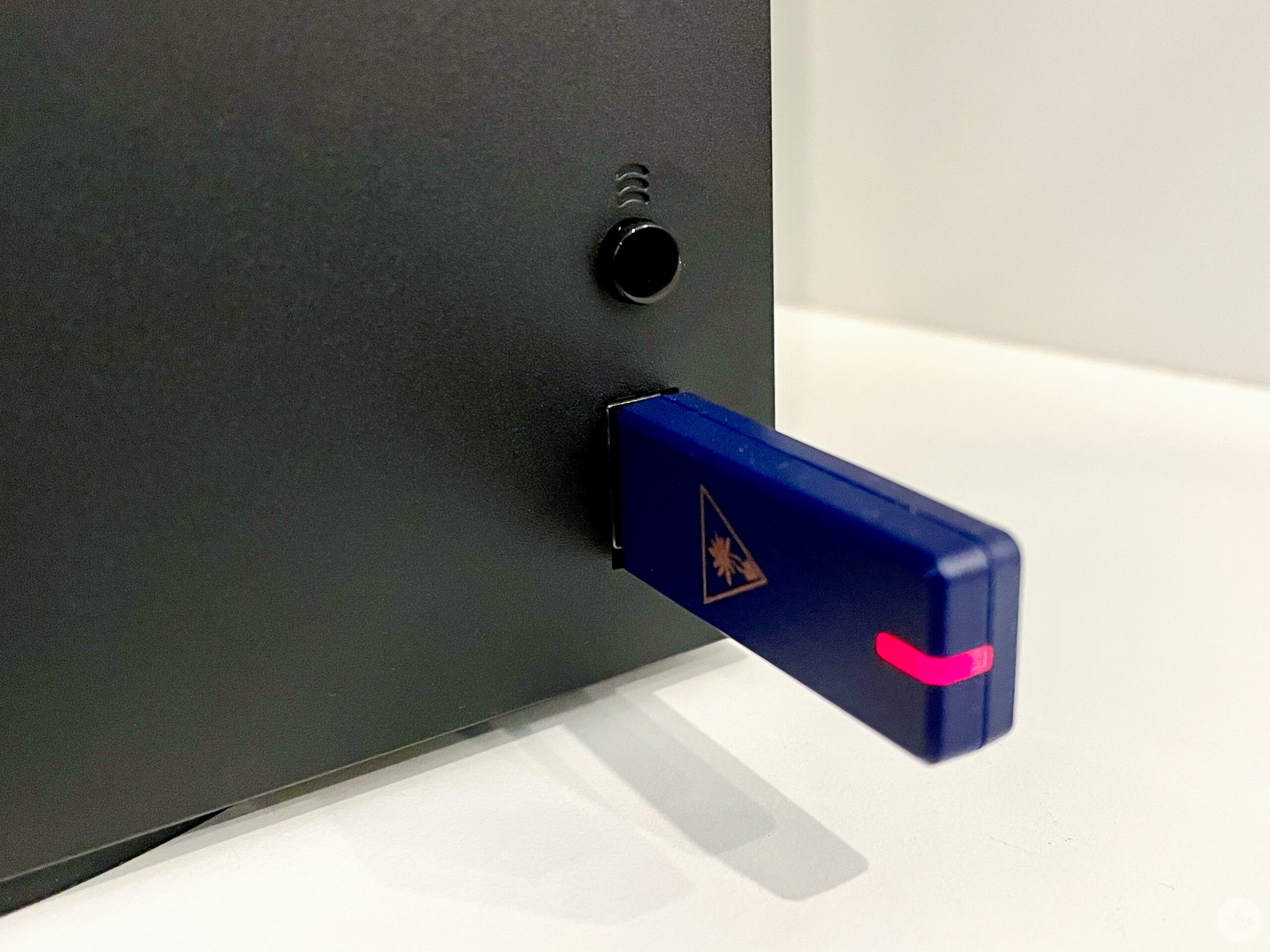
Whether gaming on a single console or multiple platforms, Turtle Beach’s Stealth 700 Gen 2 are compatible with all modern consoles, PCs and many Bluetooth-enabled devices. Even though the 700 Gen 2 Max’s are officially licensed by Microsoft for the Xbox platform, they work great with the PlayStation 4 + 5, Nintendo Switch and PC, thanks to the included mini-USB transmitter.

Turtle Beach Stealth 700 Gen 2 headset

The thumb drive emits a nearly lag-free 2.4GHz wireless signal that keeps up with all the on-screen action. What’s more impressive is that the device connects and pairs with the headset in seconds. No matter if you’re using the Xbox, PlayStation, PC & Nintendo Switch, the experience is seamless.

I was quite impressed when I first plugged it into my Xbox Series X. There were no drivers, no fiddling around with setup menus — the Stealth 700 is true “plug and play.”

Using Mobile and Bluetooth Devices

Turtle Beach’s Stealth 700 Gen 2 also works with a wide range of desktop, laptop and mobile devices as it packs Bluetooth 5.1, which is compatible with iOS, Android, PC and Mac hardware. In addition, you can download the mobile and desktop apps to fine-tune audio levels and remap buttons on the headset. I found the app experience straightforward and quite convenient on my iPhone, easily making adjustments on the fly. Syncing via Bluetooth is a little less intuitive than the “plug n’ play” USB method on gaming consoles, but it’s easily manageable once you get the hang of pairing with different devices.

Speaker Performance

The 700 Gen 2 Max packs 50mm “Nanoclear” speakers that deliver rich and detailed sound, bringing games, movies, and music to life. I tested the headset with various games, including first-person shooters, role-playing games and open-world adventure titles, and the speakers are consistent. I’m impressed with the level of detail and clarity they provided. In terms of pure audio quality, the 700 Gen 2 is one of the best gaming headsets I’ve ever used.
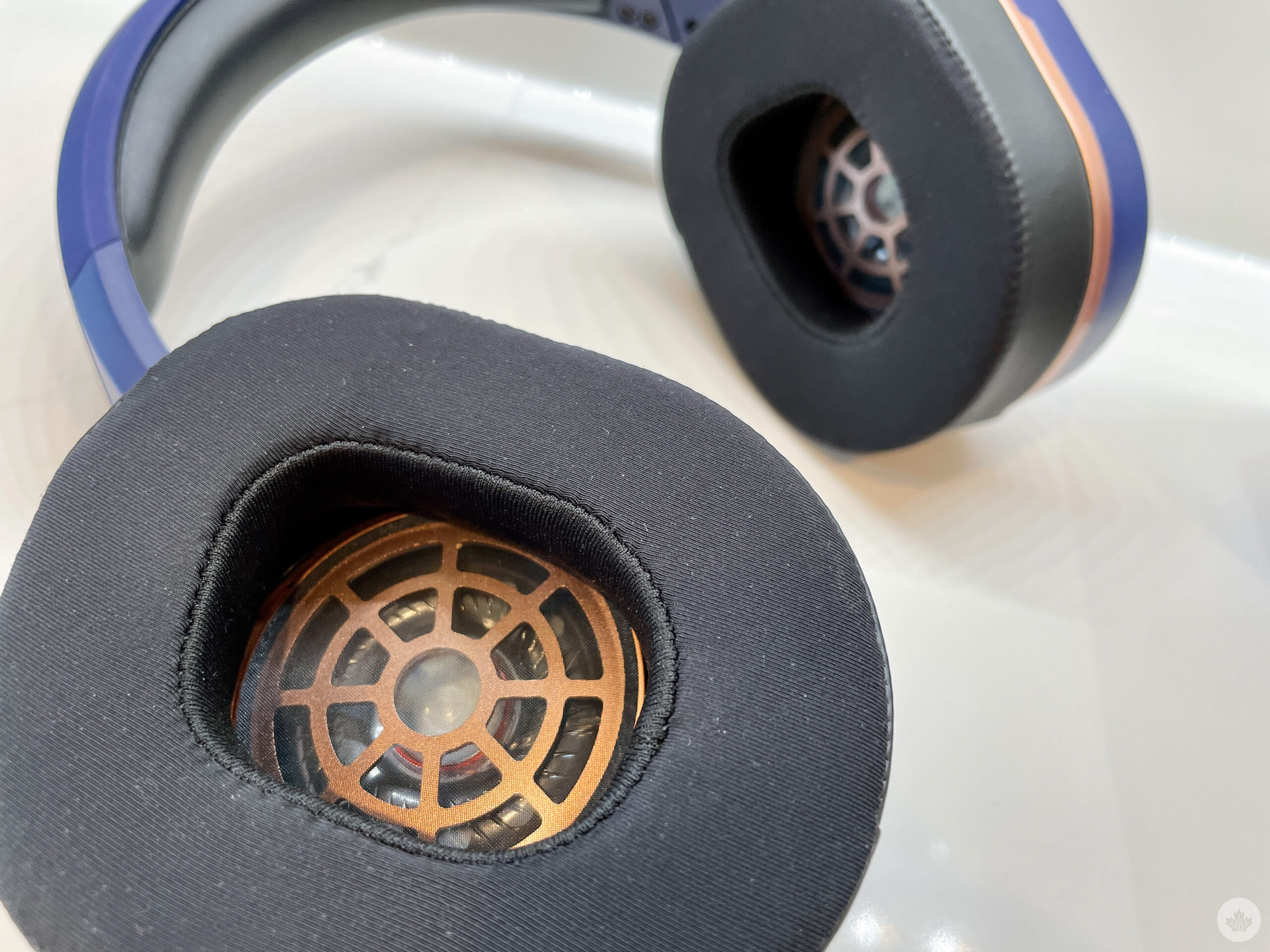
The headset offers distortion-free highs and booming full-body bass that you can feel. I could hear every little detail in the games I tested, and it made for an engaging experience. In Halo Infinite’s multiplayer, for example, I could easily pick up on enemy weapon reloads and footsteps. It made a big difference in being able to locate a for before they were even on-screen.

A Great Microphone for Game Chat

The “flip-to-mute” microphone also offers excellent performance, it’s clear and it picks up your voice well over a lot of ambient noise. The new mic is slightly larger than the previous iteration, offering greater sensitivity to sound. There’s also noise cancellation, so you won’t have to worry about background noise interfering with your gameplay. It’s not perfect, and the Gen 2 still picks up some background noise, but it accurately captures your in-person voice. The mic also features built-in monitoring, allowing you to hear your voice while chatting through the headset. This helps avoid shouting since it will enable you to hear yourself even over multiple voices.

One of my favourite Stealth 700 Gen 2 features is that mic arm conceals into the ear cup body when flipped up to mute. I found this adds a great deal to the device’s versatility as it could go outside the realm of just gaming at home. I was willing to wear it on my commute or out for walks because I didn’t need to contend with an unsightly mic arm. That said, the headset is still relatively large and can’t fold down flatter, resulting in it taking up ample space in your backpack or work bag.

Enhanced 40+ Hour Battery Life

Another area where the Stealth 700 Gen 2 shines is in its improved battery life. It boasts up to 40+ hours of use on a single charge, and the hardware lived up to that claim in my testing. I could go days at a time without charging them, going through several gaming sessions without having to worry. When you do need to recharge, the included high-speed USB-C gets you back into the game faster than ever. The new quick-charging feature offers eight hours of battery life from just 15 minutes of charging using the included USB-C cable. The addition of USB-C also means it was easier for me to complete software updates on both the Mac and PC platforms with the more modern USB interface.
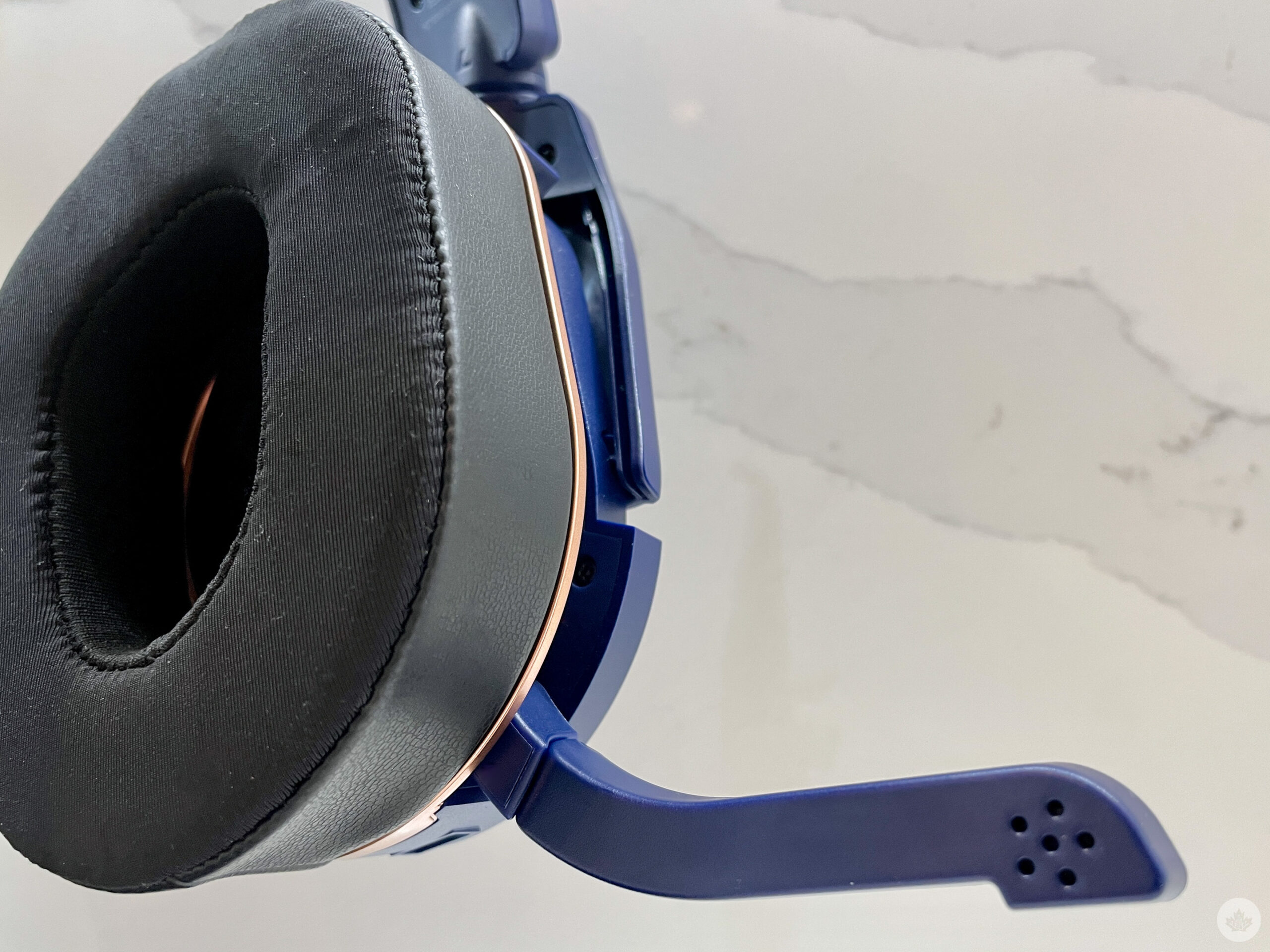
In terms of build quality, the Stealth 700 Gen 2 is rock-solid. It feels like a premium product and easily withstood the rigours of regular gaming sessions. It also survived a road trip with my family, along with extended use by an 8-year-old, for what it’s worth. It shows no signs of wear, or quality degradation even after dozens of hours of use. This is partly due to the “skeleton” of the headset, which is a sturdy yet flexible aluminum band. The headband is easily adjustable, so the headset takes minor tweaks to get it feeling great. Out of the box, it did feel very tight on my head, but after more use, the band and ear cups formed more to my head and were comfortable to use.

The ear cups are made of a black synthetic leather with memory foam cushioning that feels firm and cups your ear well. A layer of “Aerofit” cooling gel is lined into the ear cushion to help keep you cool, but I still found that the ear cups got hot after a while.

An Audio Control Centre Behind Your Ear

Another 700 Gen 2 element I like is the on-ear cup controls. Turtle Beach has managed to pack a lot of switches, buttons and indicators into the sleek design. I also found it easier to access the volume scroll wheel on the back of the ear cup than dangling elsewhere.
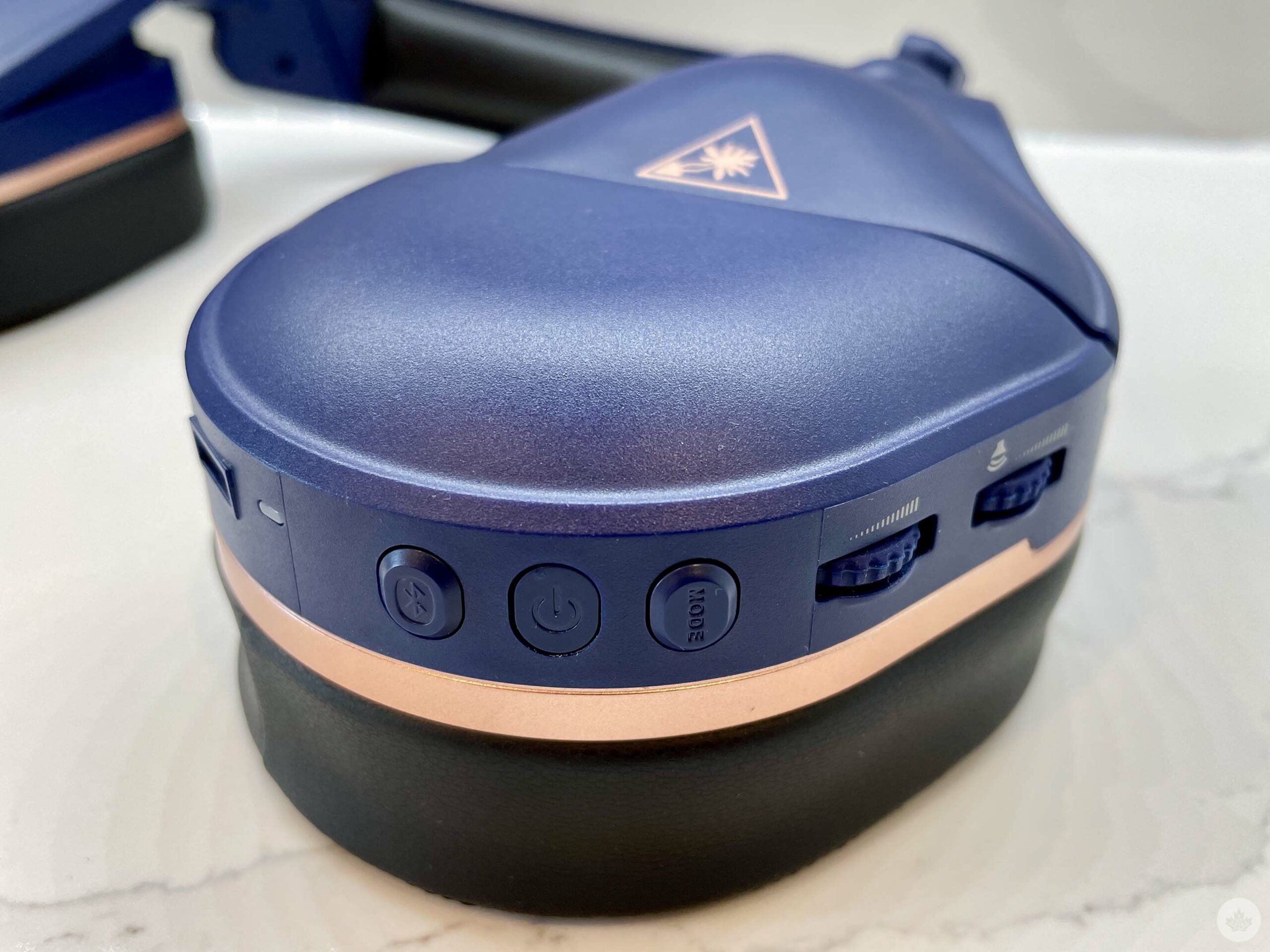
Turtle beach Stealth 700 Earcup

The headset features Turtle Beach’s patented “ProSpecs” glasses relief system with dual-foam ear cushions. This is softer foam in the section of the ear cushions that rests against your glasses. I mix my gaming time between contact lenses and eyeglasses and found both ways to play very comfortably. If you’re looking for a great-sounding and well-designed gaming headset, the Turtle Beach Stealth 700 Gen 2 is a great option.

Stealth 700 Gen 2 Max colour options

The Turtle Beach Stealth 700 Gen 2 is available in two colours: ‘Black’ and ‘Cobalt Blue.’ The black model is more understated, while the blue model adds a pop of colour with stunning copper-coloured highlights. The reason I bring up the different colours is because the cobalt model is one of the most striking-looking pieces of audio hardware I’ve ever used. In terms of design, it’s a real head-turner. The copper accents are particularly eye-catching, adding a touch of luxury to the overall look. I’m happy to see more frilly-looking designs usurped by more sleek and mature-styled options.

The Turtle Beach Stealth 700 Gen 2 is a well-designed gaming headset that’s comfortable to wear for long periods. The ear cups are padded and fit snugly around your ears, and the headband is adjustable to find the perfect fit. I wore the headset for hours at a time, and I never experienced any significant discomfort but did feel my ears and head getting hot. The temperature of the device never spiked, I just found the synthetic leather-lined ear cups got hot. This is a minor nitpick, but it’s worth mentioning if you are sensitive to temperature.
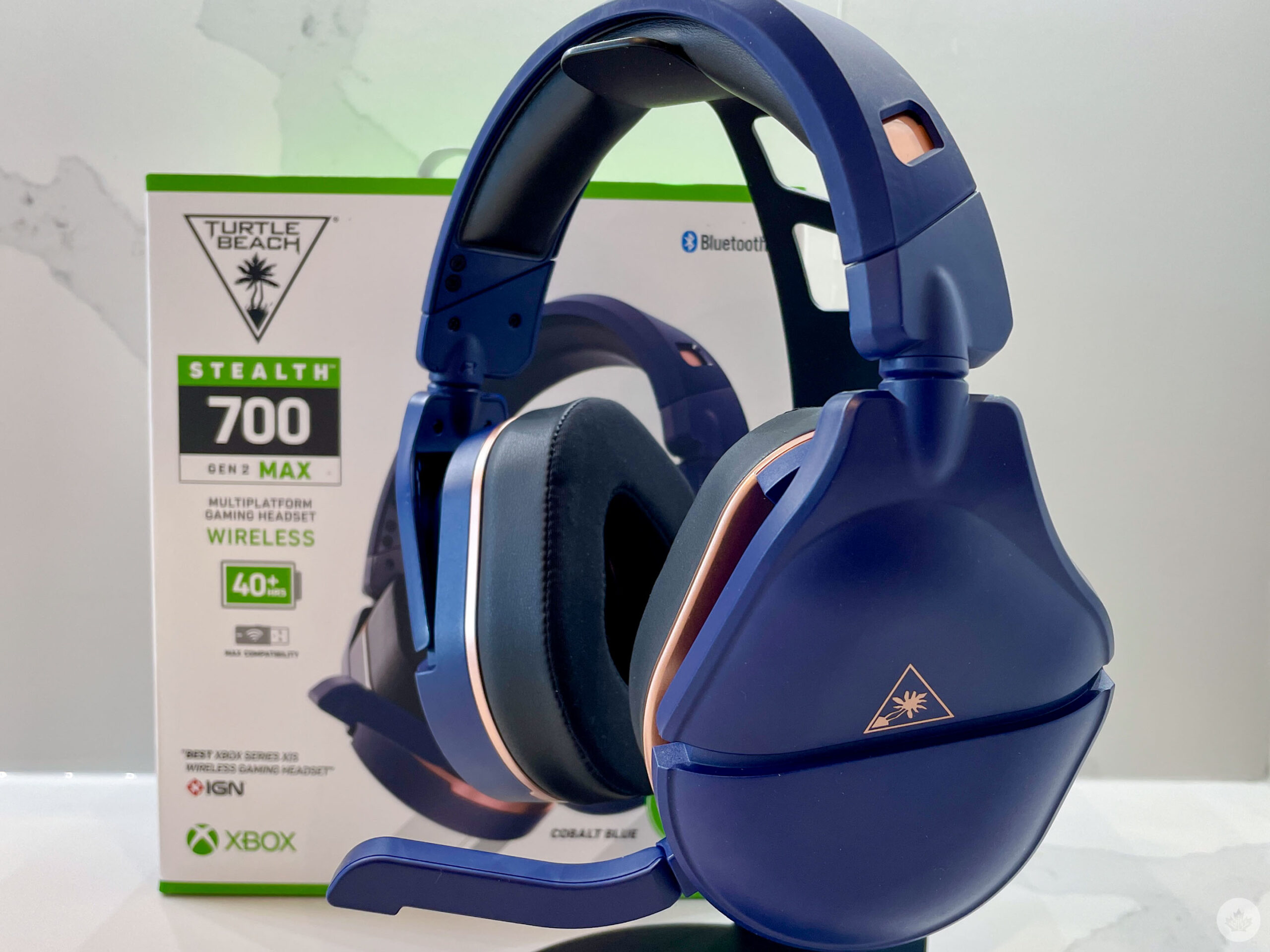
Turtle Beach Stealth 700 on stand

The Turtle Beach Stealth 700 Gen 2 is a great high-end wireless gaming headset. It offers excellent audio quality, a great microphone, and impressive battery life. The only downsides are the price and ear cup heat issues, but it’s still a high-quality headset that I highly recommend.

Turtle Beach’s Stealth 700 Gen 2 headset is currently on sale for $139 at The Source (it regularly costs $139).

MobileSyrup utilizes affiliate partnerships. These partnerships do not influence our editorial content, though we may earn a commission on purchases made via these links that helps fund the journalism provided free on our website.

Categories
Mobile Syrup

iPhone 14 Pro’s Lightning connection limited to USB 2.0 speeds, despite larger 48MP ProRaw Support

Apple has upgraded the rear camera array for both the iPhone 14 Pro and iPhone 14 Pro Max, supporting 48MP ProRAW photography. As such, the Pro modes are now able to capture detailed-rich photos albeit at much larger file sizes. However, despite files sitting at around 75MB each, iPhone 14 Pros are still using USB 2.0 transferring speeds.

The iPhone 14 Pro models have shipped and are in the hands of users. It’s now being confirmed that the Lightnin connector on the devices remains limited to USB 2.0 speeds. Without an upgrade, the iPhone 14 Pro and iPhone 14 Pro Max are capped at speeds of around 480 Mbps. This is the same as previous models of the iPhone.

With this in mind, users expecting to transfer a full-resolution 48MP ProRaw photo from an iPhone 14 Pro to a Mac, PC, or other devices will be waiting quite some time. To perhaps mitigate some of the wait time, Apple does recommend using iCloud Photos to access ProRAW photos on another device. Alternatively, users may want to use AirDrop to wirelessly transfer those large files from their phones.

It’s worth noting that although iPhone 14 Pro is limited to USB 2.0, Apple has experimented with USB 3.0. The original iPhone Pro, which launched in 2015, supports USB 3.0. The use of the upgraded connector enables speeds of up to 5Gbps. It’s not currently known why Apple has chosen to not integrate USB 3.0 further into its products.

It’s also been reported that Apple may be transitioning away from its Lightning port to USB-C next year. Claims that the iPhone 15 could offer USB-C connectivity have persisted. If true, the new connector could offer speeds of up to 10Gbps or 40Gbps with the use of Thunderbolt 3.

Source: MacRumors

Categories
Mobile Syrup

Anker slashes charging tech by up to 25 percent off

Anker has once again started the week off correctly, this time by somewhat having a fire sale of some of its most popular tech.

The deals could save you upwards of 25 percent and you can check them out below.

MobileSyrup utilizes affiliate partnerships. These partnerships do not influence our editorial content, though we may earn a commission on purchases made via these links that helps fund the journalism provided free on our website.

Source: https://amzn.to/3djoPGN” target=”_blank” rel=”noopener” data-lasso-id=”483609″>Amazon Canada

Categories
Mobile Syrup

How to make your phone listen for common sounds like doorbells, alarms

Like many folks, I spent most of the last two years working from home because of the pandemic. I also like to work with earbuds or headphones on so I can listen to music, which is usually great.

At least, it’s great until a package arrives for me (something that happens likely more often for me than others since companies send me products to test on a regular basis). If I’m listening to music while I’m working, it’s pretty easy to miss the doorbell, and if my partner’s not around to grab the door if I miss it, it can be a problem. So, I went looking to see if there was a way I could have technology listen for the door instead and, to my surprise, both iOS and Android have built-in systems that can do this (and much, much more).

So, below you’ll find steps on how to turn on your phone’s “ears” to listen for doorbells, smoke alarms, appliances, and more. Of course, whether you use the iOS or Android versions of this, it’s worth keeping in mind that these tools aren’t perfect, so be prepared for false alarms. Still, in my time trying these out, they seemed to work pretty well.

iOS – Sound Recognition

iPhone users lucked out here with, in my opinion, the superior sound recognition system. There are not a lot of differences between the two systems, but I like how it works on iOS just a little better. Plus, it’s easier to navigate on iOS, and you can teach the iPhone to recognize custom sounds.

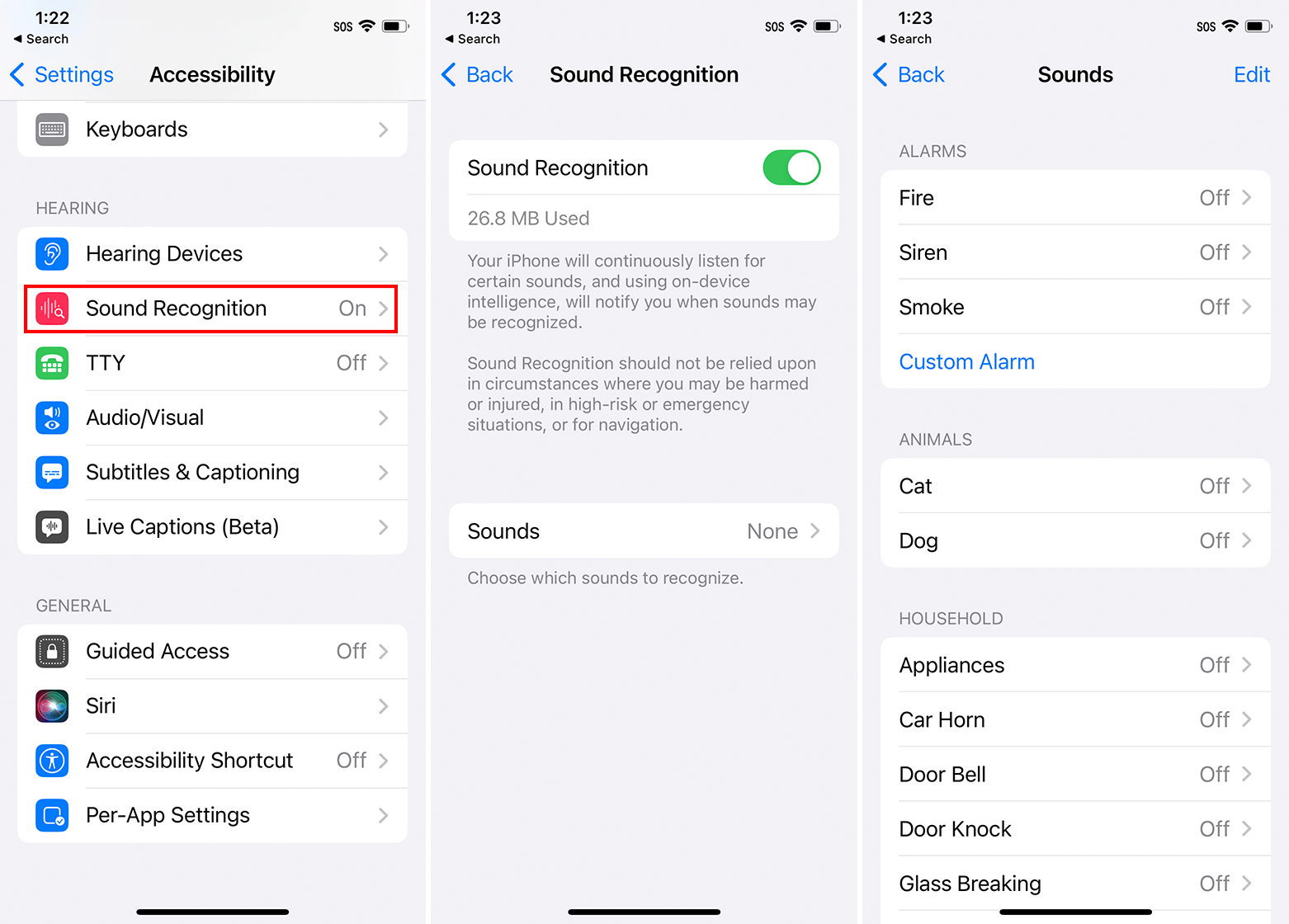
To get started, open Settings > Accessibility > Sound Recognition > Tap the toggle to turn it on. Then, you can tap ‘Sounds’ to customize which sounds your iPhone will listen to. Options include alarms (like fire or smoke alarms), animals, and various household items like appliances (like microwave dings), car horns, glass breaking, water running, and more. You can even set the iPhone to listen for crying babies (helpful if you’re a parent like me), coughing, or shouting.

You can tap each option to enable it and select which alert tone it uses (by default, they all use the Tri-tone).

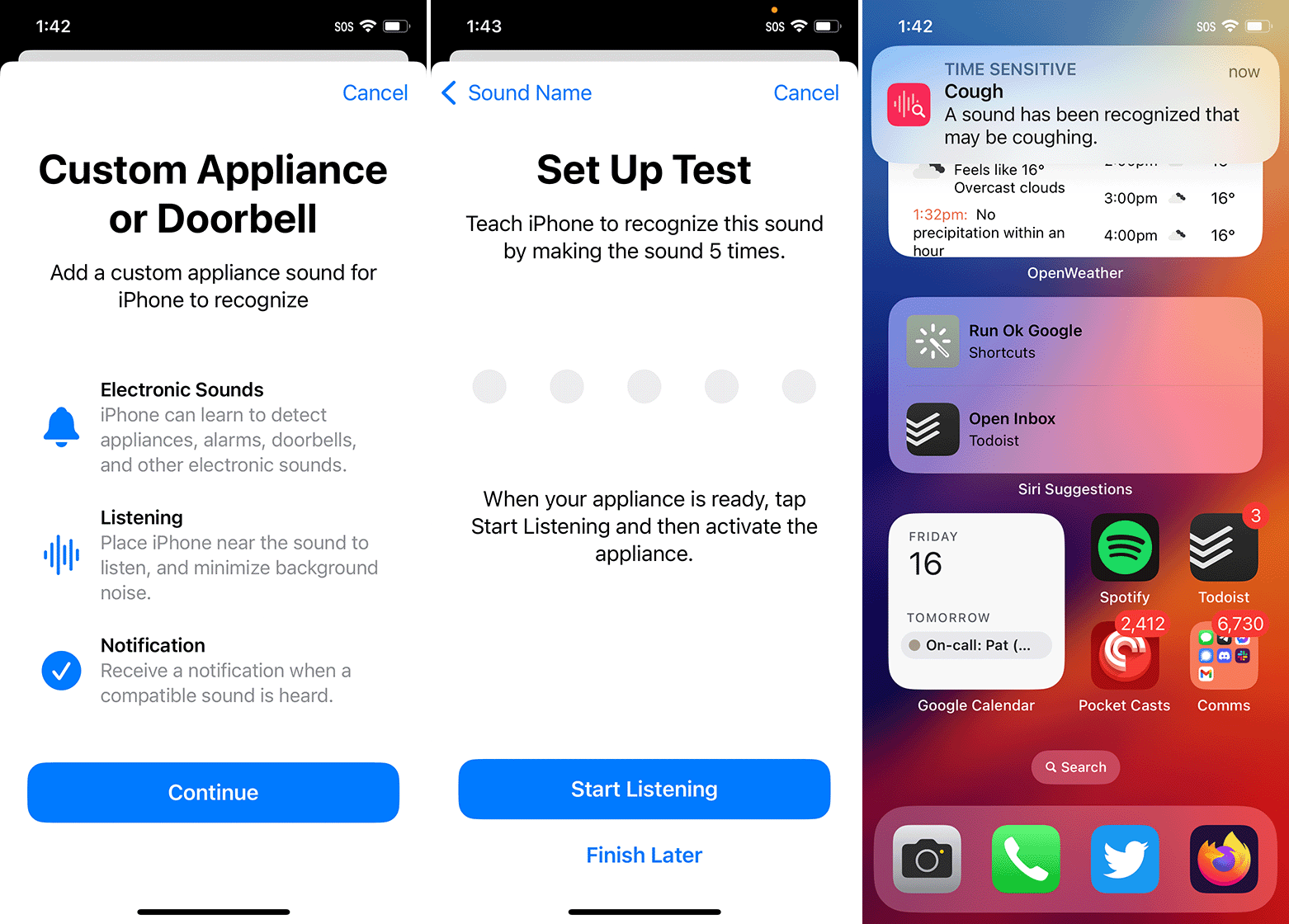
To add custom options, tap ‘Custom Alarm’ or ‘Custom Appliance or Doorbell’ and then follow the on-screen steps to teach the sound to your iPhone.

Once you have your sounds set up the way you want, you can close the Settings app and go about using your iPhone as normal. The iPhone will notify you when it detects one of your selected sounds.

Android – Sounds Notifications

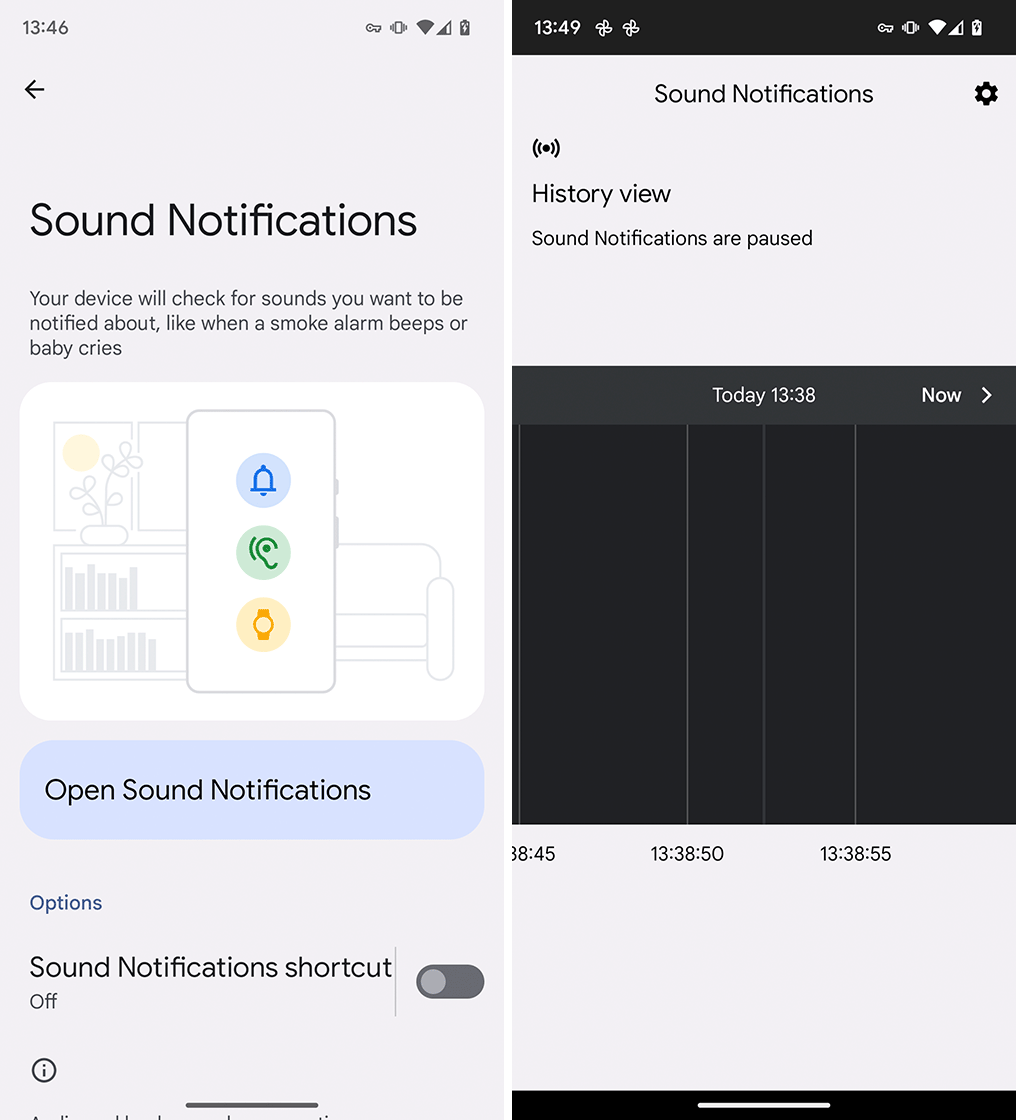
To start, you’ll need to open Settings > Accessibility > Sounds Notifications (note that the location may change depending on the manufacturer of your phone, and you may need to install the app from the Play Store).

You’ll be greeted with a screen showing a big ‘Open Sound Notifications’ button and below is an option to add a shortcut to Sound Notifications. Shortcuts can be either an on-screen accessibility option, or you can hold down both volume keys to trigger it.

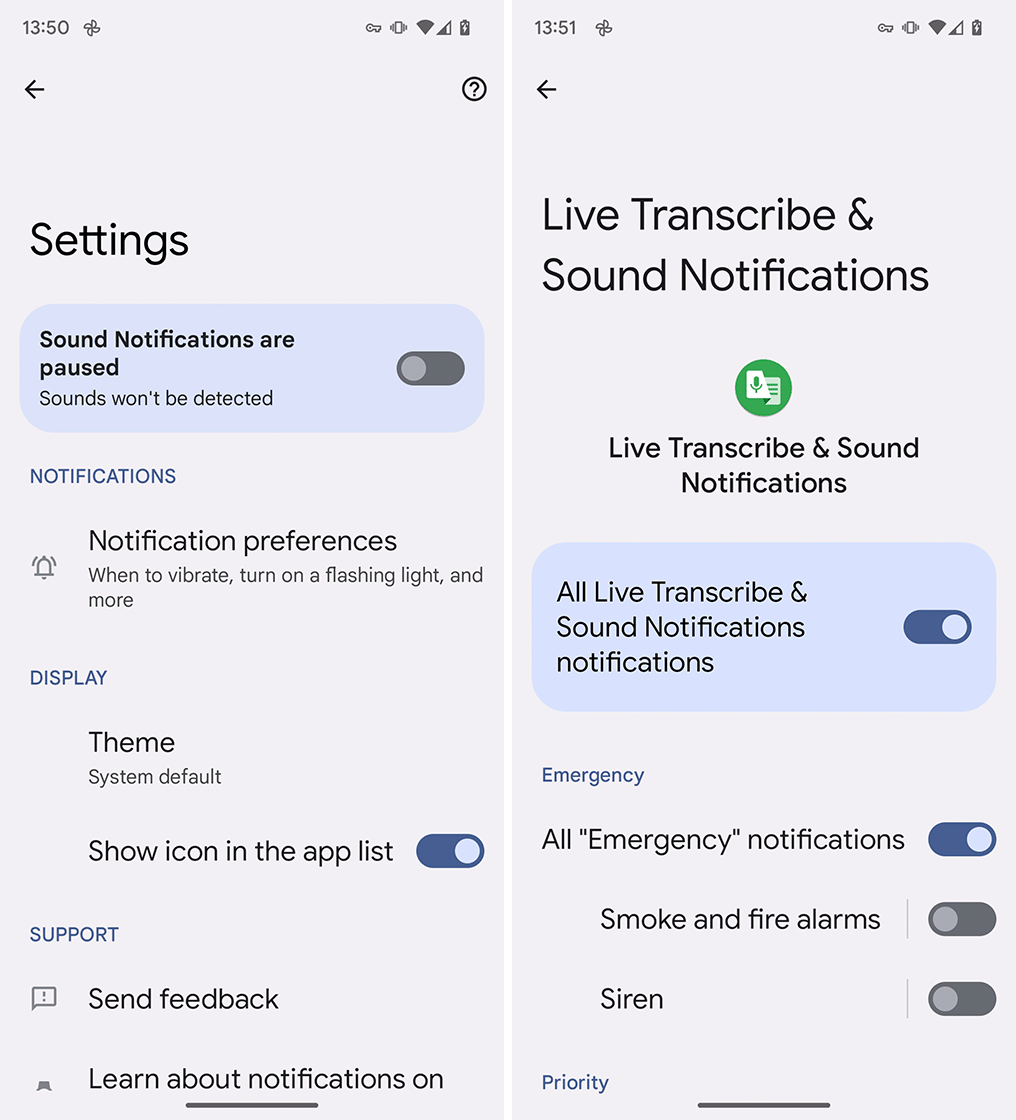
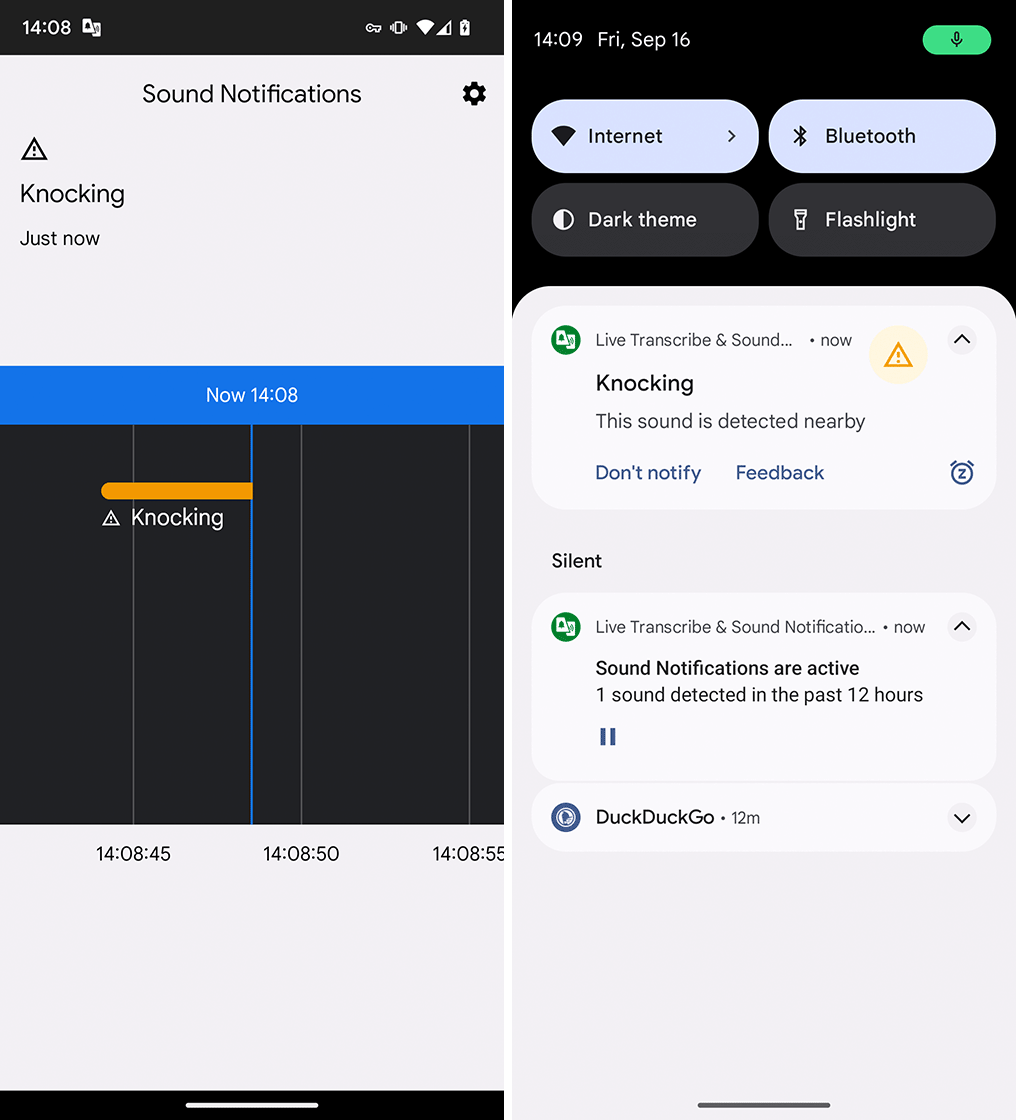
Tapping ‘Open Sound Notifications’ brings you to another screen that shows your history, which can be helpful for reviewing which sounds your phone heard. But, we’ll come back to this — next, tap the gear icon in the top right corner. This brings you to the Sound Notifications settings menu — tap the highlighted toggle at the top to turn on Sound Notifications (when you do, you should see the green microphone indicator appear on screen to show the mic is active for Sounds Notifications).

To customize what Sound Notifications will listen for, tap the highlighted ‘Sound Notifications are active’ bubble. You should see a list of sounds split into ‘Emergency,’ ‘Priority,’ and ‘Appliance and other.’ Each section includes different sounds you can turn on and off, like smoke and fire alarms, baby sounds, appliance beeping, landline phones ringing, and, importantly, doorbells.

Once you’ve turned on all the sounds you want your Android phone to listen to, head back to the Settings page. There are a few things worth checking before you finish up — for example, the ‘Show icon in the app list’ toggle, which is helpful if you plan to use Sound Notifications a lot. You can also tap ‘Notification preferences’ to customize what happens when the phone hears a specified sound — for example, whether you receive notifications on a connected watch, or whether the LED camera flash turns on to give you a visual notification.

With everything customized the way you want, you can head back to the Sound Notifications screen, which show now say ‘Live view’ with a scrolling timeline that will mark when the phone hears certain sounds. You can now start using your phone as normal, and it will notify you when it detects any of the specified noises.

It’s worth noting that Sound Notifications adds a permanent notification to the notification drawer that shows that it’s running (I set mine to ‘Silent’ so it appears minimized below my other notifications). You can use that notification to pause listening when you don’t need it anymore.

Categories
Mobile Syrup

How to view/restore deleted iMessages in iOS 16

If you’ve updated to iOS 16, you’re probably excited about the ability to delete and edit messages, but what happens if you delete the wrong thing?

Well, don’t worry because Apple has made it relatively easy to recover your deleted messages.

Just open the Messages app and tap on ‘Edit’ in the top left corner. Some users might have a button that says ‘Filter’  here instead, but you can tap on it and it will take you to the same place.

From that drop-down menu, select ‘Show Recently Deleted.’ After that, you’ll be shown a list of all your deleted conversations, and you can pick what ones to recover.

It”s important to note that these recovered conversations are only available for up to 40 days after you delete them before they’re automatically remvoed.

Source: Apple

Categories
Mobile Syrup

GTA VI footage appears online in massive leak

What looks like very early footage of Grand Theft Auto VI (GTA VI) has leaked online.

A user with the online handle ‘teapotuberhacker’ posted a substantial 3GB zip file containing 90 leaked GTA VI videos to GTAForums alongside the message, “It’s possible I could leak more data soon, GTA 5 and 6 source code and assets, GTA 6 testing build.”

At the time of publication, the link to the zip file is still active on GTAForums.

The clips are now widely available on Twitter, YouTube and TikTok, and show off what seems to be an alpha build of GTA VI that includes voice conversations between characters, gunplay and more.

For example, a video posted to YouTube featuring the early in-development leaked footage shows a female character named Lucia robbing a restaurant. The leaked clips also offer a look at GTA series staples like a seedy strip club, a police chase and the gunplay the series is know for. Overall, the leaked footage hints that GTA VI will likely play very similar to GTA V, though the title’s on-foot controls seem to expanded significantly.

The leak also appears to confirm GTA VI’s fictional Miami setting, Vice City, and that it will feature a male and female main character.

While Rockstar has not officially confirmed this leak is legitimate, Bloomberg reporter Jason Schreier recently tweeted that his sources at the developer have confirmed that the leak is “indeed real.”

It’s unclear how the videos leaked or who teapotuberhacker is. Rockstar is notorious for its tight security surrounding its in-development games.

Rockstar and its publisher Take-Two confirmed GTA VI is in development earlier this year but didn’t offer a release window.

GTA V was first dropped on the Xbox 360 and PlayStation 3 in 2013 and was recently re-released on the Xbox Series X and PlayStation 5.

Image credit: Rockstar

Source: GTAForums ‘teapotuberhacker, @jasonschreier Via: IGN, The Verge

Categories
Mobile Syrup

What do you think of the iPhone 14 Pro’s ‘Dynamic Island?’

Apple’s iPhone 14 Pro and iPhone 14 Pro Max are now available, and while they’re not a significant upgrade from the iPhone 13 Pro, they do come with one notable design change: the ‘Dynamic Island.’

The Dynamic Island looks undeniably cool. At its base lies a display hole punch that houses the smartphone’s Face ID sensor and front-facing camera. What makes it unique, though, is that it dynamically shifts depending on what app you have open. Whether you’re listening to music, receiving a call, or using Apple Maps, the Dynamic Island will expand and change, giving you instant access to related widgets.

However, the unique display cutout is pretty limited in its current state and doesn’t work with notable Apple apps like iMessage or most third-party apps. I find the Dynamic Island pretty cool, and it makes me want to buy the iPhone 14 Pro, but I’m often a sucker for unique smartphone features like this.

Let us know in the comments below what you think of Apple’s new Dynamic Island.

Also, if you really like Dynamic Island and want the chance to win a free iPhone 14 Pro, enter our contest. 

Categories
Mobile Syrup

What are Safari Tab Groups and how to share them on iOS 16

Apple introduced Safari Tab Groups to the iPhone last year with the release of iOS 15. The feature allowed users to group multiple Safari Tabs together and create a new tab group, which could be synced to the cloud, giving you access to your tab groups on other Apple devices, like a MacBook, or iPad, for example.

Now, with iOS 16, Apple is adding the ability to share Tab Groups, making research and collaboration among peers easier. Once shared, your peers can add tabs of their own to the group, and the same will reflect for you as well. So whether you’re working on a group project for school, or planning a trip abroad with your friends, everyone with the Shared Tab Group can contribute towards research visible to all.

Firstly, let’s go over how you can create tab groups on Safari on iPhone:

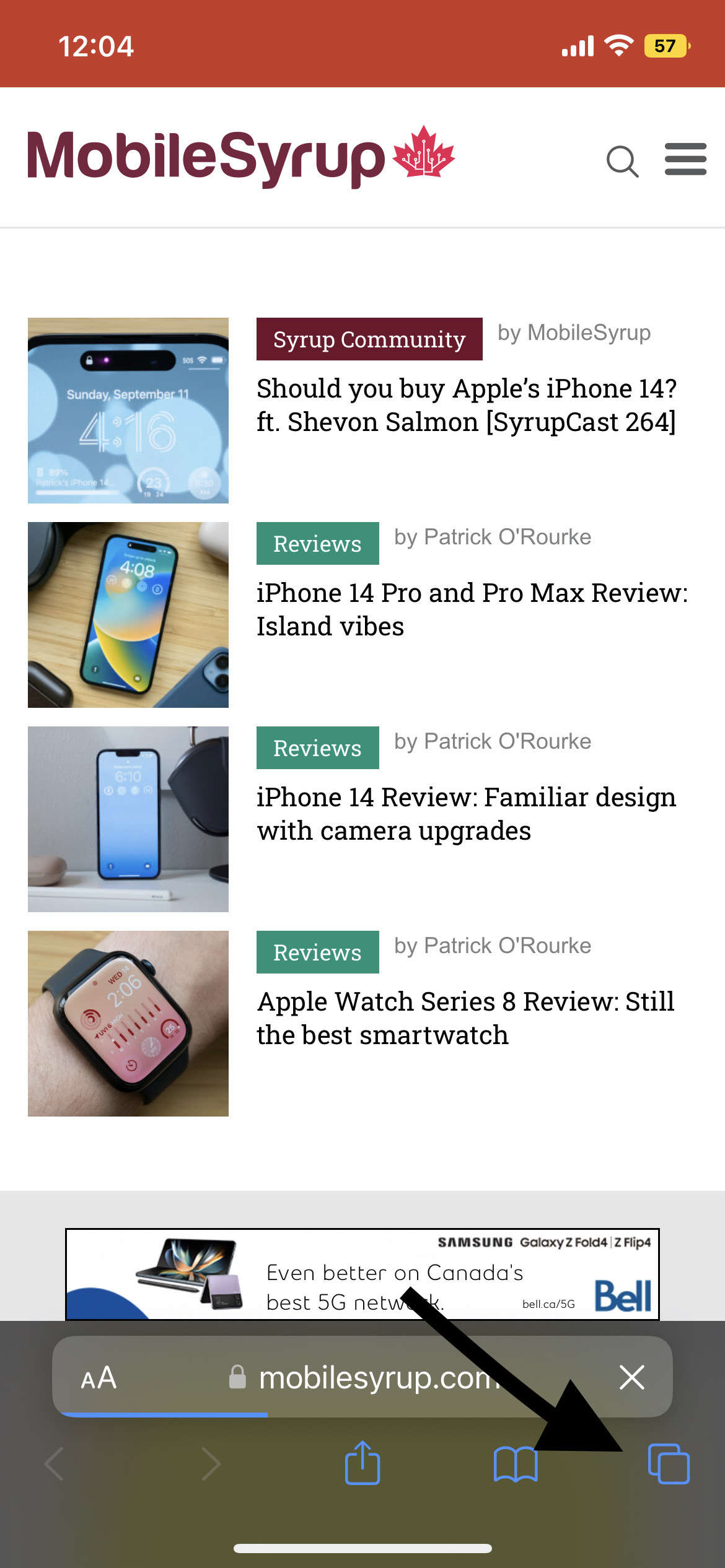
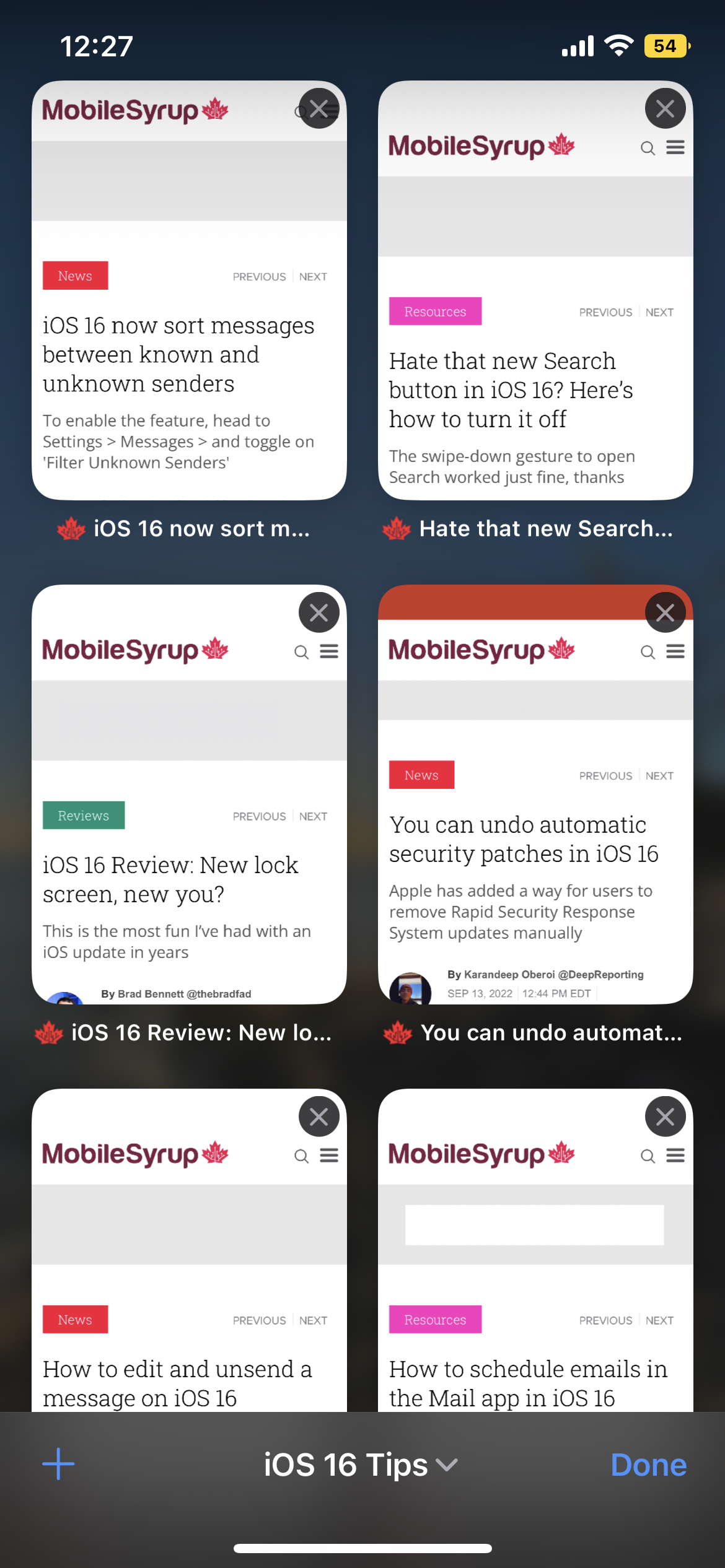
  • Open Safari and click on the ‘Tabs’ on the bottom right.
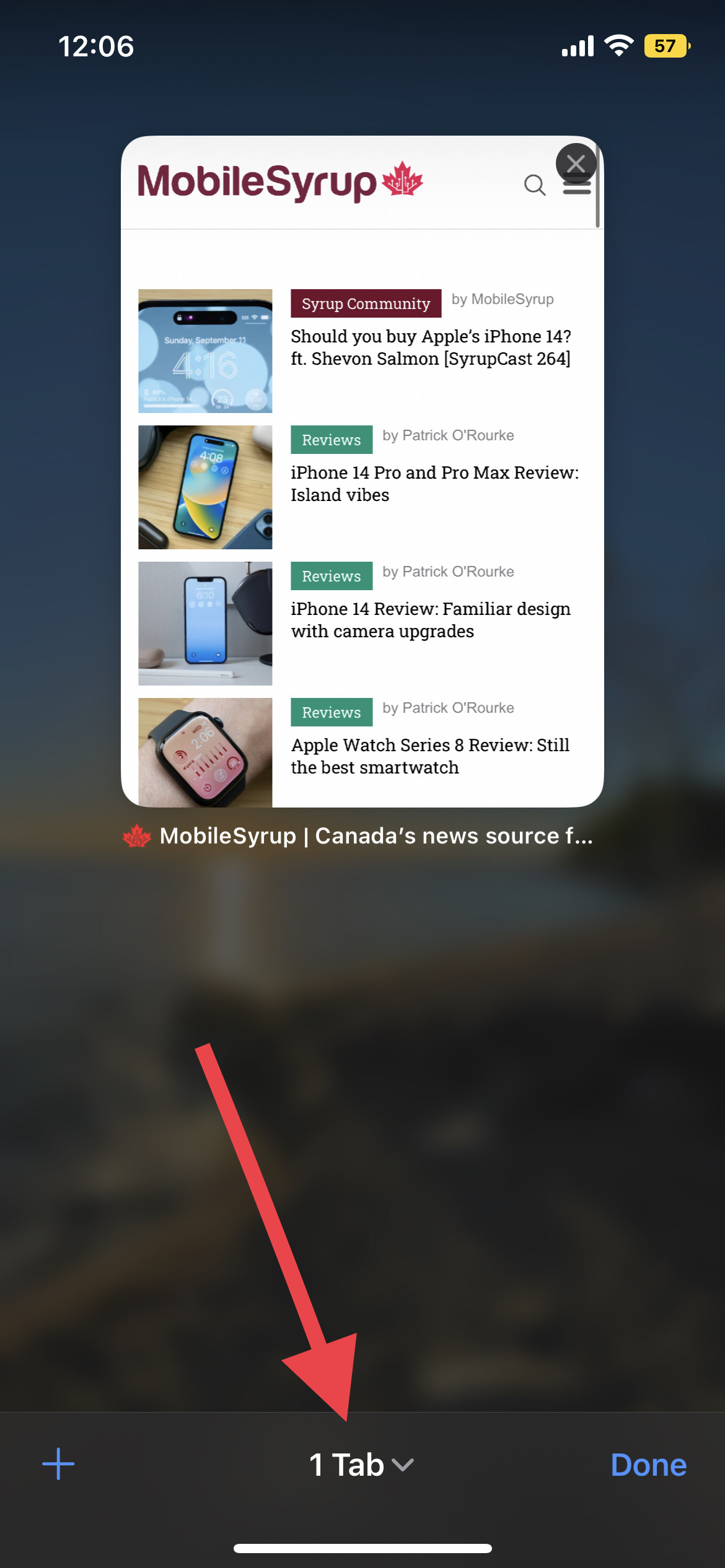
  • Tap on the middle bar that mentions how many tabs you currently have open.
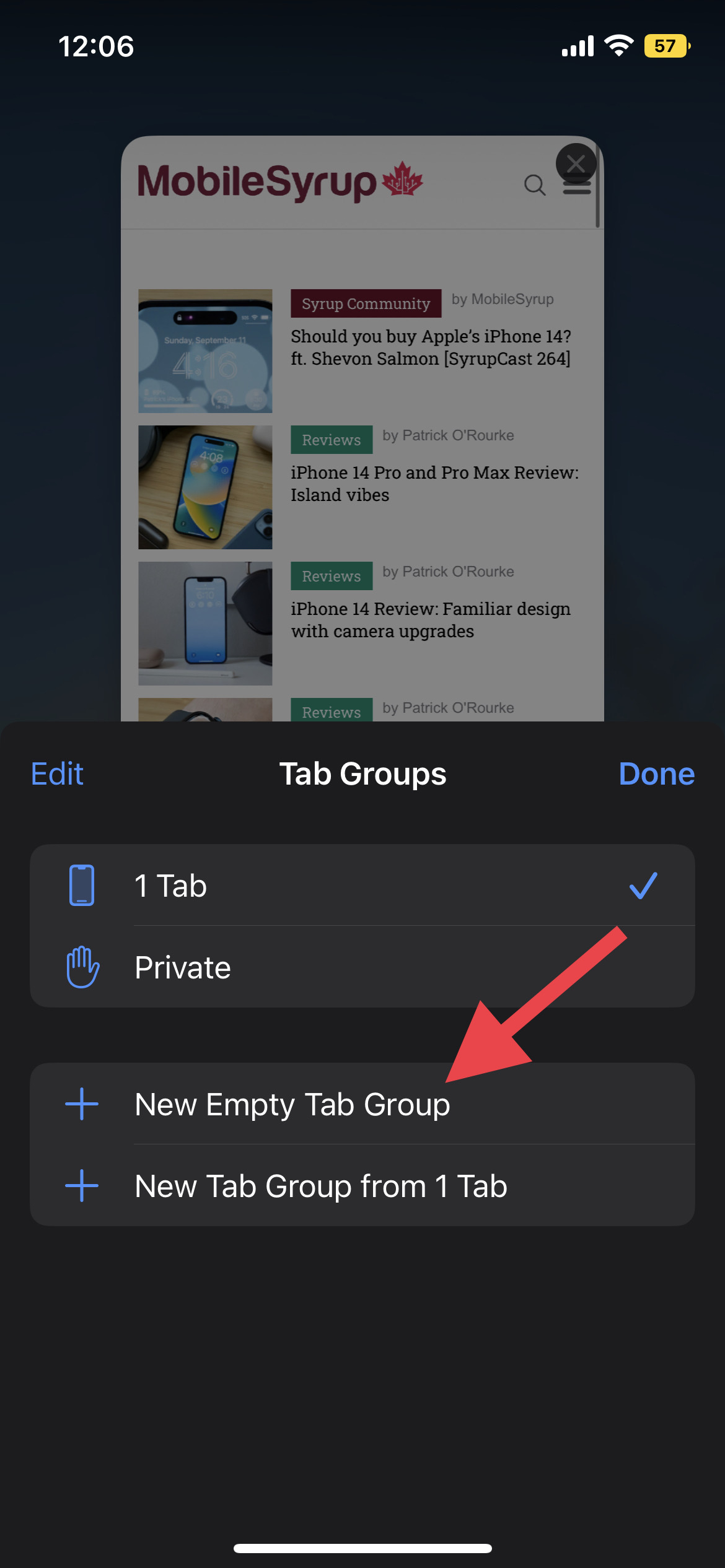
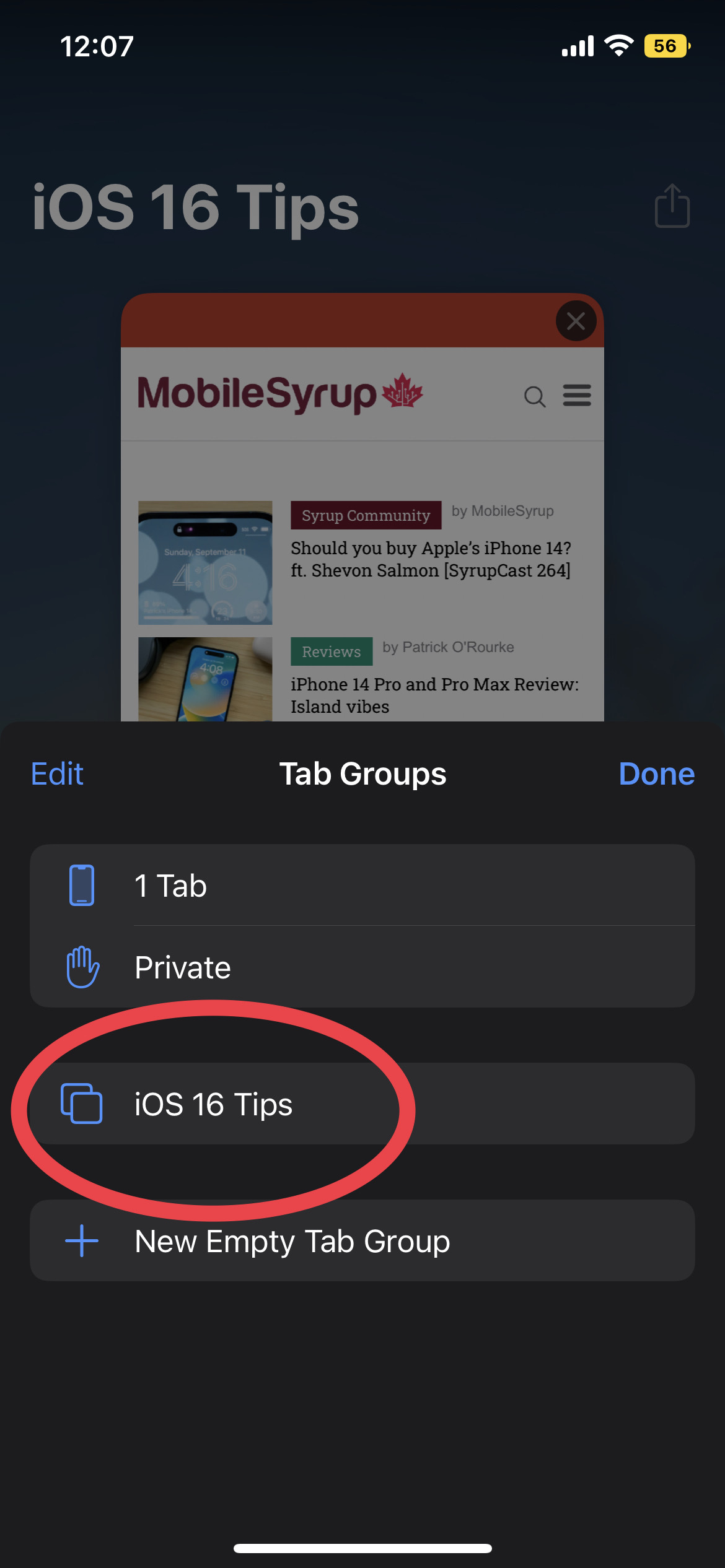
  • Tap on ‘New Empty Tab Group’ and name it whatever you’d like. In my case, I named it “iOS 16 Tips.”

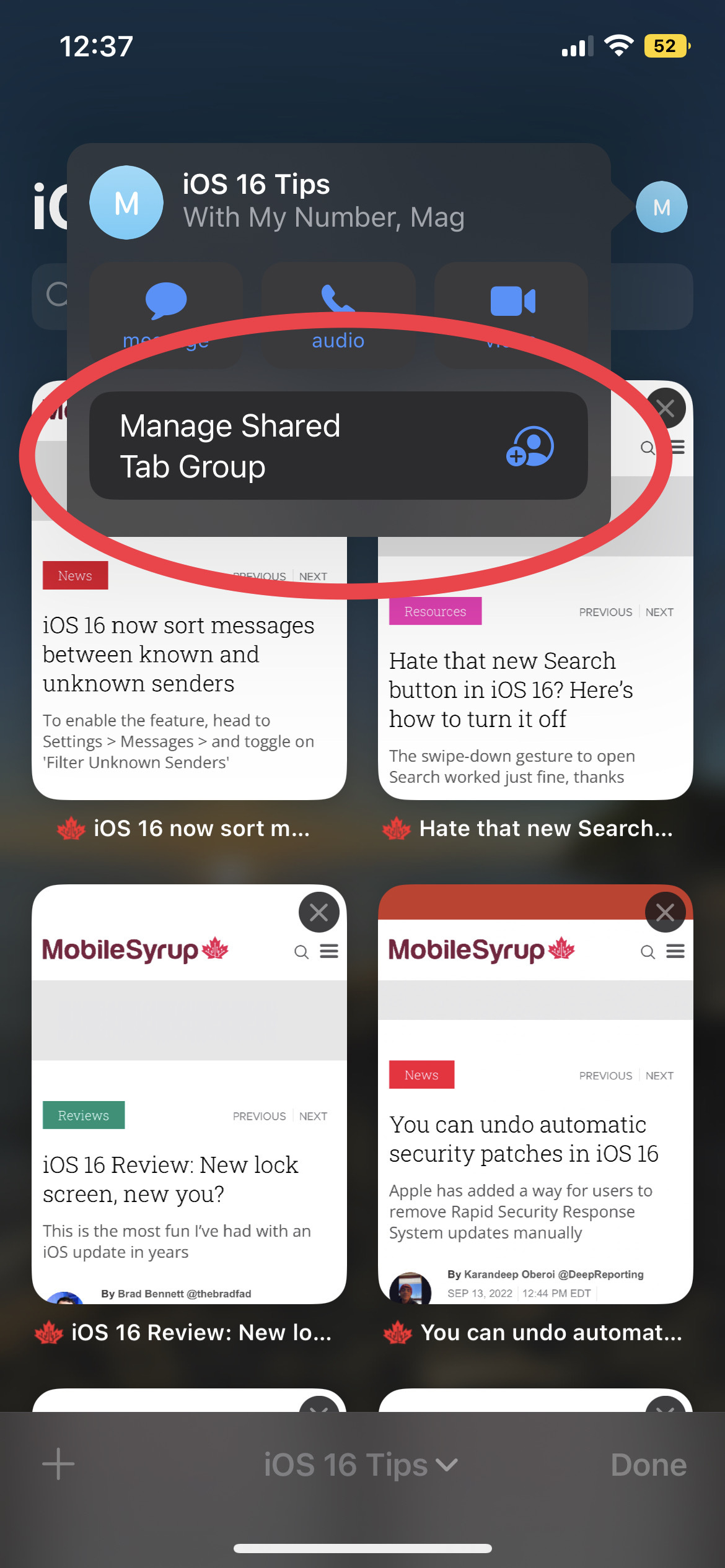
Check out the screenshots below for visual cues:

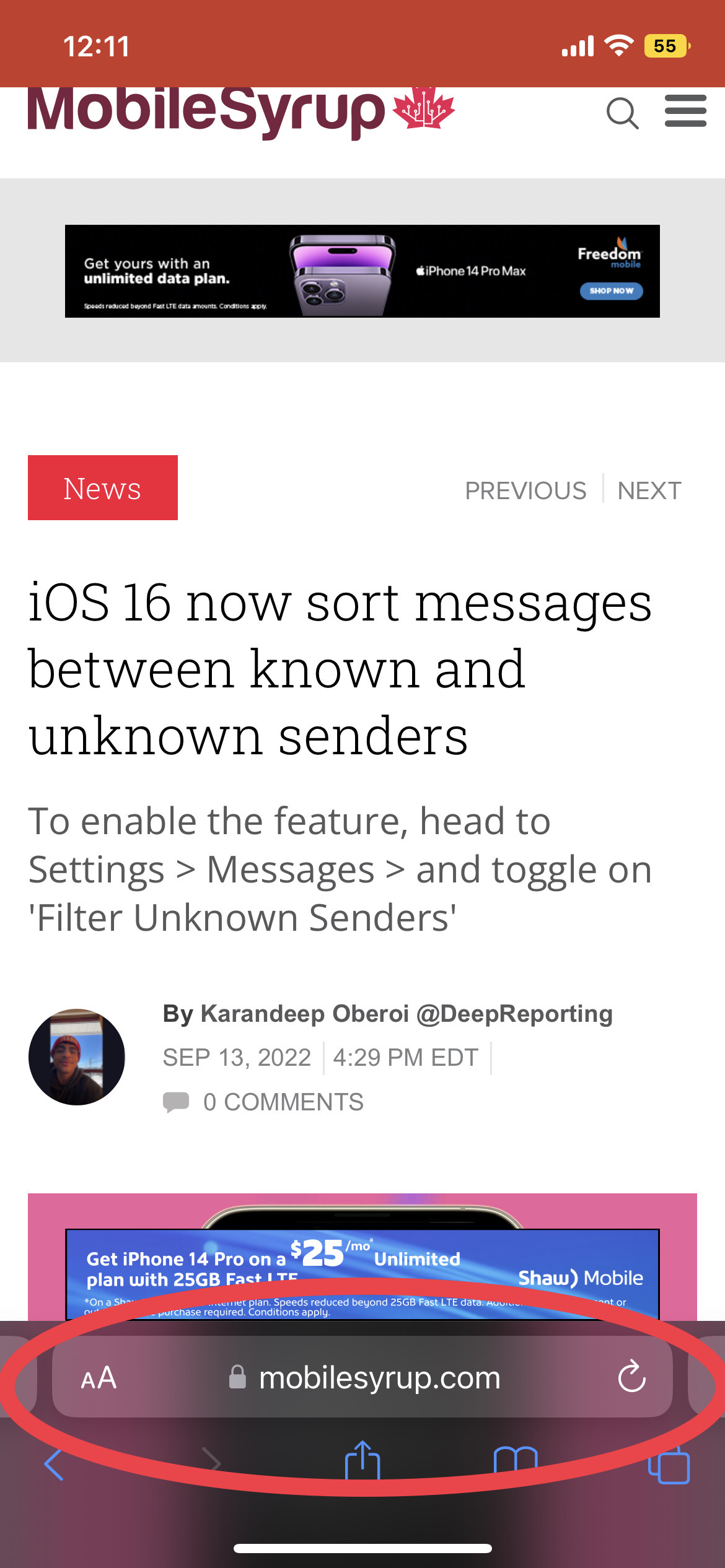
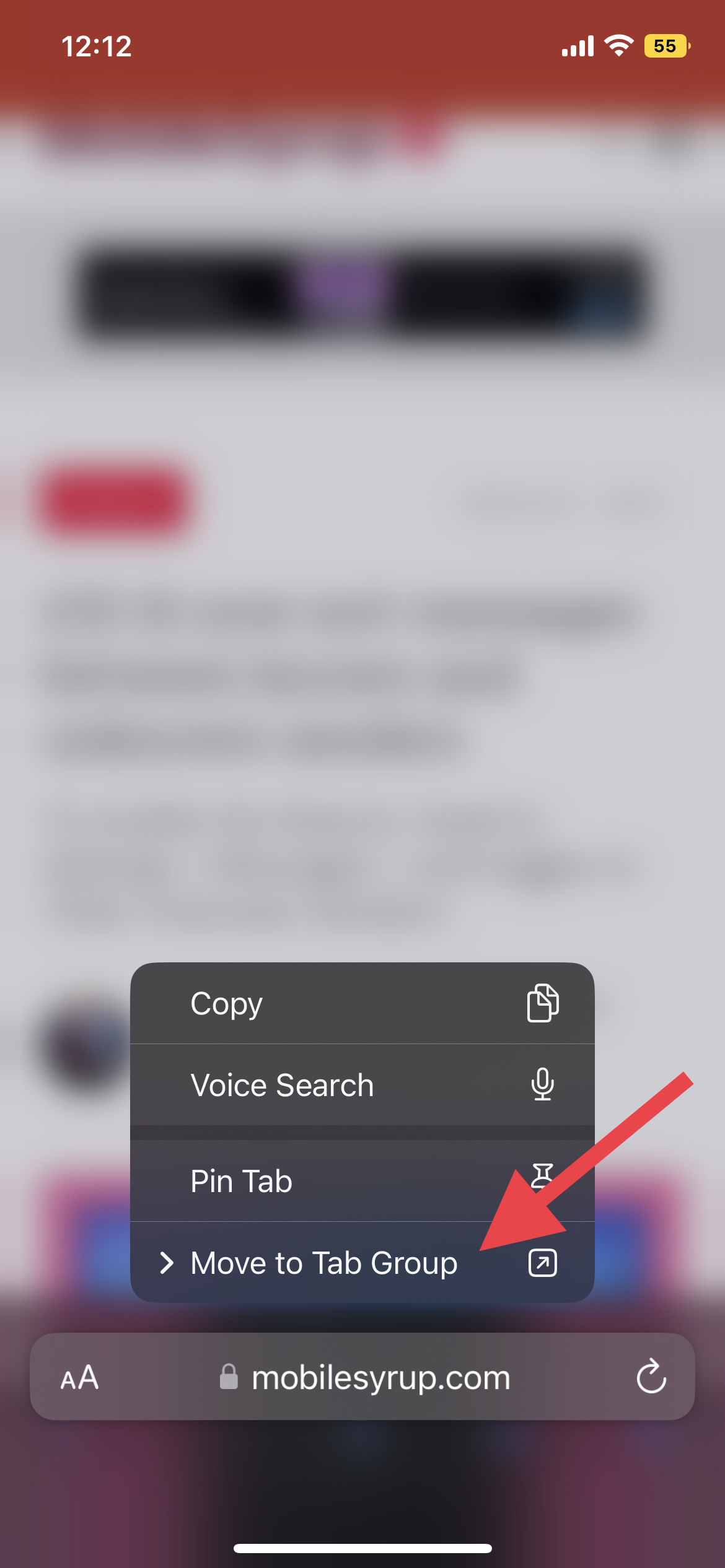
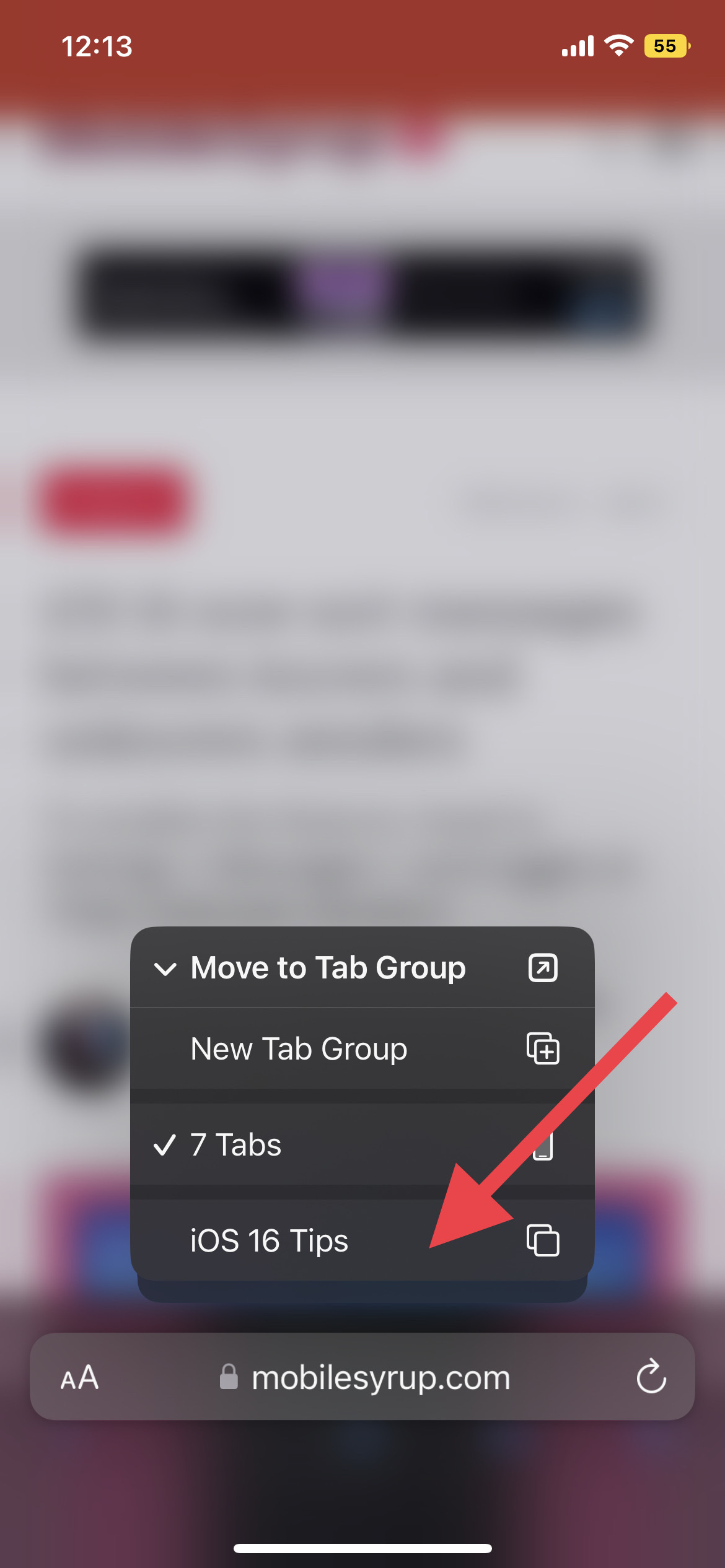
From there on, you can continue your research, and whenever you stumble upon a page that you think would fit in the tab group you created, long press the page URL, tap on ‘Move to Tab Group’ and select whatever you named your Tab Group. When multiple pages are added to the Tab Group, it should look a little something like the last screenshot below:

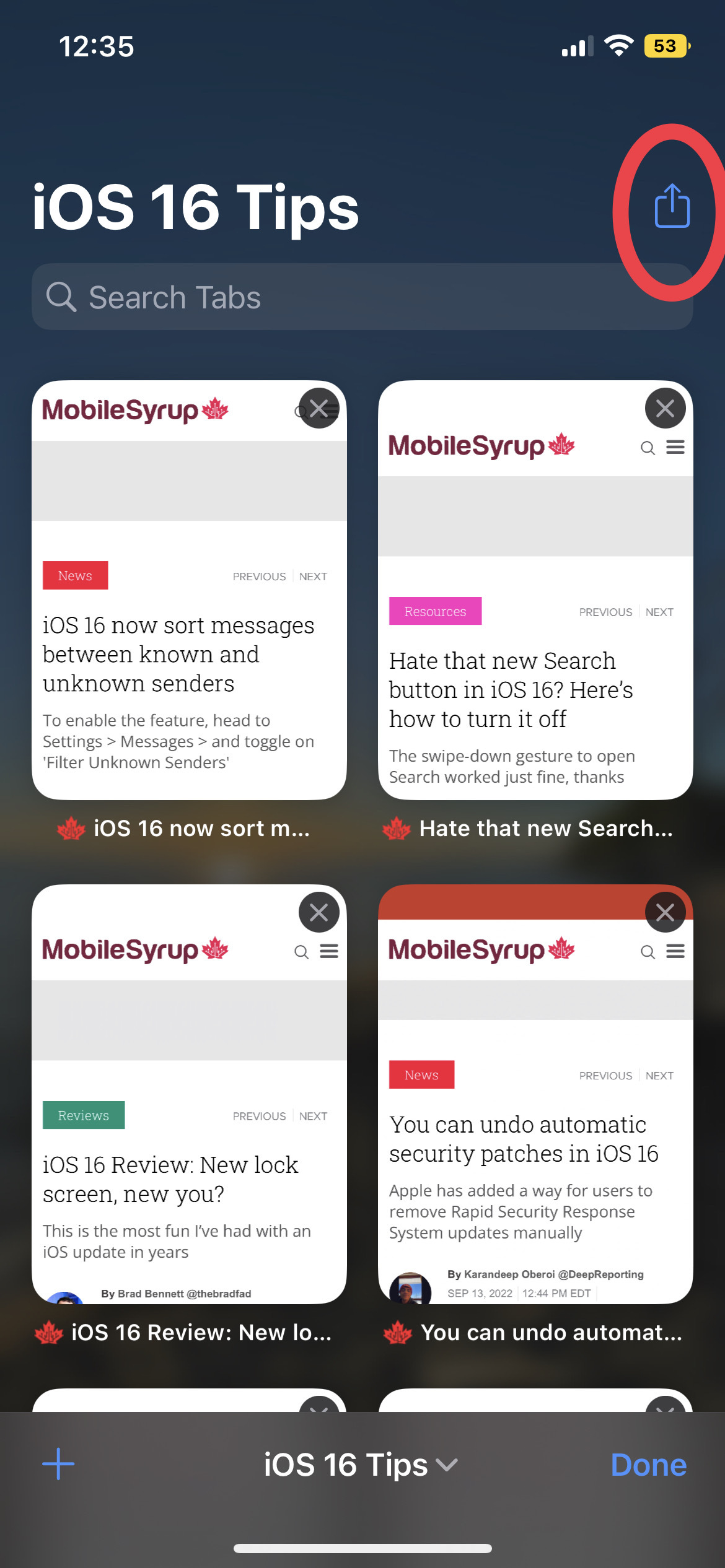
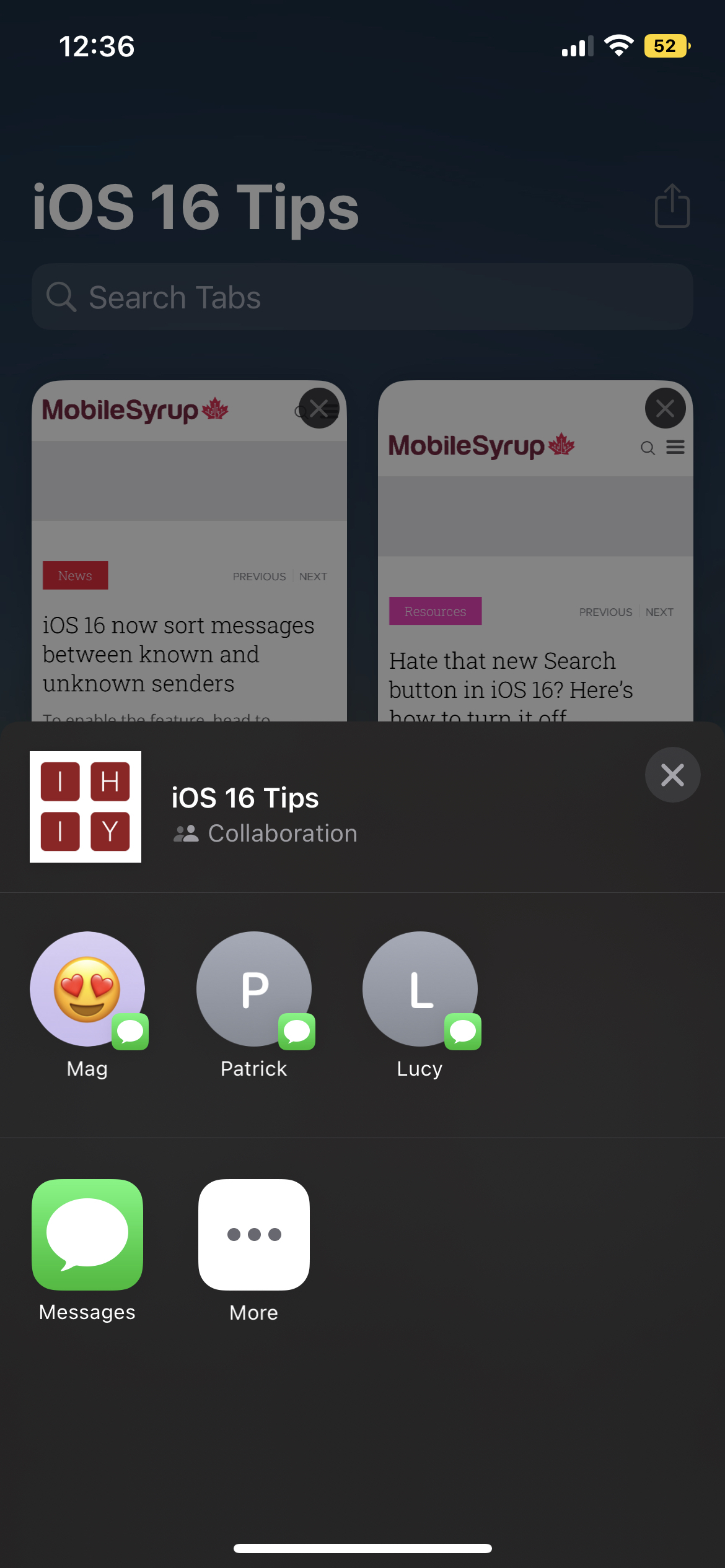
What you’ve read up until now can be done with devices running iOS 15. iOS 16, however, as mentioned above, iOS 16 adds the ability to share these tabs with your peers. All you need to do is open the Tab Group, tap the ‘Share’ button on the top right and select the person to share the Tab Group with.

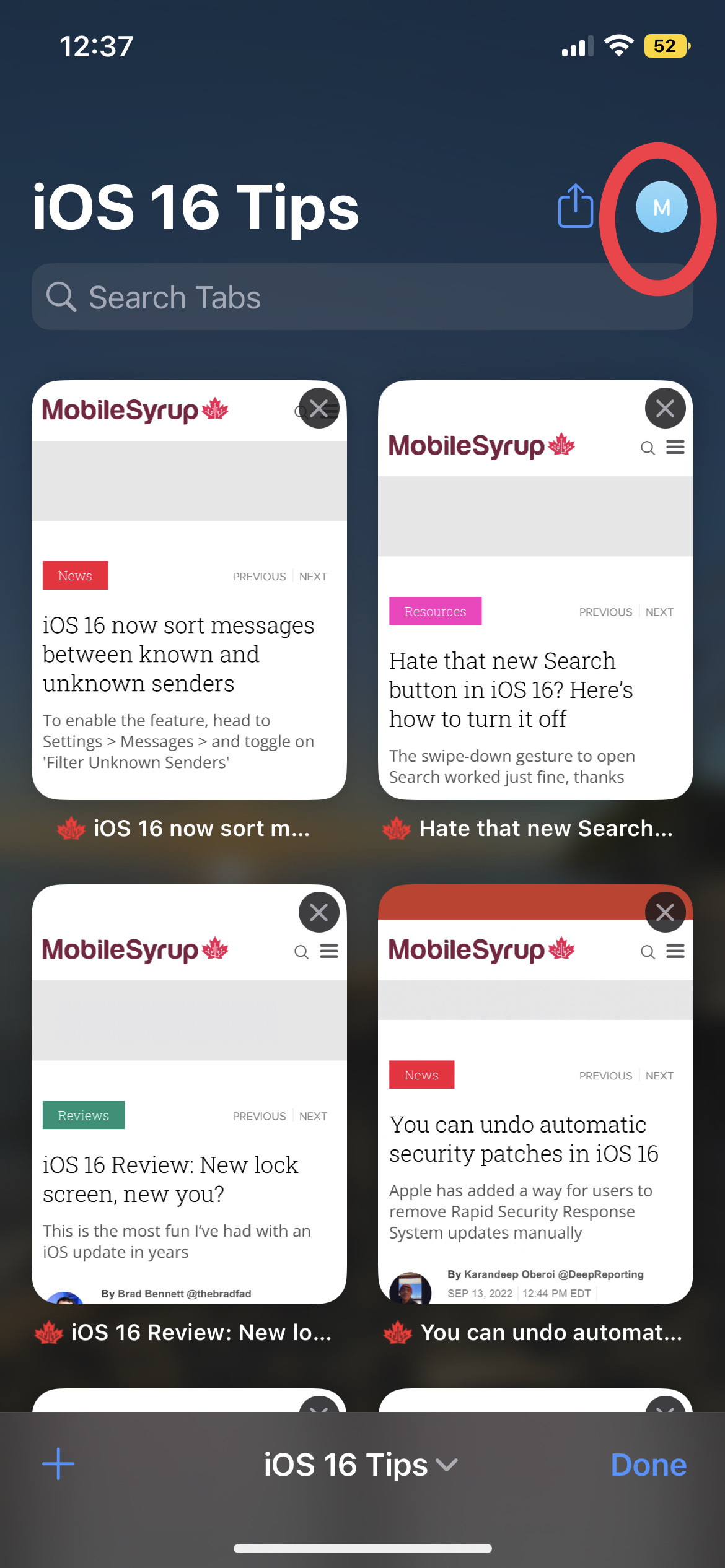
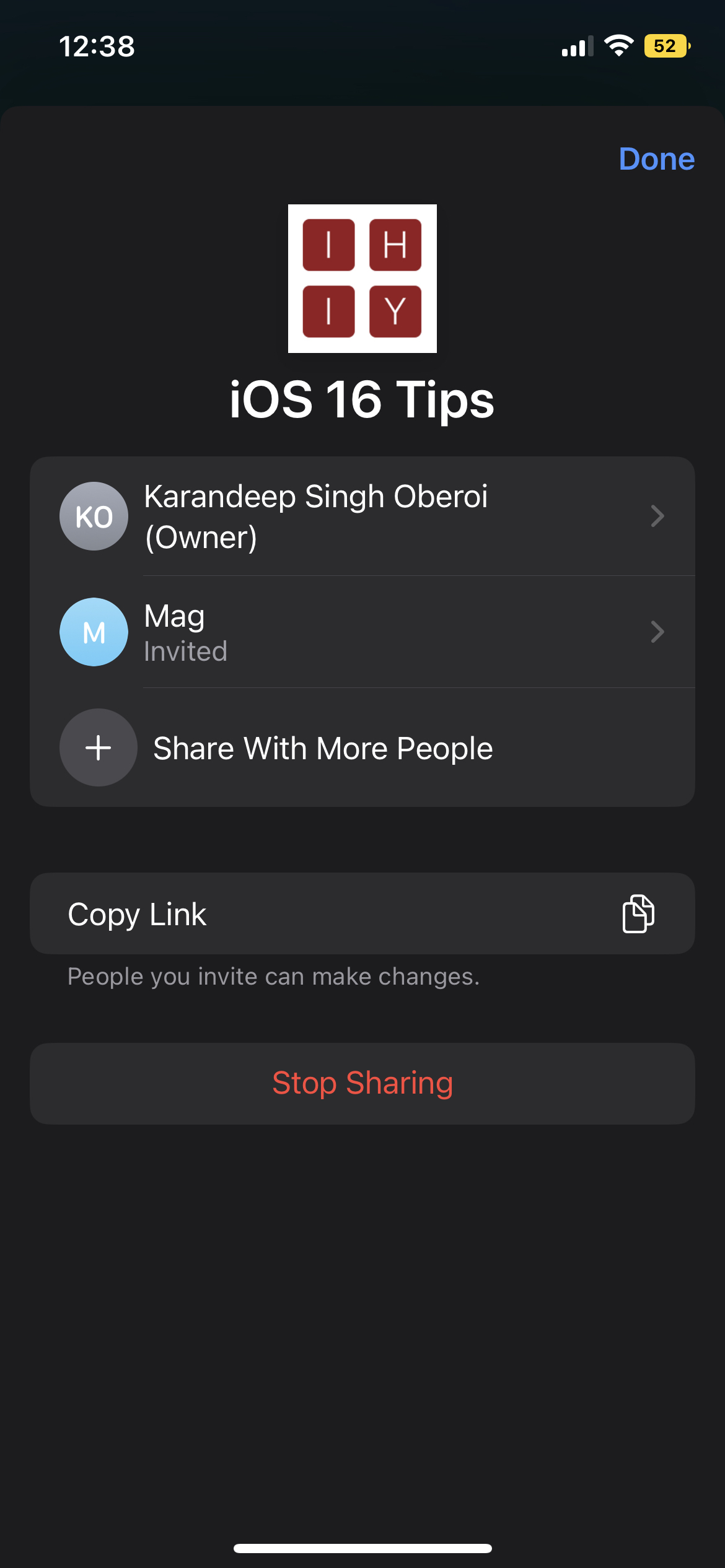
Once shared, you’ll notice that the share button has been replaced with the profile image of the person you shared the Tab Group with. By tapping their profile icon, you can manage the shared Tab Group and add/remove people from it.

Check screenshots below for visual cues:

Categories
Mobile Syrup

Streaming in Canada on Amazon Prime Video, Apple TV+, Crave and Netflix [Sept. 12-18]

Every week, MobileSyrup outlines some of the most notable movies and TV shows that recently hit Canadian streaming platforms.

Our ‘Streaming in Canada’ column typically focuses on new content from Amazon Prime Video, Crave and Netflix, but other services like Apple TV+ and Disney+ are mentioned when relevant. Premium video on demand (PVOD) platforms are also fair game as movies continue to come to digital early amid the COVID-19 pandemic.

Finally, we’ll highlight shows or movies that are made by Canadian companies, involve notable Canadian cast or crew and/or are filmed in Canada.


Amazon Prime Video

The Grand Tour: A Scandi Flick (Season 5) [Amazon Original]

Jeremy, Richard and James head to the Scandinavian Arctic Circle, exploring Cold War sub bases, frozen lake race tracks and more.

Amazon Prime Video Canada release date: September 16th, 2022 (first episode, new episodes every Friday)
Genre: Motoring
Runtime: TBA (around one hour each)

Stream The Grand Tour here.

An Amazon Prime Video subscription is included at no additional cost with an Amazon Prime membership, which costs $99/year.

The full list of movies and shows hitting Prime Video Canada this month can be found here.


Apple TV+

Sago’s Mini Friends [Apple Original]

Based on the popular Sago Mini World app, this preschool series follows Harvey the floppy-eared dog and his best friends as they express true gratitude for everything in their life through kindness, humour and original songs.

It’s worth noting that Sago’s Mini Friends was produced by Spin Master Entertainment and animated by Brown Bag Films, two Toronto-based companies.

Apple TV+ Canada premiere date: September 16th, 2022 (first episode, new episodes every Friday)
Genre: Animated, children’s
Runtime: 10 episodes (23 minutes each)

Stream Sago’s Mini Friends here.

An Apple TV+ subscription costs $5.99 in Canada.


Crave

The Handmaid’s Tale (Season 5)

Following the events of Season 4, June faces the consequences of her actions while Serena attempts to raise her profile in Toronto.

Based on Ottawa-born writer Margaret Atwood’s novel of the same name, The Handmaid’s Tale was created by Bruce Miller (Eureka) and stars Elizabeth Moss (Mad Men), Yvonne Strahovski (Chuck), Pointe-Claire, Quebec’s Amanda Brugel (Kim’s Convenience), Bradley Whitford (The West Wing), Ann Dowd (The Leftovers) and Samira Wiley (Orange is the New Black).

It’s worth noting that The Handmaid’s Tale is filmed in Toronto.

Crave premiere date: September 14th, 2022 (first episode, new episodes every Wednesday at 9pm ET)
Genre: Drama
Runtime: 10 episodes (around one hour each)

Stream The Handmaid’s Tale here. It’s important to note that while Crave has had exclusive streaming rights to the series until now, Season 5 is also streaming on Prime Video.

standard Crave subscription is priced at $19.99/month, with Starz costing an additional $5.99/month. A mobile-only subscription is also available for $9.99/month.

The full list of movies and shows hitting Crave this month can be found here.


Netflix

Cyberpunk: Edgerunners [Netflix Original]

From the popular anime company Studio Trigger (Kill la Kill) comes this spin-off of CD Projekt Red’s Cyberpunk 2077 video game.

The series follows a street kid named David (Demon Slayer‘s Zach Aguilar) who tries to survive the dangerous and futuristic Night City by becoming a mercenary outlaw known as a cyberpunk.

Netflix Canada premiere date: September 13th, 2022
Genre: Anime
Runtime: 10 episodes (23 to 26 minutes each)

Stream Cyberpunk: Edgerunners here.

Do Revenge [Netflix Original]

Down on their luck, two high school students agree to go after each other’s bullies.

Do Revenge was directed by Jennifer Kaytin Robinson (Someone Great) and stars Camila Mendes (Riverdale), Maya Hawke (Stranger Things), Sophie Turner (Game of Thrones) and Sarah Michelle Gellar (Buffy the Vampire Slayer).

Netflix Canada premiere date: September 16th, 2022
Genre: Comedy
Runtime: 1 hour, 58 minutes

Stream Do Revenge here.

Sins of Our Mother [Netflix Original]

This documentary is based on the real investigation into the disappearance of Lori Vallow’s kids, which uncovered an apocalyptic ideology and murder.

Netflix Canada premiere date: September 14t, 2022
Genre: True crime documentary
Runtime: Three episodes (41 to 50 minutes)

Stream Sins of Our Mother here.

A ‘Basic’ Netflix subscription costs $9.99/month, a ‘Standard’ subscription (HD-supported) costs $16.49/month and a ‘Premium’ membership is priced at $20.99/month (4K-supported).

The full list of movies and shows hitting Netflix Canada this month can be found here.


What are you planning on streaming this week? Let us know in the comments.

For more suggestions, check out last week’s Streaming in Canada column.

Image credit: Netflix

Categories
Mobile Syrup

Telecom news roundup [Sept 10-16]

Another Saturday, another weekly telecom roundup.

This week’s roundup focuses on Rogers’ merger with Shaw (the roundups would be incomplete without it), Bill C-11, and Apple’s new iPhone 14 series. Let’s get into it.

Business

Two months after Rogers’ nationwide service outage, Hamilton residents woke up to yet another service disruption. However, unlike the July outage, Rogers was quick to state a local fire impacted wireline services only, and service was back up in a couple of hours.

The trial between the Commissioner of Competition and Rogers and Shaw is roughly seven weeks away, and the parties appear to be having difficulty sharing information with one another. The Competition Commissioner and Rogers have filed separate motions with the Tribunal, arguing the other is withholding information it needs for trial.

The Commissioner of Competition replied to one of Rogers’ requests about statements on the sale of Freedom Mobile to Vidéotron. In his application, the Commissioner says Rogers’ request focuses on information that’s “out of context.”

Telus is proposing changes to home phone services for its Quebec customers as it migrates from copper facilities to fibre. The company filed two applications with the Canadian Radio-television and Telecommunications Commission (CRTC) detailing changes to its pay-per-use billing option for three-way calling and call return, and its call screening service.

Xplornet is a thing of the past. Well, at least the name is. The rural broadband provider has rebranded to Xplore. The company says the change represents its identity, vision and future.

Bell says it will merge two internet service providers (ISPs) it recently acquired. At BMO’s 23rd annual Media and Telecom conference earlier this week, Glen LeBlanc, Bell’s chief financial officer, shared Bell will consolidate Distributel with EBOX. Bell announced its plans to acquire Distributel earlier this month and has yet to receive regulatory approval.

More on Bell, the company’s subsidiary, Bell Technical Solution, was hacked by ransomware group Hive. The group shared the details on its leak blog earlier this week, stating it accessed the information on August 20th.

Government

The Senate Committee on Transport and Communications held several panels concerning Bill C-11 over the past week. Known as the Online Streaming Act, the bill faces ongoing concerns on how it will impact user-generated content. Canada’s Privacy Commissioner, Philippe Dufresne, says the bill should also consider user privacy.

Infrastructure

Bell continues expanding its fibre footprint under its capital expenditure acceleration program with an announcement benefiting Barrie residents. The telecom giant says it will expand access to 40,000 locations in the city.

Deals

Chatr Mobile is offering new customers 2GB of bonus data on select plans until September 19th. More details are available here.

Not much of a deal, but more of a reminder for Canadian Apple fans, the iPhone 14 SE series is now available in Canada. Read more about getting your hands on one of the new devices here.