Categories
Mobile Syrup

Here are the games hitting PlayStation Now in February 2022

PlayStation has revealed the latest batch of games coming to its PlayStation Now streaming service in February.

On February 1st, the following four games will join the PS Now catalogue:

  • Death Squared
  • Grand Theft Auto: Vice City — The Definitive Edition (available until May 2nd)
  • Little Big Workshop
  • Throughout the Darkest Times

PlayStation Now is available on PS4, PS5 and PC at a cost of $12.99/month, $34.99/three months or $79.99/12 months.

Find out what came to PlayStation Now in January here.

Image credit: Rockstar 

Source: PlayStation

Categories
Mobile Syrup

Microsoft’s Xbox Series X is now in stock on Amazon

If you’re still trying to get your hands on an Xbox Series X, the time you have been waiting for has arrived.

Amazon currently has Microsoft’s Xbox Series X in stock for $599.

This story will be updated when the Series X is no longer in stock.

MobileSyrup utilizes affiliate partnerships. These partnerships do not influence our editorial content, though we may earn a commission on purchases made via these links that helps fund the journalism provided free on our website.

Categories
Mobile Syrup

PlayStation sets Gran Turismo 7-focused State of Play for February 2

PlayStation has confirmed that it will hold a State of Play presentation on Wednesday, February 2nd that’s all about Gran Turismo 7.

The stream will kick off at 2pm PT/5pm ET and feature “just over” 30 minutes of footage from the upcoming racing sim, says Sony. This will be the company’s first State of Play of 2022, and most recent one since October 2021.

The Gran Turismo 7 State of Play will be streamed to PlayStation’s Twitch and YouTube channels.

Gran Turismo 7 is set to launch on PlayStation 4 and 5 on March 4th, 2022.

Source: PlayStation

Categories
Mobile Syrup

Your iPhone won’t suggest 2FA autofill if you’re on a phishing site

Apple is urging companies to send two-factor messages in a new, more secure format in a bid to curb phishing attacks, as first reported by 9to5mac.

Apple’s code-AutoFill feature makes it so that if a website or an app sends a two-factor authentication code via message, it will appear automatically as an AutoFill suggestion, something that scammers have reportedly started taking advantage of.

According to 9to5mac, when scammers trick people into clicking on fraudulent links, they take the login credentials and use them on the actual website that sends two-factor codes to the user, seeing the code displayed in the AutoFill suggestion gives the user a psychological feeling that the code is legitimate. This is where a new and more secure format of sending codes comes in.

With the new format, your iPhone will only offer AutoFill suggestions if the domain in the message and the domain of the website you’re on match. For example, let’s say you’re trying to log into a website that claims to be Twitter.com, but in reality, it’s a phishing link that reads Twitter.login.info.com, your device won’t offer you an autofill suggestion.

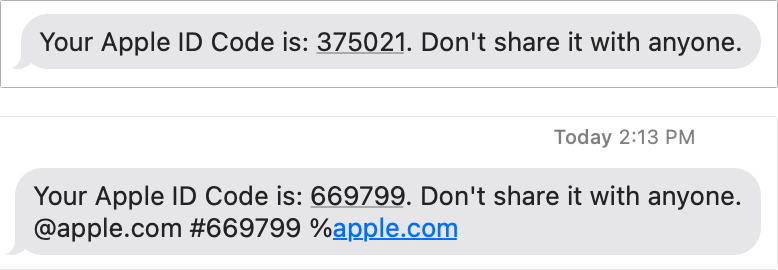
The new format, in comparison to the old one, looks something like this:

Image credit: Macworld

While this isn’t a foolproof method to deter scammers and phishing attacks, as it relies on the user noticing that the authentication code isn’t auto-filling like it normally would on legitimate websites, it is still a good step forward. Though dedicated authentication apps, like Google Authenticator, Microsoft Authenticator and Authy should serve you better.

Image credit: Shutterstock

Source: 9to5Mac

Categories
Mobile Syrup

Your iPhone won’t suggest 2FA autofill if you’re on a phishing site

Apple is urging companies to send two-factor messages in a new, more secure format in a bid to curb phishing attacks, as first reported by 9to5mac.

Apple’s code-AutoFill feature makes it so that if a website or an app sends a two-factor authentication code via message, it will appear automatically as an AutoFill suggestion, something that scammers have reportedly started taking advantage of.

According to 9to5mac, when scammers trick people into clicking on fraudulent links, they take the login credentials and use them on the actual website that sends two-factor codes to the user, seeing the code displayed in the AutoFill suggestion gives the user a psychological feeling that the code is legitimate. This is where a new and more secure format of sending codes comes in.

With the new format, your iPhone will only offer AutoFill suggestions if the domain in the message and the domain of the website you’re on match. For example, let’s say you’re trying to log into a website that claims to be Twitter.com, but in reality, it’s a phishing link that reads Twitter.login.info.com, your device won’t offer you an autofill suggestion.

The new format, in comparison to the old one, looks something like this:

Image credit: Macworld

While this isn’t a foolproof method to deter scammers and phishing attacks, as it relies on the user noticing that the authentication code isn’t auto-filling like it normally would on legitimate websites, it is still a good step forward. Though dedicated authentication apps, like Google Authenticator, Microsoft Authenticator and Authy should serve you better.

Image credit: Shutterstock

Source: 9to5Mac

Categories
Mobile Syrup

TekSavvy launches internet service in Ontario community of Bothwell

Internet service provider TekSavvy continues to spread its affordable connectivity footprint in Chatham-Kent, Ontario.

The provider has now launched its fibre-to-the-home service in the city’s Bothwell neighbourhood, giving a total of 480 homes and businesses access.

The service will deliver speeds of up to 1 Gigabit per second and offers unlimited usage.

“TekSavvy is proud to deliver the latest fibre-based technology to Bothwell,” Charlie Burns, the company’s chief technology officer, said in a statement. “Residents can access fast, reliable internet service… all at a reasonable price.”

The announcement is in addition to recent reports that saw its services expand along Riverview Line and Grande River Line, giving 300 homes and businesses access.

The company also expanded its internet services to Grande Pointe, Mitchell’s Bay and Pain Court in Ontario to serve 250 homes and businesses.

Residents or businesses in any of these communities interested in accessing TekSavvy’s internet services can visit www.teksavvy.com/fibre or call 1-519-360-4747.

Source: TekSavvy

Categories
Mobile Syrup

BMO and Plato partner to offer cloud reskilling program to Indigenous students

BMO Financial Group joined forces with Plato, an Indigenous-led and staffed Canadian IT services and training firm, to offer the Amazon Web Services (AWS) ‘re/Start’ program virtually to Indigenous students across Canada.

According to a press release from BMO, 22 students — including some from remote communities — have started a 12-week cloud computing boot camp. A six-month BMO internship will follow, providing an opportunity to learn and apply skills on the job. BMO also said there would be opportunities for full-time employment.

“I am very honoured to be accepted into a program that provides training for Cloud computing. Getting exposure to the Cloud through on-the-job training would otherwise be impossible without an organization willing to train their employees from the ground up,” said Kyle Moore, a Métis Nation student from Manitoba, in the release.

Further, the release notes that participants in the program were selected from a pool of First Nations, Métis, and Inuit applicants from across Canada.

AWS re/Start is a skills development program that helps prepare individuals for careers in technology. The focus, unsurprisingly, is on cloud and cloud-adjacent skills.

Source: BMO

Categories
Mobile Syrup

Here’s a map of the government’s Universal Broadband Fund projects

The federal government’s Universal Broadband Fund (UBF) has seen some $2.75 billion put towards high-speed internet projects across the country.

Intended to bring internet with 50Mbps download and 10Mbps upload speeds to rural and remote communities, the government has steadily announced projects over the last several months. You’ve likely seen coverage of some of the projects appear on MobileSyrup. But, when I wrote about them, I often noticed I had no idea where some of the places were. So, I’ve put together a custom map highlighting all the locations receiving funding for internet projects through the UBF.

The locations shown in the map above are based on the details from this government website that lists all the UBF projects. It’s worth noting the map is intended as a visual tool and some markers are placed at rough approximations of where projects will be based on details provided by the government. Projects are sorted by province and territory — you can click the side-bar button in the top-left corner to view a menu and toggle what the map displays if you want to focus on specific regions.

You can also view a bigger version of the map by clicking the ‘square’ icon in the top-right corner.

Additionally, projects are colour-coded based on the telecom company working on the project. Colours generally match to respective telecom companies (i.e. dark blue for Bell, red for Rogers, purple for Telus), although there may be some overlapping colours among smaller companies. Finally, you can click each icon to view which telecom company received the funding, how many households the project will serve, the amount of funding received for the project and any connected locations (some funding covers projects in multiple communities).

Source: Government of Canada

Categories
Mobile Syrup

How to use the virtual TV remote on your iPhone

Much like Android, Apple has a television remote built into iPhones. Follow these steps next time you lose your Apple TV or AirPlay 2 compatible TV remote in the couch cushions.

If you live in an Android world, we also have a guide to use a virtual remote with the operating system.

And for those who don’t like reading, we have a short version of the explainer below (if this doesn’t do it for you, keep scrolling for the full-detail version):

Quick explanation

The remote is located within the iOS/iPadOS Control Centre. If it’s not there, you can add it from the Settings app. It should work seamlessly with Apple TVs that are on the same Wi-FI network as your phone. If you have an AirPlay TV, you’ll need to set it up in your TVs settings and the Apple Home app. Usually, it’s as simple as finding the Homekit/AirPlay setting on the TV and then linking it with a QR code to your phone.

What you’ll need

  • Apple TV or AirPlay 2 compatible TV
  • iPhone or iPad

Apple TV instructions

You’ll need a newer TV or an Apple TV set-top box to make this work. If you have an Apple TV, this is really simple. If you have an AirPlay 2 compatible set, there are a few other steps I’ve outlined below.

To set it up on your phone, you need to add it to Control Centre. For those unfamiliar, that’s the pulldown menu on iOS that includes quick Bluetooth, Wi-Fi, flashlight controls and more. To customize this menu hop into the settings app and scroll down until you see Control Centre. Then in the ‘More controls’ section, make sure you add the remote to your Control Centre by pressing on the small plus icon.
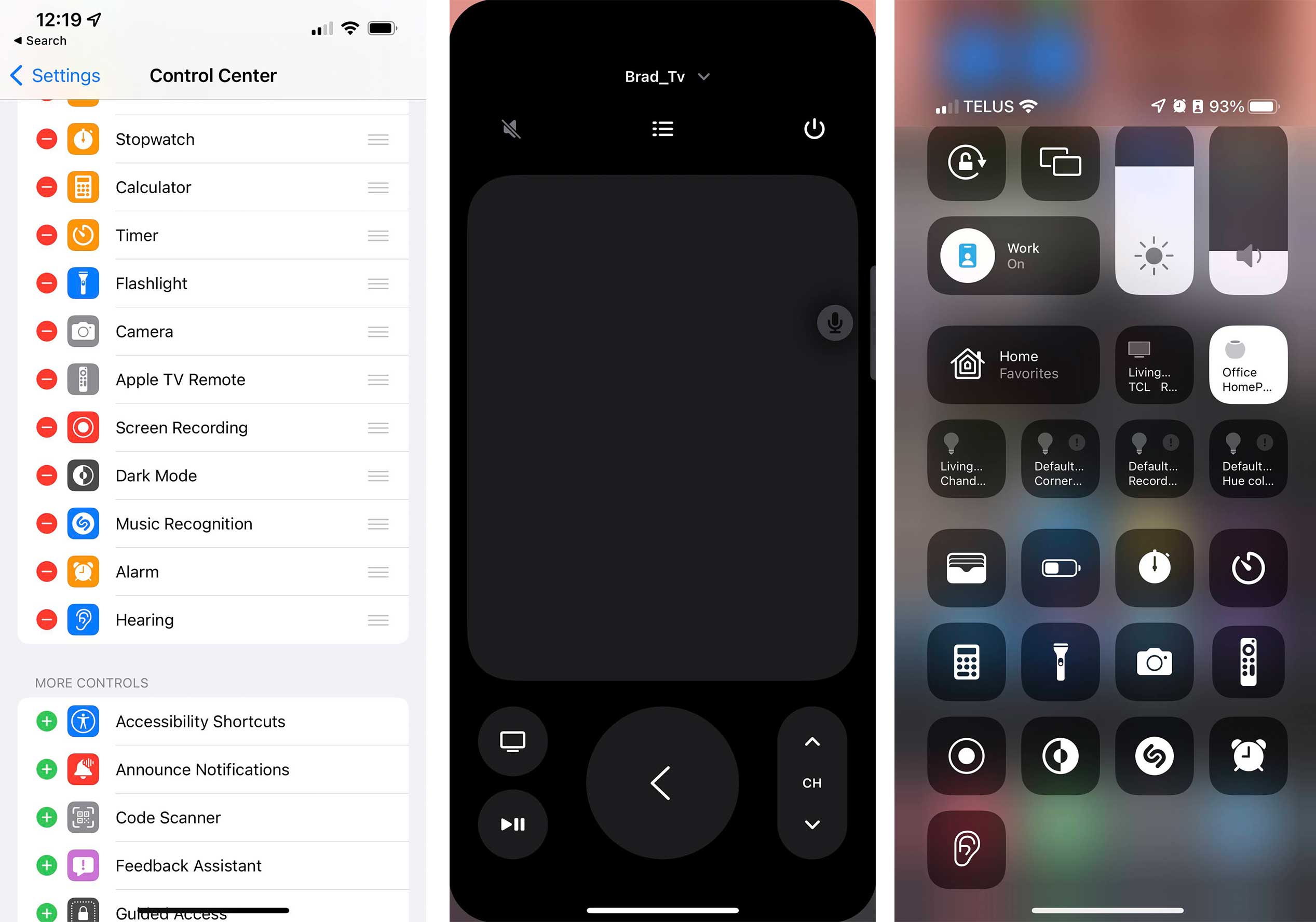
Once you’ve added the remote, swipe down from the top right corner of your phone to open up the menu. If you have an iPhone 8 or older, you’ll need to swipe up from the bottom of the screen. Tap on the remote icon, and voila, it will open.

If you’ve never opened the remote before, you’ll need to select your TV from a list. You may also need to input a pairing code on your TV or phone to make sure you’re connecting to the correct TV. If no Televisions appear, make sure your TV and phone are on the same Wi-Fi network.

AirPlay TV guide
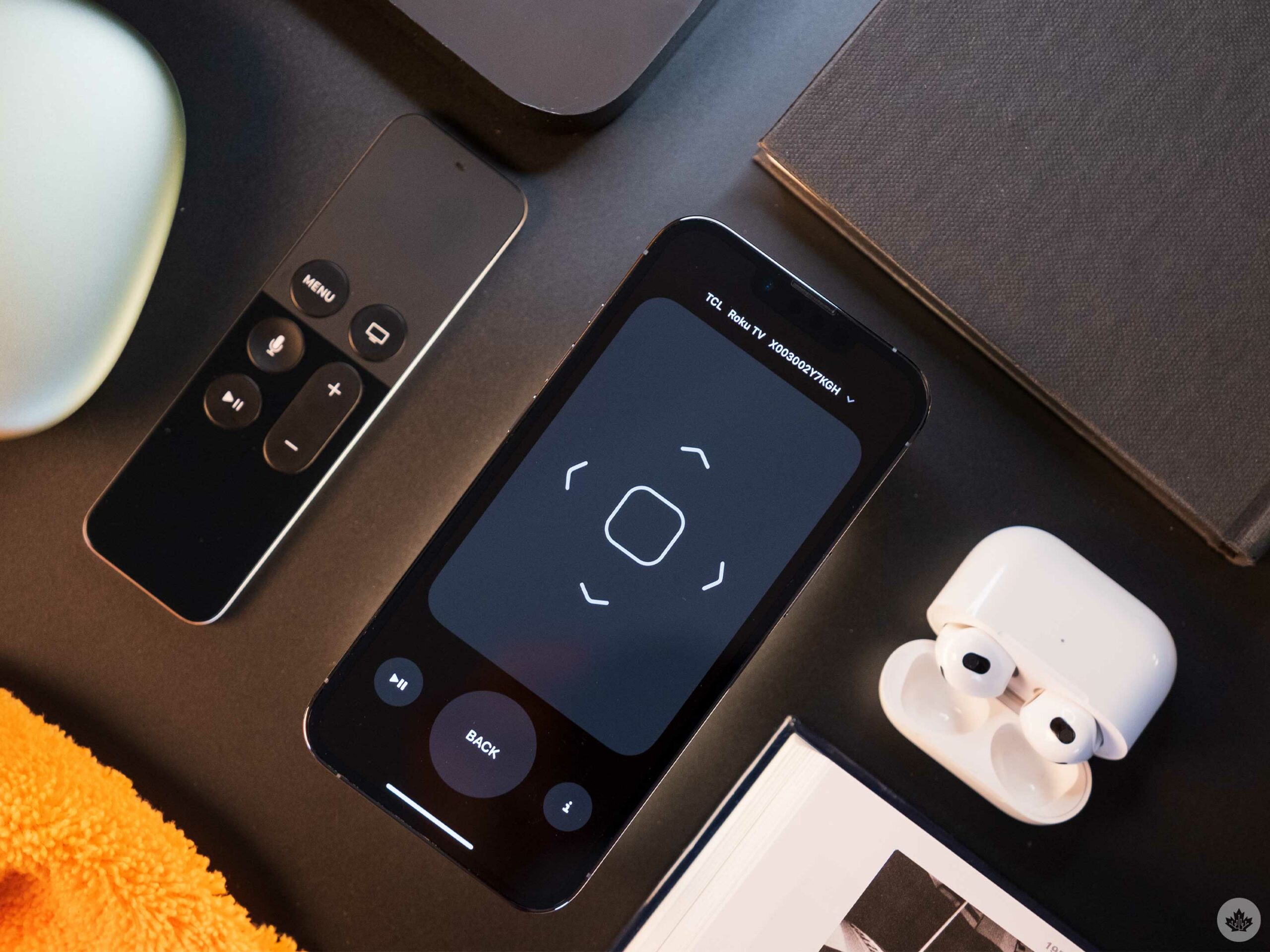
Adding an AirPlay 2 capable TV isn’t hard, but you need to set it up in the Apple Home app and through the TV’s setting first. I’ll also note here that I have a Roku TV, so people with Samsung, LG, Sony models will have to find their TV’s AirPlay settings in a slightly different way. On Roku, there’s a simple section in the Settings called AirPlay and HomeKit.

Once you turn that on, navigate to the Apple Home app and tap on the plus icon in the top corner. Then choose to ‘Add Accessory.’ If you’ve already found the HomeKit settings on your TV, there should be a QR code you can scan to quickly pair the items. Once the TV is added to the Home app, you can access it through the remote in Contol Centre. However, the remote is more limited than the Apple TV variant.

Final thoughts

I like the Apple TV virtual remote, but the AirPlay 2 version seems arbitrarily limited. When I use the Apple TV virtual remote, I get access to a channel flicker, and a few other buttons. With AirPlay, the remote scales back to being a touchpad, a play/pause control, a back button and an info button.

Neither are terrible, but it just seems like the AirPlay remote is limited for no reason other than to give the Apple TV remote more features.

Apple has also relegated volume controls to the physical volume buttons on your device in a recent update. This means when the remote is open, the volume buttons on your phone control the volume on your TV. I’ve found this to be a bit confusing and pretty unnecessary since the giant trackpad doesn’t need to take up so much space, so the company could have left the virtual volume buttons alone.

Source: Apple support 

Categories
Mobile Syrup

Do you buy your smartphones outright?

Smartphones are expensive; even those that aren’t supposed to be can get pretty pricey aftertax. That’s why carriers like Bell, Telus and Rogers offer subsidized pricing, breaking down the cost of a phone to a more manageable amount.

However, often when, especially if it’s a new phone involved, the carrier adds a premium to the monthly cost, plus you have to purchase a phone plan, making your monthly payments more than you expected and in some cases more expensive than the phone itself. If you’re someone like me who likes to update your smartphone often, the Big Three carriers also offer a loaner option. You purchase the smartphones for a lower cost, and then after two years, you have to return the phones. This option is similar to loaning a car, which means you have to keep your phone in pristine condition for two years.

There is another option that many people don’t seem to consider, however. If you’re purchasing a Samsung or Apple flagship directly from the company itself, you can subsidize the cost of the phone, and you won’t be charged a premium or required to buy a phone plan, so that’s another option.

So our question this week: do you purchase your phone outright, or do you subsidize it? And if you do subsidize it, do you grab it from the manufacturer directly or buy it from a carrier. Let us know in the comments below.